Risorse
Cosa facciamo Editor fotografico con IA Website BuilderBeta DeepAI Code PrezziDocumentazione
Guide, risorse di riferimento e documentazione API per gli strumenti di DeepAI
Inizia subito
 Cosa facciamo
Scopri i nostri strumenti basati sull'intelligenza artificiale qui su DeepAI
 Chat con IA
Chatta, cerca sul web e chiedi aiuto per qualsiasi cosa
 Generatore di immagini con IA
Crea foto fantastiche con i nostri vari generatori di immagini
 Editor fotografico con IA
Modifica le tue foto con il nostro editor di immagini con IA
 Generatore di video con IA
Crea video fantastici partendo dalle tue immagini o dalle tue idee
 Website Builder
Descrivi il tuo sito e crealo senza scrivere codice
 Strumenti aggiuntivi
Musica, rimozione dello sfondo, colorazione, upscaling e altro ancora
 Prezzi
Cosa include DeepAI Pro e quanto costa
 API
API
Scopri quali API offriamo dando un'occhiata alla documentazione
DeepAI è un fantastico spazio digitale pieno di strumenti con IA. Rendiamo la creazione di contenuti più facile e accessibile a tutti! Che tu stia lavorando a un progetto per la scuola, per il lavoro o che tu voglia semplicemente sperimentare idee creative, puoi provare i nostri strumenti, tra cui Chat con IA, Generazione di immagini con IA, Editor fotografico con IA, Personaggi con IA e molto altro ancora. DeepAI offre anche risorse per aiutarti a imparare e a restare al passo con gli ultimi progressi in questo campo.
Chat con IA è un assistente che risponde ai prompt di testo.
Puoi usarla per creare storie, scrivere messaggi o programmare. È come chattare con un amico IA super intelligente con cui puoi parlare di qualsiasi cosa. Grazie ad algoritmi avanzati, Chat con IA capisce e risponde a una vasta gamma di domande con competenza e ragionamento.
Vuoi un'interazione vocale facile da usare? Con la nostra Chat vocale con IA, puoi! Puoi porre domande e chiedere consigli sugli argomenti su cui devi lavorare, oppure rivedere i documenti che vuoi migliorare senza digitare nemmeno una parola.
Con questo strumento, puoi provarlo con un account gratuito per 60 secondi al giorno oppure con un abbonamento a DeepAI Pro per avere la versione migliore della nostra chat vocale.
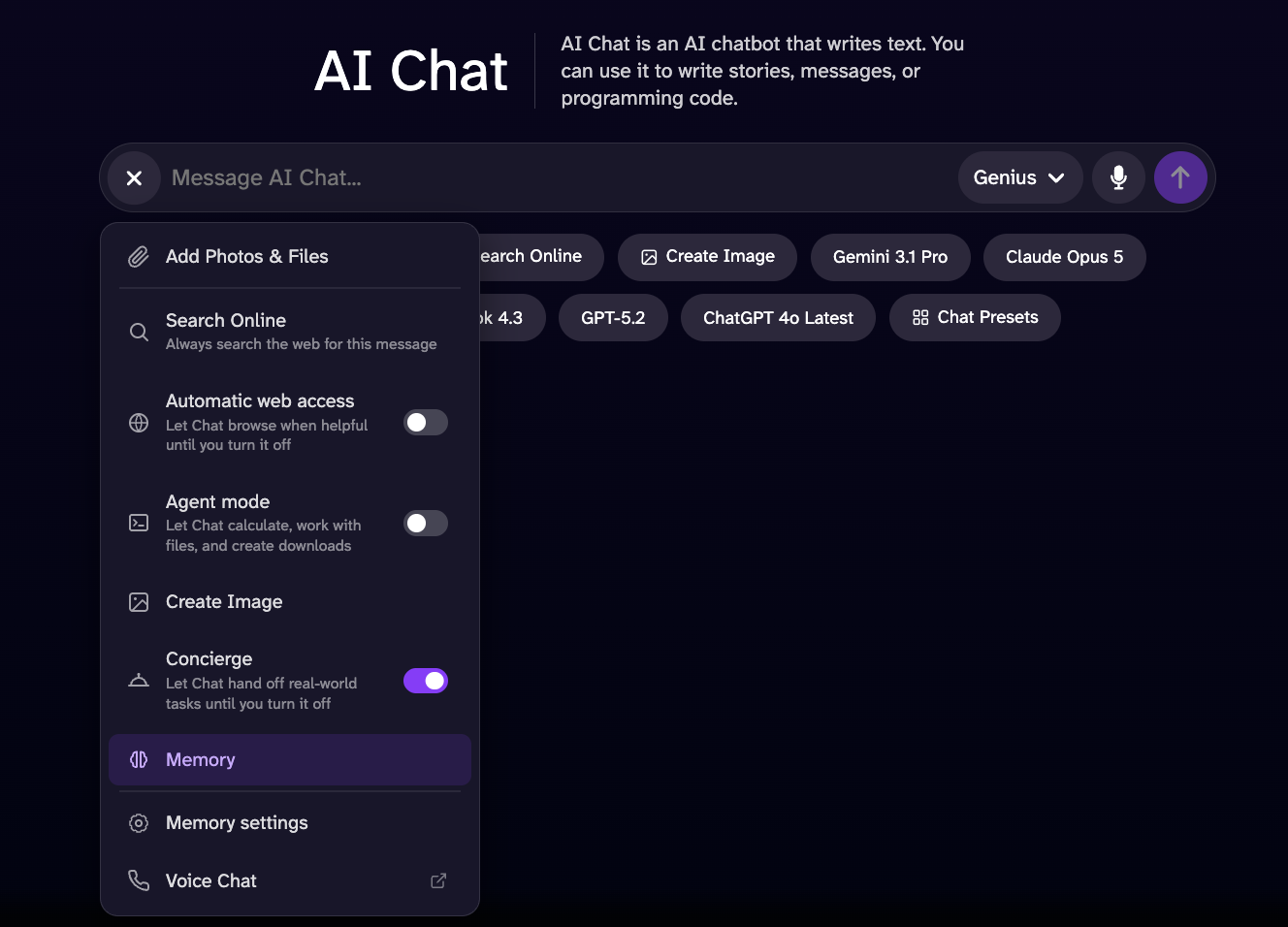
Lo strumento "Memoria" aiuta il sistema di chat a raccogliere informazioni e criteri più precisi per darti risposte più accurate. Tiene conto delle informazioni che hai condiviso in passato per capire cosa ti piace, le tue preferenze e i tuoi interessi. Tutte queste informazioni si basano sulle conversazioni che hai avuto con il sistema di chat da quando hai attivato questa opzione. Il sistema di chat ha accesso alle informazioni che hai fornito in precedenza, e tali informazioni sono disponibili solo finché l'opzione è attiva e hai una cronologia delle chat. Se cancelli la cronologia, non terrà conto delle conversazioni precedenti.
Lascia che la chat navighi sul web in tempo reale per trovare informazioni più precise e aggiornate, oltre a dati completi su ciò che stai cercando.
Lo strumento "Crea immagine" ti permette di generare immagini dalla chat in base al modello di chat che stai usando: Standard, Genius Pro o Super Genius Pro. Basta inserire il prompt di ciò che vuoi generare e il gioco è fatto!
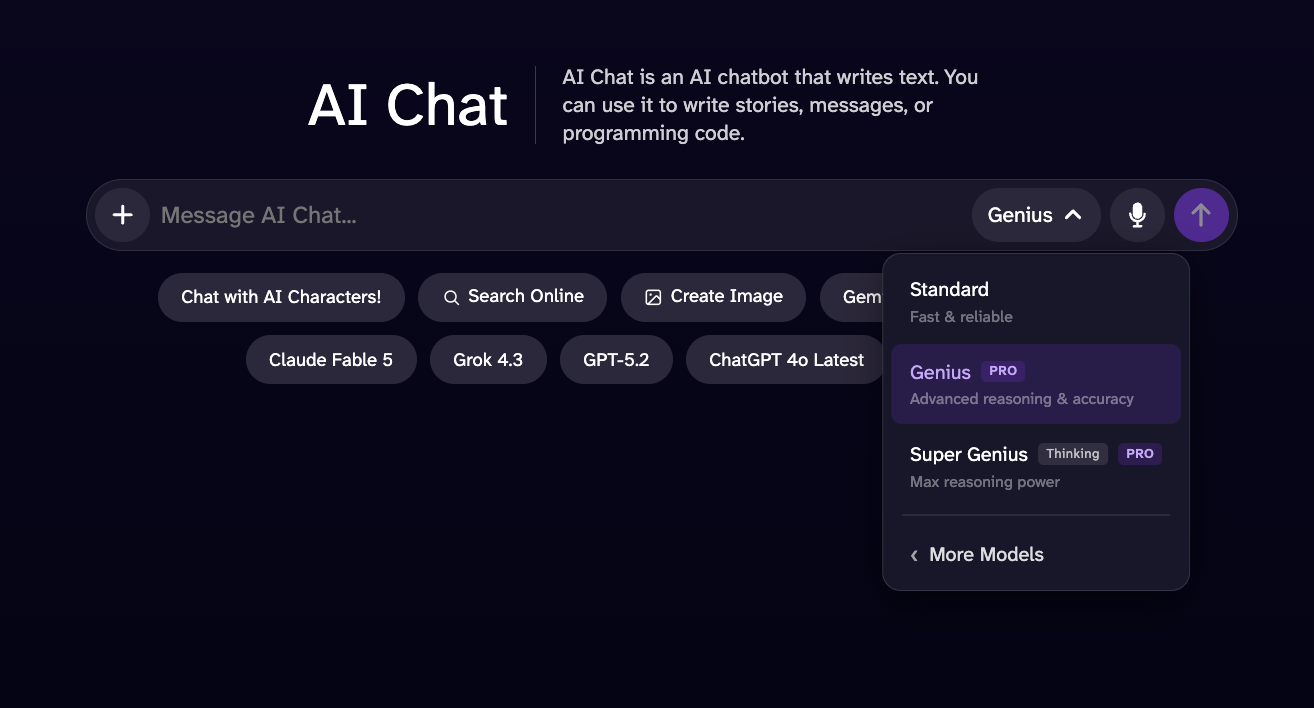
Questa versione è un miglioramento rispetto a Chat con IA Standard, con prestazioni superiori, risposte più dettagliate e una maggiore intelligenza.
Questo modello è stato progettato per superare la Modalità Genius nelle attività che richiedono ragionamento avanzato, analisi logica e risoluzione di problemi matematici. Anche se il tempo di risposta stimato potrebbe essere leggermente più lungo, offre una maggiore profondità, una comprensione contestuale più ampia e risposte più complete, garantendo un'esperienza più efficace e affidabile per le attività complesse.
Con questo componente aggiuntivo puoi risolvere problemi di matematica e scienze, tra cui equazioni, derivate, problemi con enunciato, algebra, calcolo e molto altro ancora! Questa modalità è perfetta sia per risolvere problemi tecnici che per controllare un compito su cui hai dei dubbi.
Il Generatore di immagini con IA è il nostro strumento da testo a immagine che ti permette di dare libero sfogo alla tua creatività e creare con l'intelligenza artificiale. Prova a descrivere un'immagine del luogo dei tuoi sogni o di qualsiasi cosa desideri e lascia che l'IA faccia il resto!
Per creare immagini di alta qualità, scegli il tuo prompt, poi seleziona uno tra oltre 100 stili e forme.
Per maggiori dettagli, una qualità artistica superiore e immagini che rispecchiano le tue indicazioni meglio rispetto all'HD, con una risoluzione fino a 1024x1024px, con la possibilità di utilizzarle in formato orizzontale, quadrato o verticale.
Per immagini 2K ad altissima risoluzione con dettagli mozzafiato. Che tu stia semplicemente sperimentando o voglia creare qualcosa di epico, questo strumento offre una modalità adatta a ogni esigenza. Questo formato è perfetto se vuoi stampare l'immagine.
L'Editor fotografico con IA è uno strumento che ti permette di dare sfogo alla tua creatività e di ricreare o modificare qualsiasi immagine, nuova o vecchia che sia, usando una descrizione testuale delle modifiche che vuoi apportare.
Puoi iniziare semplicemente caricando un'immagine o un URL, inserendo il prompt con le informazioni che vuoi modificare o aggiungere, generando l'immagine e il gioco è fatto. Per ottenere risultati ottimali, usa istruzioni specifiche e concise, ad esempio "rendi il cielo rosso" o "aggiungi dei fiori allo sfondo".
Puoi anche creare una modifica utilizzando fino a 3 immagini di riferimento, indicando ad esempio:
Il nostro Generatore di video con IA trasforma le tue immagini e i tuoi testi in video. Puoi usarlo per creare video didattici, di intrattenimento o brevi storie.
Caricando il contenuto sul generatore di video, concedi a DeepAI il diritto di condividere pubblicamente l'immagine e il video. Assicurati di aver compreso bene come funziona leggendo quanto segue.
L'abbonamento a DeepAI Pro include 25 secondi di generazione di video HD al mese. I secondi di video HD aggiuntivi vengono addebitati sul tuo portafoglio al costo di 0.20 USD al secondo. La Modalità Hollywood (con risoluzione 2K) include 8 secondi di video al mese, mentre i video aggiuntivi in Modalità Hollywood vengono detratti dai tuoi crediti al costo di 0.30 USD al secondo.
Una modalità di generazione versatile, pensata per creare oggetti di uso quotidiano, ambienti e scene comuni in modo realistico, con immagini nitide e dettagli precisi. Funziona particolarmente bene con soggetti pratici e familiari come elettrodomestici, mobili, camere da letto, cucine, uffici, soggiorni e oggetti di uso quotidiano. Ottimo rapporto qualità-prezzo a 0.20 USD al secondo.
Video cinematografici di alta qualità con audio e immagini professionali. Massima qualità creativa a 0.30 USD al secondo.
Puoi generare video usando un'immagine come riferimento. Il nostro Generatore di video con IA utilizza l'immagine come punto di partenza per la scena e interpreta meglio il tuo prompt, in modo da fornirti un risultato il più possibile simile all'immagine e al testo inserito.
Hai un riferimento che vorresti usare nel tuo progetto? Puoi aggiungerlo e il Generatore di video con IA lo utilizzerà insieme al tuo prompt per creare il miglior risultato possibile basandosi su di esso.
Trasforma il tuo video con l'intelligenza artificiale. Aggiungi, modifica o rimuovi elementi dalle tue scene con semplici istruzioni e dai ai tuoi contenuti esattamente il risultato che desideri.
Il Website Builder è una piattaforma online pensata per semplificare la creazione, la personalizzazione e la gestione dei siti web senza bisogno di conoscenze tecniche o di programmazione avanzate.
Offre agli utenti un'interfaccia intuitiva e una serie di componenti configurabili che permettono loro di creare siti web responsive, personalizzare layout e contenuti, gestire le pagine e modificare l'aspetto grafico dei propri progetti.
DeepAI Code è un agente di programmazione IA per Mac. Apri una cartella di progetto, descrivi un'attività e lascia che legga i file, modifichi il codice ed esegua comandi. Controlla le modifiche nell'app prima di confermarle.
- Scarica DeepAI Code per Mac. Scegli tra Apple Silicon e Intel in base al tuo Mac, apri l'immagine disco e trascina l'app nella cartella Applicazioni.
- Apri l'app e scegli una cartella di progetto. Avvia una chat e spiega cosa vuoi creare o modificare.
- Scegli un modello e una modalità di accesso. La modalità Pianifica esplora un'attività prima di apportare modifiche; le altre modalità consentono all'agente di agire con impostazioni di approvazione diverse. Controlla queste impostazioni prima di iniziare.
- Segui l'attività, controlla i diff dei file e mantieni o annulla le modifiche.
I modelli veloci come GLM 5.3 Flash e GPT-6 Luna sono gratuiti. I modelli premium consumano Theos, il credito giornaliero che ogni utente registrato riceve; DeepAI Pro ne aggiunge di più ogni giorno. Puoi cambiare modello durante una conversazione. Guarda i prezzi.
L'app funziona con i file presenti sul tuo Mac. Le richieste e i contenuti rilevanti dei file vengono inviati ai modelli di IA per portare a termine la tua attività. La cronologia delle chat si sincronizza con il tuo account quando hai effettuato l'accesso.
Windows in arrivo
Esplora tutti i nostri strumenti e scoprirai che, con le tue conoscenze e la tua immaginazione, puoi creare cose incredibili!
Crea musica unica senza alcuno sforzo con il generatore di musica di DeepAI. Perfetto per Foley, effetti sonori e tracce di sottofondo per i tuoi video. Trasforma i tuoi progetti con paesaggi sonori generati su misura per le tue esigenze.
Se hai DeepAI Pro, i primi 100 brani al mese sono gratis, mentre quelli aggiuntivi costano 0.10 USD l'uno.
Hai un'immagine da cui vuoi rimuovere lo sfondo, o semplicemente non ti piace lo sfondo? Prova questo strumento: lo rimuoverà in un attimo.
Ti piacerebbe vedere come sarebbe una vecchia foto in bianco e nero? Aggiungi le tue vecchie foto di famiglia e ridai loro vita con il colore.
Lo strumento Super risoluzione usa l'apprendimento automatico per rendere più nitida, definire meglio e ingrandire la foto senza perderne il contenuto e le caratteristiche distintive. Le immagini sfocate sono purtroppo comuni e rappresentano un problema sia per i professionisti che per gli appassionati. Super risoluzione utilizza tecniche di apprendimento automatico per ingrandire le immagini in una frazione di secondo.
C'è qualcosa nella foto che non ti piace? Questo strumento ti permette di modificare facilmente gli oggetti; specificando esattamente cosa vuoi, puoi migliorare la tua immagine.
Hai dubbi sull'autenticità di un'immagine? Carica un'immagine per stimare se è stata generata dall'IA o modificata digitalmente; i risultati sono probabilistici e non vanno considerati come una prova definitiva.
DeepAI Pro è un abbonamento che ti dà accesso alla suite completa di strumenti di DeepAI al costo di 9.99 USD al mese o 89.99 USD all'anno, con quote che si rinnovano ogni mese. Puoi anche aggiungere crediti per generare più contenuti quando le quote del tuo ciclo attuale sono esaurite. Trovi maggiori informazioni nella nostra pagina dei prezzi, disponibile all'indirizzo https://deepai.org/pricing.
Prezzi: le chiamate API sono incluse nel tuo abbonamento a DeepAI Pro. Ogni generazione viene prelevata dalla tua quota mensile o detratta dal saldo del tuo portafoglio prepagato.
DeepAI offre una serie di API per le immagini. Ognuna è un semplice endpoint HTTP che puoi chiamare da qualsiasi linguaggio di programmazione, ad esempio:- Da testo a immagine: genera immagini a partire da una descrizione testuale.
- Editor fotografico con IA: modifica e trasforma un'immagine esistente con un prompt di testo.
- Super risoluzione: migliora la qualità delle immagini e recupera i dettagli nitidi grazie all'apprendimento automatico.
- Colorazione immagini: aggiungi colori realistici alle foto in bianco e nero.
- Rimuovi sfondo: ritaglia con precisione il soggetto da una foto.
- Generatore di video: genera video a partire da un prompt di testo o da un'immagine di origine — consulta l'API Video.
Ogni API DeepAI è una singola richiesta POST. Invia gli input del modello come multipart/form-data e autenticati con la tua chiave API in un'intestazione della richiesta.
Accedi e copia la tua chiave dalla dashboard del tuo account. L'accesso all'API richiede un abbonamento a DeepAI Pro. Tieni segreta la tua chiave: trattala come una password e non rivelarla mai nel codice lato client.
Inserisci la tua chiave nell'intestazione api-key e gli input del modello come campi del modulo. L'URL dell'endpoint è https://api.deepai.org/api/<model>, dove <model> è l'ID del modello (indicato per ogni modello qui sotto).
curl -X POST https://api.deepai.org/api/text2img \
    -H 'api-key:YOUR_API_KEY' \
    -F 'text=a serene mountain lake at sunrise'
In caso di successo ricevi 200 OK con un corpo JSON. output_url rimanda al file generato e id è l'identificatore univoco del processo:
{
    "id": "59a0e8a9-...",
    "output_url": "https://api.deepai.org/job-view-file/.../output.jpg"
}
Gli errori restituiscono uno stato diverso da 200 e un corpo JSON con un messaggio err o status:
- 401 — chiave API mancante o non valida, oppure è stata superata la quota di utilizzo.
- 410 — il modello richiesto è stato rimosso.
- 500 — l'ID del modello non è stato trovato oppure si è verificato un errore di elaborazione.
Genera video da un prompt di testo o da un'immagine di origine. La generazione dei video richiede alcuni minuti, quindi, a differenza delle API per le immagini, è asincrona: invia un job, ricevi l'id del job, poi interroga l'endpoint di stato finché il video non è pronto.
Tariffe: per generare video è necessario DeepAI Pro; il costo viene addebitato per ogni secondo di video generato, attingendo prima dalla tua quota mensile (25 secondi Standard, 8 secondi in Modalità Hollywood) e poi dal tuo portafoglio prepagato (20¢ per ogni secondo Standard, 30¢ per ogni secondo in Modalità Hollywood). Vedi Tariffe.
Da testo a video: POST https://api.deepai.org/video-api/text2video
Da immagine a video: POST https://api.deepai.org/video-api/img2video
Stato del job: GET https://api.deepai.org/video-api/status/<id>
Invia i parametri come multipart/form-data, form-urlencoded o come corpo application/json (con image come URL o dati base64), inserendo la tua chiave nell'intestazione api-key, esattamente come nelle API per le immagini. L'intestazione è obbligatoria in ogni chiamata, comprese le richieste di stato; una sessione del browser non autentica queste route.
| Parametro | Tipo | Obbligatorio | Predefinito |
|---|---|---|---|
prompt | string | text2video: Sì img2video: No | — |
image | file, URL o base64 | Solo img2video: Sì | — |
mode | string | No | hd |
duration | integer | No | 5 |
shape | string | No | auto |
prompt — cosa generare, fino a 3000 caratteri (i prompt più lunghi vengono rifiutati con un 400). Opzionale per img2video (basta l'immagine di partenza).
image — l'immagine di origine per img2video: caricala come campo file, inserisci un URL pubblico http(s) oppure invia dati in base64 (non codificati o come URL data:image/...;base64,). Massimo 20 MB; l'immagine deve poter essere decodificata correttamente. I reindirizzamenti vengono seguiti.
mode — hd per i video standard, oppure hollywood per i video in qualità cinematografica a 2K.
duration — durata del video generato in secondi, da 5 a 15. L'addebito è al secondo.
shape — square, landscape, standard, vertical, portrait o auto. Con auto, img2video segue le proporzioni dell'immagine di partenza, mentre text2video usa il formato orizzontale. In modalità hollywood img2video mantiene sempre la forma dell'immagine di partenza, quindi in questo caso shape deve essere auto.
curl -X POST https://api.deepai.org/video-api/text2video \
    -H 'api-key:YOUR_API_KEY' \
    -F 'prompt=a golden retriever surfing a wave at sunset' \
    -F 'mode=hd' \
    -F 'duration=5' \
    -F 'shape=landscape'
Da immagine a video, da un file o da un URL:
curl -X POST https://api.deepai.org/video-api/img2video \
    -H 'api-key:YOUR_API_KEY' \
    -F 'image=@/path/to/photo.jpg' \
    -F 'prompt=the camera slowly zooms in'
Se l'invio va a buon fine, viene restituito l'ID del job da interrogare:
{
    "id": "59a0e8a9-...",
    "status": "processing"
}
Interroga l'endpoint di stato ogni pochi secondi. status è processing, completed o failed:
curl https://api.deepai.org/video-api/status/59a0e8a9-... \
    -H 'api-key:YOUR_API_KEY'
{"status": "processing"}

{"status": "completed", "output_url": "https://...mp4"}

{"status": "failed", "error": "..."}
Un esempio completo in Python:
import time, requests

headers = {'api-key': 'YOUR_API_KEY'}
job = requests.post(
    'https://api.deepai.org/video-api/text2video',
    data={'prompt': 'a golden retriever surfing a wave at sunset',
          'mode': 'hd', 'duration': 5, 'shape': 'landscape'},
    headers=headers).json()

while True:
    status = requests.get(
        'https://api.deepai.org/video-api/status/' + job['id'],
        headers=headers).json()
    if status['status'] == 'completed':
        print(status['output_url'])
        break
    if status['status'] == 'failed':
        raise RuntimeError(status['error'])
    time.sleep(5)
- Recupera subito il risultato: il record di stato (e il relativo
output_url) è disponibile per un'ora dopo il completamento, dopodiché l'endpoint di stato restituisce un codice 404. Scarica il video una volta completato. - Ti verranno addebitati solo i video portati a termine. I crediti vengono riservati al momento dell'invio di un lavoro e sbloccati se questo non va a buon fine.
- Un
401indica che l'intestazioneapi-keymanca o non è valida. Un403indica che l'account non ha un abbonamento DeepAI Pro attivo. - Una risposta
402al momento dell'invio significa che il saldo del tuo portafoglio non è sufficiente per coprire il video (il corpo della risposta include il costo e il tuo saldo) oppure che il tuo account è bloccato a seguito di un pagamento non riuscito. Aggiungi crediti o attiva la ricarica automatica nella tua dashboard. - I prompt e le immagini vengono moderati: i contenuti segnalati vengono rifiutati al momento dell'invio con un
400, mentre i contenuti segnalati dal fornitore del video durante la generazione compaiono come{"status": "failed", "error": "NSFW detected"}.
Generatore di immagini con IATorna all'inizio ↑
Questo è un generatore di immagini con IA. Crea un'immagine da zero partendo da una descrizione testuale.
Endpoint: POST https://api.deepai.org/api/text2img
| Parametro | Tipo | Obbligatorio | Predefinito |
|---|---|---|---|
text |
text | Sì | — |
text — una stringa che descrive cosa generare, ad esempio "Una notte stellata su un lago tranquillo" o "Il ritratto di un vecchio pirata".
width, height — passa una stringa, ad esempio "256" o "768" (impostazione predefinita 512). Usa valori compresi tra 128 e 1536, in multipli di 32. Consigliati per immagini standard: 1024x576, 1024x720, 512x512, 768x1024, 576x1024. Consigliati per immagini HD: 1216x832, 1152x896, 1024x1024, 896x1152, 832x1216. Valori superiori a ~700 o inferiori a 256 potrebbero dare risultati strani.
image_generator_version — "standard" (impostazione predefinita), "hd", "genius" o "super_genius".
resolution — "2k" (predefinito) o "4k". Si usa solo quando image_generator_version è impostato su "super_genius".
genius_preference — "anime", "photography", "graphic" o "cinematic". Si usa solo quando image_generator_version è impostato su "genius".
negative_prompt — una stringa che descrive cosa rimuovere dall'immagine; utile per migliorare la qualità e i dettagli. Esempio: anatomia errata, sfocata, ritagliata, deformata, sfigurata, duplicata, arti in più, dita fuse, artefatti JPEG, bassa qualità, bassa risoluzione, mani mutate, fuori campo, firma, testo, filigrana, pessima qualità.
Esempi di Generatore di immagini con IA in cURL
# Example posting a text URL:

curl \
    -F 'text=YOUR_TEXT_HERE' \
    -H 'api-key:YOUR_API_KEY' \
    https://api.deepai.org/api/text2img


# Example posting a local text file:

curl \
    -F 'text=YOUR_TEXT_HERE' \
    -H 'api-key:YOUR_API_KEY' \
    https://api.deepai.org/api/text2img


# Example directly sending a text string:

curl \
    -F 'text=YOUR_TEXT_HERE' \
    -H 'api-key:YOUR_API_KEY' \
    https://api.deepai.org/api/text2img
Esempi di Generatore di immagini con IA in Javascript
// Example posting a text URL:
(async function() {
    const resp = await fetch('https://api.deepai.org/api/text2img', {
        method: 'POST',
        headers: {
            'Content-Type': 'application/json',
            'api-key': 'YOUR_API_KEY'
        },
        body: JSON.stringify({
            text: "YOUR_TEXT_HERE",
        })
    });

    const data = await resp.json();
    console.log(data);
})()


// Example posting file picker input text (Browser only):
document.getElementById('yourFileInputId').addEventListener('change', async function() {
       const formData = new FormData();
       formData.append('text', 'YOUR_TEXT_HERE');

       const resp = await fetch('https://api.deepai.org/api/text2img', {
           method: 'POST',
           headers: {
               'api-key': 'YOUR_API_KEY'
           },
           body: formData
       });

       const data = await resp.json();
       console.log(data);
});

// Example posting a local text file (Node.js only):
const fs = require('fs');
(async function() {
       const formData = new FormData();
       formData.append('text', 'YOUR_TEXT_HERE');

       const resp = await fetch('https://api.deepai.org/api/text2img', {
           method: 'POST',
           headers: {
               'api-key': 'YOUR_API_KEY'
           },
           body: formData
       });

       const data = await resp.json();
       console.log(data);
});

// Example directly sending a text string:
(async function() {
    const resp = await fetch('https://api.deepai.org/api/text2img', {
        method: 'POST',
        headers: {
            'Content-Type': 'application/json',
            'api-key': 'YOUR_API_KEY'
        },
        body: JSON.stringify({
            text: "YOUR_TEXT_HERE",
        })
    });

    const data = await resp.json();
    console.log(data);
})()
Esempi di Generatore di immagini con IA in Python
# Example posting a text URL:

import requests
r = requests.post(
    "https://api.deepai.org/api/text2img",
    data={
        'text': 'YOUR_TEXT_HERE',
    },
    headers={'api-key': 'YOUR_API_KEY'}
)
print(r.json())


# Example posting a local text file:

import requests
r = requests.post(
    "https://api.deepai.org/api/text2img",
    data={
        'text': 'YOUR_TEXT_HERE',
    },
    headers={'api-key': 'YOUR_API_KEY'}
)
print(r.json())


# Example directly sending a text string:

import requests
r = requests.post(
    "https://api.deepai.org/api/text2img",
    data={
        'text': 'YOUR_TEXT_HERE',
    },
    headers={'api-key': 'YOUR_API_KEY'}
)
print(r.json())
Esempi di Generatore di immagini con IA in Ruby
# Example posting a text URL:

require 'rest_client'
r = RestClient::Request.execute(method: :post, url: 'https://api.deepai.org/api/text2img', timeout: 600,
    headers: {'api-key' => 'YOUR_API_KEY'},
    payload: {
        'text' => 'YOUR_TEXT_HERE',
    }
)
puts r


# Example posting a local text file:

require 'rest_client'
r = RestClient::Request.execute(method: :post, url: 'https://api.deepai.org/api/text2img', timeout: 600,
    headers: {'api-key' => 'YOUR_API_KEY'},
    payload: {
        'text' => 'YOUR_TEXT_HERE',
    }
)
puts r


# Example directly sending a text string:

require 'rest_client'
r = RestClient::Request.execute(method: :post, url: 'https://api.deepai.org/api/text2img', timeout: 600,
    headers: {'api-key' => 'YOUR_API_KEY'},
    payload: {
        'text' => 'YOUR_TEXT_HERE',
    }
)
puts r
Esempi di Generatore di immagini con IA in Php
// Example posting a text URL:
<?php
require 'vendor/autoload.php'; // Ensure you have Guzzle installed (composer require guzzlehttp/guzzle)

use GuzzleHttp\Client;
use GuzzleHttp\Psr7\Utils;

$client = new Client();
$headers = [
    'api-key' => 'YOUR_API_KEY'
];
$options = [
    'multipart' => [
        [
            'name'     => 'text',
            'contents' => 'YOUR_TEXT_HERE'
        ],
    ]
];
$request = new GuzzleHttp\Psr7\Request('POST', 'https://api.deepai.org/api/text2img', $headers);
try {
    $res = $client->sendAsync($request, $options)->wait();
    echo $res->getBody();
} catch (Exception $e) {
    echo 'Error: ' . $e->getMessage();
}
?>


// Example posting a local text file:
<?php
require 'vendor/autoload.php'; // Ensure you have Guzzle installed (composer require guzzlehttp/guzzle)

use GuzzleHttp\Client;
use GuzzleHttp\Psr7\Utils;

$client = new Client();
$headers = [
    'api-key' => 'YOUR_API_KEY'
];
$options = [
    'multipart' => [
        [
            'name'     => 'text',
            'contents' => 'YOUR_TEXT_HERE'
        ],
    ]
];
$request = new GuzzleHttp\Psr7\Request('POST', 'https://api.deepai.org/api/text2img', $headers);
try {
    $res = $client->sendAsync($request, $options)->wait();
    echo $res->getBody();
} catch (Exception $e) {
    echo 'Error: ' . $e->getMessage();
}
?>


// Example directly sending a text string:
<?php
require 'vendor/autoload.php'; // Ensure you have Guzzle installed (composer require guzzlehttp/guzzle)

use GuzzleHttp\Client;
use GuzzleHttp\Psr7\Utils;

$client = new Client();
$headers = [
    'api-key' => 'YOUR_API_KEY'
];
$options = [
    'multipart' => [
        [
            'name'     => 'text',
            'contents' => 'YOUR_TEXT_HERE'
        ],
    ]
];
$request = new GuzzleHttp\Psr7\Request('POST', 'https://api.deepai.org/api/text2img', $headers);
try {
    $res = $client->sendAsync($request, $options)->wait();
    echo $res->getBody();
} catch (Exception $e) {
    echo 'Error: ' . $e->getMessage();
}
?>
Esempi di Generatore di immagini con IA in Go
// Example posting a text URL:
package main

import (
    "bytes"
    "encoding/json"
    "fmt"
    "io"
    "net/http"
)

func main() {
    url := "https://api.deepai.org/api/text2img"
    payload := map[string]string{
        "text": "YOUR_TEXT_HERE",
    }
    jsonData, _ := json.Marshal(payload)

    req, _ := http.NewRequest("POST", url, bytes.NewBuffer(jsonData))
    req.Header.Set("Content-Type", "application/json")
    req.Header.Set("api-key", "YOUR_API_KEY")

    client := &http.Client{}
    resp, err := client.Do(req)
    if err != nil {
        panic(err)
    }
    defer resp.Body.Close()

    body, _ := io.ReadAll(resp.Body)
    fmt.Println(string(body))
}


// Example posting a local text file:
package main

import (
    "bytes"
    "fmt"
    "io"
    "mime/multipart"
    "net/http"
    "os"
)

func main() {
    url := "https://api.deepai.org/api/text2img"

    var b bytes.Buffer
    w := multipart.NewWriter(&b)

    w.WriteField("text", "YOUR_TEXT_HERE")

    if err := w.Close(); err != nil {
        panic(err)
    }

    req, _ := http.NewRequest("POST", url, &b)
    req.Header.Set("Content-Type", w.FormDataContentType())
    req.Header.Set("api-key", "YOUR_API_KEY")

    client := &http.Client{}
    resp, err := client.Do(req)
    if err != nil {
        panic(err)
    }
    defer resp.Body.Close()

    body, _ := io.ReadAll(resp.Body)
    fmt.Println(string(body))
}


// Example directly sending a text string:
package main

import (
    "bytes"
    "encoding/json"
    "fmt"
    "io"
    "net/http"
)

func main() {
    url := "https://api.deepai.org/api/text2img"
    payload := map[string]string{
        "text": "YOUR_TEXT_HERE",
    }
    jsonData, _ := json.Marshal(payload)

    req, _ := http.NewRequest("POST", url, bytes.NewBuffer(jsonData))
    req.Header.Set("Content-Type", "application/json")
    req.Header.Set("api-key", "YOUR_API_KEY")

    client := &http.Client{}
    resp, err := client.Do(req)
    if err != nil {
        panic(err)
    }
    defer resp.Body.Close()

    body, _ := io.ReadAll(resp.Body)
    fmt.Println(string(body))
}
Esempi di Generatore di immagini con IA in Java
// Example posting a text URL:
import java.net.http.HttpClient;
import java.net.http.HttpRequest;
import java.net.http.HttpResponse;
import java.net.URI;

public class Main {
    public static void main(String[] args) throws Exception {
        HttpClient client = HttpClient.newHttpClient();

        String json = "{" +
            "\"text\": \"YOUR_TEXT_HERE\"" +
            "}";

        HttpRequest request = HttpRequest.newBuilder()
            .uri(URI.create("https://api.deepai.org/api/text2img"))
            .header("Content-Type", "application/json")
            .header("api-key", "YOUR_API_KEY")
            .POST(HttpRequest.BodyPublishers.ofString(json))
            .build();

        HttpResponse<String> response = client.send(request, HttpResponse.BodyHandlers.ofString());
        System.out.println(response.body());
    }
}


// Example posting a local text file:
// Add to build.gradle: implementation 'com.squareup.okhttp3:okhttp:4.12.0'
import okhttp3.*;
import java.io.File;
import java.io.IOException;

public class Main {
    public static void main(String[] args) throws IOException {
        OkHttpClient client = new OkHttpClient();

        RequestBody requestBody = new MultipartBody.Builder()
            .setType(MultipartBody.FORM)
            .addFormDataPart("text", "YOUR_TEXT_HERE")
            .build();

        Request request = new Request.Builder()
            .url("https://api.deepai.org/api/text2img")
            .addHeader("api-key", "YOUR_API_KEY")
            .post(requestBody)
            .build();

        try (Response response = client.newCall(request).execute()) {
            System.out.println(response.body().string());
        }
    }
}


// Example directly sending a text string:
import java.net.http.HttpClient;
import java.net.http.HttpRequest;
import java.net.http.HttpResponse;
import java.net.URI;

public class Main {
    public static void main(String[] args) throws Exception {
        HttpClient client = HttpClient.newHttpClient();

        String json = "{" +
            "\"text\": \"YOUR_TEXT_HERE\"" +
            "}";

        HttpRequest request = HttpRequest.newBuilder()
            .uri(URI.create("https://api.deepai.org/api/text2img"))
            .header("Content-Type", "application/json")
            .header("api-key", "YOUR_API_KEY")
            .POST(HttpRequest.BodyPublishers.ofString(json))
            .build();

        HttpResponse<String> response = client.send(request, HttpResponse.BodyHandlers.ofString());
        System.out.println(response.body());
    }
}
Esempi di Generatore di immagini con IA in C#
// Example posting a text URL:
using System;
using System.Net.Http;
using System.Text;
using System.Text.Json;
using System.Threading.Tasks;

class Program
{
    static async Task Main()
    {
        using var client = new HttpClient();
        client.DefaultRequestHeaders.Add("api-key", "YOUR_API_KEY");

        var payload = new
        {
            text = "YOUR_TEXT_HERE",
        };

        var json = JsonSerializer.Serialize(payload);
        var content = new StringContent(json, Encoding.UTF8, "application/json");

        var response = await client.PostAsync("https://api.deepai.org/api/text2img", content);
        var result = await response.Content.ReadAsStringAsync();
        Console.WriteLine(result);
    }
}


// Example posting a local text file:
using System;
using System.IO;
using System.Net.Http;
using System.Threading.Tasks;

class Program
{
    static async Task Main()
    {
        using var client = new HttpClient();
        client.DefaultRequestHeaders.Add("api-key", "YOUR_API_KEY");

        using var form = new MultipartFormDataContent();

        form.Add(new StringContent("YOUR_TEXT_HERE"), "text");

        var response = await client.PostAsync("https://api.deepai.org/api/text2img", form);
        var result = await response.Content.ReadAsStringAsync();
        Console.WriteLine(result);
    }
}


// Example directly sending a text string:
using System;
using System.Net.Http;
using System.Text;
using System.Text.Json;
using System.Threading.Tasks;

class Program
{
    static async Task Main()
    {
        using var client = new HttpClient();
        client.DefaultRequestHeaders.Add("api-key", "YOUR_API_KEY");

        var payload = new
        {
            text = "YOUR_TEXT_HERE",
        };

        var json = JsonSerializer.Serialize(payload);
        var content = new StringContent(json, Encoding.UTF8, "application/json");

        var response = await client.PostAsync("https://api.deepai.org/api/text2img", content);
        var result = await response.Content.ReadAsStringAsync();
        Console.WriteLine(result);
    }
}
Esempi di Generatore di immagini con IA in Swift
// Example posting a text URL:
import Foundation

let url = URL(string: "https://api.deepai.org/api/text2img")!
var request = URLRequest(url: url)
request.httpMethod = "POST"
request.setValue("application/json", forHTTPHeaderField: "Content-Type")
request.setValue("YOUR_API_KEY", forHTTPHeaderField: "api-key")

let payload: [String: Any] = [
    "text": "YOUR_TEXT_HERE",
]

request.httpBody = try? JSONSerialization.data(withJSONObject: payload)

let task = URLSession.shared.dataTask(with: request) { data, response, error in
    if let data = data {
        print(String(data: data, encoding: .utf8) ?? "")
    }
}
task.resume()

// Keep the program running for async request
RunLoop.main.run()


// Example posting a local text file:
import Foundation

let url = URL(string: "https://api.deepai.org/api/text2img")!
var request = URLRequest(url: url)
request.httpMethod = "POST"
request.setValue("YOUR_API_KEY", forHTTPHeaderField: "api-key")

let boundary = UUID().uuidString
request.setValue("multipart/form-data; boundary=\(boundary)", forHTTPHeaderField: "Content-Type")

var body = Data()

body.append("--\(boundary)\r\n".data(using: .utf8)!)
body.append("Content-Disposition: form-data; name=\"text\"\r\n\r\n".data(using: .utf8)!)
body.append("YOUR_TEXT_HERE".data(using: .utf8)!)
body.append("\r\n".data(using: .utf8)!)

body.append("--\(boundary)--\r\n".data(using: .utf8)!)
request.httpBody = body

let task = URLSession.shared.dataTask(with: request) { data, response, error in
    if let data = data {
        print(String(data: data, encoding: .utf8) ?? "")
    }
}
task.resume()

RunLoop.main.run()


// Example directly sending a text string:
import Foundation

let url = URL(string: "https://api.deepai.org/api/text2img")!
var request = URLRequest(url: url)
request.httpMethod = "POST"
request.setValue("application/json", forHTTPHeaderField: "Content-Type")
request.setValue("YOUR_API_KEY", forHTTPHeaderField: "api-key")

let payload: [String: Any] = [
    "text": "YOUR_TEXT_HERE",
]

request.httpBody = try? JSONSerialization.data(withJSONObject: payload)

let task = URLSession.shared.dataTask(with: request) { data, response, error in
    if let data = data {
        print(String(data: data, encoding: .utf8) ?? "")
    }
}
task.resume()

RunLoop.main.run()
Esempi di Generatore di immagini con IA in Kotlin
// Example posting a text URL:
import java.net.URI
import java.net.http.HttpClient
import java.net.http.HttpRequest
import java.net.http.HttpResponse

fun main() {
    val client = HttpClient.newHttpClient()

    val json = """{
        "text": "YOUR_TEXT_HERE"
    }"""

    val request = HttpRequest.newBuilder()
        .uri(URI.create("https://api.deepai.org/api/text2img"))
        .header("Content-Type", "application/json")
        .header("api-key", "YOUR_API_KEY")
        .POST(HttpRequest.BodyPublishers.ofString(json))
        .build()

    val response = client.send(request, HttpResponse.BodyHandlers.ofString())
    println(response.body())
}


// Example posting a local text file:
// Add to build.gradle.kts: implementation("com.squareup.okhttp3:okhttp:4.12.0")
import okhttp3.*
import okhttp3.MediaType.Companion.toMediaType
import okhttp3.RequestBody.Companion.asRequestBody
import java.io.File

fun main() {
    val client = OkHttpClient()

    val requestBody = MultipartBody.Builder()
        .setType(MultipartBody.FORM)
        .addFormDataPart("text", "YOUR_TEXT_HERE")
        .build()

    val request = Request.Builder()
        .url("https://api.deepai.org/api/text2img")
        .addHeader("api-key", "YOUR_API_KEY")
        .post(requestBody)
        .build()

    client.newCall(request).execute().use { response ->
        println(response.body?.string())
    }
}


// Example directly sending a text string:
import java.net.URI
import java.net.http.HttpClient
import java.net.http.HttpRequest
import java.net.http.HttpResponse

fun main() {
    val client = HttpClient.newHttpClient()

    val json = """{
        "text": "YOUR_TEXT_HERE"
    }"""

    val request = HttpRequest.newBuilder()
        .uri(URI.create("https://api.deepai.org/api/text2img"))
        .header("Content-Type", "application/json")
        .header("api-key", "YOUR_API_KEY")
        .POST(HttpRequest.BodyPublishers.ofString(json))
        .build()

    val response = client.send(request, HttpResponse.BodyHandlers.ofString())
    println(response.body())
}
Esempi di Generatore di immagini con IA in Rust
// Example posting a text URL:
// Add to Cargo.toml: reqwest = { version = "0.11", features = ["json", "multipart"] }
// tokio = { version = "1", features = ["full"] }
// serde_json = "1"

use reqwest::header::HeaderMap;
use std::collections::HashMap;

#[tokio::main]
async fn main() -> Result<(), Box<dyn std::error::Error>> {
    let client = reqwest::Client::new();

    let mut headers = HeaderMap::new();
    headers.insert("api-key", "YOUR_API_KEY".parse()?);

    let mut payload = HashMap::new();
    payload.insert("text", "YOUR_TEXT_HERE");

    let response = client
        .post("https://api.deepai.org/api/text2img")
        .headers(headers)
        .json(&payload)
        .send()
        .await?;

    println!("{}", response.text().await?);
    Ok(())
}


// Example posting a local text file:
// Add to Cargo.toml: reqwest = { version = "0.11", features = ["json", "multipart"] }
// tokio = { version = "1", features = ["full"] }

use reqwest::multipart;
use std::fs;

#[tokio::main]
async fn main() -> Result<(), Box<dyn std::error::Error>> {
    let client = reqwest::Client::new();

    let form = multipart::Form::new()
        .text("text", "YOUR_TEXT_HERE");

    let response = client
        .post("https://api.deepai.org/api/text2img")
        .header("api-key", "YOUR_API_KEY")
        .multipart(form)
        .send()
        .await?;

    println!("{}", response.text().await?);
    Ok(())
}


// Example directly sending a text string:
// Add to Cargo.toml: reqwest = { version = "0.11", features = ["json", "multipart"] }
// tokio = { version = "1", features = ["full"] }
// serde_json = "1"

use reqwest::header::HeaderMap;
use std::collections::HashMap;

#[tokio::main]
async fn main() -> Result<(), Box<dyn std::error::Error>> {
    let client = reqwest::Client::new();

    let mut headers = HeaderMap::new();
    headers.insert("api-key", "YOUR_API_KEY".parse()?);

    let mut payload = HashMap::new();
    payload.insert("text", "YOUR_TEXT_HERE");

    let response = client
        .post("https://api.deepai.org/api/text2img")
        .headers(headers)
        .json(&payload)
        .send()
        .await?;

    println!("{}", response.text().await?);
    Ok(())
}
Esempi di Generatore di immagini con IA in TypeScript
// Example posting a text URL:
interface ApiResponse {
    // Define your response type here
    [key: string]: unknown;
}

async function callApi(): Promise<ApiResponse> {
    const response = await fetch('https://api.deepai.org/api/text2img', {
        method: 'POST',
        headers: {
            'Content-Type': 'application/json',
            'api-key': 'YOUR_API_KEY'
        },
        body: JSON.stringify({
            text: 'YOUR_TEXT_HERE',
        })
    });

    const data: ApiResponse = await response.json();
    console.log(data);
    return data;
}

callApi();


// Example posting a local text file (Node.js with form-data package):
// npm install form-data
import * as fs from 'fs';
import FormData from 'form-data';

interface ApiResponse {
    [key: string]: unknown;
}

async function uploadFile(): Promise<ApiResponse> {
    const formData = new FormData();
    formData.append('text', 'YOUR_TEXT_HERE');

    const response = await fetch('https://api.deepai.org/api/text2img', {
        method: 'POST',
        headers: {
            ...formData.getHeaders(),
            'api-key': 'YOUR_API_KEY'
        },
        body: formData as unknown as BodyInit
    });

    const data: ApiResponse = await response.json();
    console.log(data);
    return data;
}

uploadFile();


// Example directly sending a text string:
interface ApiResponse {
    [key: string]: unknown;
}

async function callApi(): Promise<ApiResponse> {
    const response = await fetch('https://api.deepai.org/api/text2img', {
        method: 'POST',
        headers: {
            'Content-Type': 'application/json',
            'api-key': 'YOUR_API_KEY'
        },
        body: JSON.stringify({
            text: 'YOUR_TEXT_HERE',
        })
    });

    const data: ApiResponse = await response.json();
    console.log(data);
    return data;
}

callApi();
Esempi di Generatore di immagini con IA in Dart
// Example posting a text URL:
// Add to pubspec.yaml: http: ^1.1.0

import 'dart:convert';
import 'package:http/http.dart' as http;

Future<void> main() async {
  final response = await http.post(
    Uri.parse('https://api.deepai.org/api/text2img'),
    headers: {
      'Content-Type': 'application/json',
      'api-key': 'YOUR_API_KEY',
    },
    body: jsonEncode({
      'text': 'YOUR_TEXT_HERE',
    }),
  );

  print(response.body);
}


// Example posting a local text file:
// Add to pubspec.yaml: http: ^1.1.0

import 'dart:io';
import 'package:http/http.dart' as http;

Future<void> main() async {
  var request = http.MultipartRequest(
    'POST',
    Uri.parse('https://api.deepai.org/api/text2img'),
  );

  request.headers['api-key'] = 'YOUR_API_KEY';

  request.fields['text'] = 'YOUR_TEXT_HERE';

  var response = await request.send();
  var responseBody = await response.stream.bytesToString();
  print(responseBody);
}


// Example directly sending a text string:
// Add to pubspec.yaml: http: ^1.1.0

import 'dart:convert';
import 'package:http/http.dart' as http;

Future<void> main() async {
  final response = await http.post(
    Uri.parse('https://api.deepai.org/api/text2img'),
    headers: {
      'Content-Type': 'application/json',
      'api-key': 'YOUR_API_KEY',
    },
    body: jsonEncode({
      'text': 'YOUR_TEXT_HERE',
    }),
  );

  print(response.body);
}
Esempi di Generatore di immagini con IA in PowerShell
# Example posting a text URL:

$r = Invoke-WebRequest `
    -Uri https://api.deepai.org/api/text2img `
    -Method Post `
    -Form @{
         text='YOUR_TEXT_HERE'
    } `
    -Headers @{
        'api-key'='YOUR_API_KEY'
    }
$r.Content

# Example posting a local text file:

$r = Invoke-WebRequest `
    -Uri https://api.deepai.org/api/text2img `
    -Method Post `
    -Form @{
         text='YOUR_TEXT_HERE'
    } `
    -Headers @{
        'api-key'='YOUR_API_KEY'
    }
$r.Content

# Example directly sending a text string:

$r = Invoke-WebRequest `
    -Uri https://api.deepai.org/api/text2img `
    -Method Post `
    -Form @{
         text='YOUR_TEXT_HERE'
    } `
    -Headers @{
        'api-key'='YOUR_API_KEY'
    }
$r.Content
Rimuovi sfondoTorna all'inizio ↑
Rimuovi lo sfondo dell'immagine con l'IA.
Endpoint: POST https://api.deepai.org/api/background-remover
| Parametro | Tipo | Obbligatorio | Predefinito |
|---|---|---|---|
image |
image | Sì | — |
Esempi di Rimuovi sfondo in cURL
# Example posting a image URL:

curl \
    -F 'image=YOUR_IMAGE_URL' \
    -H 'api-key:YOUR_API_KEY' \
    https://api.deepai.org/api/background-remover


# Example posting a local image file:

curl \
    -F 'image=@/path/to/your/file.jpg' \
    -H 'api-key:YOUR_API_KEY' \
    https://api.deepai.org/api/background-remover
Esempi di Rimuovi sfondo in Javascript
// Example posting a image URL:
(async function() {
    const resp = await fetch('https://api.deepai.org/api/background-remover', {
        method: 'POST',
        headers: {
            'Content-Type': 'application/json',
            'api-key': 'YOUR_API_KEY'
        },
        body: JSON.stringify({
            image: "YOUR_IMAGE_URL",
        })
    });

    const data = await resp.json();
    console.log(data);
})()


// Example posting file picker input image (Browser only):
document.getElementById('yourFileInputId').addEventListener('change', async function() {
       const formData = new FormData();
       formData.append('image', this.files[0]);

       const resp = await fetch('https://api.deepai.org/api/background-remover', {
           method: 'POST',
           headers: {
               'api-key': 'YOUR_API_KEY'
           },
           body: formData
       });

       const data = await resp.json();
       console.log(data);
});

// Example posting a local image file (Node.js only):
const fs = require('fs');
(async function() {
       const formData = new FormData();
       const jpgFileStream = fs.createReadStream("/path/to/your/file.jpg");
       formData.append('image', jpgFileStream);

       const resp = await fetch('https://api.deepai.org/api/background-remover', {
           method: 'POST',
           headers: {
               'api-key': 'YOUR_API_KEY'
           },
           body: formData
       });

       const data = await resp.json();
       console.log(data);
});
Esempi di Rimuovi sfondo in Python
# Example posting a image URL:

import requests
r = requests.post(
    "https://api.deepai.org/api/background-remover",
    data={
        'image': 'YOUR_IMAGE_URL',
    },
    headers={'api-key': 'YOUR_API_KEY'}
)
print(r.json())


# Example posting a local image file:

import requests
r = requests.post(
    "https://api.deepai.org/api/background-remover",
    files={
        'image': open('/path/to/your/file.jpg', 'rb'),
    },
    headers={'api-key': 'YOUR_API_KEY'}
)
print(r.json())
Esempi di Rimuovi sfondo in Ruby
# Example posting a image URL:

require 'rest_client'
r = RestClient::Request.execute(method: :post, url: 'https://api.deepai.org/api/background-remover', timeout: 600,
    headers: {'api-key' => 'YOUR_API_KEY'},
    payload: {
        'image' => 'YOUR_IMAGE_URL',
    }
)
puts r


# Example posting a local image file:

require 'rest_client'
r = RestClient::Request.execute(method: :post, url: 'https://api.deepai.org/api/background-remover', timeout: 600,
    headers: {'api-key' => 'YOUR_API_KEY'},
    payload: {
        'image' => File.new('/path/to/your/file.jpg'),
    }
)
puts r
Esempi di Rimuovi sfondo in Php
// Example posting a image URL:
<?php
require 'vendor/autoload.php'; // Ensure you have Guzzle installed (composer require guzzlehttp/guzzle)

use GuzzleHttp\Client;
use GuzzleHttp\Psr7\Utils;

$client = new Client();
$headers = [
    'api-key' => 'YOUR_API_KEY'
];
$options = [
    'multipart' => [
        [
            'name'     => 'image',
            'contents' => 'YOUR_IMAGE_URL'
        ],
    ]
];
$request = new GuzzleHttp\Psr7\Request('POST', 'https://api.deepai.org/api/background-remover', $headers);
try {
    $res = $client->sendAsync($request, $options)->wait();
    echo $res->getBody();
} catch (Exception $e) {
    echo 'Error: ' . $e->getMessage();
}
?>


// Example posting a local image file:
<?php
require 'vendor/autoload.php'; // Ensure you have Guzzle installed (composer require guzzlehttp/guzzle)

use GuzzleHttp\Client;
use GuzzleHttp\Psr7\Utils;

$client = new Client();
$headers = [
    'api-key' => 'YOUR_API_KEY'
];
$options = [
    'multipart' => [
        [
            'name'     => 'image',
            'contents' => Utils::tryFopen('/path/to/your/file.jpg', 'r')
        ],
    ]
];
$request = new GuzzleHttp\Psr7\Request('POST', 'https://api.deepai.org/api/background-remover', $headers);
try {
    $res = $client->sendAsync($request, $options)->wait();
    echo $res->getBody();
} catch (Exception $e) {
    echo 'Error: ' . $e->getMessage();
}
?>
Esempi di Rimuovi sfondo in Go
// Example posting a image URL:
package main

import (
    "bytes"
    "encoding/json"
    "fmt"
    "io"
    "net/http"
)

func main() {
    url := "https://api.deepai.org/api/background-remover"
    payload := map[string]string{
        "image": "YOUR_IMAGE_URL",
    }
    jsonData, _ := json.Marshal(payload)

    req, _ := http.NewRequest("POST", url, bytes.NewBuffer(jsonData))
    req.Header.Set("Content-Type", "application/json")
    req.Header.Set("api-key", "YOUR_API_KEY")

    client := &http.Client{}
    resp, err := client.Do(req)
    if err != nil {
        panic(err)
    }
    defer resp.Body.Close()

    body, _ := io.ReadAll(resp.Body)
    fmt.Println(string(body))
}


// Example posting a local image file:
package main

import (
    "bytes"
    "fmt"
    "io"
    "mime/multipart"
    "net/http"
    "os"
)

func main() {
    url := "https://api.deepai.org/api/background-remover"

    var b bytes.Buffer
    w := multipart.NewWriter(&b)

    imageFile, _ := os.Open("/path/to/your/file.jpg")
    defer imageFile.Close()
    imageWriter, _ := w.CreateFormFile("image", "file.jpg")
    io.Copy(imageWriter, imageFile)

    if err := w.Close(); err != nil {
        panic(err)
    }

    req, _ := http.NewRequest("POST", url, &b)
    req.Header.Set("Content-Type", w.FormDataContentType())
    req.Header.Set("api-key", "YOUR_API_KEY")

    client := &http.Client{}
    resp, err := client.Do(req)
    if err != nil {
        panic(err)
    }
    defer resp.Body.Close()

    body, _ := io.ReadAll(resp.Body)
    fmt.Println(string(body))
}
Esempi di Rimuovi sfondo in Java
// Example posting a image URL:
import java.net.http.HttpClient;
import java.net.http.HttpRequest;
import java.net.http.HttpResponse;
import java.net.URI;

public class Main {
    public static void main(String[] args) throws Exception {
        HttpClient client = HttpClient.newHttpClient();

        String json = "{" +
            "\"image\": \"YOUR_IMAGE_URL\"" +
            "}";

        HttpRequest request = HttpRequest.newBuilder()
            .uri(URI.create("https://api.deepai.org/api/background-remover"))
            .header("Content-Type", "application/json")
            .header("api-key", "YOUR_API_KEY")
            .POST(HttpRequest.BodyPublishers.ofString(json))
            .build();

        HttpResponse<String> response = client.send(request, HttpResponse.BodyHandlers.ofString());
        System.out.println(response.body());
    }
}


// Example posting a local image file:
// Add to build.gradle: implementation 'com.squareup.okhttp3:okhttp:4.12.0'
import okhttp3.*;
import java.io.File;
import java.io.IOException;

public class Main {
    public static void main(String[] args) throws IOException {
        OkHttpClient client = new OkHttpClient();

        RequestBody requestBody = new MultipartBody.Builder()
            .setType(MultipartBody.FORM)
            .addFormDataPart("image", "file.jpg", RequestBody.create(new File("/path/to/your/file.jpg"), MediaType.parse("application/octet-stream")))
            .build();

        Request request = new Request.Builder()
            .url("https://api.deepai.org/api/background-remover")
            .addHeader("api-key", "YOUR_API_KEY")
            .post(requestBody)
            .build();

        try (Response response = client.newCall(request).execute()) {
            System.out.println(response.body().string());
        }
    }
}
Esempi di Rimuovi sfondo in C#
// Example posting a image URL:
using System;
using System.Net.Http;
using System.Text;
using System.Text.Json;
using System.Threading.Tasks;

class Program
{
    static async Task Main()
    {
        using var client = new HttpClient();
        client.DefaultRequestHeaders.Add("api-key", "YOUR_API_KEY");

        var payload = new
        {
            image = "YOUR_IMAGE_URL",
        };

        var json = JsonSerializer.Serialize(payload);
        var content = new StringContent(json, Encoding.UTF8, "application/json");

        var response = await client.PostAsync("https://api.deepai.org/api/background-remover", content);
        var result = await response.Content.ReadAsStringAsync();
        Console.WriteLine(result);
    }
}


// Example posting a local image file:
using System;
using System.IO;
using System.Net.Http;
using System.Threading.Tasks;

class Program
{
    static async Task Main()
    {
        using var client = new HttpClient();
        client.DefaultRequestHeaders.Add("api-key", "YOUR_API_KEY");

        using var form = new MultipartFormDataContent();

        var imageStream = File.OpenRead("/path/to/your/file.jpg");
        form.Add(new StreamContent(imageStream), "image", "file.jpg");

        var response = await client.PostAsync("https://api.deepai.org/api/background-remover", form);
        var result = await response.Content.ReadAsStringAsync();
        Console.WriteLine(result);
    }
}
Esempi di Rimuovi sfondo in Swift
// Example posting a image URL:
import Foundation

let url = URL(string: "https://api.deepai.org/api/background-remover")!
var request = URLRequest(url: url)
request.httpMethod = "POST"
request.setValue("application/json", forHTTPHeaderField: "Content-Type")
request.setValue("YOUR_API_KEY", forHTTPHeaderField: "api-key")

let payload: [String: Any] = [
    "image": "YOUR_IMAGE_URL",
]

request.httpBody = try? JSONSerialization.data(withJSONObject: payload)

let task = URLSession.shared.dataTask(with: request) { data, response, error in
    if let data = data {
        print(String(data: data, encoding: .utf8) ?? "")
    }
}
task.resume()

// Keep the program running for async request
RunLoop.main.run()


// Example posting a local image file:
import Foundation

let url = URL(string: "https://api.deepai.org/api/background-remover")!
var request = URLRequest(url: url)
request.httpMethod = "POST"
request.setValue("YOUR_API_KEY", forHTTPHeaderField: "api-key")

let boundary = UUID().uuidString
request.setValue("multipart/form-data; boundary=\(boundary)", forHTTPHeaderField: "Content-Type")

var body = Data()

let imageData = try! Data(contentsOf: URL(fileURLWithPath: "/path/to/your/file.jpg"))
body.append("--\(boundary)\r\n".data(using: .utf8)!)
body.append("Content-Disposition: form-data; name=\"image\"; filename=\"file.jpg\"\r\n".data(using: .utf8)!)
body.append("Content-Type: application/octet-stream\r\n\r\n".data(using: .utf8)!)
body.append(imageData)
body.append("\r\n".data(using: .utf8)!)

body.append("--\(boundary)--\r\n".data(using: .utf8)!)
request.httpBody = body

let task = URLSession.shared.dataTask(with: request) { data, response, error in
    if let data = data {
        print(String(data: data, encoding: .utf8) ?? "")
    }
}
task.resume()

RunLoop.main.run()
Esempi di Rimuovi sfondo in Kotlin
// Example posting a image URL:
import java.net.URI
import java.net.http.HttpClient
import java.net.http.HttpRequest
import java.net.http.HttpResponse

fun main() {
    val client = HttpClient.newHttpClient()

    val json = """{
        "image": "YOUR_IMAGE_URL"
    }"""

    val request = HttpRequest.newBuilder()
        .uri(URI.create("https://api.deepai.org/api/background-remover"))
        .header("Content-Type", "application/json")
        .header("api-key", "YOUR_API_KEY")
        .POST(HttpRequest.BodyPublishers.ofString(json))
        .build()

    val response = client.send(request, HttpResponse.BodyHandlers.ofString())
    println(response.body())
}


// Example posting a local image file:
// Add to build.gradle.kts: implementation("com.squareup.okhttp3:okhttp:4.12.0")
import okhttp3.*
import okhttp3.MediaType.Companion.toMediaType
import okhttp3.RequestBody.Companion.asRequestBody
import java.io.File

fun main() {
    val client = OkHttpClient()

    val requestBody = MultipartBody.Builder()
        .setType(MultipartBody.FORM)
        .addFormDataPart("image", "file.jpg", File("/path/to/your/file.jpg").asRequestBody("application/octet-stream".toMediaType()))
        .build()

    val request = Request.Builder()
        .url("https://api.deepai.org/api/background-remover")
        .addHeader("api-key", "YOUR_API_KEY")
        .post(requestBody)
        .build()

    client.newCall(request).execute().use { response ->
        println(response.body?.string())
    }
}
Esempi di Rimuovi sfondo in Rust
// Example posting a image URL:
// Add to Cargo.toml: reqwest = { version = "0.11", features = ["json", "multipart"] }
// tokio = { version = "1", features = ["full"] }
// serde_json = "1"

use reqwest::header::HeaderMap;
use std::collections::HashMap;

#[tokio::main]
async fn main() -> Result<(), Box<dyn std::error::Error>> {
    let client = reqwest::Client::new();

    let mut headers = HeaderMap::new();
    headers.insert("api-key", "YOUR_API_KEY".parse()?);

    let mut payload = HashMap::new();
    payload.insert("image", "YOUR_IMAGE_URL");

    let response = client
        .post("https://api.deepai.org/api/background-remover")
        .headers(headers)
        .json(&payload)
        .send()
        .await?;

    println!("{}", response.text().await?);
    Ok(())
}


// Example posting a local image file:
// Add to Cargo.toml: reqwest = { version = "0.11", features = ["json", "multipart"] }
// tokio = { version = "1", features = ["full"] }

use reqwest::multipart;
use std::fs;

#[tokio::main]
async fn main() -> Result<(), Box<dyn std::error::Error>> {
    let client = reqwest::Client::new();

    let form = multipart::Form::new()
        .file("image", "/path/to/your/file.jpg")?;

    let response = client
        .post("https://api.deepai.org/api/background-remover")
        .header("api-key", "YOUR_API_KEY")
        .multipart(form)
        .send()
        .await?;

    println!("{}", response.text().await?);
    Ok(())
}
Esempi di Rimuovi sfondo in TypeScript
// Example posting a image URL:
interface ApiResponse {
    // Define your response type here
    [key: string]: unknown;
}

async function callApi(): Promise<ApiResponse> {
    const response = await fetch('https://api.deepai.org/api/background-remover', {
        method: 'POST',
        headers: {
            'Content-Type': 'application/json',
            'api-key': 'YOUR_API_KEY'
        },
        body: JSON.stringify({
            image: 'YOUR_IMAGE_URL',
        })
    });

    const data: ApiResponse = await response.json();
    console.log(data);
    return data;
}

callApi();


// Example posting a local image file (Node.js with form-data package):
// npm install form-data
import * as fs from 'fs';
import FormData from 'form-data';

interface ApiResponse {
    [key: string]: unknown;
}

async function uploadFile(): Promise<ApiResponse> {
    const formData = new FormData();
    formData.append('image', fs.createReadStream('/path/to/your/file.jpg'));

    const response = await fetch('https://api.deepai.org/api/background-remover', {
        method: 'POST',
        headers: {
            ...formData.getHeaders(),
            'api-key': 'YOUR_API_KEY'
        },
        body: formData as unknown as BodyInit
    });

    const data: ApiResponse = await response.json();
    console.log(data);
    return data;
}

uploadFile();
Esempi di Rimuovi sfondo in Dart
// Example posting a image URL:
// Add to pubspec.yaml: http: ^1.1.0

import 'dart:convert';
import 'package:http/http.dart' as http;

Future<void> main() async {
  final response = await http.post(
    Uri.parse('https://api.deepai.org/api/background-remover'),
    headers: {
      'Content-Type': 'application/json',
      'api-key': 'YOUR_API_KEY',
    },
    body: jsonEncode({
      'image': 'YOUR_IMAGE_URL',
    }),
  );

  print(response.body);
}


// Example posting a local image file:
// Add to pubspec.yaml: http: ^1.1.0

import 'dart:io';
import 'package:http/http.dart' as http;

Future<void> main() async {
  var request = http.MultipartRequest(
    'POST',
    Uri.parse('https://api.deepai.org/api/background-remover'),
  );

  request.headers['api-key'] = 'YOUR_API_KEY';

  request.files.add(
    await http.MultipartFile.fromPath('image', '/path/to/your/file.jpg'),
  );

  var response = await request.send();
  var responseBody = await response.stream.bytesToString();
  print(responseBody);
}
Esempi di Rimuovi sfondo in PowerShell
# Example posting a image URL:

$r = Invoke-WebRequest `
    -Uri https://api.deepai.org/api/background-remover `
    -Method Post `
    -Form @{
         image='YOUR_IMAGE_URL'
    } `
    -Headers @{
        'api-key'='YOUR_API_KEY'
    }
$r.Content

# Example posting a local image file:

$r = Invoke-WebRequest `
    -Uri https://api.deepai.org/api/background-remover `
    -Method Post `
    -Form @{
        image=Get-Item -Path '/path/to/your/file.jpg'
    } `
    -Headers @{
        'api-key'='YOUR_API_KEY'
    }
$r.Content
Editor fotografico con IATorna all'inizio ↑
Modifica foto e immagini con l'IA.
Endpoint: POST https://api.deepai.org/api/image-editor
| Parametro | Tipo | Obbligatorio | Predefinito |
|---|---|---|---|
image |
image | Sì | — |
text |
text | Sì | — |
image_generator_version — opzionale. Passa "genius" o "super_genius" per modifiche di qualità superiore e più dettagliate. L'impostazione predefinita è l'editor standard.
resolution — "2k" (predefinito) o "4k". Si usa solo quando image_generator_version è impostato su "super_genius".
Esempi di Editor fotografico con IA in cURL
# Example posting a image URL:

curl \
    -F 'image=YOUR_IMAGE_URL' \
    -F 'text=YOUR_TEXT_HERE' \
    -H 'api-key:YOUR_API_KEY' \
    https://api.deepai.org/api/image-editor


# Example posting a local image file:

curl \
    -F 'image=@/path/to/your/file.jpg' \
    -F 'text=YOUR_TEXT_HERE' \
    -H 'api-key:YOUR_API_KEY' \
    https://api.deepai.org/api/image-editor
Esempi di Editor fotografico con IA in Javascript
// Example posting a image URL:
(async function() {
    const resp = await fetch('https://api.deepai.org/api/image-editor', {
        method: 'POST',
        headers: {
            'Content-Type': 'application/json',
            'api-key': 'YOUR_API_KEY'
        },
        body: JSON.stringify({
            image: "YOUR_IMAGE_URL",
            text: "YOUR_TEXT_HERE",
        })
    });

    const data = await resp.json();
    console.log(data);
})()


// Example posting file picker input image (Browser only):
document.getElementById('yourFileInputId').addEventListener('change', async function() {
       const formData = new FormData();
       formData.append('image', this.files[0]);
       formData.append('text', 'YOUR_TEXT_HERE');

       const resp = await fetch('https://api.deepai.org/api/image-editor', {
           method: 'POST',
           headers: {
               'api-key': 'YOUR_API_KEY'
           },
           body: formData
       });

       const data = await resp.json();
       console.log(data);
});

// Example posting a local image file (Node.js only):
const fs = require('fs');
(async function() {
       const formData = new FormData();
       const jpgFileStream = fs.createReadStream("/path/to/your/file.jpg");
       formData.append('image', jpgFileStream);
       formData.append('text', 'YOUR_TEXT_HERE');

       const resp = await fetch('https://api.deepai.org/api/image-editor', {
           method: 'POST',
           headers: {
               'api-key': 'YOUR_API_KEY'
           },
           body: formData
       });

       const data = await resp.json();
       console.log(data);
});
Esempi di Editor fotografico con IA in Python
# Example posting a image URL:

import requests
r = requests.post(
    "https://api.deepai.org/api/image-editor",
    data={
        'image': 'YOUR_IMAGE_URL',
        'text': 'YOUR_TEXT_HERE',
    },
    headers={'api-key': 'YOUR_API_KEY'}
)
print(r.json())


# Example posting a local image file:

import requests
r = requests.post(
    "https://api.deepai.org/api/image-editor",
    files={
        'image': open('/path/to/your/file.jpg', 'rb'),
    },
    data={
        'text': 'YOUR_TEXT_HERE',
    },
    headers={'api-key': 'YOUR_API_KEY'}
)
print(r.json())
Esempi di Editor fotografico con IA in Ruby
# Example posting a image URL:

require 'rest_client'
r = RestClient::Request.execute(method: :post, url: 'https://api.deepai.org/api/image-editor', timeout: 600,
    headers: {'api-key' => 'YOUR_API_KEY'},
    payload: {
        'image' => 'YOUR_IMAGE_URL',
        'text' => 'YOUR_TEXT_HERE',
    }
)
puts r


# Example posting a local image file:

require 'rest_client'
r = RestClient::Request.execute(method: :post, url: 'https://api.deepai.org/api/image-editor', timeout: 600,
    headers: {'api-key' => 'YOUR_API_KEY'},
    payload: {
        'image' => File.new('/path/to/your/file.jpg'),
        'text' => 'YOUR_TEXT_HERE',
    }
)
puts r
Esempi di Editor fotografico con IA in Php
// Example posting a image URL:
<?php
require 'vendor/autoload.php'; // Ensure you have Guzzle installed (composer require guzzlehttp/guzzle)

use GuzzleHttp\Client;
use GuzzleHttp\Psr7\Utils;

$client = new Client();
$headers = [
    'api-key' => 'YOUR_API_KEY'
];
$options = [
    'multipart' => [
        [
            'name'     => 'image',
            'contents' => 'YOUR_IMAGE_URL'
        ],
        [
            'name'     => 'text',
            'contents' => 'YOUR_TEXT_HERE'
        ],
    ]
];
$request = new GuzzleHttp\Psr7\Request('POST', 'https://api.deepai.org/api/image-editor', $headers);
try {
    $res = $client->sendAsync($request, $options)->wait();
    echo $res->getBody();
} catch (Exception $e) {
    echo 'Error: ' . $e->getMessage();
}
?>


// Example posting a local image file:
<?php
require 'vendor/autoload.php'; // Ensure you have Guzzle installed (composer require guzzlehttp/guzzle)

use GuzzleHttp\Client;
use GuzzleHttp\Psr7\Utils;

$client = new Client();
$headers = [
    'api-key' => 'YOUR_API_KEY'
];
$options = [
    'multipart' => [
        [
            'name'     => 'image',
            'contents' => Utils::tryFopen('/path/to/your/file.jpg', 'r')
        ],
        [
            'name'     => 'text',
            'contents' => 'YOUR_TEXT_HERE'
        ],
    ]
];
$request = new GuzzleHttp\Psr7\Request('POST', 'https://api.deepai.org/api/image-editor', $headers);
try {
    $res = $client->sendAsync($request, $options)->wait();
    echo $res->getBody();
} catch (Exception $e) {
    echo 'Error: ' . $e->getMessage();
}
?>
Esempi di Editor fotografico con IA in Go
// Example posting a image URL:
package main

import (
    "bytes"
    "encoding/json"
    "fmt"
    "io"
    "net/http"
)

func main() {
    url := "https://api.deepai.org/api/image-editor"
    payload := map[string]string{
        "image": "YOUR_IMAGE_URL",
        "text": "YOUR_TEXT_HERE",
    }
    jsonData, _ := json.Marshal(payload)

    req, _ := http.NewRequest("POST", url, bytes.NewBuffer(jsonData))
    req.Header.Set("Content-Type", "application/json")
    req.Header.Set("api-key", "YOUR_API_KEY")

    client := &http.Client{}
    resp, err := client.Do(req)
    if err != nil {
        panic(err)
    }
    defer resp.Body.Close()

    body, _ := io.ReadAll(resp.Body)
    fmt.Println(string(body))
}


// Example posting a local image file:
package main

import (
    "bytes"
    "fmt"
    "io"
    "mime/multipart"
    "net/http"
    "os"
)

func main() {
    url := "https://api.deepai.org/api/image-editor"

    var b bytes.Buffer
    w := multipart.NewWriter(&b)

    imageFile, _ := os.Open("/path/to/your/file.jpg")
    defer imageFile.Close()
    imageWriter, _ := w.CreateFormFile("image", "file.jpg")
    io.Copy(imageWriter, imageFile)

    w.WriteField("text", "YOUR_TEXT_HERE")

    if err := w.Close(); err != nil {
        panic(err)
    }

    req, _ := http.NewRequest("POST", url, &b)
    req.Header.Set("Content-Type", w.FormDataContentType())
    req.Header.Set("api-key", "YOUR_API_KEY")

    client := &http.Client{}
    resp, err := client.Do(req)
    if err != nil {
        panic(err)
    }
    defer resp.Body.Close()

    body, _ := io.ReadAll(resp.Body)
    fmt.Println(string(body))
}
Esempi di Editor fotografico con IA in Java
// Example posting a image URL:
import java.net.http.HttpClient;
import java.net.http.HttpRequest;
import java.net.http.HttpResponse;
import java.net.URI;

public class Main {
    public static void main(String[] args) throws Exception {
        HttpClient client = HttpClient.newHttpClient();

        String json = "{" +
            "\"image\": \"YOUR_IMAGE_URL\"" +
            "\"text\": \"YOUR_TEXT_HERE\"" +
            "}";

        HttpRequest request = HttpRequest.newBuilder()
            .uri(URI.create("https://api.deepai.org/api/image-editor"))
            .header("Content-Type", "application/json")
            .header("api-key", "YOUR_API_KEY")
            .POST(HttpRequest.BodyPublishers.ofString(json))
            .build();

        HttpResponse<String> response = client.send(request, HttpResponse.BodyHandlers.ofString());
        System.out.println(response.body());
    }
}


// Example posting a local image file:
// Add to build.gradle: implementation 'com.squareup.okhttp3:okhttp:4.12.0'
import okhttp3.*;
import java.io.File;
import java.io.IOException;

public class Main {
    public static void main(String[] args) throws IOException {
        OkHttpClient client = new OkHttpClient();

        RequestBody requestBody = new MultipartBody.Builder()
            .setType(MultipartBody.FORM)
            .addFormDataPart("image", "file.jpg", RequestBody.create(new File("/path/to/your/file.jpg"), MediaType.parse("application/octet-stream")))
            .addFormDataPart("text", "YOUR_TEXT_HERE")
            .build();

        Request request = new Request.Builder()
            .url("https://api.deepai.org/api/image-editor")
            .addHeader("api-key", "YOUR_API_KEY")
            .post(requestBody)
            .build();

        try (Response response = client.newCall(request).execute()) {
            System.out.println(response.body().string());
        }
    }
}
Esempi di Editor fotografico con IA in C#
// Example posting a image URL:
using System;
using System.Net.Http;
using System.Text;
using System.Text.Json;
using System.Threading.Tasks;

class Program
{
    static async Task Main()
    {
        using var client = new HttpClient();
        client.DefaultRequestHeaders.Add("api-key", "YOUR_API_KEY");

        var payload = new
        {
            image = "YOUR_IMAGE_URL",
            text = "YOUR_TEXT_HERE",
        };

        var json = JsonSerializer.Serialize(payload);
        var content = new StringContent(json, Encoding.UTF8, "application/json");

        var response = await client.PostAsync("https://api.deepai.org/api/image-editor", content);
        var result = await response.Content.ReadAsStringAsync();
        Console.WriteLine(result);
    }
}


// Example posting a local image file:
using System;
using System.IO;
using System.Net.Http;
using System.Threading.Tasks;

class Program
{
    static async Task Main()
    {
        using var client = new HttpClient();
        client.DefaultRequestHeaders.Add("api-key", "YOUR_API_KEY");

        using var form = new MultipartFormDataContent();

        var imageStream = File.OpenRead("/path/to/your/file.jpg");
        form.Add(new StreamContent(imageStream), "image", "file.jpg");

        form.Add(new StringContent("YOUR_TEXT_HERE"), "text");

        var response = await client.PostAsync("https://api.deepai.org/api/image-editor", form);
        var result = await response.Content.ReadAsStringAsync();
        Console.WriteLine(result);
    }
}
Esempi di Editor fotografico con IA in Swift
// Example posting a image URL:
import Foundation

let url = URL(string: "https://api.deepai.org/api/image-editor")!
var request = URLRequest(url: url)
request.httpMethod = "POST"
request.setValue("application/json", forHTTPHeaderField: "Content-Type")
request.setValue("YOUR_API_KEY", forHTTPHeaderField: "api-key")

let payload: [String: Any] = [
    "image": "YOUR_IMAGE_URL",
    "text": "YOUR_TEXT_HERE",
]

request.httpBody = try? JSONSerialization.data(withJSONObject: payload)

let task = URLSession.shared.dataTask(with: request) { data, response, error in
    if let data = data {
        print(String(data: data, encoding: .utf8) ?? "")
    }
}
task.resume()

// Keep the program running for async request
RunLoop.main.run()


// Example posting a local image file:
import Foundation

let url = URL(string: "https://api.deepai.org/api/image-editor")!
var request = URLRequest(url: url)
request.httpMethod = "POST"
request.setValue("YOUR_API_KEY", forHTTPHeaderField: "api-key")

let boundary = UUID().uuidString
request.setValue("multipart/form-data; boundary=\(boundary)", forHTTPHeaderField: "Content-Type")

var body = Data()

let imageData = try! Data(contentsOf: URL(fileURLWithPath: "/path/to/your/file.jpg"))
body.append("--\(boundary)\r\n".data(using: .utf8)!)
body.append("Content-Disposition: form-data; name=\"image\"; filename=\"file.jpg\"\r\n".data(using: .utf8)!)
body.append("Content-Type: application/octet-stream\r\n\r\n".data(using: .utf8)!)
body.append(imageData)
body.append("\r\n".data(using: .utf8)!)

body.append("--\(boundary)\r\n".data(using: .utf8)!)
body.append("Content-Disposition: form-data; name=\"text\"\r\n\r\n".data(using: .utf8)!)
body.append("YOUR_TEXT_HERE".data(using: .utf8)!)
body.append("\r\n".data(using: .utf8)!)

body.append("--\(boundary)--\r\n".data(using: .utf8)!)
request.httpBody = body

let task = URLSession.shared.dataTask(with: request) { data, response, error in
    if let data = data {
        print(String(data: data, encoding: .utf8) ?? "")
    }
}
task.resume()

RunLoop.main.run()
Esempi di Editor fotografico con IA in Kotlin
// Example posting a image URL:
import java.net.URI
import java.net.http.HttpClient
import java.net.http.HttpRequest
import java.net.http.HttpResponse

fun main() {
    val client = HttpClient.newHttpClient()

    val json = """{
        "image": "YOUR_IMAGE_URL",
        "text": "YOUR_TEXT_HERE"
    }"""

    val request = HttpRequest.newBuilder()
        .uri(URI.create("https://api.deepai.org/api/image-editor"))
        .header("Content-Type", "application/json")
        .header("api-key", "YOUR_API_KEY")
        .POST(HttpRequest.BodyPublishers.ofString(json))
        .build()

    val response = client.send(request, HttpResponse.BodyHandlers.ofString())
    println(response.body())
}


// Example posting a local image file:
// Add to build.gradle.kts: implementation("com.squareup.okhttp3:okhttp:4.12.0")
import okhttp3.*
import okhttp3.MediaType.Companion.toMediaType
import okhttp3.RequestBody.Companion.asRequestBody
import java.io.File

fun main() {
    val client = OkHttpClient()

    val requestBody = MultipartBody.Builder()
        .setType(MultipartBody.FORM)
        .addFormDataPart("image", "file.jpg", File("/path/to/your/file.jpg").asRequestBody("application/octet-stream".toMediaType()))
        .addFormDataPart("text", "YOUR_TEXT_HERE")
        .build()

    val request = Request.Builder()
        .url("https://api.deepai.org/api/image-editor")
        .addHeader("api-key", "YOUR_API_KEY")
        .post(requestBody)
        .build()

    client.newCall(request).execute().use { response ->
        println(response.body?.string())
    }
}
Esempi di Editor fotografico con IA in Rust
// Example posting a image URL:
// Add to Cargo.toml: reqwest = { version = "0.11", features = ["json", "multipart"] }
// tokio = { version = "1", features = ["full"] }
// serde_json = "1"

use reqwest::header::HeaderMap;
use std::collections::HashMap;

#[tokio::main]
async fn main() -> Result<(), Box<dyn std::error::Error>> {
    let client = reqwest::Client::new();

    let mut headers = HeaderMap::new();
    headers.insert("api-key", "YOUR_API_KEY".parse()?);

    let mut payload = HashMap::new();
    payload.insert("image", "YOUR_IMAGE_URL");
    payload.insert("text", "YOUR_TEXT_HERE");

    let response = client
        .post("https://api.deepai.org/api/image-editor")
        .headers(headers)
        .json(&payload)
        .send()
        .await?;

    println!("{}", response.text().await?);
    Ok(())
}


// Example posting a local image file:
// Add to Cargo.toml: reqwest = { version = "0.11", features = ["json", "multipart"] }
// tokio = { version = "1", features = ["full"] }

use reqwest::multipart;
use std::fs;

#[tokio::main]
async fn main() -> Result<(), Box<dyn std::error::Error>> {
    let client = reqwest::Client::new();

    let form = multipart::Form::new()
        .file("image", "/path/to/your/file.jpg")?
        .text("text", "YOUR_TEXT_HERE");

    let response = client
        .post("https://api.deepai.org/api/image-editor")
        .header("api-key", "YOUR_API_KEY")
        .multipart(form)
        .send()
        .await?;

    println!("{}", response.text().await?);
    Ok(())
}
Esempi di Editor fotografico con IA in TypeScript
// Example posting a image URL:
interface ApiResponse {
    // Define your response type here
    [key: string]: unknown;
}

async function callApi(): Promise<ApiResponse> {
    const response = await fetch('https://api.deepai.org/api/image-editor', {
        method: 'POST',
        headers: {
            'Content-Type': 'application/json',
            'api-key': 'YOUR_API_KEY'
        },
        body: JSON.stringify({
            image: 'YOUR_IMAGE_URL',
            text: 'YOUR_TEXT_HERE',
        })
    });

    const data: ApiResponse = await response.json();
    console.log(data);
    return data;
}

callApi();


// Example posting a local image file (Node.js with form-data package):
// npm install form-data
import * as fs from 'fs';
import FormData from 'form-data';

interface ApiResponse {
    [key: string]: unknown;
}

async function uploadFile(): Promise<ApiResponse> {
    const formData = new FormData();
    formData.append('image', fs.createReadStream('/path/to/your/file.jpg'));
    formData.append('text', 'YOUR_TEXT_HERE');

    const response = await fetch('https://api.deepai.org/api/image-editor', {
        method: 'POST',
        headers: {
            ...formData.getHeaders(),
            'api-key': 'YOUR_API_KEY'
        },
        body: formData as unknown as BodyInit
    });

    const data: ApiResponse = await response.json();
    console.log(data);
    return data;
}

uploadFile();
Esempi di Editor fotografico con IA in Dart
// Example posting a image URL:
// Add to pubspec.yaml: http: ^1.1.0

import 'dart:convert';
import 'package:http/http.dart' as http;

Future<void> main() async {
  final response = await http.post(
    Uri.parse('https://api.deepai.org/api/image-editor'),
    headers: {
      'Content-Type': 'application/json',
      'api-key': 'YOUR_API_KEY',
    },
    body: jsonEncode({
      'image': 'YOUR_IMAGE_URL',
      'text': 'YOUR_TEXT_HERE',
    }),
  );

  print(response.body);
}


// Example posting a local image file:
// Add to pubspec.yaml: http: ^1.1.0

import 'dart:io';
import 'package:http/http.dart' as http;

Future<void> main() async {
  var request = http.MultipartRequest(
    'POST',
    Uri.parse('https://api.deepai.org/api/image-editor'),
  );

  request.headers['api-key'] = 'YOUR_API_KEY';

  request.files.add(
    await http.MultipartFile.fromPath('image', '/path/to/your/file.jpg'),
  );

  request.fields['text'] = 'YOUR_TEXT_HERE';

  var response = await request.send();
  var responseBody = await response.stream.bytesToString();
  print(responseBody);
}
Esempi di Editor fotografico con IA in PowerShell
# Example posting a image URL:

$r = Invoke-WebRequest `
    -Uri https://api.deepai.org/api/image-editor `
    -Method Post `
    -Form @{
         image='YOUR_IMAGE_URL'
         text='YOUR_TEXT_HERE'
    } `
    -Headers @{
        'api-key'='YOUR_API_KEY'
    }
$r.Content

# Example posting a local image file:

$r = Invoke-WebRequest `
    -Uri https://api.deepai.org/api/image-editor `
    -Method Post `
    -Form @{
        image=Get-Item -Path '/path/to/your/file.jpg'
         text='YOUR_TEXT_HERE'
    } `
    -Headers @{
        'api-key'='YOUR_API_KEY'
    }
$r.Content
Colorazione immaginiTorna all'inizio ↑
Dai un tocco di colore alle vecchie foto di famiglia e alle immagini storiche, oppure ridai vita a una vecchia pellicola grazie alla colorizzazione.
Endpoint: POST https://api.deepai.org/api/colorizer
| Parametro | Tipo | Obbligatorio | Predefinito |
|---|---|---|---|
image |
image | Sì | — |
Esempi di Colorazione immagini in cURL
# Example posting a image URL:

curl \
    -F 'image=YOUR_IMAGE_URL' \
    -H 'api-key:YOUR_API_KEY' \
    https://api.deepai.org/api/colorizer


# Example posting a local image file:

curl \
    -F 'image=@/path/to/your/file.jpg' \
    -H 'api-key:YOUR_API_KEY' \
    https://api.deepai.org/api/colorizer
Esempi di Colorazione immagini in Javascript
// Example posting a image URL:
(async function() {
    const resp = await fetch('https://api.deepai.org/api/colorizer', {
        method: 'POST',
        headers: {
            'Content-Type': 'application/json',
            'api-key': 'YOUR_API_KEY'
        },
        body: JSON.stringify({
            image: "YOUR_IMAGE_URL",
        })
    });

    const data = await resp.json();
    console.log(data);
})()


// Example posting file picker input image (Browser only):
document.getElementById('yourFileInputId').addEventListener('change', async function() {
       const formData = new FormData();
       formData.append('image', this.files[0]);

       const resp = await fetch('https://api.deepai.org/api/colorizer', {
           method: 'POST',
           headers: {
               'api-key': 'YOUR_API_KEY'
           },
           body: formData
       });

       const data = await resp.json();
       console.log(data);
});

// Example posting a local image file (Node.js only):
const fs = require('fs');
(async function() {
       const formData = new FormData();
       const jpgFileStream = fs.createReadStream("/path/to/your/file.jpg");
       formData.append('image', jpgFileStream);

       const resp = await fetch('https://api.deepai.org/api/colorizer', {
           method: 'POST',
           headers: {
               'api-key': 'YOUR_API_KEY'
           },
           body: formData
       });

       const data = await resp.json();
       console.log(data);
});
Esempi di Colorazione immagini in Python
# Example posting a image URL:

import requests
r = requests.post(
    "https://api.deepai.org/api/colorizer",
    data={
        'image': 'YOUR_IMAGE_URL',
    },
    headers={'api-key': 'YOUR_API_KEY'}
)
print(r.json())


# Example posting a local image file:

import requests
r = requests.post(
    "https://api.deepai.org/api/colorizer",
    files={
        'image': open('/path/to/your/file.jpg', 'rb'),
    },
    headers={'api-key': 'YOUR_API_KEY'}
)
print(r.json())
Esempi di Colorazione immagini in Ruby
# Example posting a image URL:

require 'rest_client'
r = RestClient::Request.execute(method: :post, url: 'https://api.deepai.org/api/colorizer', timeout: 600,
    headers: {'api-key' => 'YOUR_API_KEY'},
    payload: {
        'image' => 'YOUR_IMAGE_URL',
    }
)
puts r


# Example posting a local image file:

require 'rest_client'
r = RestClient::Request.execute(method: :post, url: 'https://api.deepai.org/api/colorizer', timeout: 600,
    headers: {'api-key' => 'YOUR_API_KEY'},
    payload: {
        'image' => File.new('/path/to/your/file.jpg'),
    }
)
puts r
Esempi di Colorazione immagini in Php
// Example posting a image URL:
<?php
require 'vendor/autoload.php'; // Ensure you have Guzzle installed (composer require guzzlehttp/guzzle)

use GuzzleHttp\Client;
use GuzzleHttp\Psr7\Utils;

$client = new Client();
$headers = [
    'api-key' => 'YOUR_API_KEY'
];
$options = [
    'multipart' => [
        [
            'name'     => 'image',
            'contents' => 'YOUR_IMAGE_URL'
        ],
    ]
];
$request = new GuzzleHttp\Psr7\Request('POST', 'https://api.deepai.org/api/colorizer', $headers);
try {
    $res = $client->sendAsync($request, $options)->wait();
    echo $res->getBody();
} catch (Exception $e) {
    echo 'Error: ' . $e->getMessage();
}
?>


// Example posting a local image file:
<?php
require 'vendor/autoload.php'; // Ensure you have Guzzle installed (composer require guzzlehttp/guzzle)

use GuzzleHttp\Client;
use GuzzleHttp\Psr7\Utils;

$client = new Client();
$headers = [
    'api-key' => 'YOUR_API_KEY'
];
$options = [
    'multipart' => [
        [
            'name'     => 'image',
            'contents' => Utils::tryFopen('/path/to/your/file.jpg', 'r')
        ],
    ]
];
$request = new GuzzleHttp\Psr7\Request('POST', 'https://api.deepai.org/api/colorizer', $headers);
try {
    $res = $client->sendAsync($request, $options)->wait();
    echo $res->getBody();
} catch (Exception $e) {
    echo 'Error: ' . $e->getMessage();
}
?>
Esempi di Colorazione immagini in Go
// Example posting a image URL:
package main

import (
    "bytes"
    "encoding/json"
    "fmt"
    "io"
    "net/http"
)

func main() {
    url := "https://api.deepai.org/api/colorizer"
    payload := map[string]string{
        "image": "YOUR_IMAGE_URL",
    }
    jsonData, _ := json.Marshal(payload)

    req, _ := http.NewRequest("POST", url, bytes.NewBuffer(jsonData))
    req.Header.Set("Content-Type", "application/json")
    req.Header.Set("api-key", "YOUR_API_KEY")

    client := &http.Client{}
    resp, err := client.Do(req)
    if err != nil {
        panic(err)
    }
    defer resp.Body.Close()

    body, _ := io.ReadAll(resp.Body)
    fmt.Println(string(body))
}


// Example posting a local image file:
package main

import (
    "bytes"
    "fmt"
    "io"
    "mime/multipart"
    "net/http"
    "os"
)

func main() {
    url := "https://api.deepai.org/api/colorizer"

    var b bytes.Buffer
    w := multipart.NewWriter(&b)

    imageFile, _ := os.Open("/path/to/your/file.jpg")
    defer imageFile.Close()
    imageWriter, _ := w.CreateFormFile("image", "file.jpg")
    io.Copy(imageWriter, imageFile)

    if err := w.Close(); err != nil {
        panic(err)
    }

    req, _ := http.NewRequest("POST", url, &b)
    req.Header.Set("Content-Type", w.FormDataContentType())
    req.Header.Set("api-key", "YOUR_API_KEY")

    client := &http.Client{}
    resp, err := client.Do(req)
    if err != nil {
        panic(err)
    }
    defer resp.Body.Close()

    body, _ := io.ReadAll(resp.Body)
    fmt.Println(string(body))
}
Esempi di Colorazione immagini in Java
// Example posting a image URL:
import java.net.http.HttpClient;
import java.net.http.HttpRequest;
import java.net.http.HttpResponse;
import java.net.URI;

public class Main {
    public static void main(String[] args) throws Exception {
        HttpClient client = HttpClient.newHttpClient();

        String json = "{" +
            "\"image\": \"YOUR_IMAGE_URL\"" +
            "}";

        HttpRequest request = HttpRequest.newBuilder()
            .uri(URI.create("https://api.deepai.org/api/colorizer"))
            .header("Content-Type", "application/json")
            .header("api-key", "YOUR_API_KEY")
            .POST(HttpRequest.BodyPublishers.ofString(json))
            .build();

        HttpResponse<String> response = client.send(request, HttpResponse.BodyHandlers.ofString());
        System.out.println(response.body());
    }
}


// Example posting a local image file:
// Add to build.gradle: implementation 'com.squareup.okhttp3:okhttp:4.12.0'
import okhttp3.*;
import java.io.File;
import java.io.IOException;

public class Main {
    public static void main(String[] args) throws IOException {
        OkHttpClient client = new OkHttpClient();

        RequestBody requestBody = new MultipartBody.Builder()
            .setType(MultipartBody.FORM)
            .addFormDataPart("image", "file.jpg", RequestBody.create(new File("/path/to/your/file.jpg"), MediaType.parse("application/octet-stream")))
            .build();

        Request request = new Request.Builder()
            .url("https://api.deepai.org/api/colorizer")
            .addHeader("api-key", "YOUR_API_KEY")
            .post(requestBody)
            .build();

        try (Response response = client.newCall(request).execute()) {
            System.out.println(response.body().string());
        }
    }
}
Esempi di Colorazione immagini in C#
// Example posting a image URL:
using System;
using System.Net.Http;
using System.Text;
using System.Text.Json;
using System.Threading.Tasks;

class Program
{
    static async Task Main()
    {
        using var client = new HttpClient();
        client.DefaultRequestHeaders.Add("api-key", "YOUR_API_KEY");

        var payload = new
        {
            image = "YOUR_IMAGE_URL",
        };

        var json = JsonSerializer.Serialize(payload);
        var content = new StringContent(json, Encoding.UTF8, "application/json");

        var response = await client.PostAsync("https://api.deepai.org/api/colorizer", content);
        var result = await response.Content.ReadAsStringAsync();
        Console.WriteLine(result);
    }
}


// Example posting a local image file:
using System;
using System.IO;
using System.Net.Http;
using System.Threading.Tasks;

class Program
{
    static async Task Main()
    {
        using var client = new HttpClient();
        client.DefaultRequestHeaders.Add("api-key", "YOUR_API_KEY");

        using var form = new MultipartFormDataContent();

        var imageStream = File.OpenRead("/path/to/your/file.jpg");
        form.Add(new StreamContent(imageStream), "image", "file.jpg");

        var response = await client.PostAsync("https://api.deepai.org/api/colorizer", form);
        var result = await response.Content.ReadAsStringAsync();
        Console.WriteLine(result);
    }
}
Esempi di Colorazione immagini in Swift
// Example posting a image URL:
import Foundation

let url = URL(string: "https://api.deepai.org/api/colorizer")!
var request = URLRequest(url: url)
request.httpMethod = "POST"
request.setValue("application/json", forHTTPHeaderField: "Content-Type")
request.setValue("YOUR_API_KEY", forHTTPHeaderField: "api-key")

let payload: [String: Any] = [
    "image": "YOUR_IMAGE_URL",
]

request.httpBody = try? JSONSerialization.data(withJSONObject: payload)

let task = URLSession.shared.dataTask(with: request) { data, response, error in
    if let data = data {
        print(String(data: data, encoding: .utf8) ?? "")
    }
}
task.resume()

// Keep the program running for async request
RunLoop.main.run()


// Example posting a local image file:
import Foundation

let url = URL(string: "https://api.deepai.org/api/colorizer")!
var request = URLRequest(url: url)
request.httpMethod = "POST"
request.setValue("YOUR_API_KEY", forHTTPHeaderField: "api-key")

let boundary = UUID().uuidString
request.setValue("multipart/form-data; boundary=\(boundary)", forHTTPHeaderField: "Content-Type")

var body = Data()

let imageData = try! Data(contentsOf: URL(fileURLWithPath: "/path/to/your/file.jpg"))
body.append("--\(boundary)\r\n".data(using: .utf8)!)
body.append("Content-Disposition: form-data; name=\"image\"; filename=\"file.jpg\"\r\n".data(using: .utf8)!)
body.append("Content-Type: application/octet-stream\r\n\r\n".data(using: .utf8)!)
body.append(imageData)
body.append("\r\n".data(using: .utf8)!)

body.append("--\(boundary)--\r\n".data(using: .utf8)!)
request.httpBody = body

let task = URLSession.shared.dataTask(with: request) { data, response, error in
    if let data = data {
        print(String(data: data, encoding: .utf8) ?? "")
    }
}
task.resume()

RunLoop.main.run()
Esempi di Colorazione immagini in Kotlin
// Example posting a image URL:
import java.net.URI
import java.net.http.HttpClient
import java.net.http.HttpRequest
import java.net.http.HttpResponse

fun main() {
    val client = HttpClient.newHttpClient()

    val json = """{
        "image": "YOUR_IMAGE_URL"
    }"""

    val request = HttpRequest.newBuilder()
        .uri(URI.create("https://api.deepai.org/api/colorizer"))
        .header("Content-Type", "application/json")
        .header("api-key", "YOUR_API_KEY")
        .POST(HttpRequest.BodyPublishers.ofString(json))
        .build()

    val response = client.send(request, HttpResponse.BodyHandlers.ofString())
    println(response.body())
}


// Example posting a local image file:
// Add to build.gradle.kts: implementation("com.squareup.okhttp3:okhttp:4.12.0")
import okhttp3.*
import okhttp3.MediaType.Companion.toMediaType
import okhttp3.RequestBody.Companion.asRequestBody
import java.io.File

fun main() {
    val client = OkHttpClient()

    val requestBody = MultipartBody.Builder()
        .setType(MultipartBody.FORM)
        .addFormDataPart("image", "file.jpg", File("/path/to/your/file.jpg").asRequestBody("application/octet-stream".toMediaType()))
        .build()

    val request = Request.Builder()
        .url("https://api.deepai.org/api/colorizer")
        .addHeader("api-key", "YOUR_API_KEY")
        .post(requestBody)
        .build()

    client.newCall(request).execute().use { response ->
        println(response.body?.string())
    }
}
Esempi di Colorazione immagini in Rust
// Example posting a image URL:
// Add to Cargo.toml: reqwest = { version = "0.11", features = ["json", "multipart"] }
// tokio = { version = "1", features = ["full"] }
// serde_json = "1"

use reqwest::header::HeaderMap;
use std::collections::HashMap;

#[tokio::main]
async fn main() -> Result<(), Box<dyn std::error::Error>> {
    let client = reqwest::Client::new();

    let mut headers = HeaderMap::new();
    headers.insert("api-key", "YOUR_API_KEY".parse()?);

    let mut payload = HashMap::new();
    payload.insert("image", "YOUR_IMAGE_URL");

    let response = client
        .post("https://api.deepai.org/api/colorizer")
        .headers(headers)
        .json(&payload)
        .send()
        .await?;

    println!("{}", response.text().await?);
    Ok(())
}


// Example posting a local image file:
// Add to Cargo.toml: reqwest = { version = "0.11", features = ["json", "multipart"] }
// tokio = { version = "1", features = ["full"] }

use reqwest::multipart;
use std::fs;

#[tokio::main]
async fn main() -> Result<(), Box<dyn std::error::Error>> {
    let client = reqwest::Client::new();

    let form = multipart::Form::new()
        .file("image", "/path/to/your/file.jpg")?;

    let response = client
        .post("https://api.deepai.org/api/colorizer")
        .header("api-key", "YOUR_API_KEY")
        .multipart(form)
        .send()
        .await?;

    println!("{}", response.text().await?);
    Ok(())
}
Esempi di Colorazione immagini in TypeScript
// Example posting a image URL:
interface ApiResponse {
    // Define your response type here
    [key: string]: unknown;
}

async function callApi(): Promise<ApiResponse> {
    const response = await fetch('https://api.deepai.org/api/colorizer', {
        method: 'POST',
        headers: {
            'Content-Type': 'application/json',
            'api-key': 'YOUR_API_KEY'
        },
        body: JSON.stringify({
            image: 'YOUR_IMAGE_URL',
        })
    });

    const data: ApiResponse = await response.json();
    console.log(data);
    return data;
}

callApi();


// Example posting a local image file (Node.js with form-data package):
// npm install form-data
import * as fs from 'fs';
import FormData from 'form-data';

interface ApiResponse {
    [key: string]: unknown;
}

async function uploadFile(): Promise<ApiResponse> {
    const formData = new FormData();
    formData.append('image', fs.createReadStream('/path/to/your/file.jpg'));

    const response = await fetch('https://api.deepai.org/api/colorizer', {
        method: 'POST',
        headers: {
            ...formData.getHeaders(),
            'api-key': 'YOUR_API_KEY'
        },
        body: formData as unknown as BodyInit
    });

    const data: ApiResponse = await response.json();
    console.log(data);
    return data;
}

uploadFile();
Esempi di Colorazione immagini in Dart
// Example posting a image URL:
// Add to pubspec.yaml: http: ^1.1.0

import 'dart:convert';
import 'package:http/http.dart' as http;

Future<void> main() async {
  final response = await http.post(
    Uri.parse('https://api.deepai.org/api/colorizer'),
    headers: {
      'Content-Type': 'application/json',
      'api-key': 'YOUR_API_KEY',
    },
    body: jsonEncode({
      'image': 'YOUR_IMAGE_URL',
    }),
  );

  print(response.body);
}


// Example posting a local image file:
// Add to pubspec.yaml: http: ^1.1.0

import 'dart:io';
import 'package:http/http.dart' as http;

Future<void> main() async {
  var request = http.MultipartRequest(
    'POST',
    Uri.parse('https://api.deepai.org/api/colorizer'),
  );

  request.headers['api-key'] = 'YOUR_API_KEY';

  request.files.add(
    await http.MultipartFile.fromPath('image', '/path/to/your/file.jpg'),
  );

  var response = await request.send();
  var responseBody = await response.stream.bytesToString();
  print(responseBody);
}
Esempi di Colorazione immagini in PowerShell
# Example posting a image URL:

$r = Invoke-WebRequest `
    -Uri https://api.deepai.org/api/colorizer `
    -Method Post `
    -Form @{
         image='YOUR_IMAGE_URL'
    } `
    -Headers @{
        'api-key'='YOUR_API_KEY'
    }
$r.Content

# Example posting a local image file:

$r = Invoke-WebRequest `
    -Uri https://api.deepai.org/api/colorizer `
    -Method Post `
    -Form @{
        image=Get-Item -Path '/path/to/your/file.jpg'
    } `
    -Headers @{
        'api-key'='YOUR_API_KEY'
    }
$r.Content
Super risoluzioneTorna all'inizio ↑
L'API Super Resolution utilizza l'apprendimento automatico per rendere più nitida, definire meglio e ingrandire la foto senza perderne il contenuto e le caratteristiche distintive. Le immagini sfocate sono purtroppo comuni e rappresentano un problema sia per i professionisti che per gli appassionati. La super risoluzione utilizza tecniche di apprendimento automatico per ingrandire le immagini in una frazione di secondo.
Endpoint: POST https://api.deepai.org/api/torch-srgan
| Parametro | Tipo | Obbligatorio | Predefinito |
|---|---|---|---|
image |
image | Sì | — |
Esempi di Super risoluzione in cURL
# Example posting a image URL:

curl \
    -F 'image=YOUR_IMAGE_URL' \
    -H 'api-key:YOUR_API_KEY' \
    https://api.deepai.org/api/torch-srgan


# Example posting a local image file:

curl \
    -F 'image=@/path/to/your/file.jpg' \
    -H 'api-key:YOUR_API_KEY' \
    https://api.deepai.org/api/torch-srgan
Esempi di Super risoluzione in Javascript
// Example posting a image URL:
(async function() {
    const resp = await fetch('https://api.deepai.org/api/torch-srgan', {
        method: 'POST',
        headers: {
            'Content-Type': 'application/json',
            'api-key': 'YOUR_API_KEY'
        },
        body: JSON.stringify({
            image: "YOUR_IMAGE_URL",
        })
    });

    const data = await resp.json();
    console.log(data);
})()


// Example posting file picker input image (Browser only):
document.getElementById('yourFileInputId').addEventListener('change', async function() {
       const formData = new FormData();
       formData.append('image', this.files[0]);

       const resp = await fetch('https://api.deepai.org/api/torch-srgan', {
           method: 'POST',
           headers: {
               'api-key': 'YOUR_API_KEY'
           },
           body: formData
       });

       const data = await resp.json();
       console.log(data);
});

// Example posting a local image file (Node.js only):
const fs = require('fs');
(async function() {
       const formData = new FormData();
       const jpgFileStream = fs.createReadStream("/path/to/your/file.jpg");
       formData.append('image', jpgFileStream);

       const resp = await fetch('https://api.deepai.org/api/torch-srgan', {
           method: 'POST',
           headers: {
               'api-key': 'YOUR_API_KEY'
           },
           body: formData
       });

       const data = await resp.json();
       console.log(data);
});
Esempi di Super risoluzione in Python
# Example posting a image URL:

import requests
r = requests.post(
    "https://api.deepai.org/api/torch-srgan",
    data={
        'image': 'YOUR_IMAGE_URL',
    },
    headers={'api-key': 'YOUR_API_KEY'}
)
print(r.json())


# Example posting a local image file:

import requests
r = requests.post(
    "https://api.deepai.org/api/torch-srgan",
    files={
        'image': open('/path/to/your/file.jpg', 'rb'),
    },
    headers={'api-key': 'YOUR_API_KEY'}
)
print(r.json())
Esempi di Super risoluzione in Ruby
# Example posting a image URL:

require 'rest_client'
r = RestClient::Request.execute(method: :post, url: 'https://api.deepai.org/api/torch-srgan', timeout: 600,
    headers: {'api-key' => 'YOUR_API_KEY'},
    payload: {
        'image' => 'YOUR_IMAGE_URL',
    }
)
puts r


# Example posting a local image file:

require 'rest_client'
r = RestClient::Request.execute(method: :post, url: 'https://api.deepai.org/api/torch-srgan', timeout: 600,
    headers: {'api-key' => 'YOUR_API_KEY'},
    payload: {
        'image' => File.new('/path/to/your/file.jpg'),
    }
)
puts r
Esempi di Super risoluzione in Php
// Example posting a image URL:
<?php
require 'vendor/autoload.php'; // Ensure you have Guzzle installed (composer require guzzlehttp/guzzle)

use GuzzleHttp\Client;
use GuzzleHttp\Psr7\Utils;

$client = new Client();
$headers = [
    'api-key' => 'YOUR_API_KEY'
];
$options = [
    'multipart' => [
        [
            'name'     => 'image',
            'contents' => 'YOUR_IMAGE_URL'
        ],
    ]
];
$request = new GuzzleHttp\Psr7\Request('POST', 'https://api.deepai.org/api/torch-srgan', $headers);
try {
    $res = $client->sendAsync($request, $options)->wait();
    echo $res->getBody();
} catch (Exception $e) {
    echo 'Error: ' . $e->getMessage();
}
?>


// Example posting a local image file:
<?php
require 'vendor/autoload.php'; // Ensure you have Guzzle installed (composer require guzzlehttp/guzzle)

use GuzzleHttp\Client;
use GuzzleHttp\Psr7\Utils;

$client = new Client();
$headers = [
    'api-key' => 'YOUR_API_KEY'
];
$options = [
    'multipart' => [
        [
            'name'     => 'image',
            'contents' => Utils::tryFopen('/path/to/your/file.jpg', 'r')
        ],
    ]
];
$request = new GuzzleHttp\Psr7\Request('POST', 'https://api.deepai.org/api/torch-srgan', $headers);
try {
    $res = $client->sendAsync($request, $options)->wait();
    echo $res->getBody();
} catch (Exception $e) {
    echo 'Error: ' . $e->getMessage();
}
?>
Esempi di Super risoluzione in Go
// Example posting a image URL:
package main

import (
    "bytes"
    "encoding/json"
    "fmt"
    "io"
    "net/http"
)

func main() {
    url := "https://api.deepai.org/api/torch-srgan"
    payload := map[string]string{
        "image": "YOUR_IMAGE_URL",
    }
    jsonData, _ := json.Marshal(payload)

    req, _ := http.NewRequest("POST", url, bytes.NewBuffer(jsonData))
    req.Header.Set("Content-Type", "application/json")
    req.Header.Set("api-key", "YOUR_API_KEY")

    client := &http.Client{}
    resp, err := client.Do(req)
    if err != nil {
        panic(err)
    }
    defer resp.Body.Close()

    body, _ := io.ReadAll(resp.Body)
    fmt.Println(string(body))
}


// Example posting a local image file:
package main

import (
    "bytes"
    "fmt"
    "io"
    "mime/multipart"
    "net/http"
    "os"
)

func main() {
    url := "https://api.deepai.org/api/torch-srgan"

    var b bytes.Buffer
    w := multipart.NewWriter(&b)

    imageFile, _ := os.Open("/path/to/your/file.jpg")
    defer imageFile.Close()
    imageWriter, _ := w.CreateFormFile("image", "file.jpg")
    io.Copy(imageWriter, imageFile)

    if err := w.Close(); err != nil {
        panic(err)
    }

    req, _ := http.NewRequest("POST", url, &b)
    req.Header.Set("Content-Type", w.FormDataContentType())
    req.Header.Set("api-key", "YOUR_API_KEY")

    client := &http.Client{}
    resp, err := client.Do(req)
    if err != nil {
        panic(err)
    }
    defer resp.Body.Close()

    body, _ := io.ReadAll(resp.Body)
    fmt.Println(string(body))
}
Esempi di Super risoluzione in Java
// Example posting a image URL:
import java.net.http.HttpClient;
import java.net.http.HttpRequest;
import java.net.http.HttpResponse;
import java.net.URI;

public class Main {
    public static void main(String[] args) throws Exception {
        HttpClient client = HttpClient.newHttpClient();

        String json = "{" +
            "\"image\": \"YOUR_IMAGE_URL\"" +
            "}";

        HttpRequest request = HttpRequest.newBuilder()
            .uri(URI.create("https://api.deepai.org/api/torch-srgan"))
            .header("Content-Type", "application/json")
            .header("api-key", "YOUR_API_KEY")
            .POST(HttpRequest.BodyPublishers.ofString(json))
            .build();

        HttpResponse<String> response = client.send(request, HttpResponse.BodyHandlers.ofString());
        System.out.println(response.body());
    }
}


// Example posting a local image file:
// Add to build.gradle: implementation 'com.squareup.okhttp3:okhttp:4.12.0'
import okhttp3.*;
import java.io.File;
import java.io.IOException;

public class Main {
    public static void main(String[] args) throws IOException {
        OkHttpClient client = new OkHttpClient();

        RequestBody requestBody = new MultipartBody.Builder()
            .setType(MultipartBody.FORM)
            .addFormDataPart("image", "file.jpg", RequestBody.create(new File("/path/to/your/file.jpg"), MediaType.parse("application/octet-stream")))
            .build();

        Request request = new Request.Builder()
            .url("https://api.deepai.org/api/torch-srgan")
            .addHeader("api-key", "YOUR_API_KEY")
            .post(requestBody)
            .build();

        try (Response response = client.newCall(request).execute()) {
            System.out.println(response.body().string());
        }
    }
}
Esempi di Super risoluzione in C#
// Example posting a image URL:
using System;
using System.Net.Http;
using System.Text;
using System.Text.Json;
using System.Threading.Tasks;

class Program
{
    static async Task Main()
    {
        using var client = new HttpClient();
        client.DefaultRequestHeaders.Add("api-key", "YOUR_API_KEY");

        var payload = new
        {
            image = "YOUR_IMAGE_URL",
        };

        var json = JsonSerializer.Serialize(payload);
        var content = new StringContent(json, Encoding.UTF8, "application/json");

        var response = await client.PostAsync("https://api.deepai.org/api/torch-srgan", content);
        var result = await response.Content.ReadAsStringAsync();
        Console.WriteLine(result);
    }
}


// Example posting a local image file:
using System;
using System.IO;
using System.Net.Http;
using System.Threading.Tasks;

class Program
{
    static async Task Main()
    {
        using var client = new HttpClient();
        client.DefaultRequestHeaders.Add("api-key", "YOUR_API_KEY");

        using var form = new MultipartFormDataContent();

        var imageStream = File.OpenRead("/path/to/your/file.jpg");
        form.Add(new StreamContent(imageStream), "image", "file.jpg");

        var response = await client.PostAsync("https://api.deepai.org/api/torch-srgan", form);
        var result = await response.Content.ReadAsStringAsync();
        Console.WriteLine(result);
    }
}
Esempi di Super risoluzione in Swift
// Example posting a image URL:
import Foundation

let url = URL(string: "https://api.deepai.org/api/torch-srgan")!
var request = URLRequest(url: url)
request.httpMethod = "POST"
request.setValue("application/json", forHTTPHeaderField: "Content-Type")
request.setValue("YOUR_API_KEY", forHTTPHeaderField: "api-key")

let payload: [String: Any] = [
    "image": "YOUR_IMAGE_URL",
]

request.httpBody = try? JSONSerialization.data(withJSONObject: payload)

let task = URLSession.shared.dataTask(with: request) { data, response, error in
    if let data = data {
        print(String(data: data, encoding: .utf8) ?? "")
    }
}
task.resume()

// Keep the program running for async request
RunLoop.main.run()


// Example posting a local image file:
import Foundation

let url = URL(string: "https://api.deepai.org/api/torch-srgan")!
var request = URLRequest(url: url)
request.httpMethod = "POST"
request.setValue("YOUR_API_KEY", forHTTPHeaderField: "api-key")

let boundary = UUID().uuidString
request.setValue("multipart/form-data; boundary=\(boundary)", forHTTPHeaderField: "Content-Type")

var body = Data()

let imageData = try! Data(contentsOf: URL(fileURLWithPath: "/path/to/your/file.jpg"))
body.append("--\(boundary)\r\n".data(using: .utf8)!)
body.append("Content-Disposition: form-data; name=\"image\"; filename=\"file.jpg\"\r\n".data(using: .utf8)!)
body.append("Content-Type: application/octet-stream\r\n\r\n".data(using: .utf8)!)
body.append(imageData)
body.append("\r\n".data(using: .utf8)!)

body.append("--\(boundary)--\r\n".data(using: .utf8)!)
request.httpBody = body

let task = URLSession.shared.dataTask(with: request) { data, response, error in
    if let data = data {
        print(String(data: data, encoding: .utf8) ?? "")
    }
}
task.resume()

RunLoop.main.run()
Esempi di Super risoluzione in Kotlin
// Example posting a image URL:
import java.net.URI
import java.net.http.HttpClient
import java.net.http.HttpRequest
import java.net.http.HttpResponse

fun main() {
    val client = HttpClient.newHttpClient()

    val json = """{
        "image": "YOUR_IMAGE_URL"
    }"""

    val request = HttpRequest.newBuilder()
        .uri(URI.create("https://api.deepai.org/api/torch-srgan"))
        .header("Content-Type", "application/json")
        .header("api-key", "YOUR_API_KEY")
        .POST(HttpRequest.BodyPublishers.ofString(json))
        .build()

    val response = client.send(request, HttpResponse.BodyHandlers.ofString())
    println(response.body())
}


// Example posting a local image file:
// Add to build.gradle.kts: implementation("com.squareup.okhttp3:okhttp:4.12.0")
import okhttp3.*
import okhttp3.MediaType.Companion.toMediaType
import okhttp3.RequestBody.Companion.asRequestBody
import java.io.File

fun main() {
    val client = OkHttpClient()

    val requestBody = MultipartBody.Builder()
        .setType(MultipartBody.FORM)
        .addFormDataPart("image", "file.jpg", File("/path/to/your/file.jpg").asRequestBody("application/octet-stream".toMediaType()))
        .build()

    val request = Request.Builder()
        .url("https://api.deepai.org/api/torch-srgan")
        .addHeader("api-key", "YOUR_API_KEY")
        .post(requestBody)
        .build()

    client.newCall(request).execute().use { response ->
        println(response.body?.string())
    }
}
Esempi di Super risoluzione in Rust
// Example posting a image URL:
// Add to Cargo.toml: reqwest = { version = "0.11", features = ["json", "multipart"] }
// tokio = { version = "1", features = ["full"] }
// serde_json = "1"

use reqwest::header::HeaderMap;
use std::collections::HashMap;

#[tokio::main]
async fn main() -> Result<(), Box<dyn std::error::Error>> {
    let client = reqwest::Client::new();

    let mut headers = HeaderMap::new();
    headers.insert("api-key", "YOUR_API_KEY".parse()?);

    let mut payload = HashMap::new();
    payload.insert("image", "YOUR_IMAGE_URL");

    let response = client
        .post("https://api.deepai.org/api/torch-srgan")
        .headers(headers)
        .json(&payload)
        .send()
        .await?;

    println!("{}", response.text().await?);
    Ok(())
}


// Example posting a local image file:
// Add to Cargo.toml: reqwest = { version = "0.11", features = ["json", "multipart"] }
// tokio = { version = "1", features = ["full"] }

use reqwest::multipart;
use std::fs;

#[tokio::main]
async fn main() -> Result<(), Box<dyn std::error::Error>> {
    let client = reqwest::Client::new();

    let form = multipart::Form::new()
        .file("image", "/path/to/your/file.jpg")?;

    let response = client
        .post("https://api.deepai.org/api/torch-srgan")
        .header("api-key", "YOUR_API_KEY")
        .multipart(form)
        .send()
        .await?;

    println!("{}", response.text().await?);
    Ok(())
}
Esempi di Super risoluzione in TypeScript
// Example posting a image URL:
interface ApiResponse {
    // Define your response type here
    [key: string]: unknown;
}

async function callApi(): Promise<ApiResponse> {
    const response = await fetch('https://api.deepai.org/api/torch-srgan', {
        method: 'POST',
        headers: {
            'Content-Type': 'application/json',
            'api-key': 'YOUR_API_KEY'
        },
        body: JSON.stringify({
            image: 'YOUR_IMAGE_URL',
        })
    });

    const data: ApiResponse = await response.json();
    console.log(data);
    return data;
}

callApi();


// Example posting a local image file (Node.js with form-data package):
// npm install form-data
import * as fs from 'fs';
import FormData from 'form-data';

interface ApiResponse {
    [key: string]: unknown;
}

async function uploadFile(): Promise<ApiResponse> {
    const formData = new FormData();
    formData.append('image', fs.createReadStream('/path/to/your/file.jpg'));

    const response = await fetch('https://api.deepai.org/api/torch-srgan', {
        method: 'POST',
        headers: {
            ...formData.getHeaders(),
            'api-key': 'YOUR_API_KEY'
        },
        body: formData as unknown as BodyInit
    });

    const data: ApiResponse = await response.json();
    console.log(data);
    return data;
}

uploadFile();
Esempi di Super risoluzione in Dart
// Example posting a image URL:
// Add to pubspec.yaml: http: ^1.1.0

import 'dart:convert';
import 'package:http/http.dart' as http;

Future<void> main() async {
  final response = await http.post(
    Uri.parse('https://api.deepai.org/api/torch-srgan'),
    headers: {
      'Content-Type': 'application/json',
      'api-key': 'YOUR_API_KEY',
    },
    body: jsonEncode({
      'image': 'YOUR_IMAGE_URL',
    }),
  );

  print(response.body);
}


// Example posting a local image file:
// Add to pubspec.yaml: http: ^1.1.0

import 'dart:io';
import 'package:http/http.dart' as http;

Future<void> main() async {
  var request = http.MultipartRequest(
    'POST',
    Uri.parse('https://api.deepai.org/api/torch-srgan'),
  );

  request.headers['api-key'] = 'YOUR_API_KEY';

  request.files.add(
    await http.MultipartFile.fromPath('image', '/path/to/your/file.jpg'),
  );

  var response = await request.send();
  var responseBody = await response.stream.bytesToString();
  print(responseBody);
}
Esempi di Super risoluzione in PowerShell
# Example posting a image URL:

$r = Invoke-WebRequest `
    -Uri https://api.deepai.org/api/torch-srgan `
    -Method Post `
    -Form @{
         image='YOUR_IMAGE_URL'
    } `
    -Headers @{
        'api-key'='YOUR_API_KEY'
    }
$r.Content

# Example posting a local image file:

$r = Invoke-WebRequest `
    -Uri https://api.deepai.org/api/torch-srgan `
    -Method Post `
    -Form @{
        image=Get-Item -Path '/path/to/your/file.jpg'
    } `
    -Headers @{
        'api-key'='YOUR_API_KEY'
    }
$r.Content
Waifu2xTorna all'inizio ↑
Waifu2x è un algoritmo che ingrandisce le immagini riducendo il rumore al loro interno. Il suo nome deriva dallo stile artistico degli anime noto come 'waifu', su cui è stato in gran parte addestrato. Anche se i waifu costituivano la maggior parte dei dati di addestramento, questa API di Waifu2x funziona bene anche con le fotografie e altri tipi di immagini. Puoi usare Waifu2x per raddoppiare le dimensioni delle tue immagini riducendo al contempo il rumore.
Endpoint: POST https://api.deepai.org/api/waifu2x
| Parametro | Tipo | Obbligatorio | Predefinito |
|---|---|---|---|
image |
image | Sì | — |
Esempi di Waifu2x in cURL
# Example posting a image URL:

curl \
    -F 'image=YOUR_IMAGE_URL' \
    -H 'api-key:YOUR_API_KEY' \
    https://api.deepai.org/api/waifu2x


# Example posting a local image file:

curl \
    -F 'image=@/path/to/your/file.jpg' \
    -H 'api-key:YOUR_API_KEY' \
    https://api.deepai.org/api/waifu2x
Esempi di Waifu2x in Javascript
// Example posting a image URL:
(async function() {
    const resp = await fetch('https://api.deepai.org/api/waifu2x', {
        method: 'POST',
        headers: {
            'Content-Type': 'application/json',
            'api-key': 'YOUR_API_KEY'
        },
        body: JSON.stringify({
            image: "YOUR_IMAGE_URL",
        })
    });

    const data = await resp.json();
    console.log(data);
})()


// Example posting file picker input image (Browser only):
document.getElementById('yourFileInputId').addEventListener('change', async function() {
       const formData = new FormData();
       formData.append('image', this.files[0]);

       const resp = await fetch('https://api.deepai.org/api/waifu2x', {
           method: 'POST',
           headers: {
               'api-key': 'YOUR_API_KEY'
           },
           body: formData
       });

       const data = await resp.json();
       console.log(data);
});

// Example posting a local image file (Node.js only):
const fs = require('fs');
(async function() {
       const formData = new FormData();
       const jpgFileStream = fs.createReadStream("/path/to/your/file.jpg");
       formData.append('image', jpgFileStream);

       const resp = await fetch('https://api.deepai.org/api/waifu2x', {
           method: 'POST',
           headers: {
               'api-key': 'YOUR_API_KEY'
           },
           body: formData
       });

       const data = await resp.json();
       console.log(data);
});
Esempi di Waifu2x in Python
# Example posting a image URL:

import requests
r = requests.post(
    "https://api.deepai.org/api/waifu2x",
    data={
        'image': 'YOUR_IMAGE_URL',
    },
    headers={'api-key': 'YOUR_API_KEY'}
)
print(r.json())


# Example posting a local image file:

import requests
r = requests.post(
    "https://api.deepai.org/api/waifu2x",
    files={
        'image': open('/path/to/your/file.jpg', 'rb'),
    },
    headers={'api-key': 'YOUR_API_KEY'}
)
print(r.json())
Esempi di Waifu2x in Ruby
# Example posting a image URL:

require 'rest_client'
r = RestClient::Request.execute(method: :post, url: 'https://api.deepai.org/api/waifu2x', timeout: 600,
    headers: {'api-key' => 'YOUR_API_KEY'},
    payload: {
        'image' => 'YOUR_IMAGE_URL',
    }
)
puts r


# Example posting a local image file:

require 'rest_client'
r = RestClient::Request.execute(method: :post, url: 'https://api.deepai.org/api/waifu2x', timeout: 600,
    headers: {'api-key' => 'YOUR_API_KEY'},
    payload: {
        'image' => File.new('/path/to/your/file.jpg'),
    }
)
puts r
Esempi di Waifu2x in Php
// Example posting a image URL:
<?php
require 'vendor/autoload.php'; // Ensure you have Guzzle installed (composer require guzzlehttp/guzzle)

use GuzzleHttp\Client;
use GuzzleHttp\Psr7\Utils;

$client = new Client();
$headers = [
    'api-key' => 'YOUR_API_KEY'
];
$options = [
    'multipart' => [
        [
            'name'     => 'image',
            'contents' => 'YOUR_IMAGE_URL'
        ],
    ]
];
$request = new GuzzleHttp\Psr7\Request('POST', 'https://api.deepai.org/api/waifu2x', $headers);
try {
    $res = $client->sendAsync($request, $options)->wait();
    echo $res->getBody();
} catch (Exception $e) {
    echo 'Error: ' . $e->getMessage();
}
?>


// Example posting a local image file:
<?php
require 'vendor/autoload.php'; // Ensure you have Guzzle installed (composer require guzzlehttp/guzzle)

use GuzzleHttp\Client;
use GuzzleHttp\Psr7\Utils;

$client = new Client();
$headers = [
    'api-key' => 'YOUR_API_KEY'
];
$options = [
    'multipart' => [
        [
            'name'     => 'image',
            'contents' => Utils::tryFopen('/path/to/your/file.jpg', 'r')
        ],
    ]
];
$request = new GuzzleHttp\Psr7\Request('POST', 'https://api.deepai.org/api/waifu2x', $headers);
try {
    $res = $client->sendAsync($request, $options)->wait();
    echo $res->getBody();
} catch (Exception $e) {
    echo 'Error: ' . $e->getMessage();
}
?>
Esempi di Waifu2x in Go
// Example posting a image URL:
package main

import (
    "bytes"
    "encoding/json"
    "fmt"
    "io"
    "net/http"
)

func main() {
    url := "https://api.deepai.org/api/waifu2x"
    payload := map[string]string{
        "image": "YOUR_IMAGE_URL",
    }
    jsonData, _ := json.Marshal(payload)

    req, _ := http.NewRequest("POST", url, bytes.NewBuffer(jsonData))
    req.Header.Set("Content-Type", "application/json")
    req.Header.Set("api-key", "YOUR_API_KEY")

    client := &http.Client{}
    resp, err := client.Do(req)
    if err != nil {
        panic(err)
    }
    defer resp.Body.Close()

    body, _ := io.ReadAll(resp.Body)
    fmt.Println(string(body))
}


// Example posting a local image file:
package main

import (
    "bytes"
    "fmt"
    "io"
    "mime/multipart"
    "net/http"
    "os"
)

func main() {
    url := "https://api.deepai.org/api/waifu2x"

    var b bytes.Buffer
    w := multipart.NewWriter(&b)

    imageFile, _ := os.Open("/path/to/your/file.jpg")
    defer imageFile.Close()
    imageWriter, _ := w.CreateFormFile("image", "file.jpg")
    io.Copy(imageWriter, imageFile)

    if err := w.Close(); err != nil {
        panic(err)
    }

    req, _ := http.NewRequest("POST", url, &b)
    req.Header.Set("Content-Type", w.FormDataContentType())
    req.Header.Set("api-key", "YOUR_API_KEY")

    client := &http.Client{}
    resp, err := client.Do(req)
    if err != nil {
        panic(err)
    }
    defer resp.Body.Close()

    body, _ := io.ReadAll(resp.Body)
    fmt.Println(string(body))
}
Esempi di Waifu2x in Java
// Example posting a image URL:
import java.net.http.HttpClient;
import java.net.http.HttpRequest;
import java.net.http.HttpResponse;
import java.net.URI;

public class Main {
    public static void main(String[] args) throws Exception {
        HttpClient client = HttpClient.newHttpClient();

        String json = "{" +
            "\"image\": \"YOUR_IMAGE_URL\"" +
            "}";

        HttpRequest request = HttpRequest.newBuilder()
            .uri(URI.create("https://api.deepai.org/api/waifu2x"))
            .header("Content-Type", "application/json")
            .header("api-key", "YOUR_API_KEY")
            .POST(HttpRequest.BodyPublishers.ofString(json))
            .build();

        HttpResponse<String> response = client.send(request, HttpResponse.BodyHandlers.ofString());
        System.out.println(response.body());
    }
}


// Example posting a local image file:
// Add to build.gradle: implementation 'com.squareup.okhttp3:okhttp:4.12.0'
import okhttp3.*;
import java.io.File;
import java.io.IOException;

public class Main {
    public static void main(String[] args) throws IOException {
        OkHttpClient client = new OkHttpClient();

        RequestBody requestBody = new MultipartBody.Builder()
            .setType(MultipartBody.FORM)
            .addFormDataPart("image", "file.jpg", RequestBody.create(new File("/path/to/your/file.jpg"), MediaType.parse("application/octet-stream")))
            .build();

        Request request = new Request.Builder()
            .url("https://api.deepai.org/api/waifu2x")
            .addHeader("api-key", "YOUR_API_KEY")
            .post(requestBody)
            .build();

        try (Response response = client.newCall(request).execute()) {
            System.out.println(response.body().string());
        }
    }
}
Esempi di Waifu2x in C#
// Example posting a image URL:
using System;
using System.Net.Http;
using System.Text;
using System.Text.Json;
using System.Threading.Tasks;

class Program
{
    static async Task Main()
    {
        using var client = new HttpClient();
        client.DefaultRequestHeaders.Add("api-key", "YOUR_API_KEY");

        var payload = new
        {
            image = "YOUR_IMAGE_URL",
        };

        var json = JsonSerializer.Serialize(payload);
        var content = new StringContent(json, Encoding.UTF8, "application/json");

        var response = await client.PostAsync("https://api.deepai.org/api/waifu2x", content);
        var result = await response.Content.ReadAsStringAsync();
        Console.WriteLine(result);
    }
}


// Example posting a local image file:
using System;
using System.IO;
using System.Net.Http;
using System.Threading.Tasks;

class Program
{
    static async Task Main()
    {
        using var client = new HttpClient();
        client.DefaultRequestHeaders.Add("api-key", "YOUR_API_KEY");

        using var form = new MultipartFormDataContent();

        var imageStream = File.OpenRead("/path/to/your/file.jpg");
        form.Add(new StreamContent(imageStream), "image", "file.jpg");

        var response = await client.PostAsync("https://api.deepai.org/api/waifu2x", form);
        var result = await response.Content.ReadAsStringAsync();
        Console.WriteLine(result);
    }
}
Esempi di Waifu2x in Swift
// Example posting a image URL:
import Foundation

let url = URL(string: "https://api.deepai.org/api/waifu2x")!
var request = URLRequest(url: url)
request.httpMethod = "POST"
request.setValue("application/json", forHTTPHeaderField: "Content-Type")
request.setValue("YOUR_API_KEY", forHTTPHeaderField: "api-key")

let payload: [String: Any] = [
    "image": "YOUR_IMAGE_URL",
]

request.httpBody = try? JSONSerialization.data(withJSONObject: payload)

let task = URLSession.shared.dataTask(with: request) { data, response, error in
    if let data = data {
        print(String(data: data, encoding: .utf8) ?? "")
    }
}
task.resume()

// Keep the program running for async request
RunLoop.main.run()


// Example posting a local image file:
import Foundation

let url = URL(string: "https://api.deepai.org/api/waifu2x")!
var request = URLRequest(url: url)
request.httpMethod = "POST"
request.setValue("YOUR_API_KEY", forHTTPHeaderField: "api-key")

let boundary = UUID().uuidString
request.setValue("multipart/form-data; boundary=\(boundary)", forHTTPHeaderField: "Content-Type")

var body = Data()

let imageData = try! Data(contentsOf: URL(fileURLWithPath: "/path/to/your/file.jpg"))
body.append("--\(boundary)\r\n".data(using: .utf8)!)
body.append("Content-Disposition: form-data; name=\"image\"; filename=\"file.jpg\"\r\n".data(using: .utf8)!)
body.append("Content-Type: application/octet-stream\r\n\r\n".data(using: .utf8)!)
body.append(imageData)
body.append("\r\n".data(using: .utf8)!)

body.append("--\(boundary)--\r\n".data(using: .utf8)!)
request.httpBody = body

let task = URLSession.shared.dataTask(with: request) { data, response, error in
    if let data = data {
        print(String(data: data, encoding: .utf8) ?? "")
    }
}
task.resume()

RunLoop.main.run()
Esempi di Waifu2x in Kotlin
// Example posting a image URL:
import java.net.URI
import java.net.http.HttpClient
import java.net.http.HttpRequest
import java.net.http.HttpResponse

fun main() {
    val client = HttpClient.newHttpClient()

    val json = """{
        "image": "YOUR_IMAGE_URL"
    }"""

    val request = HttpRequest.newBuilder()
        .uri(URI.create("https://api.deepai.org/api/waifu2x"))
        .header("Content-Type", "application/json")
        .header("api-key", "YOUR_API_KEY")
        .POST(HttpRequest.BodyPublishers.ofString(json))
        .build()

    val response = client.send(request, HttpResponse.BodyHandlers.ofString())
    println(response.body())
}


// Example posting a local image file:
// Add to build.gradle.kts: implementation("com.squareup.okhttp3:okhttp:4.12.0")
import okhttp3.*
import okhttp3.MediaType.Companion.toMediaType
import okhttp3.RequestBody.Companion.asRequestBody
import java.io.File

fun main() {
    val client = OkHttpClient()

    val requestBody = MultipartBody.Builder()
        .setType(MultipartBody.FORM)
        .addFormDataPart("image", "file.jpg", File("/path/to/your/file.jpg").asRequestBody("application/octet-stream".toMediaType()))
        .build()

    val request = Request.Builder()
        .url("https://api.deepai.org/api/waifu2x")
        .addHeader("api-key", "YOUR_API_KEY")
        .post(requestBody)
        .build()

    client.newCall(request).execute().use { response ->
        println(response.body?.string())
    }
}
Esempi di Waifu2x in Rust
// Example posting a image URL:
// Add to Cargo.toml: reqwest = { version = "0.11", features = ["json", "multipart"] }
// tokio = { version = "1", features = ["full"] }
// serde_json = "1"

use reqwest::header::HeaderMap;
use std::collections::HashMap;

#[tokio::main]
async fn main() -> Result<(), Box<dyn std::error::Error>> {
    let client = reqwest::Client::new();

    let mut headers = HeaderMap::new();
    headers.insert("api-key", "YOUR_API_KEY".parse()?);

    let mut payload = HashMap::new();
    payload.insert("image", "YOUR_IMAGE_URL");

    let response = client
        .post("https://api.deepai.org/api/waifu2x")
        .headers(headers)
        .json(&payload)
        .send()
        .await?;

    println!("{}", response.text().await?);
    Ok(())
}


// Example posting a local image file:
// Add to Cargo.toml: reqwest = { version = "0.11", features = ["json", "multipart"] }
// tokio = { version = "1", features = ["full"] }

use reqwest::multipart;
use std::fs;

#[tokio::main]
async fn main() -> Result<(), Box<dyn std::error::Error>> {
    let client = reqwest::Client::new();

    let form = multipart::Form::new()
        .file("image", "/path/to/your/file.jpg")?;

    let response = client
        .post("https://api.deepai.org/api/waifu2x")
        .header("api-key", "YOUR_API_KEY")
        .multipart(form)
        .send()
        .await?;

    println!("{}", response.text().await?);
    Ok(())
}
Esempi di Waifu2x in TypeScript
// Example posting a image URL:
interface ApiResponse {
    // Define your response type here
    [key: string]: unknown;
}

async function callApi(): Promise<ApiResponse> {
    const response = await fetch('https://api.deepai.org/api/waifu2x', {
        method: 'POST',
        headers: {
            'Content-Type': 'application/json',
            'api-key': 'YOUR_API_KEY'
        },
        body: JSON.stringify({
            image: 'YOUR_IMAGE_URL',
        })
    });

    const data: ApiResponse = await response.json();
    console.log(data);
    return data;
}

callApi();


// Example posting a local image file (Node.js with form-data package):
// npm install form-data
import * as fs from 'fs';
import FormData from 'form-data';

interface ApiResponse {
    [key: string]: unknown;
}

async function uploadFile(): Promise<ApiResponse> {
    const formData = new FormData();
    formData.append('image', fs.createReadStream('/path/to/your/file.jpg'));

    const response = await fetch('https://api.deepai.org/api/waifu2x', {
        method: 'POST',
        headers: {
            ...formData.getHeaders(),
            'api-key': 'YOUR_API_KEY'
        },
        body: formData as unknown as BodyInit
    });

    const data: ApiResponse = await response.json();
    console.log(data);
    return data;
}

uploadFile();
Esempi di Waifu2x in Dart
// Example posting a image URL:
// Add to pubspec.yaml: http: ^1.1.0

import 'dart:convert';
import 'package:http/http.dart' as http;

Future<void> main() async {
  final response = await http.post(
    Uri.parse('https://api.deepai.org/api/waifu2x'),
    headers: {
      'Content-Type': 'application/json',
      'api-key': 'YOUR_API_KEY',
    },
    body: jsonEncode({
      'image': 'YOUR_IMAGE_URL',
    }),
  );

  print(response.body);
}


// Example posting a local image file:
// Add to pubspec.yaml: http: ^1.1.0

import 'dart:io';
import 'package:http/http.dart' as http;

Future<void> main() async {
  var request = http.MultipartRequest(
    'POST',
    Uri.parse('https://api.deepai.org/api/waifu2x'),
  );

  request.headers['api-key'] = 'YOUR_API_KEY';

  request.files.add(
    await http.MultipartFile.fromPath('image', '/path/to/your/file.jpg'),
  );

  var response = await request.send();
  var responseBody = await response.stream.bytesToString();
  print(responseBody);
}
Esempi di Waifu2x in PowerShell
# Example posting a image URL:

$r = Invoke-WebRequest `
    -Uri https://api.deepai.org/api/waifu2x `
    -Method Post `
    -Form @{
         image='YOUR_IMAGE_URL'
    } `
    -Headers @{
        'api-key'='YOUR_API_KEY'
    }
$r.Content

# Example posting a local image file:

$r = Invoke-WebRequest `
    -Uri https://api.deepai.org/api/waifu2x `
    -Method Post `
    -Form @{
        image=Get-Item -Path '/path/to/your/file.jpg'
    } `
    -Headers @{
        'api-key'='YOUR_API_KEY'
    }
$r.Content
Ingrandimento creativoTorna all'inizio ↑
Endpoint: POST https://api.deepai.org/api/creative-upscale
| Parametro | Tipo | Obbligatorio | Predefinito |
|---|---|---|---|
image |
image | Sì | — |
Esempi di Ingrandimento creativo in cURL
# Example posting a image URL:

curl \
    -F 'image=YOUR_IMAGE_URL' \
    -H 'api-key:YOUR_API_KEY' \
    https://api.deepai.org/api/creative-upscale


# Example posting a local image file:

curl \
    -F 'image=@/path/to/your/file.jpg' \
    -H 'api-key:YOUR_API_KEY' \
    https://api.deepai.org/api/creative-upscale
Esempi di Ingrandimento creativo in Javascript
// Example posting a image URL:
(async function() {
    const resp = await fetch('https://api.deepai.org/api/creative-upscale', {
        method: 'POST',
        headers: {
            'Content-Type': 'application/json',
            'api-key': 'YOUR_API_KEY'
        },
        body: JSON.stringify({
            image: "YOUR_IMAGE_URL",
        })
    });

    const data = await resp.json();
    console.log(data);
})()


// Example posting file picker input image (Browser only):
document.getElementById('yourFileInputId').addEventListener('change', async function() {
       const formData = new FormData();
       formData.append('image', this.files[0]);

       const resp = await fetch('https://api.deepai.org/api/creative-upscale', {
           method: 'POST',
           headers: {
               'api-key': 'YOUR_API_KEY'
           },
           body: formData
       });

       const data = await resp.json();
       console.log(data);
});

// Example posting a local image file (Node.js only):
const fs = require('fs');
(async function() {
       const formData = new FormData();
       const jpgFileStream = fs.createReadStream("/path/to/your/file.jpg");
       formData.append('image', jpgFileStream);

       const resp = await fetch('https://api.deepai.org/api/creative-upscale', {
           method: 'POST',
           headers: {
               'api-key': 'YOUR_API_KEY'
           },
           body: formData
       });

       const data = await resp.json();
       console.log(data);
});
Esempi di Ingrandimento creativo in Python
# Example posting a image URL:

import requests
r = requests.post(
    "https://api.deepai.org/api/creative-upscale",
    data={
        'image': 'YOUR_IMAGE_URL',
    },
    headers={'api-key': 'YOUR_API_KEY'}
)
print(r.json())


# Example posting a local image file:

import requests
r = requests.post(
    "https://api.deepai.org/api/creative-upscale",
    files={
        'image': open('/path/to/your/file.jpg', 'rb'),
    },
    headers={'api-key': 'YOUR_API_KEY'}
)
print(r.json())
Esempi di Ingrandimento creativo in Ruby
# Example posting a image URL:

require 'rest_client'
r = RestClient::Request.execute(method: :post, url: 'https://api.deepai.org/api/creative-upscale', timeout: 600,
    headers: {'api-key' => 'YOUR_API_KEY'},
    payload: {
        'image' => 'YOUR_IMAGE_URL',
    }
)
puts r


# Example posting a local image file:

require 'rest_client'
r = RestClient::Request.execute(method: :post, url: 'https://api.deepai.org/api/creative-upscale', timeout: 600,
    headers: {'api-key' => 'YOUR_API_KEY'},
    payload: {
        'image' => File.new('/path/to/your/file.jpg'),
    }
)
puts r
Esempi di Ingrandimento creativo in Php
// Example posting a image URL:
<?php
require 'vendor/autoload.php'; // Ensure you have Guzzle installed (composer require guzzlehttp/guzzle)

use GuzzleHttp\Client;
use GuzzleHttp\Psr7\Utils;

$client = new Client();
$headers = [
    'api-key' => 'YOUR_API_KEY'
];
$options = [
    'multipart' => [
        [
            'name'     => 'image',
            'contents' => 'YOUR_IMAGE_URL'
        ],
    ]
];
$request = new GuzzleHttp\Psr7\Request('POST', 'https://api.deepai.org/api/creative-upscale', $headers);
try {
    $res = $client->sendAsync($request, $options)->wait();
    echo $res->getBody();
} catch (Exception $e) {
    echo 'Error: ' . $e->getMessage();
}
?>


// Example posting a local image file:
<?php
require 'vendor/autoload.php'; // Ensure you have Guzzle installed (composer require guzzlehttp/guzzle)

use GuzzleHttp\Client;
use GuzzleHttp\Psr7\Utils;

$client = new Client();
$headers = [
    'api-key' => 'YOUR_API_KEY'
];
$options = [
    'multipart' => [
        [
            'name'     => 'image',
            'contents' => Utils::tryFopen('/path/to/your/file.jpg', 'r')
        ],
    ]
];
$request = new GuzzleHttp\Psr7\Request('POST', 'https://api.deepai.org/api/creative-upscale', $headers);
try {
    $res = $client->sendAsync($request, $options)->wait();
    echo $res->getBody();
} catch (Exception $e) {
    echo 'Error: ' . $e->getMessage();
}
?>
Esempi di Ingrandimento creativo in Go
// Example posting a image URL:
package main

import (
    "bytes"
    "encoding/json"
    "fmt"
    "io"
    "net/http"
)

func main() {
    url := "https://api.deepai.org/api/creative-upscale"
    payload := map[string]string{
        "image": "YOUR_IMAGE_URL",
    }
    jsonData, _ := json.Marshal(payload)

    req, _ := http.NewRequest("POST", url, bytes.NewBuffer(jsonData))
    req.Header.Set("Content-Type", "application/json")
    req.Header.Set("api-key", "YOUR_API_KEY")

    client := &http.Client{}
    resp, err := client.Do(req)
    if err != nil {
        panic(err)
    }
    defer resp.Body.Close()

    body, _ := io.ReadAll(resp.Body)
    fmt.Println(string(body))
}


// Example posting a local image file:
package main

import (
    "bytes"
    "fmt"
    "io"
    "mime/multipart"
    "net/http"
    "os"
)

func main() {
    url := "https://api.deepai.org/api/creative-upscale"

    var b bytes.Buffer
    w := multipart.NewWriter(&b)

    imageFile, _ := os.Open("/path/to/your/file.jpg")
    defer imageFile.Close()
    imageWriter, _ := w.CreateFormFile("image", "file.jpg")
    io.Copy(imageWriter, imageFile)

    if err := w.Close(); err != nil {
        panic(err)
    }

    req, _ := http.NewRequest("POST", url, &b)
    req.Header.Set("Content-Type", w.FormDataContentType())
    req.Header.Set("api-key", "YOUR_API_KEY")

    client := &http.Client{}
    resp, err := client.Do(req)
    if err != nil {
        panic(err)
    }
    defer resp.Body.Close()

    body, _ := io.ReadAll(resp.Body)
    fmt.Println(string(body))
}
Esempi di Ingrandimento creativo in Java
// Example posting a image URL:
import java.net.http.HttpClient;
import java.net.http.HttpRequest;
import java.net.http.HttpResponse;
import java.net.URI;

public class Main {
    public static void main(String[] args) throws Exception {
        HttpClient client = HttpClient.newHttpClient();

        String json = "{" +
            "\"image\": \"YOUR_IMAGE_URL\"" +
            "}";

        HttpRequest request = HttpRequest.newBuilder()
            .uri(URI.create("https://api.deepai.org/api/creative-upscale"))
            .header("Content-Type", "application/json")
            .header("api-key", "YOUR_API_KEY")
            .POST(HttpRequest.BodyPublishers.ofString(json))
            .build();

        HttpResponse<String> response = client.send(request, HttpResponse.BodyHandlers.ofString());
        System.out.println(response.body());
    }
}


// Example posting a local image file:
// Add to build.gradle: implementation 'com.squareup.okhttp3:okhttp:4.12.0'
import okhttp3.*;
import java.io.File;
import java.io.IOException;

public class Main {
    public static void main(String[] args) throws IOException {
        OkHttpClient client = new OkHttpClient();

        RequestBody requestBody = new MultipartBody.Builder()
            .setType(MultipartBody.FORM)
            .addFormDataPart("image", "file.jpg", RequestBody.create(new File("/path/to/your/file.jpg"), MediaType.parse("application/octet-stream")))
            .build();

        Request request = new Request.Builder()
            .url("https://api.deepai.org/api/creative-upscale")
            .addHeader("api-key", "YOUR_API_KEY")
            .post(requestBody)
            .build();

        try (Response response = client.newCall(request).execute()) {
            System.out.println(response.body().string());
        }
    }
}
Esempi di Ingrandimento creativo in C#
// Example posting a image URL:
using System;
using System.Net.Http;
using System.Text;
using System.Text.Json;
using System.Threading.Tasks;

class Program
{
    static async Task Main()
    {
        using var client = new HttpClient();
        client.DefaultRequestHeaders.Add("api-key", "YOUR_API_KEY");

        var payload = new
        {
            image = "YOUR_IMAGE_URL",
        };

        var json = JsonSerializer.Serialize(payload);
        var content = new StringContent(json, Encoding.UTF8, "application/json");

        var response = await client.PostAsync("https://api.deepai.org/api/creative-upscale", content);
        var result = await response.Content.ReadAsStringAsync();
        Console.WriteLine(result);
    }
}


// Example posting a local image file:
using System;
using System.IO;
using System.Net.Http;
using System.Threading.Tasks;

class Program
{
    static async Task Main()
    {
        using var client = new HttpClient();
        client.DefaultRequestHeaders.Add("api-key", "YOUR_API_KEY");

        using var form = new MultipartFormDataContent();

        var imageStream = File.OpenRead("/path/to/your/file.jpg");
        form.Add(new StreamContent(imageStream), "image", "file.jpg");

        var response = await client.PostAsync("https://api.deepai.org/api/creative-upscale", form);
        var result = await response.Content.ReadAsStringAsync();
        Console.WriteLine(result);
    }
}
Esempi di Ingrandimento creativo in Swift
// Example posting a image URL:
import Foundation

let url = URL(string: "https://api.deepai.org/api/creative-upscale")!
var request = URLRequest(url: url)
request.httpMethod = "POST"
request.setValue("application/json", forHTTPHeaderField: "Content-Type")
request.setValue("YOUR_API_KEY", forHTTPHeaderField: "api-key")

let payload: [String: Any] = [
    "image": "YOUR_IMAGE_URL",
]

request.httpBody = try? JSONSerialization.data(withJSONObject: payload)

let task = URLSession.shared.dataTask(with: request) { data, response, error in
    if let data = data {
        print(String(data: data, encoding: .utf8) ?? "")
    }
}
task.resume()

// Keep the program running for async request
RunLoop.main.run()


// Example posting a local image file:
import Foundation

let url = URL(string: "https://api.deepai.org/api/creative-upscale")!
var request = URLRequest(url: url)
request.httpMethod = "POST"
request.setValue("YOUR_API_KEY", forHTTPHeaderField: "api-key")

let boundary = UUID().uuidString
request.setValue("multipart/form-data; boundary=\(boundary)", forHTTPHeaderField: "Content-Type")

var body = Data()

let imageData = try! Data(contentsOf: URL(fileURLWithPath: "/path/to/your/file.jpg"))
body.append("--\(boundary)\r\n".data(using: .utf8)!)
body.append("Content-Disposition: form-data; name=\"image\"; filename=\"file.jpg\"\r\n".data(using: .utf8)!)
body.append("Content-Type: application/octet-stream\r\n\r\n".data(using: .utf8)!)
body.append(imageData)
body.append("\r\n".data(using: .utf8)!)

body.append("--\(boundary)--\r\n".data(using: .utf8)!)
request.httpBody = body

let task = URLSession.shared.dataTask(with: request) { data, response, error in
    if let data = data {
        print(String(data: data, encoding: .utf8) ?? "")
    }
}
task.resume()

RunLoop.main.run()
Esempi di Ingrandimento creativo in Kotlin
// Example posting a image URL:
import java.net.URI
import java.net.http.HttpClient
import java.net.http.HttpRequest
import java.net.http.HttpResponse

fun main() {
    val client = HttpClient.newHttpClient()

    val json = """{
        "image": "YOUR_IMAGE_URL"
    }"""

    val request = HttpRequest.newBuilder()
        .uri(URI.create("https://api.deepai.org/api/creative-upscale"))
        .header("Content-Type", "application/json")
        .header("api-key", "YOUR_API_KEY")
        .POST(HttpRequest.BodyPublishers.ofString(json))
        .build()

    val response = client.send(request, HttpResponse.BodyHandlers.ofString())
    println(response.body())
}


// Example posting a local image file:
// Add to build.gradle.kts: implementation("com.squareup.okhttp3:okhttp:4.12.0")
import okhttp3.*
import okhttp3.MediaType.Companion.toMediaType
import okhttp3.RequestBody.Companion.asRequestBody
import java.io.File

fun main() {
    val client = OkHttpClient()

    val requestBody = MultipartBody.Builder()
        .setType(MultipartBody.FORM)
        .addFormDataPart("image", "file.jpg", File("/path/to/your/file.jpg").asRequestBody("application/octet-stream".toMediaType()))
        .build()

    val request = Request.Builder()
        .url("https://api.deepai.org/api/creative-upscale")
        .addHeader("api-key", "YOUR_API_KEY")
        .post(requestBody)
        .build()

    client.newCall(request).execute().use { response ->
        println(response.body?.string())
    }
}
Esempi di Ingrandimento creativo in Rust
// Example posting a image URL:
// Add to Cargo.toml: reqwest = { version = "0.11", features = ["json", "multipart"] }
// tokio = { version = "1", features = ["full"] }
// serde_json = "1"

use reqwest::header::HeaderMap;
use std::collections::HashMap;

#[tokio::main]
async fn main() -> Result<(), Box<dyn std::error::Error>> {
    let client = reqwest::Client::new();

    let mut headers = HeaderMap::new();
    headers.insert("api-key", "YOUR_API_KEY".parse()?);

    let mut payload = HashMap::new();
    payload.insert("image", "YOUR_IMAGE_URL");

    let response = client
        .post("https://api.deepai.org/api/creative-upscale")
        .headers(headers)
        .json(&payload)
        .send()
        .await?;

    println!("{}", response.text().await?);
    Ok(())
}


// Example posting a local image file:
// Add to Cargo.toml: reqwest = { version = "0.11", features = ["json", "multipart"] }
// tokio = { version = "1", features = ["full"] }

use reqwest::multipart;
use std::fs;

#[tokio::main]
async fn main() -> Result<(), Box<dyn std::error::Error>> {
    let client = reqwest::Client::new();

    let form = multipart::Form::new()
        .file("image", "/path/to/your/file.jpg")?;

    let response = client
        .post("https://api.deepai.org/api/creative-upscale")
        .header("api-key", "YOUR_API_KEY")
        .multipart(form)
        .send()
        .await?;

    println!("{}", response.text().await?);
    Ok(())
}
Esempi di Ingrandimento creativo in TypeScript
// Example posting a image URL:
interface ApiResponse {
    // Define your response type here
    [key: string]: unknown;
}

async function callApi(): Promise<ApiResponse> {
    const response = await fetch('https://api.deepai.org/api/creative-upscale', {
        method: 'POST',
        headers: {
            'Content-Type': 'application/json',
            'api-key': 'YOUR_API_KEY'
        },
        body: JSON.stringify({
            image: 'YOUR_IMAGE_URL',
        })
    });

    const data: ApiResponse = await response.json();
    console.log(data);
    return data;
}

callApi();


// Example posting a local image file (Node.js with form-data package):
// npm install form-data
import * as fs from 'fs';
import FormData from 'form-data';

interface ApiResponse {
    [key: string]: unknown;
}

async function uploadFile(): Promise<ApiResponse> {
    const formData = new FormData();
    formData.append('image', fs.createReadStream('/path/to/your/file.jpg'));

    const response = await fetch('https://api.deepai.org/api/creative-upscale', {
        method: 'POST',
        headers: {
            ...formData.getHeaders(),
            'api-key': 'YOUR_API_KEY'
        },
        body: formData as unknown as BodyInit
    });

    const data: ApiResponse = await response.json();
    console.log(data);
    return data;
}

uploadFile();
Esempi di Ingrandimento creativo in Dart
// Example posting a image URL:
// Add to pubspec.yaml: http: ^1.1.0

import 'dart:convert';
import 'package:http/http.dart' as http;

Future<void> main() async {
  final response = await http.post(
    Uri.parse('https://api.deepai.org/api/creative-upscale'),
    headers: {
      'Content-Type': 'application/json',
      'api-key': 'YOUR_API_KEY',
    },
    body: jsonEncode({
      'image': 'YOUR_IMAGE_URL',
    }),
  );

  print(response.body);
}


// Example posting a local image file:
// Add to pubspec.yaml: http: ^1.1.0

import 'dart:io';
import 'package:http/http.dart' as http;

Future<void> main() async {
  var request = http.MultipartRequest(
    'POST',
    Uri.parse('https://api.deepai.org/api/creative-upscale'),
  );

  request.headers['api-key'] = 'YOUR_API_KEY';

  request.files.add(
    await http.MultipartFile.fromPath('image', '/path/to/your/file.jpg'),
  );

  var response = await request.send();
  var responseBody = await response.stream.bytesToString();
  print(responseBody);
}
Esempi di Ingrandimento creativo in PowerShell
# Example posting a image URL:

$r = Invoke-WebRequest `
    -Uri https://api.deepai.org/api/creative-upscale `
    -Method Post `
    -Form @{
         image='YOUR_IMAGE_URL'
    } `
    -Headers @{
        'api-key'='YOUR_API_KEY'
    }
$r.Content

# Example posting a local image file:

$r = Invoke-WebRequest `
    -Uri https://api.deepai.org/api/creative-upscale `
    -Method Post `
    -Form @{
        image=Get-Item -Path '/path/to/your/file.jpg'
    } `
    -Headers @{
        'api-key'='YOUR_API_KEY'
    }
$r.Content
Sostituzione immagineTorna all'inizio ↑
Sostituisci e modifica gli oggetti nelle immagini con l'IA.
Endpoint: POST https://api.deepai.org/api/image-replace
| Parametro | Tipo | Obbligatorio | Predefinito |
|---|---|---|---|
image |
image | Sì | — |
mask |
image | Sì | — |
text |
text | Sì | — |
Esempi di Sostituzione immagine in cURL
# Example posting a image URL:

curl \
    -F 'text=YOUR_TEXT_HERE' \
    -F 'mask=YOUR_IMAGE_URL' \
    -F 'image=YOUR_IMAGE_URL' \
    -H 'api-key:YOUR_API_KEY' \
    https://api.deepai.org/api/image-replace


# Example posting a local image file:

curl \
    -F 'text=YOUR_TEXT_HERE' \
    -F 'mask=@/path/to/your/file.jpg' \
    -F 'image=@/path/to/your/file.jpg' \
    -H 'api-key:YOUR_API_KEY' \
    https://api.deepai.org/api/image-replace


# Example directly sending a text string:

curl \
    -F 'text=YOUR_TEXT_HERE' \
    -F 'mask=YOUR_TEXT_HERE' \
    -F 'image=YOUR_TEXT_HERE' \
    -H 'api-key:YOUR_API_KEY' \
    https://api.deepai.org/api/image-replace
Esempi di Sostituzione immagine in Javascript
// Example posting a image URL:
(async function() {
    const resp = await fetch('https://api.deepai.org/api/image-replace', {
        method: 'POST',
        headers: {
            'Content-Type': 'application/json',
            'api-key': 'YOUR_API_KEY'
        },
        body: JSON.stringify({
            text: "YOUR_TEXT_HERE",
            mask: "YOUR_IMAGE_URL",
            image: "YOUR_IMAGE_URL",
        })
    });

    const data = await resp.json();
    console.log(data);
})()


// Example posting file picker input image (Browser only):
document.getElementById('yourFileInputId').addEventListener('change', async function() {
       const formData = new FormData();
       formData.append('text', 'YOUR_TEXT_HERE');
       formData.append('mask', this.files[0]);
       formData.append('image', this.files[1]);

       const resp = await fetch('https://api.deepai.org/api/image-replace', {
           method: 'POST',
           headers: {
               'api-key': 'YOUR_API_KEY'
           },
           body: formData
       });

       const data = await resp.json();
       console.log(data);
});

// Example posting a local image file (Node.js only):
const fs = require('fs');
(async function() {
       const formData = new FormData();
       formData.append('text', 'YOUR_TEXT_HERE');
       const jpgFileStream = fs.createReadStream("/path/to/your/file.jpg");
       formData.append('mask', jpgFileStream);
       const jpgFileStream = fs.createReadStream("/path/to/your/file.jpg");
       formData.append('image', jpgFileStream);

       const resp = await fetch('https://api.deepai.org/api/image-replace', {
           method: 'POST',
           headers: {
               'api-key': 'YOUR_API_KEY'
           },
           body: formData
       });

       const data = await resp.json();
       console.log(data);
});

// Example directly sending a text string:
(async function() {
    const resp = await fetch('https://api.deepai.org/api/image-replace', {
        method: 'POST',
        headers: {
            'Content-Type': 'application/json',
            'api-key': 'YOUR_API_KEY'
        },
        body: JSON.stringify({
            text: "YOUR_TEXT_HERE",
            mask: "YOUR_TEXT_HERE",
            image: "YOUR_TEXT_HERE",
        })
    });

    const data = await resp.json();
    console.log(data);
})()
Esempi di Sostituzione immagine in Python
# Example posting a image URL:

import requests
r = requests.post(
    "https://api.deepai.org/api/image-replace",
    data={
        'text': 'YOUR_TEXT_HERE',
        'mask': 'YOUR_IMAGE_URL',
        'image': 'YOUR_IMAGE_URL',
    },
    headers={'api-key': 'YOUR_API_KEY'}
)
print(r.json())


# Example posting a local image file:

import requests
r = requests.post(
    "https://api.deepai.org/api/image-replace",
    files={
        'mask': open('/path/to/your/file.jpg', 'rb'),
        'image': open('/path/to/your/file.jpg', 'rb'),
    },
    data={
        'text': 'YOUR_TEXT_HERE',
    },
    headers={'api-key': 'YOUR_API_KEY'}
)
print(r.json())


# Example directly sending a text string:

import requests
r = requests.post(
    "https://api.deepai.org/api/image-replace",
    data={
        'text': 'YOUR_TEXT_HERE',
        'mask': 'YOUR_TEXT_HERE',
        'image': 'YOUR_TEXT_HERE',
    },
    headers={'api-key': 'YOUR_API_KEY'}
)
print(r.json())
Esempi di Sostituzione immagine in Ruby
# Example posting a image URL:

require 'rest_client'
r = RestClient::Request.execute(method: :post, url: 'https://api.deepai.org/api/image-replace', timeout: 600,
    headers: {'api-key' => 'YOUR_API_KEY'},
    payload: {
        'text' => 'YOUR_TEXT_HERE',
        'mask' => 'YOUR_IMAGE_URL',
        'image' => 'YOUR_IMAGE_URL',
    }
)
puts r


# Example posting a local image file:

require 'rest_client'
r = RestClient::Request.execute(method: :post, url: 'https://api.deepai.org/api/image-replace', timeout: 600,
    headers: {'api-key' => 'YOUR_API_KEY'},
    payload: {
        'text' => 'YOUR_TEXT_HERE',
        'mask' => File.new('/path/to/your/file.jpg'),
        'image' => File.new('/path/to/your/file.jpg'),
    }
)
puts r


# Example directly sending a text string:

require 'rest_client'
r = RestClient::Request.execute(method: :post, url: 'https://api.deepai.org/api/image-replace', timeout: 600,
    headers: {'api-key' => 'YOUR_API_KEY'},
    payload: {
        'text' => 'YOUR_TEXT_HERE',
        'mask' => 'YOUR_TEXT_HERE',
        'image' => 'YOUR_TEXT_HERE',
    }
)
puts r
Esempi di Sostituzione immagine in Php
// Example posting a image URL:
<?php
require 'vendor/autoload.php'; // Ensure you have Guzzle installed (composer require guzzlehttp/guzzle)

use GuzzleHttp\Client;
use GuzzleHttp\Psr7\Utils;

$client = new Client();
$headers = [
    'api-key' => 'YOUR_API_KEY'
];
$options = [
    'multipart' => [
        [
            'name'     => 'text',
            'contents' => 'YOUR_TEXT_HERE'
        ],
        [
            'name'     => 'mask',
            'contents' => 'YOUR_IMAGE_URL'
        ],
        [
            'name'     => 'image',
            'contents' => 'YOUR_IMAGE_URL'
        ],
    ]
];
$request = new GuzzleHttp\Psr7\Request('POST', 'https://api.deepai.org/api/image-replace', $headers);
try {
    $res = $client->sendAsync($request, $options)->wait();
    echo $res->getBody();
} catch (Exception $e) {
    echo 'Error: ' . $e->getMessage();
}
?>


// Example posting a local image file:
<?php
require 'vendor/autoload.php'; // Ensure you have Guzzle installed (composer require guzzlehttp/guzzle)

use GuzzleHttp\Client;
use GuzzleHttp\Psr7\Utils;

$client = new Client();
$headers = [
    'api-key' => 'YOUR_API_KEY'
];
$options = [
    'multipart' => [
        [
            'name'     => 'text',
            'contents' => 'YOUR_TEXT_HERE'
        ],
        [
            'name'     => 'mask',
            'contents' => Utils::tryFopen('/path/to/your/file.jpg', 'r')
        ],
        [
            'name'     => 'image',
            'contents' => Utils::tryFopen('/path/to/your/file.jpg', 'r')
        ],
    ]
];
$request = new GuzzleHttp\Psr7\Request('POST', 'https://api.deepai.org/api/image-replace', $headers);
try {
    $res = $client->sendAsync($request, $options)->wait();
    echo $res->getBody();
} catch (Exception $e) {
    echo 'Error: ' . $e->getMessage();
}
?>


// Example directly sending a text string:
<?php
require 'vendor/autoload.php'; // Ensure you have Guzzle installed (composer require guzzlehttp/guzzle)

use GuzzleHttp\Client;
use GuzzleHttp\Psr7\Utils;

$client = new Client();
$headers = [
    'api-key' => 'YOUR_API_KEY'
];
$options = [
    'multipart' => [
        [
            'name'     => 'text',
            'contents' => 'YOUR_TEXT_HERE'
        ],
        [
            'name'     => 'mask',
            'contents' => 'YOUR_TEXT_HERE'
        ],
        [
            'name'     => 'image',
            'contents' => 'YOUR_TEXT_HERE'
        ],
    ]
];
$request = new GuzzleHttp\Psr7\Request('POST', 'https://api.deepai.org/api/image-replace', $headers);
try {
    $res = $client->sendAsync($request, $options)->wait();
    echo $res->getBody();
} catch (Exception $e) {
    echo 'Error: ' . $e->getMessage();
}
?>
Esempi di Sostituzione immagine in Go
// Example posting a image URL:
package main

import (
    "bytes"
    "encoding/json"
    "fmt"
    "io"
    "net/http"
)

func main() {
    url := "https://api.deepai.org/api/image-replace"
    payload := map[string]string{
        "text": "YOUR_TEXT_HERE",
        "mask": "YOUR_IMAGE_URL",
        "image": "YOUR_IMAGE_URL",
    }
    jsonData, _ := json.Marshal(payload)

    req, _ := http.NewRequest("POST", url, bytes.NewBuffer(jsonData))
    req.Header.Set("Content-Type", "application/json")
    req.Header.Set("api-key", "YOUR_API_KEY")

    client := &http.Client{}
    resp, err := client.Do(req)
    if err != nil {
        panic(err)
    }
    defer resp.Body.Close()

    body, _ := io.ReadAll(resp.Body)
    fmt.Println(string(body))
}


// Example posting a local image file:
package main

import (
    "bytes"
    "fmt"
    "io"
    "mime/multipart"
    "net/http"
    "os"
)

func main() {
    url := "https://api.deepai.org/api/image-replace"

    var b bytes.Buffer
    w := multipart.NewWriter(&b)

    w.WriteField("text", "YOUR_TEXT_HERE")

    maskFile, _ := os.Open("/path/to/your/file.jpg")
    defer maskFile.Close()
    maskWriter, _ := w.CreateFormFile("mask", "file.jpg")
    io.Copy(maskWriter, maskFile)

    imageFile, _ := os.Open("/path/to/your/file.jpg")
    defer imageFile.Close()
    imageWriter, _ := w.CreateFormFile("image", "file.jpg")
    io.Copy(imageWriter, imageFile)

    if err := w.Close(); err != nil {
        panic(err)
    }

    req, _ := http.NewRequest("POST", url, &b)
    req.Header.Set("Content-Type", w.FormDataContentType())
    req.Header.Set("api-key", "YOUR_API_KEY")

    client := &http.Client{}
    resp, err := client.Do(req)
    if err != nil {
        panic(err)
    }
    defer resp.Body.Close()

    body, _ := io.ReadAll(resp.Body)
    fmt.Println(string(body))
}


// Example directly sending a text string:
package main

import (
    "bytes"
    "encoding/json"
    "fmt"
    "io"
    "net/http"
)

func main() {
    url := "https://api.deepai.org/api/image-replace"
    payload := map[string]string{
        "text": "YOUR_TEXT_HERE",
        "mask": "YOUR_TEXT_HERE",
        "image": "YOUR_TEXT_HERE",
    }
    jsonData, _ := json.Marshal(payload)

    req, _ := http.NewRequest("POST", url, bytes.NewBuffer(jsonData))
    req.Header.Set("Content-Type", "application/json")
    req.Header.Set("api-key", "YOUR_API_KEY")

    client := &http.Client{}
    resp, err := client.Do(req)
    if err != nil {
        panic(err)
    }
    defer resp.Body.Close()

    body, _ := io.ReadAll(resp.Body)
    fmt.Println(string(body))
}
Esempi di Sostituzione immagine in Java
// Example posting a image URL:
import java.net.http.HttpClient;
import java.net.http.HttpRequest;
import java.net.http.HttpResponse;
import java.net.URI;

public class Main {
    public static void main(String[] args) throws Exception {
        HttpClient client = HttpClient.newHttpClient();

        String json = "{" +
            "\"text\": \"YOUR_TEXT_HERE\"" +
            "\"mask\": \"YOUR_IMAGE_URL\"" +
            "\"image\": \"YOUR_IMAGE_URL\"" +
            "}";

        HttpRequest request = HttpRequest.newBuilder()
            .uri(URI.create("https://api.deepai.org/api/image-replace"))
            .header("Content-Type", "application/json")
            .header("api-key", "YOUR_API_KEY")
            .POST(HttpRequest.BodyPublishers.ofString(json))
            .build();

        HttpResponse<String> response = client.send(request, HttpResponse.BodyHandlers.ofString());
        System.out.println(response.body());
    }
}


// Example posting a local image file:
// Add to build.gradle: implementation 'com.squareup.okhttp3:okhttp:4.12.0'
import okhttp3.*;
import java.io.File;
import java.io.IOException;

public class Main {
    public static void main(String[] args) throws IOException {
        OkHttpClient client = new OkHttpClient();

        RequestBody requestBody = new MultipartBody.Builder()
            .setType(MultipartBody.FORM)
            .addFormDataPart("text", "YOUR_TEXT_HERE")
            .addFormDataPart("mask", "file.jpg", RequestBody.create(new File("/path/to/your/file.jpg"), MediaType.parse("application/octet-stream")))
            .addFormDataPart("image", "file.jpg", RequestBody.create(new File("/path/to/your/file.jpg"), MediaType.parse("application/octet-stream")))
            .build();

        Request request = new Request.Builder()
            .url("https://api.deepai.org/api/image-replace")
            .addHeader("api-key", "YOUR_API_KEY")
            .post(requestBody)
            .build();

        try (Response response = client.newCall(request).execute()) {
            System.out.println(response.body().string());
        }
    }
}


// Example directly sending a text string:
import java.net.http.HttpClient;
import java.net.http.HttpRequest;
import java.net.http.HttpResponse;
import java.net.URI;

public class Main {
    public static void main(String[] args) throws Exception {
        HttpClient client = HttpClient.newHttpClient();

        String json = "{" +
            "\"text\": \"YOUR_TEXT_HERE\"" +
            "\"mask\": \"YOUR_TEXT_HERE\"" +
            "\"image\": \"YOUR_TEXT_HERE\"" +
            "}";

        HttpRequest request = HttpRequest.newBuilder()
            .uri(URI.create("https://api.deepai.org/api/image-replace"))
            .header("Content-Type", "application/json")
            .header("api-key", "YOUR_API_KEY")
            .POST(HttpRequest.BodyPublishers.ofString(json))
            .build();

        HttpResponse<String> response = client.send(request, HttpResponse.BodyHandlers.ofString());
        System.out.println(response.body());
    }
}
Esempi di Sostituzione immagine in C#
// Example posting a image URL:
using System;
using System.Net.Http;
using System.Text;
using System.Text.Json;
using System.Threading.Tasks;

class Program
{
    static async Task Main()
    {
        using var client = new HttpClient();
        client.DefaultRequestHeaders.Add("api-key", "YOUR_API_KEY");

        var payload = new
        {
            text = "YOUR_TEXT_HERE",
            mask = "YOUR_IMAGE_URL",
            image = "YOUR_IMAGE_URL",
        };

        var json = JsonSerializer.Serialize(payload);
        var content = new StringContent(json, Encoding.UTF8, "application/json");

        var response = await client.PostAsync("https://api.deepai.org/api/image-replace", content);
        var result = await response.Content.ReadAsStringAsync();
        Console.WriteLine(result);
    }
}


// Example posting a local image file:
using System;
using System.IO;
using System.Net.Http;
using System.Threading.Tasks;

class Program
{
    static async Task Main()
    {
        using var client = new HttpClient();
        client.DefaultRequestHeaders.Add("api-key", "YOUR_API_KEY");

        using var form = new MultipartFormDataContent();

        form.Add(new StringContent("YOUR_TEXT_HERE"), "text");

        var maskStream = File.OpenRead("/path/to/your/file.jpg");
        form.Add(new StreamContent(maskStream), "mask", "file.jpg");

        var imageStream = File.OpenRead("/path/to/your/file.jpg");
        form.Add(new StreamContent(imageStream), "image", "file.jpg");

        var response = await client.PostAsync("https://api.deepai.org/api/image-replace", form);
        var result = await response.Content.ReadAsStringAsync();
        Console.WriteLine(result);
    }
}


// Example directly sending a text string:
using System;
using System.Net.Http;
using System.Text;
using System.Text.Json;
using System.Threading.Tasks;

class Program
{
    static async Task Main()
    {
        using var client = new HttpClient();
        client.DefaultRequestHeaders.Add("api-key", "YOUR_API_KEY");

        var payload = new
        {
            text = "YOUR_TEXT_HERE",
            mask = "YOUR_TEXT_HERE",
            image = "YOUR_TEXT_HERE",
        };

        var json = JsonSerializer.Serialize(payload);
        var content = new StringContent(json, Encoding.UTF8, "application/json");

        var response = await client.PostAsync("https://api.deepai.org/api/image-replace", content);
        var result = await response.Content.ReadAsStringAsync();
        Console.WriteLine(result);
    }
}
Esempi di Sostituzione immagine in Swift
// Example posting a image URL:
import Foundation

let url = URL(string: "https://api.deepai.org/api/image-replace")!
var request = URLRequest(url: url)
request.httpMethod = "POST"
request.setValue("application/json", forHTTPHeaderField: "Content-Type")
request.setValue("YOUR_API_KEY", forHTTPHeaderField: "api-key")

let payload: [String: Any] = [
    "text": "YOUR_TEXT_HERE",
    "mask": "YOUR_IMAGE_URL",
    "image": "YOUR_IMAGE_URL",
]

request.httpBody = try? JSONSerialization.data(withJSONObject: payload)

let task = URLSession.shared.dataTask(with: request) { data, response, error in
    if let data = data {
        print(String(data: data, encoding: .utf8) ?? "")
    }
}
task.resume()

// Keep the program running for async request
RunLoop.main.run()


// Example posting a local image file:
import Foundation

let url = URL(string: "https://api.deepai.org/api/image-replace")!
var request = URLRequest(url: url)
request.httpMethod = "POST"
request.setValue("YOUR_API_KEY", forHTTPHeaderField: "api-key")

let boundary = UUID().uuidString
request.setValue("multipart/form-data; boundary=\(boundary)", forHTTPHeaderField: "Content-Type")

var body = Data()

body.append("--\(boundary)\r\n".data(using: .utf8)!)
body.append("Content-Disposition: form-data; name=\"text\"\r\n\r\n".data(using: .utf8)!)
body.append("YOUR_TEXT_HERE".data(using: .utf8)!)
body.append("\r\n".data(using: .utf8)!)

let maskData = try! Data(contentsOf: URL(fileURLWithPath: "/path/to/your/file.jpg"))
body.append("--\(boundary)\r\n".data(using: .utf8)!)
body.append("Content-Disposition: form-data; name=\"mask\"; filename=\"file.jpg\"\r\n".data(using: .utf8)!)
body.append("Content-Type: application/octet-stream\r\n\r\n".data(using: .utf8)!)
body.append(maskData)
body.append("\r\n".data(using: .utf8)!)

let imageData = try! Data(contentsOf: URL(fileURLWithPath: "/path/to/your/file.jpg"))
body.append("--\(boundary)\r\n".data(using: .utf8)!)
body.append("Content-Disposition: form-data; name=\"image\"; filename=\"file.jpg\"\r\n".data(using: .utf8)!)
body.append("Content-Type: application/octet-stream\r\n\r\n".data(using: .utf8)!)
body.append(imageData)
body.append("\r\n".data(using: .utf8)!)

body.append("--\(boundary)--\r\n".data(using: .utf8)!)
request.httpBody = body

let task = URLSession.shared.dataTask(with: request) { data, response, error in
    if let data = data {
        print(String(data: data, encoding: .utf8) ?? "")
    }
}
task.resume()

RunLoop.main.run()


// Example directly sending a text string:
import Foundation

let url = URL(string: "https://api.deepai.org/api/image-replace")!
var request = URLRequest(url: url)
request.httpMethod = "POST"
request.setValue("application/json", forHTTPHeaderField: "Content-Type")
request.setValue("YOUR_API_KEY", forHTTPHeaderField: "api-key")

let payload: [String: Any] = [
    "text": "YOUR_TEXT_HERE",
    "mask": "YOUR_TEXT_HERE",
    "image": "YOUR_TEXT_HERE",
]

request.httpBody = try? JSONSerialization.data(withJSONObject: payload)

let task = URLSession.shared.dataTask(with: request) { data, response, error in
    if let data = data {
        print(String(data: data, encoding: .utf8) ?? "")
    }
}
task.resume()

RunLoop.main.run()
Esempi di Sostituzione immagine in Kotlin
// Example posting a image URL:
import java.net.URI
import java.net.http.HttpClient
import java.net.http.HttpRequest
import java.net.http.HttpResponse

fun main() {
    val client = HttpClient.newHttpClient()

    val json = """{
        "text": "YOUR_TEXT_HERE",
        "mask": "YOUR_IMAGE_URL",
        "image": "YOUR_IMAGE_URL"
    }"""

    val request = HttpRequest.newBuilder()
        .uri(URI.create("https://api.deepai.org/api/image-replace"))
        .header("Content-Type", "application/json")
        .header("api-key", "YOUR_API_KEY")
        .POST(HttpRequest.BodyPublishers.ofString(json))
        .build()

    val response = client.send(request, HttpResponse.BodyHandlers.ofString())
    println(response.body())
}


// Example posting a local image file:
// Add to build.gradle.kts: implementation("com.squareup.okhttp3:okhttp:4.12.0")
import okhttp3.*
import okhttp3.MediaType.Companion.toMediaType
import okhttp3.RequestBody.Companion.asRequestBody
import java.io.File

fun main() {
    val client = OkHttpClient()

    val requestBody = MultipartBody.Builder()
        .setType(MultipartBody.FORM)
        .addFormDataPart("text", "YOUR_TEXT_HERE")
        .addFormDataPart("mask", "file.jpg", File("/path/to/your/file.jpg").asRequestBody("application/octet-stream".toMediaType()))
        .addFormDataPart("image", "file.jpg", File("/path/to/your/file.jpg").asRequestBody("application/octet-stream".toMediaType()))
        .build()

    val request = Request.Builder()
        .url("https://api.deepai.org/api/image-replace")
        .addHeader("api-key", "YOUR_API_KEY")
        .post(requestBody)
        .build()

    client.newCall(request).execute().use { response ->
        println(response.body?.string())
    }
}


// Example directly sending a text string:
import java.net.URI
import java.net.http.HttpClient
import java.net.http.HttpRequest
import java.net.http.HttpResponse

fun main() {
    val client = HttpClient.newHttpClient()

    val json = """{
        "text": "YOUR_TEXT_HERE",
        "mask": "YOUR_TEXT_HERE",
        "image": "YOUR_TEXT_HERE"
    }"""

    val request = HttpRequest.newBuilder()
        .uri(URI.create("https://api.deepai.org/api/image-replace"))
        .header("Content-Type", "application/json")
        .header("api-key", "YOUR_API_KEY")
        .POST(HttpRequest.BodyPublishers.ofString(json))
        .build()

    val response = client.send(request, HttpResponse.BodyHandlers.ofString())
    println(response.body())
}
Esempi di Sostituzione immagine in Rust
// Example posting a image URL:
// Add to Cargo.toml: reqwest = { version = "0.11", features = ["json", "multipart"] }
// tokio = { version = "1", features = ["full"] }
// serde_json = "1"

use reqwest::header::HeaderMap;
use std::collections::HashMap;

#[tokio::main]
async fn main() -> Result<(), Box<dyn std::error::Error>> {
    let client = reqwest::Client::new();

    let mut headers = HeaderMap::new();
    headers.insert("api-key", "YOUR_API_KEY".parse()?);

    let mut payload = HashMap::new();
    payload.insert("text", "YOUR_TEXT_HERE");
    payload.insert("mask", "YOUR_IMAGE_URL");
    payload.insert("image", "YOUR_IMAGE_URL");

    let response = client
        .post("https://api.deepai.org/api/image-replace")
        .headers(headers)
        .json(&payload)
        .send()
        .await?;

    println!("{}", response.text().await?);
    Ok(())
}


// Example posting a local image file:
// Add to Cargo.toml: reqwest = { version = "0.11", features = ["json", "multipart"] }
// tokio = { version = "1", features = ["full"] }

use reqwest::multipart;
use std::fs;

#[tokio::main]
async fn main() -> Result<(), Box<dyn std::error::Error>> {
    let client = reqwest::Client::new();

    let form = multipart::Form::new()
        .text("text", "YOUR_TEXT_HERE")
        .file("mask", "/path/to/your/file.jpg")?
        .file("image", "/path/to/your/file.jpg")?;

    let response = client
        .post("https://api.deepai.org/api/image-replace")
        .header("api-key", "YOUR_API_KEY")
        .multipart(form)
        .send()
        .await?;

    println!("{}", response.text().await?);
    Ok(())
}


// Example directly sending a text string:
// Add to Cargo.toml: reqwest = { version = "0.11", features = ["json", "multipart"] }
// tokio = { version = "1", features = ["full"] }
// serde_json = "1"

use reqwest::header::HeaderMap;
use std::collections::HashMap;

#[tokio::main]
async fn main() -> Result<(), Box<dyn std::error::Error>> {
    let client = reqwest::Client::new();

    let mut headers = HeaderMap::new();
    headers.insert("api-key", "YOUR_API_KEY".parse()?);

    let mut payload = HashMap::new();
    payload.insert("text", "YOUR_TEXT_HERE");
    payload.insert("mask", "YOUR_TEXT_HERE");
    payload.insert("image", "YOUR_TEXT_HERE");

    let response = client
        .post("https://api.deepai.org/api/image-replace")
        .headers(headers)
        .json(&payload)
        .send()
        .await?;

    println!("{}", response.text().await?);
    Ok(())
}
Esempi di Sostituzione immagine in TypeScript
// Example posting a image URL:
interface ApiResponse {
    // Define your response type here
    [key: string]: unknown;
}

async function callApi(): Promise<ApiResponse> {
    const response = await fetch('https://api.deepai.org/api/image-replace', {
        method: 'POST',
        headers: {
            'Content-Type': 'application/json',
            'api-key': 'YOUR_API_KEY'
        },
        body: JSON.stringify({
            text: 'YOUR_TEXT_HERE',
            mask: 'YOUR_IMAGE_URL',
            image: 'YOUR_IMAGE_URL',
        })
    });

    const data: ApiResponse = await response.json();
    console.log(data);
    return data;
}

callApi();


// Example posting a local image file (Node.js with form-data package):
// npm install form-data
import * as fs from 'fs';
import FormData from 'form-data';

interface ApiResponse {
    [key: string]: unknown;
}

async function uploadFile(): Promise<ApiResponse> {
    const formData = new FormData();
    formData.append('text', 'YOUR_TEXT_HERE');
    formData.append('mask', fs.createReadStream('/path/to/your/file.jpg'));
    formData.append('image', fs.createReadStream('/path/to/your/file.jpg'));

    const response = await fetch('https://api.deepai.org/api/image-replace', {
        method: 'POST',
        headers: {
            ...formData.getHeaders(),
            'api-key': 'YOUR_API_KEY'
        },
        body: formData as unknown as BodyInit
    });

    const data: ApiResponse = await response.json();
    console.log(data);
    return data;
}

uploadFile();


// Example directly sending a text string:
interface ApiResponse {
    [key: string]: unknown;
}

async function callApi(): Promise<ApiResponse> {
    const response = await fetch('https://api.deepai.org/api/image-replace', {
        method: 'POST',
        headers: {
            'Content-Type': 'application/json',
            'api-key': 'YOUR_API_KEY'
        },
        body: JSON.stringify({
            text: 'YOUR_TEXT_HERE',
            mask: 'YOUR_TEXT_HERE',
            image: 'YOUR_TEXT_HERE',
        })
    });

    const data: ApiResponse = await response.json();
    console.log(data);
    return data;
}

callApi();
Esempi di Sostituzione immagine in Dart
// Example posting a image URL:
// Add to pubspec.yaml: http: ^1.1.0

import 'dart:convert';
import 'package:http/http.dart' as http;

Future<void> main() async {
  final response = await http.post(
    Uri.parse('https://api.deepai.org/api/image-replace'),
    headers: {
      'Content-Type': 'application/json',
      'api-key': 'YOUR_API_KEY',
    },
    body: jsonEncode({
      'text': 'YOUR_TEXT_HERE',
      'mask': 'YOUR_IMAGE_URL',
      'image': 'YOUR_IMAGE_URL',
    }),
  );

  print(response.body);
}


// Example posting a local image file:
// Add to pubspec.yaml: http: ^1.1.0

import 'dart:io';
import 'package:http/http.dart' as http;

Future<void> main() async {
  var request = http.MultipartRequest(
    'POST',
    Uri.parse('https://api.deepai.org/api/image-replace'),
  );

  request.headers['api-key'] = 'YOUR_API_KEY';

  request.fields['text'] = 'YOUR_TEXT_HERE';

  request.files.add(
    await http.MultipartFile.fromPath('mask', '/path/to/your/file.jpg'),
  );

  request.files.add(
    await http.MultipartFile.fromPath('image', '/path/to/your/file.jpg'),
  );

  var response = await request.send();
  var responseBody = await response.stream.bytesToString();
  print(responseBody);
}


// Example directly sending a text string:
// Add to pubspec.yaml: http: ^1.1.0

import 'dart:convert';
import 'package:http/http.dart' as http;

Future<void> main() async {
  final response = await http.post(
    Uri.parse('https://api.deepai.org/api/image-replace'),
    headers: {
      'Content-Type': 'application/json',
      'api-key': 'YOUR_API_KEY',
    },
    body: jsonEncode({
      'text': 'YOUR_TEXT_HERE',
      'mask': 'YOUR_TEXT_HERE',
      'image': 'YOUR_TEXT_HERE',
    }),
  );

  print(response.body);
}
Esempi di Sostituzione immagine in PowerShell
# Example posting a image URL:

$r = Invoke-WebRequest `
    -Uri https://api.deepai.org/api/image-replace `
    -Method Post `
    -Form @{
         text='YOUR_TEXT_HERE'
         mask='YOUR_IMAGE_URL'
         image='YOUR_IMAGE_URL'
    } `
    -Headers @{
        'api-key'='YOUR_API_KEY'
    }
$r.Content

# Example posting a local image file:

$r = Invoke-WebRequest `
    -Uri https://api.deepai.org/api/image-replace `
    -Method Post `
    -Form @{
         text='YOUR_TEXT_HERE'
        mask=Get-Item -Path '/path/to/your/file.jpg'
        image=Get-Item -Path '/path/to/your/file.jpg'
    } `
    -Headers @{
        'api-key'='YOUR_API_KEY'
    }
$r.Content

# Example directly sending a text string:

$r = Invoke-WebRequest `
    -Uri https://api.deepai.org/api/image-replace `
    -Method Post `
    -Form @{
         text='YOUR_TEXT_HERE'
         mask='YOUR_TEXT_HERE'
         image='YOUR_TEXT_HERE'
    } `
    -Headers @{
        'api-key'='YOUR_API_KEY'
    }
$r.Content

