दस्तावेज़ीकरण
DeepAI के टूल्स के लिए गाइड, संदर्भ और API दस्तावेज़ीकरण
शुरू करें
 हम क्या करते हैं
यहाँ DeepAI पर हमारे कृत्रिम बुद्धिमत्ता वाले टूल्स देखें।
 AI चैट
चैट करें, वेब पर खोजें, और किसी भी चीज़ में मदद पाएं।
 AI इमेज जनरेटर
हमारे विभिन्न इमेज जनरेटर के साथ शानदार तस्वीरें बनाएं।
 AI फोटो एडिटर
हमारे AI इमेज एडिटर से अपनी खुद की शानदार तस्वीरें एडिट करें।
 AI वीडियो जनरेटर
अपनी खुद की छवियों या विचारों से अद्भुत वीडियो बनाएं
 Website Builder
अपनी साइट का वर्णन करें और बिना कोड लिखे उसे बनाएं।
 अतिरिक्त उपकरण
संगीत, पृष्ठभूमि हटाना, रंगीन करना, अपस्केलिंग, और भी बहुत कुछ
 मूल्य निर्धारण
DeepAI Pro में क्या शामिल है और इसकी कीमत क्या है
 API
API
दस्तावेज़ पढ़कर जानें कि हम कौन-कौन से API प्रदान करते हैं।
DeepAI एक शानदार डिजिटल स्थान है जो AI टूल्स से भरा हुआ है। हम सभी के लिए सामग्री निर्माण को आसान और अधिक सुलभ बनाते हैं! चाहे आप स्कूल, काम के लिए किसी प्रोजेक्ट पर काम कर रहे हों, या बस रचनात्मक विचारों के साथ प्रयोग करना चाहते हों, आप हमारे टूल्स आज़मा सकते हैं, जिनमें AI चैट, AI इमेज जनरेशन, AI फोटो एडिटर, AI कैरेक्टर, और भी बहुत कुछ शामिल हैं। DeepAI इस क्षेत्र में नवीनतम प्रगति के साथ सीखने और अपडेट रहने में आपकी मदद करने के लिए संसाधन भी प्रदान करता है।
AI चैट एक सहायक है जो टेक्स्ट प्रॉम्प्ट्स का जवाब देता है।
आप इसका उपयोग कहानियाँ बनाने, संदेश लिखने या कोड लिखने के लिए कर सकते हैं। यह एक अति-बुद्धिमान AI मित्र के साथ बातचीत करने जैसा है, जो किसी भी विषय पर बात कर सकता है। उन्नत एल्गोरिदम से लैस, AI चैट ज्ञान और तर्क के साथ विभिन्न प्रकार के प्रश्नों को समझता है और उनका उत्तर देता है।
क्या आप एक उपयोगकर्ता-अनुकूल, मौखिक बातचीत चाहते हैं? हमारे AI वॉइस चैट के साथ, आप यह कर सकते हैं! उन विषयों पर प्रश्न पूछने और परामर्श लेने से लेकर उन दस्तावेज़ों की समीक्षा करने तक जिन्हें आप सुधारना चाहते हैं, बिना एक भी शब्द टाइप किए।
इस टूल के साथ, आप इसे प्रतिदिन 60 सेकंड के लिए मुफ्त खाते से या हमारे वॉइस चैट का सर्वश्रेष्ठ संस्करण प्राप्त करने के लिए DeepAI Pro सदस्यता के साथ आज़मा सकते हैं।
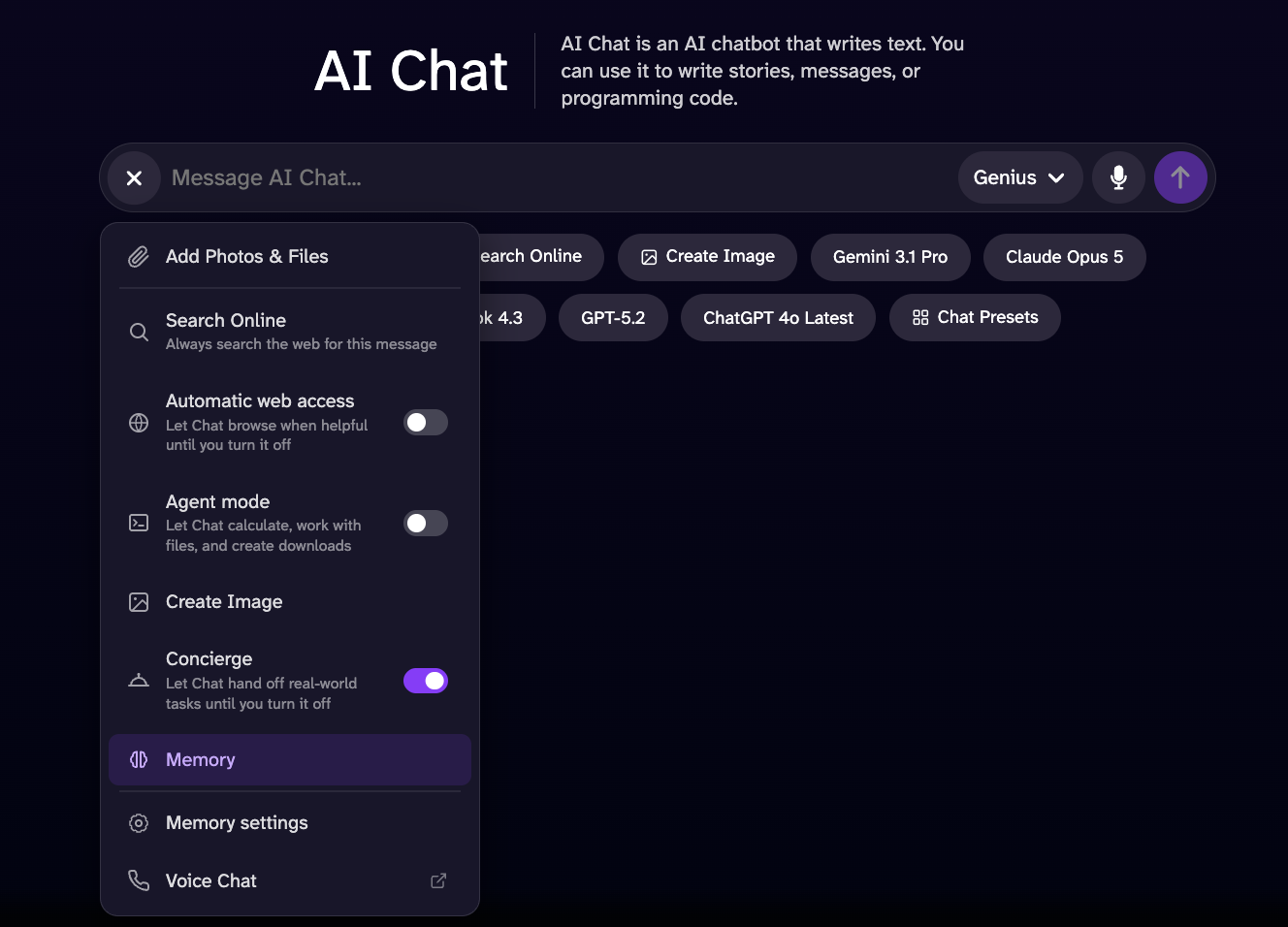
मेमोरी टूल चैट सिस्टम को अधिक सटीक प्रतिक्रियाओं के लिए जानकारी और बेहतर मानदंड इकट्ठा करने में मदद करता है। यह आपकी पसंद, प्राथमिकताएँ और रुचियों को समझने के लिए पहले साझा की गई जानकारी को ध्यान में रखता है। यह सारी जानकारी उन वार्तालापों पर आधारित है जो आपने इस विकल्प को सक्रिय करने के बाद चैट सिस्टम के साथ की हैं। चैट सिस्टम के पास वह जानकारी उपलब्ध है जो आपने पहले प्रदान की थी, और यह केवल तब तक उपलब्ध रहती है जब तक यह विकल्प सक्षम है और आपका चैट इतिहास मौजूद है। यदि आप अपना इतिहास हटा देते हैं, तो यह किसी भी पिछले वार्तालाप को ध्यान में नहीं रखेगा।
चैट को वास्तविक समय में वेब ब्राउज़ करने दें ताकि यह आप जो खोज रहे हैं, उसके बारे में अधिक सटीक, अद्यतित जानकारी और पूर्ण डेटा ढूंढ सके।
इमेज बनाएँ टूल आपको उस चैट मॉडल के अनुसार चैट से इमेज जनरेट करने की सुविधा देता है जिसका आप उपयोग कर रहे हैं: Standard, Genius Pro, या Super Genius Pro। बस वह प्रॉम्प्ट दर्ज करें जो आप जनरेट करना चाहते हैं, और आपका काम हो गया!
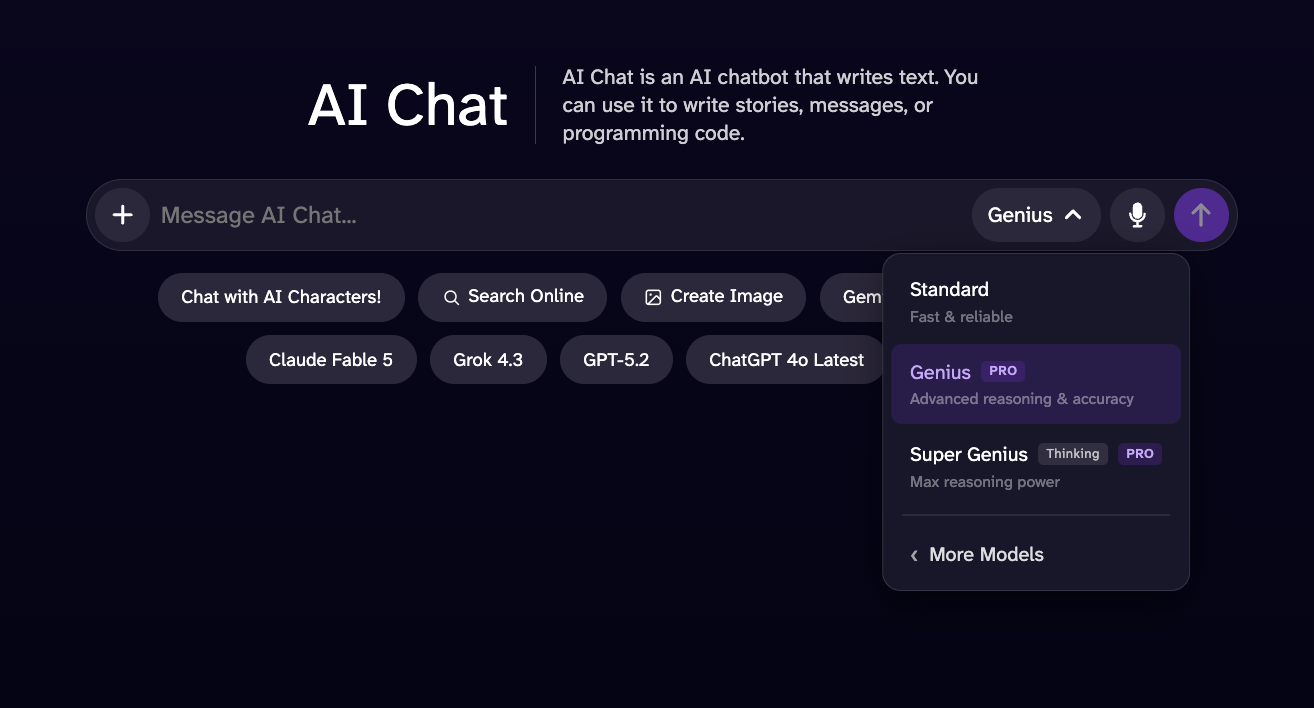
यह संस्करण Standard AI चैट की तुलना में बेहतर है, जिसमें उत्कृष्ट प्रदर्शन, अधिक विस्तृत प्रतिक्रियाएँ और अधिक बुद्धिमत्ता है।
यह मॉडल उन कार्यों में Genius मोड से बेहतर प्रदर्शन करने के लिए डिज़ाइन किया गया है, जिनमें उन्नत तर्क, तार्किक विश्लेषण और गणितीय समस्या-समाधान की आवश्यकता होती है। हालांकि इसका अनुमानित प्रतिक्रिया समय थोड़ा अधिक हो सकता है, यह अधिक गहराई, व्यापक संदर्भात्मक समझ और अधिक व्यापक प्रतिक्रियाएँ प्रदान करता है, जिससे जटिल कार्यों के लिए एक अधिक सक्षम और विश्वसनीय अनुभव प्राप्त होता है।
इस ऐड-ऑन के साथ, आप गणित और विज्ञान की समस्याओं को हल कर सकते हैं, जिनमें समीकरण, अवकलज, वर्ड प्रॉब्लम्स, बीजगणित, कैलकुलस और बहुत कुछ शामिल हैं! यह मोड तकनीकी समस्याओं को हल करने और उस असाइनमेंट की जाँच करने के लिए उत्कृष्ट है, जिसके बारे में आप अनिश्चित हैं।
AI इमेज जनरेटर हमारा टेक्स्ट-टू-इमेज टूल है जो आपको अपनी रचनात्मकता को खोजने और कृत्रिम बुद्धिमत्ता का उपयोग करके रचना करने की सुविधा देता है। अपनी सपनों की जगह या अपनी किसी भी इच्छित चीज़ की इमेज का वर्णन करें, और बाकी काम AI पर छोड़ दें!
उच्च-गुणवत्ता वाली छवियाँ उत्पन्न करने के लिए, अपना प्रॉम्प्ट चुनें, फिर 100 से अधिक शैलियों और आकृतियों में से चुनें।
अधिक विवरण, उच्च कलात्मक गुणवत्ता, और HD से भी बेहतर आपके निर्देशों का पालन करने वाली छवियाँ, 1024x1024px तक के रिज़ॉल्यूशन के साथ, जिन्हें क्षैतिज, वर्गाकार या ऊर्ध्वाधर प्रारूपों में उपयोग किया जा सकता है।
अल्ट्रा-हाई-रिज़ॉल्यूशन 2K छवियों के लिए शानदार विवरण के साथ। चाहे आप सिर्फ प्रयोग कर रहे हों या कुछ भव्य बनाना चाहते हों, यह टूल हर ज़रूरत के लिए एक उपयुक्त मोड प्रदान करता है। यदि आप छवि को प्रिंट करना चाहते हैं तो यह प्रारूप पूरी तरह से काम करता है।
AI फोटो एडिटर एक ऐसा टूल है जो आपको रचनात्मक होने और अपने इच्छित परिवर्तनों का टेक्स्ट विवरण देकर किसी भी छवि को, चाहे वह नई हो या पुरानी, पुनः बनाने या संशोधित करने की सुविधा देता है।
आप बस एक छवि या URL अपलोड करके, प्रॉम्प्ट में वह जानकारी डालकर जिसे आप संपादित करना या जोड़ना चाहते हैं, उसे जनरेट करके काम पूरा कर सकते हैं। सर्वोत्तम परिणामों के लिए, अपने निर्देशों को विशिष्ट और संक्षिप्त रखें, जैसे "आकाश को लाल बनाएं" या "पृष्ठभूमि में फूल जोड़ें।"
आप अधिकतम 3 संदर्भ छवियों का उपयोग करके भी एक संपादन बना सकते हैं, उदाहरणों के साथ इस प्रकार संकेत करते हुए:
हमारा AI वीडियो जनरेटर आपकी छवियों और टेक्स्ट को वीडियो में बदल देता है। आप इसका उपयोग शैक्षिक, मनोरंजक या लघु-कथा वीडियो बनाने के लिए कर सकते हैं।
वीडियो जनरेटर में अपलोड करके, आप DeepAI को छवि और वीडियो को सार्वजनिक रूप से साझा करने का अधिकार देते हैं। कृपया नीचे पढ़कर यह सुनिश्चित करें कि आप समझते हैं कि यह कैसे काम करता है।
हमारी DeepAI Pro सदस्यता में प्रति माह 25 सेकंड का HD वीडियो जनरेशन शामिल है। अतिरिक्त HD वीडियो सेकंड आपके वॉलेट से प्रति सेकंड $0.20 की दर से कटते हैं। Hollywood मोड (2K रिज़ॉल्यूशन के साथ) में प्रति माह 8 सेकंड वीडियो शामिल हैं, और अतिरिक्त Hollywood मोड वीडियो आपके क्रेडिट्स से प्रति सेकंड $0.30 की दर से कट जाते हैं।
एक बहुमुखी जनरेशन मोड जो तीक्ष्ण दृश्यों और सूक्ष्म विवरणों के साथ यथार्थवादी दैनिक वस्तुओं, परिवेशों और सामान्य दृश्यों को बनाने के लिए डिज़ाइन किया गया है। यह घरेलू उपकरणों, फर्नीचर, बेडरूम, रसोई, कार्यालय, लिविंग रूम और दैनिक वस्तुओं जैसे व्यावहारिक और परिचित विषयों के लिए विशेष रूप से अच्छा प्रदर्शन करता है। प्रति सेकंड $0.20 की कीमत पर यह पैसे का सर्वोत्तम मूल्य प्रदान करता है।
उच्च-गुणवत्ता वाले, सिनेमाई वीडियो पेशेवर ऑडियो और छवियों के साथ। प्रति सेकंड $0.30 पर अधिकतम रचनात्मक गुणवत्ता।
आप एक छवि को मार्गदर्शक के रूप में उपयोग करके वीडियो बना सकते हैं। हमारा AI वीडियो जनरेटर दृश्य की शुरुआत के लिए छवि को आधार के रूप में लेता है, और आपके प्रॉम्प्ट को बेहतर ढंग से समझकर दिए गए टेक्स्ट के साथ छवि के जितना संभव हो उतना निकट परिणाम प्रदान करता है।
क्या आपके पास कोई संदर्भ है जिसे आप अपने प्रोजेक्ट में उपयोग करना चाहेंगे? आप उसे जोड़ सकते हैं, और AI वीडियो जनरेटर आपके प्रॉम्प्ट के आधार पर सर्वोत्तम संभव परिणाम बनाने के लिए काम करेगा।
कृत्रिम बुद्धिमत्ता से अपने वीडियो को रूपांतरित करें। सरल निर्देशों के साथ अपने सीन में तत्व जोड़ें, संशोधित करें या हटाएँ और अपनी सामग्री को बिल्कुल वैसा ही परिणाम दें जिसकी आप तलाश कर रहे हैं।
Website Builder एक वेब-आधारित प्लेटफ़ॉर्म है जिसे उन्नत तकनीकी या कोडिंग ज्ञान की आवश्यकता के बिना वेबसाइटों के निर्माण, अनुकूलन और प्रबंधन को सरल बनाने के लिए बनाया गया है।
यह उपयोगकर्ताओं को एक सहज इंटरफ़ेस और कॉन्फ़िगर करने योग्य कंपोनेंट्स का एक सेट देता है, जिनकी मदद से वे रिस्पॉन्सिव वेबसाइटें बना सकते हैं, लेआउट और सामग्री को कस्टमाइज़ कर सकते हैं, पेज मैनेज कर सकते हैं और अपने प्रोजेक्ट्स के विज़ुअल लुक को एडजस्ट कर सकते हैं।
DeepAI Code मैक के लिए एक AI कोडिंग एजेंट है। कोई प्रोजेक्ट फ़ोल्डर खोलें, कोई टास्क बताएँ और इसे फ़ाइलें पढ़ने, कोड एडिट करने और कमांड चलाने दें। बदलावों को रखने से पहले ऐप में उनकी समीक्षा करें।
- मैक के लिए DeepAI Code डाउनलोड करें. अपने मैक से मेल खाने के लिए Apple सिलिकॉन या Intel चुनें, डिस्क इमेज खोलें और ऐप को Applications में ड्रैग करें।
- ऐप खोलें और एक प्रोजेक्ट फ़ोल्डर चुनें। एक चैट शुरू करें और बताएं कि आप क्या बनाना या बदलना चाहते हैं।
- एक मॉडल और एक एक्सेस मोड चुनें। प्लान मोड में बदलाव करने से पहले कार्य की जाँच की जाती है; अन्य मोड एजेंट को विभिन्न अनुमोदन सेटिंग्स के साथ कार्य करने की अनुमति देते हैं। शुरू करने से पहले उन सेटिंग्स की समीक्षा करें।
- टास्क पर नज़र रखें, उसके फ़ाइल डिफ़ की समीक्षा करें और बदलावों को रखें या पूर्ववत करें।
GLM 5.3 Flash और GPT-6 Luna जैसे तेज़ मॉडल मुफ्त हैं। प्रीमियम मॉडल Theos खर्च करते हैं, जो हर साइन-इन किए गए उपयोगकर्ता को मिलने वाला दैनिक भत्ता है; DeepAI Pro हर दिन और अधिक जोड़ता है। आप एक ही बातचीत के दौरान मॉडल बदल सकते हैं। मूल्य देखें.
यह ऐप आपके Mac पर मौजूद फ़ाइलों के साथ काम करता है। आपका टास्क पूरा करने के लिए प्रॉम्प्ट और संबंधित फ़ाइल सामग्री AI मॉडल को भेजी जाती है। जब आप साइन इन होते हैं, तो चैट इतिहास आपके खाते में सिंक हो जाता है।
Windows जल्द ही आ रहा है
हमारे हर टूल को एक्सप्लोर करें, और आप पाएँगे कि अपने ज्ञान और कल्पना के साथ आप अविश्वसनीय चीज़ें बना सकते हैं!
DeepAI के म्यूज़िक जनरेटर के साथ आसानी से अनूठा संगीत बनाएँ। आपके वीडियो के लिए फोली, साउंड इफ़ेक्ट और बैकग्राउंड ट्रैक के लिए बिल्कुल सही। अपनी ज़रूरतों के अनुरूप तैयार किए गए कस्टम साउंडस्केप के साथ अपने प्रोजेक्ट्स को नया रूप दें।
यदि आपके पास DeepAI Pro है, तो आपके पहले 100 गाने हर महीने मुफ्त हैं, और अतिरिक्त गानों की कीमत प्रत्येक $0.10 है।
क्या आपके पास कोई ऐसी तस्वीर है जिससे आप बैकग्राउंड हटाना चाहते हैं, या आपको बस बैकग्राउंड पसंद नहीं है? इस टूल को आज़माएँ, यह इसे सहजता से हटा देगा।
क्या आप देखना चाहेंगे कि एक पुरानी ब्लैक-एंड-व्हाइट तस्वीर कैसी दिखेगी? अपनी पुरानी पारिवारिक तस्वीरें जोड़ें और उन्हें रंगों से जीवंत करें।
सुपर रेज़ोल्यूशन टूल मशीन लर्निंग का उपयोग करके फोटो की सामग्री और उसकी खास विशेषताओं को खोए बिना उसे स्पष्ट, शार्प और अपस्केल करता है। धुंधली इमेज दुर्भाग्य से आम हैं और पेशेवरों तथा शौकिया लोगों दोनों के लिए समस्या हैं। सुपर रेज़ोल्यूशन मशीन लर्निंग तकनीकों का उपयोग करके इमेज को एक सेकंड के अंश में अपस्केल करता है।
क्या फोटो में कुछ पसंद नहीं आ रहा है? यह टूल आपको आसानी से ऑब्जेक्ट बदलने की सुविधा देता है; बस यह बताएँ कि आप वास्तव में क्या चाहते हैं, और आप अपनी तस्वीर को बेहतर बना सकते हैं।
क्या आप सुनिश्चित नहीं हैं कि कोई इमेज असली है या नहीं? यह अनुमान लगाने के लिए इमेज अपलोड करें कि क्या वह AI से बनाई गई है या डिजिटल रूप से बदली गई है; परिणाम संभावना पर आधारित हैं और इन्हें निर्णायक प्रमाण नहीं माना जाना चाहिए।
DeepAI Pro एक सदस्यता है जो $9.99 प्रति माह या $89.99 प्रति वर्ष में DeepAI के सभी टूल्स तक पहुँच प्रदान करती है, जिसमें मासिक नवीनीकृत होने वाले कोटे शामिल हैं। जब आपके वर्तमान चक्र के कोटे समाप्त हो जाते हैं, तो आप अधिक सामग्री उत्पन्न करने के लिए क्रेडिट भी जोड़ सकते हैं। अधिक जानकारी के लिए हमारे प्राइसिंग पेज पर जाएँ, जो https://deepai.org/pricing पर उपलब्ध है।
मूल्य निर्धारण: API कॉल आपकी DeepAI Pro सदस्यता में शामिल हैं। प्रत्येक जनरेशन आपके मासिक कोटे से निकाली जाती है या आपके प्रीपेड वॉलेट बैलेंस से घटाई जाती है।
DeepAI कई तरह के इमेज API प्रदान करता है। प्रत्येक एक सरल HTTP एंडपॉइंट है जिसे आप किसी भी भाषा से कॉल कर सकते हैं, जैसे:- टेक्स्ट से इमेज: टेक्स्ट विवरण से छवियाँ उत्पन्न करें।
- AI फोटो एडिटर: टेक्स्ट प्रॉम्प्ट के साथ मौजूदा छवि को संपादित और रूपांतरित करें।
- सुपर रेज़ोल्यूशन: मशीन लर्निंग का उपयोग करके छवियों को अपस्केल करें और शार्प डिटेल वापस पाएँ।
- इमेज कलराइज़र: ब्लैक-एंड-व्हाइट तस्वीरों में यथार्थवादी रंग जोड़ें।
- बैकग्राउंड रिमूवर: फोटो से सब्जेक्ट को साफ़-सुथरे तरीके से अलग करें।
- वीडियो जनरेटर: टेक्स्ट प्रॉम्प्ट या स्रोत छवि से वीडियो उत्पन्न करें — वीडियो API देखें।
हर DeepAI API एक ही POST अनुरोध होता है। मॉडल के इनपुट्स को multipart/form-data के रूप में भेजें और अनुरोध हेडर में अपनी API कुंजी से प्रमाणीकरण करें।
साइन इन करें और अपने अकाउंट डैशबोर्ड से अपनी कुंजी कॉपी करें। API एक्सेस के लिए DeepAI Pro सदस्यता आवश्यक है। अपनी कुंजी को गुप्त रखें — इसे पासवर्ड की तरह मानें, और क्लाइंट-साइड कोड में कभी भी इसे प्रदर्शित न करें।
अपनी कुंजी को api-key हेडर में और मॉडल के इनपुट्स को फॉर्म फ़ील्ड्स के रूप में भेजें। एंडपॉइंट URL है https://api.deepai.org/api/<model>, जहाँ <model> मॉडल आईडी है (नीचे प्रत्येक मॉडल के साथ दिखाया गया है)।
curl -X POST https://api.deepai.org/api/text2img \
    -H 'api-key:YOUR_API_KEY' \
    -F 'text=a serene mountain lake at sunrise'
सफलता पर आपको JSON बॉडी के साथ एक 200 OK प्राप्त होता है। output_url उत्पन्न फ़ाइल से लिंक करता है और id अनूठा जॉब पहचानकर्ता है:
{
    "id": "59a0e8a9-...",
    "output_url": "https://api.deepai.org/job-view-file/.../output.jpg"
}
त्रुटियाँ 200 के अलावा कोई स्टेटस और एक JSON बॉडी लौटाती हैं, जिसमें एक err या status संदेश होता है:
- 401 — API कुंजी मौजूद नहीं है या अमान्य है, या उपयोग कोटा पार हो गया है।
- 410 — अनुरोधित मॉडल हटा दिया गया है।
- 500 — मॉडल आईडी नहीं मिली, या प्रो��ेसिंग में त्रुटि हुई।
टेक्स्ट प्रॉम्प्ट या स्रोत इमेज से वीडियो जनरेट करें। वीडियो जनरेशन में कुछ मिनट लगते हैं, इसलिए इमेज API के विपरीत यह असिंक्रोनस है: एक जॉब सबमिट करें, जॉब id प्राप्त करें, फिर वीडियो तैयार होने तक स्टेटस एंडपॉइंट को पोल करें।
मूल्य निर्धारण: वीडियो जनरेशन के लिए DeepAI Pro आवश्यक है और उत्पन्न वीडियो के प्रति सेकंड के हिसाब से बिल किया जाता है, जो पहले आपके मासिक भत्ते (25 मानक सेकंड, 8 Hollywood मोड सेकंड) से और फिर आपके प्रीपेड वॉलेट (प्रति मानक सेकंड 20¢, प्रति Hollywood मोड सेकंड 30¢) से काटा जाता है। मूल्य निर्धारण देखें।
टेक्स्ट से वीडियो: POST https://api.deepai.org/video-api/text2video
इमेज से वीडियो: POST https://api.deepai.org/video-api/img2video
जॉब स्टेटस: GET https://api.deepai.org/video-api/status/<id>
पैरामीटर को multipart/form-data, form-urlencoded या application/json बॉडी (image को URL या base64 डेटा के रूप में) के साथ अपनी कुंजी को api-key हेडर में बिल्कुल इमेज APIs की तरह भेजें। यह हेडर हर कॉल पर अनिवार्य है, जिसमें स्टेटस पोल भी शामिल हैं; ब्राउज़र सत्र इन राउट्स को प्रमाणित नहीं करता।
| पैरामीटर | प्रकार | आवश्यक | डिफ़ॉल्ट |
|---|---|---|---|
prompt | string | text2video: हाँ img2video: नहीं | — |
image | फ़ाइल, URL, या base64 | केवल img2video: हाँ | — |
mode | string | नहीं | hd |
duration | integer | नहीं | 5 |
shape | string | नहीं | auto |
prompt — क्या जनरेट करना है, अधिकतम 3000 वर्ण (इससे लंबे प्रॉम्प्ट 400 के साथ अस्वीकार कर दिए जाते हैं)। img2video पर वैकल्पिक (केवल स्रोत इमेज ही पर्याप्त है)।
image — img2video के लिए स्रोत इमेज: इसे फ़ाइल फ़ील्ड के रूप में अपलोड करें, एक सार्वजनिक http(s) URL दें, या base64 डेटा (रॉ या data:image/...;base64, URL के रूप में) भेजें। अधिकतम 20MB, और यह इमेज के रूप में डीकोड होना चाहिए। रीडायरेक्ट का अनुसरण किया जाता है।
mode — मानक वीडियो के लिए hd, या 2K सिनेमाई-गुणवत्ता वाले वीडियो के लिए hollywood।
duration — उत्पन्न वीडियो की लंबाई सेकंड में, 5 से 15 तक। बिलिंग प्रति सेकंड के हिसाब से है।
shape — square, landscape, standard, vertical, portrait, या auto। auto के साथ img2video स्रोत इमेज के आकार से मेल खाता है और text2video लैंडस्केप का उपयोग करता है। hollywood मोड में img2video हमेशा स्रोत इमेज का आकार बनाए रखता है, इसलिए वहाँ shape auto ही होना चाहिए।
curl -X POST https://api.deepai.org/video-api/text2video \
    -H 'api-key:YOUR_API_KEY' \
    -F 'prompt=a golden retriever surfing a wave at sunset' \
    -F 'mode=hd' \
    -F 'duration=5' \
    -F 'shape=landscape'
फ़ाइल या URL से इमेज को वीडियो में:
curl -X POST https://api.deepai.org/video-api/img2video \
    -H 'api-key:YOUR_API_KEY' \
    -F 'image=@/path/to/photo.jpg' \
    -F 'prompt=the camera slowly zooms in'
सफल सबमिशन पोल करने के लिए जॉब आईडी लौटाता है:
{
    "id": "59a0e8a9-...",
    "status": "processing"
}
हर कुछ सेकंड में स्टेटस एंडपॉइंट को पोल करें। status का मान processing, completed या failed होता है:
curl https://api.deepai.org/video-api/status/59a0e8a9-... \
    -H 'api-key:YOUR_API_KEY'
{"status": "processing"}

{"status": "completed", "output_url": "https://...mp4"}

{"status": "failed", "error": "..."}
पाइथन में एक संपूर्ण उदाहरण:
import time, requests

headers = {'api-key': 'YOUR_API_KEY'}
job = requests.post(
    'https://api.deepai.org/video-api/text2video',
    data={'prompt': 'a golden retriever surfing a wave at sunset',
          'mode': 'hd', 'duration': 5, 'shape': 'landscape'},
    headers=headers).json()

while True:
    status = requests.get(
        'https://api.deepai.org/video-api/status/' + job['id'],
        headers=headers).json()
    if status['status'] == 'completed':
        print(status['output_url'])
        break
    if status['status'] == 'failed':
        raise RuntimeError(status['error'])
    time.sleep(5)
- अपना परिणाम तुरंत प्राप्त करें: स्टेटस रिकॉर्ड (और उसका
output_url) पूरा होने के बाद एक घंटे तक उपलब्ध रहता है, जिसके बाद स्टेटस एंडपॉइंट 404 लौटाता है। वीडियो पूरा होने पर उसे डाउनलोड करें। - आपको केवल उन वीडियो के लिए ही बिल किया जाता है जो पूरे हो जाते हैं। जब कोई जॉब सबमिट की जाती है तो क्रेडिट्स आरक्षित कर दिए जाते हैं और यदि वह विफल हो जाती है तो क्रेडिट्स रिलीज़ कर दिए जाते हैं।
401का अर्थ है किapi-keyहेडर अनुपस्थित या अमान्य है।403का अर्थ है कि खाते में कोई सक्रिय DeepAI Pro सदस्यता नहीं है।- सबमिशन के समय
402प्रतिक्रिया का मतलब है कि आपका वॉलेट बैलेंस वीडियो की लागत के लिए पर्याप्त नहीं है (बॉडी में लागत और आपका बैलेंस शामिल होता है) या भुगतान विफल होने के बाद आपका खाता लॉक है। अपने डैशबोर्ड में क्रेडिट जोड़ें या ऑटो टॉप-अप सक्षम करें। - प्रॉम्प्ट्स और छवियाँ मॉडरेट की जाती हैं: फ़्लैग किए गए कंटेंट को सबमिशन पर
400के साथ अस्वीकार कर दिया जाता है, और वीडियो प्रदाता द्वारा जनरेशन के दौरान फ़्लैग किए गए कंटेंट को{"status": "failed", "error": "NSFW detected"}के रूप में दिखाया जाता है।
AI इमेज जनरेटरशीर्ष पर वापस ↑
यह एक AI इमेज जनरेटर है। यह टेक्स्ट विवरण से बिल्कुल नई इमेज बनाता है।
एंडपॉइंट: POST https://api.deepai.org/api/text2img
| पैरामीटर | प्रकार | आवश्यक | डिफ़ॉल्ट |
|---|---|---|---|
text |
text | हाँ | — |
text — एक स्ट्रिंग जो यह बताती है कि क्या उत्पन्न करना है, जैसे "एक शांत झील पर तारों भरी रात" या "एक बूढ़े समुद्री डाकू का चित्र"।
width, height — एक स्ट्रिंग पास करें, जैसे "256" या "768" (डिफ़ॉल्ट 512)। 128 और 1536 के बीच, 32 के गुणकों में मानों का उपयोग करें। मानक छवियों के लिए अनुशंसित: 1024x576, 1024x720, 512x512, 768x1024, 576x1024। HD छवियों के लिए अनुशंसित: 1216x832, 1152x896, 1024x1024, 896x1152, 832x1216। ~700 से ऊपर या 256 से नीचे के मान अजीब परिणाम दे सकते हैं।
image_generator_version — "standard" (डिफ़ॉल्ट), "hd", "genius", या "super_genius"।
resolution — "2k" (डिफ़ॉल्ट) या "4k"। केवल तब उपयोग किया जाता है जब image_generator_version "super_genius" हो।
genius_preference — "anime", "photography", "graphic", या "cinematic"। केवल तभी इस्तेमाल किया जाता है जब image_generator_version "genius" हो।
negative_prompt — एक स्ट्रिंग जो बताती है कि छवि से क्या हटाना है; गुणवत्ता और विवरण में सुधार के लिए उपयोगी। उदाहरण: खराब एनाटॉमी, धुंधला, क्रॉप्ड, विकृत, बदसूरत, डुप्लिकेट, अतिरिक्त अंग, जुड़ी हुई उंगलियाँ, जेपीईजी आर्टिफैक्ट्स, निम्न गुणवत्ता, लो-रेस, विकृत हाथ, फ्रेम से बाहर, हस्ताक्षर, टेक्स्ट, वॉटरमार्क, सबसे खराब गुणवत्ता।
AI इमेज जनरेटर cURL उदाहरण
# Example posting a text URL:

curl \
    -F 'text=YOUR_TEXT_HERE' \
    -H 'api-key:YOUR_API_KEY' \
    https://api.deepai.org/api/text2img


# Example posting a local text file:

curl \
    -F 'text=YOUR_TEXT_HERE' \
    -H 'api-key:YOUR_API_KEY' \
    https://api.deepai.org/api/text2img


# Example directly sending a text string:

curl \
    -F 'text=YOUR_TEXT_HERE' \
    -H 'api-key:YOUR_API_KEY' \
    https://api.deepai.org/api/text2img
AI इमेज जनरेटर Javascript उदाहरण
// Example posting a text URL:
(async function() {
    const resp = await fetch('https://api.deepai.org/api/text2img', {
        method: 'POST',
        headers: {
            'Content-Type': 'application/json',
            'api-key': 'YOUR_API_KEY'
        },
        body: JSON.stringify({
            text: "YOUR_TEXT_HERE",
        })
    });

    const data = await resp.json();
    console.log(data);
})()


// Example posting file picker input text (Browser only):
document.getElementById('yourFileInputId').addEventListener('change', async function() {
       const formData = new FormData();
       formData.append('text', 'YOUR_TEXT_HERE');

       const resp = await fetch('https://api.deepai.org/api/text2img', {
           method: 'POST',
           headers: {
               'api-key': 'YOUR_API_KEY'
           },
           body: formData
       });

       const data = await resp.json();
       console.log(data);
});

// Example posting a local text file (Node.js only):
const fs = require('fs');
(async function() {
       const formData = new FormData();
       formData.append('text', 'YOUR_TEXT_HERE');

       const resp = await fetch('https://api.deepai.org/api/text2img', {
           method: 'POST',
           headers: {
               'api-key': 'YOUR_API_KEY'
           },
           body: formData
       });

       const data = await resp.json();
       console.log(data);
});

// Example directly sending a text string:
(async function() {
    const resp = await fetch('https://api.deepai.org/api/text2img', {
        method: 'POST',
        headers: {
            'Content-Type': 'application/json',
            'api-key': 'YOUR_API_KEY'
        },
        body: JSON.stringify({
            text: "YOUR_TEXT_HERE",
        })
    });

    const data = await resp.json();
    console.log(data);
})()
AI इमेज जनरेटर Python उदाहरण
# Example posting a text URL:

import requests
r = requests.post(
    "https://api.deepai.org/api/text2img",
    data={
        'text': 'YOUR_TEXT_HERE',
    },
    headers={'api-key': 'YOUR_API_KEY'}
)
print(r.json())


# Example posting a local text file:

import requests
r = requests.post(
    "https://api.deepai.org/api/text2img",
    data={
        'text': 'YOUR_TEXT_HERE',
    },
    headers={'api-key': 'YOUR_API_KEY'}
)
print(r.json())


# Example directly sending a text string:

import requests
r = requests.post(
    "https://api.deepai.org/api/text2img",
    data={
        'text': 'YOUR_TEXT_HERE',
    },
    headers={'api-key': 'YOUR_API_KEY'}
)
print(r.json())
AI इमेज जनरेटर Ruby उदाहरण
# Example posting a text URL:

require 'rest_client'
r = RestClient::Request.execute(method: :post, url: 'https://api.deepai.org/api/text2img', timeout: 600,
    headers: {'api-key' => 'YOUR_API_KEY'},
    payload: {
        'text' => 'YOUR_TEXT_HERE',
    }
)
puts r


# Example posting a local text file:

require 'rest_client'
r = RestClient::Request.execute(method: :post, url: 'https://api.deepai.org/api/text2img', timeout: 600,
    headers: {'api-key' => 'YOUR_API_KEY'},
    payload: {
        'text' => 'YOUR_TEXT_HERE',
    }
)
puts r


# Example directly sending a text string:

require 'rest_client'
r = RestClient::Request.execute(method: :post, url: 'https://api.deepai.org/api/text2img', timeout: 600,
    headers: {'api-key' => 'YOUR_API_KEY'},
    payload: {
        'text' => 'YOUR_TEXT_HERE',
    }
)
puts r
AI इमेज जनरेटर Php उदाहरण
// Example posting a text URL:
<?php
require 'vendor/autoload.php'; // Ensure you have Guzzle installed (composer require guzzlehttp/guzzle)

use GuzzleHttp\Client;
use GuzzleHttp\Psr7\Utils;

$client = new Client();
$headers = [
    'api-key' => 'YOUR_API_KEY'
];
$options = [
    'multipart' => [
        [
            'name'     => 'text',
            'contents' => 'YOUR_TEXT_HERE'
        ],
    ]
];
$request = new GuzzleHttp\Psr7\Request('POST', 'https://api.deepai.org/api/text2img', $headers);
try {
    $res = $client->sendAsync($request, $options)->wait();
    echo $res->getBody();
} catch (Exception $e) {
    echo 'Error: ' . $e->getMessage();
}
?>


// Example posting a local text file:
<?php
require 'vendor/autoload.php'; // Ensure you have Guzzle installed (composer require guzzlehttp/guzzle)

use GuzzleHttp\Client;
use GuzzleHttp\Psr7\Utils;

$client = new Client();
$headers = [
    'api-key' => 'YOUR_API_KEY'
];
$options = [
    'multipart' => [
        [
            'name'     => 'text',
            'contents' => 'YOUR_TEXT_HERE'
        ],
    ]
];
$request = new GuzzleHttp\Psr7\Request('POST', 'https://api.deepai.org/api/text2img', $headers);
try {
    $res = $client->sendAsync($request, $options)->wait();
    echo $res->getBody();
} catch (Exception $e) {
    echo 'Error: ' . $e->getMessage();
}
?>


// Example directly sending a text string:
<?php
require 'vendor/autoload.php'; // Ensure you have Guzzle installed (composer require guzzlehttp/guzzle)

use GuzzleHttp\Client;
use GuzzleHttp\Psr7\Utils;

$client = new Client();
$headers = [
    'api-key' => 'YOUR_API_KEY'
];
$options = [
    'multipart' => [
        [
            'name'     => 'text',
            'contents' => 'YOUR_TEXT_HERE'
        ],
    ]
];
$request = new GuzzleHttp\Psr7\Request('POST', 'https://api.deepai.org/api/text2img', $headers);
try {
    $res = $client->sendAsync($request, $options)->wait();
    echo $res->getBody();
} catch (Exception $e) {
    echo 'Error: ' . $e->getMessage();
}
?>
AI इमेज जनरेटर Go उदाहरण
// Example posting a text URL:
package main

import (
    "bytes"
    "encoding/json"
    "fmt"
    "io"
    "net/http"
)

func main() {
    url := "https://api.deepai.org/api/text2img"
    payload := map[string]string{
        "text": "YOUR_TEXT_HERE",
    }
    jsonData, _ := json.Marshal(payload)

    req, _ := http.NewRequest("POST", url, bytes.NewBuffer(jsonData))
    req.Header.Set("Content-Type", "application/json")
    req.Header.Set("api-key", "YOUR_API_KEY")

    client := &http.Client{}
    resp, err := client.Do(req)
    if err != nil {
        panic(err)
    }
    defer resp.Body.Close()

    body, _ := io.ReadAll(resp.Body)
    fmt.Println(string(body))
}


// Example posting a local text file:
package main

import (
    "bytes"
    "fmt"
    "io"
    "mime/multipart"
    "net/http"
    "os"
)

func main() {
    url := "https://api.deepai.org/api/text2img"

    var b bytes.Buffer
    w := multipart.NewWriter(&b)

    w.WriteField("text", "YOUR_TEXT_HERE")

    if err := w.Close(); err != nil {
        panic(err)
    }

    req, _ := http.NewRequest("POST", url, &b)
    req.Header.Set("Content-Type", w.FormDataContentType())
    req.Header.Set("api-key", "YOUR_API_KEY")

    client := &http.Client{}
    resp, err := client.Do(req)
    if err != nil {
        panic(err)
    }
    defer resp.Body.Close()

    body, _ := io.ReadAll(resp.Body)
    fmt.Println(string(body))
}


// Example directly sending a text string:
package main

import (
    "bytes"
    "encoding/json"
    "fmt"
    "io"
    "net/http"
)

func main() {
    url := "https://api.deepai.org/api/text2img"
    payload := map[string]string{
        "text": "YOUR_TEXT_HERE",
    }
    jsonData, _ := json.Marshal(payload)

    req, _ := http.NewRequest("POST", url, bytes.NewBuffer(jsonData))
    req.Header.Set("Content-Type", "application/json")
    req.Header.Set("api-key", "YOUR_API_KEY")

    client := &http.Client{}
    resp, err := client.Do(req)
    if err != nil {
        panic(err)
    }
    defer resp.Body.Close()

    body, _ := io.ReadAll(resp.Body)
    fmt.Println(string(body))
}
AI इमेज जनरेटर Java उदाहरण
// Example posting a text URL:
import java.net.http.HttpClient;
import java.net.http.HttpRequest;
import java.net.http.HttpResponse;
import java.net.URI;

public class Main {
    public static void main(String[] args) throws Exception {
        HttpClient client = HttpClient.newHttpClient();

        String json = "{" +
            "\"text\": \"YOUR_TEXT_HERE\"" +
            "}";

        HttpRequest request = HttpRequest.newBuilder()
            .uri(URI.create("https://api.deepai.org/api/text2img"))
            .header("Content-Type", "application/json")
            .header("api-key", "YOUR_API_KEY")
            .POST(HttpRequest.BodyPublishers.ofString(json))
            .build();

        HttpResponse<String> response = client.send(request, HttpResponse.BodyHandlers.ofString());
        System.out.println(response.body());
    }
}


// Example posting a local text file:
// Add to build.gradle: implementation 'com.squareup.okhttp3:okhttp:4.12.0'
import okhttp3.*;
import java.io.File;
import java.io.IOException;

public class Main {
    public static void main(String[] args) throws IOException {
        OkHttpClient client = new OkHttpClient();

        RequestBody requestBody = new MultipartBody.Builder()
            .setType(MultipartBody.FORM)
            .addFormDataPart("text", "YOUR_TEXT_HERE")
            .build();

        Request request = new Request.Builder()
            .url("https://api.deepai.org/api/text2img")
            .addHeader("api-key", "YOUR_API_KEY")
            .post(requestBody)
            .build();

        try (Response response = client.newCall(request).execute()) {
            System.out.println(response.body().string());
        }
    }
}


// Example directly sending a text string:
import java.net.http.HttpClient;
import java.net.http.HttpRequest;
import java.net.http.HttpResponse;
import java.net.URI;

public class Main {
    public static void main(String[] args) throws Exception {
        HttpClient client = HttpClient.newHttpClient();

        String json = "{" +
            "\"text\": \"YOUR_TEXT_HERE\"" +
            "}";

        HttpRequest request = HttpRequest.newBuilder()
            .uri(URI.create("https://api.deepai.org/api/text2img"))
            .header("Content-Type", "application/json")
            .header("api-key", "YOUR_API_KEY")
            .POST(HttpRequest.BodyPublishers.ofString(json))
            .build();

        HttpResponse<String> response = client.send(request, HttpResponse.BodyHandlers.ofString());
        System.out.println(response.body());
    }
}
AI इमेज जनरेटर C# उदाहरण
// Example posting a text URL:
using System;
using System.Net.Http;
using System.Text;
using System.Text.Json;
using System.Threading.Tasks;

class Program
{
    static async Task Main()
    {
        using var client = new HttpClient();
        client.DefaultRequestHeaders.Add("api-key", "YOUR_API_KEY");

        var payload = new
        {
            text = "YOUR_TEXT_HERE",
        };

        var json = JsonSerializer.Serialize(payload);
        var content = new StringContent(json, Encoding.UTF8, "application/json");

        var response = await client.PostAsync("https://api.deepai.org/api/text2img", content);
        var result = await response.Content.ReadAsStringAsync();
        Console.WriteLine(result);
    }
}


// Example posting a local text file:
using System;
using System.IO;
using System.Net.Http;
using System.Threading.Tasks;

class Program
{
    static async Task Main()
    {
        using var client = new HttpClient();
        client.DefaultRequestHeaders.Add("api-key", "YOUR_API_KEY");

        using var form = new MultipartFormDataContent();

        form.Add(new StringContent("YOUR_TEXT_HERE"), "text");

        var response = await client.PostAsync("https://api.deepai.org/api/text2img", form);
        var result = await response.Content.ReadAsStringAsync();
        Console.WriteLine(result);
    }
}


// Example directly sending a text string:
using System;
using System.Net.Http;
using System.Text;
using System.Text.Json;
using System.Threading.Tasks;

class Program
{
    static async Task Main()
    {
        using var client = new HttpClient();
        client.DefaultRequestHeaders.Add("api-key", "YOUR_API_KEY");

        var payload = new
        {
            text = "YOUR_TEXT_HERE",
        };

        var json = JsonSerializer.Serialize(payload);
        var content = new StringContent(json, Encoding.UTF8, "application/json");

        var response = await client.PostAsync("https://api.deepai.org/api/text2img", content);
        var result = await response.Content.ReadAsStringAsync();
        Console.WriteLine(result);
    }
}
AI इमेज जनरेटर Swift उदाहरण
// Example posting a text URL:
import Foundation

let url = URL(string: "https://api.deepai.org/api/text2img")!
var request = URLRequest(url: url)
request.httpMethod = "POST"
request.setValue("application/json", forHTTPHeaderField: "Content-Type")
request.setValue("YOUR_API_KEY", forHTTPHeaderField: "api-key")

let payload: [String: Any] = [
    "text": "YOUR_TEXT_HERE",
]

request.httpBody = try? JSONSerialization.data(withJSONObject: payload)

let task = URLSession.shared.dataTask(with: request) { data, response, error in
    if let data = data {
        print(String(data: data, encoding: .utf8) ?? "")
    }
}
task.resume()

// Keep the program running for async request
RunLoop.main.run()


// Example posting a local text file:
import Foundation

let url = URL(string: "https://api.deepai.org/api/text2img")!
var request = URLRequest(url: url)
request.httpMethod = "POST"
request.setValue("YOUR_API_KEY", forHTTPHeaderField: "api-key")

let boundary = UUID().uuidString
request.setValue("multipart/form-data; boundary=\(boundary)", forHTTPHeaderField: "Content-Type")

var body = Data()

body.append("--\(boundary)\r\n".data(using: .utf8)!)
body.append("Content-Disposition: form-data; name=\"text\"\r\n\r\n".data(using: .utf8)!)
body.append("YOUR_TEXT_HERE".data(using: .utf8)!)
body.append("\r\n".data(using: .utf8)!)

body.append("--\(boundary)--\r\n".data(using: .utf8)!)
request.httpBody = body

let task = URLSession.shared.dataTask(with: request) { data, response, error in
    if let data = data {
        print(String(data: data, encoding: .utf8) ?? "")
    }
}
task.resume()

RunLoop.main.run()


// Example directly sending a text string:
import Foundation

let url = URL(string: "https://api.deepai.org/api/text2img")!
var request = URLRequest(url: url)
request.httpMethod = "POST"
request.setValue("application/json", forHTTPHeaderField: "Content-Type")
request.setValue("YOUR_API_KEY", forHTTPHeaderField: "api-key")

let payload: [String: Any] = [
    "text": "YOUR_TEXT_HERE",
]

request.httpBody = try? JSONSerialization.data(withJSONObject: payload)

let task = URLSession.shared.dataTask(with: request) { data, response, error in
    if let data = data {
        print(String(data: data, encoding: .utf8) ?? "")
    }
}
task.resume()

RunLoop.main.run()
AI इमेज जनरेटर Kotlin उदाहरण
// Example posting a text URL:
import java.net.URI
import java.net.http.HttpClient
import java.net.http.HttpRequest
import java.net.http.HttpResponse

fun main() {
    val client = HttpClient.newHttpClient()

    val json = """{
        "text": "YOUR_TEXT_HERE"
    }"""

    val request = HttpRequest.newBuilder()
        .uri(URI.create("https://api.deepai.org/api/text2img"))
        .header("Content-Type", "application/json")
        .header("api-key", "YOUR_API_KEY")
        .POST(HttpRequest.BodyPublishers.ofString(json))
        .build()

    val response = client.send(request, HttpResponse.BodyHandlers.ofString())
    println(response.body())
}


// Example posting a local text file:
// Add to build.gradle.kts: implementation("com.squareup.okhttp3:okhttp:4.12.0")
import okhttp3.*
import okhttp3.MediaType.Companion.toMediaType
import okhttp3.RequestBody.Companion.asRequestBody
import java.io.File

fun main() {
    val client = OkHttpClient()

    val requestBody = MultipartBody.Builder()
        .setType(MultipartBody.FORM)
        .addFormDataPart("text", "YOUR_TEXT_HERE")
        .build()

    val request = Request.Builder()
        .url("https://api.deepai.org/api/text2img")
        .addHeader("api-key", "YOUR_API_KEY")
        .post(requestBody)
        .build()

    client.newCall(request).execute().use { response ->
        println(response.body?.string())
    }
}


// Example directly sending a text string:
import java.net.URI
import java.net.http.HttpClient
import java.net.http.HttpRequest
import java.net.http.HttpResponse

fun main() {
    val client = HttpClient.newHttpClient()

    val json = """{
        "text": "YOUR_TEXT_HERE"
    }"""

    val request = HttpRequest.newBuilder()
        .uri(URI.create("https://api.deepai.org/api/text2img"))
        .header("Content-Type", "application/json")
        .header("api-key", "YOUR_API_KEY")
        .POST(HttpRequest.BodyPublishers.ofString(json))
        .build()

    val response = client.send(request, HttpResponse.BodyHandlers.ofString())
    println(response.body())
}
AI इमेज जनरेटर Rust उदाहरण
// Example posting a text URL:
// Add to Cargo.toml: reqwest = { version = "0.11", features = ["json", "multipart"] }
// tokio = { version = "1", features = ["full"] }
// serde_json = "1"

use reqwest::header::HeaderMap;
use std::collections::HashMap;

#[tokio::main]
async fn main() -> Result<(), Box<dyn std::error::Error>> {
    let client = reqwest::Client::new();

    let mut headers = HeaderMap::new();
    headers.insert("api-key", "YOUR_API_KEY".parse()?);

    let mut payload = HashMap::new();
    payload.insert("text", "YOUR_TEXT_HERE");

    let response = client
        .post("https://api.deepai.org/api/text2img")
        .headers(headers)
        .json(&payload)
        .send()
        .await?;

    println!("{}", response.text().await?);
    Ok(())
}


// Example posting a local text file:
// Add to Cargo.toml: reqwest = { version = "0.11", features = ["json", "multipart"] }
// tokio = { version = "1", features = ["full"] }

use reqwest::multipart;
use std::fs;

#[tokio::main]
async fn main() -> Result<(), Box<dyn std::error::Error>> {
    let client = reqwest::Client::new();

    let form = multipart::Form::new()
        .text("text", "YOUR_TEXT_HERE");

    let response = client
        .post("https://api.deepai.org/api/text2img")
        .header("api-key", "YOUR_API_KEY")
        .multipart(form)
        .send()
        .await?;

    println!("{}", response.text().await?);
    Ok(())
}


// Example directly sending a text string:
// Add to Cargo.toml: reqwest = { version = "0.11", features = ["json", "multipart"] }
// tokio = { version = "1", features = ["full"] }
// serde_json = "1"

use reqwest::header::HeaderMap;
use std::collections::HashMap;

#[tokio::main]
async fn main() -> Result<(), Box<dyn std::error::Error>> {
    let client = reqwest::Client::new();

    let mut headers = HeaderMap::new();
    headers.insert("api-key", "YOUR_API_KEY".parse()?);

    let mut payload = HashMap::new();
    payload.insert("text", "YOUR_TEXT_HERE");

    let response = client
        .post("https://api.deepai.org/api/text2img")
        .headers(headers)
        .json(&payload)
        .send()
        .await?;

    println!("{}", response.text().await?);
    Ok(())
}
AI इमेज जनरेटर TypeScript उदाहरण
// Example posting a text URL:
interface ApiResponse {
    // Define your response type here
    [key: string]: unknown;
}

async function callApi(): Promise<ApiResponse> {
    const response = await fetch('https://api.deepai.org/api/text2img', {
        method: 'POST',
        headers: {
            'Content-Type': 'application/json',
            'api-key': 'YOUR_API_KEY'
        },
        body: JSON.stringify({
            text: 'YOUR_TEXT_HERE',
        })
    });

    const data: ApiResponse = await response.json();
    console.log(data);
    return data;
}

callApi();


// Example posting a local text file (Node.js with form-data package):
// npm install form-data
import * as fs from 'fs';
import FormData from 'form-data';

interface ApiResponse {
    [key: string]: unknown;
}

async function uploadFile(): Promise<ApiResponse> {
    const formData = new FormData();
    formData.append('text', 'YOUR_TEXT_HERE');

    const response = await fetch('https://api.deepai.org/api/text2img', {
        method: 'POST',
        headers: {
            ...formData.getHeaders(),
            'api-key': 'YOUR_API_KEY'
        },
        body: formData as unknown as BodyInit
    });

    const data: ApiResponse = await response.json();
    console.log(data);
    return data;
}

uploadFile();


// Example directly sending a text string:
interface ApiResponse {
    [key: string]: unknown;
}

async function callApi(): Promise<ApiResponse> {
    const response = await fetch('https://api.deepai.org/api/text2img', {
        method: 'POST',
        headers: {
            'Content-Type': 'application/json',
            'api-key': 'YOUR_API_KEY'
        },
        body: JSON.stringify({
            text: 'YOUR_TEXT_HERE',
        })
    });

    const data: ApiResponse = await response.json();
    console.log(data);
    return data;
}

callApi();
AI इमेज जनरेटर Dart उदाहरण
// Example posting a text URL:
// Add to pubspec.yaml: http: ^1.1.0

import 'dart:convert';
import 'package:http/http.dart' as http;

Future<void> main() async {
  final response = await http.post(
    Uri.parse('https://api.deepai.org/api/text2img'),
    headers: {
      'Content-Type': 'application/json',
      'api-key': 'YOUR_API_KEY',
    },
    body: jsonEncode({
      'text': 'YOUR_TEXT_HERE',
    }),
  );

  print(response.body);
}


// Example posting a local text file:
// Add to pubspec.yaml: http: ^1.1.0

import 'dart:io';
import 'package:http/http.dart' as http;

Future<void> main() async {
  var request = http.MultipartRequest(
    'POST',
    Uri.parse('https://api.deepai.org/api/text2img'),
  );

  request.headers['api-key'] = 'YOUR_API_KEY';

  request.fields['text'] = 'YOUR_TEXT_HERE';

  var response = await request.send();
  var responseBody = await response.stream.bytesToString();
  print(responseBody);
}


// Example directly sending a text string:
// Add to pubspec.yaml: http: ^1.1.0

import 'dart:convert';
import 'package:http/http.dart' as http;

Future<void> main() async {
  final response = await http.post(
    Uri.parse('https://api.deepai.org/api/text2img'),
    headers: {
      'Content-Type': 'application/json',
      'api-key': 'YOUR_API_KEY',
    },
    body: jsonEncode({
      'text': 'YOUR_TEXT_HERE',
    }),
  );

  print(response.body);
}
AI इमेज जनरेटर PowerShell उदाहरण
# Example posting a text URL:

$r = Invoke-WebRequest `
    -Uri https://api.deepai.org/api/text2img `
    -Method Post `
    -Form @{
         text='YOUR_TEXT_HERE'
    } `
    -Headers @{
        'api-key'='YOUR_API_KEY'
    }
$r.Content

# Example posting a local text file:

$r = Invoke-WebRequest `
    -Uri https://api.deepai.org/api/text2img `
    -Method Post `
    -Form @{
         text='YOUR_TEXT_HERE'
    } `
    -Headers @{
        'api-key'='YOUR_API_KEY'
    }
$r.Content

# Example directly sending a text string:

$r = Invoke-WebRequest `
    -Uri https://api.deepai.org/api/text2img `
    -Method Post `
    -Form @{
         text='YOUR_TEXT_HERE'
    } `
    -Headers @{
        'api-key'='YOUR_API_KEY'
    }
$r.Content
बैकग्राउंड रिमूवरशीर्ष पर वापस ↑
AI से छवि का बैकग्राउंड हटाएँ।
एंडपॉइंट: POST https://api.deepai.org/api/background-remover
| पैरामीटर | प्रकार | आवश्यक | डिफ़ॉल्ट |
|---|---|---|---|
image |
image | हाँ | — |
बैकग्राउंड रिमूवर cURL उदाहरण
# Example posting a image URL:

curl \
    -F 'image=YOUR_IMAGE_URL' \
    -H 'api-key:YOUR_API_KEY' \
    https://api.deepai.org/api/background-remover


# Example posting a local image file:

curl \
    -F 'image=@/path/to/your/file.jpg' \
    -H 'api-key:YOUR_API_KEY' \
    https://api.deepai.org/api/background-remover
बैकग्राउंड रिमूवर Javascript उदाहरण
// Example posting a image URL:
(async function() {
    const resp = await fetch('https://api.deepai.org/api/background-remover', {
        method: 'POST',
        headers: {
            'Content-Type': 'application/json',
            'api-key': 'YOUR_API_KEY'
        },
        body: JSON.stringify({
            image: "YOUR_IMAGE_URL",
        })
    });

    const data = await resp.json();
    console.log(data);
})()


// Example posting file picker input image (Browser only):
document.getElementById('yourFileInputId').addEventListener('change', async function() {
       const formData = new FormData();
       formData.append('image', this.files[0]);

       const resp = await fetch('https://api.deepai.org/api/background-remover', {
           method: 'POST',
           headers: {
               'api-key': 'YOUR_API_KEY'
           },
           body: formData
       });

       const data = await resp.json();
       console.log(data);
});

// Example posting a local image file (Node.js only):
const fs = require('fs');
(async function() {
       const formData = new FormData();
       const jpgFileStream = fs.createReadStream("/path/to/your/file.jpg");
       formData.append('image', jpgFileStream);

       const resp = await fetch('https://api.deepai.org/api/background-remover', {
           method: 'POST',
           headers: {
               'api-key': 'YOUR_API_KEY'
           },
           body: formData
       });

       const data = await resp.json();
       console.log(data);
});
बैकग्राउंड रिमूवर Python उदाहरण
# Example posting a image URL:

import requests
r = requests.post(
    "https://api.deepai.org/api/background-remover",
    data={
        'image': 'YOUR_IMAGE_URL',
    },
    headers={'api-key': 'YOUR_API_KEY'}
)
print(r.json())


# Example posting a local image file:

import requests
r = requests.post(
    "https://api.deepai.org/api/background-remover",
    files={
        'image': open('/path/to/your/file.jpg', 'rb'),
    },
    headers={'api-key': 'YOUR_API_KEY'}
)
print(r.json())
बैकग्राउंड रिमूवर Ruby उदाहरण
# Example posting a image URL:

require 'rest_client'
r = RestClient::Request.execute(method: :post, url: 'https://api.deepai.org/api/background-remover', timeout: 600,
    headers: {'api-key' => 'YOUR_API_KEY'},
    payload: {
        'image' => 'YOUR_IMAGE_URL',
    }
)
puts r


# Example posting a local image file:

require 'rest_client'
r = RestClient::Request.execute(method: :post, url: 'https://api.deepai.org/api/background-remover', timeout: 600,
    headers: {'api-key' => 'YOUR_API_KEY'},
    payload: {
        'image' => File.new('/path/to/your/file.jpg'),
    }
)
puts r
बैकग्राउंड रिमूवर Php उदाहरण
// Example posting a image URL:
<?php
require 'vendor/autoload.php'; // Ensure you have Guzzle installed (composer require guzzlehttp/guzzle)

use GuzzleHttp\Client;
use GuzzleHttp\Psr7\Utils;

$client = new Client();
$headers = [
    'api-key' => 'YOUR_API_KEY'
];
$options = [
    'multipart' => [
        [
            'name'     => 'image',
            'contents' => 'YOUR_IMAGE_URL'
        ],
    ]
];
$request = new GuzzleHttp\Psr7\Request('POST', 'https://api.deepai.org/api/background-remover', $headers);
try {
    $res = $client->sendAsync($request, $options)->wait();
    echo $res->getBody();
} catch (Exception $e) {
    echo 'Error: ' . $e->getMessage();
}
?>


// Example posting a local image file:
<?php
require 'vendor/autoload.php'; // Ensure you have Guzzle installed (composer require guzzlehttp/guzzle)

use GuzzleHttp\Client;
use GuzzleHttp\Psr7\Utils;

$client = new Client();
$headers = [
    'api-key' => 'YOUR_API_KEY'
];
$options = [
    'multipart' => [
        [
            'name'     => 'image',
            'contents' => Utils::tryFopen('/path/to/your/file.jpg', 'r')
        ],
    ]
];
$request = new GuzzleHttp\Psr7\Request('POST', 'https://api.deepai.org/api/background-remover', $headers);
try {
    $res = $client->sendAsync($request, $options)->wait();
    echo $res->getBody();
} catch (Exception $e) {
    echo 'Error: ' . $e->getMessage();
}
?>
बैकग्राउंड रिमूवर Go उदाहरण
// Example posting a image URL:
package main

import (
    "bytes"
    "encoding/json"
    "fmt"
    "io"
    "net/http"
)

func main() {
    url := "https://api.deepai.org/api/background-remover"
    payload := map[string]string{
        "image": "YOUR_IMAGE_URL",
    }
    jsonData, _ := json.Marshal(payload)

    req, _ := http.NewRequest("POST", url, bytes.NewBuffer(jsonData))
    req.Header.Set("Content-Type", "application/json")
    req.Header.Set("api-key", "YOUR_API_KEY")

    client := &http.Client{}
    resp, err := client.Do(req)
    if err != nil {
        panic(err)
    }
    defer resp.Body.Close()

    body, _ := io.ReadAll(resp.Body)
    fmt.Println(string(body))
}


// Example posting a local image file:
package main

import (
    "bytes"
    "fmt"
    "io"
    "mime/multipart"
    "net/http"
    "os"
)

func main() {
    url := "https://api.deepai.org/api/background-remover"

    var b bytes.Buffer
    w := multipart.NewWriter(&b)

    imageFile, _ := os.Open("/path/to/your/file.jpg")
    defer imageFile.Close()
    imageWriter, _ := w.CreateFormFile("image", "file.jpg")
    io.Copy(imageWriter, imageFile)

    if err := w.Close(); err != nil {
        panic(err)
    }

    req, _ := http.NewRequest("POST", url, &b)
    req.Header.Set("Content-Type", w.FormDataContentType())
    req.Header.Set("api-key", "YOUR_API_KEY")

    client := &http.Client{}
    resp, err := client.Do(req)
    if err != nil {
        panic(err)
    }
    defer resp.Body.Close()

    body, _ := io.ReadAll(resp.Body)
    fmt.Println(string(body))
}
बैकग्राउंड रिमूवर Java उदाहरण
// Example posting a image URL:
import java.net.http.HttpClient;
import java.net.http.HttpRequest;
import java.net.http.HttpResponse;
import java.net.URI;

public class Main {
    public static void main(String[] args) throws Exception {
        HttpClient client = HttpClient.newHttpClient();

        String json = "{" +
            "\"image\": \"YOUR_IMAGE_URL\"" +
            "}";

        HttpRequest request = HttpRequest.newBuilder()
            .uri(URI.create("https://api.deepai.org/api/background-remover"))
            .header("Content-Type", "application/json")
            .header("api-key", "YOUR_API_KEY")
            .POST(HttpRequest.BodyPublishers.ofString(json))
            .build();

        HttpResponse<String> response = client.send(request, HttpResponse.BodyHandlers.ofString());
        System.out.println(response.body());
    }
}


// Example posting a local image file:
// Add to build.gradle: implementation 'com.squareup.okhttp3:okhttp:4.12.0'
import okhttp3.*;
import java.io.File;
import java.io.IOException;

public class Main {
    public static void main(String[] args) throws IOException {
        OkHttpClient client = new OkHttpClient();

        RequestBody requestBody = new MultipartBody.Builder()
            .setType(MultipartBody.FORM)
            .addFormDataPart("image", "file.jpg", RequestBody.create(new File("/path/to/your/file.jpg"), MediaType.parse("application/octet-stream")))
            .build();

        Request request = new Request.Builder()
            .url("https://api.deepai.org/api/background-remover")
            .addHeader("api-key", "YOUR_API_KEY")
            .post(requestBody)
            .build();

        try (Response response = client.newCall(request).execute()) {
            System.out.println(response.body().string());
        }
    }
}
बैकग्राउंड रिमूवर C# उदाहरण
// Example posting a image URL:
using System;
using System.Net.Http;
using System.Text;
using System.Text.Json;
using System.Threading.Tasks;

class Program
{
    static async Task Main()
    {
        using var client = new HttpClient();
        client.DefaultRequestHeaders.Add("api-key", "YOUR_API_KEY");

        var payload = new
        {
            image = "YOUR_IMAGE_URL",
        };

        var json = JsonSerializer.Serialize(payload);
        var content = new StringContent(json, Encoding.UTF8, "application/json");

        var response = await client.PostAsync("https://api.deepai.org/api/background-remover", content);
        var result = await response.Content.ReadAsStringAsync();
        Console.WriteLine(result);
    }
}


// Example posting a local image file:
using System;
using System.IO;
using System.Net.Http;
using System.Threading.Tasks;

class Program
{
    static async Task Main()
    {
        using var client = new HttpClient();
        client.DefaultRequestHeaders.Add("api-key", "YOUR_API_KEY");

        using var form = new MultipartFormDataContent();

        var imageStream = File.OpenRead("/path/to/your/file.jpg");
        form.Add(new StreamContent(imageStream), "image", "file.jpg");

        var response = await client.PostAsync("https://api.deepai.org/api/background-remover", form);
        var result = await response.Content.ReadAsStringAsync();
        Console.WriteLine(result);
    }
}
बैकग्राउंड रिमूवर Swift उदाहरण
// Example posting a image URL:
import Foundation

let url = URL(string: "https://api.deepai.org/api/background-remover")!
var request = URLRequest(url: url)
request.httpMethod = "POST"
request.setValue("application/json", forHTTPHeaderField: "Content-Type")
request.setValue("YOUR_API_KEY", forHTTPHeaderField: "api-key")

let payload: [String: Any] = [
    "image": "YOUR_IMAGE_URL",
]

request.httpBody = try? JSONSerialization.data(withJSONObject: payload)

let task = URLSession.shared.dataTask(with: request) { data, response, error in
    if let data = data {
        print(String(data: data, encoding: .utf8) ?? "")
    }
}
task.resume()

// Keep the program running for async request
RunLoop.main.run()


// Example posting a local image file:
import Foundation

let url = URL(string: "https://api.deepai.org/api/background-remover")!
var request = URLRequest(url: url)
request.httpMethod = "POST"
request.setValue("YOUR_API_KEY", forHTTPHeaderField: "api-key")

let boundary = UUID().uuidString
request.setValue("multipart/form-data; boundary=\(boundary)", forHTTPHeaderField: "Content-Type")

var body = Data()

let imageData = try! Data(contentsOf: URL(fileURLWithPath: "/path/to/your/file.jpg"))
body.append("--\(boundary)\r\n".data(using: .utf8)!)
body.append("Content-Disposition: form-data; name=\"image\"; filename=\"file.jpg\"\r\n".data(using: .utf8)!)
body.append("Content-Type: application/octet-stream\r\n\r\n".data(using: .utf8)!)
body.append(imageData)
body.append("\r\n".data(using: .utf8)!)

body.append("--\(boundary)--\r\n".data(using: .utf8)!)
request.httpBody = body

let task = URLSession.shared.dataTask(with: request) { data, response, error in
    if let data = data {
        print(String(data: data, encoding: .utf8) ?? "")
    }
}
task.resume()

RunLoop.main.run()
बैकग्राउंड रिमूवर Kotlin उदाहरण
// Example posting a image URL:
import java.net.URI
import java.net.http.HttpClient
import java.net.http.HttpRequest
import java.net.http.HttpResponse

fun main() {
    val client = HttpClient.newHttpClient()

    val json = """{
        "image": "YOUR_IMAGE_URL"
    }"""

    val request = HttpRequest.newBuilder()
        .uri(URI.create("https://api.deepai.org/api/background-remover"))
        .header("Content-Type", "application/json")
        .header("api-key", "YOUR_API_KEY")
        .POST(HttpRequest.BodyPublishers.ofString(json))
        .build()

    val response = client.send(request, HttpResponse.BodyHandlers.ofString())
    println(response.body())
}


// Example posting a local image file:
// Add to build.gradle.kts: implementation("com.squareup.okhttp3:okhttp:4.12.0")
import okhttp3.*
import okhttp3.MediaType.Companion.toMediaType
import okhttp3.RequestBody.Companion.asRequestBody
import java.io.File

fun main() {
    val client = OkHttpClient()

    val requestBody = MultipartBody.Builder()
        .setType(MultipartBody.FORM)
        .addFormDataPart("image", "file.jpg", File("/path/to/your/file.jpg").asRequestBody("application/octet-stream".toMediaType()))
        .build()

    val request = Request.Builder()
        .url("https://api.deepai.org/api/background-remover")
        .addHeader("api-key", "YOUR_API_KEY")
        .post(requestBody)
        .build()

    client.newCall(request).execute().use { response ->
        println(response.body?.string())
    }
}
बैकग्राउंड रिमूवर Rust उदाहरण
// Example posting a image URL:
// Add to Cargo.toml: reqwest = { version = "0.11", features = ["json", "multipart"] }
// tokio = { version = "1", features = ["full"] }
// serde_json = "1"

use reqwest::header::HeaderMap;
use std::collections::HashMap;

#[tokio::main]
async fn main() -> Result<(), Box<dyn std::error::Error>> {
    let client = reqwest::Client::new();

    let mut headers = HeaderMap::new();
    headers.insert("api-key", "YOUR_API_KEY".parse()?);

    let mut payload = HashMap::new();
    payload.insert("image", "YOUR_IMAGE_URL");

    let response = client
        .post("https://api.deepai.org/api/background-remover")
        .headers(headers)
        .json(&payload)
        .send()
        .await?;

    println!("{}", response.text().await?);
    Ok(())
}


// Example posting a local image file:
// Add to Cargo.toml: reqwest = { version = "0.11", features = ["json", "multipart"] }
// tokio = { version = "1", features = ["full"] }

use reqwest::multipart;
use std::fs;

#[tokio::main]
async fn main() -> Result<(), Box<dyn std::error::Error>> {
    let client = reqwest::Client::new();

    let form = multipart::Form::new()
        .file("image", "/path/to/your/file.jpg")?;

    let response = client
        .post("https://api.deepai.org/api/background-remover")
        .header("api-key", "YOUR_API_KEY")
        .multipart(form)
        .send()
        .await?;

    println!("{}", response.text().await?);
    Ok(())
}
बैकग्राउंड रिमूवर TypeScript उदाहरण
// Example posting a image URL:
interface ApiResponse {
    // Define your response type here
    [key: string]: unknown;
}

async function callApi(): Promise<ApiResponse> {
    const response = await fetch('https://api.deepai.org/api/background-remover', {
        method: 'POST',
        headers: {
            'Content-Type': 'application/json',
            'api-key': 'YOUR_API_KEY'
        },
        body: JSON.stringify({
            image: 'YOUR_IMAGE_URL',
        })
    });

    const data: ApiResponse = await response.json();
    console.log(data);
    return data;
}

callApi();


// Example posting a local image file (Node.js with form-data package):
// npm install form-data
import * as fs from 'fs';
import FormData from 'form-data';

interface ApiResponse {
    [key: string]: unknown;
}

async function uploadFile(): Promise<ApiResponse> {
    const formData = new FormData();
    formData.append('image', fs.createReadStream('/path/to/your/file.jpg'));

    const response = await fetch('https://api.deepai.org/api/background-remover', {
        method: 'POST',
        headers: {
            ...formData.getHeaders(),
            'api-key': 'YOUR_API_KEY'
        },
        body: formData as unknown as BodyInit
    });

    const data: ApiResponse = await response.json();
    console.log(data);
    return data;
}

uploadFile();
बैकग्राउंड रिमूवर Dart उदाहरण
// Example posting a image URL:
// Add to pubspec.yaml: http: ^1.1.0

import 'dart:convert';
import 'package:http/http.dart' as http;

Future<void> main() async {
  final response = await http.post(
    Uri.parse('https://api.deepai.org/api/background-remover'),
    headers: {
      'Content-Type': 'application/json',
      'api-key': 'YOUR_API_KEY',
    },
    body: jsonEncode({
      'image': 'YOUR_IMAGE_URL',
    }),
  );

  print(response.body);
}


// Example posting a local image file:
// Add to pubspec.yaml: http: ^1.1.0

import 'dart:io';
import 'package:http/http.dart' as http;

Future<void> main() async {
  var request = http.MultipartRequest(
    'POST',
    Uri.parse('https://api.deepai.org/api/background-remover'),
  );

  request.headers['api-key'] = 'YOUR_API_KEY';

  request.files.add(
    await http.MultipartFile.fromPath('image', '/path/to/your/file.jpg'),
  );

  var response = await request.send();
  var responseBody = await response.stream.bytesToString();
  print(responseBody);
}
बैकग्राउंड रिमूवर PowerShell उदाहरण
# Example posting a image URL:

$r = Invoke-WebRequest `
    -Uri https://api.deepai.org/api/background-remover `
    -Method Post `
    -Form @{
         image='YOUR_IMAGE_URL'
    } `
    -Headers @{
        'api-key'='YOUR_API_KEY'
    }
$r.Content

# Example posting a local image file:

$r = Invoke-WebRequest `
    -Uri https://api.deepai.org/api/background-remover `
    -Method Post `
    -Form @{
        image=Get-Item -Path '/path/to/your/file.jpg'
    } `
    -Headers @{
        'api-key'='YOUR_API_KEY'
    }
$r.Content
AI फोटो एडिटरशीर्ष पर वापस ↑
AI से फोटो और इमेज एडिट करें।
एंडपॉइंट: POST https://api.deepai.org/api/image-editor
| पैरामीटर | प्रकार | आवश्यक | डिफ़ॉल्ट |
|---|---|---|---|
image |
image | हाँ | — |
text |
text | हाँ | — |
image_generator_version — वैकल्पिक। उच्च-गुणवत्ता और अधिक विस्तृत संपादन के लिए "genius" या "super_genius" पास करें। डिफ़ॉल्ट मानक संपादक है।
resolution — "2k" (डिफ़ॉल्ट) या "4k"। केवल तब उपयोग किया जाता है जब image_generator_version "super_genius" हो।
AI फोटो एडिटर cURL उदाहरण
# Example posting a image URL:

curl \
    -F 'image=YOUR_IMAGE_URL' \
    -F 'text=YOUR_TEXT_HERE' \
    -H 'api-key:YOUR_API_KEY' \
    https://api.deepai.org/api/image-editor


# Example posting a local image file:

curl \
    -F 'image=@/path/to/your/file.jpg' \
    -F 'text=YOUR_TEXT_HERE' \
    -H 'api-key:YOUR_API_KEY' \
    https://api.deepai.org/api/image-editor
AI फोटो एडिटर Javascript उदाहरण
// Example posting a image URL:
(async function() {
    const resp = await fetch('https://api.deepai.org/api/image-editor', {
        method: 'POST',
        headers: {
            'Content-Type': 'application/json',
            'api-key': 'YOUR_API_KEY'
        },
        body: JSON.stringify({
            image: "YOUR_IMAGE_URL",
            text: "YOUR_TEXT_HERE",
        })
    });

    const data = await resp.json();
    console.log(data);
})()


// Example posting file picker input image (Browser only):
document.getElementById('yourFileInputId').addEventListener('change', async function() {
       const formData = new FormData();
       formData.append('image', this.files[0]);
       formData.append('text', 'YOUR_TEXT_HERE');

       const resp = await fetch('https://api.deepai.org/api/image-editor', {
           method: 'POST',
           headers: {
               'api-key': 'YOUR_API_KEY'
           },
           body: formData
       });

       const data = await resp.json();
       console.log(data);
});

// Example posting a local image file (Node.js only):
const fs = require('fs');
(async function() {
       const formData = new FormData();
       const jpgFileStream = fs.createReadStream("/path/to/your/file.jpg");
       formData.append('image', jpgFileStream);
       formData.append('text', 'YOUR_TEXT_HERE');

       const resp = await fetch('https://api.deepai.org/api/image-editor', {
           method: 'POST',
           headers: {
               'api-key': 'YOUR_API_KEY'
           },
           body: formData
       });

       const data = await resp.json();
       console.log(data);
});
AI फोटो एडिटर Python उदाहरण
# Example posting a image URL:

import requests
r = requests.post(
    "https://api.deepai.org/api/image-editor",
    data={
        'image': 'YOUR_IMAGE_URL',
        'text': 'YOUR_TEXT_HERE',
    },
    headers={'api-key': 'YOUR_API_KEY'}
)
print(r.json())


# Example posting a local image file:

import requests
r = requests.post(
    "https://api.deepai.org/api/image-editor",
    files={
        'image': open('/path/to/your/file.jpg', 'rb'),
    },
    data={
        'text': 'YOUR_TEXT_HERE',
    },
    headers={'api-key': 'YOUR_API_KEY'}
)
print(r.json())
AI फोटो एडिटर Ruby उदाहरण
# Example posting a image URL:

require 'rest_client'
r = RestClient::Request.execute(method: :post, url: 'https://api.deepai.org/api/image-editor', timeout: 600,
    headers: {'api-key' => 'YOUR_API_KEY'},
    payload: {
        'image' => 'YOUR_IMAGE_URL',
        'text' => 'YOUR_TEXT_HERE',
    }
)
puts r


# Example posting a local image file:

require 'rest_client'
r = RestClient::Request.execute(method: :post, url: 'https://api.deepai.org/api/image-editor', timeout: 600,
    headers: {'api-key' => 'YOUR_API_KEY'},
    payload: {
        'image' => File.new('/path/to/your/file.jpg'),
        'text' => 'YOUR_TEXT_HERE',
    }
)
puts r
AI फोटो एडिटर Php उदाहरण
// Example posting a image URL:
<?php
require 'vendor/autoload.php'; // Ensure you have Guzzle installed (composer require guzzlehttp/guzzle)

use GuzzleHttp\Client;
use GuzzleHttp\Psr7\Utils;

$client = new Client();
$headers = [
    'api-key' => 'YOUR_API_KEY'
];
$options = [
    'multipart' => [
        [
            'name'     => 'image',
            'contents' => 'YOUR_IMAGE_URL'
        ],
        [
            'name'     => 'text',
            'contents' => 'YOUR_TEXT_HERE'
        ],
    ]
];
$request = new GuzzleHttp\Psr7\Request('POST', 'https://api.deepai.org/api/image-editor', $headers);
try {
    $res = $client->sendAsync($request, $options)->wait();
    echo $res->getBody();
} catch (Exception $e) {
    echo 'Error: ' . $e->getMessage();
}
?>


// Example posting a local image file:
<?php
require 'vendor/autoload.php'; // Ensure you have Guzzle installed (composer require guzzlehttp/guzzle)

use GuzzleHttp\Client;
use GuzzleHttp\Psr7\Utils;

$client = new Client();
$headers = [
    'api-key' => 'YOUR_API_KEY'
];
$options = [
    'multipart' => [
        [
            'name'     => 'image',
            'contents' => Utils::tryFopen('/path/to/your/file.jpg', 'r')
        ],
        [
            'name'     => 'text',
            'contents' => 'YOUR_TEXT_HERE'
        ],
    ]
];
$request = new GuzzleHttp\Psr7\Request('POST', 'https://api.deepai.org/api/image-editor', $headers);
try {
    $res = $client->sendAsync($request, $options)->wait();
    echo $res->getBody();
} catch (Exception $e) {
    echo 'Error: ' . $e->getMessage();
}
?>
AI फोटो एडिटर Go उदाहरण
// Example posting a image URL:
package main

import (
    "bytes"
    "encoding/json"
    "fmt"
    "io"
    "net/http"
)

func main() {
    url := "https://api.deepai.org/api/image-editor"
    payload := map[string]string{
        "image": "YOUR_IMAGE_URL",
        "text": "YOUR_TEXT_HERE",
    }
    jsonData, _ := json.Marshal(payload)

    req, _ := http.NewRequest("POST", url, bytes.NewBuffer(jsonData))
    req.Header.Set("Content-Type", "application/json")
    req.Header.Set("api-key", "YOUR_API_KEY")

    client := &http.Client{}
    resp, err := client.Do(req)
    if err != nil {
        panic(err)
    }
    defer resp.Body.Close()

    body, _ := io.ReadAll(resp.Body)
    fmt.Println(string(body))
}


// Example posting a local image file:
package main

import (
    "bytes"
    "fmt"
    "io"
    "mime/multipart"
    "net/http"
    "os"
)

func main() {
    url := "https://api.deepai.org/api/image-editor"

    var b bytes.Buffer
    w := multipart.NewWriter(&b)

    imageFile, _ := os.Open("/path/to/your/file.jpg")
    defer imageFile.Close()
    imageWriter, _ := w.CreateFormFile("image", "file.jpg")
    io.Copy(imageWriter, imageFile)

    w.WriteField("text", "YOUR_TEXT_HERE")

    if err := w.Close(); err != nil {
        panic(err)
    }

    req, _ := http.NewRequest("POST", url, &b)
    req.Header.Set("Content-Type", w.FormDataContentType())
    req.Header.Set("api-key", "YOUR_API_KEY")

    client := &http.Client{}
    resp, err := client.Do(req)
    if err != nil {
        panic(err)
    }
    defer resp.Body.Close()

    body, _ := io.ReadAll(resp.Body)
    fmt.Println(string(body))
}
AI फोटो एडिटर Java उदाहरण
// Example posting a image URL:
import java.net.http.HttpClient;
import java.net.http.HttpRequest;
import java.net.http.HttpResponse;
import java.net.URI;

public class Main {
    public static void main(String[] args) throws Exception {
        HttpClient client = HttpClient.newHttpClient();

        String json = "{" +
            "\"image\": \"YOUR_IMAGE_URL\"" +
            "\"text\": \"YOUR_TEXT_HERE\"" +
            "}";

        HttpRequest request = HttpRequest.newBuilder()
            .uri(URI.create("https://api.deepai.org/api/image-editor"))
            .header("Content-Type", "application/json")
            .header("api-key", "YOUR_API_KEY")
            .POST(HttpRequest.BodyPublishers.ofString(json))
            .build();

        HttpResponse<String> response = client.send(request, HttpResponse.BodyHandlers.ofString());
        System.out.println(response.body());
    }
}


// Example posting a local image file:
// Add to build.gradle: implementation 'com.squareup.okhttp3:okhttp:4.12.0'
import okhttp3.*;
import java.io.File;
import java.io.IOException;

public class Main {
    public static void main(String[] args) throws IOException {
        OkHttpClient client = new OkHttpClient();

        RequestBody requestBody = new MultipartBody.Builder()
            .setType(MultipartBody.FORM)
            .addFormDataPart("image", "file.jpg", RequestBody.create(new File("/path/to/your/file.jpg"), MediaType.parse("application/octet-stream")))
            .addFormDataPart("text", "YOUR_TEXT_HERE")
            .build();

        Request request = new Request.Builder()
            .url("https://api.deepai.org/api/image-editor")
            .addHeader("api-key", "YOUR_API_KEY")
            .post(requestBody)
            .build();

        try (Response response = client.newCall(request).execute()) {
            System.out.println(response.body().string());
        }
    }
}
AI फोटो एडिटर C# उदाहरण
// Example posting a image URL:
using System;
using System.Net.Http;
using System.Text;
using System.Text.Json;
using System.Threading.Tasks;

class Program
{
    static async Task Main()
    {
        using var client = new HttpClient();
        client.DefaultRequestHeaders.Add("api-key", "YOUR_API_KEY");

        var payload = new
        {
            image = "YOUR_IMAGE_URL",
            text = "YOUR_TEXT_HERE",
        };

        var json = JsonSerializer.Serialize(payload);
        var content = new StringContent(json, Encoding.UTF8, "application/json");

        var response = await client.PostAsync("https://api.deepai.org/api/image-editor", content);
        var result = await response.Content.ReadAsStringAsync();
        Console.WriteLine(result);
    }
}


// Example posting a local image file:
using System;
using System.IO;
using System.Net.Http;
using System.Threading.Tasks;

class Program
{
    static async Task Main()
    {
        using var client = new HttpClient();
        client.DefaultRequestHeaders.Add("api-key", "YOUR_API_KEY");

        using var form = new MultipartFormDataContent();

        var imageStream = File.OpenRead("/path/to/your/file.jpg");
        form.Add(new StreamContent(imageStream), "image", "file.jpg");

        form.Add(new StringContent("YOUR_TEXT_HERE"), "text");

        var response = await client.PostAsync("https://api.deepai.org/api/image-editor", form);
        var result = await response.Content.ReadAsStringAsync();
        Console.WriteLine(result);
    }
}
AI फोटो एडिटर Swift उदाहरण
// Example posting a image URL:
import Foundation

let url = URL(string: "https://api.deepai.org/api/image-editor")!
var request = URLRequest(url: url)
request.httpMethod = "POST"
request.setValue("application/json", forHTTPHeaderField: "Content-Type")
request.setValue("YOUR_API_KEY", forHTTPHeaderField: "api-key")

let payload: [String: Any] = [
    "image": "YOUR_IMAGE_URL",
    "text": "YOUR_TEXT_HERE",
]

request.httpBody = try? JSONSerialization.data(withJSONObject: payload)

let task = URLSession.shared.dataTask(with: request) { data, response, error in
    if let data = data {
        print(String(data: data, encoding: .utf8) ?? "")
    }
}
task.resume()

// Keep the program running for async request
RunLoop.main.run()


// Example posting a local image file:
import Foundation

let url = URL(string: "https://api.deepai.org/api/image-editor")!
var request = URLRequest(url: url)
request.httpMethod = "POST"
request.setValue("YOUR_API_KEY", forHTTPHeaderField: "api-key")

let boundary = UUID().uuidString
request.setValue("multipart/form-data; boundary=\(boundary)", forHTTPHeaderField: "Content-Type")

var body = Data()

let imageData = try! Data(contentsOf: URL(fileURLWithPath: "/path/to/your/file.jpg"))
body.append("--\(boundary)\r\n".data(using: .utf8)!)
body.append("Content-Disposition: form-data; name=\"image\"; filename=\"file.jpg\"\r\n".data(using: .utf8)!)
body.append("Content-Type: application/octet-stream\r\n\r\n".data(using: .utf8)!)
body.append(imageData)
body.append("\r\n".data(using: .utf8)!)

body.append("--\(boundary)\r\n".data(using: .utf8)!)
body.append("Content-Disposition: form-data; name=\"text\"\r\n\r\n".data(using: .utf8)!)
body.append("YOUR_TEXT_HERE".data(using: .utf8)!)
body.append("\r\n".data(using: .utf8)!)

body.append("--\(boundary)--\r\n".data(using: .utf8)!)
request.httpBody = body

let task = URLSession.shared.dataTask(with: request) { data, response, error in
    if let data = data {
        print(String(data: data, encoding: .utf8) ?? "")
    }
}
task.resume()

RunLoop.main.run()
AI फोटो एडिटर Kotlin उदाहरण
// Example posting a image URL:
import java.net.URI
import java.net.http.HttpClient
import java.net.http.HttpRequest
import java.net.http.HttpResponse

fun main() {
    val client = HttpClient.newHttpClient()

    val json = """{
        "image": "YOUR_IMAGE_URL",
        "text": "YOUR_TEXT_HERE"
    }"""

    val request = HttpRequest.newBuilder()
        .uri(URI.create("https://api.deepai.org/api/image-editor"))
        .header("Content-Type", "application/json")
        .header("api-key", "YOUR_API_KEY")
        .POST(HttpRequest.BodyPublishers.ofString(json))
        .build()

    val response = client.send(request, HttpResponse.BodyHandlers.ofString())
    println(response.body())
}


// Example posting a local image file:
// Add to build.gradle.kts: implementation("com.squareup.okhttp3:okhttp:4.12.0")
import okhttp3.*
import okhttp3.MediaType.Companion.toMediaType
import okhttp3.RequestBody.Companion.asRequestBody
import java.io.File

fun main() {
    val client = OkHttpClient()

    val requestBody = MultipartBody.Builder()
        .setType(MultipartBody.FORM)
        .addFormDataPart("image", "file.jpg", File("/path/to/your/file.jpg").asRequestBody("application/octet-stream".toMediaType()))
        .addFormDataPart("text", "YOUR_TEXT_HERE")
        .build()

    val request = Request.Builder()
        .url("https://api.deepai.org/api/image-editor")
        .addHeader("api-key", "YOUR_API_KEY")
        .post(requestBody)
        .build()

    client.newCall(request).execute().use { response ->
        println(response.body?.string())
    }
}
AI फोटो एडिटर Rust उदाहरण
// Example posting a image URL:
// Add to Cargo.toml: reqwest = { version = "0.11", features = ["json", "multipart"] }
// tokio = { version = "1", features = ["full"] }
// serde_json = "1"

use reqwest::header::HeaderMap;
use std::collections::HashMap;

#[tokio::main]
async fn main() -> Result<(), Box<dyn std::error::Error>> {
    let client = reqwest::Client::new();

    let mut headers = HeaderMap::new();
    headers.insert("api-key", "YOUR_API_KEY".parse()?);

    let mut payload = HashMap::new();
    payload.insert("image", "YOUR_IMAGE_URL");
    payload.insert("text", "YOUR_TEXT_HERE");

    let response = client
        .post("https://api.deepai.org/api/image-editor")
        .headers(headers)
        .json(&payload)
        .send()
        .await?;

    println!("{}", response.text().await?);
    Ok(())
}


// Example posting a local image file:
// Add to Cargo.toml: reqwest = { version = "0.11", features = ["json", "multipart"] }
// tokio = { version = "1", features = ["full"] }

use reqwest::multipart;
use std::fs;

#[tokio::main]
async fn main() -> Result<(), Box<dyn std::error::Error>> {
    let client = reqwest::Client::new();

    let form = multipart::Form::new()
        .file("image", "/path/to/your/file.jpg")?
        .text("text", "YOUR_TEXT_HERE");

    let response = client
        .post("https://api.deepai.org/api/image-editor")
        .header("api-key", "YOUR_API_KEY")
        .multipart(form)
        .send()
        .await?;

    println!("{}", response.text().await?);
    Ok(())
}
AI फोटो एडिटर TypeScript उदाहरण
// Example posting a image URL:
interface ApiResponse {
    // Define your response type here
    [key: string]: unknown;
}

async function callApi(): Promise<ApiResponse> {
    const response = await fetch('https://api.deepai.org/api/image-editor', {
        method: 'POST',
        headers: {
            'Content-Type': 'application/json',
            'api-key': 'YOUR_API_KEY'
        },
        body: JSON.stringify({
            image: 'YOUR_IMAGE_URL',
            text: 'YOUR_TEXT_HERE',
        })
    });

    const data: ApiResponse = await response.json();
    console.log(data);
    return data;
}

callApi();


// Example posting a local image file (Node.js with form-data package):
// npm install form-data
import * as fs from 'fs';
import FormData from 'form-data';

interface ApiResponse {
    [key: string]: unknown;
}

async function uploadFile(): Promise<ApiResponse> {
    const formData = new FormData();
    formData.append('image', fs.createReadStream('/path/to/your/file.jpg'));
    formData.append('text', 'YOUR_TEXT_HERE');

    const response = await fetch('https://api.deepai.org/api/image-editor', {
        method: 'POST',
        headers: {
            ...formData.getHeaders(),
            'api-key': 'YOUR_API_KEY'
        },
        body: formData as unknown as BodyInit
    });

    const data: ApiResponse = await response.json();
    console.log(data);
    return data;
}

uploadFile();
AI फोटो एडिटर Dart उदाहरण
// Example posting a image URL:
// Add to pubspec.yaml: http: ^1.1.0

import 'dart:convert';
import 'package:http/http.dart' as http;

Future<void> main() async {
  final response = await http.post(
    Uri.parse('https://api.deepai.org/api/image-editor'),
    headers: {
      'Content-Type': 'application/json',
      'api-key': 'YOUR_API_KEY',
    },
    body: jsonEncode({
      'image': 'YOUR_IMAGE_URL',
      'text': 'YOUR_TEXT_HERE',
    }),
  );

  print(response.body);
}


// Example posting a local image file:
// Add to pubspec.yaml: http: ^1.1.0

import 'dart:io';
import 'package:http/http.dart' as http;

Future<void> main() async {
  var request = http.MultipartRequest(
    'POST',
    Uri.parse('https://api.deepai.org/api/image-editor'),
  );

  request.headers['api-key'] = 'YOUR_API_KEY';

  request.files.add(
    await http.MultipartFile.fromPath('image', '/path/to/your/file.jpg'),
  );

  request.fields['text'] = 'YOUR_TEXT_HERE';

  var response = await request.send();
  var responseBody = await response.stream.bytesToString();
  print(responseBody);
}
AI फोटो एडिटर PowerShell उदाहरण
# Example posting a image URL:

$r = Invoke-WebRequest `
    -Uri https://api.deepai.org/api/image-editor `
    -Method Post `
    -Form @{
         image='YOUR_IMAGE_URL'
         text='YOUR_TEXT_HERE'
    } `
    -Headers @{
        'api-key'='YOUR_API_KEY'
    }
$r.Content

# Example posting a local image file:

$r = Invoke-WebRequest `
    -Uri https://api.deepai.org/api/image-editor `
    -Method Post `
    -Form @{
        image=Get-Item -Path '/path/to/your/file.jpg'
         text='YOUR_TEXT_HERE'
    } `
    -Headers @{
        'api-key'='YOUR_API_KEY'
    }
$r.Content
इमेज कलराइज़रशीर्ष पर वापस ↑
पुराने पारिवारिक फोटो और ऐतिहासिक तस्वीरों में रंग भरें, या रंग भरकर किसी पुरानी फ़िल्म को फिर से जीवंत करें।
एंडपॉइंट: POST https://api.deepai.org/api/colorizer
| पैरामीटर | प्रकार | आवश्यक | डिफ़ॉल्ट |
|---|---|---|---|
image |
image | हाँ | — |
इमेज कलराइज़र cURL उदाहरण
# Example posting a image URL:

curl \
    -F 'image=YOUR_IMAGE_URL' \
    -H 'api-key:YOUR_API_KEY' \
    https://api.deepai.org/api/colorizer


# Example posting a local image file:

curl \
    -F 'image=@/path/to/your/file.jpg' \
    -H 'api-key:YOUR_API_KEY' \
    https://api.deepai.org/api/colorizer
इमेज कलराइज़र Javascript उदाहरण
// Example posting a image URL:
(async function() {
    const resp = await fetch('https://api.deepai.org/api/colorizer', {
        method: 'POST',
        headers: {
            'Content-Type': 'application/json',
            'api-key': 'YOUR_API_KEY'
        },
        body: JSON.stringify({
            image: "YOUR_IMAGE_URL",
        })
    });

    const data = await resp.json();
    console.log(data);
})()


// Example posting file picker input image (Browser only):
document.getElementById('yourFileInputId').addEventListener('change', async function() {
       const formData = new FormData();
       formData.append('image', this.files[0]);

       const resp = await fetch('https://api.deepai.org/api/colorizer', {
           method: 'POST',
           headers: {
               'api-key': 'YOUR_API_KEY'
           },
           body: formData
       });

       const data = await resp.json();
       console.log(data);
});

// Example posting a local image file (Node.js only):
const fs = require('fs');
(async function() {
       const formData = new FormData();
       const jpgFileStream = fs.createReadStream("/path/to/your/file.jpg");
       formData.append('image', jpgFileStream);

       const resp = await fetch('https://api.deepai.org/api/colorizer', {
           method: 'POST',
           headers: {
               'api-key': 'YOUR_API_KEY'
           },
           body: formData
       });

       const data = await resp.json();
       console.log(data);
});
इमेज कलराइज़र Python उदाहरण
# Example posting a image URL:

import requests
r = requests.post(
    "https://api.deepai.org/api/colorizer",
    data={
        'image': 'YOUR_IMAGE_URL',
    },
    headers={'api-key': 'YOUR_API_KEY'}
)
print(r.json())


# Example posting a local image file:

import requests
r = requests.post(
    "https://api.deepai.org/api/colorizer",
    files={
        'image': open('/path/to/your/file.jpg', 'rb'),
    },
    headers={'api-key': 'YOUR_API_KEY'}
)
print(r.json())
इमेज कलराइज़र Ruby उदाहरण
# Example posting a image URL:

require 'rest_client'
r = RestClient::Request.execute(method: :post, url: 'https://api.deepai.org/api/colorizer', timeout: 600,
    headers: {'api-key' => 'YOUR_API_KEY'},
    payload: {
        'image' => 'YOUR_IMAGE_URL',
    }
)
puts r


# Example posting a local image file:

require 'rest_client'
r = RestClient::Request.execute(method: :post, url: 'https://api.deepai.org/api/colorizer', timeout: 600,
    headers: {'api-key' => 'YOUR_API_KEY'},
    payload: {
        'image' => File.new('/path/to/your/file.jpg'),
    }
)
puts r
इमेज कलराइज़र Php उदाहरण
// Example posting a image URL:
<?php
require 'vendor/autoload.php'; // Ensure you have Guzzle installed (composer require guzzlehttp/guzzle)

use GuzzleHttp\Client;
use GuzzleHttp\Psr7\Utils;

$client = new Client();
$headers = [
    'api-key' => 'YOUR_API_KEY'
];
$options = [
    'multipart' => [
        [
            'name'     => 'image',
            'contents' => 'YOUR_IMAGE_URL'
        ],
    ]
];
$request = new GuzzleHttp\Psr7\Request('POST', 'https://api.deepai.org/api/colorizer', $headers);
try {
    $res = $client->sendAsync($request, $options)->wait();
    echo $res->getBody();
} catch (Exception $e) {
    echo 'Error: ' . $e->getMessage();
}
?>


// Example posting a local image file:
<?php
require 'vendor/autoload.php'; // Ensure you have Guzzle installed (composer require guzzlehttp/guzzle)

use GuzzleHttp\Client;
use GuzzleHttp\Psr7\Utils;

$client = new Client();
$headers = [
    'api-key' => 'YOUR_API_KEY'
];
$options = [
    'multipart' => [
        [
            'name'     => 'image',
            'contents' => Utils::tryFopen('/path/to/your/file.jpg', 'r')
        ],
    ]
];
$request = new GuzzleHttp\Psr7\Request('POST', 'https://api.deepai.org/api/colorizer', $headers);
try {
    $res = $client->sendAsync($request, $options)->wait();
    echo $res->getBody();
} catch (Exception $e) {
    echo 'Error: ' . $e->getMessage();
}
?>
इमेज कलराइज़र Go उदाहरण
// Example posting a image URL:
package main

import (
    "bytes"
    "encoding/json"
    "fmt"
    "io"
    "net/http"
)

func main() {
    url := "https://api.deepai.org/api/colorizer"
    payload := map[string]string{
        "image": "YOUR_IMAGE_URL",
    }
    jsonData, _ := json.Marshal(payload)

    req, _ := http.NewRequest("POST", url, bytes.NewBuffer(jsonData))
    req.Header.Set("Content-Type", "application/json")
    req.Header.Set("api-key", "YOUR_API_KEY")

    client := &http.Client{}
    resp, err := client.Do(req)
    if err != nil {
        panic(err)
    }
    defer resp.Body.Close()

    body, _ := io.ReadAll(resp.Body)
    fmt.Println(string(body))
}


// Example posting a local image file:
package main

import (
    "bytes"
    "fmt"
    "io"
    "mime/multipart"
    "net/http"
    "os"
)

func main() {
    url := "https://api.deepai.org/api/colorizer"

    var b bytes.Buffer
    w := multipart.NewWriter(&b)

    imageFile, _ := os.Open("/path/to/your/file.jpg")
    defer imageFile.Close()
    imageWriter, _ := w.CreateFormFile("image", "file.jpg")
    io.Copy(imageWriter, imageFile)

    if err := w.Close(); err != nil {
        panic(err)
    }

    req, _ := http.NewRequest("POST", url, &b)
    req.Header.Set("Content-Type", w.FormDataContentType())
    req.Header.Set("api-key", "YOUR_API_KEY")

    client := &http.Client{}
    resp, err := client.Do(req)
    if err != nil {
        panic(err)
    }
    defer resp.Body.Close()

    body, _ := io.ReadAll(resp.Body)
    fmt.Println(string(body))
}
इमेज कलराइज़र Java उदाहरण
// Example posting a image URL:
import java.net.http.HttpClient;
import java.net.http.HttpRequest;
import java.net.http.HttpResponse;
import java.net.URI;

public class Main {
    public static void main(String[] args) throws Exception {
        HttpClient client = HttpClient.newHttpClient();

        String json = "{" +
            "\"image\": \"YOUR_IMAGE_URL\"" +
            "}";

        HttpRequest request = HttpRequest.newBuilder()
            .uri(URI.create("https://api.deepai.org/api/colorizer"))
            .header("Content-Type", "application/json")
            .header("api-key", "YOUR_API_KEY")
            .POST(HttpRequest.BodyPublishers.ofString(json))
            .build();

        HttpResponse<String> response = client.send(request, HttpResponse.BodyHandlers.ofString());
        System.out.println(response.body());
    }
}


// Example posting a local image file:
// Add to build.gradle: implementation 'com.squareup.okhttp3:okhttp:4.12.0'
import okhttp3.*;
import java.io.File;
import java.io.IOException;

public class Main {
    public static void main(String[] args) throws IOException {
        OkHttpClient client = new OkHttpClient();

        RequestBody requestBody = new MultipartBody.Builder()
            .setType(MultipartBody.FORM)
            .addFormDataPart("image", "file.jpg", RequestBody.create(new File("/path/to/your/file.jpg"), MediaType.parse("application/octet-stream")))
            .build();

        Request request = new Request.Builder()
            .url("https://api.deepai.org/api/colorizer")
            .addHeader("api-key", "YOUR_API_KEY")
            .post(requestBody)
            .build();

        try (Response response = client.newCall(request).execute()) {
            System.out.println(response.body().string());
        }
    }
}
इमेज कलराइज़र C# उदाहरण
// Example posting a image URL:
using System;
using System.Net.Http;
using System.Text;
using System.Text.Json;
using System.Threading.Tasks;

class Program
{
    static async Task Main()
    {
        using var client = new HttpClient();
        client.DefaultRequestHeaders.Add("api-key", "YOUR_API_KEY");

        var payload = new
        {
            image = "YOUR_IMAGE_URL",
        };

        var json = JsonSerializer.Serialize(payload);
        var content = new StringContent(json, Encoding.UTF8, "application/json");

        var response = await client.PostAsync("https://api.deepai.org/api/colorizer", content);
        var result = await response.Content.ReadAsStringAsync();
        Console.WriteLine(result);
    }
}


// Example posting a local image file:
using System;
using System.IO;
using System.Net.Http;
using System.Threading.Tasks;

class Program
{
    static async Task Main()
    {
        using var client = new HttpClient();
        client.DefaultRequestHeaders.Add("api-key", "YOUR_API_KEY");

        using var form = new MultipartFormDataContent();

        var imageStream = File.OpenRead("/path/to/your/file.jpg");
        form.Add(new StreamContent(imageStream), "image", "file.jpg");

        var response = await client.PostAsync("https://api.deepai.org/api/colorizer", form);
        var result = await response.Content.ReadAsStringAsync();
        Console.WriteLine(result);
    }
}
इमेज कलराइज़र Swift उदाहरण
// Example posting a image URL:
import Foundation

let url = URL(string: "https://api.deepai.org/api/colorizer")!
var request = URLRequest(url: url)
request.httpMethod = "POST"
request.setValue("application/json", forHTTPHeaderField: "Content-Type")
request.setValue("YOUR_API_KEY", forHTTPHeaderField: "api-key")

let payload: [String: Any] = [
    "image": "YOUR_IMAGE_URL",
]

request.httpBody = try? JSONSerialization.data(withJSONObject: payload)

let task = URLSession.shared.dataTask(with: request) { data, response, error in
    if let data = data {
        print(String(data: data, encoding: .utf8) ?? "")
    }
}
task.resume()

// Keep the program running for async request
RunLoop.main.run()


// Example posting a local image file:
import Foundation

let url = URL(string: "https://api.deepai.org/api/colorizer")!
var request = URLRequest(url: url)
request.httpMethod = "POST"
request.setValue("YOUR_API_KEY", forHTTPHeaderField: "api-key")

let boundary = UUID().uuidString
request.setValue("multipart/form-data; boundary=\(boundary)", forHTTPHeaderField: "Content-Type")

var body = Data()

let imageData = try! Data(contentsOf: URL(fileURLWithPath: "/path/to/your/file.jpg"))
body.append("--\(boundary)\r\n".data(using: .utf8)!)
body.append("Content-Disposition: form-data; name=\"image\"; filename=\"file.jpg\"\r\n".data(using: .utf8)!)
body.append("Content-Type: application/octet-stream\r\n\r\n".data(using: .utf8)!)
body.append(imageData)
body.append("\r\n".data(using: .utf8)!)

body.append("--\(boundary)--\r\n".data(using: .utf8)!)
request.httpBody = body

let task = URLSession.shared.dataTask(with: request) { data, response, error in
    if let data = data {
        print(String(data: data, encoding: .utf8) ?? "")
    }
}
task.resume()

RunLoop.main.run()
इमेज कलराइज़र Kotlin उदाहरण
// Example posting a image URL:
import java.net.URI
import java.net.http.HttpClient
import java.net.http.HttpRequest
import java.net.http.HttpResponse

fun main() {
    val client = HttpClient.newHttpClient()

    val json = """{
        "image": "YOUR_IMAGE_URL"
    }"""

    val request = HttpRequest.newBuilder()
        .uri(URI.create("https://api.deepai.org/api/colorizer"))
        .header("Content-Type", "application/json")
        .header("api-key", "YOUR_API_KEY")
        .POST(HttpRequest.BodyPublishers.ofString(json))
        .build()

    val response = client.send(request, HttpResponse.BodyHandlers.ofString())
    println(response.body())
}


// Example posting a local image file:
// Add to build.gradle.kts: implementation("com.squareup.okhttp3:okhttp:4.12.0")
import okhttp3.*
import okhttp3.MediaType.Companion.toMediaType
import okhttp3.RequestBody.Companion.asRequestBody
import java.io.File

fun main() {
    val client = OkHttpClient()

    val requestBody = MultipartBody.Builder()
        .setType(MultipartBody.FORM)
        .addFormDataPart("image", "file.jpg", File("/path/to/your/file.jpg").asRequestBody("application/octet-stream".toMediaType()))
        .build()

    val request = Request.Builder()
        .url("https://api.deepai.org/api/colorizer")
        .addHeader("api-key", "YOUR_API_KEY")
        .post(requestBody)
        .build()

    client.newCall(request).execute().use { response ->
        println(response.body?.string())
    }
}
इमेज कलराइज़र Rust उदाहरण
// Example posting a image URL:
// Add to Cargo.toml: reqwest = { version = "0.11", features = ["json", "multipart"] }
// tokio = { version = "1", features = ["full"] }
// serde_json = "1"

use reqwest::header::HeaderMap;
use std::collections::HashMap;

#[tokio::main]
async fn main() -> Result<(), Box<dyn std::error::Error>> {
    let client = reqwest::Client::new();

    let mut headers = HeaderMap::new();
    headers.insert("api-key", "YOUR_API_KEY".parse()?);

    let mut payload = HashMap::new();
    payload.insert("image", "YOUR_IMAGE_URL");

    let response = client
        .post("https://api.deepai.org/api/colorizer")
        .headers(headers)
        .json(&payload)
        .send()
        .await?;

    println!("{}", response.text().await?);
    Ok(())
}


// Example posting a local image file:
// Add to Cargo.toml: reqwest = { version = "0.11", features = ["json", "multipart"] }
// tokio = { version = "1", features = ["full"] }

use reqwest::multipart;
use std::fs;

#[tokio::main]
async fn main() -> Result<(), Box<dyn std::error::Error>> {
    let client = reqwest::Client::new();

    let form = multipart::Form::new()
        .file("image", "/path/to/your/file.jpg")?;

    let response = client
        .post("https://api.deepai.org/api/colorizer")
        .header("api-key", "YOUR_API_KEY")
        .multipart(form)
        .send()
        .await?;

    println!("{}", response.text().await?);
    Ok(())
}
इमेज कलराइज़र TypeScript उदाहरण
// Example posting a image URL:
interface ApiResponse {
    // Define your response type here
    [key: string]: unknown;
}

async function callApi(): Promise<ApiResponse> {
    const response = await fetch('https://api.deepai.org/api/colorizer', {
        method: 'POST',
        headers: {
            'Content-Type': 'application/json',
            'api-key': 'YOUR_API_KEY'
        },
        body: JSON.stringify({
            image: 'YOUR_IMAGE_URL',
        })
    });

    const data: ApiResponse = await response.json();
    console.log(data);
    return data;
}

callApi();


// Example posting a local image file (Node.js with form-data package):
// npm install form-data
import * as fs from 'fs';
import FormData from 'form-data';

interface ApiResponse {
    [key: string]: unknown;
}

async function uploadFile(): Promise<ApiResponse> {
    const formData = new FormData();
    formData.append('image', fs.createReadStream('/path/to/your/file.jpg'));

    const response = await fetch('https://api.deepai.org/api/colorizer', {
        method: 'POST',
        headers: {
            ...formData.getHeaders(),
            'api-key': 'YOUR_API_KEY'
        },
        body: formData as unknown as BodyInit
    });

    const data: ApiResponse = await response.json();
    console.log(data);
    return data;
}

uploadFile();
इमेज कलराइज़र Dart उदाहरण
// Example posting a image URL:
// Add to pubspec.yaml: http: ^1.1.0

import 'dart:convert';
import 'package:http/http.dart' as http;

Future<void> main() async {
  final response = await http.post(
    Uri.parse('https://api.deepai.org/api/colorizer'),
    headers: {
      'Content-Type': 'application/json',
      'api-key': 'YOUR_API_KEY',
    },
    body: jsonEncode({
      'image': 'YOUR_IMAGE_URL',
    }),
  );

  print(response.body);
}


// Example posting a local image file:
// Add to pubspec.yaml: http: ^1.1.0

import 'dart:io';
import 'package:http/http.dart' as http;

Future<void> main() async {
  var request = http.MultipartRequest(
    'POST',
    Uri.parse('https://api.deepai.org/api/colorizer'),
  );

  request.headers['api-key'] = 'YOUR_API_KEY';

  request.files.add(
    await http.MultipartFile.fromPath('image', '/path/to/your/file.jpg'),
  );

  var response = await request.send();
  var responseBody = await response.stream.bytesToString();
  print(responseBody);
}
इमेज कलराइज़र PowerShell उदाहरण
# Example posting a image URL:

$r = Invoke-WebRequest `
    -Uri https://api.deepai.org/api/colorizer `
    -Method Post `
    -Form @{
         image='YOUR_IMAGE_URL'
    } `
    -Headers @{
        'api-key'='YOUR_API_KEY'
    }
$r.Content

# Example posting a local image file:

$r = Invoke-WebRequest `
    -Uri https://api.deepai.org/api/colorizer `
    -Method Post `
    -Form @{
        image=Get-Item -Path '/path/to/your/file.jpg'
    } `
    -Headers @{
        'api-key'='YOUR_API_KEY'
    }
$r.Content
सुपर रेज़ोल्यूशनशीर्ष पर वापस ↑
सुपर रेज़ोल्यूशन API मशीन लर्निंग का उपयोग करके फोटो को उसकी सामग्री और खास विशेषताओं को खोए बिना स्पष्ट, शार्प और अपस्केल करता है। धुंधली इमेज दुर्भाग्यवश आम हैं और पेशेवरों तथा शौकिया लोगों दोनों के लिए समस्या हैं। सुपर रेज़ोल्यूशन मशीन लर्निंग तकनीकों का उपयोग करके इमेज को एक सेकंड के अंश में अपस्केल करता है।
एंडपॉइंट: POST https://api.deepai.org/api/torch-srgan
| पैरामीटर | प्रकार | आवश्यक | डिफ़ॉल्ट |
|---|---|---|---|
image |
image | हाँ | — |
सुपर रेज़ोल्यूशन cURL उदाहरण
# Example posting a image URL:

curl \
    -F 'image=YOUR_IMAGE_URL' \
    -H 'api-key:YOUR_API_KEY' \
    https://api.deepai.org/api/torch-srgan


# Example posting a local image file:

curl \
    -F 'image=@/path/to/your/file.jpg' \
    -H 'api-key:YOUR_API_KEY' \
    https://api.deepai.org/api/torch-srgan
सुपर रेज़ोल्यूशन Javascript उदाहरण
// Example posting a image URL:
(async function() {
    const resp = await fetch('https://api.deepai.org/api/torch-srgan', {
        method: 'POST',
        headers: {
            'Content-Type': 'application/json',
            'api-key': 'YOUR_API_KEY'
        },
        body: JSON.stringify({
            image: "YOUR_IMAGE_URL",
        })
    });

    const data = await resp.json();
    console.log(data);
})()


// Example posting file picker input image (Browser only):
document.getElementById('yourFileInputId').addEventListener('change', async function() {
       const formData = new FormData();
       formData.append('image', this.files[0]);

       const resp = await fetch('https://api.deepai.org/api/torch-srgan', {
           method: 'POST',
           headers: {
               'api-key': 'YOUR_API_KEY'
           },
           body: formData
       });

       const data = await resp.json();
       console.log(data);
});

// Example posting a local image file (Node.js only):
const fs = require('fs');
(async function() {
       const formData = new FormData();
       const jpgFileStream = fs.createReadStream("/path/to/your/file.jpg");
       formData.append('image', jpgFileStream);

       const resp = await fetch('https://api.deepai.org/api/torch-srgan', {
           method: 'POST',
           headers: {
               'api-key': 'YOUR_API_KEY'
           },
           body: formData
       });

       const data = await resp.json();
       console.log(data);
});
सुपर रेज़ोल्यूशन Python उदाहरण
# Example posting a image URL:

import requests
r = requests.post(
    "https://api.deepai.org/api/torch-srgan",
    data={
        'image': 'YOUR_IMAGE_URL',
    },
    headers={'api-key': 'YOUR_API_KEY'}
)
print(r.json())


# Example posting a local image file:

import requests
r = requests.post(
    "https://api.deepai.org/api/torch-srgan",
    files={
        'image': open('/path/to/your/file.jpg', 'rb'),
    },
    headers={'api-key': 'YOUR_API_KEY'}
)
print(r.json())
सुपर रेज़ोल्यूशन Ruby उदाहरण
# Example posting a image URL:

require 'rest_client'
r = RestClient::Request.execute(method: :post, url: 'https://api.deepai.org/api/torch-srgan', timeout: 600,
    headers: {'api-key' => 'YOUR_API_KEY'},
    payload: {
        'image' => 'YOUR_IMAGE_URL',
    }
)
puts r


# Example posting a local image file:

require 'rest_client'
r = RestClient::Request.execute(method: :post, url: 'https://api.deepai.org/api/torch-srgan', timeout: 600,
    headers: {'api-key' => 'YOUR_API_KEY'},
    payload: {
        'image' => File.new('/path/to/your/file.jpg'),
    }
)
puts r
सुपर रेज़ोल्यूशन Php उदाहरण
// Example posting a image URL:
<?php
require 'vendor/autoload.php'; // Ensure you have Guzzle installed (composer require guzzlehttp/guzzle)

use GuzzleHttp\Client;
use GuzzleHttp\Psr7\Utils;

$client = new Client();
$headers = [
    'api-key' => 'YOUR_API_KEY'
];
$options = [
    'multipart' => [
        [
            'name'     => 'image',
            'contents' => 'YOUR_IMAGE_URL'
        ],
    ]
];
$request = new GuzzleHttp\Psr7\Request('POST', 'https://api.deepai.org/api/torch-srgan', $headers);
try {
    $res = $client->sendAsync($request, $options)->wait();
    echo $res->getBody();
} catch (Exception $e) {
    echo 'Error: ' . $e->getMessage();
}
?>


// Example posting a local image file:
<?php
require 'vendor/autoload.php'; // Ensure you have Guzzle installed (composer require guzzlehttp/guzzle)

use GuzzleHttp\Client;
use GuzzleHttp\Psr7\Utils;

$client = new Client();
$headers = [
    'api-key' => 'YOUR_API_KEY'
];
$options = [
    'multipart' => [
        [
            'name'     => 'image',
            'contents' => Utils::tryFopen('/path/to/your/file.jpg', 'r')
        ],
    ]
];
$request = new GuzzleHttp\Psr7\Request('POST', 'https://api.deepai.org/api/torch-srgan', $headers);
try {
    $res = $client->sendAsync($request, $options)->wait();
    echo $res->getBody();
} catch (Exception $e) {
    echo 'Error: ' . $e->getMessage();
}
?>
सुपर रेज़ोल्यूशन Go उदाहरण
// Example posting a image URL:
package main

import (
    "bytes"
    "encoding/json"
    "fmt"
    "io"
    "net/http"
)

func main() {
    url := "https://api.deepai.org/api/torch-srgan"
    payload := map[string]string{
        "image": "YOUR_IMAGE_URL",
    }
    jsonData, _ := json.Marshal(payload)

    req, _ := http.NewRequest("POST", url, bytes.NewBuffer(jsonData))
    req.Header.Set("Content-Type", "application/json")
    req.Header.Set("api-key", "YOUR_API_KEY")

    client := &http.Client{}
    resp, err := client.Do(req)
    if err != nil {
        panic(err)
    }
    defer resp.Body.Close()

    body, _ := io.ReadAll(resp.Body)
    fmt.Println(string(body))
}


// Example posting a local image file:
package main

import (
    "bytes"
    "fmt"
    "io"
    "mime/multipart"
    "net/http"
    "os"
)

func main() {
    url := "https://api.deepai.org/api/torch-srgan"

    var b bytes.Buffer
    w := multipart.NewWriter(&b)

    imageFile, _ := os.Open("/path/to/your/file.jpg")
    defer imageFile.Close()
    imageWriter, _ := w.CreateFormFile("image", "file.jpg")
    io.Copy(imageWriter, imageFile)

    if err := w.Close(); err != nil {
        panic(err)
    }

    req, _ := http.NewRequest("POST", url, &b)
    req.Header.Set("Content-Type", w.FormDataContentType())
    req.Header.Set("api-key", "YOUR_API_KEY")

    client := &http.Client{}
    resp, err := client.Do(req)
    if err != nil {
        panic(err)
    }
    defer resp.Body.Close()

    body, _ := io.ReadAll(resp.Body)
    fmt.Println(string(body))
}
सुपर रेज़ोल्यूशन Java उदाहरण
// Example posting a image URL:
import java.net.http.HttpClient;
import java.net.http.HttpRequest;
import java.net.http.HttpResponse;
import java.net.URI;

public class Main {
    public static void main(String[] args) throws Exception {
        HttpClient client = HttpClient.newHttpClient();

        String json = "{" +
            "\"image\": \"YOUR_IMAGE_URL\"" +
            "}";

        HttpRequest request = HttpRequest.newBuilder()
            .uri(URI.create("https://api.deepai.org/api/torch-srgan"))
            .header("Content-Type", "application/json")
            .header("api-key", "YOUR_API_KEY")
            .POST(HttpRequest.BodyPublishers.ofString(json))
            .build();

        HttpResponse<String> response = client.send(request, HttpResponse.BodyHandlers.ofString());
        System.out.println(response.body());
    }
}


// Example posting a local image file:
// Add to build.gradle: implementation 'com.squareup.okhttp3:okhttp:4.12.0'
import okhttp3.*;
import java.io.File;
import java.io.IOException;

public class Main {
    public static void main(String[] args) throws IOException {
        OkHttpClient client = new OkHttpClient();

        RequestBody requestBody = new MultipartBody.Builder()
            .setType(MultipartBody.FORM)
            .addFormDataPart("image", "file.jpg", RequestBody.create(new File("/path/to/your/file.jpg"), MediaType.parse("application/octet-stream")))
            .build();

        Request request = new Request.Builder()
            .url("https://api.deepai.org/api/torch-srgan")
            .addHeader("api-key", "YOUR_API_KEY")
            .post(requestBody)
            .build();

        try (Response response = client.newCall(request).execute()) {
            System.out.println(response.body().string());
        }
    }
}
सुपर रेज़ोल्यूशन C# उदाहरण
// Example posting a image URL:
using System;
using System.Net.Http;
using System.Text;
using System.Text.Json;
using System.Threading.Tasks;

class Program
{
    static async Task Main()
    {
        using var client = new HttpClient();
        client.DefaultRequestHeaders.Add("api-key", "YOUR_API_KEY");

        var payload = new
        {
            image = "YOUR_IMAGE_URL",
        };

        var json = JsonSerializer.Serialize(payload);
        var content = new StringContent(json, Encoding.UTF8, "application/json");

        var response = await client.PostAsync("https://api.deepai.org/api/torch-srgan", content);
        var result = await response.Content.ReadAsStringAsync();
        Console.WriteLine(result);
    }
}


// Example posting a local image file:
using System;
using System.IO;
using System.Net.Http;
using System.Threading.Tasks;

class Program
{
    static async Task Main()
    {
        using var client = new HttpClient();
        client.DefaultRequestHeaders.Add("api-key", "YOUR_API_KEY");

        using var form = new MultipartFormDataContent();

        var imageStream = File.OpenRead("/path/to/your/file.jpg");
        form.Add(new StreamContent(imageStream), "image", "file.jpg");

        var response = await client.PostAsync("https://api.deepai.org/api/torch-srgan", form);
        var result = await response.Content.ReadAsStringAsync();
        Console.WriteLine(result);
    }
}
सुपर रेज़ोल्यूशन Swift उदाहरण
// Example posting a image URL:
import Foundation

let url = URL(string: "https://api.deepai.org/api/torch-srgan")!
var request = URLRequest(url: url)
request.httpMethod = "POST"
request.setValue("application/json", forHTTPHeaderField: "Content-Type")
request.setValue("YOUR_API_KEY", forHTTPHeaderField: "api-key")

let payload: [String: Any] = [
    "image": "YOUR_IMAGE_URL",
]

request.httpBody = try? JSONSerialization.data(withJSONObject: payload)

let task = URLSession.shared.dataTask(with: request) { data, response, error in
    if let data = data {
        print(String(data: data, encoding: .utf8) ?? "")
    }
}
task.resume()

// Keep the program running for async request
RunLoop.main.run()


// Example posting a local image file:
import Foundation

let url = URL(string: "https://api.deepai.org/api/torch-srgan")!
var request = URLRequest(url: url)
request.httpMethod = "POST"
request.setValue("YOUR_API_KEY", forHTTPHeaderField: "api-key")

let boundary = UUID().uuidString
request.setValue("multipart/form-data; boundary=\(boundary)", forHTTPHeaderField: "Content-Type")

var body = Data()

let imageData = try! Data(contentsOf: URL(fileURLWithPath: "/path/to/your/file.jpg"))
body.append("--\(boundary)\r\n".data(using: .utf8)!)
body.append("Content-Disposition: form-data; name=\"image\"; filename=\"file.jpg\"\r\n".data(using: .utf8)!)
body.append("Content-Type: application/octet-stream\r\n\r\n".data(using: .utf8)!)
body.append(imageData)
body.append("\r\n".data(using: .utf8)!)

body.append("--\(boundary)--\r\n".data(using: .utf8)!)
request.httpBody = body

let task = URLSession.shared.dataTask(with: request) { data, response, error in
    if let data = data {
        print(String(data: data, encoding: .utf8) ?? "")
    }
}
task.resume()

RunLoop.main.run()
सुपर रेज़ोल्यूशन Kotlin उदाहरण
// Example posting a image URL:
import java.net.URI
import java.net.http.HttpClient
import java.net.http.HttpRequest
import java.net.http.HttpResponse

fun main() {
    val client = HttpClient.newHttpClient()

    val json = """{
        "image": "YOUR_IMAGE_URL"
    }"""

    val request = HttpRequest.newBuilder()
        .uri(URI.create("https://api.deepai.org/api/torch-srgan"))
        .header("Content-Type", "application/json")
        .header("api-key", "YOUR_API_KEY")
        .POST(HttpRequest.BodyPublishers.ofString(json))
        .build()

    val response = client.send(request, HttpResponse.BodyHandlers.ofString())
    println(response.body())
}


// Example posting a local image file:
// Add to build.gradle.kts: implementation("com.squareup.okhttp3:okhttp:4.12.0")
import okhttp3.*
import okhttp3.MediaType.Companion.toMediaType
import okhttp3.RequestBody.Companion.asRequestBody
import java.io.File

fun main() {
    val client = OkHttpClient()

    val requestBody = MultipartBody.Builder()
        .setType(MultipartBody.FORM)
        .addFormDataPart("image", "file.jpg", File("/path/to/your/file.jpg").asRequestBody("application/octet-stream".toMediaType()))
        .build()

    val request = Request.Builder()
        .url("https://api.deepai.org/api/torch-srgan")
        .addHeader("api-key", "YOUR_API_KEY")
        .post(requestBody)
        .build()

    client.newCall(request).execute().use { response ->
        println(response.body?.string())
    }
}
सुपर रेज़ोल्यूशन Rust उदाहरण
// Example posting a image URL:
// Add to Cargo.toml: reqwest = { version = "0.11", features = ["json", "multipart"] }
// tokio = { version = "1", features = ["full"] }
// serde_json = "1"

use reqwest::header::HeaderMap;
use std::collections::HashMap;

#[tokio::main]
async fn main() -> Result<(), Box<dyn std::error::Error>> {
    let client = reqwest::Client::new();

    let mut headers = HeaderMap::new();
    headers.insert("api-key", "YOUR_API_KEY".parse()?);

    let mut payload = HashMap::new();
    payload.insert("image", "YOUR_IMAGE_URL");

    let response = client
        .post("https://api.deepai.org/api/torch-srgan")
        .headers(headers)
        .json(&payload)
        .send()
        .await?;

    println!("{}", response.text().await?);
    Ok(())
}


// Example posting a local image file:
// Add to Cargo.toml: reqwest = { version = "0.11", features = ["json", "multipart"] }
// tokio = { version = "1", features = ["full"] }

use reqwest::multipart;
use std::fs;

#[tokio::main]
async fn main() -> Result<(), Box<dyn std::error::Error>> {
    let client = reqwest::Client::new();

    let form = multipart::Form::new()
        .file("image", "/path/to/your/file.jpg")?;

    let response = client
        .post("https://api.deepai.org/api/torch-srgan")
        .header("api-key", "YOUR_API_KEY")
        .multipart(form)
        .send()
        .await?;

    println!("{}", response.text().await?);
    Ok(())
}
सुपर रेज़ोल्यूशन TypeScript उदाहरण
// Example posting a image URL:
interface ApiResponse {
    // Define your response type here
    [key: string]: unknown;
}

async function callApi(): Promise<ApiResponse> {
    const response = await fetch('https://api.deepai.org/api/torch-srgan', {
        method: 'POST',
        headers: {
            'Content-Type': 'application/json',
            'api-key': 'YOUR_API_KEY'
        },
        body: JSON.stringify({
            image: 'YOUR_IMAGE_URL',
        })
    });

    const data: ApiResponse = await response.json();
    console.log(data);
    return data;
}

callApi();


// Example posting a local image file (Node.js with form-data package):
// npm install form-data
import * as fs from 'fs';
import FormData from 'form-data';

interface ApiResponse {
    [key: string]: unknown;
}

async function uploadFile(): Promise<ApiResponse> {
    const formData = new FormData();
    formData.append('image', fs.createReadStream('/path/to/your/file.jpg'));

    const response = await fetch('https://api.deepai.org/api/torch-srgan', {
        method: 'POST',
        headers: {
            ...formData.getHeaders(),
            'api-key': 'YOUR_API_KEY'
        },
        body: formData as unknown as BodyInit
    });

    const data: ApiResponse = await response.json();
    console.log(data);
    return data;
}

uploadFile();
सुपर रेज़ोल्यूशन Dart उदाहरण
// Example posting a image URL:
// Add to pubspec.yaml: http: ^1.1.0

import 'dart:convert';
import 'package:http/http.dart' as http;

Future<void> main() async {
  final response = await http.post(
    Uri.parse('https://api.deepai.org/api/torch-srgan'),
    headers: {
      'Content-Type': 'application/json',
      'api-key': 'YOUR_API_KEY',
    },
    body: jsonEncode({
      'image': 'YOUR_IMAGE_URL',
    }),
  );

  print(response.body);
}


// Example posting a local image file:
// Add to pubspec.yaml: http: ^1.1.0

import 'dart:io';
import 'package:http/http.dart' as http;

Future<void> main() async {
  var request = http.MultipartRequest(
    'POST',
    Uri.parse('https://api.deepai.org/api/torch-srgan'),
  );

  request.headers['api-key'] = 'YOUR_API_KEY';

  request.files.add(
    await http.MultipartFile.fromPath('image', '/path/to/your/file.jpg'),
  );

  var response = await request.send();
  var responseBody = await response.stream.bytesToString();
  print(responseBody);
}
सुपर रेज़ोल्यूशन PowerShell उदाहरण
# Example posting a image URL:

$r = Invoke-WebRequest `
    -Uri https://api.deepai.org/api/torch-srgan `
    -Method Post `
    -Form @{
         image='YOUR_IMAGE_URL'
    } `
    -Headers @{
        'api-key'='YOUR_API_KEY'
    }
$r.Content

# Example posting a local image file:

$r = Invoke-WebRequest `
    -Uri https://api.deepai.org/api/torch-srgan `
    -Method Post `
    -Form @{
        image=Get-Item -Path '/path/to/your/file.jpg'
    } `
    -Headers @{
        'api-key'='YOUR_API_KEY'
    }
$r.Content
Waifu2xशीर्ष पर वापस ↑
Waifu2x एक एल्गोरिदम है जो छवियों का आकार बढ़ाते हुए उनमें मौजूद शोर को कम करता है। इसका नाम 'वाइफू' नामक एनीमे-शैली की कला से लिया गया है, जिस पर इसे मुख्य रूप से प्रशिक्षित किया गया था। हालांकि प्रशिक्षण डेटा का अधिकांश हिस्सा वाइफू पर आधारित था, फिर भी यह Waifu2x API तस्वीरों और अन्य प्रकार की छवियों पर भी अच्छी तरह से काम करता है। आप Waifu2x का उपयोग अपनी छवियों का आकार दोगुना करने और साथ ही शोर को कम करने के लिए कर सकते हैं।
एंडपॉइंट: POST https://api.deepai.org/api/waifu2x
| पैरामीटर | प्रकार | आवश्यक | डिफ़ॉल्ट |
|---|---|---|---|
image |
image | हाँ | — |
Waifu2x cURL उदाहरण
# Example posting a image URL:

curl \
    -F 'image=YOUR_IMAGE_URL' \
    -H 'api-key:YOUR_API_KEY' \
    https://api.deepai.org/api/waifu2x


# Example posting a local image file:

curl \
    -F 'image=@/path/to/your/file.jpg' \
    -H 'api-key:YOUR_API_KEY' \
    https://api.deepai.org/api/waifu2x
Waifu2x Javascript उदाहरण
// Example posting a image URL:
(async function() {
    const resp = await fetch('https://api.deepai.org/api/waifu2x', {
        method: 'POST',
        headers: {
            'Content-Type': 'application/json',
            'api-key': 'YOUR_API_KEY'
        },
        body: JSON.stringify({
            image: "YOUR_IMAGE_URL",
        })
    });

    const data = await resp.json();
    console.log(data);
})()


// Example posting file picker input image (Browser only):
document.getElementById('yourFileInputId').addEventListener('change', async function() {
       const formData = new FormData();
       formData.append('image', this.files[0]);

       const resp = await fetch('https://api.deepai.org/api/waifu2x', {
           method: 'POST',
           headers: {
               'api-key': 'YOUR_API_KEY'
           },
           body: formData
       });

       const data = await resp.json();
       console.log(data);
});

// Example posting a local image file (Node.js only):
const fs = require('fs');
(async function() {
       const formData = new FormData();
       const jpgFileStream = fs.createReadStream("/path/to/your/file.jpg");
       formData.append('image', jpgFileStream);

       const resp = await fetch('https://api.deepai.org/api/waifu2x', {
           method: 'POST',
           headers: {
               'api-key': 'YOUR_API_KEY'
           },
           body: formData
       });

       const data = await resp.json();
       console.log(data);
});
Waifu2x Python उदाहरण
# Example posting a image URL:

import requests
r = requests.post(
    "https://api.deepai.org/api/waifu2x",
    data={
        'image': 'YOUR_IMAGE_URL',
    },
    headers={'api-key': 'YOUR_API_KEY'}
)
print(r.json())


# Example posting a local image file:

import requests
r = requests.post(
    "https://api.deepai.org/api/waifu2x",
    files={
        'image': open('/path/to/your/file.jpg', 'rb'),
    },
    headers={'api-key': 'YOUR_API_KEY'}
)
print(r.json())
Waifu2x Ruby उदाहरण
# Example posting a image URL:

require 'rest_client'
r = RestClient::Request.execute(method: :post, url: 'https://api.deepai.org/api/waifu2x', timeout: 600,
    headers: {'api-key' => 'YOUR_API_KEY'},
    payload: {
        'image' => 'YOUR_IMAGE_URL',
    }
)
puts r


# Example posting a local image file:

require 'rest_client'
r = RestClient::Request.execute(method: :post, url: 'https://api.deepai.org/api/waifu2x', timeout: 600,
    headers: {'api-key' => 'YOUR_API_KEY'},
    payload: {
        'image' => File.new('/path/to/your/file.jpg'),
    }
)
puts r
Waifu2x Php उदाहरण
// Example posting a image URL:
<?php
require 'vendor/autoload.php'; // Ensure you have Guzzle installed (composer require guzzlehttp/guzzle)

use GuzzleHttp\Client;
use GuzzleHttp\Psr7\Utils;

$client = new Client();
$headers = [
    'api-key' => 'YOUR_API_KEY'
];
$options = [
    'multipart' => [
        [
            'name'     => 'image',
            'contents' => 'YOUR_IMAGE_URL'
        ],
    ]
];
$request = new GuzzleHttp\Psr7\Request('POST', 'https://api.deepai.org/api/waifu2x', $headers);
try {
    $res = $client->sendAsync($request, $options)->wait();
    echo $res->getBody();
} catch (Exception $e) {
    echo 'Error: ' . $e->getMessage();
}
?>


// Example posting a local image file:
<?php
require 'vendor/autoload.php'; // Ensure you have Guzzle installed (composer require guzzlehttp/guzzle)

use GuzzleHttp\Client;
use GuzzleHttp\Psr7\Utils;

$client = new Client();
$headers = [
    'api-key' => 'YOUR_API_KEY'
];
$options = [
    'multipart' => [
        [
            'name'     => 'image',
            'contents' => Utils::tryFopen('/path/to/your/file.jpg', 'r')
        ],
    ]
];
$request = new GuzzleHttp\Psr7\Request('POST', 'https://api.deepai.org/api/waifu2x', $headers);
try {
    $res = $client->sendAsync($request, $options)->wait();
    echo $res->getBody();
} catch (Exception $e) {
    echo 'Error: ' . $e->getMessage();
}
?>
Waifu2x Go उदाहरण
// Example posting a image URL:
package main

import (
    "bytes"
    "encoding/json"
    "fmt"
    "io"
    "net/http"
)

func main() {
    url := "https://api.deepai.org/api/waifu2x"
    payload := map[string]string{
        "image": "YOUR_IMAGE_URL",
    }
    jsonData, _ := json.Marshal(payload)

    req, _ := http.NewRequest("POST", url, bytes.NewBuffer(jsonData))
    req.Header.Set("Content-Type", "application/json")
    req.Header.Set("api-key", "YOUR_API_KEY")

    client := &http.Client{}
    resp, err := client.Do(req)
    if err != nil {
        panic(err)
    }
    defer resp.Body.Close()

    body, _ := io.ReadAll(resp.Body)
    fmt.Println(string(body))
}


// Example posting a local image file:
package main

import (
    "bytes"
    "fmt"
    "io"
    "mime/multipart"
    "net/http"
    "os"
)

func main() {
    url := "https://api.deepai.org/api/waifu2x"

    var b bytes.Buffer
    w := multipart.NewWriter(&b)

    imageFile, _ := os.Open("/path/to/your/file.jpg")
    defer imageFile.Close()
    imageWriter, _ := w.CreateFormFile("image", "file.jpg")
    io.Copy(imageWriter, imageFile)

    if err := w.Close(); err != nil {
        panic(err)
    }

    req, _ := http.NewRequest("POST", url, &b)
    req.Header.Set("Content-Type", w.FormDataContentType())
    req.Header.Set("api-key", "YOUR_API_KEY")

    client := &http.Client{}
    resp, err := client.Do(req)
    if err != nil {
        panic(err)
    }
    defer resp.Body.Close()

    body, _ := io.ReadAll(resp.Body)
    fmt.Println(string(body))
}
Waifu2x Java उदाहरण
// Example posting a image URL:
import java.net.http.HttpClient;
import java.net.http.HttpRequest;
import java.net.http.HttpResponse;
import java.net.URI;

public class Main {
    public static void main(String[] args) throws Exception {
        HttpClient client = HttpClient.newHttpClient();

        String json = "{" +
            "\"image\": \"YOUR_IMAGE_URL\"" +
            "}";

        HttpRequest request = HttpRequest.newBuilder()
            .uri(URI.create("https://api.deepai.org/api/waifu2x"))
            .header("Content-Type", "application/json")
            .header("api-key", "YOUR_API_KEY")
            .POST(HttpRequest.BodyPublishers.ofString(json))
            .build();

        HttpResponse<String> response = client.send(request, HttpResponse.BodyHandlers.ofString());
        System.out.println(response.body());
    }
}


// Example posting a local image file:
// Add to build.gradle: implementation 'com.squareup.okhttp3:okhttp:4.12.0'
import okhttp3.*;
import java.io.File;
import java.io.IOException;

public class Main {
    public static void main(String[] args) throws IOException {
        OkHttpClient client = new OkHttpClient();

        RequestBody requestBody = new MultipartBody.Builder()
            .setType(MultipartBody.FORM)
            .addFormDataPart("image", "file.jpg", RequestBody.create(new File("/path/to/your/file.jpg"), MediaType.parse("application/octet-stream")))
            .build();

        Request request = new Request.Builder()
            .url("https://api.deepai.org/api/waifu2x")
            .addHeader("api-key", "YOUR_API_KEY")
            .post(requestBody)
            .build();

        try (Response response = client.newCall(request).execute()) {
            System.out.println(response.body().string());
        }
    }
}
Waifu2x C# उदाहरण
// Example posting a image URL:
using System;
using System.Net.Http;
using System.Text;
using System.Text.Json;
using System.Threading.Tasks;

class Program
{
    static async Task Main()
    {
        using var client = new HttpClient();
        client.DefaultRequestHeaders.Add("api-key", "YOUR_API_KEY");

        var payload = new
        {
            image = "YOUR_IMAGE_URL",
        };

        var json = JsonSerializer.Serialize(payload);
        var content = new StringContent(json, Encoding.UTF8, "application/json");

        var response = await client.PostAsync("https://api.deepai.org/api/waifu2x", content);
        var result = await response.Content.ReadAsStringAsync();
        Console.WriteLine(result);
    }
}


// Example posting a local image file:
using System;
using System.IO;
using System.Net.Http;
using System.Threading.Tasks;

class Program
{
    static async Task Main()
    {
        using var client = new HttpClient();
        client.DefaultRequestHeaders.Add("api-key", "YOUR_API_KEY");

        using var form = new MultipartFormDataContent();

        var imageStream = File.OpenRead("/path/to/your/file.jpg");
        form.Add(new StreamContent(imageStream), "image", "file.jpg");

        var response = await client.PostAsync("https://api.deepai.org/api/waifu2x", form);
        var result = await response.Content.ReadAsStringAsync();
        Console.WriteLine(result);
    }
}
Waifu2x Swift उदाहरण
// Example posting a image URL:
import Foundation

let url = URL(string: "https://api.deepai.org/api/waifu2x")!
var request = URLRequest(url: url)
request.httpMethod = "POST"
request.setValue("application/json", forHTTPHeaderField: "Content-Type")
request.setValue("YOUR_API_KEY", forHTTPHeaderField: "api-key")

let payload: [String: Any] = [
    "image": "YOUR_IMAGE_URL",
]

request.httpBody = try? JSONSerialization.data(withJSONObject: payload)

let task = URLSession.shared.dataTask(with: request) { data, response, error in
    if let data = data {
        print(String(data: data, encoding: .utf8) ?? "")
    }
}
task.resume()

// Keep the program running for async request
RunLoop.main.run()


// Example posting a local image file:
import Foundation

let url = URL(string: "https://api.deepai.org/api/waifu2x")!
var request = URLRequest(url: url)
request.httpMethod = "POST"
request.setValue("YOUR_API_KEY", forHTTPHeaderField: "api-key")

let boundary = UUID().uuidString
request.setValue("multipart/form-data; boundary=\(boundary)", forHTTPHeaderField: "Content-Type")

var body = Data()

let imageData = try! Data(contentsOf: URL(fileURLWithPath: "/path/to/your/file.jpg"))
body.append("--\(boundary)\r\n".data(using: .utf8)!)
body.append("Content-Disposition: form-data; name=\"image\"; filename=\"file.jpg\"\r\n".data(using: .utf8)!)
body.append("Content-Type: application/octet-stream\r\n\r\n".data(using: .utf8)!)
body.append(imageData)
body.append("\r\n".data(using: .utf8)!)

body.append("--\(boundary)--\r\n".data(using: .utf8)!)
request.httpBody = body

let task = URLSession.shared.dataTask(with: request) { data, response, error in
    if let data = data {
        print(String(data: data, encoding: .utf8) ?? "")
    }
}
task.resume()

RunLoop.main.run()
Waifu2x Kotlin उदाहरण
// Example posting a image URL:
import java.net.URI
import java.net.http.HttpClient
import java.net.http.HttpRequest
import java.net.http.HttpResponse

fun main() {
    val client = HttpClient.newHttpClient()

    val json = """{
        "image": "YOUR_IMAGE_URL"
    }"""

    val request = HttpRequest.newBuilder()
        .uri(URI.create("https://api.deepai.org/api/waifu2x"))
        .header("Content-Type", "application/json")
        .header("api-key", "YOUR_API_KEY")
        .POST(HttpRequest.BodyPublishers.ofString(json))
        .build()

    val response = client.send(request, HttpResponse.BodyHandlers.ofString())
    println(response.body())
}


// Example posting a local image file:
// Add to build.gradle.kts: implementation("com.squareup.okhttp3:okhttp:4.12.0")
import okhttp3.*
import okhttp3.MediaType.Companion.toMediaType
import okhttp3.RequestBody.Companion.asRequestBody
import java.io.File

fun main() {
    val client = OkHttpClient()

    val requestBody = MultipartBody.Builder()
        .setType(MultipartBody.FORM)
        .addFormDataPart("image", "file.jpg", File("/path/to/your/file.jpg").asRequestBody("application/octet-stream".toMediaType()))
        .build()

    val request = Request.Builder()
        .url("https://api.deepai.org/api/waifu2x")
        .addHeader("api-key", "YOUR_API_KEY")
        .post(requestBody)
        .build()

    client.newCall(request).execute().use { response ->
        println(response.body?.string())
    }
}
Waifu2x Rust उदाहरण
// Example posting a image URL:
// Add to Cargo.toml: reqwest = { version = "0.11", features = ["json", "multipart"] }
// tokio = { version = "1", features = ["full"] }
// serde_json = "1"

use reqwest::header::HeaderMap;
use std::collections::HashMap;

#[tokio::main]
async fn main() -> Result<(), Box<dyn std::error::Error>> {
    let client = reqwest::Client::new();

    let mut headers = HeaderMap::new();
    headers.insert("api-key", "YOUR_API_KEY".parse()?);

    let mut payload = HashMap::new();
    payload.insert("image", "YOUR_IMAGE_URL");

    let response = client
        .post("https://api.deepai.org/api/waifu2x")
        .headers(headers)
        .json(&payload)
        .send()
        .await?;

    println!("{}", response.text().await?);
    Ok(())
}


// Example posting a local image file:
// Add to Cargo.toml: reqwest = { version = "0.11", features = ["json", "multipart"] }
// tokio = { version = "1", features = ["full"] }

use reqwest::multipart;
use std::fs;

#[tokio::main]
async fn main() -> Result<(), Box<dyn std::error::Error>> {
    let client = reqwest::Client::new();

    let form = multipart::Form::new()
        .file("image", "/path/to/your/file.jpg")?;

    let response = client
        .post("https://api.deepai.org/api/waifu2x")
        .header("api-key", "YOUR_API_KEY")
        .multipart(form)
        .send()
        .await?;

    println!("{}", response.text().await?);
    Ok(())
}
Waifu2x TypeScript उदाहरण
// Example posting a image URL:
interface ApiResponse {
    // Define your response type here
    [key: string]: unknown;
}

async function callApi(): Promise<ApiResponse> {
    const response = await fetch('https://api.deepai.org/api/waifu2x', {
        method: 'POST',
        headers: {
            'Content-Type': 'application/json',
            'api-key': 'YOUR_API_KEY'
        },
        body: JSON.stringify({
            image: 'YOUR_IMAGE_URL',
        })
    });

    const data: ApiResponse = await response.json();
    console.log(data);
    return data;
}

callApi();


// Example posting a local image file (Node.js with form-data package):
// npm install form-data
import * as fs from 'fs';
import FormData from 'form-data';

interface ApiResponse {
    [key: string]: unknown;
}

async function uploadFile(): Promise<ApiResponse> {
    const formData = new FormData();
    formData.append('image', fs.createReadStream('/path/to/your/file.jpg'));

    const response = await fetch('https://api.deepai.org/api/waifu2x', {
        method: 'POST',
        headers: {
            ...formData.getHeaders(),
            'api-key': 'YOUR_API_KEY'
        },
        body: formData as unknown as BodyInit
    });

    const data: ApiResponse = await response.json();
    console.log(data);
    return data;
}

uploadFile();
Waifu2x Dart उदाहरण
// Example posting a image URL:
// Add to pubspec.yaml: http: ^1.1.0

import 'dart:convert';
import 'package:http/http.dart' as http;

Future<void> main() async {
  final response = await http.post(
    Uri.parse('https://api.deepai.org/api/waifu2x'),
    headers: {
      'Content-Type': 'application/json',
      'api-key': 'YOUR_API_KEY',
    },
    body: jsonEncode({
      'image': 'YOUR_IMAGE_URL',
    }),
  );

  print(response.body);
}


// Example posting a local image file:
// Add to pubspec.yaml: http: ^1.1.0

import 'dart:io';
import 'package:http/http.dart' as http;

Future<void> main() async {
  var request = http.MultipartRequest(
    'POST',
    Uri.parse('https://api.deepai.org/api/waifu2x'),
  );

  request.headers['api-key'] = 'YOUR_API_KEY';

  request.files.add(
    await http.MultipartFile.fromPath('image', '/path/to/your/file.jpg'),
  );

  var response = await request.send();
  var responseBody = await response.stream.bytesToString();
  print(responseBody);
}
Waifu2x PowerShell उदाहरण
# Example posting a image URL:

$r = Invoke-WebRequest `
    -Uri https://api.deepai.org/api/waifu2x `
    -Method Post `
    -Form @{
         image='YOUR_IMAGE_URL'
    } `
    -Headers @{
        'api-key'='YOUR_API_KEY'
    }
$r.Content

# Example posting a local image file:

$r = Invoke-WebRequest `
    -Uri https://api.deepai.org/api/waifu2x `
    -Method Post `
    -Form @{
        image=Get-Item -Path '/path/to/your/file.jpg'
    } `
    -Headers @{
        'api-key'='YOUR_API_KEY'
    }
$r.Content
क्रिएटिव अपस्केलरशीर्ष पर वापस ↑
एंडपॉइंट: POST https://api.deepai.org/api/creative-upscale
| पैरामीटर | प्रकार | आवश्यक | डिफ़ॉल्ट |
|---|---|---|---|
image |
image | हाँ | — |
क्रिएटिव अपस्केलर cURL उदाहरण
# Example posting a image URL:

curl \
    -F 'image=YOUR_IMAGE_URL' \
    -H 'api-key:YOUR_API_KEY' \
    https://api.deepai.org/api/creative-upscale


# Example posting a local image file:

curl \
    -F 'image=@/path/to/your/file.jpg' \
    -H 'api-key:YOUR_API_KEY' \
    https://api.deepai.org/api/creative-upscale
क्रिएटिव अपस्केलर Javascript उदाहरण
// Example posting a image URL:
(async function() {
    const resp = await fetch('https://api.deepai.org/api/creative-upscale', {
        method: 'POST',
        headers: {
            'Content-Type': 'application/json',
            'api-key': 'YOUR_API_KEY'
        },
        body: JSON.stringify({
            image: "YOUR_IMAGE_URL",
        })
    });

    const data = await resp.json();
    console.log(data);
})()


// Example posting file picker input image (Browser only):
document.getElementById('yourFileInputId').addEventListener('change', async function() {
       const formData = new FormData();
       formData.append('image', this.files[0]);

       const resp = await fetch('https://api.deepai.org/api/creative-upscale', {
           method: 'POST',
           headers: {
               'api-key': 'YOUR_API_KEY'
           },
           body: formData
       });

       const data = await resp.json();
       console.log(data);
});

// Example posting a local image file (Node.js only):
const fs = require('fs');
(async function() {
       const formData = new FormData();
       const jpgFileStream = fs.createReadStream("/path/to/your/file.jpg");
       formData.append('image', jpgFileStream);

       const resp = await fetch('https://api.deepai.org/api/creative-upscale', {
           method: 'POST',
           headers: {
               'api-key': 'YOUR_API_KEY'
           },
           body: formData
       });

       const data = await resp.json();
       console.log(data);
});
क्रिएटिव अपस्केलर Python उदाहरण
# Example posting a image URL:

import requests
r = requests.post(
    "https://api.deepai.org/api/creative-upscale",
    data={
        'image': 'YOUR_IMAGE_URL',
    },
    headers={'api-key': 'YOUR_API_KEY'}
)
print(r.json())


# Example posting a local image file:

import requests
r = requests.post(
    "https://api.deepai.org/api/creative-upscale",
    files={
        'image': open('/path/to/your/file.jpg', 'rb'),
    },
    headers={'api-key': 'YOUR_API_KEY'}
)
print(r.json())
क्रिएटिव अपस्केलर Ruby उदाहरण
# Example posting a image URL:

require 'rest_client'
r = RestClient::Request.execute(method: :post, url: 'https://api.deepai.org/api/creative-upscale', timeout: 600,
    headers: {'api-key' => 'YOUR_API_KEY'},
    payload: {
        'image' => 'YOUR_IMAGE_URL',
    }
)
puts r


# Example posting a local image file:

require 'rest_client'
r = RestClient::Request.execute(method: :post, url: 'https://api.deepai.org/api/creative-upscale', timeout: 600,
    headers: {'api-key' => 'YOUR_API_KEY'},
    payload: {
        'image' => File.new('/path/to/your/file.jpg'),
    }
)
puts r
क्रिएटिव अपस्केलर Php उदाहरण
// Example posting a image URL:
<?php
require 'vendor/autoload.php'; // Ensure you have Guzzle installed (composer require guzzlehttp/guzzle)

use GuzzleHttp\Client;
use GuzzleHttp\Psr7\Utils;

$client = new Client();
$headers = [
    'api-key' => 'YOUR_API_KEY'
];
$options = [
    'multipart' => [
        [
            'name'     => 'image',
            'contents' => 'YOUR_IMAGE_URL'
        ],
    ]
];
$request = new GuzzleHttp\Psr7\Request('POST', 'https://api.deepai.org/api/creative-upscale', $headers);
try {
    $res = $client->sendAsync($request, $options)->wait();
    echo $res->getBody();
} catch (Exception $e) {
    echo 'Error: ' . $e->getMessage();
}
?>


// Example posting a local image file:
<?php
require 'vendor/autoload.php'; // Ensure you have Guzzle installed (composer require guzzlehttp/guzzle)

use GuzzleHttp\Client;
use GuzzleHttp\Psr7\Utils;

$client = new Client();
$headers = [
    'api-key' => 'YOUR_API_KEY'
];
$options = [
    'multipart' => [
        [
            'name'     => 'image',
            'contents' => Utils::tryFopen('/path/to/your/file.jpg', 'r')
        ],
    ]
];
$request = new GuzzleHttp\Psr7\Request('POST', 'https://api.deepai.org/api/creative-upscale', $headers);
try {
    $res = $client->sendAsync($request, $options)->wait();
    echo $res->getBody();
} catch (Exception $e) {
    echo 'Error: ' . $e->getMessage();
}
?>
क्रिएटिव अपस्केलर Go उदाहरण
// Example posting a image URL:
package main

import (
    "bytes"
    "encoding/json"
    "fmt"
    "io"
    "net/http"
)

func main() {
    url := "https://api.deepai.org/api/creative-upscale"
    payload := map[string]string{
        "image": "YOUR_IMAGE_URL",
    }
    jsonData, _ := json.Marshal(payload)

    req, _ := http.NewRequest("POST", url, bytes.NewBuffer(jsonData))
    req.Header.Set("Content-Type", "application/json")
    req.Header.Set("api-key", "YOUR_API_KEY")

    client := &http.Client{}
    resp, err := client.Do(req)
    if err != nil {
        panic(err)
    }
    defer resp.Body.Close()

    body, _ := io.ReadAll(resp.Body)
    fmt.Println(string(body))
}


// Example posting a local image file:
package main

import (
    "bytes"
    "fmt"
    "io"
    "mime/multipart"
    "net/http"
    "os"
)

func main() {
    url := "https://api.deepai.org/api/creative-upscale"

    var b bytes.Buffer
    w := multipart.NewWriter(&b)

    imageFile, _ := os.Open("/path/to/your/file.jpg")
    defer imageFile.Close()
    imageWriter, _ := w.CreateFormFile("image", "file.jpg")
    io.Copy(imageWriter, imageFile)

    if err := w.Close(); err != nil {
        panic(err)
    }

    req, _ := http.NewRequest("POST", url, &b)
    req.Header.Set("Content-Type", w.FormDataContentType())
    req.Header.Set("api-key", "YOUR_API_KEY")

    client := &http.Client{}
    resp, err := client.Do(req)
    if err != nil {
        panic(err)
    }
    defer resp.Body.Close()

    body, _ := io.ReadAll(resp.Body)
    fmt.Println(string(body))
}
क्रिएटिव अपस्केलर Java उदाहरण
// Example posting a image URL:
import java.net.http.HttpClient;
import java.net.http.HttpRequest;
import java.net.http.HttpResponse;
import java.net.URI;

public class Main {
    public static void main(String[] args) throws Exception {
        HttpClient client = HttpClient.newHttpClient();

        String json = "{" +
            "\"image\": \"YOUR_IMAGE_URL\"" +
            "}";

        HttpRequest request = HttpRequest.newBuilder()
            .uri(URI.create("https://api.deepai.org/api/creative-upscale"))
            .header("Content-Type", "application/json")
            .header("api-key", "YOUR_API_KEY")
            .POST(HttpRequest.BodyPublishers.ofString(json))
            .build();

        HttpResponse<String> response = client.send(request, HttpResponse.BodyHandlers.ofString());
        System.out.println(response.body());
    }
}


// Example posting a local image file:
// Add to build.gradle: implementation 'com.squareup.okhttp3:okhttp:4.12.0'
import okhttp3.*;
import java.io.File;
import java.io.IOException;

public class Main {
    public static void main(String[] args) throws IOException {
        OkHttpClient client = new OkHttpClient();

        RequestBody requestBody = new MultipartBody.Builder()
            .setType(MultipartBody.FORM)
            .addFormDataPart("image", "file.jpg", RequestBody.create(new File("/path/to/your/file.jpg"), MediaType.parse("application/octet-stream")))
            .build();

        Request request = new Request.Builder()
            .url("https://api.deepai.org/api/creative-upscale")
            .addHeader("api-key", "YOUR_API_KEY")
            .post(requestBody)
            .build();

        try (Response response = client.newCall(request).execute()) {
            System.out.println(response.body().string());
        }
    }
}
क्रिएटिव अपस्केलर C# उदाहरण
// Example posting a image URL:
using System;
using System.Net.Http;
using System.Text;
using System.Text.Json;
using System.Threading.Tasks;

class Program
{
    static async Task Main()
    {
        using var client = new HttpClient();
        client.DefaultRequestHeaders.Add("api-key", "YOUR_API_KEY");

        var payload = new
        {
            image = "YOUR_IMAGE_URL",
        };

        var json = JsonSerializer.Serialize(payload);
        var content = new StringContent(json, Encoding.UTF8, "application/json");

        var response = await client.PostAsync("https://api.deepai.org/api/creative-upscale", content);
        var result = await response.Content.ReadAsStringAsync();
        Console.WriteLine(result);
    }
}


// Example posting a local image file:
using System;
using System.IO;
using System.Net.Http;
using System.Threading.Tasks;

class Program
{
    static async Task Main()
    {
        using var client = new HttpClient();
        client.DefaultRequestHeaders.Add("api-key", "YOUR_API_KEY");

        using var form = new MultipartFormDataContent();

        var imageStream = File.OpenRead("/path/to/your/file.jpg");
        form.Add(new StreamContent(imageStream), "image", "file.jpg");

        var response = await client.PostAsync("https://api.deepai.org/api/creative-upscale", form);
        var result = await response.Content.ReadAsStringAsync();
        Console.WriteLine(result);
    }
}
क्रिएटिव अपस्केलर Swift उदाहरण
// Example posting a image URL:
import Foundation

let url = URL(string: "https://api.deepai.org/api/creative-upscale")!
var request = URLRequest(url: url)
request.httpMethod = "POST"
request.setValue("application/json", forHTTPHeaderField: "Content-Type")
request.setValue("YOUR_API_KEY", forHTTPHeaderField: "api-key")

let payload: [String: Any] = [
    "image": "YOUR_IMAGE_URL",
]

request.httpBody = try? JSONSerialization.data(withJSONObject: payload)

let task = URLSession.shared.dataTask(with: request) { data, response, error in
    if let data = data {
        print(String(data: data, encoding: .utf8) ?? "")
    }
}
task.resume()

// Keep the program running for async request
RunLoop.main.run()


// Example posting a local image file:
import Foundation

let url = URL(string: "https://api.deepai.org/api/creative-upscale")!
var request = URLRequest(url: url)
request.httpMethod = "POST"
request.setValue("YOUR_API_KEY", forHTTPHeaderField: "api-key")

let boundary = UUID().uuidString
request.setValue("multipart/form-data; boundary=\(boundary)", forHTTPHeaderField: "Content-Type")

var body = Data()

let imageData = try! Data(contentsOf: URL(fileURLWithPath: "/path/to/your/file.jpg"))
body.append("--\(boundary)\r\n".data(using: .utf8)!)
body.append("Content-Disposition: form-data; name=\"image\"; filename=\"file.jpg\"\r\n".data(using: .utf8)!)
body.append("Content-Type: application/octet-stream\r\n\r\n".data(using: .utf8)!)
body.append(imageData)
body.append("\r\n".data(using: .utf8)!)

body.append("--\(boundary)--\r\n".data(using: .utf8)!)
request.httpBody = body

let task = URLSession.shared.dataTask(with: request) { data, response, error in
    if let data = data {
        print(String(data: data, encoding: .utf8) ?? "")
    }
}
task.resume()

RunLoop.main.run()
क्रिएटिव अपस्केलर Kotlin उदाहरण
// Example posting a image URL:
import java.net.URI
import java.net.http.HttpClient
import java.net.http.HttpRequest
import java.net.http.HttpResponse

fun main() {
    val client = HttpClient.newHttpClient()

    val json = """{
        "image": "YOUR_IMAGE_URL"
    }"""

    val request = HttpRequest.newBuilder()
        .uri(URI.create("https://api.deepai.org/api/creative-upscale"))
        .header("Content-Type", "application/json")
        .header("api-key", "YOUR_API_KEY")
        .POST(HttpRequest.BodyPublishers.ofString(json))
        .build()

    val response = client.send(request, HttpResponse.BodyHandlers.ofString())
    println(response.body())
}


// Example posting a local image file:
// Add to build.gradle.kts: implementation("com.squareup.okhttp3:okhttp:4.12.0")
import okhttp3.*
import okhttp3.MediaType.Companion.toMediaType
import okhttp3.RequestBody.Companion.asRequestBody
import java.io.File

fun main() {
    val client = OkHttpClient()

    val requestBody = MultipartBody.Builder()
        .setType(MultipartBody.FORM)
        .addFormDataPart("image", "file.jpg", File("/path/to/your/file.jpg").asRequestBody("application/octet-stream".toMediaType()))
        .build()

    val request = Request.Builder()
        .url("https://api.deepai.org/api/creative-upscale")
        .addHeader("api-key", "YOUR_API_KEY")
        .post(requestBody)
        .build()

    client.newCall(request).execute().use { response ->
        println(response.body?.string())
    }
}
क्रिएटिव अपस्केलर Rust उदाहरण
// Example posting a image URL:
// Add to Cargo.toml: reqwest = { version = "0.11", features = ["json", "multipart"] }
// tokio = { version = "1", features = ["full"] }
// serde_json = "1"

use reqwest::header::HeaderMap;
use std::collections::HashMap;

#[tokio::main]
async fn main() -> Result<(), Box<dyn std::error::Error>> {
    let client = reqwest::Client::new();

    let mut headers = HeaderMap::new();
    headers.insert("api-key", "YOUR_API_KEY".parse()?);

    let mut payload = HashMap::new();
    payload.insert("image", "YOUR_IMAGE_URL");

    let response = client
        .post("https://api.deepai.org/api/creative-upscale")
        .headers(headers)
        .json(&payload)
        .send()
        .await?;

    println!("{}", response.text().await?);
    Ok(())
}


// Example posting a local image file:
// Add to Cargo.toml: reqwest = { version = "0.11", features = ["json", "multipart"] }
// tokio = { version = "1", features = ["full"] }

use reqwest::multipart;
use std::fs;

#[tokio::main]
async fn main() -> Result<(), Box<dyn std::error::Error>> {
    let client = reqwest::Client::new();

    let form = multipart::Form::new()
        .file("image", "/path/to/your/file.jpg")?;

    let response = client
        .post("https://api.deepai.org/api/creative-upscale")
        .header("api-key", "YOUR_API_KEY")
        .multipart(form)
        .send()
        .await?;

    println!("{}", response.text().await?);
    Ok(())
}
क्रिएटिव अपस्केलर TypeScript उदाहरण
// Example posting a image URL:
interface ApiResponse {
    // Define your response type here
    [key: string]: unknown;
}

async function callApi(): Promise<ApiResponse> {
    const response = await fetch('https://api.deepai.org/api/creative-upscale', {
        method: 'POST',
        headers: {
            'Content-Type': 'application/json',
            'api-key': 'YOUR_API_KEY'
        },
        body: JSON.stringify({
            image: 'YOUR_IMAGE_URL',
        })
    });

    const data: ApiResponse = await response.json();
    console.log(data);
    return data;
}

callApi();


// Example posting a local image file (Node.js with form-data package):
// npm install form-data
import * as fs from 'fs';
import FormData from 'form-data';

interface ApiResponse {
    [key: string]: unknown;
}

async function uploadFile(): Promise<ApiResponse> {
    const formData = new FormData();
    formData.append('image', fs.createReadStream('/path/to/your/file.jpg'));

    const response = await fetch('https://api.deepai.org/api/creative-upscale', {
        method: 'POST',
        headers: {
            ...formData.getHeaders(),
            'api-key': 'YOUR_API_KEY'
        },
        body: formData as unknown as BodyInit
    });

    const data: ApiResponse = await response.json();
    console.log(data);
    return data;
}

uploadFile();
क्रिएटिव अपस्केलर Dart उदाहरण
// Example posting a image URL:
// Add to pubspec.yaml: http: ^1.1.0

import 'dart:convert';
import 'package:http/http.dart' as http;

Future<void> main() async {
  final response = await http.post(
    Uri.parse('https://api.deepai.org/api/creative-upscale'),
    headers: {
      'Content-Type': 'application/json',
      'api-key': 'YOUR_API_KEY',
    },
    body: jsonEncode({
      'image': 'YOUR_IMAGE_URL',
    }),
  );

  print(response.body);
}


// Example posting a local image file:
// Add to pubspec.yaml: http: ^1.1.0

import 'dart:io';
import 'package:http/http.dart' as http;

Future<void> main() async {
  var request = http.MultipartRequest(
    'POST',
    Uri.parse('https://api.deepai.org/api/creative-upscale'),
  );

  request.headers['api-key'] = 'YOUR_API_KEY';

  request.files.add(
    await http.MultipartFile.fromPath('image', '/path/to/your/file.jpg'),
  );

  var response = await request.send();
  var responseBody = await response.stream.bytesToString();
  print(responseBody);
}
क्रिएटिव अपस्केलर PowerShell उदाहरण
# Example posting a image URL:

$r = Invoke-WebRequest `
    -Uri https://api.deepai.org/api/creative-upscale `
    -Method Post `
    -Form @{
         image='YOUR_IMAGE_URL'
    } `
    -Headers @{
        'api-key'='YOUR_API_KEY'
    }
$r.Content

# Example posting a local image file:

$r = Invoke-WebRequest `
    -Uri https://api.deepai.org/api/creative-upscale `
    -Method Post `
    -Form @{
        image=Get-Item -Path '/path/to/your/file.jpg'
    } `
    -Headers @{
        'api-key'='YOUR_API_KEY'
    }
$r.Content
इमेज रिप्लेसशीर्ष पर वापस ↑
AI के साथ छवियों में वस्तुओं को बदलें और संपादित करें।
एंडपॉइंट: POST https://api.deepai.org/api/image-replace
| पैरामीटर | प्रकार | आवश्यक | डिफ़ॉल्ट |
|---|---|---|---|
image |
image | हाँ | — |
mask |
image | हाँ | — |
text |
text | हाँ | — |
इमेज रिप्लेस cURL उदाहरण
# Example posting a image URL:

curl \
    -F 'text=YOUR_TEXT_HERE' \
    -F 'mask=YOUR_IMAGE_URL' \
    -F 'image=YOUR_IMAGE_URL' \
    -H 'api-key:YOUR_API_KEY' \
    https://api.deepai.org/api/image-replace


# Example posting a local image file:

curl \
    -F 'text=YOUR_TEXT_HERE' \
    -F 'mask=@/path/to/your/file.jpg' \
    -F 'image=@/path/to/your/file.jpg' \
    -H 'api-key:YOUR_API_KEY' \
    https://api.deepai.org/api/image-replace


# Example directly sending a text string:

curl \
    -F 'text=YOUR_TEXT_HERE' \
    -F 'mask=YOUR_TEXT_HERE' \
    -F 'image=YOUR_TEXT_HERE' \
    -H 'api-key:YOUR_API_KEY' \
    https://api.deepai.org/api/image-replace
इमेज रिप्लेस Javascript उदाहरण
// Example posting a image URL:
(async function() {
    const resp = await fetch('https://api.deepai.org/api/image-replace', {
        method: 'POST',
        headers: {
            'Content-Type': 'application/json',
            'api-key': 'YOUR_API_KEY'
        },
        body: JSON.stringify({
            text: "YOUR_TEXT_HERE",
            mask: "YOUR_IMAGE_URL",
            image: "YOUR_IMAGE_URL",
        })
    });

    const data = await resp.json();
    console.log(data);
})()


// Example posting file picker input image (Browser only):
document.getElementById('yourFileInputId').addEventListener('change', async function() {
       const formData = new FormData();
       formData.append('text', 'YOUR_TEXT_HERE');
       formData.append('mask', this.files[0]);
       formData.append('image', this.files[1]);

       const resp = await fetch('https://api.deepai.org/api/image-replace', {
           method: 'POST',
           headers: {
               'api-key': 'YOUR_API_KEY'
           },
           body: formData
       });

       const data = await resp.json();
       console.log(data);
});

// Example posting a local image file (Node.js only):
const fs = require('fs');
(async function() {
       const formData = new FormData();
       formData.append('text', 'YOUR_TEXT_HERE');
       const jpgFileStream = fs.createReadStream("/path/to/your/file.jpg");
       formData.append('mask', jpgFileStream);
       const jpgFileStream = fs.createReadStream("/path/to/your/file.jpg");
       formData.append('image', jpgFileStream);

       const resp = await fetch('https://api.deepai.org/api/image-replace', {
           method: 'POST',
           headers: {
               'api-key': 'YOUR_API_KEY'
           },
           body: formData
       });

       const data = await resp.json();
       console.log(data);
});

// Example directly sending a text string:
(async function() {
    const resp = await fetch('https://api.deepai.org/api/image-replace', {
        method: 'POST',
        headers: {
            'Content-Type': 'application/json',
            'api-key': 'YOUR_API_KEY'
        },
        body: JSON.stringify({
            text: "YOUR_TEXT_HERE",
            mask: "YOUR_TEXT_HERE",
            image: "YOUR_TEXT_HERE",
        })
    });

    const data = await resp.json();
    console.log(data);
})()
इमेज रिप्लेस Python उदाहरण
# Example posting a image URL:

import requests
r = requests.post(
    "https://api.deepai.org/api/image-replace",
    data={
        'text': 'YOUR_TEXT_HERE',
        'mask': 'YOUR_IMAGE_URL',
        'image': 'YOUR_IMAGE_URL',
    },
    headers={'api-key': 'YOUR_API_KEY'}
)
print(r.json())


# Example posting a local image file:

import requests
r = requests.post(
    "https://api.deepai.org/api/image-replace",
    files={
        'mask': open('/path/to/your/file.jpg', 'rb'),
        'image': open('/path/to/your/file.jpg', 'rb'),
    },
    data={
        'text': 'YOUR_TEXT_HERE',
    },
    headers={'api-key': 'YOUR_API_KEY'}
)
print(r.json())


# Example directly sending a text string:

import requests
r = requests.post(
    "https://api.deepai.org/api/image-replace",
    data={
        'text': 'YOUR_TEXT_HERE',
        'mask': 'YOUR_TEXT_HERE',
        'image': 'YOUR_TEXT_HERE',
    },
    headers={'api-key': 'YOUR_API_KEY'}
)
print(r.json())
इमेज रिप्लेस Ruby उदाहरण
# Example posting a image URL:

require 'rest_client'
r = RestClient::Request.execute(method: :post, url: 'https://api.deepai.org/api/image-replace', timeout: 600,
    headers: {'api-key' => 'YOUR_API_KEY'},
    payload: {
        'text' => 'YOUR_TEXT_HERE',
        'mask' => 'YOUR_IMAGE_URL',
        'image' => 'YOUR_IMAGE_URL',
    }
)
puts r


# Example posting a local image file:

require 'rest_client'
r = RestClient::Request.execute(method: :post, url: 'https://api.deepai.org/api/image-replace', timeout: 600,
    headers: {'api-key' => 'YOUR_API_KEY'},
    payload: {
        'text' => 'YOUR_TEXT_HERE',
        'mask' => File.new('/path/to/your/file.jpg'),
        'image' => File.new('/path/to/your/file.jpg'),
    }
)
puts r


# Example directly sending a text string:

require 'rest_client'
r = RestClient::Request.execute(method: :post, url: 'https://api.deepai.org/api/image-replace', timeout: 600,
    headers: {'api-key' => 'YOUR_API_KEY'},
    payload: {
        'text' => 'YOUR_TEXT_HERE',
        'mask' => 'YOUR_TEXT_HERE',
        'image' => 'YOUR_TEXT_HERE',
    }
)
puts r
इमेज रिप्लेस Php उदाहरण
// Example posting a image URL:
<?php
require 'vendor/autoload.php'; // Ensure you have Guzzle installed (composer require guzzlehttp/guzzle)

use GuzzleHttp\Client;
use GuzzleHttp\Psr7\Utils;

$client = new Client();
$headers = [
    'api-key' => 'YOUR_API_KEY'
];
$options = [
    'multipart' => [
        [
            'name'     => 'text',
            'contents' => 'YOUR_TEXT_HERE'
        ],
        [
            'name'     => 'mask',
            'contents' => 'YOUR_IMAGE_URL'
        ],
        [
            'name'     => 'image',
            'contents' => 'YOUR_IMAGE_URL'
        ],
    ]
];
$request = new GuzzleHttp\Psr7\Request('POST', 'https://api.deepai.org/api/image-replace', $headers);
try {
    $res = $client->sendAsync($request, $options)->wait();
    echo $res->getBody();
} catch (Exception $e) {
    echo 'Error: ' . $e->getMessage();
}
?>


// Example posting a local image file:
<?php
require 'vendor/autoload.php'; // Ensure you have Guzzle installed (composer require guzzlehttp/guzzle)

use GuzzleHttp\Client;
use GuzzleHttp\Psr7\Utils;

$client = new Client();
$headers = [
    'api-key' => 'YOUR_API_KEY'
];
$options = [
    'multipart' => [
        [
            'name'     => 'text',
            'contents' => 'YOUR_TEXT_HERE'
        ],
        [
            'name'     => 'mask',
            'contents' => Utils::tryFopen('/path/to/your/file.jpg', 'r')
        ],
        [
            'name'     => 'image',
            'contents' => Utils::tryFopen('/path/to/your/file.jpg', 'r')
        ],
    ]
];
$request = new GuzzleHttp\Psr7\Request('POST', 'https://api.deepai.org/api/image-replace', $headers);
try {
    $res = $client->sendAsync($request, $options)->wait();
    echo $res->getBody();
} catch (Exception $e) {
    echo 'Error: ' . $e->getMessage();
}
?>


// Example directly sending a text string:
<?php
require 'vendor/autoload.php'; // Ensure you have Guzzle installed (composer require guzzlehttp/guzzle)

use GuzzleHttp\Client;
use GuzzleHttp\Psr7\Utils;

$client = new Client();
$headers = [
    'api-key' => 'YOUR_API_KEY'
];
$options = [
    'multipart' => [
        [
            'name'     => 'text',
            'contents' => 'YOUR_TEXT_HERE'
        ],
        [
            'name'     => 'mask',
            'contents' => 'YOUR_TEXT_HERE'
        ],
        [
            'name'     => 'image',
            'contents' => 'YOUR_TEXT_HERE'
        ],
    ]
];
$request = new GuzzleHttp\Psr7\Request('POST', 'https://api.deepai.org/api/image-replace', $headers);
try {
    $res = $client->sendAsync($request, $options)->wait();
    echo $res->getBody();
} catch (Exception $e) {
    echo 'Error: ' . $e->getMessage();
}
?>
इमेज रिप्लेस Go उदाहरण
// Example posting a image URL:
package main

import (
    "bytes"
    "encoding/json"
    "fmt"
    "io"
    "net/http"
)

func main() {
    url := "https://api.deepai.org/api/image-replace"
    payload := map[string]string{
        "text": "YOUR_TEXT_HERE",
        "mask": "YOUR_IMAGE_URL",
        "image": "YOUR_IMAGE_URL",
    }
    jsonData, _ := json.Marshal(payload)

    req, _ := http.NewRequest("POST", url, bytes.NewBuffer(jsonData))
    req.Header.Set("Content-Type", "application/json")
    req.Header.Set("api-key", "YOUR_API_KEY")

    client := &http.Client{}
    resp, err := client.Do(req)
    if err != nil {
        panic(err)
    }
    defer resp.Body.Close()

    body, _ := io.ReadAll(resp.Body)
    fmt.Println(string(body))
}


// Example posting a local image file:
package main

import (
    "bytes"
    "fmt"
    "io"
    "mime/multipart"
    "net/http"
    "os"
)

func main() {
    url := "https://api.deepai.org/api/image-replace"

    var b bytes.Buffer
    w := multipart.NewWriter(&b)

    w.WriteField("text", "YOUR_TEXT_HERE")

    maskFile, _ := os.Open("/path/to/your/file.jpg")
    defer maskFile.Close()
    maskWriter, _ := w.CreateFormFile("mask", "file.jpg")
    io.Copy(maskWriter, maskFile)

    imageFile, _ := os.Open("/path/to/your/file.jpg")
    defer imageFile.Close()
    imageWriter, _ := w.CreateFormFile("image", "file.jpg")
    io.Copy(imageWriter, imageFile)

    if err := w.Close(); err != nil {
        panic(err)
    }

    req, _ := http.NewRequest("POST", url, &b)
    req.Header.Set("Content-Type", w.FormDataContentType())
    req.Header.Set("api-key", "YOUR_API_KEY")

    client := &http.Client{}
    resp, err := client.Do(req)
    if err != nil {
        panic(err)
    }
    defer resp.Body.Close()

    body, _ := io.ReadAll(resp.Body)
    fmt.Println(string(body))
}


// Example directly sending a text string:
package main

import (
    "bytes"
    "encoding/json"
    "fmt"
    "io"
    "net/http"
)

func main() {
    url := "https://api.deepai.org/api/image-replace"
    payload := map[string]string{
        "text": "YOUR_TEXT_HERE",
        "mask": "YOUR_TEXT_HERE",
        "image": "YOUR_TEXT_HERE",
    }
    jsonData, _ := json.Marshal(payload)

    req, _ := http.NewRequest("POST", url, bytes.NewBuffer(jsonData))
    req.Header.Set("Content-Type", "application/json")
    req.Header.Set("api-key", "YOUR_API_KEY")

    client := &http.Client{}
    resp, err := client.Do(req)
    if err != nil {
        panic(err)
    }
    defer resp.Body.Close()

    body, _ := io.ReadAll(resp.Body)
    fmt.Println(string(body))
}
इमेज रिप्लेस Java उदाहरण
// Example posting a image URL:
import java.net.http.HttpClient;
import java.net.http.HttpRequest;
import java.net.http.HttpResponse;
import java.net.URI;

public class Main {
    public static void main(String[] args) throws Exception {
        HttpClient client = HttpClient.newHttpClient();

        String json = "{" +
            "\"text\": \"YOUR_TEXT_HERE\"" +
            "\"mask\": \"YOUR_IMAGE_URL\"" +
            "\"image\": \"YOUR_IMAGE_URL\"" +
            "}";

        HttpRequest request = HttpRequest.newBuilder()
            .uri(URI.create("https://api.deepai.org/api/image-replace"))
            .header("Content-Type", "application/json")
            .header("api-key", "YOUR_API_KEY")
            .POST(HttpRequest.BodyPublishers.ofString(json))
            .build();

        HttpResponse<String> response = client.send(request, HttpResponse.BodyHandlers.ofString());
        System.out.println(response.body());
    }
}


// Example posting a local image file:
// Add to build.gradle: implementation 'com.squareup.okhttp3:okhttp:4.12.0'
import okhttp3.*;
import java.io.File;
import java.io.IOException;

public class Main {
    public static void main(String[] args) throws IOException {
        OkHttpClient client = new OkHttpClient();

        RequestBody requestBody = new MultipartBody.Builder()
            .setType(MultipartBody.FORM)
            .addFormDataPart("text", "YOUR_TEXT_HERE")
            .addFormDataPart("mask", "file.jpg", RequestBody.create(new File("/path/to/your/file.jpg"), MediaType.parse("application/octet-stream")))
            .addFormDataPart("image", "file.jpg", RequestBody.create(new File("/path/to/your/file.jpg"), MediaType.parse("application/octet-stream")))
            .build();

        Request request = new Request.Builder()
            .url("https://api.deepai.org/api/image-replace")
            .addHeader("api-key", "YOUR_API_KEY")
            .post(requestBody)
            .build();

        try (Response response = client.newCall(request).execute()) {
            System.out.println(response.body().string());
        }
    }
}


// Example directly sending a text string:
import java.net.http.HttpClient;
import java.net.http.HttpRequest;
import java.net.http.HttpResponse;
import java.net.URI;

public class Main {
    public static void main(String[] args) throws Exception {
        HttpClient client = HttpClient.newHttpClient();

        String json = "{" +
            "\"text\": \"YOUR_TEXT_HERE\"" +
            "\"mask\": \"YOUR_TEXT_HERE\"" +
            "\"image\": \"YOUR_TEXT_HERE\"" +
            "}";

        HttpRequest request = HttpRequest.newBuilder()
            .uri(URI.create("https://api.deepai.org/api/image-replace"))
            .header("Content-Type", "application/json")
            .header("api-key", "YOUR_API_KEY")
            .POST(HttpRequest.BodyPublishers.ofString(json))
            .build();

        HttpResponse<String> response = client.send(request, HttpResponse.BodyHandlers.ofString());
        System.out.println(response.body());
    }
}
इमेज रिप्लेस C# उदाहरण
// Example posting a image URL:
using System;
using System.Net.Http;
using System.Text;
using System.Text.Json;
using System.Threading.Tasks;

class Program
{
    static async Task Main()
    {
        using var client = new HttpClient();
        client.DefaultRequestHeaders.Add("api-key", "YOUR_API_KEY");

        var payload = new
        {
            text = "YOUR_TEXT_HERE",
            mask = "YOUR_IMAGE_URL",
            image = "YOUR_IMAGE_URL",
        };

        var json = JsonSerializer.Serialize(payload);
        var content = new StringContent(json, Encoding.UTF8, "application/json");

        var response = await client.PostAsync("https://api.deepai.org/api/image-replace", content);
        var result = await response.Content.ReadAsStringAsync();
        Console.WriteLine(result);
    }
}


// Example posting a local image file:
using System;
using System.IO;
using System.Net.Http;
using System.Threading.Tasks;

class Program
{
    static async Task Main()
    {
        using var client = new HttpClient();
        client.DefaultRequestHeaders.Add("api-key", "YOUR_API_KEY");

        using var form = new MultipartFormDataContent();

        form.Add(new StringContent("YOUR_TEXT_HERE"), "text");

        var maskStream = File.OpenRead("/path/to/your/file.jpg");
        form.Add(new StreamContent(maskStream), "mask", "file.jpg");

        var imageStream = File.OpenRead("/path/to/your/file.jpg");
        form.Add(new StreamContent(imageStream), "image", "file.jpg");

        var response = await client.PostAsync("https://api.deepai.org/api/image-replace", form);
        var result = await response.Content.ReadAsStringAsync();
        Console.WriteLine(result);
    }
}


// Example directly sending a text string:
using System;
using System.Net.Http;
using System.Text;
using System.Text.Json;
using System.Threading.Tasks;

class Program
{
    static async Task Main()
    {
        using var client = new HttpClient();
        client.DefaultRequestHeaders.Add("api-key", "YOUR_API_KEY");

        var payload = new
        {
            text = "YOUR_TEXT_HERE",
            mask = "YOUR_TEXT_HERE",
            image = "YOUR_TEXT_HERE",
        };

        var json = JsonSerializer.Serialize(payload);
        var content = new StringContent(json, Encoding.UTF8, "application/json");

        var response = await client.PostAsync("https://api.deepai.org/api/image-replace", content);
        var result = await response.Content.ReadAsStringAsync();
        Console.WriteLine(result);
    }
}
इमेज रिप्लेस Swift उदाहरण
// Example posting a image URL:
import Foundation

let url = URL(string: "https://api.deepai.org/api/image-replace")!
var request = URLRequest(url: url)
request.httpMethod = "POST"
request.setValue("application/json", forHTTPHeaderField: "Content-Type")
request.setValue("YOUR_API_KEY", forHTTPHeaderField: "api-key")

let payload: [String: Any] = [
    "text": "YOUR_TEXT_HERE",
    "mask": "YOUR_IMAGE_URL",
    "image": "YOUR_IMAGE_URL",
]

request.httpBody = try? JSONSerialization.data(withJSONObject: payload)

let task = URLSession.shared.dataTask(with: request) { data, response, error in
    if let data = data {
        print(String(data: data, encoding: .utf8) ?? "")
    }
}
task.resume()

// Keep the program running for async request
RunLoop.main.run()


// Example posting a local image file:
import Foundation

let url = URL(string: "https://api.deepai.org/api/image-replace")!
var request = URLRequest(url: url)
request.httpMethod = "POST"
request.setValue("YOUR_API_KEY", forHTTPHeaderField: "api-key")

let boundary = UUID().uuidString
request.setValue("multipart/form-data; boundary=\(boundary)", forHTTPHeaderField: "Content-Type")

var body = Data()

body.append("--\(boundary)\r\n".data(using: .utf8)!)
body.append("Content-Disposition: form-data; name=\"text\"\r\n\r\n".data(using: .utf8)!)
body.append("YOUR_TEXT_HERE".data(using: .utf8)!)
body.append("\r\n".data(using: .utf8)!)

let maskData = try! Data(contentsOf: URL(fileURLWithPath: "/path/to/your/file.jpg"))
body.append("--\(boundary)\r\n".data(using: .utf8)!)
body.append("Content-Disposition: form-data; name=\"mask\"; filename=\"file.jpg\"\r\n".data(using: .utf8)!)
body.append("Content-Type: application/octet-stream\r\n\r\n".data(using: .utf8)!)
body.append(maskData)
body.append("\r\n".data(using: .utf8)!)

let imageData = try! Data(contentsOf: URL(fileURLWithPath: "/path/to/your/file.jpg"))
body.append("--\(boundary)\r\n".data(using: .utf8)!)
body.append("Content-Disposition: form-data; name=\"image\"; filename=\"file.jpg\"\r\n".data(using: .utf8)!)
body.append("Content-Type: application/octet-stream\r\n\r\n".data(using: .utf8)!)
body.append(imageData)
body.append("\r\n".data(using: .utf8)!)

body.append("--\(boundary)--\r\n".data(using: .utf8)!)
request.httpBody = body

let task = URLSession.shared.dataTask(with: request) { data, response, error in
    if let data = data {
        print(String(data: data, encoding: .utf8) ?? "")
    }
}
task.resume()

RunLoop.main.run()


// Example directly sending a text string:
import Foundation

let url = URL(string: "https://api.deepai.org/api/image-replace")!
var request = URLRequest(url: url)
request.httpMethod = "POST"
request.setValue("application/json", forHTTPHeaderField: "Content-Type")
request.setValue("YOUR_API_KEY", forHTTPHeaderField: "api-key")

let payload: [String: Any] = [
    "text": "YOUR_TEXT_HERE",
    "mask": "YOUR_TEXT_HERE",
    "image": "YOUR_TEXT_HERE",
]

request.httpBody = try? JSONSerialization.data(withJSONObject: payload)

let task = URLSession.shared.dataTask(with: request) { data, response, error in
    if let data = data {
        print(String(data: data, encoding: .utf8) ?? "")
    }
}
task.resume()

RunLoop.main.run()
इमेज रिप्लेस Kotlin उदाहरण
// Example posting a image URL:
import java.net.URI
import java.net.http.HttpClient
import java.net.http.HttpRequest
import java.net.http.HttpResponse

fun main() {
    val client = HttpClient.newHttpClient()

    val json = """{
        "text": "YOUR_TEXT_HERE",
        "mask": "YOUR_IMAGE_URL",
        "image": "YOUR_IMAGE_URL"
    }"""

    val request = HttpRequest.newBuilder()
        .uri(URI.create("https://api.deepai.org/api/image-replace"))
        .header("Content-Type", "application/json")
        .header("api-key", "YOUR_API_KEY")
        .POST(HttpRequest.BodyPublishers.ofString(json))
        .build()

    val response = client.send(request, HttpResponse.BodyHandlers.ofString())
    println(response.body())
}


// Example posting a local image file:
// Add to build.gradle.kts: implementation("com.squareup.okhttp3:okhttp:4.12.0")
import okhttp3.*
import okhttp3.MediaType.Companion.toMediaType
import okhttp3.RequestBody.Companion.asRequestBody
import java.io.File

fun main() {
    val client = OkHttpClient()

    val requestBody = MultipartBody.Builder()
        .setType(MultipartBody.FORM)
        .addFormDataPart("text", "YOUR_TEXT_HERE")
        .addFormDataPart("mask", "file.jpg", File("/path/to/your/file.jpg").asRequestBody("application/octet-stream".toMediaType()))
        .addFormDataPart("image", "file.jpg", File("/path/to/your/file.jpg").asRequestBody("application/octet-stream".toMediaType()))
        .build()

    val request = Request.Builder()
        .url("https://api.deepai.org/api/image-replace")
        .addHeader("api-key", "YOUR_API_KEY")
        .post(requestBody)
        .build()

    client.newCall(request).execute().use { response ->
        println(response.body?.string())
    }
}


// Example directly sending a text string:
import java.net.URI
import java.net.http.HttpClient
import java.net.http.HttpRequest
import java.net.http.HttpResponse

fun main() {
    val client = HttpClient.newHttpClient()

    val json = """{
        "text": "YOUR_TEXT_HERE",
        "mask": "YOUR_TEXT_HERE",
        "image": "YOUR_TEXT_HERE"
    }"""

    val request = HttpRequest.newBuilder()
        .uri(URI.create("https://api.deepai.org/api/image-replace"))
        .header("Content-Type", "application/json")
        .header("api-key", "YOUR_API_KEY")
        .POST(HttpRequest.BodyPublishers.ofString(json))
        .build()

    val response = client.send(request, HttpResponse.BodyHandlers.ofString())
    println(response.body())
}
इमेज रिप्लेस Rust उदाहरण
// Example posting a image URL:
// Add to Cargo.toml: reqwest = { version = "0.11", features = ["json", "multipart"] }
// tokio = { version = "1", features = ["full"] }
// serde_json = "1"

use reqwest::header::HeaderMap;
use std::collections::HashMap;

#[tokio::main]
async fn main() -> Result<(), Box<dyn std::error::Error>> {
    let client = reqwest::Client::new();

    let mut headers = HeaderMap::new();
    headers.insert("api-key", "YOUR_API_KEY".parse()?);

    let mut payload = HashMap::new();
    payload.insert("text", "YOUR_TEXT_HERE");
    payload.insert("mask", "YOUR_IMAGE_URL");
    payload.insert("image", "YOUR_IMAGE_URL");

    let response = client
        .post("https://api.deepai.org/api/image-replace")
        .headers(headers)
        .json(&payload)
        .send()
        .await?;

    println!("{}", response.text().await?);
    Ok(())
}


// Example posting a local image file:
// Add to Cargo.toml: reqwest = { version = "0.11", features = ["json", "multipart"] }
// tokio = { version = "1", features = ["full"] }

use reqwest::multipart;
use std::fs;

#[tokio::main]
async fn main() -> Result<(), Box<dyn std::error::Error>> {
    let client = reqwest::Client::new();

    let form = multipart::Form::new()
        .text("text", "YOUR_TEXT_HERE")
        .file("mask", "/path/to/your/file.jpg")?
        .file("image", "/path/to/your/file.jpg")?;

    let response = client
        .post("https://api.deepai.org/api/image-replace")
        .header("api-key", "YOUR_API_KEY")
        .multipart(form)
        .send()
        .await?;

    println!("{}", response.text().await?);
    Ok(())
}


// Example directly sending a text string:
// Add to Cargo.toml: reqwest = { version = "0.11", features = ["json", "multipart"] }
// tokio = { version = "1", features = ["full"] }
// serde_json = "1"

use reqwest::header::HeaderMap;
use std::collections::HashMap;

#[tokio::main]
async fn main() -> Result<(), Box<dyn std::error::Error>> {
    let client = reqwest::Client::new();

    let mut headers = HeaderMap::new();
    headers.insert("api-key", "YOUR_API_KEY".parse()?);

    let mut payload = HashMap::new();
    payload.insert("text", "YOUR_TEXT_HERE");
    payload.insert("mask", "YOUR_TEXT_HERE");
    payload.insert("image", "YOUR_TEXT_HERE");

    let response = client
        .post("https://api.deepai.org/api/image-replace")
        .headers(headers)
        .json(&payload)
        .send()
        .await?;

    println!("{}", response.text().await?);
    Ok(())
}
इमेज रिप्लेस TypeScript उदाहरण
// Example posting a image URL:
interface ApiResponse {
    // Define your response type here
    [key: string]: unknown;
}

async function callApi(): Promise<ApiResponse> {
    const response = await fetch('https://api.deepai.org/api/image-replace', {
        method: 'POST',
        headers: {
            'Content-Type': 'application/json',
            'api-key': 'YOUR_API_KEY'
        },
        body: JSON.stringify({
            text: 'YOUR_TEXT_HERE',
            mask: 'YOUR_IMAGE_URL',
            image: 'YOUR_IMAGE_URL',
        })
    });

    const data: ApiResponse = await response.json();
    console.log(data);
    return data;
}

callApi();


// Example posting a local image file (Node.js with form-data package):
// npm install form-data
import * as fs from 'fs';
import FormData from 'form-data';

interface ApiResponse {
    [key: string]: unknown;
}

async function uploadFile(): Promise<ApiResponse> {
    const formData = new FormData();
    formData.append('text', 'YOUR_TEXT_HERE');
    formData.append('mask', fs.createReadStream('/path/to/your/file.jpg'));
    formData.append('image', fs.createReadStream('/path/to/your/file.jpg'));

    const response = await fetch('https://api.deepai.org/api/image-replace', {
        method: 'POST',
        headers: {
            ...formData.getHeaders(),
            'api-key': 'YOUR_API_KEY'
        },
        body: formData as unknown as BodyInit
    });

    const data: ApiResponse = await response.json();
    console.log(data);
    return data;
}

uploadFile();


// Example directly sending a text string:
interface ApiResponse {
    [key: string]: unknown;
}

async function callApi(): Promise<ApiResponse> {
    const response = await fetch('https://api.deepai.org/api/image-replace', {
        method: 'POST',
        headers: {
            'Content-Type': 'application/json',
            'api-key': 'YOUR_API_KEY'
        },
        body: JSON.stringify({
            text: 'YOUR_TEXT_HERE',
            mask: 'YOUR_TEXT_HERE',
            image: 'YOUR_TEXT_HERE',
        })
    });

    const data: ApiResponse = await response.json();
    console.log(data);
    return data;
}

callApi();
इमेज रिप्लेस Dart उदाहरण
// Example posting a image URL:
// Add to pubspec.yaml: http: ^1.1.0

import 'dart:convert';
import 'package:http/http.dart' as http;

Future<void> main() async {
  final response = await http.post(
    Uri.parse('https://api.deepai.org/api/image-replace'),
    headers: {
      'Content-Type': 'application/json',
      'api-key': 'YOUR_API_KEY',
    },
    body: jsonEncode({
      'text': 'YOUR_TEXT_HERE',
      'mask': 'YOUR_IMAGE_URL',
      'image': 'YOUR_IMAGE_URL',
    }),
  );

  print(response.body);
}


// Example posting a local image file:
// Add to pubspec.yaml: http: ^1.1.0

import 'dart:io';
import 'package:http/http.dart' as http;

Future<void> main() async {
  var request = http.MultipartRequest(
    'POST',
    Uri.parse('https://api.deepai.org/api/image-replace'),
  );

  request.headers['api-key'] = 'YOUR_API_KEY';

  request.fields['text'] = 'YOUR_TEXT_HERE';

  request.files.add(
    await http.MultipartFile.fromPath('mask', '/path/to/your/file.jpg'),
  );

  request.files.add(
    await http.MultipartFile.fromPath('image', '/path/to/your/file.jpg'),
  );

  var response = await request.send();
  var responseBody = await response.stream.bytesToString();
  print(responseBody);
}


// Example directly sending a text string:
// Add to pubspec.yaml: http: ^1.1.0

import 'dart:convert';
import 'package:http/http.dart' as http;

Future<void> main() async {
  final response = await http.post(
    Uri.parse('https://api.deepai.org/api/image-replace'),
    headers: {
      'Content-Type': 'application/json',
      'api-key': 'YOUR_API_KEY',
    },
    body: jsonEncode({
      'text': 'YOUR_TEXT_HERE',
      'mask': 'YOUR_TEXT_HERE',
      'image': 'YOUR_TEXT_HERE',
    }),
  );

  print(response.body);
}
इमेज रिप्लेस PowerShell उदाहरण
# Example posting a image URL:

$r = Invoke-WebRequest `
    -Uri https://api.deepai.org/api/image-replace `
    -Method Post `
    -Form @{
         text='YOUR_TEXT_HERE'
         mask='YOUR_IMAGE_URL'
         image='YOUR_IMAGE_URL'
    } `
    -Headers @{
        'api-key'='YOUR_API_KEY'
    }
$r.Content

# Example posting a local image file:

$r = Invoke-WebRequest `
    -Uri https://api.deepai.org/api/image-replace `
    -Method Post `
    -Form @{
         text='YOUR_TEXT_HERE'
        mask=Get-Item -Path '/path/to/your/file.jpg'
        image=Get-Item -Path '/path/to/your/file.jpg'
    } `
    -Headers @{
        'api-key'='YOUR_API_KEY'
    }
$r.Content

# Example directly sending a text string:

$r = Invoke-WebRequest `
    -Uri https://api.deepai.org/api/image-replace `
    -Method Post `
    -Form @{
         text='YOUR_TEXT_HERE'
         mask='YOUR_TEXT_HERE'
         image='YOUR_TEXT_HERE'
    } `
    -Headers @{
        'api-key'='YOUR_API_KEY'
    }
$r.Content

