文档
DeepAI 工具的使用指南、参考资料和 API 文档
立即体验
 我们的业务
我们的业务
探索 DeepAI 的各种人工智能工具
 AI 聊天
AI 聊天
聊天、搜索网页,并获取任何问题的帮助
 AI 图像生成器
使用我们各种图片生成器制作酷炫图片
 AI 照片编辑器
使用我们的 AI 图片编辑器,编辑出属于您自己的酷炫照片
 AI 视频生成器
利用自己的图片或创意制作精彩视频
 网站建设工具
描述您想要的网站,无需编写代码即可构建完成
 其他工具
其他工具
音乐、背景去除、上色、画质提升等
 定价
定价
DeepAI Pro 包含哪些功能以及价格是多少
 API
API
请阅读文档,了解我们提供的 API
DeepAI 是一个充满 AI 工具的精彩数字空间。我们让内容创作变得更简单,让每个人都能轻松上手!无论您是在完成学校或工作项目,还是单纯想尝试一些创意点子,都可以试用我们的工具,包括 AI 聊天、AI 图像生成、AI 照片编辑器、AI 角色等众多功能。DeepAI 还提供各类资源,助您学习并随时掌握该领域的最新进展。
AI 聊天是一款能够响应文本提示的助手。
您可以用它来创作故事、撰写消息或编写代码。这就像是在与一位超级智能的 AI 朋友聊天,它能聊任何话题。凭借先进的算法,AI 聊天能够运用知识和推理能力,理解并回答各种各样的问题。
想要一种用户友好的语音交互体验吗?借助我们的 AI 语音聊天功能,您就能实现!无论是提出问题、就需要处理的主题进行咨询,还是审阅希望改进的文档,您都无需输入任何文字。
使用此工具,您可以通过免费账户每天体验 60 秒,或订阅 DeepAI Pro,以获得我们语音聊天功能的最佳体验。
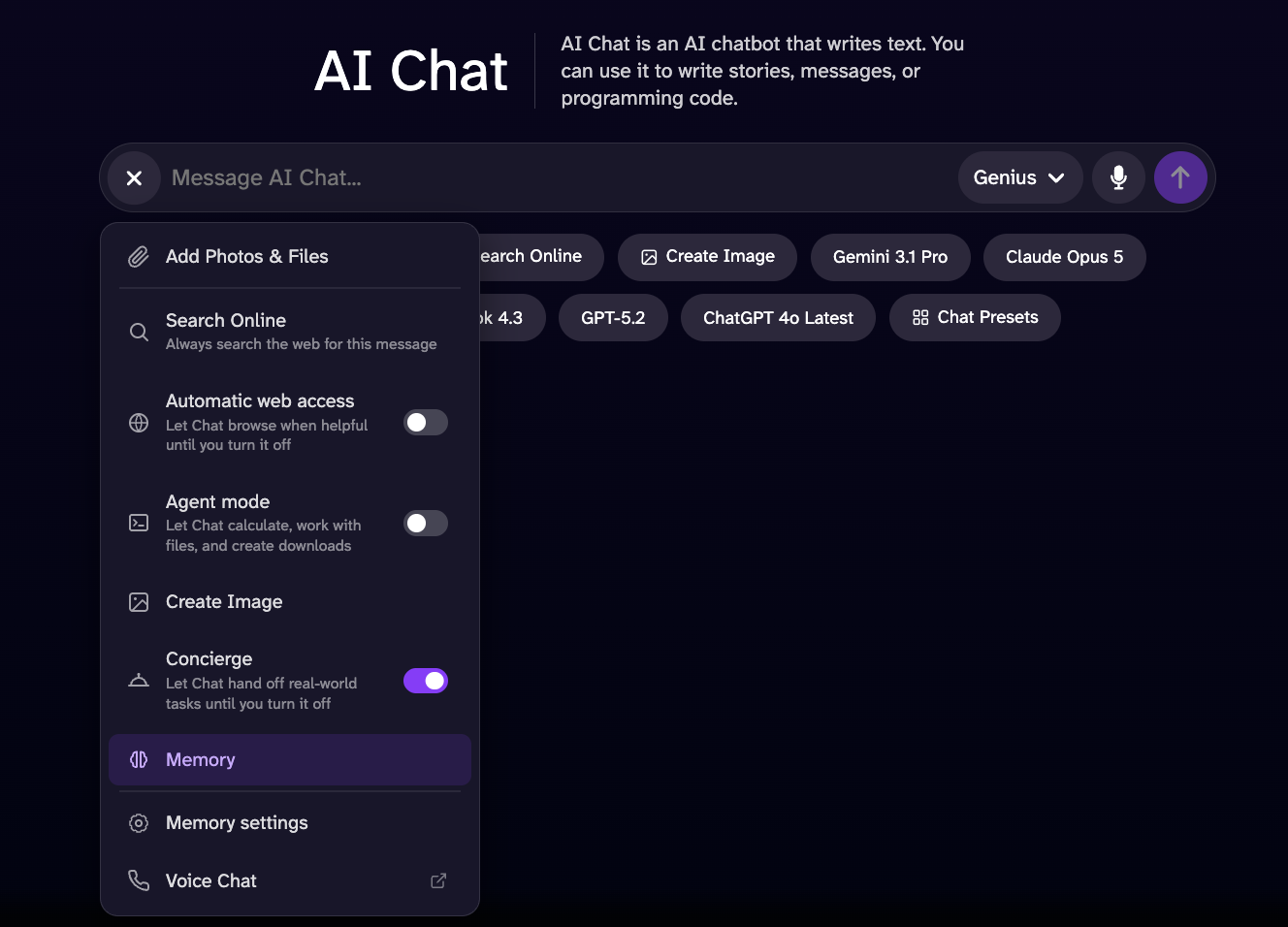
Online 搜索可让您在网络上查找信息;非常适合学习新知识或探索有趣的话题。请登录您的 DeepAI 账户以使用此模式。
该模式是进行实时网络搜索的绝佳选择;借助它,您可以找到关于时事和热门话题的更全面、更详细的信息。
“记忆”工具可帮助聊天系统收集信息并制定更合理的标准,从而提供更准确的回复。它会参考您之前分享的信息,以了解您的喜好、偏好和兴趣。所有这些信息均基于您自启用此选项以来与聊天系统进行的对话。聊天系统可以访问您之前提供的信息,但仅在该选项处于启用状态且您拥有聊天记录时才可用。如果您删除了聊天记录,系统将不再参考任何之前的对话内容。
让聊天机器人实时浏览网页,为您查找更准确、更及时的信息,并获取您所需内容的完整数据。
“生成图片”工具可让您在聊天中根据正在使用的聊天模型(Standard、Genius Pro 或 Super Genius Pro)生成图片。只需输入您想要生成内容的提示词即可!
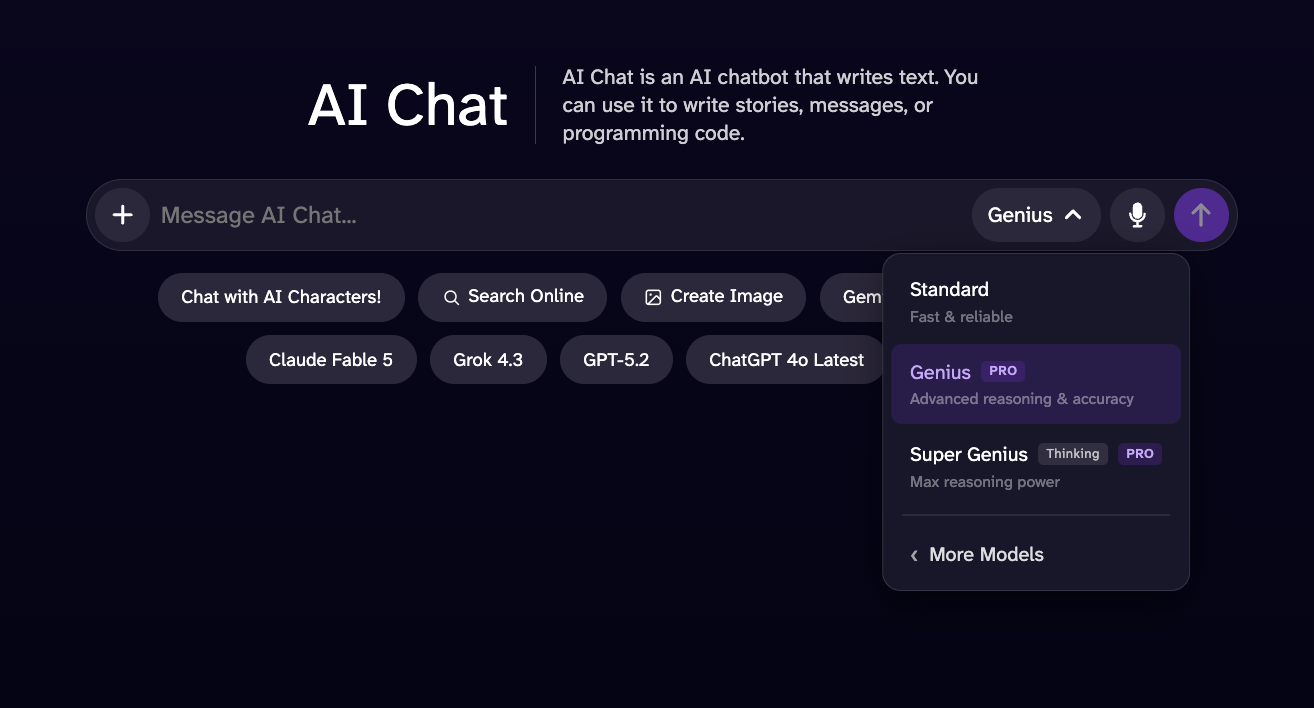
此版本是对 Standard AI 聊天的改进,性能更优、回复更详细、智能程度更高。
该模型专为在需要高级推理、逻辑分析和数学解题能力的任务中超越 Genius 模式而设计。虽然其预计响应时间可能略长,但它能提供更深入的分析、更广泛的语境理解以及更全面的回答,从而在处理复杂任务时带来更强大、更可靠的体验。
借助此插件,您可以解决数学和科学问题,包括方程、导数、应用题、代数、微积分等等!该模式既适合解决技术性问题,也适合检查您不确定是否正确的作业。
AI 图像生成器是我们的文本转图像工具,可让您发挥创造力,借助人工智能进行创作。试着描述您梦想中的地方或任何您想要的场景,剩下的就交给 AI 吧!
要生成高质量的图片,请先选择提示词,然后从 100 多种风格和形状中进行选择。
如需更丰富的细节、更高的艺术品质,以及比 HD 更能准确遵循您指令的图像,分辨率最高可达 1024x1024 像素,并支持横向、正方形或纵向格式。
可生成细节惊人的超高分辨率 2K 图像。无论您只是想尝试一下,还是希望创作宏伟之作,这款工具都提供适合各种需求的模式。如果您想打印图像,这种格式是绝佳的选择。
AI 照片编辑器是一款让您发挥创意的工具,只需用文字描述想要的修改,即可重构或修改任何图片,无论新旧。
您可以先上传一张图片或一个网址,输入包含您想要编辑或添加的信息的提示语,然后生成图片,就这样完成了。为了获得最佳效果,请确保您的指令具体且简洁,例如“把天空变成红色”或“在背景中添加花朵”。
您还可以使用最多 3 张参考图片创建编辑内容,并通过以下示例进行说明:
我们的 AI 视频生成器能将您的图片和文字转化为视频。您可以用它制作教育类、娱乐类或短篇故事视频。
通过将内容上传至视频生成器,您即授予 DeepAI 公开分享该图片和视频的权利。请阅读下文,确保您了解其运作方式。
我们的 DeepAI Pro 会员每月包含 25 秒 HD 视频生成配额。超出部分的 HD 视频时长将按每秒 0.20 美元的费率从您的钱包中扣除。Hollywood 模式(2K 分辨率)每月包含 8 秒视频配额,超出部分将按每秒 0.30 美元的费率从您的余额中扣除。
一种多功能生成模式,专为生成逼真的日常物品、环境和常见场景而设计,画面清晰、细节精细。它在处理家用电器、家具、卧室、厨房、办公室、客厅等实用且常见的主题时表现尤为出色。每秒 0.20 美元,性价比最高。
高品质电影级视频,配以专业音频和画面。每秒 0.30 美元,呈现极致创意品质。
您可以使用图片作为参考来生成视频。我们的 AI 视频生成器会以该图片作为场景的起点,并更好地理解您的提示词,从而生成尽可能贴近该图片且符合输入文本的结果。
您是否有想要在项目中使用的参考素材?您可以将其添加进来,AI 视频生成器会结合您的提示,以此为基础生成最佳效果。
利用人工智能重塑您的视频。只需通过简单的指令,即可在场景中添加、修改或删除元素,让您的内容呈现出您想要的完美效果。
Website Builder 是一个基于网页的平台,旨在简化网站的创建、定制和管理,无需具备高级的技术或编程知识。
它为用户提供了一个直观的界面和一套可配置的组件,使用户能够构建响应式网站、自定义布局和内容、管理页面,并调整项目的视觉效果。
DeepAI Code 是一款适用于 Mac 的 AI 编程智能体。打开项目文件夹,描述任务,它便会读取文件、编辑代码并运行命令。在保留更改之前,您可以先在应用中查看这些更改。
- 下载 Mac 版 DeepAI Code. 根据您的 Mac 机型选择 Apple 芯片或 Intel 版本,打开磁盘映像,然后将应用拖到“应用程序”文件夹中。
- 打开应用并选择一个项目文件夹。发起聊天,描述您想要构建或修改的内容。
- 选择一个模型和一种访问模式。规划模式会在进行更改前先探索任务;其他模式则允许代理在不同的审批设置下执行操作。开始前请先检查这些设置。
- 跟踪任务进度,查看文件差异,然后选择保留或撤销这些修改。
GLM 5.3 Flash 和 GPT-6 Luna 等高速模型可免费使用。高级模型需消耗 Theos——这是每位登录用户每日可获得的配额;DeepAI Pro 每天会额外增加该配额。您可以在同一对话中切换模型。 查看价格.
该应用可处理您 Mac 上的文件。系统会将提示和相关文件内容发送给 AI 模型,以完成您的任务。登录后,聊天记录会与您的账户同步。
Windows 即将推出
探索我们每一款工具,您就会发现,凭借您的知识和想象力,您可以创造出令人惊叹的作品!
借助 DeepAI 的音乐生成器,轻松创作独一无二的音乐。非常适合为您的视频制作拟音、音效和背景音乐。通过量身定制的音景,让您的项目焕然一新。
如果您拥有 DeepAI Pro,每月前 100 首歌曲免费,额外的歌曲每首收费 0.10 美元。
您有需要去除背景的图片,或者只是不喜欢图片的背景?试试这个工具,它能轻松为您去除背景。
想看看一张老旧的黑白照片上色后会是什么样子吗?上传您的老家庭照片,用色彩让它们重焕生机。
超分辨率工具利用机器学习技术,在不丢失照片内容和特征细节的前提下,对照片进行清晰化、锐化及放大处理。遗憾的是,模糊的图像十分常见,无论是专业人士还是业余爱好者都深受其扰。超分辨率利用机器学习技术,能在不到一秒的时间内对图像进行放大处理。
不喜欢照片里的某个部分?这款工具能让您轻松更换画面中的对象;只需精确指定您想要的效果,就能让您的图片更完美。
不确定一张图片是否真实?上传图片即可估算它是由 AI 生成还是经过数字处理;结果仅为概率性判断,不应视为确凿证据。
DeepAI Pro 是一项订阅服务,每月 9.99 美元或每年 89.99 美元即可使用 DeepAI 的全套工具,并享有每月刷新的配额。当本周期的配额用尽时,您还可以充值余额以生成更多内容。更多信息请参阅我们的定价页面:https://deepai.org/pricing。
定价:API 调用已包含在您的 DeepAI Pro 会员资格中。每次生成都会从您的月度配额中扣除,或从您的预付钱包余额中扣除。
DeepAI 提供了一系列图像 API。每个 API 都是一个简单的 HTTP 端点,您可以使用任何编程语言进行调用,例如:- 文本转图像:根据文本描述生成图像。
- AI 照片编辑器:通过文本提示编辑和处理现有图片。
- 超分辨率:利用机器学习放大图像并恢复清晰细节。
- 图片上色器:为黑白照片添加逼真的色彩。
- 背景去除工具:将照片中的主体干净利落地抠出来。
- 视频生成器:根据文本提示或源图像生成视频——请参阅视频 API。
每个 DeepAI API 调用都对应一个 POST 请求。请将模型的输入作为 multipart/form-data 发送,并在请求头中使用您的 API 密钥进行身份验证。
登录后,从账户仪表盘中复制您的密钥。使用 API 需要订阅 DeepAI Pro 服务。请妥善保管您的密钥——将其视为密码一样对待,切勿在客户端代码中暴露该密钥。
请在 api-key 请求头中传入您的密钥,并将模型的输入作为表单字段提交。端点 URL 为 https://api.deepai.org/api/<model>,其中 <model> 是模型 ID(如下文每个模型所示)。
curl -X POST https://api.deepai.org/api/text2img \
    -H 'api-key:YOUR_API_KEY' \
    -F 'text=a serene mountain lake at sunrise'
请求成功后,您将收到状态为 200 OK 的响应及 JSON 正文。output_url 指向生成的文件,id 是该任务的唯一标识符:
{
    "id": "59a0e8a9-...",
    "output_url": "https://api.deepai.org/job-view-file/.../output.jpg"
}
错误会返回非 200 状态码,以及包含 err 或 status 消息的 JSON 正文:
- 401 — API 密钥缺失或无效,或者超出了使用配额。
- 410 — 请求的模型已被移除。
- 500 — 未找到该模型 ID,或者发生了处理错误。
根据文本提示或源图像生成视频。视频生成需要几分钟时间,因此与图像 API 不同,它采用异步方式:提交任务,获取任务 id,然后轮询状态端点,直到视频生成完成。
定价:视频生成需要 DeepAI Pro,并按生成视频的秒数计费,先从您的每月配额中扣除(标准模式 25 秒,Hollywood 模式 8 秒),再从您的预付钱包中扣除(标准模式每秒 20¢,Hollywood 模式每秒 30¢)。请参阅定价。
文字转视频: POST https://api.deepai.org/video-api/text2video
图片转视频: POST https://api.deepai.org/video-api/img2video
任务状态: GET https://api.deepai.org/video-api/status/<id>
请以 multipart/form-data、表单 URL 编码或 application/json 正文(其中 image 为 URL 或 base64 数据)的形式发送参数,并在 api-key 标头中提供您的密钥,与图像 API 完全一致。每次调用(包括状态轮询)都必须携带该标头;浏览器会话不会对这些路由进行身份验证。
| 参数 | 类型 | 必填 | 默认 |
|---|---|---|---|
prompt | string | text2video:是 img2video:否 | — |
image | 文件、URL 或 base64 | 仅限 img2video:是 | — |
mode | string | 否 | hd |
duration | integer | 否 | 5 |
shape | string | 否 | auto |
prompt — 要生成的内容,最多 3000 个字符(超出长度的提示词将被拒绝并返回 400)。在 img2video 中为可选参数(仅提供源图像即可)。
image — img2video 的源图像:可将其作为文件字段上传、提供一个公开的 HTTP(S) 链接,或发送 Base64 编码数据(原始数据或以 data:image/...;base64, 形式的链接)。最大大小为 20MB,且解码后必须为图像。系统会跟随重定向链接。
mode — hd 用于标准视频,hollywood 用于 2K 电影级画质视频。
duration — 生成的视频时长(以秒为单位),范围为 5 到 15。计费按秒计算。
shape — square、landscape、standard、vertical、portrait 或 auto。当使用 auto 时,img2video 会匹配源图像,而 text2video 则使用横向模式。在 hollywood 模式下,img2video 始终保留源图像的形状,因此此时必须将 shape 设置为 auto。
curl -X POST https://api.deepai.org/video-api/text2video \
    -H 'api-key:YOUR_API_KEY' \
    -F 'prompt=a golden retriever surfing a wave at sunset' \
    -F 'mode=hd' \
    -F 'duration=5' \
    -F 'shape=landscape'
将图片转换为视频,来源可以是文件或网址:
curl -X POST https://api.deepai.org/video-api/img2video \
    -H 'api-key:YOUR_API_KEY' \
    -F 'image=@/path/to/photo.jpg' \
    -F 'prompt=the camera slowly zooms in'
提交成功后会返回用于轮询的任务 ID:
{
    "id": "59a0e8a9-...",
    "status": "processing"
}
每隔几秒钟查询一次状态端点。status 可以是 processing、completed 或 failed:
curl https://api.deepai.org/video-api/status/59a0e8a9-... \
    -H 'api-key:YOUR_API_KEY'
{"status": "processing"}

{"status": "completed", "output_url": "https://...mp4"}

{"status": "failed", "error": "..."}
一个完整的 Python 示例:
import time, requests

headers = {'api-key': 'YOUR_API_KEY'}
job = requests.post(
    'https://api.deepai.org/video-api/text2video',
    data={'prompt': 'a golden retriever surfing a wave at sunset',
          'mode': 'hd', 'duration': 5, 'shape': 'landscape'},
    headers=headers).json()

while True:
    status = requests.get(
        'https://api.deepai.org/video-api/status/' + job['id'],
        headers=headers).json()
    if status['status'] == 'completed':
        print(status['output_url'])
        break
    if status['status'] == 'failed':
        raise RuntimeError(status['error'])
    time.sleep(5)
- 请及时获取结果:状态记录(及其
output_url)在完成后一小时内可用,此后状态端点将返回 404。视频完成后请立即下载。 - 您只需为成功完成的视频付费。提交任务时会预留相应额度,若任务失败则会退回。
401表示缺少api-key标头或该标头无效。403表示该账户没有有效的 DeepAI Pro 订阅。- 提交时收到
402响应,表示您的钱包余额不足以支付该视频的费用(响应正文中包含费用和您的余额),或者您的账户因付款失败而被锁定。请在控制面板中充值或启用自动充值。 - 提示词和图片均会经过审核:被标记的内容在提交时将被拒绝并返回
400;视频提供商在生成过程中标记的内容则会显示为{"status": "failed", "error": "NSFW detected"}。
AI 图像生成器返回顶部 ↑
这是一个 AI 图像生成器。它能根据文字描述从零开始生成图像。
端点: POST https://api.deepai.org/api/text2img
| 参数 | 类型 | 必填 | 默认 |
|---|---|---|---|
text |
text | 是的 | — |
text — 一个描述要生成内容的字符串,例如“宁静湖面上的星夜”或“一位老海盗的肖像”。
width、height — 传入一个字符串,例如“256”或“768”(默认值为 512)。请使用 128 到 1536 之间的数值,且必须是 32 的倍数。标准图像推荐分辨率:1024x576、1024x720、512x512、768x1024、576x1024。HD 图像推荐分辨率:1216x832、1152x896、1024x1024、896x1152、832x1216。大于约 700 或小于 256 的数值可能会产生异常输出。
image_generator_version — “standard”(默认)、“hd”、“genius”或“super_genius”。
resolution — “2k”(默认)或“4k”。仅当 image_generator_version 为“super_genius”时使用。
genius_preference — “anime”、“photography”、“graphic”或“cinematic”。仅当 image_generator_version 为“genius”时使用。
negative_prompt — 一个字符串,用于描述需要从图像中移除的内容;有助于提升图像质量和细节。示例:解剖结构不合理、模糊、裁剪、变形、畸形、重复、多余的肢体、手指粘连、JPEG 伪影、低质量、低分辨率、手部畸变、超出画面、签名、文字、水印、最差质量。
AI 图像生成器 cURL 示例
# Example posting a text URL:

curl \
    -F 'text=YOUR_TEXT_HERE' \
    -H 'api-key:YOUR_API_KEY' \
    https://api.deepai.org/api/text2img


# Example posting a local text file:

curl \
    -F 'text=YOUR_TEXT_HERE' \
    -H 'api-key:YOUR_API_KEY' \
    https://api.deepai.org/api/text2img


# Example directly sending a text string:

curl \
    -F 'text=YOUR_TEXT_HERE' \
    -H 'api-key:YOUR_API_KEY' \
    https://api.deepai.org/api/text2img
AI 图像生成器 Javascript 示例
// Example posting a text URL:
(async function() {
    const resp = await fetch('https://api.deepai.org/api/text2img', {
        method: 'POST',
        headers: {
            'Content-Type': 'application/json',
            'api-key': 'YOUR_API_KEY'
        },
        body: JSON.stringify({
            text: "YOUR_TEXT_HERE",
        })
    });

    const data = await resp.json();
    console.log(data);
})()


// Example posting file picker input text (Browser only):
document.getElementById('yourFileInputId').addEventListener('change', async function() {
       const formData = new FormData();
       formData.append('text', 'YOUR_TEXT_HERE');

       const resp = await fetch('https://api.deepai.org/api/text2img', {
           method: 'POST',
           headers: {
               'api-key': 'YOUR_API_KEY'
           },
           body: formData
       });

       const data = await resp.json();
       console.log(data);
});

// Example posting a local text file (Node.js only):
const fs = require('fs');
(async function() {
       const formData = new FormData();
       formData.append('text', 'YOUR_TEXT_HERE');

       const resp = await fetch('https://api.deepai.org/api/text2img', {
           method: 'POST',
           headers: {
               'api-key': 'YOUR_API_KEY'
           },
           body: formData
       });

       const data = await resp.json();
       console.log(data);
});

// Example directly sending a text string:
(async function() {
    const resp = await fetch('https://api.deepai.org/api/text2img', {
        method: 'POST',
        headers: {
            'Content-Type': 'application/json',
            'api-key': 'YOUR_API_KEY'
        },
        body: JSON.stringify({
            text: "YOUR_TEXT_HERE",
        })
    });

    const data = await resp.json();
    console.log(data);
})()
AI 图像生成器 Python 示例
# Example posting a text URL:

import requests
r = requests.post(
    "https://api.deepai.org/api/text2img",
    data={
        'text': 'YOUR_TEXT_HERE',
    },
    headers={'api-key': 'YOUR_API_KEY'}
)
print(r.json())


# Example posting a local text file:

import requests
r = requests.post(
    "https://api.deepai.org/api/text2img",
    data={
        'text': 'YOUR_TEXT_HERE',
    },
    headers={'api-key': 'YOUR_API_KEY'}
)
print(r.json())


# Example directly sending a text string:

import requests
r = requests.post(
    "https://api.deepai.org/api/text2img",
    data={
        'text': 'YOUR_TEXT_HERE',
    },
    headers={'api-key': 'YOUR_API_KEY'}
)
print(r.json())
AI 图像生成器 Ruby 示例
# Example posting a text URL:

require 'rest_client'
r = RestClient::Request.execute(method: :post, url: 'https://api.deepai.org/api/text2img', timeout: 600,
    headers: {'api-key' => 'YOUR_API_KEY'},
    payload: {
        'text' => 'YOUR_TEXT_HERE',
    }
)
puts r


# Example posting a local text file:

require 'rest_client'
r = RestClient::Request.execute(method: :post, url: 'https://api.deepai.org/api/text2img', timeout: 600,
    headers: {'api-key' => 'YOUR_API_KEY'},
    payload: {
        'text' => 'YOUR_TEXT_HERE',
    }
)
puts r


# Example directly sending a text string:

require 'rest_client'
r = RestClient::Request.execute(method: :post, url: 'https://api.deepai.org/api/text2img', timeout: 600,
    headers: {'api-key' => 'YOUR_API_KEY'},
    payload: {
        'text' => 'YOUR_TEXT_HERE',
    }
)
puts r
AI 图像生成器 Php 示例
// Example posting a text URL:
<?php
require 'vendor/autoload.php'; // Ensure you have Guzzle installed (composer require guzzlehttp/guzzle)

use GuzzleHttp\Client;
use GuzzleHttp\Psr7\Utils;

$client = new Client();
$headers = [
    'api-key' => 'YOUR_API_KEY'
];
$options = [
    'multipart' => [
        [
            'name'     => 'text',
            'contents' => 'YOUR_TEXT_HERE'
        ],
    ]
];
$request = new GuzzleHttp\Psr7\Request('POST', 'https://api.deepai.org/api/text2img', $headers);
try {
    $res = $client->sendAsync($request, $options)->wait();
    echo $res->getBody();
} catch (Exception $e) {
    echo 'Error: ' . $e->getMessage();
}
?>


// Example posting a local text file:
<?php
require 'vendor/autoload.php'; // Ensure you have Guzzle installed (composer require guzzlehttp/guzzle)

use GuzzleHttp\Client;
use GuzzleHttp\Psr7\Utils;

$client = new Client();
$headers = [
    'api-key' => 'YOUR_API_KEY'
];
$options = [
    'multipart' => [
        [
            'name'     => 'text',
            'contents' => 'YOUR_TEXT_HERE'
        ],
    ]
];
$request = new GuzzleHttp\Psr7\Request('POST', 'https://api.deepai.org/api/text2img', $headers);
try {
    $res = $client->sendAsync($request, $options)->wait();
    echo $res->getBody();
} catch (Exception $e) {
    echo 'Error: ' . $e->getMessage();
}
?>


// Example directly sending a text string:
<?php
require 'vendor/autoload.php'; // Ensure you have Guzzle installed (composer require guzzlehttp/guzzle)

use GuzzleHttp\Client;
use GuzzleHttp\Psr7\Utils;

$client = new Client();
$headers = [
    'api-key' => 'YOUR_API_KEY'
];
$options = [
    'multipart' => [
        [
            'name'     => 'text',
            'contents' => 'YOUR_TEXT_HERE'
        ],
    ]
];
$request = new GuzzleHttp\Psr7\Request('POST', 'https://api.deepai.org/api/text2img', $headers);
try {
    $res = $client->sendAsync($request, $options)->wait();
    echo $res->getBody();
} catch (Exception $e) {
    echo 'Error: ' . $e->getMessage();
}
?>
AI 图像生成器 Go 示例
// Example posting a text URL:
package main

import (
    "bytes"
    "encoding/json"
    "fmt"
    "io"
    "net/http"
)

func main() {
    url := "https://api.deepai.org/api/text2img"
    payload := map[string]string{
        "text": "YOUR_TEXT_HERE",
    }
    jsonData, _ := json.Marshal(payload)

    req, _ := http.NewRequest("POST", url, bytes.NewBuffer(jsonData))
    req.Header.Set("Content-Type", "application/json")
    req.Header.Set("api-key", "YOUR_API_KEY")

    client := &http.Client{}
    resp, err := client.Do(req)
    if err != nil {
        panic(err)
    }
    defer resp.Body.Close()

    body, _ := io.ReadAll(resp.Body)
    fmt.Println(string(body))
}


// Example posting a local text file:
package main

import (
    "bytes"
    "fmt"
    "io"
    "mime/multipart"
    "net/http"
    "os"
)

func main() {
    url := "https://api.deepai.org/api/text2img"

    var b bytes.Buffer
    w := multipart.NewWriter(&b)

    w.WriteField("text", "YOUR_TEXT_HERE")

    if err := w.Close(); err != nil {
        panic(err)
    }

    req, _ := http.NewRequest("POST", url, &b)
    req.Header.Set("Content-Type", w.FormDataContentType())
    req.Header.Set("api-key", "YOUR_API_KEY")

    client := &http.Client{}
    resp, err := client.Do(req)
    if err != nil {
        panic(err)
    }
    defer resp.Body.Close()

    body, _ := io.ReadAll(resp.Body)
    fmt.Println(string(body))
}


// Example directly sending a text string:
package main

import (
    "bytes"
    "encoding/json"
    "fmt"
    "io"
    "net/http"
)

func main() {
    url := "https://api.deepai.org/api/text2img"
    payload := map[string]string{
        "text": "YOUR_TEXT_HERE",
    }
    jsonData, _ := json.Marshal(payload)

    req, _ := http.NewRequest("POST", url, bytes.NewBuffer(jsonData))
    req.Header.Set("Content-Type", "application/json")
    req.Header.Set("api-key", "YOUR_API_KEY")

    client := &http.Client{}
    resp, err := client.Do(req)
    if err != nil {
        panic(err)
    }
    defer resp.Body.Close()

    body, _ := io.ReadAll(resp.Body)
    fmt.Println(string(body))
}
AI 图像生成器 Java 示例
// Example posting a text URL:
import java.net.http.HttpClient;
import java.net.http.HttpRequest;
import java.net.http.HttpResponse;
import java.net.URI;

public class Main {
    public static void main(String[] args) throws Exception {
        HttpClient client = HttpClient.newHttpClient();

        String json = "{" +
            "\"text\": \"YOUR_TEXT_HERE\"" +
            "}";

        HttpRequest request = HttpRequest.newBuilder()
            .uri(URI.create("https://api.deepai.org/api/text2img"))
            .header("Content-Type", "application/json")
            .header("api-key", "YOUR_API_KEY")
            .POST(HttpRequest.BodyPublishers.ofString(json))
            .build();

        HttpResponse<String> response = client.send(request, HttpResponse.BodyHandlers.ofString());
        System.out.println(response.body());
    }
}


// Example posting a local text file:
// Add to build.gradle: implementation 'com.squareup.okhttp3:okhttp:4.12.0'
import okhttp3.*;
import java.io.File;
import java.io.IOException;

public class Main {
    public static void main(String[] args) throws IOException {
        OkHttpClient client = new OkHttpClient();

        RequestBody requestBody = new MultipartBody.Builder()
            .setType(MultipartBody.FORM)
            .addFormDataPart("text", "YOUR_TEXT_HERE")
            .build();

        Request request = new Request.Builder()
            .url("https://api.deepai.org/api/text2img")
            .addHeader("api-key", "YOUR_API_KEY")
            .post(requestBody)
            .build();

        try (Response response = client.newCall(request).execute()) {
            System.out.println(response.body().string());
        }
    }
}


// Example directly sending a text string:
import java.net.http.HttpClient;
import java.net.http.HttpRequest;
import java.net.http.HttpResponse;
import java.net.URI;

public class Main {
    public static void main(String[] args) throws Exception {
        HttpClient client = HttpClient.newHttpClient();

        String json = "{" +
            "\"text\": \"YOUR_TEXT_HERE\"" +
            "}";

        HttpRequest request = HttpRequest.newBuilder()
            .uri(URI.create("https://api.deepai.org/api/text2img"))
            .header("Content-Type", "application/json")
            .header("api-key", "YOUR_API_KEY")
            .POST(HttpRequest.BodyPublishers.ofString(json))
            .build();

        HttpResponse<String> response = client.send(request, HttpResponse.BodyHandlers.ofString());
        System.out.println(response.body());
    }
}
AI 图像生成器 C# 示例
// Example posting a text URL:
using System;
using System.Net.Http;
using System.Text;
using System.Text.Json;
using System.Threading.Tasks;

class Program
{
    static async Task Main()
    {
        using var client = new HttpClient();
        client.DefaultRequestHeaders.Add("api-key", "YOUR_API_KEY");

        var payload = new
        {
            text = "YOUR_TEXT_HERE",
        };

        var json = JsonSerializer.Serialize(payload);
        var content = new StringContent(json, Encoding.UTF8, "application/json");

        var response = await client.PostAsync("https://api.deepai.org/api/text2img", content);
        var result = await response.Content.ReadAsStringAsync();
        Console.WriteLine(result);
    }
}


// Example posting a local text file:
using System;
using System.IO;
using System.Net.Http;
using System.Threading.Tasks;

class Program
{
    static async Task Main()
    {
        using var client = new HttpClient();
        client.DefaultRequestHeaders.Add("api-key", "YOUR_API_KEY");

        using var form = new MultipartFormDataContent();

        form.Add(new StringContent("YOUR_TEXT_HERE"), "text");

        var response = await client.PostAsync("https://api.deepai.org/api/text2img", form);
        var result = await response.Content.ReadAsStringAsync();
        Console.WriteLine(result);
    }
}


// Example directly sending a text string:
using System;
using System.Net.Http;
using System.Text;
using System.Text.Json;
using System.Threading.Tasks;

class Program
{
    static async Task Main()
    {
        using var client = new HttpClient();
        client.DefaultRequestHeaders.Add("api-key", "YOUR_API_KEY");

        var payload = new
        {
            text = "YOUR_TEXT_HERE",
        };

        var json = JsonSerializer.Serialize(payload);
        var content = new StringContent(json, Encoding.UTF8, "application/json");

        var response = await client.PostAsync("https://api.deepai.org/api/text2img", content);
        var result = await response.Content.ReadAsStringAsync();
        Console.WriteLine(result);
    }
}
AI 图像生成器 Swift 示例
// Example posting a text URL:
import Foundation

let url = URL(string: "https://api.deepai.org/api/text2img")!
var request = URLRequest(url: url)
request.httpMethod = "POST"
request.setValue("application/json", forHTTPHeaderField: "Content-Type")
request.setValue("YOUR_API_KEY", forHTTPHeaderField: "api-key")

let payload: [String: Any] = [
    "text": "YOUR_TEXT_HERE",
]

request.httpBody = try? JSONSerialization.data(withJSONObject: payload)

let task = URLSession.shared.dataTask(with: request) { data, response, error in
    if let data = data {
        print(String(data: data, encoding: .utf8) ?? "")
    }
}
task.resume()

// Keep the program running for async request
RunLoop.main.run()


// Example posting a local text file:
import Foundation

let url = URL(string: "https://api.deepai.org/api/text2img")!
var request = URLRequest(url: url)
request.httpMethod = "POST"
request.setValue("YOUR_API_KEY", forHTTPHeaderField: "api-key")

let boundary = UUID().uuidString
request.setValue("multipart/form-data; boundary=\(boundary)", forHTTPHeaderField: "Content-Type")

var body = Data()

body.append("--\(boundary)\r\n".data(using: .utf8)!)
body.append("Content-Disposition: form-data; name=\"text\"\r\n\r\n".data(using: .utf8)!)
body.append("YOUR_TEXT_HERE".data(using: .utf8)!)
body.append("\r\n".data(using: .utf8)!)

body.append("--\(boundary)--\r\n".data(using: .utf8)!)
request.httpBody = body

let task = URLSession.shared.dataTask(with: request) { data, response, error in
    if let data = data {
        print(String(data: data, encoding: .utf8) ?? "")
    }
}
task.resume()

RunLoop.main.run()


// Example directly sending a text string:
import Foundation

let url = URL(string: "https://api.deepai.org/api/text2img")!
var request = URLRequest(url: url)
request.httpMethod = "POST"
request.setValue("application/json", forHTTPHeaderField: "Content-Type")
request.setValue("YOUR_API_KEY", forHTTPHeaderField: "api-key")

let payload: [String: Any] = [
    "text": "YOUR_TEXT_HERE",
]

request.httpBody = try? JSONSerialization.data(withJSONObject: payload)

let task = URLSession.shared.dataTask(with: request) { data, response, error in
    if let data = data {
        print(String(data: data, encoding: .utf8) ?? "")
    }
}
task.resume()

RunLoop.main.run()
AI 图像生成器 Kotlin 示例
// Example posting a text URL:
import java.net.URI
import java.net.http.HttpClient
import java.net.http.HttpRequest
import java.net.http.HttpResponse

fun main() {
    val client = HttpClient.newHttpClient()

    val json = """{
        "text": "YOUR_TEXT_HERE"
    }"""

    val request = HttpRequest.newBuilder()
        .uri(URI.create("https://api.deepai.org/api/text2img"))
        .header("Content-Type", "application/json")
        .header("api-key", "YOUR_API_KEY")
        .POST(HttpRequest.BodyPublishers.ofString(json))
        .build()

    val response = client.send(request, HttpResponse.BodyHandlers.ofString())
    println(response.body())
}


// Example posting a local text file:
// Add to build.gradle.kts: implementation("com.squareup.okhttp3:okhttp:4.12.0")
import okhttp3.*
import okhttp3.MediaType.Companion.toMediaType
import okhttp3.RequestBody.Companion.asRequestBody
import java.io.File

fun main() {
    val client = OkHttpClient()

    val requestBody = MultipartBody.Builder()
        .setType(MultipartBody.FORM)
        .addFormDataPart("text", "YOUR_TEXT_HERE")
        .build()

    val request = Request.Builder()
        .url("https://api.deepai.org/api/text2img")
        .addHeader("api-key", "YOUR_API_KEY")
        .post(requestBody)
        .build()

    client.newCall(request).execute().use { response ->
        println(response.body?.string())
    }
}


// Example directly sending a text string:
import java.net.URI
import java.net.http.HttpClient
import java.net.http.HttpRequest
import java.net.http.HttpResponse

fun main() {
    val client = HttpClient.newHttpClient()

    val json = """{
        "text": "YOUR_TEXT_HERE"
    }"""

    val request = HttpRequest.newBuilder()
        .uri(URI.create("https://api.deepai.org/api/text2img"))
        .header("Content-Type", "application/json")
        .header("api-key", "YOUR_API_KEY")
        .POST(HttpRequest.BodyPublishers.ofString(json))
        .build()

    val response = client.send(request, HttpResponse.BodyHandlers.ofString())
    println(response.body())
}
AI 图像生成器 Rust 示例
// Example posting a text URL:
// Add to Cargo.toml: reqwest = { version = "0.11", features = ["json", "multipart"] }
// tokio = { version = "1", features = ["full"] }
// serde_json = "1"

use reqwest::header::HeaderMap;
use std::collections::HashMap;

#[tokio::main]
async fn main() -> Result<(), Box<dyn std::error::Error>> {
    let client = reqwest::Client::new();

    let mut headers = HeaderMap::new();
    headers.insert("api-key", "YOUR_API_KEY".parse()?);

    let mut payload = HashMap::new();
    payload.insert("text", "YOUR_TEXT_HERE");

    let response = client
        .post("https://api.deepai.org/api/text2img")
        .headers(headers)
        .json(&payload)
        .send()
        .await?;

    println!("{}", response.text().await?);
    Ok(())
}


// Example posting a local text file:
// Add to Cargo.toml: reqwest = { version = "0.11", features = ["json", "multipart"] }
// tokio = { version = "1", features = ["full"] }

use reqwest::multipart;
use std::fs;

#[tokio::main]
async fn main() -> Result<(), Box<dyn std::error::Error>> {
    let client = reqwest::Client::new();

    let form = multipart::Form::new()
        .text("text", "YOUR_TEXT_HERE");

    let response = client
        .post("https://api.deepai.org/api/text2img")
        .header("api-key", "YOUR_API_KEY")
        .multipart(form)
        .send()
        .await?;

    println!("{}", response.text().await?);
    Ok(())
}


// Example directly sending a text string:
// Add to Cargo.toml: reqwest = { version = "0.11", features = ["json", "multipart"] }
// tokio = { version = "1", features = ["full"] }
// serde_json = "1"

use reqwest::header::HeaderMap;
use std::collections::HashMap;

#[tokio::main]
async fn main() -> Result<(), Box<dyn std::error::Error>> {
    let client = reqwest::Client::new();

    let mut headers = HeaderMap::new();
    headers.insert("api-key", "YOUR_API_KEY".parse()?);

    let mut payload = HashMap::new();
    payload.insert("text", "YOUR_TEXT_HERE");

    let response = client
        .post("https://api.deepai.org/api/text2img")
        .headers(headers)
        .json(&payload)
        .send()
        .await?;

    println!("{}", response.text().await?);
    Ok(())
}
AI 图像生成器 TypeScript 示例
// Example posting a text URL:
interface ApiResponse {
    // Define your response type here
    [key: string]: unknown;
}

async function callApi(): Promise<ApiResponse> {
    const response = await fetch('https://api.deepai.org/api/text2img', {
        method: 'POST',
        headers: {
            'Content-Type': 'application/json',
            'api-key': 'YOUR_API_KEY'
        },
        body: JSON.stringify({
            text: 'YOUR_TEXT_HERE',
        })
    });

    const data: ApiResponse = await response.json();
    console.log(data);
    return data;
}

callApi();


// Example posting a local text file (Node.js with form-data package):
// npm install form-data
import * as fs from 'fs';
import FormData from 'form-data';

interface ApiResponse {
    [key: string]: unknown;
}

async function uploadFile(): Promise<ApiResponse> {
    const formData = new FormData();
    formData.append('text', 'YOUR_TEXT_HERE');

    const response = await fetch('https://api.deepai.org/api/text2img', {
        method: 'POST',
        headers: {
            ...formData.getHeaders(),
            'api-key': 'YOUR_API_KEY'
        },
        body: formData as unknown as BodyInit
    });

    const data: ApiResponse = await response.json();
    console.log(data);
    return data;
}

uploadFile();


// Example directly sending a text string:
interface ApiResponse {
    [key: string]: unknown;
}

async function callApi(): Promise<ApiResponse> {
    const response = await fetch('https://api.deepai.org/api/text2img', {
        method: 'POST',
        headers: {
            'Content-Type': 'application/json',
            'api-key': 'YOUR_API_KEY'
        },
        body: JSON.stringify({
            text: 'YOUR_TEXT_HERE',
        })
    });

    const data: ApiResponse = await response.json();
    console.log(data);
    return data;
}

callApi();
AI 图像生成器 Dart 示例
// Example posting a text URL:
// Add to pubspec.yaml: http: ^1.1.0

import 'dart:convert';
import 'package:http/http.dart' as http;

Future<void> main() async {
  final response = await http.post(
    Uri.parse('https://api.deepai.org/api/text2img'),
    headers: {
      'Content-Type': 'application/json',
      'api-key': 'YOUR_API_KEY',
    },
    body: jsonEncode({
      'text': 'YOUR_TEXT_HERE',
    }),
  );

  print(response.body);
}


// Example posting a local text file:
// Add to pubspec.yaml: http: ^1.1.0

import 'dart:io';
import 'package:http/http.dart' as http;

Future<void> main() async {
  var request = http.MultipartRequest(
    'POST',
    Uri.parse('https://api.deepai.org/api/text2img'),
  );

  request.headers['api-key'] = 'YOUR_API_KEY';

  request.fields['text'] = 'YOUR_TEXT_HERE';

  var response = await request.send();
  var responseBody = await response.stream.bytesToString();
  print(responseBody);
}


// Example directly sending a text string:
// Add to pubspec.yaml: http: ^1.1.0

import 'dart:convert';
import 'package:http/http.dart' as http;

Future<void> main() async {
  final response = await http.post(
    Uri.parse('https://api.deepai.org/api/text2img'),
    headers: {
      'Content-Type': 'application/json',
      'api-key': 'YOUR_API_KEY',
    },
    body: jsonEncode({
      'text': 'YOUR_TEXT_HERE',
    }),
  );

  print(response.body);
}
AI 图像生成器 PowerShell 示例
# Example posting a text URL:

$r = Invoke-WebRequest `
    -Uri https://api.deepai.org/api/text2img `
    -Method Post `
    -Form @{
         text='YOUR_TEXT_HERE'
    } `
    -Headers @{
        'api-key'='YOUR_API_KEY'
    }
$r.Content

# Example posting a local text file:

$r = Invoke-WebRequest `
    -Uri https://api.deepai.org/api/text2img `
    -Method Post `
    -Form @{
         text='YOUR_TEXT_HERE'
    } `
    -Headers @{
        'api-key'='YOUR_API_KEY'
    }
$r.Content

# Example directly sending a text string:

$r = Invoke-WebRequest `
    -Uri https://api.deepai.org/api/text2img `
    -Method Post `
    -Form @{
         text='YOUR_TEXT_HERE'
    } `
    -Headers @{
        'api-key'='YOUR_API_KEY'
    }
$r.Content
背景去除工具返回顶部 ↑
使用 AI 去除图片背景。
端点: POST https://api.deepai.org/api/background-remover
| 参数 | 类型 | 必填 | 默认 |
|---|---|---|---|
image |
image | 是的 | — |
背景去除工具 cURL 示例
# Example posting a image URL:

curl \
    -F 'image=YOUR_IMAGE_URL' \
    -H 'api-key:YOUR_API_KEY' \
    https://api.deepai.org/api/background-remover


# Example posting a local image file:

curl \
    -F 'image=@/path/to/your/file.jpg' \
    -H 'api-key:YOUR_API_KEY' \
    https://api.deepai.org/api/background-remover
背景去除工具 Javascript 示例
// Example posting a image URL:
(async function() {
    const resp = await fetch('https://api.deepai.org/api/background-remover', {
        method: 'POST',
        headers: {
            'Content-Type': 'application/json',
            'api-key': 'YOUR_API_KEY'
        },
        body: JSON.stringify({
            image: "YOUR_IMAGE_URL",
        })
    });

    const data = await resp.json();
    console.log(data);
})()


// Example posting file picker input image (Browser only):
document.getElementById('yourFileInputId').addEventListener('change', async function() {
       const formData = new FormData();
       formData.append('image', this.files[0]);

       const resp = await fetch('https://api.deepai.org/api/background-remover', {
           method: 'POST',
           headers: {
               'api-key': 'YOUR_API_KEY'
           },
           body: formData
       });

       const data = await resp.json();
       console.log(data);
});

// Example posting a local image file (Node.js only):
const fs = require('fs');
(async function() {
       const formData = new FormData();
       const jpgFileStream = fs.createReadStream("/path/to/your/file.jpg");
       formData.append('image', jpgFileStream);

       const resp = await fetch('https://api.deepai.org/api/background-remover', {
           method: 'POST',
           headers: {
               'api-key': 'YOUR_API_KEY'
           },
           body: formData
       });

       const data = await resp.json();
       console.log(data);
});
背景去除工具 Python 示例
# Example posting a image URL:

import requests
r = requests.post(
    "https://api.deepai.org/api/background-remover",
    data={
        'image': 'YOUR_IMAGE_URL',
    },
    headers={'api-key': 'YOUR_API_KEY'}
)
print(r.json())


# Example posting a local image file:

import requests
r = requests.post(
    "https://api.deepai.org/api/background-remover",
    files={
        'image': open('/path/to/your/file.jpg', 'rb'),
    },
    headers={'api-key': 'YOUR_API_KEY'}
)
print(r.json())
背景去除工具 Ruby 示例
# Example posting a image URL:

require 'rest_client'
r = RestClient::Request.execute(method: :post, url: 'https://api.deepai.org/api/background-remover', timeout: 600,
    headers: {'api-key' => 'YOUR_API_KEY'},
    payload: {
        'image' => 'YOUR_IMAGE_URL',
    }
)
puts r


# Example posting a local image file:

require 'rest_client'
r = RestClient::Request.execute(method: :post, url: 'https://api.deepai.org/api/background-remover', timeout: 600,
    headers: {'api-key' => 'YOUR_API_KEY'},
    payload: {
        'image' => File.new('/path/to/your/file.jpg'),
    }
)
puts r
背景去除工具 Php 示例
// Example posting a image URL:
<?php
require 'vendor/autoload.php'; // Ensure you have Guzzle installed (composer require guzzlehttp/guzzle)

use GuzzleHttp\Client;
use GuzzleHttp\Psr7\Utils;

$client = new Client();
$headers = [
    'api-key' => 'YOUR_API_KEY'
];
$options = [
    'multipart' => [
        [
            'name'     => 'image',
            'contents' => 'YOUR_IMAGE_URL'
        ],
    ]
];
$request = new GuzzleHttp\Psr7\Request('POST', 'https://api.deepai.org/api/background-remover', $headers);
try {
    $res = $client->sendAsync($request, $options)->wait();
    echo $res->getBody();
} catch (Exception $e) {
    echo 'Error: ' . $e->getMessage();
}
?>


// Example posting a local image file:
<?php
require 'vendor/autoload.php'; // Ensure you have Guzzle installed (composer require guzzlehttp/guzzle)

use GuzzleHttp\Client;
use GuzzleHttp\Psr7\Utils;

$client = new Client();
$headers = [
    'api-key' => 'YOUR_API_KEY'
];
$options = [
    'multipart' => [
        [
            'name'     => 'image',
            'contents' => Utils::tryFopen('/path/to/your/file.jpg', 'r')
        ],
    ]
];
$request = new GuzzleHttp\Psr7\Request('POST', 'https://api.deepai.org/api/background-remover', $headers);
try {
    $res = $client->sendAsync($request, $options)->wait();
    echo $res->getBody();
} catch (Exception $e) {
    echo 'Error: ' . $e->getMessage();
}
?>
背景去除工具 Go 示例
// Example posting a image URL:
package main

import (
    "bytes"
    "encoding/json"
    "fmt"
    "io"
    "net/http"
)

func main() {
    url := "https://api.deepai.org/api/background-remover"
    payload := map[string]string{
        "image": "YOUR_IMAGE_URL",
    }
    jsonData, _ := json.Marshal(payload)

    req, _ := http.NewRequest("POST", url, bytes.NewBuffer(jsonData))
    req.Header.Set("Content-Type", "application/json")
    req.Header.Set("api-key", "YOUR_API_KEY")

    client := &http.Client{}
    resp, err := client.Do(req)
    if err != nil {
        panic(err)
    }
    defer resp.Body.Close()

    body, _ := io.ReadAll(resp.Body)
    fmt.Println(string(body))
}


// Example posting a local image file:
package main

import (
    "bytes"
    "fmt"
    "io"
    "mime/multipart"
    "net/http"
    "os"
)

func main() {
    url := "https://api.deepai.org/api/background-remover"

    var b bytes.Buffer
    w := multipart.NewWriter(&b)

    imageFile, _ := os.Open("/path/to/your/file.jpg")
    defer imageFile.Close()
    imageWriter, _ := w.CreateFormFile("image", "file.jpg")
    io.Copy(imageWriter, imageFile)

    if err := w.Close(); err != nil {
        panic(err)
    }

    req, _ := http.NewRequest("POST", url, &b)
    req.Header.Set("Content-Type", w.FormDataContentType())
    req.Header.Set("api-key", "YOUR_API_KEY")

    client := &http.Client{}
    resp, err := client.Do(req)
    if err != nil {
        panic(err)
    }
    defer resp.Body.Close()

    body, _ := io.ReadAll(resp.Body)
    fmt.Println(string(body))
}
背景去除工具 Java 示例
// Example posting a image URL:
import java.net.http.HttpClient;
import java.net.http.HttpRequest;
import java.net.http.HttpResponse;
import java.net.URI;

public class Main {
    public static void main(String[] args) throws Exception {
        HttpClient client = HttpClient.newHttpClient();

        String json = "{" +
            "\"image\": \"YOUR_IMAGE_URL\"" +
            "}";

        HttpRequest request = HttpRequest.newBuilder()
            .uri(URI.create("https://api.deepai.org/api/background-remover"))
            .header("Content-Type", "application/json")
            .header("api-key", "YOUR_API_KEY")
            .POST(HttpRequest.BodyPublishers.ofString(json))
            .build();

        HttpResponse<String> response = client.send(request, HttpResponse.BodyHandlers.ofString());
        System.out.println(response.body());
    }
}


// Example posting a local image file:
// Add to build.gradle: implementation 'com.squareup.okhttp3:okhttp:4.12.0'
import okhttp3.*;
import java.io.File;
import java.io.IOException;

public class Main {
    public static void main(String[] args) throws IOException {
        OkHttpClient client = new OkHttpClient();

        RequestBody requestBody = new MultipartBody.Builder()
            .setType(MultipartBody.FORM)
            .addFormDataPart("image", "file.jpg", RequestBody.create(new File("/path/to/your/file.jpg"), MediaType.parse("application/octet-stream")))
            .build();

        Request request = new Request.Builder()
            .url("https://api.deepai.org/api/background-remover")
            .addHeader("api-key", "YOUR_API_KEY")
            .post(requestBody)
            .build();

        try (Response response = client.newCall(request).execute()) {
            System.out.println(response.body().string());
        }
    }
}
背景去除工具 C# 示例
// Example posting a image URL:
using System;
using System.Net.Http;
using System.Text;
using System.Text.Json;
using System.Threading.Tasks;

class Program
{
    static async Task Main()
    {
        using var client = new HttpClient();
        client.DefaultRequestHeaders.Add("api-key", "YOUR_API_KEY");

        var payload = new
        {
            image = "YOUR_IMAGE_URL",
        };

        var json = JsonSerializer.Serialize(payload);
        var content = new StringContent(json, Encoding.UTF8, "application/json");

        var response = await client.PostAsync("https://api.deepai.org/api/background-remover", content);
        var result = await response.Content.ReadAsStringAsync();
        Console.WriteLine(result);
    }
}


// Example posting a local image file:
using System;
using System.IO;
using System.Net.Http;
using System.Threading.Tasks;

class Program
{
    static async Task Main()
    {
        using var client = new HttpClient();
        client.DefaultRequestHeaders.Add("api-key", "YOUR_API_KEY");

        using var form = new MultipartFormDataContent();

        var imageStream = File.OpenRead("/path/to/your/file.jpg");
        form.Add(new StreamContent(imageStream), "image", "file.jpg");

        var response = await client.PostAsync("https://api.deepai.org/api/background-remover", form);
        var result = await response.Content.ReadAsStringAsync();
        Console.WriteLine(result);
    }
}
背景去除工具 Swift 示例
// Example posting a image URL:
import Foundation

let url = URL(string: "https://api.deepai.org/api/background-remover")!
var request = URLRequest(url: url)
request.httpMethod = "POST"
request.setValue("application/json", forHTTPHeaderField: "Content-Type")
request.setValue("YOUR_API_KEY", forHTTPHeaderField: "api-key")

let payload: [String: Any] = [
    "image": "YOUR_IMAGE_URL",
]

request.httpBody = try? JSONSerialization.data(withJSONObject: payload)

let task = URLSession.shared.dataTask(with: request) { data, response, error in
    if let data = data {
        print(String(data: data, encoding: .utf8) ?? "")
    }
}
task.resume()

// Keep the program running for async request
RunLoop.main.run()


// Example posting a local image file:
import Foundation

let url = URL(string: "https://api.deepai.org/api/background-remover")!
var request = URLRequest(url: url)
request.httpMethod = "POST"
request.setValue("YOUR_API_KEY", forHTTPHeaderField: "api-key")

let boundary = UUID().uuidString
request.setValue("multipart/form-data; boundary=\(boundary)", forHTTPHeaderField: "Content-Type")

var body = Data()

let imageData = try! Data(contentsOf: URL(fileURLWithPath: "/path/to/your/file.jpg"))
body.append("--\(boundary)\r\n".data(using: .utf8)!)
body.append("Content-Disposition: form-data; name=\"image\"; filename=\"file.jpg\"\r\n".data(using: .utf8)!)
body.append("Content-Type: application/octet-stream\r\n\r\n".data(using: .utf8)!)
body.append(imageData)
body.append("\r\n".data(using: .utf8)!)

body.append("--\(boundary)--\r\n".data(using: .utf8)!)
request.httpBody = body

let task = URLSession.shared.dataTask(with: request) { data, response, error in
    if let data = data {
        print(String(data: data, encoding: .utf8) ?? "")
    }
}
task.resume()

RunLoop.main.run()
背景去除工具 Kotlin 示例
// Example posting a image URL:
import java.net.URI
import java.net.http.HttpClient
import java.net.http.HttpRequest
import java.net.http.HttpResponse

fun main() {
    val client = HttpClient.newHttpClient()

    val json = """{
        "image": "YOUR_IMAGE_URL"
    }"""

    val request = HttpRequest.newBuilder()
        .uri(URI.create("https://api.deepai.org/api/background-remover"))
        .header("Content-Type", "application/json")
        .header("api-key", "YOUR_API_KEY")
        .POST(HttpRequest.BodyPublishers.ofString(json))
        .build()

    val response = client.send(request, HttpResponse.BodyHandlers.ofString())
    println(response.body())
}


// Example posting a local image file:
// Add to build.gradle.kts: implementation("com.squareup.okhttp3:okhttp:4.12.0")
import okhttp3.*
import okhttp3.MediaType.Companion.toMediaType
import okhttp3.RequestBody.Companion.asRequestBody
import java.io.File

fun main() {
    val client = OkHttpClient()

    val requestBody = MultipartBody.Builder()
        .setType(MultipartBody.FORM)
        .addFormDataPart("image", "file.jpg", File("/path/to/your/file.jpg").asRequestBody("application/octet-stream".toMediaType()))
        .build()

    val request = Request.Builder()
        .url("https://api.deepai.org/api/background-remover")
        .addHeader("api-key", "YOUR_API_KEY")
        .post(requestBody)
        .build()

    client.newCall(request).execute().use { response ->
        println(response.body?.string())
    }
}
背景去除工具 Rust 示例
// Example posting a image URL:
// Add to Cargo.toml: reqwest = { version = "0.11", features = ["json", "multipart"] }
// tokio = { version = "1", features = ["full"] }
// serde_json = "1"

use reqwest::header::HeaderMap;
use std::collections::HashMap;

#[tokio::main]
async fn main() -> Result<(), Box<dyn std::error::Error>> {
    let client = reqwest::Client::new();

    let mut headers = HeaderMap::new();
    headers.insert("api-key", "YOUR_API_KEY".parse()?);

    let mut payload = HashMap::new();
    payload.insert("image", "YOUR_IMAGE_URL");

    let response = client
        .post("https://api.deepai.org/api/background-remover")
        .headers(headers)
        .json(&payload)
        .send()
        .await?;

    println!("{}", response.text().await?);
    Ok(())
}


// Example posting a local image file:
// Add to Cargo.toml: reqwest = { version = "0.11", features = ["json", "multipart"] }
// tokio = { version = "1", features = ["full"] }

use reqwest::multipart;
use std::fs;

#[tokio::main]
async fn main() -> Result<(), Box<dyn std::error::Error>> {
    let client = reqwest::Client::new();

    let form = multipart::Form::new()
        .file("image", "/path/to/your/file.jpg")?;

    let response = client
        .post("https://api.deepai.org/api/background-remover")
        .header("api-key", "YOUR_API_KEY")
        .multipart(form)
        .send()
        .await?;

    println!("{}", response.text().await?);
    Ok(())
}
背景去除工具 TypeScript 示例
// Example posting a image URL:
interface ApiResponse {
    // Define your response type here
    [key: string]: unknown;
}

async function callApi(): Promise<ApiResponse> {
    const response = await fetch('https://api.deepai.org/api/background-remover', {
        method: 'POST',
        headers: {
            'Content-Type': 'application/json',
            'api-key': 'YOUR_API_KEY'
        },
        body: JSON.stringify({
            image: 'YOUR_IMAGE_URL',
        })
    });

    const data: ApiResponse = await response.json();
    console.log(data);
    return data;
}

callApi();


// Example posting a local image file (Node.js with form-data package):
// npm install form-data
import * as fs from 'fs';
import FormData from 'form-data';

interface ApiResponse {
    [key: string]: unknown;
}

async function uploadFile(): Promise<ApiResponse> {
    const formData = new FormData();
    formData.append('image', fs.createReadStream('/path/to/your/file.jpg'));

    const response = await fetch('https://api.deepai.org/api/background-remover', {
        method: 'POST',
        headers: {
            ...formData.getHeaders(),
            'api-key': 'YOUR_API_KEY'
        },
        body: formData as unknown as BodyInit
    });

    const data: ApiResponse = await response.json();
    console.log(data);
    return data;
}

uploadFile();
背景去除工具 Dart 示例
// Example posting a image URL:
// Add to pubspec.yaml: http: ^1.1.0

import 'dart:convert';
import 'package:http/http.dart' as http;

Future<void> main() async {
  final response = await http.post(
    Uri.parse('https://api.deepai.org/api/background-remover'),
    headers: {
      'Content-Type': 'application/json',
      'api-key': 'YOUR_API_KEY',
    },
    body: jsonEncode({
      'image': 'YOUR_IMAGE_URL',
    }),
  );

  print(response.body);
}


// Example posting a local image file:
// Add to pubspec.yaml: http: ^1.1.0

import 'dart:io';
import 'package:http/http.dart' as http;

Future<void> main() async {
  var request = http.MultipartRequest(
    'POST',
    Uri.parse('https://api.deepai.org/api/background-remover'),
  );

  request.headers['api-key'] = 'YOUR_API_KEY';

  request.files.add(
    await http.MultipartFile.fromPath('image', '/path/to/your/file.jpg'),
  );

  var response = await request.send();
  var responseBody = await response.stream.bytesToString();
  print(responseBody);
}
背景去除工具 PowerShell 示例
# Example posting a image URL:

$r = Invoke-WebRequest `
    -Uri https://api.deepai.org/api/background-remover `
    -Method Post `
    -Form @{
         image='YOUR_IMAGE_URL'
    } `
    -Headers @{
        'api-key'='YOUR_API_KEY'
    }
$r.Content

# Example posting a local image file:

$r = Invoke-WebRequest `
    -Uri https://api.deepai.org/api/background-remover `
    -Method Post `
    -Form @{
        image=Get-Item -Path '/path/to/your/file.jpg'
    } `
    -Headers @{
        'api-key'='YOUR_API_KEY'
    }
$r.Content
AI 照片编辑器返回顶部 ↑
使用 AI 编辑照片和图片。
端点: POST https://api.deepai.org/api/image-editor
| 参数 | 类型 | 必填 | 默认 |
|---|---|---|---|
image |
image | 是的 | — |
text |
text | 是的 | — |
image_generator_version — 可选。传入“genius”或“super_genius”可获得更高质量、更精细的编辑结果。默认使用标准编辑器。
resolution — “2k”(默认)或“4k”。仅当 image_generator_version 为“super_genius”时使用。
AI 照片编辑器 cURL 示例
# Example posting a image URL:

curl \
    -F 'image=YOUR_IMAGE_URL' \
    -F 'text=YOUR_TEXT_HERE' \
    -H 'api-key:YOUR_API_KEY' \
    https://api.deepai.org/api/image-editor


# Example posting a local image file:

curl \
    -F 'image=@/path/to/your/file.jpg' \
    -F 'text=YOUR_TEXT_HERE' \
    -H 'api-key:YOUR_API_KEY' \
    https://api.deepai.org/api/image-editor
AI 照片编辑器 Javascript 示例
// Example posting a image URL:
(async function() {
    const resp = await fetch('https://api.deepai.org/api/image-editor', {
        method: 'POST',
        headers: {
            'Content-Type': 'application/json',
            'api-key': 'YOUR_API_KEY'
        },
        body: JSON.stringify({
            image: "YOUR_IMAGE_URL",
            text: "YOUR_TEXT_HERE",
        })
    });

    const data = await resp.json();
    console.log(data);
})()


// Example posting file picker input image (Browser only):
document.getElementById('yourFileInputId').addEventListener('change', async function() {
       const formData = new FormData();
       formData.append('image', this.files[0]);
       formData.append('text', 'YOUR_TEXT_HERE');

       const resp = await fetch('https://api.deepai.org/api/image-editor', {
           method: 'POST',
           headers: {
               'api-key': 'YOUR_API_KEY'
           },
           body: formData
       });

       const data = await resp.json();
       console.log(data);
});

// Example posting a local image file (Node.js only):
const fs = require('fs');
(async function() {
       const formData = new FormData();
       const jpgFileStream = fs.createReadStream("/path/to/your/file.jpg");
       formData.append('image', jpgFileStream);
       formData.append('text', 'YOUR_TEXT_HERE');

       const resp = await fetch('https://api.deepai.org/api/image-editor', {
           method: 'POST',
           headers: {
               'api-key': 'YOUR_API_KEY'
           },
           body: formData
       });

       const data = await resp.json();
       console.log(data);
});
AI 照片编辑器 Python 示例
# Example posting a image URL:

import requests
r = requests.post(
    "https://api.deepai.org/api/image-editor",
    data={
        'image': 'YOUR_IMAGE_URL',
        'text': 'YOUR_TEXT_HERE',
    },
    headers={'api-key': 'YOUR_API_KEY'}
)
print(r.json())


# Example posting a local image file:

import requests
r = requests.post(
    "https://api.deepai.org/api/image-editor",
    files={
        'image': open('/path/to/your/file.jpg', 'rb'),
    },
    data={
        'text': 'YOUR_TEXT_HERE',
    },
    headers={'api-key': 'YOUR_API_KEY'}
)
print(r.json())
AI 照片编辑器 Ruby 示例
# Example posting a image URL:

require 'rest_client'
r = RestClient::Request.execute(method: :post, url: 'https://api.deepai.org/api/image-editor', timeout: 600,
    headers: {'api-key' => 'YOUR_API_KEY'},
    payload: {
        'image' => 'YOUR_IMAGE_URL',
        'text' => 'YOUR_TEXT_HERE',
    }
)
puts r


# Example posting a local image file:

require 'rest_client'
r = RestClient::Request.execute(method: :post, url: 'https://api.deepai.org/api/image-editor', timeout: 600,
    headers: {'api-key' => 'YOUR_API_KEY'},
    payload: {
        'image' => File.new('/path/to/your/file.jpg'),
        'text' => 'YOUR_TEXT_HERE',
    }
)
puts r
AI 照片编辑器 Php 示例
// Example posting a image URL:
<?php
require 'vendor/autoload.php'; // Ensure you have Guzzle installed (composer require guzzlehttp/guzzle)

use GuzzleHttp\Client;
use GuzzleHttp\Psr7\Utils;

$client = new Client();
$headers = [
    'api-key' => 'YOUR_API_KEY'
];
$options = [
    'multipart' => [
        [
            'name'     => 'image',
            'contents' => 'YOUR_IMAGE_URL'
        ],
        [
            'name'     => 'text',
            'contents' => 'YOUR_TEXT_HERE'
        ],
    ]
];
$request = new GuzzleHttp\Psr7\Request('POST', 'https://api.deepai.org/api/image-editor', $headers);
try {
    $res = $client->sendAsync($request, $options)->wait();
    echo $res->getBody();
} catch (Exception $e) {
    echo 'Error: ' . $e->getMessage();
}
?>


// Example posting a local image file:
<?php
require 'vendor/autoload.php'; // Ensure you have Guzzle installed (composer require guzzlehttp/guzzle)

use GuzzleHttp\Client;
use GuzzleHttp\Psr7\Utils;

$client = new Client();
$headers = [
    'api-key' => 'YOUR_API_KEY'
];
$options = [
    'multipart' => [
        [
            'name'     => 'image',
            'contents' => Utils::tryFopen('/path/to/your/file.jpg', 'r')
        ],
        [
            'name'     => 'text',
            'contents' => 'YOUR_TEXT_HERE'
        ],
    ]
];
$request = new GuzzleHttp\Psr7\Request('POST', 'https://api.deepai.org/api/image-editor', $headers);
try {
    $res = $client->sendAsync($request, $options)->wait();
    echo $res->getBody();
} catch (Exception $e) {
    echo 'Error: ' . $e->getMessage();
}
?>
AI 照片编辑器 Go 示例
// Example posting a image URL:
package main

import (
    "bytes"
    "encoding/json"
    "fmt"
    "io"
    "net/http"
)

func main() {
    url := "https://api.deepai.org/api/image-editor"
    payload := map[string]string{
        "image": "YOUR_IMAGE_URL",
        "text": "YOUR_TEXT_HERE",
    }
    jsonData, _ := json.Marshal(payload)

    req, _ := http.NewRequest("POST", url, bytes.NewBuffer(jsonData))
    req.Header.Set("Content-Type", "application/json")
    req.Header.Set("api-key", "YOUR_API_KEY")

    client := &http.Client{}
    resp, err := client.Do(req)
    if err != nil {
        panic(err)
    }
    defer resp.Body.Close()

    body, _ := io.ReadAll(resp.Body)
    fmt.Println(string(body))
}


// Example posting a local image file:
package main

import (
    "bytes"
    "fmt"
    "io"
    "mime/multipart"
    "net/http"
    "os"
)

func main() {
    url := "https://api.deepai.org/api/image-editor"

    var b bytes.Buffer
    w := multipart.NewWriter(&b)

    imageFile, _ := os.Open("/path/to/your/file.jpg")
    defer imageFile.Close()
    imageWriter, _ := w.CreateFormFile("image", "file.jpg")
    io.Copy(imageWriter, imageFile)

    w.WriteField("text", "YOUR_TEXT_HERE")

    if err := w.Close(); err != nil {
        panic(err)
    }

    req, _ := http.NewRequest("POST", url, &b)
    req.Header.Set("Content-Type", w.FormDataContentType())
    req.Header.Set("api-key", "YOUR_API_KEY")

    client := &http.Client{}
    resp, err := client.Do(req)
    if err != nil {
        panic(err)
    }
    defer resp.Body.Close()

    body, _ := io.ReadAll(resp.Body)
    fmt.Println(string(body))
}
AI 照片编辑器 Java 示例
// Example posting a image URL:
import java.net.http.HttpClient;
import java.net.http.HttpRequest;
import java.net.http.HttpResponse;
import java.net.URI;

public class Main {
    public static void main(String[] args) throws Exception {
        HttpClient client = HttpClient.newHttpClient();

        String json = "{" +
            "\"image\": \"YOUR_IMAGE_URL\"" +
            "\"text\": \"YOUR_TEXT_HERE\"" +
            "}";

        HttpRequest request = HttpRequest.newBuilder()
            .uri(URI.create("https://api.deepai.org/api/image-editor"))
            .header("Content-Type", "application/json")
            .header("api-key", "YOUR_API_KEY")
            .POST(HttpRequest.BodyPublishers.ofString(json))
            .build();

        HttpResponse<String> response = client.send(request, HttpResponse.BodyHandlers.ofString());
        System.out.println(response.body());
    }
}


// Example posting a local image file:
// Add to build.gradle: implementation 'com.squareup.okhttp3:okhttp:4.12.0'
import okhttp3.*;
import java.io.File;
import java.io.IOException;

public class Main {
    public static void main(String[] args) throws IOException {
        OkHttpClient client = new OkHttpClient();

        RequestBody requestBody = new MultipartBody.Builder()
            .setType(MultipartBody.FORM)
            .addFormDataPart("image", "file.jpg", RequestBody.create(new File("/path/to/your/file.jpg"), MediaType.parse("application/octet-stream")))
            .addFormDataPart("text", "YOUR_TEXT_HERE")
            .build();

        Request request = new Request.Builder()
            .url("https://api.deepai.org/api/image-editor")
            .addHeader("api-key", "YOUR_API_KEY")
            .post(requestBody)
            .build();

        try (Response response = client.newCall(request).execute()) {
            System.out.println(response.body().string());
        }
    }
}
AI 照片编辑器 C# 示例
// Example posting a image URL:
using System;
using System.Net.Http;
using System.Text;
using System.Text.Json;
using System.Threading.Tasks;

class Program
{
    static async Task Main()
    {
        using var client = new HttpClient();
        client.DefaultRequestHeaders.Add("api-key", "YOUR_API_KEY");

        var payload = new
        {
            image = "YOUR_IMAGE_URL",
            text = "YOUR_TEXT_HERE",
        };

        var json = JsonSerializer.Serialize(payload);
        var content = new StringContent(json, Encoding.UTF8, "application/json");

        var response = await client.PostAsync("https://api.deepai.org/api/image-editor", content);
        var result = await response.Content.ReadAsStringAsync();
        Console.WriteLine(result);
    }
}


// Example posting a local image file:
using System;
using System.IO;
using System.Net.Http;
using System.Threading.Tasks;

class Program
{
    static async Task Main()
    {
        using var client = new HttpClient();
        client.DefaultRequestHeaders.Add("api-key", "YOUR_API_KEY");

        using var form = new MultipartFormDataContent();

        var imageStream = File.OpenRead("/path/to/your/file.jpg");
        form.Add(new StreamContent(imageStream), "image", "file.jpg");

        form.Add(new StringContent("YOUR_TEXT_HERE"), "text");

        var response = await client.PostAsync("https://api.deepai.org/api/image-editor", form);
        var result = await response.Content.ReadAsStringAsync();
        Console.WriteLine(result);
    }
}
AI 照片编辑器 Swift 示例
// Example posting a image URL:
import Foundation

let url = URL(string: "https://api.deepai.org/api/image-editor")!
var request = URLRequest(url: url)
request.httpMethod = "POST"
request.setValue("application/json", forHTTPHeaderField: "Content-Type")
request.setValue("YOUR_API_KEY", forHTTPHeaderField: "api-key")

let payload: [String: Any] = [
    "image": "YOUR_IMAGE_URL",
    "text": "YOUR_TEXT_HERE",
]

request.httpBody = try? JSONSerialization.data(withJSONObject: payload)

let task = URLSession.shared.dataTask(with: request) { data, response, error in
    if let data = data {
        print(String(data: data, encoding: .utf8) ?? "")
    }
}
task.resume()

// Keep the program running for async request
RunLoop.main.run()


// Example posting a local image file:
import Foundation

let url = URL(string: "https://api.deepai.org/api/image-editor")!
var request = URLRequest(url: url)
request.httpMethod = "POST"
request.setValue("YOUR_API_KEY", forHTTPHeaderField: "api-key")

let boundary = UUID().uuidString
request.setValue("multipart/form-data; boundary=\(boundary)", forHTTPHeaderField: "Content-Type")

var body = Data()

let imageData = try! Data(contentsOf: URL(fileURLWithPath: "/path/to/your/file.jpg"))
body.append("--\(boundary)\r\n".data(using: .utf8)!)
body.append("Content-Disposition: form-data; name=\"image\"; filename=\"file.jpg\"\r\n".data(using: .utf8)!)
body.append("Content-Type: application/octet-stream\r\n\r\n".data(using: .utf8)!)
body.append(imageData)
body.append("\r\n".data(using: .utf8)!)

body.append("--\(boundary)\r\n".data(using: .utf8)!)
body.append("Content-Disposition: form-data; name=\"text\"\r\n\r\n".data(using: .utf8)!)
body.append("YOUR_TEXT_HERE".data(using: .utf8)!)
body.append("\r\n".data(using: .utf8)!)

body.append("--\(boundary)--\r\n".data(using: .utf8)!)
request.httpBody = body

let task = URLSession.shared.dataTask(with: request) { data, response, error in
    if let data = data {
        print(String(data: data, encoding: .utf8) ?? "")
    }
}
task.resume()

RunLoop.main.run()
AI 照片编辑器 Kotlin 示例
// Example posting a image URL:
import java.net.URI
import java.net.http.HttpClient
import java.net.http.HttpRequest
import java.net.http.HttpResponse

fun main() {
    val client = HttpClient.newHttpClient()

    val json = """{
        "image": "YOUR_IMAGE_URL",
        "text": "YOUR_TEXT_HERE"
    }"""

    val request = HttpRequest.newBuilder()
        .uri(URI.create("https://api.deepai.org/api/image-editor"))
        .header("Content-Type", "application/json")
        .header("api-key", "YOUR_API_KEY")
        .POST(HttpRequest.BodyPublishers.ofString(json))
        .build()

    val response = client.send(request, HttpResponse.BodyHandlers.ofString())
    println(response.body())
}


// Example posting a local image file:
// Add to build.gradle.kts: implementation("com.squareup.okhttp3:okhttp:4.12.0")
import okhttp3.*
import okhttp3.MediaType.Companion.toMediaType
import okhttp3.RequestBody.Companion.asRequestBody
import java.io.File

fun main() {
    val client = OkHttpClient()

    val requestBody = MultipartBody.Builder()
        .setType(MultipartBody.FORM)
        .addFormDataPart("image", "file.jpg", File("/path/to/your/file.jpg").asRequestBody("application/octet-stream".toMediaType()))
        .addFormDataPart("text", "YOUR_TEXT_HERE")
        .build()

    val request = Request.Builder()
        .url("https://api.deepai.org/api/image-editor")
        .addHeader("api-key", "YOUR_API_KEY")
        .post(requestBody)
        .build()

    client.newCall(request).execute().use { response ->
        println(response.body?.string())
    }
}
AI 照片编辑器 Rust 示例
// Example posting a image URL:
// Add to Cargo.toml: reqwest = { version = "0.11", features = ["json", "multipart"] }
// tokio = { version = "1", features = ["full"] }
// serde_json = "1"

use reqwest::header::HeaderMap;
use std::collections::HashMap;

#[tokio::main]
async fn main() -> Result<(), Box<dyn std::error::Error>> {
    let client = reqwest::Client::new();

    let mut headers = HeaderMap::new();
    headers.insert("api-key", "YOUR_API_KEY".parse()?);

    let mut payload = HashMap::new();
    payload.insert("image", "YOUR_IMAGE_URL");
    payload.insert("text", "YOUR_TEXT_HERE");

    let response = client
        .post("https://api.deepai.org/api/image-editor")
        .headers(headers)
        .json(&payload)
        .send()
        .await?;

    println!("{}", response.text().await?);
    Ok(())
}


// Example posting a local image file:
// Add to Cargo.toml: reqwest = { version = "0.11", features = ["json", "multipart"] }
// tokio = { version = "1", features = ["full"] }

use reqwest::multipart;
use std::fs;

#[tokio::main]
async fn main() -> Result<(), Box<dyn std::error::Error>> {
    let client = reqwest::Client::new();

    let form = multipart::Form::new()
        .file("image", "/path/to/your/file.jpg")?
        .text("text", "YOUR_TEXT_HERE");

    let response = client
        .post("https://api.deepai.org/api/image-editor")
        .header("api-key", "YOUR_API_KEY")
        .multipart(form)
        .send()
        .await?;

    println!("{}", response.text().await?);
    Ok(())
}
AI 照片编辑器 TypeScript 示例
// Example posting a image URL:
interface ApiResponse {
    // Define your response type here
    [key: string]: unknown;
}

async function callApi(): Promise<ApiResponse> {
    const response = await fetch('https://api.deepai.org/api/image-editor', {
        method: 'POST',
        headers: {
            'Content-Type': 'application/json',
            'api-key': 'YOUR_API_KEY'
        },
        body: JSON.stringify({
            image: 'YOUR_IMAGE_URL',
            text: 'YOUR_TEXT_HERE',
        })
    });

    const data: ApiResponse = await response.json();
    console.log(data);
    return data;
}

callApi();


// Example posting a local image file (Node.js with form-data package):
// npm install form-data
import * as fs from 'fs';
import FormData from 'form-data';

interface ApiResponse {
    [key: string]: unknown;
}

async function uploadFile(): Promise<ApiResponse> {
    const formData = new FormData();
    formData.append('image', fs.createReadStream('/path/to/your/file.jpg'));
    formData.append('text', 'YOUR_TEXT_HERE');

    const response = await fetch('https://api.deepai.org/api/image-editor', {
        method: 'POST',
        headers: {
            ...formData.getHeaders(),
            'api-key': 'YOUR_API_KEY'
        },
        body: formData as unknown as BodyInit
    });

    const data: ApiResponse = await response.json();
    console.log(data);
    return data;
}

uploadFile();
AI 照片编辑器 Dart 示例
// Example posting a image URL:
// Add to pubspec.yaml: http: ^1.1.0

import 'dart:convert';
import 'package:http/http.dart' as http;

Future<void> main() async {
  final response = await http.post(
    Uri.parse('https://api.deepai.org/api/image-editor'),
    headers: {
      'Content-Type': 'application/json',
      'api-key': 'YOUR_API_KEY',
    },
    body: jsonEncode({
      'image': 'YOUR_IMAGE_URL',
      'text': 'YOUR_TEXT_HERE',
    }),
  );

  print(response.body);
}


// Example posting a local image file:
// Add to pubspec.yaml: http: ^1.1.0

import 'dart:io';
import 'package:http/http.dart' as http;

Future<void> main() async {
  var request = http.MultipartRequest(
    'POST',
    Uri.parse('https://api.deepai.org/api/image-editor'),
  );

  request.headers['api-key'] = 'YOUR_API_KEY';

  request.files.add(
    await http.MultipartFile.fromPath('image', '/path/to/your/file.jpg'),
  );

  request.fields['text'] = 'YOUR_TEXT_HERE';

  var response = await request.send();
  var responseBody = await response.stream.bytesToString();
  print(responseBody);
}
AI 照片编辑器 PowerShell 示例
# Example posting a image URL:

$r = Invoke-WebRequest `
    -Uri https://api.deepai.org/api/image-editor `
    -Method Post `
    -Form @{
         image='YOUR_IMAGE_URL'
         text='YOUR_TEXT_HERE'
    } `
    -Headers @{
        'api-key'='YOUR_API_KEY'
    }
$r.Content

# Example posting a local image file:

$r = Invoke-WebRequest `
    -Uri https://api.deepai.org/api/image-editor `
    -Method Post `
    -Form @{
        image=Get-Item -Path '/path/to/your/file.jpg'
         text='YOUR_TEXT_HERE'
    } `
    -Headers @{
        'api-key'='YOUR_API_KEY'
    }
$r.Content
图片上色器返回顶部 ↑
通过上色,为老旧的家庭照片和历史影像增添色彩,或让老胶片重焕生机。
端点: POST https://api.deepai.org/api/colorizer
| 参数 | 类型 | 必填 | 默认 |
|---|---|---|---|
image |
image | 是的 | — |
图片上色器 cURL 示例
# Example posting a image URL:

curl \
    -F 'image=YOUR_IMAGE_URL' \
    -H 'api-key:YOUR_API_KEY' \
    https://api.deepai.org/api/colorizer


# Example posting a local image file:

curl \
    -F 'image=@/path/to/your/file.jpg' \
    -H 'api-key:YOUR_API_KEY' \
    https://api.deepai.org/api/colorizer
图片上色器 Javascript 示例
// Example posting a image URL:
(async function() {
    const resp = await fetch('https://api.deepai.org/api/colorizer', {
        method: 'POST',
        headers: {
            'Content-Type': 'application/json',
            'api-key': 'YOUR_API_KEY'
        },
        body: JSON.stringify({
            image: "YOUR_IMAGE_URL",
        })
    });

    const data = await resp.json();
    console.log(data);
})()


// Example posting file picker input image (Browser only):
document.getElementById('yourFileInputId').addEventListener('change', async function() {
       const formData = new FormData();
       formData.append('image', this.files[0]);

       const resp = await fetch('https://api.deepai.org/api/colorizer', {
           method: 'POST',
           headers: {
               'api-key': 'YOUR_API_KEY'
           },
           body: formData
       });

       const data = await resp.json();
       console.log(data);
});

// Example posting a local image file (Node.js only):
const fs = require('fs');
(async function() {
       const formData = new FormData();
       const jpgFileStream = fs.createReadStream("/path/to/your/file.jpg");
       formData.append('image', jpgFileStream);

       const resp = await fetch('https://api.deepai.org/api/colorizer', {
           method: 'POST',
           headers: {
               'api-key': 'YOUR_API_KEY'
           },
           body: formData
       });

       const data = await resp.json();
       console.log(data);
});
图片上色器 Python 示例
# Example posting a image URL:

import requests
r = requests.post(
    "https://api.deepai.org/api/colorizer",
    data={
        'image': 'YOUR_IMAGE_URL',
    },
    headers={'api-key': 'YOUR_API_KEY'}
)
print(r.json())


# Example posting a local image file:

import requests
r = requests.post(
    "https://api.deepai.org/api/colorizer",
    files={
        'image': open('/path/to/your/file.jpg', 'rb'),
    },
    headers={'api-key': 'YOUR_API_KEY'}
)
print(r.json())
图片上色器 Ruby 示例
# Example posting a image URL:

require 'rest_client'
r = RestClient::Request.execute(method: :post, url: 'https://api.deepai.org/api/colorizer', timeout: 600,
    headers: {'api-key' => 'YOUR_API_KEY'},
    payload: {
        'image' => 'YOUR_IMAGE_URL',
    }
)
puts r


# Example posting a local image file:

require 'rest_client'
r = RestClient::Request.execute(method: :post, url: 'https://api.deepai.org/api/colorizer', timeout: 600,
    headers: {'api-key' => 'YOUR_API_KEY'},
    payload: {
        'image' => File.new('/path/to/your/file.jpg'),
    }
)
puts r
图片上色器 Php 示例
// Example posting a image URL:
<?php
require 'vendor/autoload.php'; // Ensure you have Guzzle installed (composer require guzzlehttp/guzzle)

use GuzzleHttp\Client;
use GuzzleHttp\Psr7\Utils;

$client = new Client();
$headers = [
    'api-key' => 'YOUR_API_KEY'
];
$options = [
    'multipart' => [
        [
            'name'     => 'image',
            'contents' => 'YOUR_IMAGE_URL'
        ],
    ]
];
$request = new GuzzleHttp\Psr7\Request('POST', 'https://api.deepai.org/api/colorizer', $headers);
try {
    $res = $client->sendAsync($request, $options)->wait();
    echo $res->getBody();
} catch (Exception $e) {
    echo 'Error: ' . $e->getMessage();
}
?>


// Example posting a local image file:
<?php
require 'vendor/autoload.php'; // Ensure you have Guzzle installed (composer require guzzlehttp/guzzle)

use GuzzleHttp\Client;
use GuzzleHttp\Psr7\Utils;

$client = new Client();
$headers = [
    'api-key' => 'YOUR_API_KEY'
];
$options = [
    'multipart' => [
        [
            'name'     => 'image',
            'contents' => Utils::tryFopen('/path/to/your/file.jpg', 'r')
        ],
    ]
];
$request = new GuzzleHttp\Psr7\Request('POST', 'https://api.deepai.org/api/colorizer', $headers);
try {
    $res = $client->sendAsync($request, $options)->wait();
    echo $res->getBody();
} catch (Exception $e) {
    echo 'Error: ' . $e->getMessage();
}
?>
图片上色器 Go 示例
// Example posting a image URL:
package main

import (
    "bytes"
    "encoding/json"
    "fmt"
    "io"
    "net/http"
)

func main() {
    url := "https://api.deepai.org/api/colorizer"
    payload := map[string]string{
        "image": "YOUR_IMAGE_URL",
    }
    jsonData, _ := json.Marshal(payload)

    req, _ := http.NewRequest("POST", url, bytes.NewBuffer(jsonData))
    req.Header.Set("Content-Type", "application/json")
    req.Header.Set("api-key", "YOUR_API_KEY")

    client := &http.Client{}
    resp, err := client.Do(req)
    if err != nil {
        panic(err)
    }
    defer resp.Body.Close()

    body, _ := io.ReadAll(resp.Body)
    fmt.Println(string(body))
}


// Example posting a local image file:
package main

import (
    "bytes"
    "fmt"
    "io"
    "mime/multipart"
    "net/http"
    "os"
)

func main() {
    url := "https://api.deepai.org/api/colorizer"

    var b bytes.Buffer
    w := multipart.NewWriter(&b)

    imageFile, _ := os.Open("/path/to/your/file.jpg")
    defer imageFile.Close()
    imageWriter, _ := w.CreateFormFile("image", "file.jpg")
    io.Copy(imageWriter, imageFile)

    if err := w.Close(); err != nil {
        panic(err)
    }

    req, _ := http.NewRequest("POST", url, &b)
    req.Header.Set("Content-Type", w.FormDataContentType())
    req.Header.Set("api-key", "YOUR_API_KEY")

    client := &http.Client{}
    resp, err := client.Do(req)
    if err != nil {
        panic(err)
    }
    defer resp.Body.Close()

    body, _ := io.ReadAll(resp.Body)
    fmt.Println(string(body))
}
图片上色器 Java 示例
// Example posting a image URL:
import java.net.http.HttpClient;
import java.net.http.HttpRequest;
import java.net.http.HttpResponse;
import java.net.URI;

public class Main {
    public static void main(String[] args) throws Exception {
        HttpClient client = HttpClient.newHttpClient();

        String json = "{" +
            "\"image\": \"YOUR_IMAGE_URL\"" +
            "}";

        HttpRequest request = HttpRequest.newBuilder()
            .uri(URI.create("https://api.deepai.org/api/colorizer"))
            .header("Content-Type", "application/json")
            .header("api-key", "YOUR_API_KEY")
            .POST(HttpRequest.BodyPublishers.ofString(json))
            .build();

        HttpResponse<String> response = client.send(request, HttpResponse.BodyHandlers.ofString());
        System.out.println(response.body());
    }
}


// Example posting a local image file:
// Add to build.gradle: implementation 'com.squareup.okhttp3:okhttp:4.12.0'
import okhttp3.*;
import java.io.File;
import java.io.IOException;

public class Main {
    public static void main(String[] args) throws IOException {
        OkHttpClient client = new OkHttpClient();

        RequestBody requestBody = new MultipartBody.Builder()
            .setType(MultipartBody.FORM)
            .addFormDataPart("image", "file.jpg", RequestBody.create(new File("/path/to/your/file.jpg"), MediaType.parse("application/octet-stream")))
            .build();

        Request request = new Request.Builder()
            .url("https://api.deepai.org/api/colorizer")
            .addHeader("api-key", "YOUR_API_KEY")
            .post(requestBody)
            .build();

        try (Response response = client.newCall(request).execute()) {
            System.out.println(response.body().string());
        }
    }
}
图片上色器 C# 示例
// Example posting a image URL:
using System;
using System.Net.Http;
using System.Text;
using System.Text.Json;
using System.Threading.Tasks;

class Program
{
    static async Task Main()
    {
        using var client = new HttpClient();
        client.DefaultRequestHeaders.Add("api-key", "YOUR_API_KEY");

        var payload = new
        {
            image = "YOUR_IMAGE_URL",
        };

        var json = JsonSerializer.Serialize(payload);
        var content = new StringContent(json, Encoding.UTF8, "application/json");

        var response = await client.PostAsync("https://api.deepai.org/api/colorizer", content);
        var result = await response.Content.ReadAsStringAsync();
        Console.WriteLine(result);
    }
}


// Example posting a local image file:
using System;
using System.IO;
using System.Net.Http;
using System.Threading.Tasks;

class Program
{
    static async Task Main()
    {
        using var client = new HttpClient();
        client.DefaultRequestHeaders.Add("api-key", "YOUR_API_KEY");

        using var form = new MultipartFormDataContent();

        var imageStream = File.OpenRead("/path/to/your/file.jpg");
        form.Add(new StreamContent(imageStream), "image", "file.jpg");

        var response = await client.PostAsync("https://api.deepai.org/api/colorizer", form);
        var result = await response.Content.ReadAsStringAsync();
        Console.WriteLine(result);
    }
}
图片上色器 Swift 示例
// Example posting a image URL:
import Foundation

let url = URL(string: "https://api.deepai.org/api/colorizer")!
var request = URLRequest(url: url)
request.httpMethod = "POST"
request.setValue("application/json", forHTTPHeaderField: "Content-Type")
request.setValue("YOUR_API_KEY", forHTTPHeaderField: "api-key")

let payload: [String: Any] = [
    "image": "YOUR_IMAGE_URL",
]

request.httpBody = try? JSONSerialization.data(withJSONObject: payload)

let task = URLSession.shared.dataTask(with: request) { data, response, error in
    if let data = data {
        print(String(data: data, encoding: .utf8) ?? "")
    }
}
task.resume()

// Keep the program running for async request
RunLoop.main.run()


// Example posting a local image file:
import Foundation

let url = URL(string: "https://api.deepai.org/api/colorizer")!
var request = URLRequest(url: url)
request.httpMethod = "POST"
request.setValue("YOUR_API_KEY", forHTTPHeaderField: "api-key")

let boundary = UUID().uuidString
request.setValue("multipart/form-data; boundary=\(boundary)", forHTTPHeaderField: "Content-Type")

var body = Data()

let imageData = try! Data(contentsOf: URL(fileURLWithPath: "/path/to/your/file.jpg"))
body.append("--\(boundary)\r\n".data(using: .utf8)!)
body.append("Content-Disposition: form-data; name=\"image\"; filename=\"file.jpg\"\r\n".data(using: .utf8)!)
body.append("Content-Type: application/octet-stream\r\n\r\n".data(using: .utf8)!)
body.append(imageData)
body.append("\r\n".data(using: .utf8)!)

body.append("--\(boundary)--\r\n".data(using: .utf8)!)
request.httpBody = body

let task = URLSession.shared.dataTask(with: request) { data, response, error in
    if let data = data {
        print(String(data: data, encoding: .utf8) ?? "")
    }
}
task.resume()

RunLoop.main.run()
图片上色器 Kotlin 示例
// Example posting a image URL:
import java.net.URI
import java.net.http.HttpClient
import java.net.http.HttpRequest
import java.net.http.HttpResponse

fun main() {
    val client = HttpClient.newHttpClient()

    val json = """{
        "image": "YOUR_IMAGE_URL"
    }"""

    val request = HttpRequest.newBuilder()
        .uri(URI.create("https://api.deepai.org/api/colorizer"))
        .header("Content-Type", "application/json")
        .header("api-key", "YOUR_API_KEY")
        .POST(HttpRequest.BodyPublishers.ofString(json))
        .build()

    val response = client.send(request, HttpResponse.BodyHandlers.ofString())
    println(response.body())
}


// Example posting a local image file:
// Add to build.gradle.kts: implementation("com.squareup.okhttp3:okhttp:4.12.0")
import okhttp3.*
import okhttp3.MediaType.Companion.toMediaType
import okhttp3.RequestBody.Companion.asRequestBody
import java.io.File

fun main() {
    val client = OkHttpClient()

    val requestBody = MultipartBody.Builder()
        .setType(MultipartBody.FORM)
        .addFormDataPart("image", "file.jpg", File("/path/to/your/file.jpg").asRequestBody("application/octet-stream".toMediaType()))
        .build()

    val request = Request.Builder()
        .url("https://api.deepai.org/api/colorizer")
        .addHeader("api-key", "YOUR_API_KEY")
        .post(requestBody)
        .build()

    client.newCall(request).execute().use { response ->
        println(response.body?.string())
    }
}
图片上色器 Rust 示例
// Example posting a image URL:
// Add to Cargo.toml: reqwest = { version = "0.11", features = ["json", "multipart"] }
// tokio = { version = "1", features = ["full"] }
// serde_json = "1"

use reqwest::header::HeaderMap;
use std::collections::HashMap;

#[tokio::main]
async fn main() -> Result<(), Box<dyn std::error::Error>> {
    let client = reqwest::Client::new();

    let mut headers = HeaderMap::new();
    headers.insert("api-key", "YOUR_API_KEY".parse()?);

    let mut payload = HashMap::new();
    payload.insert("image", "YOUR_IMAGE_URL");

    let response = client
        .post("https://api.deepai.org/api/colorizer")
        .headers(headers)
        .json(&payload)
        .send()
        .await?;

    println!("{}", response.text().await?);
    Ok(())
}


// Example posting a local image file:
// Add to Cargo.toml: reqwest = { version = "0.11", features = ["json", "multipart"] }
// tokio = { version = "1", features = ["full"] }

use reqwest::multipart;
use std::fs;

#[tokio::main]
async fn main() -> Result<(), Box<dyn std::error::Error>> {
    let client = reqwest::Client::new();

    let form = multipart::Form::new()
        .file("image", "/path/to/your/file.jpg")?;

    let response = client
        .post("https://api.deepai.org/api/colorizer")
        .header("api-key", "YOUR_API_KEY")
        .multipart(form)
        .send()
        .await?;

    println!("{}", response.text().await?);
    Ok(())
}
图片上色器 TypeScript 示例
// Example posting a image URL:
interface ApiResponse {
    // Define your response type here
    [key: string]: unknown;
}

async function callApi(): Promise<ApiResponse> {
    const response = await fetch('https://api.deepai.org/api/colorizer', {
        method: 'POST',
        headers: {
            'Content-Type': 'application/json',
            'api-key': 'YOUR_API_KEY'
        },
        body: JSON.stringify({
            image: 'YOUR_IMAGE_URL',
        })
    });

    const data: ApiResponse = await response.json();
    console.log(data);
    return data;
}

callApi();


// Example posting a local image file (Node.js with form-data package):
// npm install form-data
import * as fs from 'fs';
import FormData from 'form-data';

interface ApiResponse {
    [key: string]: unknown;
}

async function uploadFile(): Promise<ApiResponse> {
    const formData = new FormData();
    formData.append('image', fs.createReadStream('/path/to/your/file.jpg'));

    const response = await fetch('https://api.deepai.org/api/colorizer', {
        method: 'POST',
        headers: {
            ...formData.getHeaders(),
            'api-key': 'YOUR_API_KEY'
        },
        body: formData as unknown as BodyInit
    });

    const data: ApiResponse = await response.json();
    console.log(data);
    return data;
}

uploadFile();
图片上色器 Dart 示例
// Example posting a image URL:
// Add to pubspec.yaml: http: ^1.1.0

import 'dart:convert';
import 'package:http/http.dart' as http;

Future<void> main() async {
  final response = await http.post(
    Uri.parse('https://api.deepai.org/api/colorizer'),
    headers: {
      'Content-Type': 'application/json',
      'api-key': 'YOUR_API_KEY',
    },
    body: jsonEncode({
      'image': 'YOUR_IMAGE_URL',
    }),
  );

  print(response.body);
}


// Example posting a local image file:
// Add to pubspec.yaml: http: ^1.1.0

import 'dart:io';
import 'package:http/http.dart' as http;

Future<void> main() async {
  var request = http.MultipartRequest(
    'POST',
    Uri.parse('https://api.deepai.org/api/colorizer'),
  );

  request.headers['api-key'] = 'YOUR_API_KEY';

  request.files.add(
    await http.MultipartFile.fromPath('image', '/path/to/your/file.jpg'),
  );

  var response = await request.send();
  var responseBody = await response.stream.bytesToString();
  print(responseBody);
}
图片上色器 PowerShell 示例
# Example posting a image URL:

$r = Invoke-WebRequest `
    -Uri https://api.deepai.org/api/colorizer `
    -Method Post `
    -Form @{
         image='YOUR_IMAGE_URL'
    } `
    -Headers @{
        'api-key'='YOUR_API_KEY'
    }
$r.Content

# Example posting a local image file:

$r = Invoke-WebRequest `
    -Uri https://api.deepai.org/api/colorizer `
    -Method Post `
    -Form @{
        image=Get-Item -Path '/path/to/your/file.jpg'
    } `
    -Headers @{
        'api-key'='YOUR_API_KEY'
    }
$r.Content
超分辨率返回顶部 ↑
超分辨率 API 利用机器学习技术,在不丢失照片内容和特征的情况下,使照片更加清晰、锐利并进行放大。遗憾的是,模糊的图像十分常见,这既是专业人士也是业余爱好者的难题。超分辨率技术利用机器学习技术,能在不到一秒的时间内对图像进行放大。
端点: POST https://api.deepai.org/api/torch-srgan
| 参数 | 类型 | 必填 | 默认 |
|---|---|---|---|
image |
image | 是的 | — |
超分辨率 cURL 示例
# Example posting a image URL:

curl \
    -F 'image=YOUR_IMAGE_URL' \
    -H 'api-key:YOUR_API_KEY' \
    https://api.deepai.org/api/torch-srgan


# Example posting a local image file:

curl \
    -F 'image=@/path/to/your/file.jpg' \
    -H 'api-key:YOUR_API_KEY' \
    https://api.deepai.org/api/torch-srgan
超分辨率 Javascript 示例
// Example posting a image URL:
(async function() {
    const resp = await fetch('https://api.deepai.org/api/torch-srgan', {
        method: 'POST',
        headers: {
            'Content-Type': 'application/json',
            'api-key': 'YOUR_API_KEY'
        },
        body: JSON.stringify({
            image: "YOUR_IMAGE_URL",
        })
    });

    const data = await resp.json();
    console.log(data);
})()


// Example posting file picker input image (Browser only):
document.getElementById('yourFileInputId').addEventListener('change', async function() {
       const formData = new FormData();
       formData.append('image', this.files[0]);

       const resp = await fetch('https://api.deepai.org/api/torch-srgan', {
           method: 'POST',
           headers: {
               'api-key': 'YOUR_API_KEY'
           },
           body: formData
       });

       const data = await resp.json();
       console.log(data);
});

// Example posting a local image file (Node.js only):
const fs = require('fs');
(async function() {
       const formData = new FormData();
       const jpgFileStream = fs.createReadStream("/path/to/your/file.jpg");
       formData.append('image', jpgFileStream);

       const resp = await fetch('https://api.deepai.org/api/torch-srgan', {
           method: 'POST',
           headers: {
               'api-key': 'YOUR_API_KEY'
           },
           body: formData
       });

       const data = await resp.json();
       console.log(data);
});
超分辨率 Python 示例
# Example posting a image URL:

import requests
r = requests.post(
    "https://api.deepai.org/api/torch-srgan",
    data={
        'image': 'YOUR_IMAGE_URL',
    },
    headers={'api-key': 'YOUR_API_KEY'}
)
print(r.json())


# Example posting a local image file:

import requests
r = requests.post(
    "https://api.deepai.org/api/torch-srgan",
    files={
        'image': open('/path/to/your/file.jpg', 'rb'),
    },
    headers={'api-key': 'YOUR_API_KEY'}
)
print(r.json())
超分辨率 Ruby 示例
# Example posting a image URL:

require 'rest_client'
r = RestClient::Request.execute(method: :post, url: 'https://api.deepai.org/api/torch-srgan', timeout: 600,
    headers: {'api-key' => 'YOUR_API_KEY'},
    payload: {
        'image' => 'YOUR_IMAGE_URL',
    }
)
puts r


# Example posting a local image file:

require 'rest_client'
r = RestClient::Request.execute(method: :post, url: 'https://api.deepai.org/api/torch-srgan', timeout: 600,
    headers: {'api-key' => 'YOUR_API_KEY'},
    payload: {
        'image' => File.new('/path/to/your/file.jpg'),
    }
)
puts r
超分辨率 Php 示例
// Example posting a image URL:
<?php
require 'vendor/autoload.php'; // Ensure you have Guzzle installed (composer require guzzlehttp/guzzle)

use GuzzleHttp\Client;
use GuzzleHttp\Psr7\Utils;

$client = new Client();
$headers = [
    'api-key' => 'YOUR_API_KEY'
];
$options = [
    'multipart' => [
        [
            'name'     => 'image',
            'contents' => 'YOUR_IMAGE_URL'
        ],
    ]
];
$request = new GuzzleHttp\Psr7\Request('POST', 'https://api.deepai.org/api/torch-srgan', $headers);
try {
    $res = $client->sendAsync($request, $options)->wait();
    echo $res->getBody();
} catch (Exception $e) {
    echo 'Error: ' . $e->getMessage();
}
?>


// Example posting a local image file:
<?php
require 'vendor/autoload.php'; // Ensure you have Guzzle installed (composer require guzzlehttp/guzzle)

use GuzzleHttp\Client;
use GuzzleHttp\Psr7\Utils;

$client = new Client();
$headers = [
    'api-key' => 'YOUR_API_KEY'
];
$options = [
    'multipart' => [
        [
            'name'     => 'image',
            'contents' => Utils::tryFopen('/path/to/your/file.jpg', 'r')
        ],
    ]
];
$request = new GuzzleHttp\Psr7\Request('POST', 'https://api.deepai.org/api/torch-srgan', $headers);
try {
    $res = $client->sendAsync($request, $options)->wait();
    echo $res->getBody();
} catch (Exception $e) {
    echo 'Error: ' . $e->getMessage();
}
?>
超分辨率 Go 示例
// Example posting a image URL:
package main

import (
    "bytes"
    "encoding/json"
    "fmt"
    "io"
    "net/http"
)

func main() {
    url := "https://api.deepai.org/api/torch-srgan"
    payload := map[string]string{
        "image": "YOUR_IMAGE_URL",
    }
    jsonData, _ := json.Marshal(payload)

    req, _ := http.NewRequest("POST", url, bytes.NewBuffer(jsonData))
    req.Header.Set("Content-Type", "application/json")
    req.Header.Set("api-key", "YOUR_API_KEY")

    client := &http.Client{}
    resp, err := client.Do(req)
    if err != nil {
        panic(err)
    }
    defer resp.Body.Close()

    body, _ := io.ReadAll(resp.Body)
    fmt.Println(string(body))
}


// Example posting a local image file:
package main

import (
    "bytes"
    "fmt"
    "io"
    "mime/multipart"
    "net/http"
    "os"
)

func main() {
    url := "https://api.deepai.org/api/torch-srgan"

    var b bytes.Buffer
    w := multipart.NewWriter(&b)

    imageFile, _ := os.Open("/path/to/your/file.jpg")
    defer imageFile.Close()
    imageWriter, _ := w.CreateFormFile("image", "file.jpg")
    io.Copy(imageWriter, imageFile)

    if err := w.Close(); err != nil {
        panic(err)
    }

    req, _ := http.NewRequest("POST", url, &b)
    req.Header.Set("Content-Type", w.FormDataContentType())
    req.Header.Set("api-key", "YOUR_API_KEY")

    client := &http.Client{}
    resp, err := client.Do(req)
    if err != nil {
        panic(err)
    }
    defer resp.Body.Close()

    body, _ := io.ReadAll(resp.Body)
    fmt.Println(string(body))
}
超分辨率 Java 示例
// Example posting a image URL:
import java.net.http.HttpClient;
import java.net.http.HttpRequest;
import java.net.http.HttpResponse;
import java.net.URI;

public class Main {
    public static void main(String[] args) throws Exception {
        HttpClient client = HttpClient.newHttpClient();

        String json = "{" +
            "\"image\": \"YOUR_IMAGE_URL\"" +
            "}";

        HttpRequest request = HttpRequest.newBuilder()
            .uri(URI.create("https://api.deepai.org/api/torch-srgan"))
            .header("Content-Type", "application/json")
            .header("api-key", "YOUR_API_KEY")
            .POST(HttpRequest.BodyPublishers.ofString(json))
            .build();

        HttpResponse<String> response = client.send(request, HttpResponse.BodyHandlers.ofString());
        System.out.println(response.body());
    }
}


// Example posting a local image file:
// Add to build.gradle: implementation 'com.squareup.okhttp3:okhttp:4.12.0'
import okhttp3.*;
import java.io.File;
import java.io.IOException;

public class Main {
    public static void main(String[] args) throws IOException {
        OkHttpClient client = new OkHttpClient();

        RequestBody requestBody = new MultipartBody.Builder()
            .setType(MultipartBody.FORM)
            .addFormDataPart("image", "file.jpg", RequestBody.create(new File("/path/to/your/file.jpg"), MediaType.parse("application/octet-stream")))
            .build();

        Request request = new Request.Builder()
            .url("https://api.deepai.org/api/torch-srgan")
            .addHeader("api-key", "YOUR_API_KEY")
            .post(requestBody)
            .build();

        try (Response response = client.newCall(request).execute()) {
            System.out.println(response.body().string());
        }
    }
}
超分辨率 C# 示例
// Example posting a image URL:
using System;
using System.Net.Http;
using System.Text;
using System.Text.Json;
using System.Threading.Tasks;

class Program
{
    static async Task Main()
    {
        using var client = new HttpClient();
        client.DefaultRequestHeaders.Add("api-key", "YOUR_API_KEY");

        var payload = new
        {
            image = "YOUR_IMAGE_URL",
        };

        var json = JsonSerializer.Serialize(payload);
        var content = new StringContent(json, Encoding.UTF8, "application/json");

        var response = await client.PostAsync("https://api.deepai.org/api/torch-srgan", content);
        var result = await response.Content.ReadAsStringAsync();
        Console.WriteLine(result);
    }
}


// Example posting a local image file:
using System;
using System.IO;
using System.Net.Http;
using System.Threading.Tasks;

class Program
{
    static async Task Main()
    {
        using var client = new HttpClient();
        client.DefaultRequestHeaders.Add("api-key", "YOUR_API_KEY");

        using var form = new MultipartFormDataContent();

        var imageStream = File.OpenRead("/path/to/your/file.jpg");
        form.Add(new StreamContent(imageStream), "image", "file.jpg");

        var response = await client.PostAsync("https://api.deepai.org/api/torch-srgan", form);
        var result = await response.Content.ReadAsStringAsync();
        Console.WriteLine(result);
    }
}
超分辨率 Swift 示例
// Example posting a image URL:
import Foundation

let url = URL(string: "https://api.deepai.org/api/torch-srgan")!
var request = URLRequest(url: url)
request.httpMethod = "POST"
request.setValue("application/json", forHTTPHeaderField: "Content-Type")
request.setValue("YOUR_API_KEY", forHTTPHeaderField: "api-key")

let payload: [String: Any] = [
    "image": "YOUR_IMAGE_URL",
]

request.httpBody = try? JSONSerialization.data(withJSONObject: payload)

let task = URLSession.shared.dataTask(with: request) { data, response, error in
    if let data = data {
        print(String(data: data, encoding: .utf8) ?? "")
    }
}
task.resume()

// Keep the program running for async request
RunLoop.main.run()


// Example posting a local image file:
import Foundation

let url = URL(string: "https://api.deepai.org/api/torch-srgan")!
var request = URLRequest(url: url)
request.httpMethod = "POST"
request.setValue("YOUR_API_KEY", forHTTPHeaderField: "api-key")

let boundary = UUID().uuidString
request.setValue("multipart/form-data; boundary=\(boundary)", forHTTPHeaderField: "Content-Type")

var body = Data()

let imageData = try! Data(contentsOf: URL(fileURLWithPath: "/path/to/your/file.jpg"))
body.append("--\(boundary)\r\n".data(using: .utf8)!)
body.append("Content-Disposition: form-data; name=\"image\"; filename=\"file.jpg\"\r\n".data(using: .utf8)!)
body.append("Content-Type: application/octet-stream\r\n\r\n".data(using: .utf8)!)
body.append(imageData)
body.append("\r\n".data(using: .utf8)!)

body.append("--\(boundary)--\r\n".data(using: .utf8)!)
request.httpBody = body

let task = URLSession.shared.dataTask(with: request) { data, response, error in
    if let data = data {
        print(String(data: data, encoding: .utf8) ?? "")
    }
}
task.resume()

RunLoop.main.run()
超分辨率 Kotlin 示例
// Example posting a image URL:
import java.net.URI
import java.net.http.HttpClient
import java.net.http.HttpRequest
import java.net.http.HttpResponse

fun main() {
    val client = HttpClient.newHttpClient()

    val json = """{
        "image": "YOUR_IMAGE_URL"
    }"""

    val request = HttpRequest.newBuilder()
        .uri(URI.create("https://api.deepai.org/api/torch-srgan"))
        .header("Content-Type", "application/json")
        .header("api-key", "YOUR_API_KEY")
        .POST(HttpRequest.BodyPublishers.ofString(json))
        .build()

    val response = client.send(request, HttpResponse.BodyHandlers.ofString())
    println(response.body())
}


// Example posting a local image file:
// Add to build.gradle.kts: implementation("com.squareup.okhttp3:okhttp:4.12.0")
import okhttp3.*
import okhttp3.MediaType.Companion.toMediaType
import okhttp3.RequestBody.Companion.asRequestBody
import java.io.File

fun main() {
    val client = OkHttpClient()

    val requestBody = MultipartBody.Builder()
        .setType(MultipartBody.FORM)
        .addFormDataPart("image", "file.jpg", File("/path/to/your/file.jpg").asRequestBody("application/octet-stream".toMediaType()))
        .build()

    val request = Request.Builder()
        .url("https://api.deepai.org/api/torch-srgan")
        .addHeader("api-key", "YOUR_API_KEY")
        .post(requestBody)
        .build()

    client.newCall(request).execute().use { response ->
        println(response.body?.string())
    }
}
超分辨率 Rust 示例
// Example posting a image URL:
// Add to Cargo.toml: reqwest = { version = "0.11", features = ["json", "multipart"] }
// tokio = { version = "1", features = ["full"] }
// serde_json = "1"

use reqwest::header::HeaderMap;
use std::collections::HashMap;

#[tokio::main]
async fn main() -> Result<(), Box<dyn std::error::Error>> {
    let client = reqwest::Client::new();

    let mut headers = HeaderMap::new();
    headers.insert("api-key", "YOUR_API_KEY".parse()?);

    let mut payload = HashMap::new();
    payload.insert("image", "YOUR_IMAGE_URL");

    let response = client
        .post("https://api.deepai.org/api/torch-srgan")
        .headers(headers)
        .json(&payload)
        .send()
        .await?;

    println!("{}", response.text().await?);
    Ok(())
}


// Example posting a local image file:
// Add to Cargo.toml: reqwest = { version = "0.11", features = ["json", "multipart"] }
// tokio = { version = "1", features = ["full"] }

use reqwest::multipart;
use std::fs;

#[tokio::main]
async fn main() -> Result<(), Box<dyn std::error::Error>> {
    let client = reqwest::Client::new();

    let form = multipart::Form::new()
        .file("image", "/path/to/your/file.jpg")?;

    let response = client
        .post("https://api.deepai.org/api/torch-srgan")
        .header("api-key", "YOUR_API_KEY")
        .multipart(form)
        .send()
        .await?;

    println!("{}", response.text().await?);
    Ok(())
}
超分辨率 TypeScript 示例
// Example posting a image URL:
interface ApiResponse {
    // Define your response type here
    [key: string]: unknown;
}

async function callApi(): Promise<ApiResponse> {
    const response = await fetch('https://api.deepai.org/api/torch-srgan', {
        method: 'POST',
        headers: {
            'Content-Type': 'application/json',
            'api-key': 'YOUR_API_KEY'
        },
        body: JSON.stringify({
            image: 'YOUR_IMAGE_URL',
        })
    });

    const data: ApiResponse = await response.json();
    console.log(data);
    return data;
}

callApi();


// Example posting a local image file (Node.js with form-data package):
// npm install form-data
import * as fs from 'fs';
import FormData from 'form-data';

interface ApiResponse {
    [key: string]: unknown;
}

async function uploadFile(): Promise<ApiResponse> {
    const formData = new FormData();
    formData.append('image', fs.createReadStream('/path/to/your/file.jpg'));

    const response = await fetch('https://api.deepai.org/api/torch-srgan', {
        method: 'POST',
        headers: {
            ...formData.getHeaders(),
            'api-key': 'YOUR_API_KEY'
        },
        body: formData as unknown as BodyInit
    });

    const data: ApiResponse = await response.json();
    console.log(data);
    return data;
}

uploadFile();
超分辨率 Dart 示例
// Example posting a image URL:
// Add to pubspec.yaml: http: ^1.1.0

import 'dart:convert';
import 'package:http/http.dart' as http;

Future<void> main() async {
  final response = await http.post(
    Uri.parse('https://api.deepai.org/api/torch-srgan'),
    headers: {
      'Content-Type': 'application/json',
      'api-key': 'YOUR_API_KEY',
    },
    body: jsonEncode({
      'image': 'YOUR_IMAGE_URL',
    }),
  );

  print(response.body);
}


// Example posting a local image file:
// Add to pubspec.yaml: http: ^1.1.0

import 'dart:io';
import 'package:http/http.dart' as http;

Future<void> main() async {
  var request = http.MultipartRequest(
    'POST',
    Uri.parse('https://api.deepai.org/api/torch-srgan'),
  );

  request.headers['api-key'] = 'YOUR_API_KEY';

  request.files.add(
    await http.MultipartFile.fromPath('image', '/path/to/your/file.jpg'),
  );

  var response = await request.send();
  var responseBody = await response.stream.bytesToString();
  print(responseBody);
}
超分辨率 PowerShell 示例
# Example posting a image URL:

$r = Invoke-WebRequest `
    -Uri https://api.deepai.org/api/torch-srgan `
    -Method Post `
    -Form @{
         image='YOUR_IMAGE_URL'
    } `
    -Headers @{
        'api-key'='YOUR_API_KEY'
    }
$r.Content

# Example posting a local image file:

$r = Invoke-WebRequest `
    -Uri https://api.deepai.org/api/torch-srgan `
    -Method Post `
    -Form @{
        image=Get-Item -Path '/path/to/your/file.jpg'
    } `
    -Headers @{
        'api-key'='YOUR_API_KEY'
    }
$r.Content
Waifu2x返回顶部 ↑
Waifu2x 是一种在放大图像的同时降低图像内噪点的算法。其名称源自一种被称为“waifu”的动漫风格艺术,该算法主要基于此类图像进行训练。尽管训练数据中大部分是 waifu 风格的图像,但该 Waifu2x API 在处理照片和其他类型的图像时仍表现出色。您可以使用 Waifu2x 将图像尺寸放大一倍,同时减少噪点。
端点: POST https://api.deepai.org/api/waifu2x
| 参数 | 类型 | 必填 | 默认 |
|---|---|---|---|
image |
image | 是的 | — |
Waifu2x cURL 示例
# Example posting a image URL:

curl \
    -F 'image=YOUR_IMAGE_URL' \
    -H 'api-key:YOUR_API_KEY' \
    https://api.deepai.org/api/waifu2x


# Example posting a local image file:

curl \
    -F 'image=@/path/to/your/file.jpg' \
    -H 'api-key:YOUR_API_KEY' \
    https://api.deepai.org/api/waifu2x
Waifu2x Javascript 示例
// Example posting a image URL:
(async function() {
    const resp = await fetch('https://api.deepai.org/api/waifu2x', {
        method: 'POST',
        headers: {
            'Content-Type': 'application/json',
            'api-key': 'YOUR_API_KEY'
        },
        body: JSON.stringify({
            image: "YOUR_IMAGE_URL",
        })
    });

    const data = await resp.json();
    console.log(data);
})()


// Example posting file picker input image (Browser only):
document.getElementById('yourFileInputId').addEventListener('change', async function() {
       const formData = new FormData();
       formData.append('image', this.files[0]);

       const resp = await fetch('https://api.deepai.org/api/waifu2x', {
           method: 'POST',
           headers: {
               'api-key': 'YOUR_API_KEY'
           },
           body: formData
       });

       const data = await resp.json();
       console.log(data);
});

// Example posting a local image file (Node.js only):
const fs = require('fs');
(async function() {
       const formData = new FormData();
       const jpgFileStream = fs.createReadStream("/path/to/your/file.jpg");
       formData.append('image', jpgFileStream);

       const resp = await fetch('https://api.deepai.org/api/waifu2x', {
           method: 'POST',
           headers: {
               'api-key': 'YOUR_API_KEY'
           },
           body: formData
       });

       const data = await resp.json();
       console.log(data);
});
Waifu2x Python 示例
# Example posting a image URL:

import requests
r = requests.post(
    "https://api.deepai.org/api/waifu2x",
    data={
        'image': 'YOUR_IMAGE_URL',
    },
    headers={'api-key': 'YOUR_API_KEY'}
)
print(r.json())


# Example posting a local image file:

import requests
r = requests.post(
    "https://api.deepai.org/api/waifu2x",
    files={
        'image': open('/path/to/your/file.jpg', 'rb'),
    },
    headers={'api-key': 'YOUR_API_KEY'}
)
print(r.json())
Waifu2x Ruby 示例
# Example posting a image URL:

require 'rest_client'
r = RestClient::Request.execute(method: :post, url: 'https://api.deepai.org/api/waifu2x', timeout: 600,
    headers: {'api-key' => 'YOUR_API_KEY'},
    payload: {
        'image' => 'YOUR_IMAGE_URL',
    }
)
puts r


# Example posting a local image file:

require 'rest_client'
r = RestClient::Request.execute(method: :post, url: 'https://api.deepai.org/api/waifu2x', timeout: 600,
    headers: {'api-key' => 'YOUR_API_KEY'},
    payload: {
        'image' => File.new('/path/to/your/file.jpg'),
    }
)
puts r
Waifu2x Php 示例
// Example posting a image URL:
<?php
require 'vendor/autoload.php'; // Ensure you have Guzzle installed (composer require guzzlehttp/guzzle)

use GuzzleHttp\Client;
use GuzzleHttp\Psr7\Utils;

$client = new Client();
$headers = [
    'api-key' => 'YOUR_API_KEY'
];
$options = [
    'multipart' => [
        [
            'name'     => 'image',
            'contents' => 'YOUR_IMAGE_URL'
        ],
    ]
];
$request = new GuzzleHttp\Psr7\Request('POST', 'https://api.deepai.org/api/waifu2x', $headers);
try {
    $res = $client->sendAsync($request, $options)->wait();
    echo $res->getBody();
} catch (Exception $e) {
    echo 'Error: ' . $e->getMessage();
}
?>


// Example posting a local image file:
<?php
require 'vendor/autoload.php'; // Ensure you have Guzzle installed (composer require guzzlehttp/guzzle)

use GuzzleHttp\Client;
use GuzzleHttp\Psr7\Utils;

$client = new Client();
$headers = [
    'api-key' => 'YOUR_API_KEY'
];
$options = [
    'multipart' => [
        [
            'name'     => 'image',
            'contents' => Utils::tryFopen('/path/to/your/file.jpg', 'r')
        ],
    ]
];
$request = new GuzzleHttp\Psr7\Request('POST', 'https://api.deepai.org/api/waifu2x', $headers);
try {
    $res = $client->sendAsync($request, $options)->wait();
    echo $res->getBody();
} catch (Exception $e) {
    echo 'Error: ' . $e->getMessage();
}
?>
Waifu2x Go 示例
// Example posting a image URL:
package main

import (
    "bytes"
    "encoding/json"
    "fmt"
    "io"
    "net/http"
)

func main() {
    url := "https://api.deepai.org/api/waifu2x"
    payload := map[string]string{
        "image": "YOUR_IMAGE_URL",
    }
    jsonData, _ := json.Marshal(payload)

    req, _ := http.NewRequest("POST", url, bytes.NewBuffer(jsonData))
    req.Header.Set("Content-Type", "application/json")
    req.Header.Set("api-key", "YOUR_API_KEY")

    client := &http.Client{}
    resp, err := client.Do(req)
    if err != nil {
        panic(err)
    }
    defer resp.Body.Close()

    body, _ := io.ReadAll(resp.Body)
    fmt.Println(string(body))
}


// Example posting a local image file:
package main

import (
    "bytes"
    "fmt"
    "io"
    "mime/multipart"
    "net/http"
    "os"
)

func main() {
    url := "https://api.deepai.org/api/waifu2x"

    var b bytes.Buffer
    w := multipart.NewWriter(&b)

    imageFile, _ := os.Open("/path/to/your/file.jpg")
    defer imageFile.Close()
    imageWriter, _ := w.CreateFormFile("image", "file.jpg")
    io.Copy(imageWriter, imageFile)

    if err := w.Close(); err != nil {
        panic(err)
    }

    req, _ := http.NewRequest("POST", url, &b)
    req.Header.Set("Content-Type", w.FormDataContentType())
    req.Header.Set("api-key", "YOUR_API_KEY")

    client := &http.Client{}
    resp, err := client.Do(req)
    if err != nil {
        panic(err)
    }
    defer resp.Body.Close()

    body, _ := io.ReadAll(resp.Body)
    fmt.Println(string(body))
}
Waifu2x Java 示例
// Example posting a image URL:
import java.net.http.HttpClient;
import java.net.http.HttpRequest;
import java.net.http.HttpResponse;
import java.net.URI;

public class Main {
    public static void main(String[] args) throws Exception {
        HttpClient client = HttpClient.newHttpClient();

        String json = "{" +
            "\"image\": \"YOUR_IMAGE_URL\"" +
            "}";

        HttpRequest request = HttpRequest.newBuilder()
            .uri(URI.create("https://api.deepai.org/api/waifu2x"))
            .header("Content-Type", "application/json")
            .header("api-key", "YOUR_API_KEY")
            .POST(HttpRequest.BodyPublishers.ofString(json))
            .build();

        HttpResponse<String> response = client.send(request, HttpResponse.BodyHandlers.ofString());
        System.out.println(response.body());
    }
}


// Example posting a local image file:
// Add to build.gradle: implementation 'com.squareup.okhttp3:okhttp:4.12.0'
import okhttp3.*;
import java.io.File;
import java.io.IOException;

public class Main {
    public static void main(String[] args) throws IOException {
        OkHttpClient client = new OkHttpClient();

        RequestBody requestBody = new MultipartBody.Builder()
            .setType(MultipartBody.FORM)
            .addFormDataPart("image", "file.jpg", RequestBody.create(new File("/path/to/your/file.jpg"), MediaType.parse("application/octet-stream")))
            .build();

        Request request = new Request.Builder()
            .url("https://api.deepai.org/api/waifu2x")
            .addHeader("api-key", "YOUR_API_KEY")
            .post(requestBody)
            .build();

        try (Response response = client.newCall(request).execute()) {
            System.out.println(response.body().string());
        }
    }
}
Waifu2x C# 示例
// Example posting a image URL:
using System;
using System.Net.Http;
using System.Text;
using System.Text.Json;
using System.Threading.Tasks;

class Program
{
    static async Task Main()
    {
        using var client = new HttpClient();
        client.DefaultRequestHeaders.Add("api-key", "YOUR_API_KEY");

        var payload = new
        {
            image = "YOUR_IMAGE_URL",
        };

        var json = JsonSerializer.Serialize(payload);
        var content = new StringContent(json, Encoding.UTF8, "application/json");

        var response = await client.PostAsync("https://api.deepai.org/api/waifu2x", content);
        var result = await response.Content.ReadAsStringAsync();
        Console.WriteLine(result);
    }
}


// Example posting a local image file:
using System;
using System.IO;
using System.Net.Http;
using System.Threading.Tasks;

class Program
{
    static async Task Main()
    {
        using var client = new HttpClient();
        client.DefaultRequestHeaders.Add("api-key", "YOUR_API_KEY");

        using var form = new MultipartFormDataContent();

        var imageStream = File.OpenRead("/path/to/your/file.jpg");
        form.Add(new StreamContent(imageStream), "image", "file.jpg");

        var response = await client.PostAsync("https://api.deepai.org/api/waifu2x", form);
        var result = await response.Content.ReadAsStringAsync();
        Console.WriteLine(result);
    }
}
Waifu2x Swift 示例
// Example posting a image URL:
import Foundation

let url = URL(string: "https://api.deepai.org/api/waifu2x")!
var request = URLRequest(url: url)
request.httpMethod = "POST"
request.setValue("application/json", forHTTPHeaderField: "Content-Type")
request.setValue("YOUR_API_KEY", forHTTPHeaderField: "api-key")

let payload: [String: Any] = [
    "image": "YOUR_IMAGE_URL",
]

request.httpBody = try? JSONSerialization.data(withJSONObject: payload)

let task = URLSession.shared.dataTask(with: request) { data, response, error in
    if let data = data {
        print(String(data: data, encoding: .utf8) ?? "")
    }
}
task.resume()

// Keep the program running for async request
RunLoop.main.run()


// Example posting a local image file:
import Foundation

let url = URL(string: "https://api.deepai.org/api/waifu2x")!
var request = URLRequest(url: url)
request.httpMethod = "POST"
request.setValue("YOUR_API_KEY", forHTTPHeaderField: "api-key")

let boundary = UUID().uuidString
request.setValue("multipart/form-data; boundary=\(boundary)", forHTTPHeaderField: "Content-Type")

var body = Data()

let imageData = try! Data(contentsOf: URL(fileURLWithPath: "/path/to/your/file.jpg"))
body.append("--\(boundary)\r\n".data(using: .utf8)!)
body.append("Content-Disposition: form-data; name=\"image\"; filename=\"file.jpg\"\r\n".data(using: .utf8)!)
body.append("Content-Type: application/octet-stream\r\n\r\n".data(using: .utf8)!)
body.append(imageData)
body.append("\r\n".data(using: .utf8)!)

body.append("--\(boundary)--\r\n".data(using: .utf8)!)
request.httpBody = body

let task = URLSession.shared.dataTask(with: request) { data, response, error in
    if let data = data {
        print(String(data: data, encoding: .utf8) ?? "")
    }
}
task.resume()

RunLoop.main.run()
Waifu2x Kotlin 示例
// Example posting a image URL:
import java.net.URI
import java.net.http.HttpClient
import java.net.http.HttpRequest
import java.net.http.HttpResponse

fun main() {
    val client = HttpClient.newHttpClient()

    val json = """{
        "image": "YOUR_IMAGE_URL"
    }"""

    val request = HttpRequest.newBuilder()
        .uri(URI.create("https://api.deepai.org/api/waifu2x"))
        .header("Content-Type", "application/json")
        .header("api-key", "YOUR_API_KEY")
        .POST(HttpRequest.BodyPublishers.ofString(json))
        .build()

    val response = client.send(request, HttpResponse.BodyHandlers.ofString())
    println(response.body())
}


// Example posting a local image file:
// Add to build.gradle.kts: implementation("com.squareup.okhttp3:okhttp:4.12.0")
import okhttp3.*
import okhttp3.MediaType.Companion.toMediaType
import okhttp3.RequestBody.Companion.asRequestBody
import java.io.File

fun main() {
    val client = OkHttpClient()

    val requestBody = MultipartBody.Builder()
        .setType(MultipartBody.FORM)
        .addFormDataPart("image", "file.jpg", File("/path/to/your/file.jpg").asRequestBody("application/octet-stream".toMediaType()))
        .build()

    val request = Request.Builder()
        .url("https://api.deepai.org/api/waifu2x")
        .addHeader("api-key", "YOUR_API_KEY")
        .post(requestBody)
        .build()

    client.newCall(request).execute().use { response ->
        println(response.body?.string())
    }
}
Waifu2x Rust 示例
// Example posting a image URL:
// Add to Cargo.toml: reqwest = { version = "0.11", features = ["json", "multipart"] }
// tokio = { version = "1", features = ["full"] }
// serde_json = "1"

use reqwest::header::HeaderMap;
use std::collections::HashMap;

#[tokio::main]
async fn main() -> Result<(), Box<dyn std::error::Error>> {
    let client = reqwest::Client::new();

    let mut headers = HeaderMap::new();
    headers.insert("api-key", "YOUR_API_KEY".parse()?);

    let mut payload = HashMap::new();
    payload.insert("image", "YOUR_IMAGE_URL");

    let response = client
        .post("https://api.deepai.org/api/waifu2x")
        .headers(headers)
        .json(&payload)
        .send()
        .await?;

    println!("{}", response.text().await?);
    Ok(())
}


// Example posting a local image file:
// Add to Cargo.toml: reqwest = { version = "0.11", features = ["json", "multipart"] }
// tokio = { version = "1", features = ["full"] }

use reqwest::multipart;
use std::fs;

#[tokio::main]
async fn main() -> Result<(), Box<dyn std::error::Error>> {
    let client = reqwest::Client::new();

    let form = multipart::Form::new()
        .file("image", "/path/to/your/file.jpg")?;

    let response = client
        .post("https://api.deepai.org/api/waifu2x")
        .header("api-key", "YOUR_API_KEY")
        .multipart(form)
        .send()
        .await?;

    println!("{}", response.text().await?);
    Ok(())
}
Waifu2x TypeScript 示例
// Example posting a image URL:
interface ApiResponse {
    // Define your response type here
    [key: string]: unknown;
}

async function callApi(): Promise<ApiResponse> {
    const response = await fetch('https://api.deepai.org/api/waifu2x', {
        method: 'POST',
        headers: {
            'Content-Type': 'application/json',
            'api-key': 'YOUR_API_KEY'
        },
        body: JSON.stringify({
            image: 'YOUR_IMAGE_URL',
        })
    });

    const data: ApiResponse = await response.json();
    console.log(data);
    return data;
}

callApi();


// Example posting a local image file (Node.js with form-data package):
// npm install form-data
import * as fs from 'fs';
import FormData from 'form-data';

interface ApiResponse {
    [key: string]: unknown;
}

async function uploadFile(): Promise<ApiResponse> {
    const formData = new FormData();
    formData.append('image', fs.createReadStream('/path/to/your/file.jpg'));

    const response = await fetch('https://api.deepai.org/api/waifu2x', {
        method: 'POST',
        headers: {
            ...formData.getHeaders(),
            'api-key': 'YOUR_API_KEY'
        },
        body: formData as unknown as BodyInit
    });

    const data: ApiResponse = await response.json();
    console.log(data);
    return data;
}

uploadFile();
Waifu2x Dart 示例
// Example posting a image URL:
// Add to pubspec.yaml: http: ^1.1.0

import 'dart:convert';
import 'package:http/http.dart' as http;

Future<void> main() async {
  final response = await http.post(
    Uri.parse('https://api.deepai.org/api/waifu2x'),
    headers: {
      'Content-Type': 'application/json',
      'api-key': 'YOUR_API_KEY',
    },
    body: jsonEncode({
      'image': 'YOUR_IMAGE_URL',
    }),
  );

  print(response.body);
}


// Example posting a local image file:
// Add to pubspec.yaml: http: ^1.1.0

import 'dart:io';
import 'package:http/http.dart' as http;

Future<void> main() async {
  var request = http.MultipartRequest(
    'POST',
    Uri.parse('https://api.deepai.org/api/waifu2x'),
  );

  request.headers['api-key'] = 'YOUR_API_KEY';

  request.files.add(
    await http.MultipartFile.fromPath('image', '/path/to/your/file.jpg'),
  );

  var response = await request.send();
  var responseBody = await response.stream.bytesToString();
  print(responseBody);
}
Waifu2x PowerShell 示例
# Example posting a image URL:

$r = Invoke-WebRequest `
    -Uri https://api.deepai.org/api/waifu2x `
    -Method Post `
    -Form @{
         image='YOUR_IMAGE_URL'
    } `
    -Headers @{
        'api-key'='YOUR_API_KEY'
    }
$r.Content

# Example posting a local image file:

$r = Invoke-WebRequest `
    -Uri https://api.deepai.org/api/waifu2x `
    -Method Post `
    -Form @{
        image=Get-Item -Path '/path/to/your/file.jpg'
    } `
    -Headers @{
        'api-key'='YOUR_API_KEY'
    }
$r.Content
创意放大返回顶部 ↑
端点: POST https://api.deepai.org/api/creative-upscale
| 参数 | 类型 | 必填 | 默认 |
|---|---|---|---|
image |
image | 是的 | — |
创意放大 cURL 示例
# Example posting a image URL:

curl \
    -F 'image=YOUR_IMAGE_URL' \
    -H 'api-key:YOUR_API_KEY' \
    https://api.deepai.org/api/creative-upscale


# Example posting a local image file:

curl \
    -F 'image=@/path/to/your/file.jpg' \
    -H 'api-key:YOUR_API_KEY' \
    https://api.deepai.org/api/creative-upscale
创意放大 Javascript 示例
// Example posting a image URL:
(async function() {
    const resp = await fetch('https://api.deepai.org/api/creative-upscale', {
        method: 'POST',
        headers: {
            'Content-Type': 'application/json',
            'api-key': 'YOUR_API_KEY'
        },
        body: JSON.stringify({
            image: "YOUR_IMAGE_URL",
        })
    });

    const data = await resp.json();
    console.log(data);
})()


// Example posting file picker input image (Browser only):
document.getElementById('yourFileInputId').addEventListener('change', async function() {
       const formData = new FormData();
       formData.append('image', this.files[0]);

       const resp = await fetch('https://api.deepai.org/api/creative-upscale', {
           method: 'POST',
           headers: {
               'api-key': 'YOUR_API_KEY'
           },
           body: formData
       });

       const data = await resp.json();
       console.log(data);
});

// Example posting a local image file (Node.js only):
const fs = require('fs');
(async function() {
       const formData = new FormData();
       const jpgFileStream = fs.createReadStream("/path/to/your/file.jpg");
       formData.append('image', jpgFileStream);

       const resp = await fetch('https://api.deepai.org/api/creative-upscale', {
           method: 'POST',
           headers: {
               'api-key': 'YOUR_API_KEY'
           },
           body: formData
       });

       const data = await resp.json();
       console.log(data);
});
创意放大 Python 示例
# Example posting a image URL:

import requests
r = requests.post(
    "https://api.deepai.org/api/creative-upscale",
    data={
        'image': 'YOUR_IMAGE_URL',
    },
    headers={'api-key': 'YOUR_API_KEY'}
)
print(r.json())


# Example posting a local image file:

import requests
r = requests.post(
    "https://api.deepai.org/api/creative-upscale",
    files={
        'image': open('/path/to/your/file.jpg', 'rb'),
    },
    headers={'api-key': 'YOUR_API_KEY'}
)
print(r.json())
创意放大 Ruby 示例
# Example posting a image URL:

require 'rest_client'
r = RestClient::Request.execute(method: :post, url: 'https://api.deepai.org/api/creative-upscale', timeout: 600,
    headers: {'api-key' => 'YOUR_API_KEY'},
    payload: {
        'image' => 'YOUR_IMAGE_URL',
    }
)
puts r


# Example posting a local image file:

require 'rest_client'
r = RestClient::Request.execute(method: :post, url: 'https://api.deepai.org/api/creative-upscale', timeout: 600,
    headers: {'api-key' => 'YOUR_API_KEY'},
    payload: {
        'image' => File.new('/path/to/your/file.jpg'),
    }
)
puts r
创意放大 Php 示例
// Example posting a image URL:
<?php
require 'vendor/autoload.php'; // Ensure you have Guzzle installed (composer require guzzlehttp/guzzle)

use GuzzleHttp\Client;
use GuzzleHttp\Psr7\Utils;

$client = new Client();
$headers = [
    'api-key' => 'YOUR_API_KEY'
];
$options = [
    'multipart' => [
        [
            'name'     => 'image',
            'contents' => 'YOUR_IMAGE_URL'
        ],
    ]
];
$request = new GuzzleHttp\Psr7\Request('POST', 'https://api.deepai.org/api/creative-upscale', $headers);
try {
    $res = $client->sendAsync($request, $options)->wait();
    echo $res->getBody();
} catch (Exception $e) {
    echo 'Error: ' . $e->getMessage();
}
?>


// Example posting a local image file:
<?php
require 'vendor/autoload.php'; // Ensure you have Guzzle installed (composer require guzzlehttp/guzzle)

use GuzzleHttp\Client;
use GuzzleHttp\Psr7\Utils;

$client = new Client();
$headers = [
    'api-key' => 'YOUR_API_KEY'
];
$options = [
    'multipart' => [
        [
            'name'     => 'image',
            'contents' => Utils::tryFopen('/path/to/your/file.jpg', 'r')
        ],
    ]
];
$request = new GuzzleHttp\Psr7\Request('POST', 'https://api.deepai.org/api/creative-upscale', $headers);
try {
    $res = $client->sendAsync($request, $options)->wait();
    echo $res->getBody();
} catch (Exception $e) {
    echo 'Error: ' . $e->getMessage();
}
?>
创意放大 Go 示例
// Example posting a image URL:
package main

import (
    "bytes"
    "encoding/json"
    "fmt"
    "io"
    "net/http"
)

func main() {
    url := "https://api.deepai.org/api/creative-upscale"
    payload := map[string]string{
        "image": "YOUR_IMAGE_URL",
    }
    jsonData, _ := json.Marshal(payload)

    req, _ := http.NewRequest("POST", url, bytes.NewBuffer(jsonData))
    req.Header.Set("Content-Type", "application/json")
    req.Header.Set("api-key", "YOUR_API_KEY")

    client := &http.Client{}
    resp, err := client.Do(req)
    if err != nil {
        panic(err)
    }
    defer resp.Body.Close()

    body, _ := io.ReadAll(resp.Body)
    fmt.Println(string(body))
}


// Example posting a local image file:
package main

import (
    "bytes"
    "fmt"
    "io"
    "mime/multipart"
    "net/http"
    "os"
)

func main() {
    url := "https://api.deepai.org/api/creative-upscale"

    var b bytes.Buffer
    w := multipart.NewWriter(&b)

    imageFile, _ := os.Open("/path/to/your/file.jpg")
    defer imageFile.Close()
    imageWriter, _ := w.CreateFormFile("image", "file.jpg")
    io.Copy(imageWriter, imageFile)

    if err := w.Close(); err != nil {
        panic(err)
    }

    req, _ := http.NewRequest("POST", url, &b)
    req.Header.Set("Content-Type", w.FormDataContentType())
    req.Header.Set("api-key", "YOUR_API_KEY")

    client := &http.Client{}
    resp, err := client.Do(req)
    if err != nil {
        panic(err)
    }
    defer resp.Body.Close()

    body, _ := io.ReadAll(resp.Body)
    fmt.Println(string(body))
}
创意放大 Java 示例
// Example posting a image URL:
import java.net.http.HttpClient;
import java.net.http.HttpRequest;
import java.net.http.HttpResponse;
import java.net.URI;

public class Main {
    public static void main(String[] args) throws Exception {
        HttpClient client = HttpClient.newHttpClient();

        String json = "{" +
            "\"image\": \"YOUR_IMAGE_URL\"" +
            "}";

        HttpRequest request = HttpRequest.newBuilder()
            .uri(URI.create("https://api.deepai.org/api/creative-upscale"))
            .header("Content-Type", "application/json")
            .header("api-key", "YOUR_API_KEY")
            .POST(HttpRequest.BodyPublishers.ofString(json))
            .build();

        HttpResponse<String> response = client.send(request, HttpResponse.BodyHandlers.ofString());
        System.out.println(response.body());
    }
}


// Example posting a local image file:
// Add to build.gradle: implementation 'com.squareup.okhttp3:okhttp:4.12.0'
import okhttp3.*;
import java.io.File;
import java.io.IOException;

public class Main {
    public static void main(String[] args) throws IOException {
        OkHttpClient client = new OkHttpClient();

        RequestBody requestBody = new MultipartBody.Builder()
            .setType(MultipartBody.FORM)
            .addFormDataPart("image", "file.jpg", RequestBody.create(new File("/path/to/your/file.jpg"), MediaType.parse("application/octet-stream")))
            .build();

        Request request = new Request.Builder()
            .url("https://api.deepai.org/api/creative-upscale")
            .addHeader("api-key", "YOUR_API_KEY")
            .post(requestBody)
            .build();

        try (Response response = client.newCall(request).execute()) {
            System.out.println(response.body().string());
        }
    }
}
创意放大 C# 示例
// Example posting a image URL:
using System;
using System.Net.Http;
using System.Text;
using System.Text.Json;
using System.Threading.Tasks;

class Program
{
    static async Task Main()
    {
        using var client = new HttpClient();
        client.DefaultRequestHeaders.Add("api-key", "YOUR_API_KEY");

        var payload = new
        {
            image = "YOUR_IMAGE_URL",
        };

        var json = JsonSerializer.Serialize(payload);
        var content = new StringContent(json, Encoding.UTF8, "application/json");

        var response = await client.PostAsync("https://api.deepai.org/api/creative-upscale", content);
        var result = await response.Content.ReadAsStringAsync();
        Console.WriteLine(result);
    }
}


// Example posting a local image file:
using System;
using System.IO;
using System.Net.Http;
using System.Threading.Tasks;

class Program
{
    static async Task Main()
    {
        using var client = new HttpClient();
        client.DefaultRequestHeaders.Add("api-key", "YOUR_API_KEY");

        using var form = new MultipartFormDataContent();

        var imageStream = File.OpenRead("/path/to/your/file.jpg");
        form.Add(new StreamContent(imageStream), "image", "file.jpg");

        var response = await client.PostAsync("https://api.deepai.org/api/creative-upscale", form);
        var result = await response.Content.ReadAsStringAsync();
        Console.WriteLine(result);
    }
}
创意放大 Swift 示例
// Example posting a image URL:
import Foundation

let url = URL(string: "https://api.deepai.org/api/creative-upscale")!
var request = URLRequest(url: url)
request.httpMethod = "POST"
request.setValue("application/json", forHTTPHeaderField: "Content-Type")
request.setValue("YOUR_API_KEY", forHTTPHeaderField: "api-key")

let payload: [String: Any] = [
    "image": "YOUR_IMAGE_URL",
]

request.httpBody = try? JSONSerialization.data(withJSONObject: payload)

let task = URLSession.shared.dataTask(with: request) { data, response, error in
    if let data = data {
        print(String(data: data, encoding: .utf8) ?? "")
    }
}
task.resume()

// Keep the program running for async request
RunLoop.main.run()


// Example posting a local image file:
import Foundation

let url = URL(string: "https://api.deepai.org/api/creative-upscale")!
var request = URLRequest(url: url)
request.httpMethod = "POST"
request.setValue("YOUR_API_KEY", forHTTPHeaderField: "api-key")

let boundary = UUID().uuidString
request.setValue("multipart/form-data; boundary=\(boundary)", forHTTPHeaderField: "Content-Type")

var body = Data()

let imageData = try! Data(contentsOf: URL(fileURLWithPath: "/path/to/your/file.jpg"))
body.append("--\(boundary)\r\n".data(using: .utf8)!)
body.append("Content-Disposition: form-data; name=\"image\"; filename=\"file.jpg\"\r\n".data(using: .utf8)!)
body.append("Content-Type: application/octet-stream\r\n\r\n".data(using: .utf8)!)
body.append(imageData)
body.append("\r\n".data(using: .utf8)!)

body.append("--\(boundary)--\r\n".data(using: .utf8)!)
request.httpBody = body

let task = URLSession.shared.dataTask(with: request) { data, response, error in
    if let data = data {
        print(String(data: data, encoding: .utf8) ?? "")
    }
}
task.resume()

RunLoop.main.run()
创意放大 Kotlin 示例
// Example posting a image URL:
import java.net.URI
import java.net.http.HttpClient
import java.net.http.HttpRequest
import java.net.http.HttpResponse

fun main() {
    val client = HttpClient.newHttpClient()

    val json = """{
        "image": "YOUR_IMAGE_URL"
    }"""

    val request = HttpRequest.newBuilder()
        .uri(URI.create("https://api.deepai.org/api/creative-upscale"))
        .header("Content-Type", "application/json")
        .header("api-key", "YOUR_API_KEY")
        .POST(HttpRequest.BodyPublishers.ofString(json))
        .build()

    val response = client.send(request, HttpResponse.BodyHandlers.ofString())
    println(response.body())
}


// Example posting a local image file:
// Add to build.gradle.kts: implementation("com.squareup.okhttp3:okhttp:4.12.0")
import okhttp3.*
import okhttp3.MediaType.Companion.toMediaType
import okhttp3.RequestBody.Companion.asRequestBody
import java.io.File

fun main() {
    val client = OkHttpClient()

    val requestBody = MultipartBody.Builder()
        .setType(MultipartBody.FORM)
        .addFormDataPart("image", "file.jpg", File("/path/to/your/file.jpg").asRequestBody("application/octet-stream".toMediaType()))
        .build()

    val request = Request.Builder()
        .url("https://api.deepai.org/api/creative-upscale")
        .addHeader("api-key", "YOUR_API_KEY")
        .post(requestBody)
        .build()

    client.newCall(request).execute().use { response ->
        println(response.body?.string())
    }
}
创意放大 Rust 示例
// Example posting a image URL:
// Add to Cargo.toml: reqwest = { version = "0.11", features = ["json", "multipart"] }
// tokio = { version = "1", features = ["full"] }
// serde_json = "1"

use reqwest::header::HeaderMap;
use std::collections::HashMap;

#[tokio::main]
async fn main() -> Result<(), Box<dyn std::error::Error>> {
    let client = reqwest::Client::new();

    let mut headers = HeaderMap::new();
    headers.insert("api-key", "YOUR_API_KEY".parse()?);

    let mut payload = HashMap::new();
    payload.insert("image", "YOUR_IMAGE_URL");

    let response = client
        .post("https://api.deepai.org/api/creative-upscale")
        .headers(headers)
        .json(&payload)
        .send()
        .await?;

    println!("{}", response.text().await?);
    Ok(())
}


// Example posting a local image file:
// Add to Cargo.toml: reqwest = { version = "0.11", features = ["json", "multipart"] }
// tokio = { version = "1", features = ["full"] }

use reqwest::multipart;
use std::fs;

#[tokio::main]
async fn main() -> Result<(), Box<dyn std::error::Error>> {
    let client = reqwest::Client::new();

    let form = multipart::Form::new()
        .file("image", "/path/to/your/file.jpg")?;

    let response = client
        .post("https://api.deepai.org/api/creative-upscale")
        .header("api-key", "YOUR_API_KEY")
        .multipart(form)
        .send()
        .await?;

    println!("{}", response.text().await?);
    Ok(())
}
创意放大 TypeScript 示例
// Example posting a image URL:
interface ApiResponse {
    // Define your response type here
    [key: string]: unknown;
}

async function callApi(): Promise<ApiResponse> {
    const response = await fetch('https://api.deepai.org/api/creative-upscale', {
        method: 'POST',
        headers: {
            'Content-Type': 'application/json',
            'api-key': 'YOUR_API_KEY'
        },
        body: JSON.stringify({
            image: 'YOUR_IMAGE_URL',
        })
    });

    const data: ApiResponse = await response.json();
    console.log(data);
    return data;
}

callApi();


// Example posting a local image file (Node.js with form-data package):
// npm install form-data
import * as fs from 'fs';
import FormData from 'form-data';

interface ApiResponse {
    [key: string]: unknown;
}

async function uploadFile(): Promise<ApiResponse> {
    const formData = new FormData();
    formData.append('image', fs.createReadStream('/path/to/your/file.jpg'));

    const response = await fetch('https://api.deepai.org/api/creative-upscale', {
        method: 'POST',
        headers: {
            ...formData.getHeaders(),
            'api-key': 'YOUR_API_KEY'
        },
        body: formData as unknown as BodyInit
    });

    const data: ApiResponse = await response.json();
    console.log(data);
    return data;
}

uploadFile();
创意放大 Dart 示例
// Example posting a image URL:
// Add to pubspec.yaml: http: ^1.1.0

import 'dart:convert';
import 'package:http/http.dart' as http;

Future<void> main() async {
  final response = await http.post(
    Uri.parse('https://api.deepai.org/api/creative-upscale'),
    headers: {
      'Content-Type': 'application/json',
      'api-key': 'YOUR_API_KEY',
    },
    body: jsonEncode({
      'image': 'YOUR_IMAGE_URL',
    }),
  );

  print(response.body);
}


// Example posting a local image file:
// Add to pubspec.yaml: http: ^1.1.0

import 'dart:io';
import 'package:http/http.dart' as http;

Future<void> main() async {
  var request = http.MultipartRequest(
    'POST',
    Uri.parse('https://api.deepai.org/api/creative-upscale'),
  );

  request.headers['api-key'] = 'YOUR_API_KEY';

  request.files.add(
    await http.MultipartFile.fromPath('image', '/path/to/your/file.jpg'),
  );

  var response = await request.send();
  var responseBody = await response.stream.bytesToString();
  print(responseBody);
}
创意放大 PowerShell 示例
# Example posting a image URL:

$r = Invoke-WebRequest `
    -Uri https://api.deepai.org/api/creative-upscale `
    -Method Post `
    -Form @{
         image='YOUR_IMAGE_URL'
    } `
    -Headers @{
        'api-key'='YOUR_API_KEY'
    }
$r.Content

# Example posting a local image file:

$r = Invoke-WebRequest `
    -Uri https://api.deepai.org/api/creative-upscale `
    -Method Post `
    -Form @{
        image=Get-Item -Path '/path/to/your/file.jpg'
    } `
    -Headers @{
        'api-key'='YOUR_API_KEY'
    }
$r.Content
图片替换返回顶部 ↑
利用 AI 替换和编辑图像中的对象。
端点: POST https://api.deepai.org/api/image-replace
| 参数 | 类型 | 必填 | 默认 |
|---|---|---|---|
image |
image | 是的 | — |
mask |
image | 是的 | — |
text |
text | 是的 | — |
图片替换 cURL 示例
# Example posting a image URL:

curl \
    -F 'text=YOUR_TEXT_HERE' \
    -F 'mask=YOUR_IMAGE_URL' \
    -F 'image=YOUR_IMAGE_URL' \
    -H 'api-key:YOUR_API_KEY' \
    https://api.deepai.org/api/image-replace


# Example posting a local image file:

curl \
    -F 'text=YOUR_TEXT_HERE' \
    -F 'mask=@/path/to/your/file.jpg' \
    -F 'image=@/path/to/your/file.jpg' \
    -H 'api-key:YOUR_API_KEY' \
    https://api.deepai.org/api/image-replace


# Example directly sending a text string:

curl \
    -F 'text=YOUR_TEXT_HERE' \
    -F 'mask=YOUR_TEXT_HERE' \
    -F 'image=YOUR_TEXT_HERE' \
    -H 'api-key:YOUR_API_KEY' \
    https://api.deepai.org/api/image-replace
图片替换 Javascript 示例
// Example posting a image URL:
(async function() {
    const resp = await fetch('https://api.deepai.org/api/image-replace', {
        method: 'POST',
        headers: {
            'Content-Type': 'application/json',
            'api-key': 'YOUR_API_KEY'
        },
        body: JSON.stringify({
            text: "YOUR_TEXT_HERE",
            mask: "YOUR_IMAGE_URL",
            image: "YOUR_IMAGE_URL",
        })
    });

    const data = await resp.json();
    console.log(data);
})()


// Example posting file picker input image (Browser only):
document.getElementById('yourFileInputId').addEventListener('change', async function() {
       const formData = new FormData();
       formData.append('text', 'YOUR_TEXT_HERE');
       formData.append('mask', this.files[0]);
       formData.append('image', this.files[1]);

       const resp = await fetch('https://api.deepai.org/api/image-replace', {
           method: 'POST',
           headers: {
               'api-key': 'YOUR_API_KEY'
           },
           body: formData
       });

       const data = await resp.json();
       console.log(data);
});

// Example posting a local image file (Node.js only):
const fs = require('fs');
(async function() {
       const formData = new FormData();
       formData.append('text', 'YOUR_TEXT_HERE');
       const jpgFileStream = fs.createReadStream("/path/to/your/file.jpg");
       formData.append('mask', jpgFileStream);
       const jpgFileStream = fs.createReadStream("/path/to/your/file.jpg");
       formData.append('image', jpgFileStream);

       const resp = await fetch('https://api.deepai.org/api/image-replace', {
           method: 'POST',
           headers: {
               'api-key': 'YOUR_API_KEY'
           },
           body: formData
       });

       const data = await resp.json();
       console.log(data);
});

// Example directly sending a text string:
(async function() {
    const resp = await fetch('https://api.deepai.org/api/image-replace', {
        method: 'POST',
        headers: {
            'Content-Type': 'application/json',
            'api-key': 'YOUR_API_KEY'
        },
        body: JSON.stringify({
            text: "YOUR_TEXT_HERE",
            mask: "YOUR_TEXT_HERE",
            image: "YOUR_TEXT_HERE",
        })
    });

    const data = await resp.json();
    console.log(data);
})()
图片替换 Python 示例
# Example posting a image URL:

import requests
r = requests.post(
    "https://api.deepai.org/api/image-replace",
    data={
        'text': 'YOUR_TEXT_HERE',
        'mask': 'YOUR_IMAGE_URL',
        'image': 'YOUR_IMAGE_URL',
    },
    headers={'api-key': 'YOUR_API_KEY'}
)
print(r.json())


# Example posting a local image file:

import requests
r = requests.post(
    "https://api.deepai.org/api/image-replace",
    files={
        'mask': open('/path/to/your/file.jpg', 'rb'),
        'image': open('/path/to/your/file.jpg', 'rb'),
    },
    data={
        'text': 'YOUR_TEXT_HERE',
    },
    headers={'api-key': 'YOUR_API_KEY'}
)
print(r.json())


# Example directly sending a text string:

import requests
r = requests.post(
    "https://api.deepai.org/api/image-replace",
    data={
        'text': 'YOUR_TEXT_HERE',
        'mask': 'YOUR_TEXT_HERE',
        'image': 'YOUR_TEXT_HERE',
    },
    headers={'api-key': 'YOUR_API_KEY'}
)
print(r.json())
图片替换 Ruby 示例
# Example posting a image URL:

require 'rest_client'
r = RestClient::Request.execute(method: :post, url: 'https://api.deepai.org/api/image-replace', timeout: 600,
    headers: {'api-key' => 'YOUR_API_KEY'},
    payload: {
        'text' => 'YOUR_TEXT_HERE',
        'mask' => 'YOUR_IMAGE_URL',
        'image' => 'YOUR_IMAGE_URL',
    }
)
puts r


# Example posting a local image file:

require 'rest_client'
r = RestClient::Request.execute(method: :post, url: 'https://api.deepai.org/api/image-replace', timeout: 600,
    headers: {'api-key' => 'YOUR_API_KEY'},
    payload: {
        'text' => 'YOUR_TEXT_HERE',
        'mask' => File.new('/path/to/your/file.jpg'),
        'image' => File.new('/path/to/your/file.jpg'),
    }
)
puts r


# Example directly sending a text string:

require 'rest_client'
r = RestClient::Request.execute(method: :post, url: 'https://api.deepai.org/api/image-replace', timeout: 600,
    headers: {'api-key' => 'YOUR_API_KEY'},
    payload: {
        'text' => 'YOUR_TEXT_HERE',
        'mask' => 'YOUR_TEXT_HERE',
        'image' => 'YOUR_TEXT_HERE',
    }
)
puts r
图片替换 Php 示例
// Example posting a image URL:
<?php
require 'vendor/autoload.php'; // Ensure you have Guzzle installed (composer require guzzlehttp/guzzle)

use GuzzleHttp\Client;
use GuzzleHttp\Psr7\Utils;

$client = new Client();
$headers = [
    'api-key' => 'YOUR_API_KEY'
];
$options = [
    'multipart' => [
        [
            'name'     => 'text',
            'contents' => 'YOUR_TEXT_HERE'
        ],
        [
            'name'     => 'mask',
            'contents' => 'YOUR_IMAGE_URL'
        ],
        [
            'name'     => 'image',
            'contents' => 'YOUR_IMAGE_URL'
        ],
    ]
];
$request = new GuzzleHttp\Psr7\Request('POST', 'https://api.deepai.org/api/image-replace', $headers);
try {
    $res = $client->sendAsync($request, $options)->wait();
    echo $res->getBody();
} catch (Exception $e) {
    echo 'Error: ' . $e->getMessage();
}
?>


// Example posting a local image file:
<?php
require 'vendor/autoload.php'; // Ensure you have Guzzle installed (composer require guzzlehttp/guzzle)

use GuzzleHttp\Client;
use GuzzleHttp\Psr7\Utils;

$client = new Client();
$headers = [
    'api-key' => 'YOUR_API_KEY'
];
$options = [
    'multipart' => [
        [
            'name'     => 'text',
            'contents' => 'YOUR_TEXT_HERE'
        ],
        [
            'name'     => 'mask',
            'contents' => Utils::tryFopen('/path/to/your/file.jpg', 'r')
        ],
        [
            'name'     => 'image',
            'contents' => Utils::tryFopen('/path/to/your/file.jpg', 'r')
        ],
    ]
];
$request = new GuzzleHttp\Psr7\Request('POST', 'https://api.deepai.org/api/image-replace', $headers);
try {
    $res = $client->sendAsync($request, $options)->wait();
    echo $res->getBody();
} catch (Exception $e) {
    echo 'Error: ' . $e->getMessage();
}
?>


// Example directly sending a text string:
<?php
require 'vendor/autoload.php'; // Ensure you have Guzzle installed (composer require guzzlehttp/guzzle)

use GuzzleHttp\Client;
use GuzzleHttp\Psr7\Utils;

$client = new Client();
$headers = [
    'api-key' => 'YOUR_API_KEY'
];
$options = [
    'multipart' => [
        [
            'name'     => 'text',
            'contents' => 'YOUR_TEXT_HERE'
        ],
        [
            'name'     => 'mask',
            'contents' => 'YOUR_TEXT_HERE'
        ],
        [
            'name'     => 'image',
            'contents' => 'YOUR_TEXT_HERE'
        ],
    ]
];
$request = new GuzzleHttp\Psr7\Request('POST', 'https://api.deepai.org/api/image-replace', $headers);
try {
    $res = $client->sendAsync($request, $options)->wait();
    echo $res->getBody();
} catch (Exception $e) {
    echo 'Error: ' . $e->getMessage();
}
?>
图片替换 Go 示例
// Example posting a image URL:
package main

import (
    "bytes"
    "encoding/json"
    "fmt"
    "io"
    "net/http"
)

func main() {
    url := "https://api.deepai.org/api/image-replace"
    payload := map[string]string{
        "text": "YOUR_TEXT_HERE",
        "mask": "YOUR_IMAGE_URL",
        "image": "YOUR_IMAGE_URL",
    }
    jsonData, _ := json.Marshal(payload)

    req, _ := http.NewRequest("POST", url, bytes.NewBuffer(jsonData))
    req.Header.Set("Content-Type", "application/json")
    req.Header.Set("api-key", "YOUR_API_KEY")

    client := &http.Client{}
    resp, err := client.Do(req)
    if err != nil {
        panic(err)
    }
    defer resp.Body.Close()

    body, _ := io.ReadAll(resp.Body)
    fmt.Println(string(body))
}


// Example posting a local image file:
package main

import (
    "bytes"
    "fmt"
    "io"
    "mime/multipart"
    "net/http"
    "os"
)

func main() {
    url := "https://api.deepai.org/api/image-replace"

    var b bytes.Buffer
    w := multipart.NewWriter(&b)

    w.WriteField("text", "YOUR_TEXT_HERE")

    maskFile, _ := os.Open("/path/to/your/file.jpg")
    defer maskFile.Close()
    maskWriter, _ := w.CreateFormFile("mask", "file.jpg")
    io.Copy(maskWriter, maskFile)

    imageFile, _ := os.Open("/path/to/your/file.jpg")
    defer imageFile.Close()
    imageWriter, _ := w.CreateFormFile("image", "file.jpg")
    io.Copy(imageWriter, imageFile)

    if err := w.Close(); err != nil {
        panic(err)
    }

    req, _ := http.NewRequest("POST", url, &b)
    req.Header.Set("Content-Type", w.FormDataContentType())
    req.Header.Set("api-key", "YOUR_API_KEY")

    client := &http.Client{}
    resp, err := client.Do(req)
    if err != nil {
        panic(err)
    }
    defer resp.Body.Close()

    body, _ := io.ReadAll(resp.Body)
    fmt.Println(string(body))
}


// Example directly sending a text string:
package main

import (
    "bytes"
    "encoding/json"
    "fmt"
    "io"
    "net/http"
)

func main() {
    url := "https://api.deepai.org/api/image-replace"
    payload := map[string]string{
        "text": "YOUR_TEXT_HERE",
        "mask": "YOUR_TEXT_HERE",
        "image": "YOUR_TEXT_HERE",
    }
    jsonData, _ := json.Marshal(payload)

    req, _ := http.NewRequest("POST", url, bytes.NewBuffer(jsonData))
    req.Header.Set("Content-Type", "application/json")
    req.Header.Set("api-key", "YOUR_API_KEY")

    client := &http.Client{}
    resp, err := client.Do(req)
    if err != nil {
        panic(err)
    }
    defer resp.Body.Close()

    body, _ := io.ReadAll(resp.Body)
    fmt.Println(string(body))
}
图片替换 Java 示例
// Example posting a image URL:
import java.net.http.HttpClient;
import java.net.http.HttpRequest;
import java.net.http.HttpResponse;
import java.net.URI;

public class Main {
    public static void main(String[] args) throws Exception {
        HttpClient client = HttpClient.newHttpClient();

        String json = "{" +
            "\"text\": \"YOUR_TEXT_HERE\"" +
            "\"mask\": \"YOUR_IMAGE_URL\"" +
            "\"image\": \"YOUR_IMAGE_URL\"" +
            "}";

        HttpRequest request = HttpRequest.newBuilder()
            .uri(URI.create("https://api.deepai.org/api/image-replace"))
            .header("Content-Type", "application/json")
            .header("api-key", "YOUR_API_KEY")
            .POST(HttpRequest.BodyPublishers.ofString(json))
            .build();

        HttpResponse<String> response = client.send(request, HttpResponse.BodyHandlers.ofString());
        System.out.println(response.body());
    }
}


// Example posting a local image file:
// Add to build.gradle: implementation 'com.squareup.okhttp3:okhttp:4.12.0'
import okhttp3.*;
import java.io.File;
import java.io.IOException;

public class Main {
    public static void main(String[] args) throws IOException {
        OkHttpClient client = new OkHttpClient();

        RequestBody requestBody = new MultipartBody.Builder()
            .setType(MultipartBody.FORM)
            .addFormDataPart("text", "YOUR_TEXT_HERE")
            .addFormDataPart("mask", "file.jpg", RequestBody.create(new File("/path/to/your/file.jpg"), MediaType.parse("application/octet-stream")))
            .addFormDataPart("image", "file.jpg", RequestBody.create(new File("/path/to/your/file.jpg"), MediaType.parse("application/octet-stream")))
            .build();

        Request request = new Request.Builder()
            .url("https://api.deepai.org/api/image-replace")
            .addHeader("api-key", "YOUR_API_KEY")
            .post(requestBody)
            .build();

        try (Response response = client.newCall(request).execute()) {
            System.out.println(response.body().string());
        }
    }
}


// Example directly sending a text string:
import java.net.http.HttpClient;
import java.net.http.HttpRequest;
import java.net.http.HttpResponse;
import java.net.URI;

public class Main {
    public static void main(String[] args) throws Exception {
        HttpClient client = HttpClient.newHttpClient();

        String json = "{" +
            "\"text\": \"YOUR_TEXT_HERE\"" +
            "\"mask\": \"YOUR_TEXT_HERE\"" +
            "\"image\": \"YOUR_TEXT_HERE\"" +
            "}";

        HttpRequest request = HttpRequest.newBuilder()
            .uri(URI.create("https://api.deepai.org/api/image-replace"))
            .header("Content-Type", "application/json")
            .header("api-key", "YOUR_API_KEY")
            .POST(HttpRequest.BodyPublishers.ofString(json))
            .build();

        HttpResponse<String> response = client.send(request, HttpResponse.BodyHandlers.ofString());
        System.out.println(response.body());
    }
}
图片替换 C# 示例
// Example posting a image URL:
using System;
using System.Net.Http;
using System.Text;
using System.Text.Json;
using System.Threading.Tasks;

class Program
{
    static async Task Main()
    {
        using var client = new HttpClient();
        client.DefaultRequestHeaders.Add("api-key", "YOUR_API_KEY");

        var payload = new
        {
            text = "YOUR_TEXT_HERE",
            mask = "YOUR_IMAGE_URL",
            image = "YOUR_IMAGE_URL",
        };

        var json = JsonSerializer.Serialize(payload);
        var content = new StringContent(json, Encoding.UTF8, "application/json");

        var response = await client.PostAsync("https://api.deepai.org/api/image-replace", content);
        var result = await response.Content.ReadAsStringAsync();
        Console.WriteLine(result);
    }
}


// Example posting a local image file:
using System;
using System.IO;
using System.Net.Http;
using System.Threading.Tasks;

class Program
{
    static async Task Main()
    {
        using var client = new HttpClient();
        client.DefaultRequestHeaders.Add("api-key", "YOUR_API_KEY");

        using var form = new MultipartFormDataContent();

        form.Add(new StringContent("YOUR_TEXT_HERE"), "text");

        var maskStream = File.OpenRead("/path/to/your/file.jpg");
        form.Add(new StreamContent(maskStream), "mask", "file.jpg");

        var imageStream = File.OpenRead("/path/to/your/file.jpg");
        form.Add(new StreamContent(imageStream), "image", "file.jpg");

        var response = await client.PostAsync("https://api.deepai.org/api/image-replace", form);
        var result = await response.Content.ReadAsStringAsync();
        Console.WriteLine(result);
    }
}


// Example directly sending a text string:
using System;
using System.Net.Http;
using System.Text;
using System.Text.Json;
using System.Threading.Tasks;

class Program
{
    static async Task Main()
    {
        using var client = new HttpClient();
        client.DefaultRequestHeaders.Add("api-key", "YOUR_API_KEY");

        var payload = new
        {
            text = "YOUR_TEXT_HERE",
            mask = "YOUR_TEXT_HERE",
            image = "YOUR_TEXT_HERE",
        };

        var json = JsonSerializer.Serialize(payload);
        var content = new StringContent(json, Encoding.UTF8, "application/json");

        var response = await client.PostAsync("https://api.deepai.org/api/image-replace", content);
        var result = await response.Content.ReadAsStringAsync();
        Console.WriteLine(result);
    }
}
图片替换 Swift 示例
// Example posting a image URL:
import Foundation

let url = URL(string: "https://api.deepai.org/api/image-replace")!
var request = URLRequest(url: url)
request.httpMethod = "POST"
request.setValue("application/json", forHTTPHeaderField: "Content-Type")
request.setValue("YOUR_API_KEY", forHTTPHeaderField: "api-key")

let payload: [String: Any] = [
    "text": "YOUR_TEXT_HERE",
    "mask": "YOUR_IMAGE_URL",
    "image": "YOUR_IMAGE_URL",
]

request.httpBody = try? JSONSerialization.data(withJSONObject: payload)

let task = URLSession.shared.dataTask(with: request) { data, response, error in
    if let data = data {
        print(String(data: data, encoding: .utf8) ?? "")
    }
}
task.resume()

// Keep the program running for async request
RunLoop.main.run()


// Example posting a local image file:
import Foundation

let url = URL(string: "https://api.deepai.org/api/image-replace")!
var request = URLRequest(url: url)
request.httpMethod = "POST"
request.setValue("YOUR_API_KEY", forHTTPHeaderField: "api-key")

let boundary = UUID().uuidString
request.setValue("multipart/form-data; boundary=\(boundary)", forHTTPHeaderField: "Content-Type")

var body = Data()

body.append("--\(boundary)\r\n".data(using: .utf8)!)
body.append("Content-Disposition: form-data; name=\"text\"\r\n\r\n".data(using: .utf8)!)
body.append("YOUR_TEXT_HERE".data(using: .utf8)!)
body.append("\r\n".data(using: .utf8)!)

let maskData = try! Data(contentsOf: URL(fileURLWithPath: "/path/to/your/file.jpg"))
body.append("--\(boundary)\r\n".data(using: .utf8)!)
body.append("Content-Disposition: form-data; name=\"mask\"; filename=\"file.jpg\"\r\n".data(using: .utf8)!)
body.append("Content-Type: application/octet-stream\r\n\r\n".data(using: .utf8)!)
body.append(maskData)
body.append("\r\n".data(using: .utf8)!)

let imageData = try! Data(contentsOf: URL(fileURLWithPath: "/path/to/your/file.jpg"))
body.append("--\(boundary)\r\n".data(using: .utf8)!)
body.append("Content-Disposition: form-data; name=\"image\"; filename=\"file.jpg\"\r\n".data(using: .utf8)!)
body.append("Content-Type: application/octet-stream\r\n\r\n".data(using: .utf8)!)
body.append(imageData)
body.append("\r\n".data(using: .utf8)!)

body.append("--\(boundary)--\r\n".data(using: .utf8)!)
request.httpBody = body

let task = URLSession.shared.dataTask(with: request) { data, response, error in
    if let data = data {
        print(String(data: data, encoding: .utf8) ?? "")
    }
}
task.resume()

RunLoop.main.run()


// Example directly sending a text string:
import Foundation

let url = URL(string: "https://api.deepai.org/api/image-replace")!
var request = URLRequest(url: url)
request.httpMethod = "POST"
request.setValue("application/json", forHTTPHeaderField: "Content-Type")
request.setValue("YOUR_API_KEY", forHTTPHeaderField: "api-key")

let payload: [String: Any] = [
    "text": "YOUR_TEXT_HERE",
    "mask": "YOUR_TEXT_HERE",
    "image": "YOUR_TEXT_HERE",
]

request.httpBody = try? JSONSerialization.data(withJSONObject: payload)

let task = URLSession.shared.dataTask(with: request) { data, response, error in
    if let data = data {
        print(String(data: data, encoding: .utf8) ?? "")
    }
}
task.resume()

RunLoop.main.run()
图片替换 Kotlin 示例
// Example posting a image URL:
import java.net.URI
import java.net.http.HttpClient
import java.net.http.HttpRequest
import java.net.http.HttpResponse

fun main() {
    val client = HttpClient.newHttpClient()

    val json = """{
        "text": "YOUR_TEXT_HERE",
        "mask": "YOUR_IMAGE_URL",
        "image": "YOUR_IMAGE_URL"
    }"""

    val request = HttpRequest.newBuilder()
        .uri(URI.create("https://api.deepai.org/api/image-replace"))
        .header("Content-Type", "application/json")
        .header("api-key", "YOUR_API_KEY")
        .POST(HttpRequest.BodyPublishers.ofString(json))
        .build()

    val response = client.send(request, HttpResponse.BodyHandlers.ofString())
    println(response.body())
}


// Example posting a local image file:
// Add to build.gradle.kts: implementation("com.squareup.okhttp3:okhttp:4.12.0")
import okhttp3.*
import okhttp3.MediaType.Companion.toMediaType
import okhttp3.RequestBody.Companion.asRequestBody
import java.io.File

fun main() {
    val client = OkHttpClient()

    val requestBody = MultipartBody.Builder()
        .setType(MultipartBody.FORM)
        .addFormDataPart("text", "YOUR_TEXT_HERE")
        .addFormDataPart("mask", "file.jpg", File("/path/to/your/file.jpg").asRequestBody("application/octet-stream".toMediaType()))
        .addFormDataPart("image", "file.jpg", File("/path/to/your/file.jpg").asRequestBody("application/octet-stream".toMediaType()))
        .build()

    val request = Request.Builder()
        .url("https://api.deepai.org/api/image-replace")
        .addHeader("api-key", "YOUR_API_KEY")
        .post(requestBody)
        .build()

    client.newCall(request).execute().use { response ->
        println(response.body?.string())
    }
}


// Example directly sending a text string:
import java.net.URI
import java.net.http.HttpClient
import java.net.http.HttpRequest
import java.net.http.HttpResponse

fun main() {
    val client = HttpClient.newHttpClient()

    val json = """{
        "text": "YOUR_TEXT_HERE",
        "mask": "YOUR_TEXT_HERE",
        "image": "YOUR_TEXT_HERE"
    }"""

    val request = HttpRequest.newBuilder()
        .uri(URI.create("https://api.deepai.org/api/image-replace"))
        .header("Content-Type", "application/json")
        .header("api-key", "YOUR_API_KEY")
        .POST(HttpRequest.BodyPublishers.ofString(json))
        .build()

    val response = client.send(request, HttpResponse.BodyHandlers.ofString())
    println(response.body())
}
图片替换 Rust 示例
// Example posting a image URL:
// Add to Cargo.toml: reqwest = { version = "0.11", features = ["json", "multipart"] }
// tokio = { version = "1", features = ["full"] }
// serde_json = "1"

use reqwest::header::HeaderMap;
use std::collections::HashMap;

#[tokio::main]
async fn main() -> Result<(), Box<dyn std::error::Error>> {
    let client = reqwest::Client::new();

    let mut headers = HeaderMap::new();
    headers.insert("api-key", "YOUR_API_KEY".parse()?);

    let mut payload = HashMap::new();
    payload.insert("text", "YOUR_TEXT_HERE");
    payload.insert("mask", "YOUR_IMAGE_URL");
    payload.insert("image", "YOUR_IMAGE_URL");

    let response = client
        .post("https://api.deepai.org/api/image-replace")
        .headers(headers)
        .json(&payload)
        .send()
        .await?;

    println!("{}", response.text().await?);
    Ok(())
}


// Example posting a local image file:
// Add to Cargo.toml: reqwest = { version = "0.11", features = ["json", "multipart"] }
// tokio = { version = "1", features = ["full"] }

use reqwest::multipart;
use std::fs;

#[tokio::main]
async fn main() -> Result<(), Box<dyn std::error::Error>> {
    let client = reqwest::Client::new();

    let form = multipart::Form::new()
        .text("text", "YOUR_TEXT_HERE")
        .file("mask", "/path/to/your/file.jpg")?
        .file("image", "/path/to/your/file.jpg")?;

    let response = client
        .post("https://api.deepai.org/api/image-replace")
        .header("api-key", "YOUR_API_KEY")
        .multipart(form)
        .send()
        .await?;

    println!("{}", response.text().await?);
    Ok(())
}


// Example directly sending a text string:
// Add to Cargo.toml: reqwest = { version = "0.11", features = ["json", "multipart"] }
// tokio = { version = "1", features = ["full"] }
// serde_json = "1"

use reqwest::header::HeaderMap;
use std::collections::HashMap;

#[tokio::main]
async fn main() -> Result<(), Box<dyn std::error::Error>> {
    let client = reqwest::Client::new();

    let mut headers = HeaderMap::new();
    headers.insert("api-key", "YOUR_API_KEY".parse()?);

    let mut payload = HashMap::new();
    payload.insert("text", "YOUR_TEXT_HERE");
    payload.insert("mask", "YOUR_TEXT_HERE");
    payload.insert("image", "YOUR_TEXT_HERE");

    let response = client
        .post("https://api.deepai.org/api/image-replace")
        .headers(headers)
        .json(&payload)
        .send()
        .await?;

    println!("{}", response.text().await?);
    Ok(())
}
图片替换 TypeScript 示例
// Example posting a image URL:
interface ApiResponse {
    // Define your response type here
    [key: string]: unknown;
}

async function callApi(): Promise<ApiResponse> {
    const response = await fetch('https://api.deepai.org/api/image-replace', {
        method: 'POST',
        headers: {
            'Content-Type': 'application/json',
            'api-key': 'YOUR_API_KEY'
        },
        body: JSON.stringify({
            text: 'YOUR_TEXT_HERE',
            mask: 'YOUR_IMAGE_URL',
            image: 'YOUR_IMAGE_URL',
        })
    });

    const data: ApiResponse = await response.json();
    console.log(data);
    return data;
}

callApi();


// Example posting a local image file (Node.js with form-data package):
// npm install form-data
import * as fs from 'fs';
import FormData from 'form-data';

interface ApiResponse {
    [key: string]: unknown;
}

async function uploadFile(): Promise<ApiResponse> {
    const formData = new FormData();
    formData.append('text', 'YOUR_TEXT_HERE');
    formData.append('mask', fs.createReadStream('/path/to/your/file.jpg'));
    formData.append('image', fs.createReadStream('/path/to/your/file.jpg'));

    const response = await fetch('https://api.deepai.org/api/image-replace', {
        method: 'POST',
        headers: {
            ...formData.getHeaders(),
            'api-key': 'YOUR_API_KEY'
        },
        body: formData as unknown as BodyInit
    });

    const data: ApiResponse = await response.json();
    console.log(data);
    return data;
}

uploadFile();


// Example directly sending a text string:
interface ApiResponse {
    [key: string]: unknown;
}

async function callApi(): Promise<ApiResponse> {
    const response = await fetch('https://api.deepai.org/api/image-replace', {
        method: 'POST',
        headers: {
            'Content-Type': 'application/json',
            'api-key': 'YOUR_API_KEY'
        },
        body: JSON.stringify({
            text: 'YOUR_TEXT_HERE',
            mask: 'YOUR_TEXT_HERE',
            image: 'YOUR_TEXT_HERE',
        })
    });

    const data: ApiResponse = await response.json();
    console.log(data);
    return data;
}

callApi();
图片替换 Dart 示例
// Example posting a image URL:
// Add to pubspec.yaml: http: ^1.1.0

import 'dart:convert';
import 'package:http/http.dart' as http;

Future<void> main() async {
  final response = await http.post(
    Uri.parse('https://api.deepai.org/api/image-replace'),
    headers: {
      'Content-Type': 'application/json',
      'api-key': 'YOUR_API_KEY',
    },
    body: jsonEncode({
      'text': 'YOUR_TEXT_HERE',
      'mask': 'YOUR_IMAGE_URL',
      'image': 'YOUR_IMAGE_URL',
    }),
  );

  print(response.body);
}


// Example posting a local image file:
// Add to pubspec.yaml: http: ^1.1.0

import 'dart:io';
import 'package:http/http.dart' as http;

Future<void> main() async {
  var request = http.MultipartRequest(
    'POST',
    Uri.parse('https://api.deepai.org/api/image-replace'),
  );

  request.headers['api-key'] = 'YOUR_API_KEY';

  request.fields['text'] = 'YOUR_TEXT_HERE';

  request.files.add(
    await http.MultipartFile.fromPath('mask', '/path/to/your/file.jpg'),
  );

  request.files.add(
    await http.MultipartFile.fromPath('image', '/path/to/your/file.jpg'),
  );

  var response = await request.send();
  var responseBody = await response.stream.bytesToString();
  print(responseBody);
}


// Example directly sending a text string:
// Add to pubspec.yaml: http: ^1.1.0

import 'dart:convert';
import 'package:http/http.dart' as http;

Future<void> main() async {
  final response = await http.post(
    Uri.parse('https://api.deepai.org/api/image-replace'),
    headers: {
      'Content-Type': 'application/json',
      'api-key': 'YOUR_API_KEY',
    },
    body: jsonEncode({
      'text': 'YOUR_TEXT_HERE',
      'mask': 'YOUR_TEXT_HERE',
      'image': 'YOUR_TEXT_HERE',
    }),
  );

  print(response.body);
}
图片替换 PowerShell 示例
# Example posting a image URL:

$r = Invoke-WebRequest `
    -Uri https://api.deepai.org/api/image-replace `
    -Method Post `
    -Form @{
         text='YOUR_TEXT_HERE'
         mask='YOUR_IMAGE_URL'
         image='YOUR_IMAGE_URL'
    } `
    -Headers @{
        'api-key'='YOUR_API_KEY'
    }
$r.Content

# Example posting a local image file:

$r = Invoke-WebRequest `
    -Uri https://api.deepai.org/api/image-replace `
    -Method Post `
    -Form @{
         text='YOUR_TEXT_HERE'
        mask=Get-Item -Path '/path/to/your/file.jpg'
        image=Get-Item -Path '/path/to/your/file.jpg'
    } `
    -Headers @{
        'api-key'='YOUR_API_KEY'
    }
$r.Content

# Example directly sending a text string:

$r = Invoke-WebRequest `
    -Uri https://api.deepai.org/api/image-replace `
    -Method Post `
    -Form @{
         text='YOUR_TEXT_HERE'
         mask='YOUR_TEXT_HERE'
         image='YOUR_TEXT_HERE'
    } `
    -Headers @{
        'api-key'='YOUR_API_KEY'
    }
$r.Content

