Sumber daya
Apa yang kami lakukan Editor foto AI Website BuilderBeta DeepAI Code HargaDokumentasi
Panduan, referensi, dan dokumentasi API untuk alat-alat DeepAI
Mulai jelajahi
 Apa yang kami lakukan
Jelajahi alat-alat berbasis kecerdasan buatan kami di sini, di DeepAI
 Obrolan AI
Mengobrol, menelusuri web, dan mendapatkan bantuan untuk apa pun
 Pembuat gambar AI
Buat foto-foto keren dengan berbagai generator gambar kami
 Editor foto AI
Edit foto keren Anda sendiri dengan editor gambar AI kami
 Pembuat video AI
Buat video yang menakjubkan dari foto atau ide Anda sendiri
 Website Builder
Jelaskan situs Anda dan buatlah tanpa perlu menulis kode
 Alat tambahan
Musik, penghapusan latar belakang, pewarnaan, peningkatan resolusi, dan masih banyak lagi
 Harga
Harga
Fitur-fitur yang disertakan dalam DeepAI Pro dan berapa biayanya
 API
API
Pelajari API apa saja yang kami tawarkan dengan membaca dokumentasinya
DeepAI adalah ruang digital yang luar biasa, penuh dengan alat AI. Kami membuat pembuatan konten menjadi lebih mudah dan lebih mudah diakses oleh semua orang! Baik Anda sedang mengerjakan proyek untuk sekolah, pekerjaan, atau sekadar ingin bereksperimen dengan ide kreatif, Anda dapat mencoba alat kami, termasuk Obrolan AI, Pembuat gambar AI, Editor foto AI, Karakter AI, dan masih banyak lagi. DeepAI juga menyediakan sumber daya untuk membantu Anda belajar dan tetap mengikuti perkembangan terbaru di bidang ini.
Obrolan AI adalah asisten yang merespons prompt teks.
Anda dapat menggunakannya untuk membuat cerita, menyusun pesan, atau menulis kode. Rasanya seperti mengobrol dengan teman AI yang sangat cerdas yang bisa membicarakan apa saja. Dilengkapi dengan algoritma canggih, Obrolan AI mampu memahami dan menjawab berbagai macam pertanyaan dengan pengetahuan dan penalaran.
Ingin interaksi suara yang mudah digunakan? Dengan Obrolan suara AI kami, Anda bisa melakukannya! Mulai dari mengajukan pertanyaan dan berkonsultasi mengenai topik yang perlu Anda kerjakan hingga meninjau dokumen yang ingin Anda perbaiki—tanpa perlu mengetik satu kata pun.
Dengan alat ini, Anda dapat mencobanya menggunakan akun gratis selama 60 detik sehari atau dengan berlangganan DeepAI Pro untuk menikmati versi terbaik dari Obrolan suara kami.
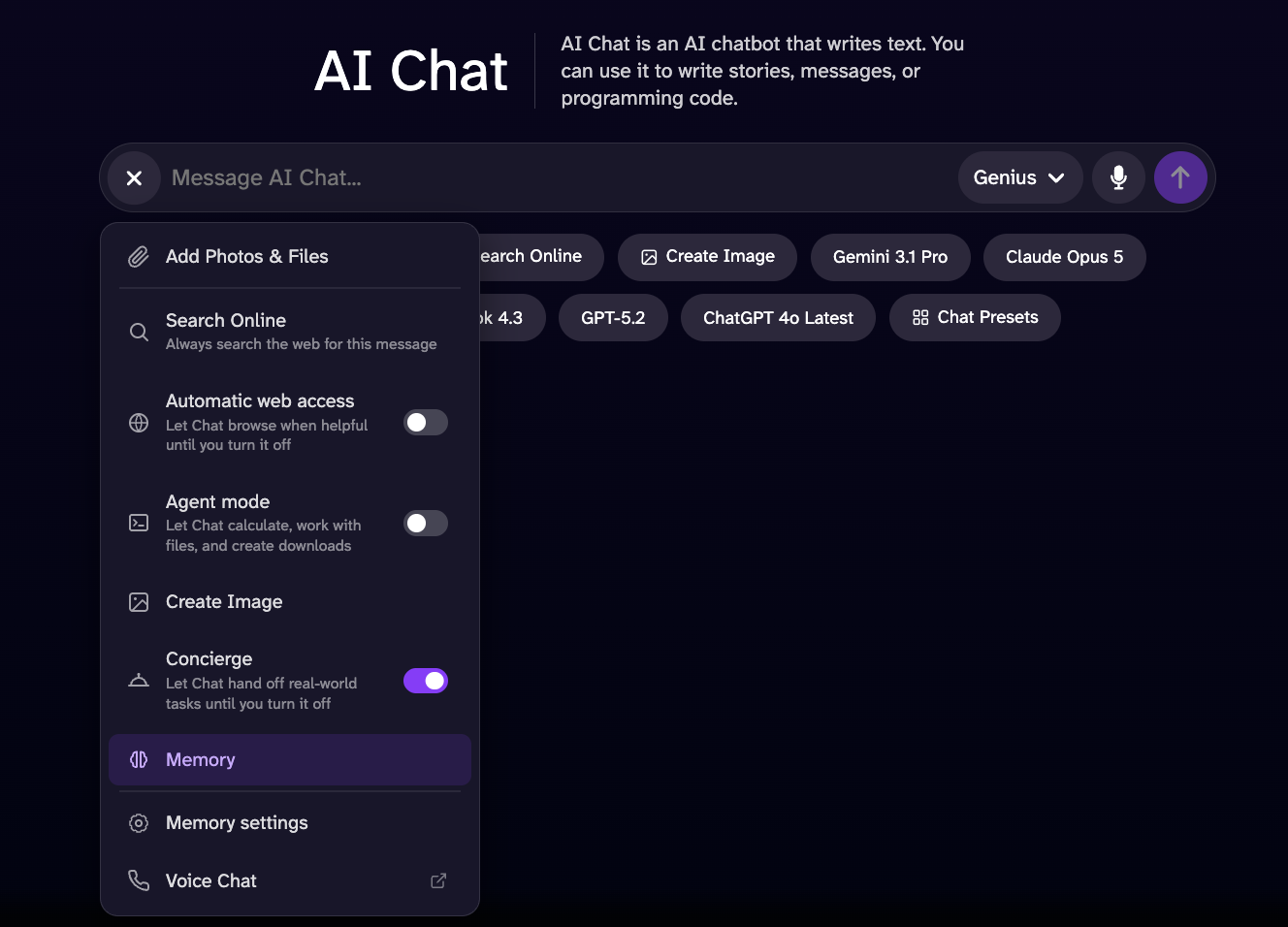
Fitur Memori membantu sistem obrolan mengumpulkan informasi dan kriteria yang lebih baik untuk memberikan tanggapan yang lebih akurat. Fitur ini mempertimbangkan informasi yang pernah Anda bagikan sebelumnya untuk memahami kesukaan, preferensi, dan minat Anda. Semua informasi ini didasarkan pada percakapan yang pernah Anda lakukan dengan sistem obrolan sejak Anda mengaktifkan opsi ini. Sistem obrolan memiliki akses ke informasi yang sebelumnya Anda berikan, dan informasi tersebut hanya tersedia selama opsi ini diaktifkan dan Anda memiliki riwayat obrolan. Jika Anda menghapus riwayat obrolan Anda, sistem tidak akan memperhitungkan percakapan sebelumnya.
Biarkan fitur obrolan menjelajahi web secara real-time untuk menemukan informasi yang lebih akurat dan terkini serta data lengkap mengenai apa yang Anda cari.
Alat "Buat gambar" memungkinkan Anda membuat gambar dari obrolan sesuai dengan model obrolan yang Anda gunakan: Standard, Genius Pro, atau Super Genius Pro. Cukup masukkan prompt untuk gambar yang ingin Anda buat, dan selesai!
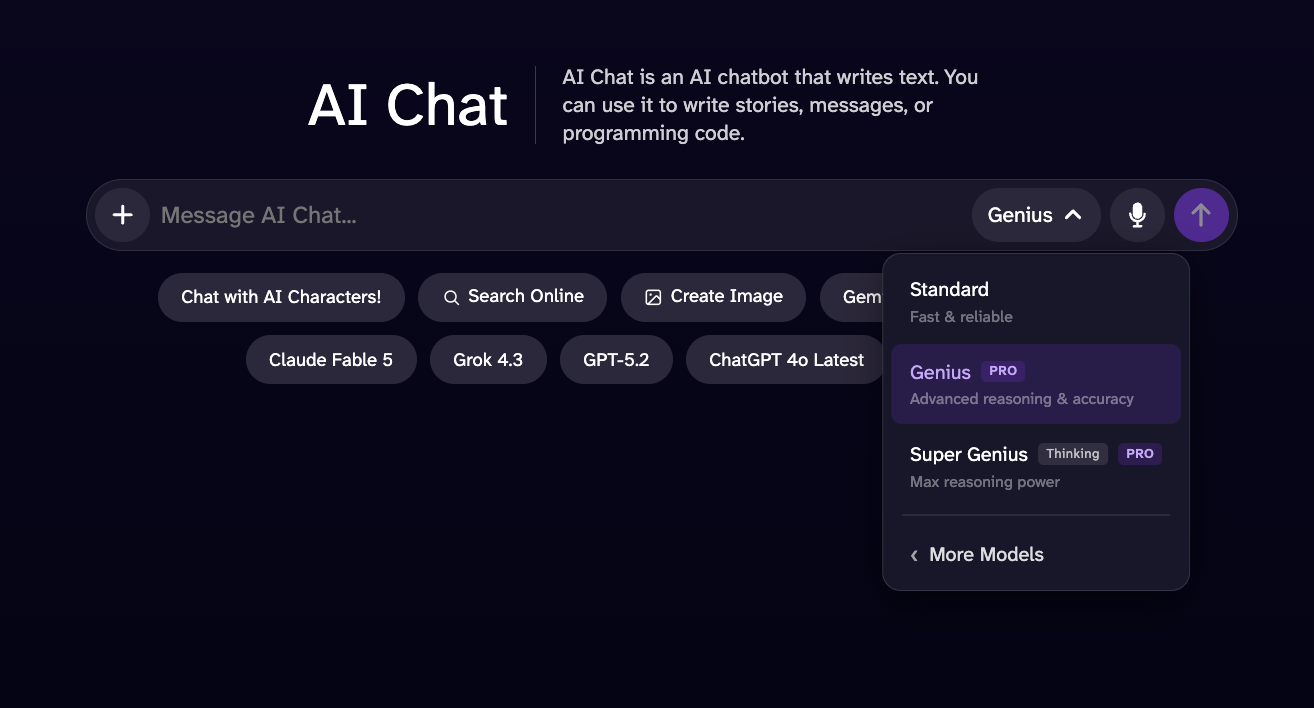
Versi ini merupakan penyempurnaan dari Obrolan AI Standard, dengan performa yang lebih baik, tanggapan yang lebih terperinci, dan kecerdasan yang lebih tinggi.
Model ini dirancang untuk memberikan kinerja yang lebih baik daripada Mode Genius dalam tugas-tugas yang membutuhkan penalaran tingkat lanjut, analisis logis, dan pemecahan masalah matematika. Meskipun waktu respons yang diperkirakan mungkin sedikit lebih lama, model ini menawarkan kedalaman yang lebih besar, pemahaman kontekstual yang lebih luas, serta tanggapan yang lebih komprehensif, sehingga menghasilkan pengalaman yang lebih mumpuni dan andal dalam menangani tugas-tugas kompleks.
Dengan fitur tambahan ini, Anda dapat menyelesaikan soal matematika dan sains, termasuk persamaan, turunan, soal cerita, aljabar, kalkulus, dan masih banyak lagi! Mode ini sangat cocok baik untuk menyelesaikan soal teknis maupun memeriksa tugas yang Anda ragukan.
Pembuat gambar AI adalah alat pengubah teks menjadi gambar kami yang memungkinkan Anda mengeksplorasi kreativitas dan berkreasi menggunakan kecerdasan buatan. Cobalah mendeskripsikan gambar tempat impian Anda atau apa pun yang Anda inginkan, lalu biarkan AI yang mengurus sisanya!
Untuk menghasilkan gambar berkualitas tinggi, pilih prompt Anda, lalu pilih dari lebih dari 100 gaya dan bentuk.
Untuk detail yang lebih lengkap, kualitas artistik yang lebih tinggi, dan gambar yang lebih sesuai dengan instruksi Anda dibandingkan dengan HD, dengan resolusi hingga 1024x1024 piksel, serta dapat digunakan dalam format horizontal, persegi, atau vertikal.
Untuk gambar 2K beresolusi sangat tinggi dengan detail yang memukau. Baik Anda sekadar bereksperimen atau ingin menciptakan karya yang epik, alat ini menyediakan mode yang sesuai untuk setiap kebutuhan. Format ini sangat cocok jika Anda ingin mencetak gambar tersebut.
Editor foto AI adalah alat yang memungkinkan Anda berkreasi serta membuat ulang atau memodifikasi gambar apa pun, baik yang baru maupun yang lama, dengan menggunakan deskripsi teks mengenai perubahan yang ingin Anda lakukan.
Anda dapat memulai cukup dengan mengunggah gambar atau URL, memasukkan prompt berisi informasi yang ingin Anda edit atau tambahkan, lalu membuatnya, dan selesai. Untuk hasil terbaik, buatlah instruksi Anda spesifik dan ringkas, seperti "buat langitnya berwarna merah" atau "tambahkan bunga ke latar belakang."
Anda juga dapat membuat hasil edit dengan menggunakan maksimal 3 gambar referensi, disertai contoh-contoh seperti:
Pembuat video AI kami mengubah gambar dan teks Anda menjadi video. Anda dapat menggunakannya untuk membuat video edukatif, hiburan, atau cerita pendek.
Dengan mengunggah ke generator video, Anda memberikan hak kepada DeepAI untuk membagikan gambar dan video tersebut secara publik. Pastikan Anda memahami cara kerjanya dengan membaca penjelasan di bawah ini.
Keanggotaan DeepAI Pro kami mencakup 25 detik pembuatan video HD per bulan. Detik video HD tambahan akan dipotong dari saldo Anda dengan tarif $0.20 per detik. Mode Hollywood (dengan resolusi 2K) mencakup 8 detik video per bulan, dan video Mode Hollywood tambahan akan dipotong dari kredit Anda dengan tarif $0.30 per detik.
Mode pembuatan yang serbaguna, dirancang untuk menciptakan objek sehari-hari, lingkungan, dan pemandangan umum yang realistis dengan visual yang tajam dan detail yang halus. Mode ini sangat efektif untuk subjek yang praktis dan akrab, seperti peralatan rumah tangga, furnitur, kamar tidur, dapur, kantor, ruang tamu, dan benda-benda sehari-hari. Harga paling sepadan, yaitu $0.20 per detik.
Video berkualitas tinggi bergaya sinematik dengan audio dan gambar profesional. Kualitas kreatif maksimal seharga $0.30 per detik.
Anda dapat membuat video dengan menggunakan gambar sebagai panduan. Pembuat video AI kami menggunakan gambar tersebut sebagai dasar untuk memulai adegan, serta memahami prompt Anda dengan lebih baik guna menghasilkan hasil yang sedekat mungkin dengan gambar tersebut sesuai teks yang dimasukkan.
Apakah Anda memiliki referensi yang ingin Anda gunakan dalam proyek Anda? Anda dapat menambahkannya, dan Pembuat video AI akan memproses prompt Anda untuk menghasilkan hasil terbaik berdasarkan referensi tersebut.
Ubah video Anda dengan kecerdasan buatan. Tambahkan, ubah, atau hapus elemen dari adegan Anda dengan instruksi sederhana, dan wujudkan konten Anda persis seperti yang Anda inginkan.
Website Builder adalah platform berbasis web yang dirancang untuk mempermudah pembuatan, penyesuaian, dan pengelolaan situs web tanpa memerlukan pengetahuan teknis atau pemrograman tingkat lanjut.
Platform ini menyediakan antarmuka yang intuitif serta serangkaian komponen yang dapat dikonfigurasi, yang memungkinkan pengguna untuk membuat situs web responsif, menyesuaikan tata letak dan konten, mengelola halaman, serta menyesuaikan tampilan visual proyek mereka.
DeepAI Code adalah agen pemrograman berbasis AI untuk Mac dan Windows. Buka folder proyek, jelaskan tugasnya, lalu biarkan aplikasi ini membaca berkas, mengedit kode, dan menjalankan perintah. Periksa perubahan yang terjadi di dalam aplikasi sebelum menyimpannya.
- Unduh DeepAI Code. Pilih tautan unduhan yang sesuai dengan sistem operasi dan jenis prosesor Anda. Di Mac, buka citra disk tersebut, lalu seret aplikasi ke folder Aplikasi. Di Windows, jalankan program penginstal.
- Buka aplikasi dan pilih folder proyek. Mulai obrolan dan jelaskan apa yang ingin Anda buat atau ubah.
- Pilih model dan mode akses. Mode Plan mengeksplorasi tugas sebelum melakukan perubahan; mode lainnya memungkinkan agen bertindak dengan pengaturan persetujuan yang berbeda. Periksa pengaturan tersebut sebelum memulai.
- Ikuti tugas tersebut, periksa perbedaan berkasnya, lalu simpan atau batalkan perubahan tersebut.
Model cepat seperti GLM 5.3 Flash dan GPT-6 Luna tersedia secara gratis. Model premium menggunakan Theos, kuota harian yang diterima setiap pengguna yang telah masuk; DeepAI Pro menambahkan kuota tambahan setiap hari. Anda dapat mengganti model di tengah percakapan. Lihat harga.
Aplikasi ini bekerja dengan berkas-berkas di komputer Anda. Perintah dan isi berkas yang relevan dikirimkan ke model AI untuk menyelesaikan tugas Anda. Riwayat obrolan akan disinkronkan ke akun Anda saat Anda masuk.
Jelajahi setiap alat yang kami sediakan, dan Anda akan menemukan bahwa, dengan pengetahuan dan imajinasi Anda, Anda bisa menciptakan hal-hal yang luar biasa!
Buat musik yang unik dengan mudah menggunakan generator musik DeepAI. Sangat cocok untuk Foley, efek suara, dan lagu latar video Anda. Ubah proyek Anda dengan lanskap suara yang dihasilkan secara khusus dan disesuaikan dengan kebutuhan Anda.
Jika Anda berlangganan DeepAI Pro, 100 lagu pertama Anda gratis setiap bulan, sedangkan lagu tambahan dikenakan biaya $0.10 per lagu.
Apakah Anda memiliki gambar yang ingin latar belakangnya dihapus, atau Anda hanya tidak menyukai latar belakangnya? Cobalah alat ini, dan alat ini akan menghapusnya dengan mudah.
Apakah Anda ingin melihat seperti apa tampilan foto hitam-putih lama itu? Tambahkan foto-foto keluarga lama Anda dan hidupkan kembali foto-foto tersebut dengan warna.
Alat Resolusi super memanfaatkan pembelajaran mesin untuk memperjelas, mempertajam, dan meningkatkan resolusi foto tanpa menghilangkan konten maupun ciri khasnya. Sayangnya, gambar yang buram merupakan hal yang umum dan menjadi masalah baik bagi para profesional maupun penggemar fotografi. Resolusi super menggunakan teknik pembelajaran mesin untuk meningkatkan resolusi gambar dalam sekejap.
Ada yang tidak disukai dari foto ini? Alat ini memungkinkan Anda mengubah objek dengan mudah; dengan menentukan secara tepat apa yang Anda inginkan, Anda dapat menyempurnakan gambar Anda.
Apakah Anda ragu apakah sebuah gambar itu asli? Unggah gambar tersebut untuk memperkirakan apakah gambar tersebut dihasilkan oleh AI atau telah dimanipulasi secara digital; hasil yang diperoleh bersifat probabilistik dan tidak boleh dianggap sebagai bukti yang pasti.
DeepAI Pro adalah layanan berlangganan yang memberikan akses ke rangkaian lengkap alat DeepAI seharga $9.99 per bulan atau $89.99 per tahun, dengan kuota yang diperbarui setiap bulan. Anda juga dapat menambahkan kredit untuk menghasilkan lebih banyak konten ketika kuota untuk siklus saat ini telah habis. Temukan informasi lebih lanjut di halaman harga kami, yang tersedia di https://deepai.org/pricing.
Harga: Panggilan API sudah termasuk dalam keanggotaan DeepAI Pro Anda. Setiap konten yang dibuat akan diambil dari kuota bulanan Anda atau dipotong dari saldo dompet prabayar Anda.
DeepAI menyediakan berbagai API gambar. Masing-masing merupakan titik akhir HTTP sederhana yang dapat Anda panggil dari bahasa pemrograman apa pun, seperti:- Teks ke gambar: menghasilkan gambar dari deskripsi teks.
- Editor foto AI: mengedit dan mengubah gambar yang sudah ada menggunakan prompt teks.
- Resolusi super: meningkatkan resolusi gambar dan memulihkan detail yang tajam menggunakan pembelajaran mesin.
- Pewarna gambar: menambahkan warna yang realistis pada foto hitam-putih.
- Penghapus latar belakang: memotong subjek dari foto dengan rapi.
- Pembuat video: membuat video dari prompt teks atau gambar sumber — lihat API Video.
Setiap API DeepAI berupa satu permintaan POST. Kirimkan input model sebagai multipart/form-data dan lakukan autentikasi menggunakan kunci API Anda di header permintaan.
Masuk dan salin kunci Anda dari dasbor akun. Akses API memerlukan langganan DeepAI Pro. Jaga kerahasiaan kunci Anda — perlakukan seperti kata sandi, dan jangan pernah menampilkannya dalam kode sisi klien.
Masukkan kunci Anda dalam header api-key dan input model sebagai kolom formulir. URL titik akhir adalah https://api.deepai.org/api/<model>, dengan <model> sebagai ID model (tercantum pada setiap model di bawah ini).
curl -X POST https://api.deepai.org/api/text2img \
    -H 'api-key:YOUR_API_KEY' \
    -F 'text=a serene mountain lake at sunrise'
Jika berhasil, Anda akan menerima respons 200 OK dengan isi JSON. output_url berisi tautan ke berkas yang dihasilkan, sedangkan id adalah pengenal tugas yang unik:
{
    "id": "59a0e8a9-...",
    "output_url": "https://api.deepai.org/job-view-file/.../output.jpg"
}
Kesalahan mengembalikan status selain 200 dan badan JSON yang berisi pesan err atau status:
- 401 — kunci API tidak ada atau tidak valid, atau batas kuota penggunaan telah terlampaui.
- 410 — model yang diminta telah dihapus.
- 500 — ID model tidak ditemukan, atau terjadi kesalahan pemrosesan.
Buat video dari prompt teks atau gambar sumber. Pembuatan video membutuhkan waktu beberapa menit, sehingga—berbeda dengan API gambar—proses ini bersifat asinkron: kirim pekerjaan, terima id pekerjaan, lalu periksa titik akhir status secara berkala hingga video siap.
Harga: pembuatan video memerlukan DeepAI Pro dan dikenakan biaya per detik video yang dihasilkan, yang terlebih dahulu dipotong dari kuota bulanan Anda (25 detik standar, 8 detik Mode Hollywood), kemudian dari dompet prabayar Anda (20¢ per detik standar, 30¢ per detik Mode Hollywood). Lihat Harga.
Teks ke video: POST https://api.deepai.org/video-api/text2video
Gambar ke video: POST https://api.deepai.org/video-api/img2video
Status pekerjaan: GET https://api.deepai.org/video-api/status/<id>
Kirim parameter sebagai multipart/form-data, form-urlencoded, atau badan permintaan application/json (dengan image sebagai URL atau data base64) beserta kunci Anda di header api-key, persis seperti pada API gambar. Header ini wajib disertakan pada setiap panggilan, termasuk permintaan status; sesi browser tidak mengautentikasi rute-rute ini.
| Parameter | Jenis | Diperlukan | Default |
|---|---|---|---|
prompt | string | text2video: Ya img2video: Tidak | — |
image | file, URL, atau base64 | Hanya img2video: Ya | — |
mode | string | Tidak | hd |
duration | integer | Tidak | 5 |
shape | string | Tidak | auto |
prompt — apa yang akan dihasilkan, maksimal 3000 karakter (prompt yang lebih panjang akan ditolak dengan status 400). Opsional pada img2video (gambar sumber saja sudah cukup).
image — gambar sumber untuk img2video: unggah sebagai bidang file, masukkan URL HTTP(S) publik, atau kirim data base64 (dalam bentuk mentah atau sebagai URL data:image/...;base64,). Ukuran maksimum 20 MB, dan file tersebut harus dapat didekode menjadi gambar. Pengalihan URL akan diikuti.
mode — hd untuk video standar, atau hollywood untuk video berkualitas sinematik 2K.
duration — durasi video yang dihasilkan dalam detik, mulai dari 5 hingga 15. Tagihan dihitung per detik.
shape — square, landscape, standard, vertical, portrait, atau auto. Dengan auto, img2video menyesuaikan dengan gambar sumber, sedangkan text2video menggunakan lanskap. Dalam mode hollywood, img2video selalu mempertahankan bentuk gambar sumber, sehingga shape harus auto di sana.
curl -X POST https://api.deepai.org/video-api/text2video \
    -H 'api-key:YOUR_API_KEY' \
    -F 'prompt=a golden retriever surfing a wave at sunset' \
    -F 'mode=hd' \
    -F 'duration=5' \
    -F 'shape=landscape'
Gambar ke video, dari file atau URL:
curl -X POST https://api.deepai.org/video-api/img2video \
    -H 'api-key:YOUR_API_KEY' \
    -F 'image=@/path/to/photo.jpg' \
    -F 'prompt=the camera slowly zooms in'
Pengiriman yang berhasil mengembalikan ID pekerjaan yang statusnya dapat diperiksa secara berkala:
{
    "id": "59a0e8a9-...",
    "status": "processing"
}
Periksa titik akhir status setiap beberapa detik. status adalah processing, completed, atau failed:
curl https://api.deepai.org/video-api/status/59a0e8a9-... \
    -H 'api-key:YOUR_API_KEY'
{"status": "processing"}

{"status": "completed", "output_url": "https://...mp4"}

{"status": "failed", "error": "..."}
Contoh lengkap dalam Python:
import time, requests

headers = {'api-key': 'YOUR_API_KEY'}
job = requests.post(
    'https://api.deepai.org/video-api/text2video',
    data={'prompt': 'a golden retriever surfing a wave at sunset',
          'mode': 'hd', 'duration': 5, 'shape': 'landscape'},
    headers=headers).json()

while True:
    status = requests.get(
        'https://api.deepai.org/video-api/status/' + job['id'],
        headers=headers).json()
    if status['status'] == 'completed':
        print(status['output_url'])
        break
    if status['status'] == 'failed':
        raise RuntimeError(status['error'])
    time.sleep(5)
- Segera ambil hasilnya: catatan status (dan
output_url-nya) tersedia selama satu jam setelah proses selesai; setelah itu, titik akhir status akan mengembalikan kode status 404. Unduh videonya setelah proses selesai. - Anda hanya akan dikenakan biaya untuk video yang berhasil diselesaikan. Kredit akan disisihkan saat pekerjaan dikirimkan dan akan dikembalikan jika pekerjaan tersebut gagal.
- Kode
401berarti headerapi-keytidak ada atau tidak valid. Kode403berarti akun tersebut tidak memiliki langganan DeepAI Pro yang aktif. - Respons
402saat pengiriman berarti saldo dompet Anda tidak mencukupi untuk membayar video tersebut (isi respons mencantumkan biaya dan saldo Anda) atau akun Anda terkunci setelah pembayaran gagal. Tambahkan kredit atau aktifkan isi ulang otomatis di dasbor Anda. - Prompt dan gambar dimoderasi: konten yang ditandai akan ditolak saat pengiriman dengan kode
400, dan konten yang ditandai oleh penyedia video selama proses pembuatan akan muncul sebagai{"status": "failed", "error": "NSFW detected"}.
Pembuat gambar AIKembali ke atas ↑
Ini adalah pembuat gambar AI. Alat ini membuat gambar dari awal berdasarkan deskripsi teks.
Titik akhir: POST https://api.deepai.org/api/text2img
| Parameter | Jenis | Diperlukan | Default |
|---|---|---|---|
text |
text | Ya | — |
text — sebuah string yang menjelaskan apa yang akan dihasilkan, misalnya "Malam berbintang di atas danau yang tenang" atau "Potret seorang bajak laut tua".
width, height — masukkan string, misalnya "256" atau "768" (nilai default 512). Gunakan nilai antara 128 dan 1536, dengan kelipatan 32. Direkomendasikan untuk gambar standar: 1024x576, 1024x720, 512x512, 768x1024, 576x1024. Direkomendasikan untuk gambar HD: 1216x832, 1152x896, 1024x1024, 896x1152, 832x1216. Nilai di atas ~700 atau di bawah 256 dapat menghasilkan keluaran yang aneh.
image_generator_version — "standard" (default), "hd", "genius", atau "super_genius".
resolution — "2k" (default) atau "4k". Hanya digunakan jika image_generator_version adalah "super_genius".
genius_preference — "anime", "photography", "graphic", atau "cinematic". Hanya digunakan jika image_generator_version adalah "genius".
negative_prompt — sebuah string yang menjelaskan apa saja yang harus dihapus dari gambar; berguna untuk meningkatkan kualitas dan detail. Contoh: bad anatomy, blurry, cropped, deformed, disfigured, duplicate, extra limbs, fused fingers, jpeg artifacts, low quality, lowres, mutated hands, out of frame, signature, text, watermark, worst quality.
Contoh Pembuat gambar AI cURL
# Example posting a text URL:

curl \
    -F 'text=YOUR_TEXT_HERE' \
    -H 'api-key:YOUR_API_KEY' \
    https://api.deepai.org/api/text2img


# Example posting a local text file:

curl \
    -F 'text=YOUR_TEXT_HERE' \
    -H 'api-key:YOUR_API_KEY' \
    https://api.deepai.org/api/text2img


# Example directly sending a text string:

curl \
    -F 'text=YOUR_TEXT_HERE' \
    -H 'api-key:YOUR_API_KEY' \
    https://api.deepai.org/api/text2img
Contoh Pembuat gambar AI Javascript
// Example posting a text URL:
(async function() {
    const resp = await fetch('https://api.deepai.org/api/text2img', {
        method: 'POST',
        headers: {
            'Content-Type': 'application/json',
            'api-key': 'YOUR_API_KEY'
        },
        body: JSON.stringify({
            text: "YOUR_TEXT_HERE",
        })
    });

    const data = await resp.json();
    console.log(data);
})()


// Example posting file picker input text (Browser only):
document.getElementById('yourFileInputId').addEventListener('change', async function() {
       const formData = new FormData();
       formData.append('text', 'YOUR_TEXT_HERE');

       const resp = await fetch('https://api.deepai.org/api/text2img', {
           method: 'POST',
           headers: {
               'api-key': 'YOUR_API_KEY'
           },
           body: formData
       });

       const data = await resp.json();
       console.log(data);
});

// Example posting a local text file (Node.js only):
const fs = require('fs');
(async function() {
       const formData = new FormData();
       formData.append('text', 'YOUR_TEXT_HERE');

       const resp = await fetch('https://api.deepai.org/api/text2img', {
           method: 'POST',
           headers: {
               'api-key': 'YOUR_API_KEY'
           },
           body: formData
       });

       const data = await resp.json();
       console.log(data);
});

// Example directly sending a text string:
(async function() {
    const resp = await fetch('https://api.deepai.org/api/text2img', {
        method: 'POST',
        headers: {
            'Content-Type': 'application/json',
            'api-key': 'YOUR_API_KEY'
        },
        body: JSON.stringify({
            text: "YOUR_TEXT_HERE",
        })
    });

    const data = await resp.json();
    console.log(data);
})()
Contoh Pembuat gambar AI Python
# Example posting a text URL:

import requests
r = requests.post(
    "https://api.deepai.org/api/text2img",
    data={
        'text': 'YOUR_TEXT_HERE',
    },
    headers={'api-key': 'YOUR_API_KEY'}
)
print(r.json())


# Example posting a local text file:

import requests
r = requests.post(
    "https://api.deepai.org/api/text2img",
    data={
        'text': 'YOUR_TEXT_HERE',
    },
    headers={'api-key': 'YOUR_API_KEY'}
)
print(r.json())


# Example directly sending a text string:

import requests
r = requests.post(
    "https://api.deepai.org/api/text2img",
    data={
        'text': 'YOUR_TEXT_HERE',
    },
    headers={'api-key': 'YOUR_API_KEY'}
)
print(r.json())
Contoh Pembuat gambar AI Ruby
# Example posting a text URL:

require 'rest_client'
r = RestClient::Request.execute(method: :post, url: 'https://api.deepai.org/api/text2img', timeout: 600,
    headers: {'api-key' => 'YOUR_API_KEY'},
    payload: {
        'text' => 'YOUR_TEXT_HERE',
    }
)
puts r


# Example posting a local text file:

require 'rest_client'
r = RestClient::Request.execute(method: :post, url: 'https://api.deepai.org/api/text2img', timeout: 600,
    headers: {'api-key' => 'YOUR_API_KEY'},
    payload: {
        'text' => 'YOUR_TEXT_HERE',
    }
)
puts r


# Example directly sending a text string:

require 'rest_client'
r = RestClient::Request.execute(method: :post, url: 'https://api.deepai.org/api/text2img', timeout: 600,
    headers: {'api-key' => 'YOUR_API_KEY'},
    payload: {
        'text' => 'YOUR_TEXT_HERE',
    }
)
puts r
Contoh Pembuat gambar AI Php
// Example posting a text URL:
<?php
require 'vendor/autoload.php'; // Ensure you have Guzzle installed (composer require guzzlehttp/guzzle)

use GuzzleHttp\Client;
use GuzzleHttp\Psr7\Utils;

$client = new Client();
$headers = [
    'api-key' => 'YOUR_API_KEY'
];
$options = [
    'multipart' => [
        [
            'name'     => 'text',
            'contents' => 'YOUR_TEXT_HERE'
        ],
    ]
];
$request = new GuzzleHttp\Psr7\Request('POST', 'https://api.deepai.org/api/text2img', $headers);
try {
    $res = $client->sendAsync($request, $options)->wait();
    echo $res->getBody();
} catch (Exception $e) {
    echo 'Error: ' . $e->getMessage();
}
?>


// Example posting a local text file:
<?php
require 'vendor/autoload.php'; // Ensure you have Guzzle installed (composer require guzzlehttp/guzzle)

use GuzzleHttp\Client;
use GuzzleHttp\Psr7\Utils;

$client = new Client();
$headers = [
    'api-key' => 'YOUR_API_KEY'
];
$options = [
    'multipart' => [
        [
            'name'     => 'text',
            'contents' => 'YOUR_TEXT_HERE'
        ],
    ]
];
$request = new GuzzleHttp\Psr7\Request('POST', 'https://api.deepai.org/api/text2img', $headers);
try {
    $res = $client->sendAsync($request, $options)->wait();
    echo $res->getBody();
} catch (Exception $e) {
    echo 'Error: ' . $e->getMessage();
}
?>


// Example directly sending a text string:
<?php
require 'vendor/autoload.php'; // Ensure you have Guzzle installed (composer require guzzlehttp/guzzle)

use GuzzleHttp\Client;
use GuzzleHttp\Psr7\Utils;

$client = new Client();
$headers = [
    'api-key' => 'YOUR_API_KEY'
];
$options = [
    'multipart' => [
        [
            'name'     => 'text',
            'contents' => 'YOUR_TEXT_HERE'
        ],
    ]
];
$request = new GuzzleHttp\Psr7\Request('POST', 'https://api.deepai.org/api/text2img', $headers);
try {
    $res = $client->sendAsync($request, $options)->wait();
    echo $res->getBody();
} catch (Exception $e) {
    echo 'Error: ' . $e->getMessage();
}
?>
Contoh Pembuat gambar AI Go
// Example posting a text URL:
package main

import (
    "bytes"
    "encoding/json"
    "fmt"
    "io"
    "net/http"
)

func main() {
    url := "https://api.deepai.org/api/text2img"
    payload := map[string]string{
        "text": "YOUR_TEXT_HERE",
    }
    jsonData, _ := json.Marshal(payload)

    req, _ := http.NewRequest("POST", url, bytes.NewBuffer(jsonData))
    req.Header.Set("Content-Type", "application/json")
    req.Header.Set("api-key", "YOUR_API_KEY")

    client := &http.Client{}
    resp, err := client.Do(req)
    if err != nil {
        panic(err)
    }
    defer resp.Body.Close()

    body, _ := io.ReadAll(resp.Body)
    fmt.Println(string(body))
}


// Example posting a local text file:
package main

import (
    "bytes"
    "fmt"
    "io"
    "mime/multipart"
    "net/http"
    "os"
)

func main() {
    url := "https://api.deepai.org/api/text2img"

    var b bytes.Buffer
    w := multipart.NewWriter(&b)

    w.WriteField("text", "YOUR_TEXT_HERE")

    if err := w.Close(); err != nil {
        panic(err)
    }

    req, _ := http.NewRequest("POST", url, &b)
    req.Header.Set("Content-Type", w.FormDataContentType())
    req.Header.Set("api-key", "YOUR_API_KEY")

    client := &http.Client{}
    resp, err := client.Do(req)
    if err != nil {
        panic(err)
    }
    defer resp.Body.Close()

    body, _ := io.ReadAll(resp.Body)
    fmt.Println(string(body))
}


// Example directly sending a text string:
package main

import (
    "bytes"
    "encoding/json"
    "fmt"
    "io"
    "net/http"
)

func main() {
    url := "https://api.deepai.org/api/text2img"
    payload := map[string]string{
        "text": "YOUR_TEXT_HERE",
    }
    jsonData, _ := json.Marshal(payload)

    req, _ := http.NewRequest("POST", url, bytes.NewBuffer(jsonData))
    req.Header.Set("Content-Type", "application/json")
    req.Header.Set("api-key", "YOUR_API_KEY")

    client := &http.Client{}
    resp, err := client.Do(req)
    if err != nil {
        panic(err)
    }
    defer resp.Body.Close()

    body, _ := io.ReadAll(resp.Body)
    fmt.Println(string(body))
}
Contoh Pembuat gambar AI Java
// Example posting a text URL:
import java.net.http.HttpClient;
import java.net.http.HttpRequest;
import java.net.http.HttpResponse;
import java.net.URI;

public class Main {
    public static void main(String[] args) throws Exception {
        HttpClient client = HttpClient.newHttpClient();

        String json = "{" +
            "\"text\": \"YOUR_TEXT_HERE\"" +
            "}";

        HttpRequest request = HttpRequest.newBuilder()
            .uri(URI.create("https://api.deepai.org/api/text2img"))
            .header("Content-Type", "application/json")
            .header("api-key", "YOUR_API_KEY")
            .POST(HttpRequest.BodyPublishers.ofString(json))
            .build();

        HttpResponse<String> response = client.send(request, HttpResponse.BodyHandlers.ofString());
        System.out.println(response.body());
    }
}


// Example posting a local text file:
// Add to build.gradle: implementation 'com.squareup.okhttp3:okhttp:4.12.0'
import okhttp3.*;
import java.io.File;
import java.io.IOException;

public class Main {
    public static void main(String[] args) throws IOException {
        OkHttpClient client = new OkHttpClient();

        RequestBody requestBody = new MultipartBody.Builder()
            .setType(MultipartBody.FORM)
            .addFormDataPart("text", "YOUR_TEXT_HERE")
            .build();

        Request request = new Request.Builder()
            .url("https://api.deepai.org/api/text2img")
            .addHeader("api-key", "YOUR_API_KEY")
            .post(requestBody)
            .build();

        try (Response response = client.newCall(request).execute()) {
            System.out.println(response.body().string());
        }
    }
}


// Example directly sending a text string:
import java.net.http.HttpClient;
import java.net.http.HttpRequest;
import java.net.http.HttpResponse;
import java.net.URI;

public class Main {
    public static void main(String[] args) throws Exception {
        HttpClient client = HttpClient.newHttpClient();

        String json = "{" +
            "\"text\": \"YOUR_TEXT_HERE\"" +
            "}";

        HttpRequest request = HttpRequest.newBuilder()
            .uri(URI.create("https://api.deepai.org/api/text2img"))
            .header("Content-Type", "application/json")
            .header("api-key", "YOUR_API_KEY")
            .POST(HttpRequest.BodyPublishers.ofString(json))
            .build();

        HttpResponse<String> response = client.send(request, HttpResponse.BodyHandlers.ofString());
        System.out.println(response.body());
    }
}
Contoh Pembuat gambar AI C#
// Example posting a text URL:
using System;
using System.Net.Http;
using System.Text;
using System.Text.Json;
using System.Threading.Tasks;

class Program
{
    static async Task Main()
    {
        using var client = new HttpClient();
        client.DefaultRequestHeaders.Add("api-key", "YOUR_API_KEY");

        var payload = new
        {
            text = "YOUR_TEXT_HERE",
        };

        var json = JsonSerializer.Serialize(payload);
        var content = new StringContent(json, Encoding.UTF8, "application/json");

        var response = await client.PostAsync("https://api.deepai.org/api/text2img", content);
        var result = await response.Content.ReadAsStringAsync();
        Console.WriteLine(result);
    }
}


// Example posting a local text file:
using System;
using System.IO;
using System.Net.Http;
using System.Threading.Tasks;

class Program
{
    static async Task Main()
    {
        using var client = new HttpClient();
        client.DefaultRequestHeaders.Add("api-key", "YOUR_API_KEY");

        using var form = new MultipartFormDataContent();

        form.Add(new StringContent("YOUR_TEXT_HERE"), "text");

        var response = await client.PostAsync("https://api.deepai.org/api/text2img", form);
        var result = await response.Content.ReadAsStringAsync();
        Console.WriteLine(result);
    }
}


// Example directly sending a text string:
using System;
using System.Net.Http;
using System.Text;
using System.Text.Json;
using System.Threading.Tasks;

class Program
{
    static async Task Main()
    {
        using var client = new HttpClient();
        client.DefaultRequestHeaders.Add("api-key", "YOUR_API_KEY");

        var payload = new
        {
            text = "YOUR_TEXT_HERE",
        };

        var json = JsonSerializer.Serialize(payload);
        var content = new StringContent(json, Encoding.UTF8, "application/json");

        var response = await client.PostAsync("https://api.deepai.org/api/text2img", content);
        var result = await response.Content.ReadAsStringAsync();
        Console.WriteLine(result);
    }
}
Contoh Pembuat gambar AI Swift
// Example posting a text URL:
import Foundation

let url = URL(string: "https://api.deepai.org/api/text2img")!
var request = URLRequest(url: url)
request.httpMethod = "POST"
request.setValue("application/json", forHTTPHeaderField: "Content-Type")
request.setValue("YOUR_API_KEY", forHTTPHeaderField: "api-key")

let payload: [String: Any] = [
    "text": "YOUR_TEXT_HERE",
]

request.httpBody = try? JSONSerialization.data(withJSONObject: payload)

let task = URLSession.shared.dataTask(with: request) { data, response, error in
    if let data = data {
        print(String(data: data, encoding: .utf8) ?? "")
    }
}
task.resume()

// Keep the program running for async request
RunLoop.main.run()


// Example posting a local text file:
import Foundation

let url = URL(string: "https://api.deepai.org/api/text2img")!
var request = URLRequest(url: url)
request.httpMethod = "POST"
request.setValue("YOUR_API_KEY", forHTTPHeaderField: "api-key")

let boundary = UUID().uuidString
request.setValue("multipart/form-data; boundary=\(boundary)", forHTTPHeaderField: "Content-Type")

var body = Data()

body.append("--\(boundary)\r\n".data(using: .utf8)!)
body.append("Content-Disposition: form-data; name=\"text\"\r\n\r\n".data(using: .utf8)!)
body.append("YOUR_TEXT_HERE".data(using: .utf8)!)
body.append("\r\n".data(using: .utf8)!)

body.append("--\(boundary)--\r\n".data(using: .utf8)!)
request.httpBody = body

let task = URLSession.shared.dataTask(with: request) { data, response, error in
    if let data = data {
        print(String(data: data, encoding: .utf8) ?? "")
    }
}
task.resume()

RunLoop.main.run()


// Example directly sending a text string:
import Foundation

let url = URL(string: "https://api.deepai.org/api/text2img")!
var request = URLRequest(url: url)
request.httpMethod = "POST"
request.setValue("application/json", forHTTPHeaderField: "Content-Type")
request.setValue("YOUR_API_KEY", forHTTPHeaderField: "api-key")

let payload: [String: Any] = [
    "text": "YOUR_TEXT_HERE",
]

request.httpBody = try? JSONSerialization.data(withJSONObject: payload)

let task = URLSession.shared.dataTask(with: request) { data, response, error in
    if let data = data {
        print(String(data: data, encoding: .utf8) ?? "")
    }
}
task.resume()

RunLoop.main.run()
Contoh Pembuat gambar AI Kotlin
// Example posting a text URL:
import java.net.URI
import java.net.http.HttpClient
import java.net.http.HttpRequest
import java.net.http.HttpResponse

fun main() {
    val client = HttpClient.newHttpClient()

    val json = """{
        "text": "YOUR_TEXT_HERE"
    }"""

    val request = HttpRequest.newBuilder()
        .uri(URI.create("https://api.deepai.org/api/text2img"))
        .header("Content-Type", "application/json")
        .header("api-key", "YOUR_API_KEY")
        .POST(HttpRequest.BodyPublishers.ofString(json))
        .build()

    val response = client.send(request, HttpResponse.BodyHandlers.ofString())
    println(response.body())
}


// Example posting a local text file:
// Add to build.gradle.kts: implementation("com.squareup.okhttp3:okhttp:4.12.0")
import okhttp3.*
import okhttp3.MediaType.Companion.toMediaType
import okhttp3.RequestBody.Companion.asRequestBody
import java.io.File

fun main() {
    val client = OkHttpClient()

    val requestBody = MultipartBody.Builder()
        .setType(MultipartBody.FORM)
        .addFormDataPart("text", "YOUR_TEXT_HERE")
        .build()

    val request = Request.Builder()
        .url("https://api.deepai.org/api/text2img")
        .addHeader("api-key", "YOUR_API_KEY")
        .post(requestBody)
        .build()

    client.newCall(request).execute().use { response ->
        println(response.body?.string())
    }
}


// Example directly sending a text string:
import java.net.URI
import java.net.http.HttpClient
import java.net.http.HttpRequest
import java.net.http.HttpResponse

fun main() {
    val client = HttpClient.newHttpClient()

    val json = """{
        "text": "YOUR_TEXT_HERE"
    }"""

    val request = HttpRequest.newBuilder()
        .uri(URI.create("https://api.deepai.org/api/text2img"))
        .header("Content-Type", "application/json")
        .header("api-key", "YOUR_API_KEY")
        .POST(HttpRequest.BodyPublishers.ofString(json))
        .build()

    val response = client.send(request, HttpResponse.BodyHandlers.ofString())
    println(response.body())
}
Contoh Pembuat gambar AI Rust
// Example posting a text URL:
// Add to Cargo.toml: reqwest = { version = "0.11", features = ["json", "multipart"] }
// tokio = { version = "1", features = ["full"] }
// serde_json = "1"

use reqwest::header::HeaderMap;
use std::collections::HashMap;

#[tokio::main]
async fn main() -> Result<(), Box<dyn std::error::Error>> {
    let client = reqwest::Client::new();

    let mut headers = HeaderMap::new();
    headers.insert("api-key", "YOUR_API_KEY".parse()?);

    let mut payload = HashMap::new();
    payload.insert("text", "YOUR_TEXT_HERE");

    let response = client
        .post("https://api.deepai.org/api/text2img")
        .headers(headers)
        .json(&payload)
        .send()
        .await?;

    println!("{}", response.text().await?);
    Ok(())
}


// Example posting a local text file:
// Add to Cargo.toml: reqwest = { version = "0.11", features = ["json", "multipart"] }
// tokio = { version = "1", features = ["full"] }

use reqwest::multipart;
use std::fs;

#[tokio::main]
async fn main() -> Result<(), Box<dyn std::error::Error>> {
    let client = reqwest::Client::new();

    let form = multipart::Form::new()
        .text("text", "YOUR_TEXT_HERE");

    let response = client
        .post("https://api.deepai.org/api/text2img")
        .header("api-key", "YOUR_API_KEY")
        .multipart(form)
        .send()
        .await?;

    println!("{}", response.text().await?);
    Ok(())
}


// Example directly sending a text string:
// Add to Cargo.toml: reqwest = { version = "0.11", features = ["json", "multipart"] }
// tokio = { version = "1", features = ["full"] }
// serde_json = "1"

use reqwest::header::HeaderMap;
use std::collections::HashMap;

#[tokio::main]
async fn main() -> Result<(), Box<dyn std::error::Error>> {
    let client = reqwest::Client::new();

    let mut headers = HeaderMap::new();
    headers.insert("api-key", "YOUR_API_KEY".parse()?);

    let mut payload = HashMap::new();
    payload.insert("text", "YOUR_TEXT_HERE");

    let response = client
        .post("https://api.deepai.org/api/text2img")
        .headers(headers)
        .json(&payload)
        .send()
        .await?;

    println!("{}", response.text().await?);
    Ok(())
}
Contoh Pembuat gambar AI TypeScript
// Example posting a text URL:
interface ApiResponse {
    // Define your response type here
    [key: string]: unknown;
}

async function callApi(): Promise<ApiResponse> {
    const response = await fetch('https://api.deepai.org/api/text2img', {
        method: 'POST',
        headers: {
            'Content-Type': 'application/json',
            'api-key': 'YOUR_API_KEY'
        },
        body: JSON.stringify({
            text: 'YOUR_TEXT_HERE',
        })
    });

    const data: ApiResponse = await response.json();
    console.log(data);
    return data;
}

callApi();


// Example posting a local text file (Node.js with form-data package):
// npm install form-data
import * as fs from 'fs';
import FormData from 'form-data';

interface ApiResponse {
    [key: string]: unknown;
}

async function uploadFile(): Promise<ApiResponse> {
    const formData = new FormData();
    formData.append('text', 'YOUR_TEXT_HERE');

    const response = await fetch('https://api.deepai.org/api/text2img', {
        method: 'POST',
        headers: {
            ...formData.getHeaders(),
            'api-key': 'YOUR_API_KEY'
        },
        body: formData as unknown as BodyInit
    });

    const data: ApiResponse = await response.json();
    console.log(data);
    return data;
}

uploadFile();


// Example directly sending a text string:
interface ApiResponse {
    [key: string]: unknown;
}

async function callApi(): Promise<ApiResponse> {
    const response = await fetch('https://api.deepai.org/api/text2img', {
        method: 'POST',
        headers: {
            'Content-Type': 'application/json',
            'api-key': 'YOUR_API_KEY'
        },
        body: JSON.stringify({
            text: 'YOUR_TEXT_HERE',
        })
    });

    const data: ApiResponse = await response.json();
    console.log(data);
    return data;
}

callApi();
Contoh Pembuat gambar AI Dart
// Example posting a text URL:
// Add to pubspec.yaml: http: ^1.1.0

import 'dart:convert';
import 'package:http/http.dart' as http;

Future<void> main() async {
  final response = await http.post(
    Uri.parse('https://api.deepai.org/api/text2img'),
    headers: {
      'Content-Type': 'application/json',
      'api-key': 'YOUR_API_KEY',
    },
    body: jsonEncode({
      'text': 'YOUR_TEXT_HERE',
    }),
  );

  print(response.body);
}


// Example posting a local text file:
// Add to pubspec.yaml: http: ^1.1.0

import 'dart:io';
import 'package:http/http.dart' as http;

Future<void> main() async {
  var request = http.MultipartRequest(
    'POST',
    Uri.parse('https://api.deepai.org/api/text2img'),
  );

  request.headers['api-key'] = 'YOUR_API_KEY';

  request.fields['text'] = 'YOUR_TEXT_HERE';

  var response = await request.send();
  var responseBody = await response.stream.bytesToString();
  print(responseBody);
}


// Example directly sending a text string:
// Add to pubspec.yaml: http: ^1.1.0

import 'dart:convert';
import 'package:http/http.dart' as http;

Future<void> main() async {
  final response = await http.post(
    Uri.parse('https://api.deepai.org/api/text2img'),
    headers: {
      'Content-Type': 'application/json',
      'api-key': 'YOUR_API_KEY',
    },
    body: jsonEncode({
      'text': 'YOUR_TEXT_HERE',
    }),
  );

  print(response.body);
}
Contoh Pembuat gambar AI PowerShell
# Example posting a text URL:

$r = Invoke-WebRequest `
    -Uri https://api.deepai.org/api/text2img `
    -Method Post `
    -Form @{
         text='YOUR_TEXT_HERE'
    } `
    -Headers @{
        'api-key'='YOUR_API_KEY'
    }
$r.Content

# Example posting a local text file:

$r = Invoke-WebRequest `
    -Uri https://api.deepai.org/api/text2img `
    -Method Post `
    -Form @{
         text='YOUR_TEXT_HERE'
    } `
    -Headers @{
        'api-key'='YOUR_API_KEY'
    }
$r.Content

# Example directly sending a text string:

$r = Invoke-WebRequest `
    -Uri https://api.deepai.org/api/text2img `
    -Method Post `
    -Form @{
         text='YOUR_TEXT_HERE'
    } `
    -Headers @{
        'api-key'='YOUR_API_KEY'
    }
$r.Content
Penghapus latar belakangKembali ke atas ↑
Hapus latar belakang gambar dengan AI.
Titik akhir: POST https://api.deepai.org/api/background-remover
| Parameter | Jenis | Diperlukan | Default |
|---|---|---|---|
image |
image | Ya | — |
Contoh Penghapus latar belakang cURL
# Example posting a image URL:

curl \
    -F 'image=YOUR_IMAGE_URL' \
    -H 'api-key:YOUR_API_KEY' \
    https://api.deepai.org/api/background-remover


# Example posting a local image file:

curl \
    -F 'image=@/path/to/your/file.jpg' \
    -H 'api-key:YOUR_API_KEY' \
    https://api.deepai.org/api/background-remover
Contoh Penghapus latar belakang Javascript
// Example posting a image URL:
(async function() {
    const resp = await fetch('https://api.deepai.org/api/background-remover', {
        method: 'POST',
        headers: {
            'Content-Type': 'application/json',
            'api-key': 'YOUR_API_KEY'
        },
        body: JSON.stringify({
            image: "YOUR_IMAGE_URL",
        })
    });

    const data = await resp.json();
    console.log(data);
})()


// Example posting file picker input image (Browser only):
document.getElementById('yourFileInputId').addEventListener('change', async function() {
       const formData = new FormData();
       formData.append('image', this.files[0]);

       const resp = await fetch('https://api.deepai.org/api/background-remover', {
           method: 'POST',
           headers: {
               'api-key': 'YOUR_API_KEY'
           },
           body: formData
       });

       const data = await resp.json();
       console.log(data);
});

// Example posting a local image file (Node.js only):
const fs = require('fs');
(async function() {
       const formData = new FormData();
       const jpgFileStream = fs.createReadStream("/path/to/your/file.jpg");
       formData.append('image', jpgFileStream);

       const resp = await fetch('https://api.deepai.org/api/background-remover', {
           method: 'POST',
           headers: {
               'api-key': 'YOUR_API_KEY'
           },
           body: formData
       });

       const data = await resp.json();
       console.log(data);
});
Contoh Penghapus latar belakang Python
# Example posting a image URL:

import requests
r = requests.post(
    "https://api.deepai.org/api/background-remover",
    data={
        'image': 'YOUR_IMAGE_URL',
    },
    headers={'api-key': 'YOUR_API_KEY'}
)
print(r.json())


# Example posting a local image file:

import requests
r = requests.post(
    "https://api.deepai.org/api/background-remover",
    files={
        'image': open('/path/to/your/file.jpg', 'rb'),
    },
    headers={'api-key': 'YOUR_API_KEY'}
)
print(r.json())
Contoh Penghapus latar belakang Ruby
# Example posting a image URL:

require 'rest_client'
r = RestClient::Request.execute(method: :post, url: 'https://api.deepai.org/api/background-remover', timeout: 600,
    headers: {'api-key' => 'YOUR_API_KEY'},
    payload: {
        'image' => 'YOUR_IMAGE_URL',
    }
)
puts r


# Example posting a local image file:

require 'rest_client'
r = RestClient::Request.execute(method: :post, url: 'https://api.deepai.org/api/background-remover', timeout: 600,
    headers: {'api-key' => 'YOUR_API_KEY'},
    payload: {
        'image' => File.new('/path/to/your/file.jpg'),
    }
)
puts r
Contoh Penghapus latar belakang Php
// Example posting a image URL:
<?php
require 'vendor/autoload.php'; // Ensure you have Guzzle installed (composer require guzzlehttp/guzzle)

use GuzzleHttp\Client;
use GuzzleHttp\Psr7\Utils;

$client = new Client();
$headers = [
    'api-key' => 'YOUR_API_KEY'
];
$options = [
    'multipart' => [
        [
            'name'     => 'image',
            'contents' => 'YOUR_IMAGE_URL'
        ],
    ]
];
$request = new GuzzleHttp\Psr7\Request('POST', 'https://api.deepai.org/api/background-remover', $headers);
try {
    $res = $client->sendAsync($request, $options)->wait();
    echo $res->getBody();
} catch (Exception $e) {
    echo 'Error: ' . $e->getMessage();
}
?>


// Example posting a local image file:
<?php
require 'vendor/autoload.php'; // Ensure you have Guzzle installed (composer require guzzlehttp/guzzle)

use GuzzleHttp\Client;
use GuzzleHttp\Psr7\Utils;

$client = new Client();
$headers = [
    'api-key' => 'YOUR_API_KEY'
];
$options = [
    'multipart' => [
        [
            'name'     => 'image',
            'contents' => Utils::tryFopen('/path/to/your/file.jpg', 'r')
        ],
    ]
];
$request = new GuzzleHttp\Psr7\Request('POST', 'https://api.deepai.org/api/background-remover', $headers);
try {
    $res = $client->sendAsync($request, $options)->wait();
    echo $res->getBody();
} catch (Exception $e) {
    echo 'Error: ' . $e->getMessage();
}
?>
Contoh Penghapus latar belakang Go
// Example posting a image URL:
package main

import (
    "bytes"
    "encoding/json"
    "fmt"
    "io"
    "net/http"
)

func main() {
    url := "https://api.deepai.org/api/background-remover"
    payload := map[string]string{
        "image": "YOUR_IMAGE_URL",
    }
    jsonData, _ := json.Marshal(payload)

    req, _ := http.NewRequest("POST", url, bytes.NewBuffer(jsonData))
    req.Header.Set("Content-Type", "application/json")
    req.Header.Set("api-key", "YOUR_API_KEY")

    client := &http.Client{}
    resp, err := client.Do(req)
    if err != nil {
        panic(err)
    }
    defer resp.Body.Close()

    body, _ := io.ReadAll(resp.Body)
    fmt.Println(string(body))
}


// Example posting a local image file:
package main

import (
    "bytes"
    "fmt"
    "io"
    "mime/multipart"
    "net/http"
    "os"
)

func main() {
    url := "https://api.deepai.org/api/background-remover"

    var b bytes.Buffer
    w := multipart.NewWriter(&b)

    imageFile, _ := os.Open("/path/to/your/file.jpg")
    defer imageFile.Close()
    imageWriter, _ := w.CreateFormFile("image", "file.jpg")
    io.Copy(imageWriter, imageFile)

    if err := w.Close(); err != nil {
        panic(err)
    }

    req, _ := http.NewRequest("POST", url, &b)
    req.Header.Set("Content-Type", w.FormDataContentType())
    req.Header.Set("api-key", "YOUR_API_KEY")

    client := &http.Client{}
    resp, err := client.Do(req)
    if err != nil {
        panic(err)
    }
    defer resp.Body.Close()

    body, _ := io.ReadAll(resp.Body)
    fmt.Println(string(body))
}
Contoh Penghapus latar belakang Java
// Example posting a image URL:
import java.net.http.HttpClient;
import java.net.http.HttpRequest;
import java.net.http.HttpResponse;
import java.net.URI;

public class Main {
    public static void main(String[] args) throws Exception {
        HttpClient client = HttpClient.newHttpClient();

        String json = "{" +
            "\"image\": \"YOUR_IMAGE_URL\"" +
            "}";

        HttpRequest request = HttpRequest.newBuilder()
            .uri(URI.create("https://api.deepai.org/api/background-remover"))
            .header("Content-Type", "application/json")
            .header("api-key", "YOUR_API_KEY")
            .POST(HttpRequest.BodyPublishers.ofString(json))
            .build();

        HttpResponse<String> response = client.send(request, HttpResponse.BodyHandlers.ofString());
        System.out.println(response.body());
    }
}


// Example posting a local image file:
// Add to build.gradle: implementation 'com.squareup.okhttp3:okhttp:4.12.0'
import okhttp3.*;
import java.io.File;
import java.io.IOException;

public class Main {
    public static void main(String[] args) throws IOException {
        OkHttpClient client = new OkHttpClient();

        RequestBody requestBody = new MultipartBody.Builder()
            .setType(MultipartBody.FORM)
            .addFormDataPart("image", "file.jpg", RequestBody.create(new File("/path/to/your/file.jpg"), MediaType.parse("application/octet-stream")))
            .build();

        Request request = new Request.Builder()
            .url("https://api.deepai.org/api/background-remover")
            .addHeader("api-key", "YOUR_API_KEY")
            .post(requestBody)
            .build();

        try (Response response = client.newCall(request).execute()) {
            System.out.println(response.body().string());
        }
    }
}
Contoh Penghapus latar belakang C#
// Example posting a image URL:
using System;
using System.Net.Http;
using System.Text;
using System.Text.Json;
using System.Threading.Tasks;

class Program
{
    static async Task Main()
    {
        using var client = new HttpClient();
        client.DefaultRequestHeaders.Add("api-key", "YOUR_API_KEY");

        var payload = new
        {
            image = "YOUR_IMAGE_URL",
        };

        var json = JsonSerializer.Serialize(payload);
        var content = new StringContent(json, Encoding.UTF8, "application/json");

        var response = await client.PostAsync("https://api.deepai.org/api/background-remover", content);
        var result = await response.Content.ReadAsStringAsync();
        Console.WriteLine(result);
    }
}


// Example posting a local image file:
using System;
using System.IO;
using System.Net.Http;
using System.Threading.Tasks;

class Program
{
    static async Task Main()
    {
        using var client = new HttpClient();
        client.DefaultRequestHeaders.Add("api-key", "YOUR_API_KEY");

        using var form = new MultipartFormDataContent();

        var imageStream = File.OpenRead("/path/to/your/file.jpg");
        form.Add(new StreamContent(imageStream), "image", "file.jpg");

        var response = await client.PostAsync("https://api.deepai.org/api/background-remover", form);
        var result = await response.Content.ReadAsStringAsync();
        Console.WriteLine(result);
    }
}
Contoh Penghapus latar belakang Swift
// Example posting a image URL:
import Foundation

let url = URL(string: "https://api.deepai.org/api/background-remover")!
var request = URLRequest(url: url)
request.httpMethod = "POST"
request.setValue("application/json", forHTTPHeaderField: "Content-Type")
request.setValue("YOUR_API_KEY", forHTTPHeaderField: "api-key")

let payload: [String: Any] = [
    "image": "YOUR_IMAGE_URL",
]

request.httpBody = try? JSONSerialization.data(withJSONObject: payload)

let task = URLSession.shared.dataTask(with: request) { data, response, error in
    if let data = data {
        print(String(data: data, encoding: .utf8) ?? "")
    }
}
task.resume()

// Keep the program running for async request
RunLoop.main.run()


// Example posting a local image file:
import Foundation

let url = URL(string: "https://api.deepai.org/api/background-remover")!
var request = URLRequest(url: url)
request.httpMethod = "POST"
request.setValue("YOUR_API_KEY", forHTTPHeaderField: "api-key")

let boundary = UUID().uuidString
request.setValue("multipart/form-data; boundary=\(boundary)", forHTTPHeaderField: "Content-Type")

var body = Data()

let imageData = try! Data(contentsOf: URL(fileURLWithPath: "/path/to/your/file.jpg"))
body.append("--\(boundary)\r\n".data(using: .utf8)!)
body.append("Content-Disposition: form-data; name=\"image\"; filename=\"file.jpg\"\r\n".data(using: .utf8)!)
body.append("Content-Type: application/octet-stream\r\n\r\n".data(using: .utf8)!)
body.append(imageData)
body.append("\r\n".data(using: .utf8)!)

body.append("--\(boundary)--\r\n".data(using: .utf8)!)
request.httpBody = body

let task = URLSession.shared.dataTask(with: request) { data, response, error in
    if let data = data {
        print(String(data: data, encoding: .utf8) ?? "")
    }
}
task.resume()

RunLoop.main.run()
Contoh Penghapus latar belakang Kotlin
// Example posting a image URL:
import java.net.URI
import java.net.http.HttpClient
import java.net.http.HttpRequest
import java.net.http.HttpResponse

fun main() {
    val client = HttpClient.newHttpClient()

    val json = """{
        "image": "YOUR_IMAGE_URL"
    }"""

    val request = HttpRequest.newBuilder()
        .uri(URI.create("https://api.deepai.org/api/background-remover"))
        .header("Content-Type", "application/json")
        .header("api-key", "YOUR_API_KEY")
        .POST(HttpRequest.BodyPublishers.ofString(json))
        .build()

    val response = client.send(request, HttpResponse.BodyHandlers.ofString())
    println(response.body())
}


// Example posting a local image file:
// Add to build.gradle.kts: implementation("com.squareup.okhttp3:okhttp:4.12.0")
import okhttp3.*
import okhttp3.MediaType.Companion.toMediaType
import okhttp3.RequestBody.Companion.asRequestBody
import java.io.File

fun main() {
    val client = OkHttpClient()

    val requestBody = MultipartBody.Builder()
        .setType(MultipartBody.FORM)
        .addFormDataPart("image", "file.jpg", File("/path/to/your/file.jpg").asRequestBody("application/octet-stream".toMediaType()))
        .build()

    val request = Request.Builder()
        .url("https://api.deepai.org/api/background-remover")
        .addHeader("api-key", "YOUR_API_KEY")
        .post(requestBody)
        .build()

    client.newCall(request).execute().use { response ->
        println(response.body?.string())
    }
}
Contoh Penghapus latar belakang Rust
// Example posting a image URL:
// Add to Cargo.toml: reqwest = { version = "0.11", features = ["json", "multipart"] }
// tokio = { version = "1", features = ["full"] }
// serde_json = "1"

use reqwest::header::HeaderMap;
use std::collections::HashMap;

#[tokio::main]
async fn main() -> Result<(), Box<dyn std::error::Error>> {
    let client = reqwest::Client::new();

    let mut headers = HeaderMap::new();
    headers.insert("api-key", "YOUR_API_KEY".parse()?);

    let mut payload = HashMap::new();
    payload.insert("image", "YOUR_IMAGE_URL");

    let response = client
        .post("https://api.deepai.org/api/background-remover")
        .headers(headers)
        .json(&payload)
        .send()
        .await?;

    println!("{}", response.text().await?);
    Ok(())
}


// Example posting a local image file:
// Add to Cargo.toml: reqwest = { version = "0.11", features = ["json", "multipart"] }
// tokio = { version = "1", features = ["full"] }

use reqwest::multipart;
use std::fs;

#[tokio::main]
async fn main() -> Result<(), Box<dyn std::error::Error>> {
    let client = reqwest::Client::new();

    let form = multipart::Form::new()
        .file("image", "/path/to/your/file.jpg")?;

    let response = client
        .post("https://api.deepai.org/api/background-remover")
        .header("api-key", "YOUR_API_KEY")
        .multipart(form)
        .send()
        .await?;

    println!("{}", response.text().await?);
    Ok(())
}
Contoh Penghapus latar belakang TypeScript
// Example posting a image URL:
interface ApiResponse {
    // Define your response type here
    [key: string]: unknown;
}

async function callApi(): Promise<ApiResponse> {
    const response = await fetch('https://api.deepai.org/api/background-remover', {
        method: 'POST',
        headers: {
            'Content-Type': 'application/json',
            'api-key': 'YOUR_API_KEY'
        },
        body: JSON.stringify({
            image: 'YOUR_IMAGE_URL',
        })
    });

    const data: ApiResponse = await response.json();
    console.log(data);
    return data;
}

callApi();


// Example posting a local image file (Node.js with form-data package):
// npm install form-data
import * as fs from 'fs';
import FormData from 'form-data';

interface ApiResponse {
    [key: string]: unknown;
}

async function uploadFile(): Promise<ApiResponse> {
    const formData = new FormData();
    formData.append('image', fs.createReadStream('/path/to/your/file.jpg'));

    const response = await fetch('https://api.deepai.org/api/background-remover', {
        method: 'POST',
        headers: {
            ...formData.getHeaders(),
            'api-key': 'YOUR_API_KEY'
        },
        body: formData as unknown as BodyInit
    });

    const data: ApiResponse = await response.json();
    console.log(data);
    return data;
}

uploadFile();
Contoh Penghapus latar belakang Dart
// Example posting a image URL:
// Add to pubspec.yaml: http: ^1.1.0

import 'dart:convert';
import 'package:http/http.dart' as http;

Future<void> main() async {
  final response = await http.post(
    Uri.parse('https://api.deepai.org/api/background-remover'),
    headers: {
      'Content-Type': 'application/json',
      'api-key': 'YOUR_API_KEY',
    },
    body: jsonEncode({
      'image': 'YOUR_IMAGE_URL',
    }),
  );

  print(response.body);
}


// Example posting a local image file:
// Add to pubspec.yaml: http: ^1.1.0

import 'dart:io';
import 'package:http/http.dart' as http;

Future<void> main() async {
  var request = http.MultipartRequest(
    'POST',
    Uri.parse('https://api.deepai.org/api/background-remover'),
  );

  request.headers['api-key'] = 'YOUR_API_KEY';

  request.files.add(
    await http.MultipartFile.fromPath('image', '/path/to/your/file.jpg'),
  );

  var response = await request.send();
  var responseBody = await response.stream.bytesToString();
  print(responseBody);
}
Contoh Penghapus latar belakang PowerShell
# Example posting a image URL:

$r = Invoke-WebRequest `
    -Uri https://api.deepai.org/api/background-remover `
    -Method Post `
    -Form @{
         image='YOUR_IMAGE_URL'
    } `
    -Headers @{
        'api-key'='YOUR_API_KEY'
    }
$r.Content

# Example posting a local image file:

$r = Invoke-WebRequest `
    -Uri https://api.deepai.org/api/background-remover `
    -Method Post `
    -Form @{
        image=Get-Item -Path '/path/to/your/file.jpg'
    } `
    -Headers @{
        'api-key'='YOUR_API_KEY'
    }
$r.Content
Editor foto AIKembali ke atas ↑
Edit foto dan gambar menggunakan AI.
Titik akhir: POST https://api.deepai.org/api/image-editor
| Parameter | Jenis | Diperlukan | Default |
|---|---|---|---|
image |
image | Ya | — |
text |
text | Ya | — |
image_generator_version — opsional. Gunakan "genius" atau "super_genius" untuk hasil pengeditan yang lebih berkualitas dan lebih terperinci. Defaultnya adalah editor standar.
resolution — "2k" (default) atau "4k". Hanya digunakan jika image_generator_version adalah "super_genius".
Contoh Editor foto AI cURL
# Example posting a image URL:

curl \
    -F 'image=YOUR_IMAGE_URL' \
    -F 'text=YOUR_TEXT_HERE' \
    -H 'api-key:YOUR_API_KEY' \
    https://api.deepai.org/api/image-editor


# Example posting a local image file:

curl \
    -F 'image=@/path/to/your/file.jpg' \
    -F 'text=YOUR_TEXT_HERE' \
    -H 'api-key:YOUR_API_KEY' \
    https://api.deepai.org/api/image-editor
Contoh Editor foto AI Javascript
// Example posting a image URL:
(async function() {
    const resp = await fetch('https://api.deepai.org/api/image-editor', {
        method: 'POST',
        headers: {
            'Content-Type': 'application/json',
            'api-key': 'YOUR_API_KEY'
        },
        body: JSON.stringify({
            image: "YOUR_IMAGE_URL",
            text: "YOUR_TEXT_HERE",
        })
    });

    const data = await resp.json();
    console.log(data);
})()


// Example posting file picker input image (Browser only):
document.getElementById('yourFileInputId').addEventListener('change', async function() {
       const formData = new FormData();
       formData.append('image', this.files[0]);
       formData.append('text', 'YOUR_TEXT_HERE');

       const resp = await fetch('https://api.deepai.org/api/image-editor', {
           method: 'POST',
           headers: {
               'api-key': 'YOUR_API_KEY'
           },
           body: formData
       });

       const data = await resp.json();
       console.log(data);
});

// Example posting a local image file (Node.js only):
const fs = require('fs');
(async function() {
       const formData = new FormData();
       const jpgFileStream = fs.createReadStream("/path/to/your/file.jpg");
       formData.append('image', jpgFileStream);
       formData.append('text', 'YOUR_TEXT_HERE');

       const resp = await fetch('https://api.deepai.org/api/image-editor', {
           method: 'POST',
           headers: {
               'api-key': 'YOUR_API_KEY'
           },
           body: formData
       });

       const data = await resp.json();
       console.log(data);
});
Contoh Editor foto AI Python
# Example posting a image URL:

import requests
r = requests.post(
    "https://api.deepai.org/api/image-editor",
    data={
        'image': 'YOUR_IMAGE_URL',
        'text': 'YOUR_TEXT_HERE',
    },
    headers={'api-key': 'YOUR_API_KEY'}
)
print(r.json())


# Example posting a local image file:

import requests
r = requests.post(
    "https://api.deepai.org/api/image-editor",
    files={
        'image': open('/path/to/your/file.jpg', 'rb'),
    },
    data={
        'text': 'YOUR_TEXT_HERE',
    },
    headers={'api-key': 'YOUR_API_KEY'}
)
print(r.json())
Contoh Editor foto AI Ruby
# Example posting a image URL:

require 'rest_client'
r = RestClient::Request.execute(method: :post, url: 'https://api.deepai.org/api/image-editor', timeout: 600,
    headers: {'api-key' => 'YOUR_API_KEY'},
    payload: {
        'image' => 'YOUR_IMAGE_URL',
        'text' => 'YOUR_TEXT_HERE',
    }
)
puts r


# Example posting a local image file:

require 'rest_client'
r = RestClient::Request.execute(method: :post, url: 'https://api.deepai.org/api/image-editor', timeout: 600,
    headers: {'api-key' => 'YOUR_API_KEY'},
    payload: {
        'image' => File.new('/path/to/your/file.jpg'),
        'text' => 'YOUR_TEXT_HERE',
    }
)
puts r
Contoh Editor foto AI Php
// Example posting a image URL:
<?php
require 'vendor/autoload.php'; // Ensure you have Guzzle installed (composer require guzzlehttp/guzzle)

use GuzzleHttp\Client;
use GuzzleHttp\Psr7\Utils;

$client = new Client();
$headers = [
    'api-key' => 'YOUR_API_KEY'
];
$options = [
    'multipart' => [
        [
            'name'     => 'image',
            'contents' => 'YOUR_IMAGE_URL'
        ],
        [
            'name'     => 'text',
            'contents' => 'YOUR_TEXT_HERE'
        ],
    ]
];
$request = new GuzzleHttp\Psr7\Request('POST', 'https://api.deepai.org/api/image-editor', $headers);
try {
    $res = $client->sendAsync($request, $options)->wait();
    echo $res->getBody();
} catch (Exception $e) {
    echo 'Error: ' . $e->getMessage();
}
?>


// Example posting a local image file:
<?php
require 'vendor/autoload.php'; // Ensure you have Guzzle installed (composer require guzzlehttp/guzzle)

use GuzzleHttp\Client;
use GuzzleHttp\Psr7\Utils;

$client = new Client();
$headers = [
    'api-key' => 'YOUR_API_KEY'
];
$options = [
    'multipart' => [
        [
            'name'     => 'image',
            'contents' => Utils::tryFopen('/path/to/your/file.jpg', 'r')
        ],
        [
            'name'     => 'text',
            'contents' => 'YOUR_TEXT_HERE'
        ],
    ]
];
$request = new GuzzleHttp\Psr7\Request('POST', 'https://api.deepai.org/api/image-editor', $headers);
try {
    $res = $client->sendAsync($request, $options)->wait();
    echo $res->getBody();
} catch (Exception $e) {
    echo 'Error: ' . $e->getMessage();
}
?>
Contoh Editor foto AI Go
// Example posting a image URL:
package main

import (
    "bytes"
    "encoding/json"
    "fmt"
    "io"
    "net/http"
)

func main() {
    url := "https://api.deepai.org/api/image-editor"
    payload := map[string]string{
        "image": "YOUR_IMAGE_URL",
        "text": "YOUR_TEXT_HERE",
    }
    jsonData, _ := json.Marshal(payload)

    req, _ := http.NewRequest("POST", url, bytes.NewBuffer(jsonData))
    req.Header.Set("Content-Type", "application/json")
    req.Header.Set("api-key", "YOUR_API_KEY")

    client := &http.Client{}
    resp, err := client.Do(req)
    if err != nil {
        panic(err)
    }
    defer resp.Body.Close()

    body, _ := io.ReadAll(resp.Body)
    fmt.Println(string(body))
}


// Example posting a local image file:
package main

import (
    "bytes"
    "fmt"
    "io"
    "mime/multipart"
    "net/http"
    "os"
)

func main() {
    url := "https://api.deepai.org/api/image-editor"

    var b bytes.Buffer
    w := multipart.NewWriter(&b)

    imageFile, _ := os.Open("/path/to/your/file.jpg")
    defer imageFile.Close()
    imageWriter, _ := w.CreateFormFile("image", "file.jpg")
    io.Copy(imageWriter, imageFile)

    w.WriteField("text", "YOUR_TEXT_HERE")

    if err := w.Close(); err != nil {
        panic(err)
    }

    req, _ := http.NewRequest("POST", url, &b)
    req.Header.Set("Content-Type", w.FormDataContentType())
    req.Header.Set("api-key", "YOUR_API_KEY")

    client := &http.Client{}
    resp, err := client.Do(req)
    if err != nil {
        panic(err)
    }
    defer resp.Body.Close()

    body, _ := io.ReadAll(resp.Body)
    fmt.Println(string(body))
}
Contoh Editor foto AI Java
// Example posting a image URL:
import java.net.http.HttpClient;
import java.net.http.HttpRequest;
import java.net.http.HttpResponse;
import java.net.URI;

public class Main {
    public static void main(String[] args) throws Exception {
        HttpClient client = HttpClient.newHttpClient();

        String json = "{" +
            "\"image\": \"YOUR_IMAGE_URL\"" +
            "\"text\": \"YOUR_TEXT_HERE\"" +
            "}";

        HttpRequest request = HttpRequest.newBuilder()
            .uri(URI.create("https://api.deepai.org/api/image-editor"))
            .header("Content-Type", "application/json")
            .header("api-key", "YOUR_API_KEY")
            .POST(HttpRequest.BodyPublishers.ofString(json))
            .build();

        HttpResponse<String> response = client.send(request, HttpResponse.BodyHandlers.ofString());
        System.out.println(response.body());
    }
}


// Example posting a local image file:
// Add to build.gradle: implementation 'com.squareup.okhttp3:okhttp:4.12.0'
import okhttp3.*;
import java.io.File;
import java.io.IOException;

public class Main {
    public static void main(String[] args) throws IOException {
        OkHttpClient client = new OkHttpClient();

        RequestBody requestBody = new MultipartBody.Builder()
            .setType(MultipartBody.FORM)
            .addFormDataPart("image", "file.jpg", RequestBody.create(new File("/path/to/your/file.jpg"), MediaType.parse("application/octet-stream")))
            .addFormDataPart("text", "YOUR_TEXT_HERE")
            .build();

        Request request = new Request.Builder()
            .url("https://api.deepai.org/api/image-editor")
            .addHeader("api-key", "YOUR_API_KEY")
            .post(requestBody)
            .build();

        try (Response response = client.newCall(request).execute()) {
            System.out.println(response.body().string());
        }
    }
}
Contoh Editor foto AI C#
// Example posting a image URL:
using System;
using System.Net.Http;
using System.Text;
using System.Text.Json;
using System.Threading.Tasks;

class Program
{
    static async Task Main()
    {
        using var client = new HttpClient();
        client.DefaultRequestHeaders.Add("api-key", "YOUR_API_KEY");

        var payload = new
        {
            image = "YOUR_IMAGE_URL",
            text = "YOUR_TEXT_HERE",
        };

        var json = JsonSerializer.Serialize(payload);
        var content = new StringContent(json, Encoding.UTF8, "application/json");

        var response = await client.PostAsync("https://api.deepai.org/api/image-editor", content);
        var result = await response.Content.ReadAsStringAsync();
        Console.WriteLine(result);
    }
}


// Example posting a local image file:
using System;
using System.IO;
using System.Net.Http;
using System.Threading.Tasks;

class Program
{
    static async Task Main()
    {
        using var client = new HttpClient();
        client.DefaultRequestHeaders.Add("api-key", "YOUR_API_KEY");

        using var form = new MultipartFormDataContent();

        var imageStream = File.OpenRead("/path/to/your/file.jpg");
        form.Add(new StreamContent(imageStream), "image", "file.jpg");

        form.Add(new StringContent("YOUR_TEXT_HERE"), "text");

        var response = await client.PostAsync("https://api.deepai.org/api/image-editor", form);
        var result = await response.Content.ReadAsStringAsync();
        Console.WriteLine(result);
    }
}
Contoh Editor foto AI Swift
// Example posting a image URL:
import Foundation

let url = URL(string: "https://api.deepai.org/api/image-editor")!
var request = URLRequest(url: url)
request.httpMethod = "POST"
request.setValue("application/json", forHTTPHeaderField: "Content-Type")
request.setValue("YOUR_API_KEY", forHTTPHeaderField: "api-key")

let payload: [String: Any] = [
    "image": "YOUR_IMAGE_URL",
    "text": "YOUR_TEXT_HERE",
]

request.httpBody = try? JSONSerialization.data(withJSONObject: payload)

let task = URLSession.shared.dataTask(with: request) { data, response, error in
    if let data = data {
        print(String(data: data, encoding: .utf8) ?? "")
    }
}
task.resume()

// Keep the program running for async request
RunLoop.main.run()


// Example posting a local image file:
import Foundation

let url = URL(string: "https://api.deepai.org/api/image-editor")!
var request = URLRequest(url: url)
request.httpMethod = "POST"
request.setValue("YOUR_API_KEY", forHTTPHeaderField: "api-key")

let boundary = UUID().uuidString
request.setValue("multipart/form-data; boundary=\(boundary)", forHTTPHeaderField: "Content-Type")

var body = Data()

let imageData = try! Data(contentsOf: URL(fileURLWithPath: "/path/to/your/file.jpg"))
body.append("--\(boundary)\r\n".data(using: .utf8)!)
body.append("Content-Disposition: form-data; name=\"image\"; filename=\"file.jpg\"\r\n".data(using: .utf8)!)
body.append("Content-Type: application/octet-stream\r\n\r\n".data(using: .utf8)!)
body.append(imageData)
body.append("\r\n".data(using: .utf8)!)

body.append("--\(boundary)\r\n".data(using: .utf8)!)
body.append("Content-Disposition: form-data; name=\"text\"\r\n\r\n".data(using: .utf8)!)
body.append("YOUR_TEXT_HERE".data(using: .utf8)!)
body.append("\r\n".data(using: .utf8)!)

body.append("--\(boundary)--\r\n".data(using: .utf8)!)
request.httpBody = body

let task = URLSession.shared.dataTask(with: request) { data, response, error in
    if let data = data {
        print(String(data: data, encoding: .utf8) ?? "")
    }
}
task.resume()

RunLoop.main.run()
Contoh Editor foto AI Kotlin
// Example posting a image URL:
import java.net.URI
import java.net.http.HttpClient
import java.net.http.HttpRequest
import java.net.http.HttpResponse

fun main() {
    val client = HttpClient.newHttpClient()

    val json = """{
        "image": "YOUR_IMAGE_URL",
        "text": "YOUR_TEXT_HERE"
    }"""

    val request = HttpRequest.newBuilder()
        .uri(URI.create("https://api.deepai.org/api/image-editor"))
        .header("Content-Type", "application/json")
        .header("api-key", "YOUR_API_KEY")
        .POST(HttpRequest.BodyPublishers.ofString(json))
        .build()

    val response = client.send(request, HttpResponse.BodyHandlers.ofString())
    println(response.body())
}


// Example posting a local image file:
// Add to build.gradle.kts: implementation("com.squareup.okhttp3:okhttp:4.12.0")
import okhttp3.*
import okhttp3.MediaType.Companion.toMediaType
import okhttp3.RequestBody.Companion.asRequestBody
import java.io.File

fun main() {
    val client = OkHttpClient()

    val requestBody = MultipartBody.Builder()
        .setType(MultipartBody.FORM)
        .addFormDataPart("image", "file.jpg", File("/path/to/your/file.jpg").asRequestBody("application/octet-stream".toMediaType()))
        .addFormDataPart("text", "YOUR_TEXT_HERE")
        .build()

    val request = Request.Builder()
        .url("https://api.deepai.org/api/image-editor")
        .addHeader("api-key", "YOUR_API_KEY")
        .post(requestBody)
        .build()

    client.newCall(request).execute().use { response ->
        println(response.body?.string())
    }
}
Contoh Editor foto AI Rust
// Example posting a image URL:
// Add to Cargo.toml: reqwest = { version = "0.11", features = ["json", "multipart"] }
// tokio = { version = "1", features = ["full"] }
// serde_json = "1"

use reqwest::header::HeaderMap;
use std::collections::HashMap;

#[tokio::main]
async fn main() -> Result<(), Box<dyn std::error::Error>> {
    let client = reqwest::Client::new();

    let mut headers = HeaderMap::new();
    headers.insert("api-key", "YOUR_API_KEY".parse()?);

    let mut payload = HashMap::new();
    payload.insert("image", "YOUR_IMAGE_URL");
    payload.insert("text", "YOUR_TEXT_HERE");

    let response = client
        .post("https://api.deepai.org/api/image-editor")
        .headers(headers)
        .json(&payload)
        .send()
        .await?;

    println!("{}", response.text().await?);
    Ok(())
}


// Example posting a local image file:
// Add to Cargo.toml: reqwest = { version = "0.11", features = ["json", "multipart"] }
// tokio = { version = "1", features = ["full"] }

use reqwest::multipart;
use std::fs;

#[tokio::main]
async fn main() -> Result<(), Box<dyn std::error::Error>> {
    let client = reqwest::Client::new();

    let form = multipart::Form::new()
        .file("image", "/path/to/your/file.jpg")?
        .text("text", "YOUR_TEXT_HERE");

    let response = client
        .post("https://api.deepai.org/api/image-editor")
        .header("api-key", "YOUR_API_KEY")
        .multipart(form)
        .send()
        .await?;

    println!("{}", response.text().await?);
    Ok(())
}
Contoh Editor foto AI TypeScript
// Example posting a image URL:
interface ApiResponse {
    // Define your response type here
    [key: string]: unknown;
}

async function callApi(): Promise<ApiResponse> {
    const response = await fetch('https://api.deepai.org/api/image-editor', {
        method: 'POST',
        headers: {
            'Content-Type': 'application/json',
            'api-key': 'YOUR_API_KEY'
        },
        body: JSON.stringify({
            image: 'YOUR_IMAGE_URL',
            text: 'YOUR_TEXT_HERE',
        })
    });

    const data: ApiResponse = await response.json();
    console.log(data);
    return data;
}

callApi();


// Example posting a local image file (Node.js with form-data package):
// npm install form-data
import * as fs from 'fs';
import FormData from 'form-data';

interface ApiResponse {
    [key: string]: unknown;
}

async function uploadFile(): Promise<ApiResponse> {
    const formData = new FormData();
    formData.append('image', fs.createReadStream('/path/to/your/file.jpg'));
    formData.append('text', 'YOUR_TEXT_HERE');

    const response = await fetch('https://api.deepai.org/api/image-editor', {
        method: 'POST',
        headers: {
            ...formData.getHeaders(),
            'api-key': 'YOUR_API_KEY'
        },
        body: formData as unknown as BodyInit
    });

    const data: ApiResponse = await response.json();
    console.log(data);
    return data;
}

uploadFile();
Contoh Editor foto AI Dart
// Example posting a image URL:
// Add to pubspec.yaml: http: ^1.1.0

import 'dart:convert';
import 'package:http/http.dart' as http;

Future<void> main() async {
  final response = await http.post(
    Uri.parse('https://api.deepai.org/api/image-editor'),
    headers: {
      'Content-Type': 'application/json',
      'api-key': 'YOUR_API_KEY',
    },
    body: jsonEncode({
      'image': 'YOUR_IMAGE_URL',
      'text': 'YOUR_TEXT_HERE',
    }),
  );

  print(response.body);
}


// Example posting a local image file:
// Add to pubspec.yaml: http: ^1.1.0

import 'dart:io';
import 'package:http/http.dart' as http;

Future<void> main() async {
  var request = http.MultipartRequest(
    'POST',
    Uri.parse('https://api.deepai.org/api/image-editor'),
  );

  request.headers['api-key'] = 'YOUR_API_KEY';

  request.files.add(
    await http.MultipartFile.fromPath('image', '/path/to/your/file.jpg'),
  );

  request.fields['text'] = 'YOUR_TEXT_HERE';

  var response = await request.send();
  var responseBody = await response.stream.bytesToString();
  print(responseBody);
}
Contoh Editor foto AI PowerShell
# Example posting a image URL:

$r = Invoke-WebRequest `
    -Uri https://api.deepai.org/api/image-editor `
    -Method Post `
    -Form @{
         image='YOUR_IMAGE_URL'
         text='YOUR_TEXT_HERE'
    } `
    -Headers @{
        'api-key'='YOUR_API_KEY'
    }
$r.Content

# Example posting a local image file:

$r = Invoke-WebRequest `
    -Uri https://api.deepai.org/api/image-editor `
    -Method Post `
    -Form @{
        image=Get-Item -Path '/path/to/your/file.jpg'
         text='YOUR_TEXT_HERE'
    } `
    -Headers @{
        'api-key'='YOUR_API_KEY'
    }
$r.Content
Pewarna gambarKembali ke atas ↑
Tambahkan warna pada foto-foto keluarga lama dan gambar-gambar bersejarah, atau hidupkan kembali film lama dengan teknik pewarnaan.
Titik akhir: POST https://api.deepai.org/api/colorizer
| Parameter | Jenis | Diperlukan | Default |
|---|---|---|---|
image |
image | Ya | — |
Contoh Pewarna gambar cURL
# Example posting a image URL:

curl \
    -F 'image=YOUR_IMAGE_URL' \
    -H 'api-key:YOUR_API_KEY' \
    https://api.deepai.org/api/colorizer


# Example posting a local image file:

curl \
    -F 'image=@/path/to/your/file.jpg' \
    -H 'api-key:YOUR_API_KEY' \
    https://api.deepai.org/api/colorizer
Contoh Pewarna gambar Javascript
// Example posting a image URL:
(async function() {
    const resp = await fetch('https://api.deepai.org/api/colorizer', {
        method: 'POST',
        headers: {
            'Content-Type': 'application/json',
            'api-key': 'YOUR_API_KEY'
        },
        body: JSON.stringify({
            image: "YOUR_IMAGE_URL",
        })
    });

    const data = await resp.json();
    console.log(data);
})()


// Example posting file picker input image (Browser only):
document.getElementById('yourFileInputId').addEventListener('change', async function() {
       const formData = new FormData();
       formData.append('image', this.files[0]);

       const resp = await fetch('https://api.deepai.org/api/colorizer', {
           method: 'POST',
           headers: {
               'api-key': 'YOUR_API_KEY'
           },
           body: formData
       });

       const data = await resp.json();
       console.log(data);
});

// Example posting a local image file (Node.js only):
const fs = require('fs');
(async function() {
       const formData = new FormData();
       const jpgFileStream = fs.createReadStream("/path/to/your/file.jpg");
       formData.append('image', jpgFileStream);

       const resp = await fetch('https://api.deepai.org/api/colorizer', {
           method: 'POST',
           headers: {
               'api-key': 'YOUR_API_KEY'
           },
           body: formData
       });

       const data = await resp.json();
       console.log(data);
});
Contoh Pewarna gambar Python
# Example posting a image URL:

import requests
r = requests.post(
    "https://api.deepai.org/api/colorizer",
    data={
        'image': 'YOUR_IMAGE_URL',
    },
    headers={'api-key': 'YOUR_API_KEY'}
)
print(r.json())


# Example posting a local image file:

import requests
r = requests.post(
    "https://api.deepai.org/api/colorizer",
    files={
        'image': open('/path/to/your/file.jpg', 'rb'),
    },
    headers={'api-key': 'YOUR_API_KEY'}
)
print(r.json())
Contoh Pewarna gambar Ruby
# Example posting a image URL:

require 'rest_client'
r = RestClient::Request.execute(method: :post, url: 'https://api.deepai.org/api/colorizer', timeout: 600,
    headers: {'api-key' => 'YOUR_API_KEY'},
    payload: {
        'image' => 'YOUR_IMAGE_URL',
    }
)
puts r


# Example posting a local image file:

require 'rest_client'
r = RestClient::Request.execute(method: :post, url: 'https://api.deepai.org/api/colorizer', timeout: 600,
    headers: {'api-key' => 'YOUR_API_KEY'},
    payload: {
        'image' => File.new('/path/to/your/file.jpg'),
    }
)
puts r
Contoh Pewarna gambar Php
// Example posting a image URL:
<?php
require 'vendor/autoload.php'; // Ensure you have Guzzle installed (composer require guzzlehttp/guzzle)

use GuzzleHttp\Client;
use GuzzleHttp\Psr7\Utils;

$client = new Client();
$headers = [
    'api-key' => 'YOUR_API_KEY'
];
$options = [
    'multipart' => [
        [
            'name'     => 'image',
            'contents' => 'YOUR_IMAGE_URL'
        ],
    ]
];
$request = new GuzzleHttp\Psr7\Request('POST', 'https://api.deepai.org/api/colorizer', $headers);
try {
    $res = $client->sendAsync($request, $options)->wait();
    echo $res->getBody();
} catch (Exception $e) {
    echo 'Error: ' . $e->getMessage();
}
?>


// Example posting a local image file:
<?php
require 'vendor/autoload.php'; // Ensure you have Guzzle installed (composer require guzzlehttp/guzzle)

use GuzzleHttp\Client;
use GuzzleHttp\Psr7\Utils;

$client = new Client();
$headers = [
    'api-key' => 'YOUR_API_KEY'
];
$options = [
    'multipart' => [
        [
            'name'     => 'image',
            'contents' => Utils::tryFopen('/path/to/your/file.jpg', 'r')
        ],
    ]
];
$request = new GuzzleHttp\Psr7\Request('POST', 'https://api.deepai.org/api/colorizer', $headers);
try {
    $res = $client->sendAsync($request, $options)->wait();
    echo $res->getBody();
} catch (Exception $e) {
    echo 'Error: ' . $e->getMessage();
}
?>
Contoh Pewarna gambar Go
// Example posting a image URL:
package main

import (
    "bytes"
    "encoding/json"
    "fmt"
    "io"
    "net/http"
)

func main() {
    url := "https://api.deepai.org/api/colorizer"
    payload := map[string]string{
        "image": "YOUR_IMAGE_URL",
    }
    jsonData, _ := json.Marshal(payload)

    req, _ := http.NewRequest("POST", url, bytes.NewBuffer(jsonData))
    req.Header.Set("Content-Type", "application/json")
    req.Header.Set("api-key", "YOUR_API_KEY")

    client := &http.Client{}
    resp, err := client.Do(req)
    if err != nil {
        panic(err)
    }
    defer resp.Body.Close()

    body, _ := io.ReadAll(resp.Body)
    fmt.Println(string(body))
}


// Example posting a local image file:
package main

import (
    "bytes"
    "fmt"
    "io"
    "mime/multipart"
    "net/http"
    "os"
)

func main() {
    url := "https://api.deepai.org/api/colorizer"

    var b bytes.Buffer
    w := multipart.NewWriter(&b)

    imageFile, _ := os.Open("/path/to/your/file.jpg")
    defer imageFile.Close()
    imageWriter, _ := w.CreateFormFile("image", "file.jpg")
    io.Copy(imageWriter, imageFile)

    if err := w.Close(); err != nil {
        panic(err)
    }

    req, _ := http.NewRequest("POST", url, &b)
    req.Header.Set("Content-Type", w.FormDataContentType())
    req.Header.Set("api-key", "YOUR_API_KEY")

    client := &http.Client{}
    resp, err := client.Do(req)
    if err != nil {
        panic(err)
    }
    defer resp.Body.Close()

    body, _ := io.ReadAll(resp.Body)
    fmt.Println(string(body))
}
Contoh Pewarna gambar Java
// Example posting a image URL:
import java.net.http.HttpClient;
import java.net.http.HttpRequest;
import java.net.http.HttpResponse;
import java.net.URI;

public class Main {
    public static void main(String[] args) throws Exception {
        HttpClient client = HttpClient.newHttpClient();

        String json = "{" +
            "\"image\": \"YOUR_IMAGE_URL\"" +
            "}";

        HttpRequest request = HttpRequest.newBuilder()
            .uri(URI.create("https://api.deepai.org/api/colorizer"))
            .header("Content-Type", "application/json")
            .header("api-key", "YOUR_API_KEY")
            .POST(HttpRequest.BodyPublishers.ofString(json))
            .build();

        HttpResponse<String> response = client.send(request, HttpResponse.BodyHandlers.ofString());
        System.out.println(response.body());
    }
}


// Example posting a local image file:
// Add to build.gradle: implementation 'com.squareup.okhttp3:okhttp:4.12.0'
import okhttp3.*;
import java.io.File;
import java.io.IOException;

public class Main {
    public static void main(String[] args) throws IOException {
        OkHttpClient client = new OkHttpClient();

        RequestBody requestBody = new MultipartBody.Builder()
            .setType(MultipartBody.FORM)
            .addFormDataPart("image", "file.jpg", RequestBody.create(new File("/path/to/your/file.jpg"), MediaType.parse("application/octet-stream")))
            .build();

        Request request = new Request.Builder()
            .url("https://api.deepai.org/api/colorizer")
            .addHeader("api-key", "YOUR_API_KEY")
            .post(requestBody)
            .build();

        try (Response response = client.newCall(request).execute()) {
            System.out.println(response.body().string());
        }
    }
}
Contoh Pewarna gambar C#
// Example posting a image URL:
using System;
using System.Net.Http;
using System.Text;
using System.Text.Json;
using System.Threading.Tasks;

class Program
{
    static async Task Main()
    {
        using var client = new HttpClient();
        client.DefaultRequestHeaders.Add("api-key", "YOUR_API_KEY");

        var payload = new
        {
            image = "YOUR_IMAGE_URL",
        };

        var json = JsonSerializer.Serialize(payload);
        var content = new StringContent(json, Encoding.UTF8, "application/json");

        var response = await client.PostAsync("https://api.deepai.org/api/colorizer", content);
        var result = await response.Content.ReadAsStringAsync();
        Console.WriteLine(result);
    }
}


// Example posting a local image file:
using System;
using System.IO;
using System.Net.Http;
using System.Threading.Tasks;

class Program
{
    static async Task Main()
    {
        using var client = new HttpClient();
        client.DefaultRequestHeaders.Add("api-key", "YOUR_API_KEY");

        using var form = new MultipartFormDataContent();

        var imageStream = File.OpenRead("/path/to/your/file.jpg");
        form.Add(new StreamContent(imageStream), "image", "file.jpg");

        var response = await client.PostAsync("https://api.deepai.org/api/colorizer", form);
        var result = await response.Content.ReadAsStringAsync();
        Console.WriteLine(result);
    }
}
Contoh Pewarna gambar Swift
// Example posting a image URL:
import Foundation

let url = URL(string: "https://api.deepai.org/api/colorizer")!
var request = URLRequest(url: url)
request.httpMethod = "POST"
request.setValue("application/json", forHTTPHeaderField: "Content-Type")
request.setValue("YOUR_API_KEY", forHTTPHeaderField: "api-key")

let payload: [String: Any] = [
    "image": "YOUR_IMAGE_URL",
]

request.httpBody = try? JSONSerialization.data(withJSONObject: payload)

let task = URLSession.shared.dataTask(with: request) { data, response, error in
    if let data = data {
        print(String(data: data, encoding: .utf8) ?? "")
    }
}
task.resume()

// Keep the program running for async request
RunLoop.main.run()


// Example posting a local image file:
import Foundation

let url = URL(string: "https://api.deepai.org/api/colorizer")!
var request = URLRequest(url: url)
request.httpMethod = "POST"
request.setValue("YOUR_API_KEY", forHTTPHeaderField: "api-key")

let boundary = UUID().uuidString
request.setValue("multipart/form-data; boundary=\(boundary)", forHTTPHeaderField: "Content-Type")

var body = Data()

let imageData = try! Data(contentsOf: URL(fileURLWithPath: "/path/to/your/file.jpg"))
body.append("--\(boundary)\r\n".data(using: .utf8)!)
body.append("Content-Disposition: form-data; name=\"image\"; filename=\"file.jpg\"\r\n".data(using: .utf8)!)
body.append("Content-Type: application/octet-stream\r\n\r\n".data(using: .utf8)!)
body.append(imageData)
body.append("\r\n".data(using: .utf8)!)

body.append("--\(boundary)--\r\n".data(using: .utf8)!)
request.httpBody = body

let task = URLSession.shared.dataTask(with: request) { data, response, error in
    if let data = data {
        print(String(data: data, encoding: .utf8) ?? "")
    }
}
task.resume()

RunLoop.main.run()
Contoh Pewarna gambar Kotlin
// Example posting a image URL:
import java.net.URI
import java.net.http.HttpClient
import java.net.http.HttpRequest
import java.net.http.HttpResponse

fun main() {
    val client = HttpClient.newHttpClient()

    val json = """{
        "image": "YOUR_IMAGE_URL"
    }"""

    val request = HttpRequest.newBuilder()
        .uri(URI.create("https://api.deepai.org/api/colorizer"))
        .header("Content-Type", "application/json")
        .header("api-key", "YOUR_API_KEY")
        .POST(HttpRequest.BodyPublishers.ofString(json))
        .build()

    val response = client.send(request, HttpResponse.BodyHandlers.ofString())
    println(response.body())
}


// Example posting a local image file:
// Add to build.gradle.kts: implementation("com.squareup.okhttp3:okhttp:4.12.0")
import okhttp3.*
import okhttp3.MediaType.Companion.toMediaType
import okhttp3.RequestBody.Companion.asRequestBody
import java.io.File

fun main() {
    val client = OkHttpClient()

    val requestBody = MultipartBody.Builder()
        .setType(MultipartBody.FORM)
        .addFormDataPart("image", "file.jpg", File("/path/to/your/file.jpg").asRequestBody("application/octet-stream".toMediaType()))
        .build()

    val request = Request.Builder()
        .url("https://api.deepai.org/api/colorizer")
        .addHeader("api-key", "YOUR_API_KEY")
        .post(requestBody)
        .build()

    client.newCall(request).execute().use { response ->
        println(response.body?.string())
    }
}
Contoh Pewarna gambar Rust
// Example posting a image URL:
// Add to Cargo.toml: reqwest = { version = "0.11", features = ["json", "multipart"] }
// tokio = { version = "1", features = ["full"] }
// serde_json = "1"

use reqwest::header::HeaderMap;
use std::collections::HashMap;

#[tokio::main]
async fn main() -> Result<(), Box<dyn std::error::Error>> {
    let client = reqwest::Client::new();

    let mut headers = HeaderMap::new();
    headers.insert("api-key", "YOUR_API_KEY".parse()?);

    let mut payload = HashMap::new();
    payload.insert("image", "YOUR_IMAGE_URL");

    let response = client
        .post("https://api.deepai.org/api/colorizer")
        .headers(headers)
        .json(&payload)
        .send()
        .await?;

    println!("{}", response.text().await?);
    Ok(())
}


// Example posting a local image file:
// Add to Cargo.toml: reqwest = { version = "0.11", features = ["json", "multipart"] }
// tokio = { version = "1", features = ["full"] }

use reqwest::multipart;
use std::fs;

#[tokio::main]
async fn main() -> Result<(), Box<dyn std::error::Error>> {
    let client = reqwest::Client::new();

    let form = multipart::Form::new()
        .file("image", "/path/to/your/file.jpg")?;

    let response = client
        .post("https://api.deepai.org/api/colorizer")
        .header("api-key", "YOUR_API_KEY")
        .multipart(form)
        .send()
        .await?;

    println!("{}", response.text().await?);
    Ok(())
}
Contoh Pewarna gambar TypeScript
// Example posting a image URL:
interface ApiResponse {
    // Define your response type here
    [key: string]: unknown;
}

async function callApi(): Promise<ApiResponse> {
    const response = await fetch('https://api.deepai.org/api/colorizer', {
        method: 'POST',
        headers: {
            'Content-Type': 'application/json',
            'api-key': 'YOUR_API_KEY'
        },
        body: JSON.stringify({
            image: 'YOUR_IMAGE_URL',
        })
    });

    const data: ApiResponse = await response.json();
    console.log(data);
    return data;
}

callApi();


// Example posting a local image file (Node.js with form-data package):
// npm install form-data
import * as fs from 'fs';
import FormData from 'form-data';

interface ApiResponse {
    [key: string]: unknown;
}

async function uploadFile(): Promise<ApiResponse> {
    const formData = new FormData();
    formData.append('image', fs.createReadStream('/path/to/your/file.jpg'));

    const response = await fetch('https://api.deepai.org/api/colorizer', {
        method: 'POST',
        headers: {
            ...formData.getHeaders(),
            'api-key': 'YOUR_API_KEY'
        },
        body: formData as unknown as BodyInit
    });

    const data: ApiResponse = await response.json();
    console.log(data);
    return data;
}

uploadFile();
Contoh Pewarna gambar Dart
// Example posting a image URL:
// Add to pubspec.yaml: http: ^1.1.0

import 'dart:convert';
import 'package:http/http.dart' as http;

Future<void> main() async {
  final response = await http.post(
    Uri.parse('https://api.deepai.org/api/colorizer'),
    headers: {
      'Content-Type': 'application/json',
      'api-key': 'YOUR_API_KEY',
    },
    body: jsonEncode({
      'image': 'YOUR_IMAGE_URL',
    }),
  );

  print(response.body);
}


// Example posting a local image file:
// Add to pubspec.yaml: http: ^1.1.0

import 'dart:io';
import 'package:http/http.dart' as http;

Future<void> main() async {
  var request = http.MultipartRequest(
    'POST',
    Uri.parse('https://api.deepai.org/api/colorizer'),
  );

  request.headers['api-key'] = 'YOUR_API_KEY';

  request.files.add(
    await http.MultipartFile.fromPath('image', '/path/to/your/file.jpg'),
  );

  var response = await request.send();
  var responseBody = await response.stream.bytesToString();
  print(responseBody);
}
Contoh Pewarna gambar PowerShell
# Example posting a image URL:

$r = Invoke-WebRequest `
    -Uri https://api.deepai.org/api/colorizer `
    -Method Post `
    -Form @{
         image='YOUR_IMAGE_URL'
    } `
    -Headers @{
        'api-key'='YOUR_API_KEY'
    }
$r.Content

# Example posting a local image file:

$r = Invoke-WebRequest `
    -Uri https://api.deepai.org/api/colorizer `
    -Method Post `
    -Form @{
        image=Get-Item -Path '/path/to/your/file.jpg'
    } `
    -Headers @{
        'api-key'='YOUR_API_KEY'
    }
$r.Content
Resolusi superKembali ke atas ↑
API Super Resolution memanfaatkan pembelajaran mesin untuk memperjelas, mempertajam, dan meningkatkan resolusi foto tanpa mengorbankan konten serta ciri khasnya. Sayangnya, gambar yang buram sering terjadi dan menjadi masalah bagi para profesional maupun penggemar fotografi. Super resolution menggunakan teknik pembelajaran mesin untuk meningkatkan resolusi gambar dalam sekejap mata.
Titik akhir: POST https://api.deepai.org/api/torch-srgan
| Parameter | Jenis | Diperlukan | Default |
|---|---|---|---|
image |
image | Ya | — |
Contoh Resolusi super cURL
# Example posting a image URL:

curl \
    -F 'image=YOUR_IMAGE_URL' \
    -H 'api-key:YOUR_API_KEY' \
    https://api.deepai.org/api/torch-srgan


# Example posting a local image file:

curl \
    -F 'image=@/path/to/your/file.jpg' \
    -H 'api-key:YOUR_API_KEY' \
    https://api.deepai.org/api/torch-srgan
Contoh Resolusi super Javascript
// Example posting a image URL:
(async function() {
    const resp = await fetch('https://api.deepai.org/api/torch-srgan', {
        method: 'POST',
        headers: {
            'Content-Type': 'application/json',
            'api-key': 'YOUR_API_KEY'
        },
        body: JSON.stringify({
            image: "YOUR_IMAGE_URL",
        })
    });

    const data = await resp.json();
    console.log(data);
})()


// Example posting file picker input image (Browser only):
document.getElementById('yourFileInputId').addEventListener('change', async function() {
       const formData = new FormData();
       formData.append('image', this.files[0]);

       const resp = await fetch('https://api.deepai.org/api/torch-srgan', {
           method: 'POST',
           headers: {
               'api-key': 'YOUR_API_KEY'
           },
           body: formData
       });

       const data = await resp.json();
       console.log(data);
});

// Example posting a local image file (Node.js only):
const fs = require('fs');
(async function() {
       const formData = new FormData();
       const jpgFileStream = fs.createReadStream("/path/to/your/file.jpg");
       formData.append('image', jpgFileStream);

       const resp = await fetch('https://api.deepai.org/api/torch-srgan', {
           method: 'POST',
           headers: {
               'api-key': 'YOUR_API_KEY'
           },
           body: formData
       });

       const data = await resp.json();
       console.log(data);
});
Contoh Resolusi super Python
# Example posting a image URL:

import requests
r = requests.post(
    "https://api.deepai.org/api/torch-srgan",
    data={
        'image': 'YOUR_IMAGE_URL',
    },
    headers={'api-key': 'YOUR_API_KEY'}
)
print(r.json())


# Example posting a local image file:

import requests
r = requests.post(
    "https://api.deepai.org/api/torch-srgan",
    files={
        'image': open('/path/to/your/file.jpg', 'rb'),
    },
    headers={'api-key': 'YOUR_API_KEY'}
)
print(r.json())
Contoh Resolusi super Ruby
# Example posting a image URL:

require 'rest_client'
r = RestClient::Request.execute(method: :post, url: 'https://api.deepai.org/api/torch-srgan', timeout: 600,
    headers: {'api-key' => 'YOUR_API_KEY'},
    payload: {
        'image' => 'YOUR_IMAGE_URL',
    }
)
puts r


# Example posting a local image file:

require 'rest_client'
r = RestClient::Request.execute(method: :post, url: 'https://api.deepai.org/api/torch-srgan', timeout: 600,
    headers: {'api-key' => 'YOUR_API_KEY'},
    payload: {
        'image' => File.new('/path/to/your/file.jpg'),
    }
)
puts r
Contoh Resolusi super Php
// Example posting a image URL:
<?php
require 'vendor/autoload.php'; // Ensure you have Guzzle installed (composer require guzzlehttp/guzzle)

use GuzzleHttp\Client;
use GuzzleHttp\Psr7\Utils;

$client = new Client();
$headers = [
    'api-key' => 'YOUR_API_KEY'
];
$options = [
    'multipart' => [
        [
            'name'     => 'image',
            'contents' => 'YOUR_IMAGE_URL'
        ],
    ]
];
$request = new GuzzleHttp\Psr7\Request('POST', 'https://api.deepai.org/api/torch-srgan', $headers);
try {
    $res = $client->sendAsync($request, $options)->wait();
    echo $res->getBody();
} catch (Exception $e) {
    echo 'Error: ' . $e->getMessage();
}
?>


// Example posting a local image file:
<?php
require 'vendor/autoload.php'; // Ensure you have Guzzle installed (composer require guzzlehttp/guzzle)

use GuzzleHttp\Client;
use GuzzleHttp\Psr7\Utils;

$client = new Client();
$headers = [
    'api-key' => 'YOUR_API_KEY'
];
$options = [
    'multipart' => [
        [
            'name'     => 'image',
            'contents' => Utils::tryFopen('/path/to/your/file.jpg', 'r')
        ],
    ]
];
$request = new GuzzleHttp\Psr7\Request('POST', 'https://api.deepai.org/api/torch-srgan', $headers);
try {
    $res = $client->sendAsync($request, $options)->wait();
    echo $res->getBody();
} catch (Exception $e) {
    echo 'Error: ' . $e->getMessage();
}
?>
Contoh Resolusi super Go
// Example posting a image URL:
package main

import (
    "bytes"
    "encoding/json"
    "fmt"
    "io"
    "net/http"
)

func main() {
    url := "https://api.deepai.org/api/torch-srgan"
    payload := map[string]string{
        "image": "YOUR_IMAGE_URL",
    }
    jsonData, _ := json.Marshal(payload)

    req, _ := http.NewRequest("POST", url, bytes.NewBuffer(jsonData))
    req.Header.Set("Content-Type", "application/json")
    req.Header.Set("api-key", "YOUR_API_KEY")

    client := &http.Client{}
    resp, err := client.Do(req)
    if err != nil {
        panic(err)
    }
    defer resp.Body.Close()

    body, _ := io.ReadAll(resp.Body)
    fmt.Println(string(body))
}


// Example posting a local image file:
package main

import (
    "bytes"
    "fmt"
    "io"
    "mime/multipart"
    "net/http"
    "os"
)

func main() {
    url := "https://api.deepai.org/api/torch-srgan"

    var b bytes.Buffer
    w := multipart.NewWriter(&b)

    imageFile, _ := os.Open("/path/to/your/file.jpg")
    defer imageFile.Close()
    imageWriter, _ := w.CreateFormFile("image", "file.jpg")
    io.Copy(imageWriter, imageFile)

    if err := w.Close(); err != nil {
        panic(err)
    }

    req, _ := http.NewRequest("POST", url, &b)
    req.Header.Set("Content-Type", w.FormDataContentType())
    req.Header.Set("api-key", "YOUR_API_KEY")

    client := &http.Client{}
    resp, err := client.Do(req)
    if err != nil {
        panic(err)
    }
    defer resp.Body.Close()

    body, _ := io.ReadAll(resp.Body)
    fmt.Println(string(body))
}
Contoh Resolusi super Java
// Example posting a image URL:
import java.net.http.HttpClient;
import java.net.http.HttpRequest;
import java.net.http.HttpResponse;
import java.net.URI;

public class Main {
    public static void main(String[] args) throws Exception {
        HttpClient client = HttpClient.newHttpClient();

        String json = "{" +
            "\"image\": \"YOUR_IMAGE_URL\"" +
            "}";

        HttpRequest request = HttpRequest.newBuilder()
            .uri(URI.create("https://api.deepai.org/api/torch-srgan"))
            .header("Content-Type", "application/json")
            .header("api-key", "YOUR_API_KEY")
            .POST(HttpRequest.BodyPublishers.ofString(json))
            .build();

        HttpResponse<String> response = client.send(request, HttpResponse.BodyHandlers.ofString());
        System.out.println(response.body());
    }
}


// Example posting a local image file:
// Add to build.gradle: implementation 'com.squareup.okhttp3:okhttp:4.12.0'
import okhttp3.*;
import java.io.File;
import java.io.IOException;

public class Main {
    public static void main(String[] args) throws IOException {
        OkHttpClient client = new OkHttpClient();

        RequestBody requestBody = new MultipartBody.Builder()
            .setType(MultipartBody.FORM)
            .addFormDataPart("image", "file.jpg", RequestBody.create(new File("/path/to/your/file.jpg"), MediaType.parse("application/octet-stream")))
            .build();

        Request request = new Request.Builder()
            .url("https://api.deepai.org/api/torch-srgan")
            .addHeader("api-key", "YOUR_API_KEY")
            .post(requestBody)
            .build();

        try (Response response = client.newCall(request).execute()) {
            System.out.println(response.body().string());
        }
    }
}
Contoh Resolusi super C#
// Example posting a image URL:
using System;
using System.Net.Http;
using System.Text;
using System.Text.Json;
using System.Threading.Tasks;

class Program
{
    static async Task Main()
    {
        using var client = new HttpClient();
        client.DefaultRequestHeaders.Add("api-key", "YOUR_API_KEY");

        var payload = new
        {
            image = "YOUR_IMAGE_URL",
        };

        var json = JsonSerializer.Serialize(payload);
        var content = new StringContent(json, Encoding.UTF8, "application/json");

        var response = await client.PostAsync("https://api.deepai.org/api/torch-srgan", content);
        var result = await response.Content.ReadAsStringAsync();
        Console.WriteLine(result);
    }
}


// Example posting a local image file:
using System;
using System.IO;
using System.Net.Http;
using System.Threading.Tasks;

class Program
{
    static async Task Main()
    {
        using var client = new HttpClient();
        client.DefaultRequestHeaders.Add("api-key", "YOUR_API_KEY");

        using var form = new MultipartFormDataContent();

        var imageStream = File.OpenRead("/path/to/your/file.jpg");
        form.Add(new StreamContent(imageStream), "image", "file.jpg");

        var response = await client.PostAsync("https://api.deepai.org/api/torch-srgan", form);
        var result = await response.Content.ReadAsStringAsync();
        Console.WriteLine(result);
    }
}
Contoh Resolusi super Swift
// Example posting a image URL:
import Foundation

let url = URL(string: "https://api.deepai.org/api/torch-srgan")!
var request = URLRequest(url: url)
request.httpMethod = "POST"
request.setValue("application/json", forHTTPHeaderField: "Content-Type")
request.setValue("YOUR_API_KEY", forHTTPHeaderField: "api-key")

let payload: [String: Any] = [
    "image": "YOUR_IMAGE_URL",
]

request.httpBody = try? JSONSerialization.data(withJSONObject: payload)

let task = URLSession.shared.dataTask(with: request) { data, response, error in
    if let data = data {
        print(String(data: data, encoding: .utf8) ?? "")
    }
}
task.resume()

// Keep the program running for async request
RunLoop.main.run()


// Example posting a local image file:
import Foundation

let url = URL(string: "https://api.deepai.org/api/torch-srgan")!
var request = URLRequest(url: url)
request.httpMethod = "POST"
request.setValue("YOUR_API_KEY", forHTTPHeaderField: "api-key")

let boundary = UUID().uuidString
request.setValue("multipart/form-data; boundary=\(boundary)", forHTTPHeaderField: "Content-Type")

var body = Data()

let imageData = try! Data(contentsOf: URL(fileURLWithPath: "/path/to/your/file.jpg"))
body.append("--\(boundary)\r\n".data(using: .utf8)!)
body.append("Content-Disposition: form-data; name=\"image\"; filename=\"file.jpg\"\r\n".data(using: .utf8)!)
body.append("Content-Type: application/octet-stream\r\n\r\n".data(using: .utf8)!)
body.append(imageData)
body.append("\r\n".data(using: .utf8)!)

body.append("--\(boundary)--\r\n".data(using: .utf8)!)
request.httpBody = body

let task = URLSession.shared.dataTask(with: request) { data, response, error in
    if let data = data {
        print(String(data: data, encoding: .utf8) ?? "")
    }
}
task.resume()

RunLoop.main.run()
Contoh Resolusi super Kotlin
// Example posting a image URL:
import java.net.URI
import java.net.http.HttpClient
import java.net.http.HttpRequest
import java.net.http.HttpResponse

fun main() {
    val client = HttpClient.newHttpClient()

    val json = """{
        "image": "YOUR_IMAGE_URL"
    }"""

    val request = HttpRequest.newBuilder()
        .uri(URI.create("https://api.deepai.org/api/torch-srgan"))
        .header("Content-Type", "application/json")
        .header("api-key", "YOUR_API_KEY")
        .POST(HttpRequest.BodyPublishers.ofString(json))
        .build()

    val response = client.send(request, HttpResponse.BodyHandlers.ofString())
    println(response.body())
}


// Example posting a local image file:
// Add to build.gradle.kts: implementation("com.squareup.okhttp3:okhttp:4.12.0")
import okhttp3.*
import okhttp3.MediaType.Companion.toMediaType
import okhttp3.RequestBody.Companion.asRequestBody
import java.io.File

fun main() {
    val client = OkHttpClient()

    val requestBody = MultipartBody.Builder()
        .setType(MultipartBody.FORM)
        .addFormDataPart("image", "file.jpg", File("/path/to/your/file.jpg").asRequestBody("application/octet-stream".toMediaType()))
        .build()

    val request = Request.Builder()
        .url("https://api.deepai.org/api/torch-srgan")
        .addHeader("api-key", "YOUR_API_KEY")
        .post(requestBody)
        .build()

    client.newCall(request).execute().use { response ->
        println(response.body?.string())
    }
}
Contoh Resolusi super Rust
// Example posting a image URL:
// Add to Cargo.toml: reqwest = { version = "0.11", features = ["json", "multipart"] }
// tokio = { version = "1", features = ["full"] }
// serde_json = "1"

use reqwest::header::HeaderMap;
use std::collections::HashMap;

#[tokio::main]
async fn main() -> Result<(), Box<dyn std::error::Error>> {
    let client = reqwest::Client::new();

    let mut headers = HeaderMap::new();
    headers.insert("api-key", "YOUR_API_KEY".parse()?);

    let mut payload = HashMap::new();
    payload.insert("image", "YOUR_IMAGE_URL");

    let response = client
        .post("https://api.deepai.org/api/torch-srgan")
        .headers(headers)
        .json(&payload)
        .send()
        .await?;

    println!("{}", response.text().await?);
    Ok(())
}


// Example posting a local image file:
// Add to Cargo.toml: reqwest = { version = "0.11", features = ["json", "multipart"] }
// tokio = { version = "1", features = ["full"] }

use reqwest::multipart;
use std::fs;

#[tokio::main]
async fn main() -> Result<(), Box<dyn std::error::Error>> {
    let client = reqwest::Client::new();

    let form = multipart::Form::new()
        .file("image", "/path/to/your/file.jpg")?;

    let response = client
        .post("https://api.deepai.org/api/torch-srgan")
        .header("api-key", "YOUR_API_KEY")
        .multipart(form)
        .send()
        .await?;

    println!("{}", response.text().await?);
    Ok(())
}
Contoh Resolusi super TypeScript
// Example posting a image URL:
interface ApiResponse {
    // Define your response type here
    [key: string]: unknown;
}

async function callApi(): Promise<ApiResponse> {
    const response = await fetch('https://api.deepai.org/api/torch-srgan', {
        method: 'POST',
        headers: {
            'Content-Type': 'application/json',
            'api-key': 'YOUR_API_KEY'
        },
        body: JSON.stringify({
            image: 'YOUR_IMAGE_URL',
        })
    });

    const data: ApiResponse = await response.json();
    console.log(data);
    return data;
}

callApi();


// Example posting a local image file (Node.js with form-data package):
// npm install form-data
import * as fs from 'fs';
import FormData from 'form-data';

interface ApiResponse {
    [key: string]: unknown;
}

async function uploadFile(): Promise<ApiResponse> {
    const formData = new FormData();
    formData.append('image', fs.createReadStream('/path/to/your/file.jpg'));

    const response = await fetch('https://api.deepai.org/api/torch-srgan', {
        method: 'POST',
        headers: {
            ...formData.getHeaders(),
            'api-key': 'YOUR_API_KEY'
        },
        body: formData as unknown as BodyInit
    });

    const data: ApiResponse = await response.json();
    console.log(data);
    return data;
}

uploadFile();
Contoh Resolusi super Dart
// Example posting a image URL:
// Add to pubspec.yaml: http: ^1.1.0

import 'dart:convert';
import 'package:http/http.dart' as http;

Future<void> main() async {
  final response = await http.post(
    Uri.parse('https://api.deepai.org/api/torch-srgan'),
    headers: {
      'Content-Type': 'application/json',
      'api-key': 'YOUR_API_KEY',
    },
    body: jsonEncode({
      'image': 'YOUR_IMAGE_URL',
    }),
  );

  print(response.body);
}


// Example posting a local image file:
// Add to pubspec.yaml: http: ^1.1.0

import 'dart:io';
import 'package:http/http.dart' as http;

Future<void> main() async {
  var request = http.MultipartRequest(
    'POST',
    Uri.parse('https://api.deepai.org/api/torch-srgan'),
  );

  request.headers['api-key'] = 'YOUR_API_KEY';

  request.files.add(
    await http.MultipartFile.fromPath('image', '/path/to/your/file.jpg'),
  );

  var response = await request.send();
  var responseBody = await response.stream.bytesToString();
  print(responseBody);
}
Contoh Resolusi super PowerShell
# Example posting a image URL:

$r = Invoke-WebRequest `
    -Uri https://api.deepai.org/api/torch-srgan `
    -Method Post `
    -Form @{
         image='YOUR_IMAGE_URL'
    } `
    -Headers @{
        'api-key'='YOUR_API_KEY'
    }
$r.Content

# Example posting a local image file:

$r = Invoke-WebRequest `
    -Uri https://api.deepai.org/api/torch-srgan `
    -Method Post `
    -Form @{
        image=Get-Item -Path '/path/to/your/file.jpg'
    } `
    -Headers @{
        'api-key'='YOUR_API_KEY'
    }
$r.Content
Waifu2xKembali ke atas ↑
Waifu2x adalah algoritma yang meningkatkan resolusi gambar sekaligus mengurangi noise di dalamnya. Nama algoritma ini diambil dari gaya seni anime yang dikenal sebagai 'waifu', yang menjadi bahan utama dalam proses pelatihannya. Meskipun waifu mendominasi sebagian besar data pelatihan, API Waifu2x ini tetap memberikan hasil yang baik pada foto dan jenis gambar lainnya. Anda dapat menggunakan Waifu2x untuk menggandakan ukuran gambar Anda sekaligus mengurangi noise.
Titik akhir: POST https://api.deepai.org/api/waifu2x
| Parameter | Jenis | Diperlukan | Default |
|---|---|---|---|
image |
image | Ya | — |
Contoh Waifu2x cURL
# Example posting a image URL:

curl \
    -F 'image=YOUR_IMAGE_URL' \
    -H 'api-key:YOUR_API_KEY' \
    https://api.deepai.org/api/waifu2x


# Example posting a local image file:

curl \
    -F 'image=@/path/to/your/file.jpg' \
    -H 'api-key:YOUR_API_KEY' \
    https://api.deepai.org/api/waifu2x
Contoh Waifu2x Javascript
// Example posting a image URL:
(async function() {
    const resp = await fetch('https://api.deepai.org/api/waifu2x', {
        method: 'POST',
        headers: {
            'Content-Type': 'application/json',
            'api-key': 'YOUR_API_KEY'
        },
        body: JSON.stringify({
            image: "YOUR_IMAGE_URL",
        })
    });

    const data = await resp.json();
    console.log(data);
})()


// Example posting file picker input image (Browser only):
document.getElementById('yourFileInputId').addEventListener('change', async function() {
       const formData = new FormData();
       formData.append('image', this.files[0]);

       const resp = await fetch('https://api.deepai.org/api/waifu2x', {
           method: 'POST',
           headers: {
               'api-key': 'YOUR_API_KEY'
           },
           body: formData
       });

       const data = await resp.json();
       console.log(data);
});

// Example posting a local image file (Node.js only):
const fs = require('fs');
(async function() {
       const formData = new FormData();
       const jpgFileStream = fs.createReadStream("/path/to/your/file.jpg");
       formData.append('image', jpgFileStream);

       const resp = await fetch('https://api.deepai.org/api/waifu2x', {
           method: 'POST',
           headers: {
               'api-key': 'YOUR_API_KEY'
           },
           body: formData
       });

       const data = await resp.json();
       console.log(data);
});
Contoh Waifu2x Python
# Example posting a image URL:

import requests
r = requests.post(
    "https://api.deepai.org/api/waifu2x",
    data={
        'image': 'YOUR_IMAGE_URL',
    },
    headers={'api-key': 'YOUR_API_KEY'}
)
print(r.json())


# Example posting a local image file:

import requests
r = requests.post(
    "https://api.deepai.org/api/waifu2x",
    files={
        'image': open('/path/to/your/file.jpg', 'rb'),
    },
    headers={'api-key': 'YOUR_API_KEY'}
)
print(r.json())
Contoh Waifu2x Ruby
# Example posting a image URL:

require 'rest_client'
r = RestClient::Request.execute(method: :post, url: 'https://api.deepai.org/api/waifu2x', timeout: 600,
    headers: {'api-key' => 'YOUR_API_KEY'},
    payload: {
        'image' => 'YOUR_IMAGE_URL',
    }
)
puts r


# Example posting a local image file:

require 'rest_client'
r = RestClient::Request.execute(method: :post, url: 'https://api.deepai.org/api/waifu2x', timeout: 600,
    headers: {'api-key' => 'YOUR_API_KEY'},
    payload: {
        'image' => File.new('/path/to/your/file.jpg'),
    }
)
puts r
Contoh Waifu2x Php
// Example posting a image URL:
<?php
require 'vendor/autoload.php'; // Ensure you have Guzzle installed (composer require guzzlehttp/guzzle)

use GuzzleHttp\Client;
use GuzzleHttp\Psr7\Utils;

$client = new Client();
$headers = [
    'api-key' => 'YOUR_API_KEY'
];
$options = [
    'multipart' => [
        [
            'name'     => 'image',
            'contents' => 'YOUR_IMAGE_URL'
        ],
    ]
];
$request = new GuzzleHttp\Psr7\Request('POST', 'https://api.deepai.org/api/waifu2x', $headers);
try {
    $res = $client->sendAsync($request, $options)->wait();
    echo $res->getBody();
} catch (Exception $e) {
    echo 'Error: ' . $e->getMessage();
}
?>


// Example posting a local image file:
<?php
require 'vendor/autoload.php'; // Ensure you have Guzzle installed (composer require guzzlehttp/guzzle)

use GuzzleHttp\Client;
use GuzzleHttp\Psr7\Utils;

$client = new Client();
$headers = [
    'api-key' => 'YOUR_API_KEY'
];
$options = [
    'multipart' => [
        [
            'name'     => 'image',
            'contents' => Utils::tryFopen('/path/to/your/file.jpg', 'r')
        ],
    ]
];
$request = new GuzzleHttp\Psr7\Request('POST', 'https://api.deepai.org/api/waifu2x', $headers);
try {
    $res = $client->sendAsync($request, $options)->wait();
    echo $res->getBody();
} catch (Exception $e) {
    echo 'Error: ' . $e->getMessage();
}
?>
Contoh Waifu2x Go
// Example posting a image URL:
package main

import (
    "bytes"
    "encoding/json"
    "fmt"
    "io"
    "net/http"
)

func main() {
    url := "https://api.deepai.org/api/waifu2x"
    payload := map[string]string{
        "image": "YOUR_IMAGE_URL",
    }
    jsonData, _ := json.Marshal(payload)

    req, _ := http.NewRequest("POST", url, bytes.NewBuffer(jsonData))
    req.Header.Set("Content-Type", "application/json")
    req.Header.Set("api-key", "YOUR_API_KEY")

    client := &http.Client{}
    resp, err := client.Do(req)
    if err != nil {
        panic(err)
    }
    defer resp.Body.Close()

    body, _ := io.ReadAll(resp.Body)
    fmt.Println(string(body))
}


// Example posting a local image file:
package main

import (
    "bytes"
    "fmt"
    "io"
    "mime/multipart"
    "net/http"
    "os"
)

func main() {
    url := "https://api.deepai.org/api/waifu2x"

    var b bytes.Buffer
    w := multipart.NewWriter(&b)

    imageFile, _ := os.Open("/path/to/your/file.jpg")
    defer imageFile.Close()
    imageWriter, _ := w.CreateFormFile("image", "file.jpg")
    io.Copy(imageWriter, imageFile)

    if err := w.Close(); err != nil {
        panic(err)
    }

    req, _ := http.NewRequest("POST", url, &b)
    req.Header.Set("Content-Type", w.FormDataContentType())
    req.Header.Set("api-key", "YOUR_API_KEY")

    client := &http.Client{}
    resp, err := client.Do(req)
    if err != nil {
        panic(err)
    }
    defer resp.Body.Close()

    body, _ := io.ReadAll(resp.Body)
    fmt.Println(string(body))
}
Contoh Waifu2x Java
// Example posting a image URL:
import java.net.http.HttpClient;
import java.net.http.HttpRequest;
import java.net.http.HttpResponse;
import java.net.URI;

public class Main {
    public static void main(String[] args) throws Exception {
        HttpClient client = HttpClient.newHttpClient();

        String json = "{" +
            "\"image\": \"YOUR_IMAGE_URL\"" +
            "}";

        HttpRequest request = HttpRequest.newBuilder()
            .uri(URI.create("https://api.deepai.org/api/waifu2x"))
            .header("Content-Type", "application/json")
            .header("api-key", "YOUR_API_KEY")
            .POST(HttpRequest.BodyPublishers.ofString(json))
            .build();

        HttpResponse<String> response = client.send(request, HttpResponse.BodyHandlers.ofString());
        System.out.println(response.body());
    }
}


// Example posting a local image file:
// Add to build.gradle: implementation 'com.squareup.okhttp3:okhttp:4.12.0'
import okhttp3.*;
import java.io.File;
import java.io.IOException;

public class Main {
    public static void main(String[] args) throws IOException {
        OkHttpClient client = new OkHttpClient();

        RequestBody requestBody = new MultipartBody.Builder()
            .setType(MultipartBody.FORM)
            .addFormDataPart("image", "file.jpg", RequestBody.create(new File("/path/to/your/file.jpg"), MediaType.parse("application/octet-stream")))
            .build();

        Request request = new Request.Builder()
            .url("https://api.deepai.org/api/waifu2x")
            .addHeader("api-key", "YOUR_API_KEY")
            .post(requestBody)
            .build();

        try (Response response = client.newCall(request).execute()) {
            System.out.println(response.body().string());
        }
    }
}
Contoh Waifu2x C#
// Example posting a image URL:
using System;
using System.Net.Http;
using System.Text;
using System.Text.Json;
using System.Threading.Tasks;

class Program
{
    static async Task Main()
    {
        using var client = new HttpClient();
        client.DefaultRequestHeaders.Add("api-key", "YOUR_API_KEY");

        var payload = new
        {
            image = "YOUR_IMAGE_URL",
        };

        var json = JsonSerializer.Serialize(payload);
        var content = new StringContent(json, Encoding.UTF8, "application/json");

        var response = await client.PostAsync("https://api.deepai.org/api/waifu2x", content);
        var result = await response.Content.ReadAsStringAsync();
        Console.WriteLine(result);
    }
}


// Example posting a local image file:
using System;
using System.IO;
using System.Net.Http;
using System.Threading.Tasks;

class Program
{
    static async Task Main()
    {
        using var client = new HttpClient();
        client.DefaultRequestHeaders.Add("api-key", "YOUR_API_KEY");

        using var form = new MultipartFormDataContent();

        var imageStream = File.OpenRead("/path/to/your/file.jpg");
        form.Add(new StreamContent(imageStream), "image", "file.jpg");

        var response = await client.PostAsync("https://api.deepai.org/api/waifu2x", form);
        var result = await response.Content.ReadAsStringAsync();
        Console.WriteLine(result);
    }
}
Contoh Waifu2x Swift
// Example posting a image URL:
import Foundation

let url = URL(string: "https://api.deepai.org/api/waifu2x")!
var request = URLRequest(url: url)
request.httpMethod = "POST"
request.setValue("application/json", forHTTPHeaderField: "Content-Type")
request.setValue("YOUR_API_KEY", forHTTPHeaderField: "api-key")

let payload: [String: Any] = [
    "image": "YOUR_IMAGE_URL",
]

request.httpBody = try? JSONSerialization.data(withJSONObject: payload)

let task = URLSession.shared.dataTask(with: request) { data, response, error in
    if let data = data {
        print(String(data: data, encoding: .utf8) ?? "")
    }
}
task.resume()

// Keep the program running for async request
RunLoop.main.run()


// Example posting a local image file:
import Foundation

let url = URL(string: "https://api.deepai.org/api/waifu2x")!
var request = URLRequest(url: url)
request.httpMethod = "POST"
request.setValue("YOUR_API_KEY", forHTTPHeaderField: "api-key")

let boundary = UUID().uuidString
request.setValue("multipart/form-data; boundary=\(boundary)", forHTTPHeaderField: "Content-Type")

var body = Data()

let imageData = try! Data(contentsOf: URL(fileURLWithPath: "/path/to/your/file.jpg"))
body.append("--\(boundary)\r\n".data(using: .utf8)!)
body.append("Content-Disposition: form-data; name=\"image\"; filename=\"file.jpg\"\r\n".data(using: .utf8)!)
body.append("Content-Type: application/octet-stream\r\n\r\n".data(using: .utf8)!)
body.append(imageData)
body.append("\r\n".data(using: .utf8)!)

body.append("--\(boundary)--\r\n".data(using: .utf8)!)
request.httpBody = body

let task = URLSession.shared.dataTask(with: request) { data, response, error in
    if let data = data {
        print(String(data: data, encoding: .utf8) ?? "")
    }
}
task.resume()

RunLoop.main.run()
Contoh Waifu2x Kotlin
// Example posting a image URL:
import java.net.URI
import java.net.http.HttpClient
import java.net.http.HttpRequest
import java.net.http.HttpResponse

fun main() {
    val client = HttpClient.newHttpClient()

    val json = """{
        "image": "YOUR_IMAGE_URL"
    }"""

    val request = HttpRequest.newBuilder()
        .uri(URI.create("https://api.deepai.org/api/waifu2x"))
        .header("Content-Type", "application/json")
        .header("api-key", "YOUR_API_KEY")
        .POST(HttpRequest.BodyPublishers.ofString(json))
        .build()

    val response = client.send(request, HttpResponse.BodyHandlers.ofString())
    println(response.body())
}


// Example posting a local image file:
// Add to build.gradle.kts: implementation("com.squareup.okhttp3:okhttp:4.12.0")
import okhttp3.*
import okhttp3.MediaType.Companion.toMediaType
import okhttp3.RequestBody.Companion.asRequestBody
import java.io.File

fun main() {
    val client = OkHttpClient()

    val requestBody = MultipartBody.Builder()
        .setType(MultipartBody.FORM)
        .addFormDataPart("image", "file.jpg", File("/path/to/your/file.jpg").asRequestBody("application/octet-stream".toMediaType()))
        .build()

    val request = Request.Builder()
        .url("https://api.deepai.org/api/waifu2x")
        .addHeader("api-key", "YOUR_API_KEY")
        .post(requestBody)
        .build()

    client.newCall(request).execute().use { response ->
        println(response.body?.string())
    }
}
Contoh Waifu2x Rust
// Example posting a image URL:
// Add to Cargo.toml: reqwest = { version = "0.11", features = ["json", "multipart"] }
// tokio = { version = "1", features = ["full"] }
// serde_json = "1"

use reqwest::header::HeaderMap;
use std::collections::HashMap;

#[tokio::main]
async fn main() -> Result<(), Box<dyn std::error::Error>> {
    let client = reqwest::Client::new();

    let mut headers = HeaderMap::new();
    headers.insert("api-key", "YOUR_API_KEY".parse()?);

    let mut payload = HashMap::new();
    payload.insert("image", "YOUR_IMAGE_URL");

    let response = client
        .post("https://api.deepai.org/api/waifu2x")
        .headers(headers)
        .json(&payload)
        .send()
        .await?;

    println!("{}", response.text().await?);
    Ok(())
}


// Example posting a local image file:
// Add to Cargo.toml: reqwest = { version = "0.11", features = ["json", "multipart"] }
// tokio = { version = "1", features = ["full"] }

use reqwest::multipart;
use std::fs;

#[tokio::main]
async fn main() -> Result<(), Box<dyn std::error::Error>> {
    let client = reqwest::Client::new();

    let form = multipart::Form::new()
        .file("image", "/path/to/your/file.jpg")?;

    let response = client
        .post("https://api.deepai.org/api/waifu2x")
        .header("api-key", "YOUR_API_KEY")
        .multipart(form)
        .send()
        .await?;

    println!("{}", response.text().await?);
    Ok(())
}
Contoh Waifu2x TypeScript
// Example posting a image URL:
interface ApiResponse {
    // Define your response type here
    [key: string]: unknown;
}

async function callApi(): Promise<ApiResponse> {
    const response = await fetch('https://api.deepai.org/api/waifu2x', {
        method: 'POST',
        headers: {
            'Content-Type': 'application/json',
            'api-key': 'YOUR_API_KEY'
        },
        body: JSON.stringify({
            image: 'YOUR_IMAGE_URL',
        })
    });

    const data: ApiResponse = await response.json();
    console.log(data);
    return data;
}

callApi();


// Example posting a local image file (Node.js with form-data package):
// npm install form-data
import * as fs from 'fs';
import FormData from 'form-data';

interface ApiResponse {
    [key: string]: unknown;
}

async function uploadFile(): Promise<ApiResponse> {
    const formData = new FormData();
    formData.append('image', fs.createReadStream('/path/to/your/file.jpg'));

    const response = await fetch('https://api.deepai.org/api/waifu2x', {
        method: 'POST',
        headers: {
            ...formData.getHeaders(),
            'api-key': 'YOUR_API_KEY'
        },
        body: formData as unknown as BodyInit
    });

    const data: ApiResponse = await response.json();
    console.log(data);
    return data;
}

uploadFile();
Contoh Waifu2x Dart
// Example posting a image URL:
// Add to pubspec.yaml: http: ^1.1.0

import 'dart:convert';
import 'package:http/http.dart' as http;

Future<void> main() async {
  final response = await http.post(
    Uri.parse('https://api.deepai.org/api/waifu2x'),
    headers: {
      'Content-Type': 'application/json',
      'api-key': 'YOUR_API_KEY',
    },
    body: jsonEncode({
      'image': 'YOUR_IMAGE_URL',
    }),
  );

  print(response.body);
}


// Example posting a local image file:
// Add to pubspec.yaml: http: ^1.1.0

import 'dart:io';
import 'package:http/http.dart' as http;

Future<void> main() async {
  var request = http.MultipartRequest(
    'POST',
    Uri.parse('https://api.deepai.org/api/waifu2x'),
  );

  request.headers['api-key'] = 'YOUR_API_KEY';

  request.files.add(
    await http.MultipartFile.fromPath('image', '/path/to/your/file.jpg'),
  );

  var response = await request.send();
  var responseBody = await response.stream.bytesToString();
  print(responseBody);
}
Contoh Waifu2x PowerShell
# Example posting a image URL:

$r = Invoke-WebRequest `
    -Uri https://api.deepai.org/api/waifu2x `
    -Method Post `
    -Form @{
         image='YOUR_IMAGE_URL'
    } `
    -Headers @{
        'api-key'='YOUR_API_KEY'
    }
$r.Content

# Example posting a local image file:

$r = Invoke-WebRequest `
    -Uri https://api.deepai.org/api/waifu2x `
    -Method Post `
    -Form @{
        image=Get-Item -Path '/path/to/your/file.jpg'
    } `
    -Headers @{
        'api-key'='YOUR_API_KEY'
    }
$r.Content
Perbesaran kreatifKembali ke atas ↑
Titik akhir: POST https://api.deepai.org/api/creative-upscale
| Parameter | Jenis | Diperlukan | Default |
|---|---|---|---|
image |
image | Ya | — |
Contoh Perbesaran kreatif cURL
# Example posting a image URL:

curl \
    -F 'image=YOUR_IMAGE_URL' \
    -H 'api-key:YOUR_API_KEY' \
    https://api.deepai.org/api/creative-upscale


# Example posting a local image file:

curl \
    -F 'image=@/path/to/your/file.jpg' \
    -H 'api-key:YOUR_API_KEY' \
    https://api.deepai.org/api/creative-upscale
Contoh Perbesaran kreatif Javascript
// Example posting a image URL:
(async function() {
    const resp = await fetch('https://api.deepai.org/api/creative-upscale', {
        method: 'POST',
        headers: {
            'Content-Type': 'application/json',
            'api-key': 'YOUR_API_KEY'
        },
        body: JSON.stringify({
            image: "YOUR_IMAGE_URL",
        })
    });

    const data = await resp.json();
    console.log(data);
})()


// Example posting file picker input image (Browser only):
document.getElementById('yourFileInputId').addEventListener('change', async function() {
       const formData = new FormData();
       formData.append('image', this.files[0]);

       const resp = await fetch('https://api.deepai.org/api/creative-upscale', {
           method: 'POST',
           headers: {
               'api-key': 'YOUR_API_KEY'
           },
           body: formData
       });

       const data = await resp.json();
       console.log(data);
});

// Example posting a local image file (Node.js only):
const fs = require('fs');
(async function() {
       const formData = new FormData();
       const jpgFileStream = fs.createReadStream("/path/to/your/file.jpg");
       formData.append('image', jpgFileStream);

       const resp = await fetch('https://api.deepai.org/api/creative-upscale', {
           method: 'POST',
           headers: {
               'api-key': 'YOUR_API_KEY'
           },
           body: formData
       });

       const data = await resp.json();
       console.log(data);
});
Contoh Perbesaran kreatif Python
# Example posting a image URL:

import requests
r = requests.post(
    "https://api.deepai.org/api/creative-upscale",
    data={
        'image': 'YOUR_IMAGE_URL',
    },
    headers={'api-key': 'YOUR_API_KEY'}
)
print(r.json())


# Example posting a local image file:

import requests
r = requests.post(
    "https://api.deepai.org/api/creative-upscale",
    files={
        'image': open('/path/to/your/file.jpg', 'rb'),
    },
    headers={'api-key': 'YOUR_API_KEY'}
)
print(r.json())
Contoh Perbesaran kreatif Ruby
# Example posting a image URL:

require 'rest_client'
r = RestClient::Request.execute(method: :post, url: 'https://api.deepai.org/api/creative-upscale', timeout: 600,
    headers: {'api-key' => 'YOUR_API_KEY'},
    payload: {
        'image' => 'YOUR_IMAGE_URL',
    }
)
puts r


# Example posting a local image file:

require 'rest_client'
r = RestClient::Request.execute(method: :post, url: 'https://api.deepai.org/api/creative-upscale', timeout: 600,
    headers: {'api-key' => 'YOUR_API_KEY'},
    payload: {
        'image' => File.new('/path/to/your/file.jpg'),
    }
)
puts r
Contoh Perbesaran kreatif Php
// Example posting a image URL:
<?php
require 'vendor/autoload.php'; // Ensure you have Guzzle installed (composer require guzzlehttp/guzzle)

use GuzzleHttp\Client;
use GuzzleHttp\Psr7\Utils;

$client = new Client();
$headers = [
    'api-key' => 'YOUR_API_KEY'
];
$options = [
    'multipart' => [
        [
            'name'     => 'image',
            'contents' => 'YOUR_IMAGE_URL'
        ],
    ]
];
$request = new GuzzleHttp\Psr7\Request('POST', 'https://api.deepai.org/api/creative-upscale', $headers);
try {
    $res = $client->sendAsync($request, $options)->wait();
    echo $res->getBody();
} catch (Exception $e) {
    echo 'Error: ' . $e->getMessage();
}
?>


// Example posting a local image file:
<?php
require 'vendor/autoload.php'; // Ensure you have Guzzle installed (composer require guzzlehttp/guzzle)

use GuzzleHttp\Client;
use GuzzleHttp\Psr7\Utils;

$client = new Client();
$headers = [
    'api-key' => 'YOUR_API_KEY'
];
$options = [
    'multipart' => [
        [
            'name'     => 'image',
            'contents' => Utils::tryFopen('/path/to/your/file.jpg', 'r')
        ],
    ]
];
$request = new GuzzleHttp\Psr7\Request('POST', 'https://api.deepai.org/api/creative-upscale', $headers);
try {
    $res = $client->sendAsync($request, $options)->wait();
    echo $res->getBody();
} catch (Exception $e) {
    echo 'Error: ' . $e->getMessage();
}
?>
Contoh Perbesaran kreatif Go
// Example posting a image URL:
package main

import (
    "bytes"
    "encoding/json"
    "fmt"
    "io"
    "net/http"
)

func main() {
    url := "https://api.deepai.org/api/creative-upscale"
    payload := map[string]string{
        "image": "YOUR_IMAGE_URL",
    }
    jsonData, _ := json.Marshal(payload)

    req, _ := http.NewRequest("POST", url, bytes.NewBuffer(jsonData))
    req.Header.Set("Content-Type", "application/json")
    req.Header.Set("api-key", "YOUR_API_KEY")

    client := &http.Client{}
    resp, err := client.Do(req)
    if err != nil {
        panic(err)
    }
    defer resp.Body.Close()

    body, _ := io.ReadAll(resp.Body)
    fmt.Println(string(body))
}


// Example posting a local image file:
package main

import (
    "bytes"
    "fmt"
    "io"
    "mime/multipart"
    "net/http"
    "os"
)

func main() {
    url := "https://api.deepai.org/api/creative-upscale"

    var b bytes.Buffer
    w := multipart.NewWriter(&b)

    imageFile, _ := os.Open("/path/to/your/file.jpg")
    defer imageFile.Close()
    imageWriter, _ := w.CreateFormFile("image", "file.jpg")
    io.Copy(imageWriter, imageFile)

    if err := w.Close(); err != nil {
        panic(err)
    }

    req, _ := http.NewRequest("POST", url, &b)
    req.Header.Set("Content-Type", w.FormDataContentType())
    req.Header.Set("api-key", "YOUR_API_KEY")

    client := &http.Client{}
    resp, err := client.Do(req)
    if err != nil {
        panic(err)
    }
    defer resp.Body.Close()

    body, _ := io.ReadAll(resp.Body)
    fmt.Println(string(body))
}
Contoh Perbesaran kreatif Java
// Example posting a image URL:
import java.net.http.HttpClient;
import java.net.http.HttpRequest;
import java.net.http.HttpResponse;
import java.net.URI;

public class Main {
    public static void main(String[] args) throws Exception {
        HttpClient client = HttpClient.newHttpClient();

        String json = "{" +
            "\"image\": \"YOUR_IMAGE_URL\"" +
            "}";

        HttpRequest request = HttpRequest.newBuilder()
            .uri(URI.create("https://api.deepai.org/api/creative-upscale"))
            .header("Content-Type", "application/json")
            .header("api-key", "YOUR_API_KEY")
            .POST(HttpRequest.BodyPublishers.ofString(json))
            .build();

        HttpResponse<String> response = client.send(request, HttpResponse.BodyHandlers.ofString());
        System.out.println(response.body());
    }
}


// Example posting a local image file:
// Add to build.gradle: implementation 'com.squareup.okhttp3:okhttp:4.12.0'
import okhttp3.*;
import java.io.File;
import java.io.IOException;

public class Main {
    public static void main(String[] args) throws IOException {
        OkHttpClient client = new OkHttpClient();

        RequestBody requestBody = new MultipartBody.Builder()
            .setType(MultipartBody.FORM)
            .addFormDataPart("image", "file.jpg", RequestBody.create(new File("/path/to/your/file.jpg"), MediaType.parse("application/octet-stream")))
            .build();

        Request request = new Request.Builder()
            .url("https://api.deepai.org/api/creative-upscale")
            .addHeader("api-key", "YOUR_API_KEY")
            .post(requestBody)
            .build();

        try (Response response = client.newCall(request).execute()) {
            System.out.println(response.body().string());
        }
    }
}
Contoh Perbesaran kreatif C#
// Example posting a image URL:
using System;
using System.Net.Http;
using System.Text;
using System.Text.Json;
using System.Threading.Tasks;

class Program
{
    static async Task Main()
    {
        using var client = new HttpClient();
        client.DefaultRequestHeaders.Add("api-key", "YOUR_API_KEY");

        var payload = new
        {
            image = "YOUR_IMAGE_URL",
        };

        var json = JsonSerializer.Serialize(payload);
        var content = new StringContent(json, Encoding.UTF8, "application/json");

        var response = await client.PostAsync("https://api.deepai.org/api/creative-upscale", content);
        var result = await response.Content.ReadAsStringAsync();
        Console.WriteLine(result);
    }
}


// Example posting a local image file:
using System;
using System.IO;
using System.Net.Http;
using System.Threading.Tasks;

class Program
{
    static async Task Main()
    {
        using var client = new HttpClient();
        client.DefaultRequestHeaders.Add("api-key", "YOUR_API_KEY");

        using var form = new MultipartFormDataContent();

        var imageStream = File.OpenRead("/path/to/your/file.jpg");
        form.Add(new StreamContent(imageStream), "image", "file.jpg");

        var response = await client.PostAsync("https://api.deepai.org/api/creative-upscale", form);
        var result = await response.Content.ReadAsStringAsync();
        Console.WriteLine(result);
    }
}
Contoh Perbesaran kreatif Swift
// Example posting a image URL:
import Foundation

let url = URL(string: "https://api.deepai.org/api/creative-upscale")!
var request = URLRequest(url: url)
request.httpMethod = "POST"
request.setValue("application/json", forHTTPHeaderField: "Content-Type")
request.setValue("YOUR_API_KEY", forHTTPHeaderField: "api-key")

let payload: [String: Any] = [
    "image": "YOUR_IMAGE_URL",
]

request.httpBody = try? JSONSerialization.data(withJSONObject: payload)

let task = URLSession.shared.dataTask(with: request) { data, response, error in
    if let data = data {
        print(String(data: data, encoding: .utf8) ?? "")
    }
}
task.resume()

// Keep the program running for async request
RunLoop.main.run()


// Example posting a local image file:
import Foundation

let url = URL(string: "https://api.deepai.org/api/creative-upscale")!
var request = URLRequest(url: url)
request.httpMethod = "POST"
request.setValue("YOUR_API_KEY", forHTTPHeaderField: "api-key")

let boundary = UUID().uuidString
request.setValue("multipart/form-data; boundary=\(boundary)", forHTTPHeaderField: "Content-Type")

var body = Data()

let imageData = try! Data(contentsOf: URL(fileURLWithPath: "/path/to/your/file.jpg"))
body.append("--\(boundary)\r\n".data(using: .utf8)!)
body.append("Content-Disposition: form-data; name=\"image\"; filename=\"file.jpg\"\r\n".data(using: .utf8)!)
body.append("Content-Type: application/octet-stream\r\n\r\n".data(using: .utf8)!)
body.append(imageData)
body.append("\r\n".data(using: .utf8)!)

body.append("--\(boundary)--\r\n".data(using: .utf8)!)
request.httpBody = body

let task = URLSession.shared.dataTask(with: request) { data, response, error in
    if let data = data {
        print(String(data: data, encoding: .utf8) ?? "")
    }
}
task.resume()

RunLoop.main.run()
Contoh Perbesaran kreatif Kotlin
// Example posting a image URL:
import java.net.URI
import java.net.http.HttpClient
import java.net.http.HttpRequest
import java.net.http.HttpResponse

fun main() {
    val client = HttpClient.newHttpClient()

    val json = """{
        "image": "YOUR_IMAGE_URL"
    }"""

    val request = HttpRequest.newBuilder()
        .uri(URI.create("https://api.deepai.org/api/creative-upscale"))
        .header("Content-Type", "application/json")
        .header("api-key", "YOUR_API_KEY")
        .POST(HttpRequest.BodyPublishers.ofString(json))
        .build()

    val response = client.send(request, HttpResponse.BodyHandlers.ofString())
    println(response.body())
}


// Example posting a local image file:
// Add to build.gradle.kts: implementation("com.squareup.okhttp3:okhttp:4.12.0")
import okhttp3.*
import okhttp3.MediaType.Companion.toMediaType
import okhttp3.RequestBody.Companion.asRequestBody
import java.io.File

fun main() {
    val client = OkHttpClient()

    val requestBody = MultipartBody.Builder()
        .setType(MultipartBody.FORM)
        .addFormDataPart("image", "file.jpg", File("/path/to/your/file.jpg").asRequestBody("application/octet-stream".toMediaType()))
        .build()

    val request = Request.Builder()
        .url("https://api.deepai.org/api/creative-upscale")
        .addHeader("api-key", "YOUR_API_KEY")
        .post(requestBody)
        .build()

    client.newCall(request).execute().use { response ->
        println(response.body?.string())
    }
}
Contoh Perbesaran kreatif Rust
// Example posting a image URL:
// Add to Cargo.toml: reqwest = { version = "0.11", features = ["json", "multipart"] }
// tokio = { version = "1", features = ["full"] }
// serde_json = "1"

use reqwest::header::HeaderMap;
use std::collections::HashMap;

#[tokio::main]
async fn main() -> Result<(), Box<dyn std::error::Error>> {
    let client = reqwest::Client::new();

    let mut headers = HeaderMap::new();
    headers.insert("api-key", "YOUR_API_KEY".parse()?);

    let mut payload = HashMap::new();
    payload.insert("image", "YOUR_IMAGE_URL");

    let response = client
        .post("https://api.deepai.org/api/creative-upscale")
        .headers(headers)
        .json(&payload)
        .send()
        .await?;

    println!("{}", response.text().await?);
    Ok(())
}


// Example posting a local image file:
// Add to Cargo.toml: reqwest = { version = "0.11", features = ["json", "multipart"] }
// tokio = { version = "1", features = ["full"] }

use reqwest::multipart;
use std::fs;

#[tokio::main]
async fn main() -> Result<(), Box<dyn std::error::Error>> {
    let client = reqwest::Client::new();

    let form = multipart::Form::new()
        .file("image", "/path/to/your/file.jpg")?;

    let response = client
        .post("https://api.deepai.org/api/creative-upscale")
        .header("api-key", "YOUR_API_KEY")
        .multipart(form)
        .send()
        .await?;

    println!("{}", response.text().await?);
    Ok(())
}
Contoh Perbesaran kreatif TypeScript
// Example posting a image URL:
interface ApiResponse {
    // Define your response type here
    [key: string]: unknown;
}

async function callApi(): Promise<ApiResponse> {
    const response = await fetch('https://api.deepai.org/api/creative-upscale', {
        method: 'POST',
        headers: {
            'Content-Type': 'application/json',
            'api-key': 'YOUR_API_KEY'
        },
        body: JSON.stringify({
            image: 'YOUR_IMAGE_URL',
        })
    });

    const data: ApiResponse = await response.json();
    console.log(data);
    return data;
}

callApi();


// Example posting a local image file (Node.js with form-data package):
// npm install form-data
import * as fs from 'fs';
import FormData from 'form-data';

interface ApiResponse {
    [key: string]: unknown;
}

async function uploadFile(): Promise<ApiResponse> {
    const formData = new FormData();
    formData.append('image', fs.createReadStream('/path/to/your/file.jpg'));

    const response = await fetch('https://api.deepai.org/api/creative-upscale', {
        method: 'POST',
        headers: {
            ...formData.getHeaders(),
            'api-key': 'YOUR_API_KEY'
        },
        body: formData as unknown as BodyInit
    });

    const data: ApiResponse = await response.json();
    console.log(data);
    return data;
}

uploadFile();
Contoh Perbesaran kreatif Dart
// Example posting a image URL:
// Add to pubspec.yaml: http: ^1.1.0

import 'dart:convert';
import 'package:http/http.dart' as http;

Future<void> main() async {
  final response = await http.post(
    Uri.parse('https://api.deepai.org/api/creative-upscale'),
    headers: {
      'Content-Type': 'application/json',
      'api-key': 'YOUR_API_KEY',
    },
    body: jsonEncode({
      'image': 'YOUR_IMAGE_URL',
    }),
  );

  print(response.body);
}


// Example posting a local image file:
// Add to pubspec.yaml: http: ^1.1.0

import 'dart:io';
import 'package:http/http.dart' as http;

Future<void> main() async {
  var request = http.MultipartRequest(
    'POST',
    Uri.parse('https://api.deepai.org/api/creative-upscale'),
  );

  request.headers['api-key'] = 'YOUR_API_KEY';

  request.files.add(
    await http.MultipartFile.fromPath('image', '/path/to/your/file.jpg'),
  );

  var response = await request.send();
  var responseBody = await response.stream.bytesToString();
  print(responseBody);
}
Contoh Perbesaran kreatif PowerShell
# Example posting a image URL:

$r = Invoke-WebRequest `
    -Uri https://api.deepai.org/api/creative-upscale `
    -Method Post `
    -Form @{
         image='YOUR_IMAGE_URL'
    } `
    -Headers @{
        'api-key'='YOUR_API_KEY'
    }
$r.Content

# Example posting a local image file:

$r = Invoke-WebRequest `
    -Uri https://api.deepai.org/api/creative-upscale `
    -Method Post `
    -Form @{
        image=Get-Item -Path '/path/to/your/file.jpg'
    } `
    -Headers @{
        'api-key'='YOUR_API_KEY'
    }
$r.Content
Penggantian gambarKembali ke atas ↑
Ganti dan edit objek dalam gambar menggunakan AI.
Titik akhir: POST https://api.deepai.org/api/image-replace
| Parameter | Jenis | Diperlukan | Default |
|---|---|---|---|
image |
image | Ya | — |
mask |
image | Ya | — |
text |
text | Ya | — |
Contoh Penggantian gambar cURL
# Example posting a image URL:

curl \
    -F 'text=YOUR_TEXT_HERE' \
    -F 'mask=YOUR_IMAGE_URL' \
    -F 'image=YOUR_IMAGE_URL' \
    -H 'api-key:YOUR_API_KEY' \
    https://api.deepai.org/api/image-replace


# Example posting a local image file:

curl \
    -F 'text=YOUR_TEXT_HERE' \
    -F 'mask=@/path/to/your/file.jpg' \
    -F 'image=@/path/to/your/file.jpg' \
    -H 'api-key:YOUR_API_KEY' \
    https://api.deepai.org/api/image-replace


# Example directly sending a text string:

curl \
    -F 'text=YOUR_TEXT_HERE' \
    -F 'mask=YOUR_TEXT_HERE' \
    -F 'image=YOUR_TEXT_HERE' \
    -H 'api-key:YOUR_API_KEY' \
    https://api.deepai.org/api/image-replace
Contoh Penggantian gambar Javascript
// Example posting a image URL:
(async function() {
    const resp = await fetch('https://api.deepai.org/api/image-replace', {
        method: 'POST',
        headers: {
            'Content-Type': 'application/json',
            'api-key': 'YOUR_API_KEY'
        },
        body: JSON.stringify({
            text: "YOUR_TEXT_HERE",
            mask: "YOUR_IMAGE_URL",
            image: "YOUR_IMAGE_URL",
        })
    });

    const data = await resp.json();
    console.log(data);
})()


// Example posting file picker input image (Browser only):
document.getElementById('yourFileInputId').addEventListener('change', async function() {
       const formData = new FormData();
       formData.append('text', 'YOUR_TEXT_HERE');
       formData.append('mask', this.files[0]);
       formData.append('image', this.files[1]);

       const resp = await fetch('https://api.deepai.org/api/image-replace', {
           method: 'POST',
           headers: {
               'api-key': 'YOUR_API_KEY'
           },
           body: formData
       });

       const data = await resp.json();
       console.log(data);
});

// Example posting a local image file (Node.js only):
const fs = require('fs');
(async function() {
       const formData = new FormData();
       formData.append('text', 'YOUR_TEXT_HERE');
       const jpgFileStream = fs.createReadStream("/path/to/your/file.jpg");
       formData.append('mask', jpgFileStream);
       const jpgFileStream = fs.createReadStream("/path/to/your/file.jpg");
       formData.append('image', jpgFileStream);

       const resp = await fetch('https://api.deepai.org/api/image-replace', {
           method: 'POST',
           headers: {
               'api-key': 'YOUR_API_KEY'
           },
           body: formData
       });

       const data = await resp.json();
       console.log(data);
});

// Example directly sending a text string:
(async function() {
    const resp = await fetch('https://api.deepai.org/api/image-replace', {
        method: 'POST',
        headers: {
            'Content-Type': 'application/json',
            'api-key': 'YOUR_API_KEY'
        },
        body: JSON.stringify({
            text: "YOUR_TEXT_HERE",
            mask: "YOUR_TEXT_HERE",
            image: "YOUR_TEXT_HERE",
        })
    });

    const data = await resp.json();
    console.log(data);
})()
Contoh Penggantian gambar Python
# Example posting a image URL:

import requests
r = requests.post(
    "https://api.deepai.org/api/image-replace",
    data={
        'text': 'YOUR_TEXT_HERE',
        'mask': 'YOUR_IMAGE_URL',
        'image': 'YOUR_IMAGE_URL',
    },
    headers={'api-key': 'YOUR_API_KEY'}
)
print(r.json())


# Example posting a local image file:

import requests
r = requests.post(
    "https://api.deepai.org/api/image-replace",
    files={
        'mask': open('/path/to/your/file.jpg', 'rb'),
        'image': open('/path/to/your/file.jpg', 'rb'),
    },
    data={
        'text': 'YOUR_TEXT_HERE',
    },
    headers={'api-key': 'YOUR_API_KEY'}
)
print(r.json())


# Example directly sending a text string:

import requests
r = requests.post(
    "https://api.deepai.org/api/image-replace",
    data={
        'text': 'YOUR_TEXT_HERE',
        'mask': 'YOUR_TEXT_HERE',
        'image': 'YOUR_TEXT_HERE',
    },
    headers={'api-key': 'YOUR_API_KEY'}
)
print(r.json())
Contoh Penggantian gambar Ruby
# Example posting a image URL:

require 'rest_client'
r = RestClient::Request.execute(method: :post, url: 'https://api.deepai.org/api/image-replace', timeout: 600,
    headers: {'api-key' => 'YOUR_API_KEY'},
    payload: {
        'text' => 'YOUR_TEXT_HERE',
        'mask' => 'YOUR_IMAGE_URL',
        'image' => 'YOUR_IMAGE_URL',
    }
)
puts r


# Example posting a local image file:

require 'rest_client'
r = RestClient::Request.execute(method: :post, url: 'https://api.deepai.org/api/image-replace', timeout: 600,
    headers: {'api-key' => 'YOUR_API_KEY'},
    payload: {
        'text' => 'YOUR_TEXT_HERE',
        'mask' => File.new('/path/to/your/file.jpg'),
        'image' => File.new('/path/to/your/file.jpg'),
    }
)
puts r


# Example directly sending a text string:

require 'rest_client'
r = RestClient::Request.execute(method: :post, url: 'https://api.deepai.org/api/image-replace', timeout: 600,
    headers: {'api-key' => 'YOUR_API_KEY'},
    payload: {
        'text' => 'YOUR_TEXT_HERE',
        'mask' => 'YOUR_TEXT_HERE',
        'image' => 'YOUR_TEXT_HERE',
    }
)
puts r
Contoh Penggantian gambar Php
// Example posting a image URL:
<?php
require 'vendor/autoload.php'; // Ensure you have Guzzle installed (composer require guzzlehttp/guzzle)

use GuzzleHttp\Client;
use GuzzleHttp\Psr7\Utils;

$client = new Client();
$headers = [
    'api-key' => 'YOUR_API_KEY'
];
$options = [
    'multipart' => [
        [
            'name'     => 'text',
            'contents' => 'YOUR_TEXT_HERE'
        ],
        [
            'name'     => 'mask',
            'contents' => 'YOUR_IMAGE_URL'
        ],
        [
            'name'     => 'image',
            'contents' => 'YOUR_IMAGE_URL'
        ],
    ]
];
$request = new GuzzleHttp\Psr7\Request('POST', 'https://api.deepai.org/api/image-replace', $headers);
try {
    $res = $client->sendAsync($request, $options)->wait();
    echo $res->getBody();
} catch (Exception $e) {
    echo 'Error: ' . $e->getMessage();
}
?>


// Example posting a local image file:
<?php
require 'vendor/autoload.php'; // Ensure you have Guzzle installed (composer require guzzlehttp/guzzle)

use GuzzleHttp\Client;
use GuzzleHttp\Psr7\Utils;

$client = new Client();
$headers = [
    'api-key' => 'YOUR_API_KEY'
];
$options = [
    'multipart' => [
        [
            'name'     => 'text',
            'contents' => 'YOUR_TEXT_HERE'
        ],
        [
            'name'     => 'mask',
            'contents' => Utils::tryFopen('/path/to/your/file.jpg', 'r')
        ],
        [
            'name'     => 'image',
            'contents' => Utils::tryFopen('/path/to/your/file.jpg', 'r')
        ],
    ]
];
$request = new GuzzleHttp\Psr7\Request('POST', 'https://api.deepai.org/api/image-replace', $headers);
try {
    $res = $client->sendAsync($request, $options)->wait();
    echo $res->getBody();
} catch (Exception $e) {
    echo 'Error: ' . $e->getMessage();
}
?>


// Example directly sending a text string:
<?php
require 'vendor/autoload.php'; // Ensure you have Guzzle installed (composer require guzzlehttp/guzzle)

use GuzzleHttp\Client;
use GuzzleHttp\Psr7\Utils;

$client = new Client();
$headers = [
    'api-key' => 'YOUR_API_KEY'
];
$options = [
    'multipart' => [
        [
            'name'     => 'text',
            'contents' => 'YOUR_TEXT_HERE'
        ],
        [
            'name'     => 'mask',
            'contents' => 'YOUR_TEXT_HERE'
        ],
        [
            'name'     => 'image',
            'contents' => 'YOUR_TEXT_HERE'
        ],
    ]
];
$request = new GuzzleHttp\Psr7\Request('POST', 'https://api.deepai.org/api/image-replace', $headers);
try {
    $res = $client->sendAsync($request, $options)->wait();
    echo $res->getBody();
} catch (Exception $e) {
    echo 'Error: ' . $e->getMessage();
}
?>
Contoh Penggantian gambar Go
// Example posting a image URL:
package main

import (
    "bytes"
    "encoding/json"
    "fmt"
    "io"
    "net/http"
)

func main() {
    url := "https://api.deepai.org/api/image-replace"
    payload := map[string]string{
        "text": "YOUR_TEXT_HERE",
        "mask": "YOUR_IMAGE_URL",
        "image": "YOUR_IMAGE_URL",
    }
    jsonData, _ := json.Marshal(payload)

    req, _ := http.NewRequest("POST", url, bytes.NewBuffer(jsonData))
    req.Header.Set("Content-Type", "application/json")
    req.Header.Set("api-key", "YOUR_API_KEY")

    client := &http.Client{}
    resp, err := client.Do(req)
    if err != nil {
        panic(err)
    }
    defer resp.Body.Close()

    body, _ := io.ReadAll(resp.Body)
    fmt.Println(string(body))
}


// Example posting a local image file:
package main

import (
    "bytes"
    "fmt"
    "io"
    "mime/multipart"
    "net/http"
    "os"
)

func main() {
    url := "https://api.deepai.org/api/image-replace"

    var b bytes.Buffer
    w := multipart.NewWriter(&b)

    w.WriteField("text", "YOUR_TEXT_HERE")

    maskFile, _ := os.Open("/path/to/your/file.jpg")
    defer maskFile.Close()
    maskWriter, _ := w.CreateFormFile("mask", "file.jpg")
    io.Copy(maskWriter, maskFile)

    imageFile, _ := os.Open("/path/to/your/file.jpg")
    defer imageFile.Close()
    imageWriter, _ := w.CreateFormFile("image", "file.jpg")
    io.Copy(imageWriter, imageFile)

    if err := w.Close(); err != nil {
        panic(err)
    }

    req, _ := http.NewRequest("POST", url, &b)
    req.Header.Set("Content-Type", w.FormDataContentType())
    req.Header.Set("api-key", "YOUR_API_KEY")

    client := &http.Client{}
    resp, err := client.Do(req)
    if err != nil {
        panic(err)
    }
    defer resp.Body.Close()

    body, _ := io.ReadAll(resp.Body)
    fmt.Println(string(body))
}


// Example directly sending a text string:
package main

import (
    "bytes"
    "encoding/json"
    "fmt"
    "io"
    "net/http"
)

func main() {
    url := "https://api.deepai.org/api/image-replace"
    payload := map[string]string{
        "text": "YOUR_TEXT_HERE",
        "mask": "YOUR_TEXT_HERE",
        "image": "YOUR_TEXT_HERE",
    }
    jsonData, _ := json.Marshal(payload)

    req, _ := http.NewRequest("POST", url, bytes.NewBuffer(jsonData))
    req.Header.Set("Content-Type", "application/json")
    req.Header.Set("api-key", "YOUR_API_KEY")

    client := &http.Client{}
    resp, err := client.Do(req)
    if err != nil {
        panic(err)
    }
    defer resp.Body.Close()

    body, _ := io.ReadAll(resp.Body)
    fmt.Println(string(body))
}
Contoh Penggantian gambar Java
// Example posting a image URL:
import java.net.http.HttpClient;
import java.net.http.HttpRequest;
import java.net.http.HttpResponse;
import java.net.URI;

public class Main {
    public static void main(String[] args) throws Exception {
        HttpClient client = HttpClient.newHttpClient();

        String json = "{" +
            "\"text\": \"YOUR_TEXT_HERE\"" +
            "\"mask\": \"YOUR_IMAGE_URL\"" +
            "\"image\": \"YOUR_IMAGE_URL\"" +
            "}";

        HttpRequest request = HttpRequest.newBuilder()
            .uri(URI.create("https://api.deepai.org/api/image-replace"))
            .header("Content-Type", "application/json")
            .header("api-key", "YOUR_API_KEY")
            .POST(HttpRequest.BodyPublishers.ofString(json))
            .build();

        HttpResponse<String> response = client.send(request, HttpResponse.BodyHandlers.ofString());
        System.out.println(response.body());
    }
}


// Example posting a local image file:
// Add to build.gradle: implementation 'com.squareup.okhttp3:okhttp:4.12.0'
import okhttp3.*;
import java.io.File;
import java.io.IOException;

public class Main {
    public static void main(String[] args) throws IOException {
        OkHttpClient client = new OkHttpClient();

        RequestBody requestBody = new MultipartBody.Builder()
            .setType(MultipartBody.FORM)
            .addFormDataPart("text", "YOUR_TEXT_HERE")
            .addFormDataPart("mask", "file.jpg", RequestBody.create(new File("/path/to/your/file.jpg"), MediaType.parse("application/octet-stream")))
            .addFormDataPart("image", "file.jpg", RequestBody.create(new File("/path/to/your/file.jpg"), MediaType.parse("application/octet-stream")))
            .build();

        Request request = new Request.Builder()
            .url("https://api.deepai.org/api/image-replace")
            .addHeader("api-key", "YOUR_API_KEY")
            .post(requestBody)
            .build();

        try (Response response = client.newCall(request).execute()) {
            System.out.println(response.body().string());
        }
    }
}


// Example directly sending a text string:
import java.net.http.HttpClient;
import java.net.http.HttpRequest;
import java.net.http.HttpResponse;
import java.net.URI;

public class Main {
    public static void main(String[] args) throws Exception {
        HttpClient client = HttpClient.newHttpClient();

        String json = "{" +
            "\"text\": \"YOUR_TEXT_HERE\"" +
            "\"mask\": \"YOUR_TEXT_HERE\"" +
            "\"image\": \"YOUR_TEXT_HERE\"" +
            "}";

        HttpRequest request = HttpRequest.newBuilder()
            .uri(URI.create("https://api.deepai.org/api/image-replace"))
            .header("Content-Type", "application/json")
            .header("api-key", "YOUR_API_KEY")
            .POST(HttpRequest.BodyPublishers.ofString(json))
            .build();

        HttpResponse<String> response = client.send(request, HttpResponse.BodyHandlers.ofString());
        System.out.println(response.body());
    }
}
Contoh Penggantian gambar C#
// Example posting a image URL:
using System;
using System.Net.Http;
using System.Text;
using System.Text.Json;
using System.Threading.Tasks;

class Program
{
    static async Task Main()
    {
        using var client = new HttpClient();
        client.DefaultRequestHeaders.Add("api-key", "YOUR_API_KEY");

        var payload = new
        {
            text = "YOUR_TEXT_HERE",
            mask = "YOUR_IMAGE_URL",
            image = "YOUR_IMAGE_URL",
        };

        var json = JsonSerializer.Serialize(payload);
        var content = new StringContent(json, Encoding.UTF8, "application/json");

        var response = await client.PostAsync("https://api.deepai.org/api/image-replace", content);
        var result = await response.Content.ReadAsStringAsync();
        Console.WriteLine(result);
    }
}


// Example posting a local image file:
using System;
using System.IO;
using System.Net.Http;
using System.Threading.Tasks;

class Program
{
    static async Task Main()
    {
        using var client = new HttpClient();
        client.DefaultRequestHeaders.Add("api-key", "YOUR_API_KEY");

        using var form = new MultipartFormDataContent();

        form.Add(new StringContent("YOUR_TEXT_HERE"), "text");

        var maskStream = File.OpenRead("/path/to/your/file.jpg");
        form.Add(new StreamContent(maskStream), "mask", "file.jpg");

        var imageStream = File.OpenRead("/path/to/your/file.jpg");
        form.Add(new StreamContent(imageStream), "image", "file.jpg");

        var response = await client.PostAsync("https://api.deepai.org/api/image-replace", form);
        var result = await response.Content.ReadAsStringAsync();
        Console.WriteLine(result);
    }
}


// Example directly sending a text string:
using System;
using System.Net.Http;
using System.Text;
using System.Text.Json;
using System.Threading.Tasks;

class Program
{
    static async Task Main()
    {
        using var client = new HttpClient();
        client.DefaultRequestHeaders.Add("api-key", "YOUR_API_KEY");

        var payload = new
        {
            text = "YOUR_TEXT_HERE",
            mask = "YOUR_TEXT_HERE",
            image = "YOUR_TEXT_HERE",
        };

        var json = JsonSerializer.Serialize(payload);
        var content = new StringContent(json, Encoding.UTF8, "application/json");

        var response = await client.PostAsync("https://api.deepai.org/api/image-replace", content);
        var result = await response.Content.ReadAsStringAsync();
        Console.WriteLine(result);
    }
}
Contoh Penggantian gambar Swift
// Example posting a image URL:
import Foundation

let url = URL(string: "https://api.deepai.org/api/image-replace")!
var request = URLRequest(url: url)
request.httpMethod = "POST"
request.setValue("application/json", forHTTPHeaderField: "Content-Type")
request.setValue("YOUR_API_KEY", forHTTPHeaderField: "api-key")

let payload: [String: Any] = [
    "text": "YOUR_TEXT_HERE",
    "mask": "YOUR_IMAGE_URL",
    "image": "YOUR_IMAGE_URL",
]

request.httpBody = try? JSONSerialization.data(withJSONObject: payload)

let task = URLSession.shared.dataTask(with: request) { data, response, error in
    if let data = data {
        print(String(data: data, encoding: .utf8) ?? "")
    }
}
task.resume()

// Keep the program running for async request
RunLoop.main.run()


// Example posting a local image file:
import Foundation

let url = URL(string: "https://api.deepai.org/api/image-replace")!
var request = URLRequest(url: url)
request.httpMethod = "POST"
request.setValue("YOUR_API_KEY", forHTTPHeaderField: "api-key")

let boundary = UUID().uuidString
request.setValue("multipart/form-data; boundary=\(boundary)", forHTTPHeaderField: "Content-Type")

var body = Data()

body.append("--\(boundary)\r\n".data(using: .utf8)!)
body.append("Content-Disposition: form-data; name=\"text\"\r\n\r\n".data(using: .utf8)!)
body.append("YOUR_TEXT_HERE".data(using: .utf8)!)
body.append("\r\n".data(using: .utf8)!)

let maskData = try! Data(contentsOf: URL(fileURLWithPath: "/path/to/your/file.jpg"))
body.append("--\(boundary)\r\n".data(using: .utf8)!)
body.append("Content-Disposition: form-data; name=\"mask\"; filename=\"file.jpg\"\r\n".data(using: .utf8)!)
body.append("Content-Type: application/octet-stream\r\n\r\n".data(using: .utf8)!)
body.append(maskData)
body.append("\r\n".data(using: .utf8)!)

let imageData = try! Data(contentsOf: URL(fileURLWithPath: "/path/to/your/file.jpg"))
body.append("--\(boundary)\r\n".data(using: .utf8)!)
body.append("Content-Disposition: form-data; name=\"image\"; filename=\"file.jpg\"\r\n".data(using: .utf8)!)
body.append("Content-Type: application/octet-stream\r\n\r\n".data(using: .utf8)!)
body.append(imageData)
body.append("\r\n".data(using: .utf8)!)

body.append("--\(boundary)--\r\n".data(using: .utf8)!)
request.httpBody = body

let task = URLSession.shared.dataTask(with: request) { data, response, error in
    if let data = data {
        print(String(data: data, encoding: .utf8) ?? "")
    }
}
task.resume()

RunLoop.main.run()


// Example directly sending a text string:
import Foundation

let url = URL(string: "https://api.deepai.org/api/image-replace")!
var request = URLRequest(url: url)
request.httpMethod = "POST"
request.setValue("application/json", forHTTPHeaderField: "Content-Type")
request.setValue("YOUR_API_KEY", forHTTPHeaderField: "api-key")

let payload: [String: Any] = [
    "text": "YOUR_TEXT_HERE",
    "mask": "YOUR_TEXT_HERE",
    "image": "YOUR_TEXT_HERE",
]

request.httpBody = try? JSONSerialization.data(withJSONObject: payload)

let task = URLSession.shared.dataTask(with: request) { data, response, error in
    if let data = data {
        print(String(data: data, encoding: .utf8) ?? "")
    }
}
task.resume()

RunLoop.main.run()
Contoh Penggantian gambar Kotlin
// Example posting a image URL:
import java.net.URI
import java.net.http.HttpClient
import java.net.http.HttpRequest
import java.net.http.HttpResponse

fun main() {
    val client = HttpClient.newHttpClient()

    val json = """{
        "text": "YOUR_TEXT_HERE",
        "mask": "YOUR_IMAGE_URL",
        "image": "YOUR_IMAGE_URL"
    }"""

    val request = HttpRequest.newBuilder()
        .uri(URI.create("https://api.deepai.org/api/image-replace"))
        .header("Content-Type", "application/json")
        .header("api-key", "YOUR_API_KEY")
        .POST(HttpRequest.BodyPublishers.ofString(json))
        .build()

    val response = client.send(request, HttpResponse.BodyHandlers.ofString())
    println(response.body())
}


// Example posting a local image file:
// Add to build.gradle.kts: implementation("com.squareup.okhttp3:okhttp:4.12.0")
import okhttp3.*
import okhttp3.MediaType.Companion.toMediaType
import okhttp3.RequestBody.Companion.asRequestBody
import java.io.File

fun main() {
    val client = OkHttpClient()

    val requestBody = MultipartBody.Builder()
        .setType(MultipartBody.FORM)
        .addFormDataPart("text", "YOUR_TEXT_HERE")
        .addFormDataPart("mask", "file.jpg", File("/path/to/your/file.jpg").asRequestBody("application/octet-stream".toMediaType()))
        .addFormDataPart("image", "file.jpg", File("/path/to/your/file.jpg").asRequestBody("application/octet-stream".toMediaType()))
        .build()

    val request = Request.Builder()
        .url("https://api.deepai.org/api/image-replace")
        .addHeader("api-key", "YOUR_API_KEY")
        .post(requestBody)
        .build()

    client.newCall(request).execute().use { response ->
        println(response.body?.string())
    }
}


// Example directly sending a text string:
import java.net.URI
import java.net.http.HttpClient
import java.net.http.HttpRequest
import java.net.http.HttpResponse

fun main() {
    val client = HttpClient.newHttpClient()

    val json = """{
        "text": "YOUR_TEXT_HERE",
        "mask": "YOUR_TEXT_HERE",
        "image": "YOUR_TEXT_HERE"
    }"""

    val request = HttpRequest.newBuilder()
        .uri(URI.create("https://api.deepai.org/api/image-replace"))
        .header("Content-Type", "application/json")
        .header("api-key", "YOUR_API_KEY")
        .POST(HttpRequest.BodyPublishers.ofString(json))
        .build()

    val response = client.send(request, HttpResponse.BodyHandlers.ofString())
    println(response.body())
}
Contoh Penggantian gambar Rust
// Example posting a image URL:
// Add to Cargo.toml: reqwest = { version = "0.11", features = ["json", "multipart"] }
// tokio = { version = "1", features = ["full"] }
// serde_json = "1"

use reqwest::header::HeaderMap;
use std::collections::HashMap;

#[tokio::main]
async fn main() -> Result<(), Box<dyn std::error::Error>> {
    let client = reqwest::Client::new();

    let mut headers = HeaderMap::new();
    headers.insert("api-key", "YOUR_API_KEY".parse()?);

    let mut payload = HashMap::new();
    payload.insert("text", "YOUR_TEXT_HERE");
    payload.insert("mask", "YOUR_IMAGE_URL");
    payload.insert("image", "YOUR_IMAGE_URL");

    let response = client
        .post("https://api.deepai.org/api/image-replace")
        .headers(headers)
        .json(&payload)
        .send()
        .await?;

    println!("{}", response.text().await?);
    Ok(())
}


// Example posting a local image file:
// Add to Cargo.toml: reqwest = { version = "0.11", features = ["json", "multipart"] }
// tokio = { version = "1", features = ["full"] }

use reqwest::multipart;
use std::fs;

#[tokio::main]
async fn main() -> Result<(), Box<dyn std::error::Error>> {
    let client = reqwest::Client::new();

    let form = multipart::Form::new()
        .text("text", "YOUR_TEXT_HERE")
        .file("mask", "/path/to/your/file.jpg")?
        .file("image", "/path/to/your/file.jpg")?;

    let response = client
        .post("https://api.deepai.org/api/image-replace")
        .header("api-key", "YOUR_API_KEY")
        .multipart(form)
        .send()
        .await?;

    println!("{}", response.text().await?);
    Ok(())
}


// Example directly sending a text string:
// Add to Cargo.toml: reqwest = { version = "0.11", features = ["json", "multipart"] }
// tokio = { version = "1", features = ["full"] }
// serde_json = "1"

use reqwest::header::HeaderMap;
use std::collections::HashMap;

#[tokio::main]
async fn main() -> Result<(), Box<dyn std::error::Error>> {
    let client = reqwest::Client::new();

    let mut headers = HeaderMap::new();
    headers.insert("api-key", "YOUR_API_KEY".parse()?);

    let mut payload = HashMap::new();
    payload.insert("text", "YOUR_TEXT_HERE");
    payload.insert("mask", "YOUR_TEXT_HERE");
    payload.insert("image", "YOUR_TEXT_HERE");

    let response = client
        .post("https://api.deepai.org/api/image-replace")
        .headers(headers)
        .json(&payload)
        .send()
        .await?;

    println!("{}", response.text().await?);
    Ok(())
}
Contoh Penggantian gambar TypeScript
// Example posting a image URL:
interface ApiResponse {
    // Define your response type here
    [key: string]: unknown;
}

async function callApi(): Promise<ApiResponse> {
    const response = await fetch('https://api.deepai.org/api/image-replace', {
        method: 'POST',
        headers: {
            'Content-Type': 'application/json',
            'api-key': 'YOUR_API_KEY'
        },
        body: JSON.stringify({
            text: 'YOUR_TEXT_HERE',
            mask: 'YOUR_IMAGE_URL',
            image: 'YOUR_IMAGE_URL',
        })
    });

    const data: ApiResponse = await response.json();
    console.log(data);
    return data;
}

callApi();


// Example posting a local image file (Node.js with form-data package):
// npm install form-data
import * as fs from 'fs';
import FormData from 'form-data';

interface ApiResponse {
    [key: string]: unknown;
}

async function uploadFile(): Promise<ApiResponse> {
    const formData = new FormData();
    formData.append('text', 'YOUR_TEXT_HERE');
    formData.append('mask', fs.createReadStream('/path/to/your/file.jpg'));
    formData.append('image', fs.createReadStream('/path/to/your/file.jpg'));

    const response = await fetch('https://api.deepai.org/api/image-replace', {
        method: 'POST',
        headers: {
            ...formData.getHeaders(),
            'api-key': 'YOUR_API_KEY'
        },
        body: formData as unknown as BodyInit
    });

    const data: ApiResponse = await response.json();
    console.log(data);
    return data;
}

uploadFile();


// Example directly sending a text string:
interface ApiResponse {
    [key: string]: unknown;
}

async function callApi(): Promise<ApiResponse> {
    const response = await fetch('https://api.deepai.org/api/image-replace', {
        method: 'POST',
        headers: {
            'Content-Type': 'application/json',
            'api-key': 'YOUR_API_KEY'
        },
        body: JSON.stringify({
            text: 'YOUR_TEXT_HERE',
            mask: 'YOUR_TEXT_HERE',
            image: 'YOUR_TEXT_HERE',
        })
    });

    const data: ApiResponse = await response.json();
    console.log(data);
    return data;
}

callApi();
Contoh Penggantian gambar Dart
// Example posting a image URL:
// Add to pubspec.yaml: http: ^1.1.0

import 'dart:convert';
import 'package:http/http.dart' as http;

Future<void> main() async {
  final response = await http.post(
    Uri.parse('https://api.deepai.org/api/image-replace'),
    headers: {
      'Content-Type': 'application/json',
      'api-key': 'YOUR_API_KEY',
    },
    body: jsonEncode({
      'text': 'YOUR_TEXT_HERE',
      'mask': 'YOUR_IMAGE_URL',
      'image': 'YOUR_IMAGE_URL',
    }),
  );

  print(response.body);
}


// Example posting a local image file:
// Add to pubspec.yaml: http: ^1.1.0

import 'dart:io';
import 'package:http/http.dart' as http;

Future<void> main() async {
  var request = http.MultipartRequest(
    'POST',
    Uri.parse('https://api.deepai.org/api/image-replace'),
  );

  request.headers['api-key'] = 'YOUR_API_KEY';

  request.fields['text'] = 'YOUR_TEXT_HERE';

  request.files.add(
    await http.MultipartFile.fromPath('mask', '/path/to/your/file.jpg'),
  );

  request.files.add(
    await http.MultipartFile.fromPath('image', '/path/to/your/file.jpg'),
  );

  var response = await request.send();
  var responseBody = await response.stream.bytesToString();
  print(responseBody);
}


// Example directly sending a text string:
// Add to pubspec.yaml: http: ^1.1.0

import 'dart:convert';
import 'package:http/http.dart' as http;

Future<void> main() async {
  final response = await http.post(
    Uri.parse('https://api.deepai.org/api/image-replace'),
    headers: {
      'Content-Type': 'application/json',
      'api-key': 'YOUR_API_KEY',
    },
    body: jsonEncode({
      'text': 'YOUR_TEXT_HERE',
      'mask': 'YOUR_TEXT_HERE',
      'image': 'YOUR_TEXT_HERE',
    }),
  );

  print(response.body);
}
Contoh Penggantian gambar PowerShell
# Example posting a image URL:

$r = Invoke-WebRequest `
    -Uri https://api.deepai.org/api/image-replace `
    -Method Post `
    -Form @{
         text='YOUR_TEXT_HERE'
         mask='YOUR_IMAGE_URL'
         image='YOUR_IMAGE_URL'
    } `
    -Headers @{
        'api-key'='YOUR_API_KEY'
    }
$r.Content

# Example posting a local image file:

$r = Invoke-WebRequest `
    -Uri https://api.deepai.org/api/image-replace `
    -Method Post `
    -Form @{
         text='YOUR_TEXT_HERE'
        mask=Get-Item -Path '/path/to/your/file.jpg'
        image=Get-Item -Path '/path/to/your/file.jpg'
    } `
    -Headers @{
        'api-key'='YOUR_API_KEY'
    }
$r.Content

# Example directly sending a text string:

$r = Invoke-WebRequest `
    -Uri https://api.deepai.org/api/image-replace `
    -Method Post `
    -Form @{
         text='YOUR_TEXT_HERE'
         mask='YOUR_TEXT_HERE'
         image='YOUR_TEXT_HERE'
    } `
    -Headers @{
        'api-key'='YOUR_API_KEY'
    }
$r.Content

