Recursos
Qué hacemos Editor de fotos con IA Website BuilderBeta DeepAI Code PreciosDocumentación
Guías, referencias y documentación de la API para las herramientas de DeepAI
¡Lánzate!
 Qué hacemos
Explora nuestras herramientas de inteligencia artificial aquí, en DeepAI
 Chat con IA
Chatea, busca en Internet y pide ayuda para lo que sea
 Generador de imágenes con IA
Crea fotos geniales con nuestros diferentes generadores de imágenes
 Editor de fotos con IA
Edita tus propias fotos geniales con nuestro editor de imágenes con IA
 Generador de videos con IA
Crea videos increíbles a partir de tus propias imágenes o ideas
 Website Builder
Describe tu sitio y créalo sin escribir código
 Herramientas adicionales
Música, eliminación de fondo, colorización, mejora de la resolución y mucho más
 Precios
Qué incluye DeepAI Pro y cuánto cuesta
 API
API
Descubre qué APIs ofrecemos leyendo la documentación
DeepAI es un espacio digital increíble lleno de herramientas de IA. ¡Hacemos que crear contenido sea más fácil y accesible para todos! Ya sea que estés trabajando en un proyecto para la escuela, el trabajo o simplemente quieras experimentar con ideas creativas, puedes probar nuestras herramientas, como el Chat con IA, la generación de imágenes con IA, el Editor de fotos con IA, los Personajes de IA y mucho más. DeepAI también ofrece recursos para ayudarte a aprender y mantenerte al día con los últimos avances en este campo.
El Chat con IA es un asistente que responde a indicaciones de texto.
Puedes usarlo para crear historias, escribir mensajes o programar. Es como conversar con un amigo de IA superinteligente que puede hablar de cualquier tema. Gracias a sus algoritmos avanzados, el Chat con IA entiende y responde a una gran variedad de preguntas con conocimiento y razonamiento.
¿Quieres una interacción de voz fácil de usar? ¡Con nuestro chat de voz con IA, puedes hacerlo! Desde hacer preguntas y pedir consejos sobre temas en los que necesitas trabajar hasta revisar documentos que quieres mejorar, sin tener que escribir ni una sola palabra.
Con esta herramienta, puedes probarla con una cuenta gratuita durante 60 segundos al día o con una suscripción a DeepAI Pro para disfrutar de la mejor versión de nuestro chat de voz.
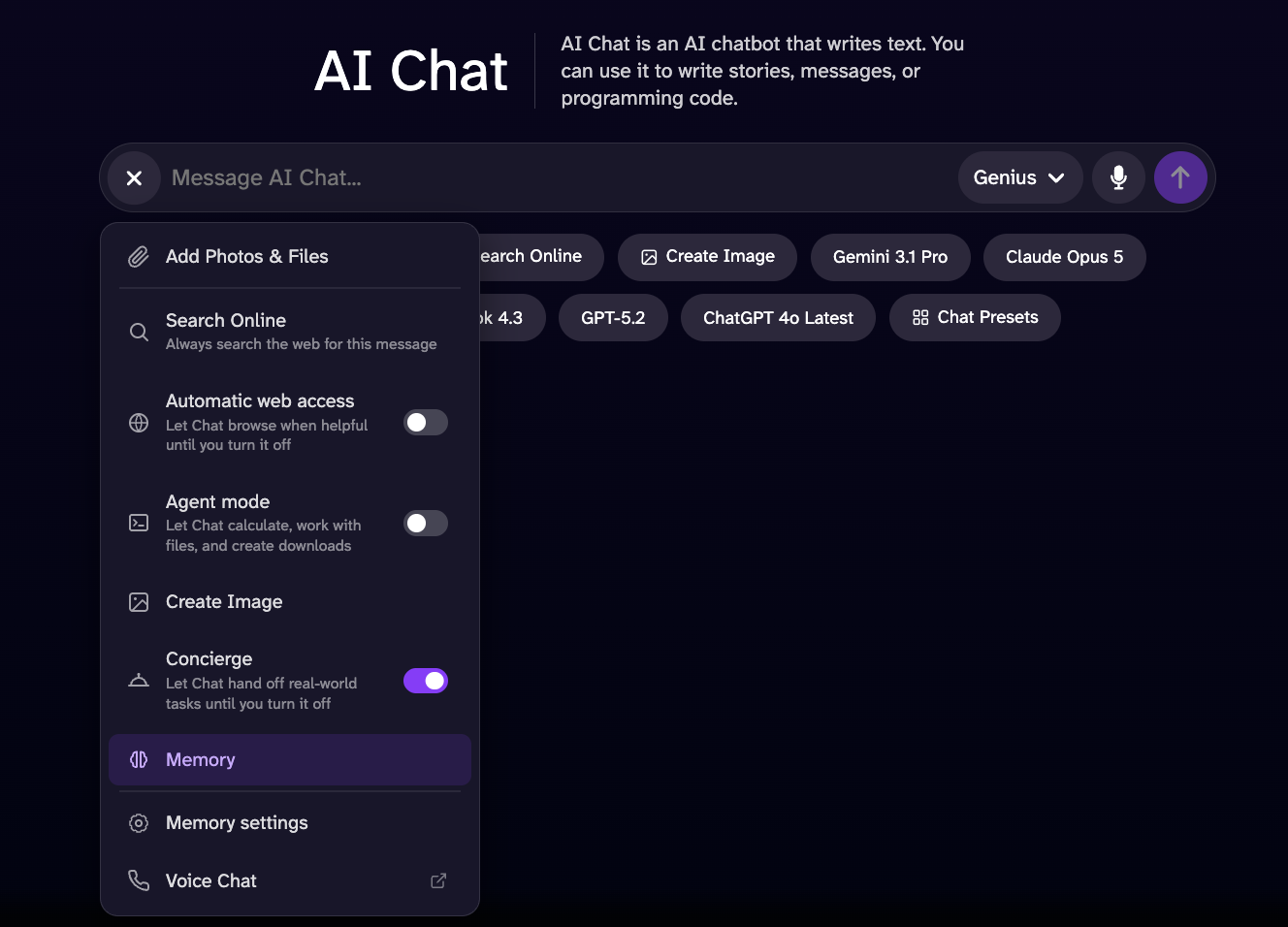
La herramienta «Memoria» ayuda al sistema de chat a recopilar información y a establecer mejores criterios para darte respuestas más precisas. Toma en cuenta la información que has compartido antes para entender tus gustos, preferencias e intereses. Toda esta información se basa en las conversaciones que has tenido con el sistema de chat desde que activaste esta opción. El sistema de chat tiene acceso a la información que proporcionaste anteriormente, y solo está disponible mientras la opción esté activada y tengas un historial de chat. Si borras tu historial, no tomará en cuenta ninguna conversación anterior.
Deja que el chat navegue por la web en tiempo real para encontrar información más precisa y actualizada, además de datos completos sobre lo que estás buscando.
La herramienta «Crear imagen» te permite generar imágenes a partir del chat según el modelo de chat que estés usando: Standard, Genius Pro o Super Genius Pro. ¡Solo tienes que escribir la indicación de lo que quieres generar y listo!
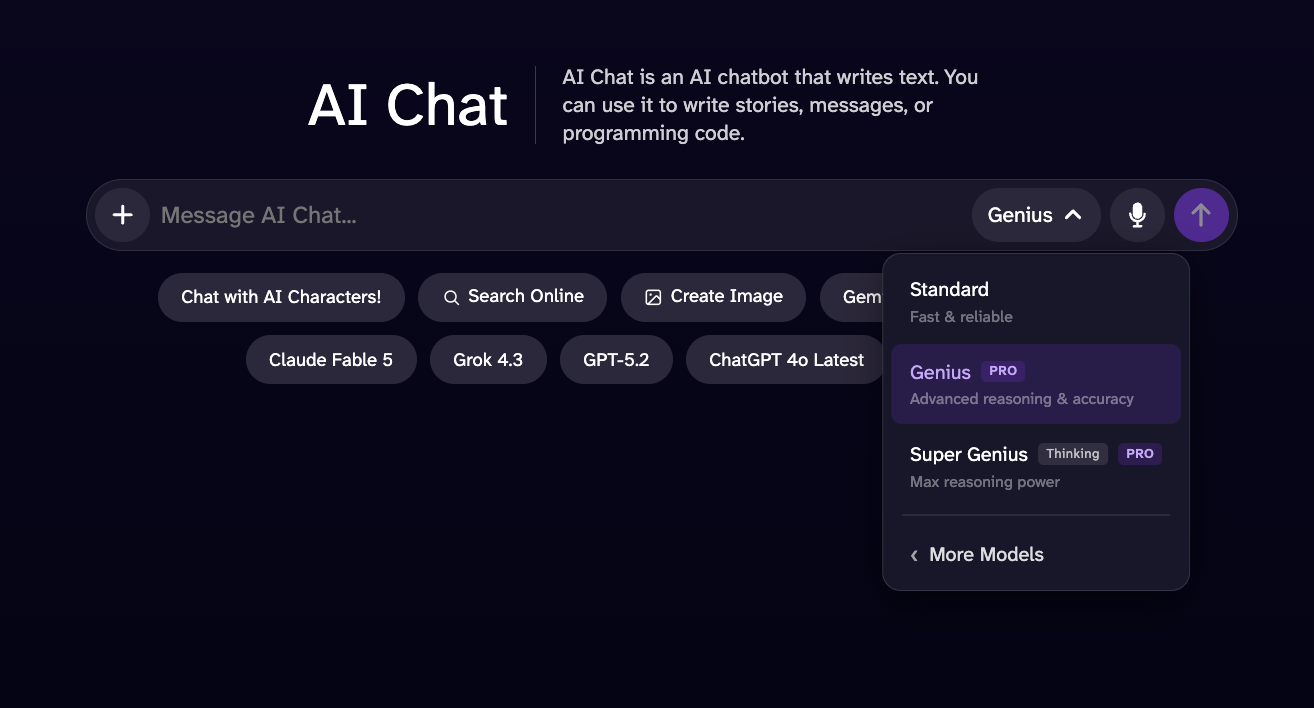
Esta versión es una mejora respecto al Chat con IA Standard, con un rendimiento superior, respuestas más detalladas y mayor inteligencia.
Este modelo está diseñado para superar al Modo Genius en tareas que requieren razonamiento avanzado, análisis lógico y resolución de problemas matemáticos. Aunque su tiempo de respuesta estimado puede ser un poco más largo, ofrece mayor profundidad, una comprensión contextual más amplia y respuestas más completas, lo que se traduce en una experiencia más eficaz y confiable para tareas complejas.
Con este complemento, puedes resolver problemas de matemáticas y ciencias, como ecuaciones, derivadas, problemas de enunciado, álgebra, cálculo ¡y mucho más! Este modo es ideal tanto para resolver problemas técnicos como para revisar una tarea de la que tengas dudas.
El Generador de imágenes con IA es nuestra herramienta de «texto a imagen» que te permite dar rienda suelta a tu creatividad y crear con ayuda de la inteligencia artificial. ¡Intenta describir una imagen del lugar de tus sueños o de lo que quieras, y deja que la IA se encargue del resto!
Para generar imágenes de alta calidad, escribe tu indicación y luego selecciona entre más de 100 estilos y formas.
Si quieres más detalles, mayor calidad artística e imágenes que se ajusten mejor a tus instrucciones que las de HD, con una resolución de hasta 1024x1024 píxeles y la posibilidad de usarlas en formatos horizontal, cuadrado o vertical.
Para imágenes 2K de ultra alta resolución con un nivel de detalle impresionante. Ya sea que solo estés experimentando o quieras crear algo épico, esta herramienta tiene un modo para cada necesidad. Este formato funciona de maravilla si quieres imprimir la imagen.
El Editor de fotos con IA es una herramienta que te permite dar rienda suelta a tu creatividad y recrear o modificar cualquier imagen, ya sea nueva o antigua, usando una descripción de texto de los cambios que quieres ver.
Puedes empezar simplemente subiendo una imagen o una URL, ingresando la indicación con la información que quieres editar o agregar, generándola, y listo. Para obtener los mejores resultados, procura que tus instrucciones sean específicas y concisas, como por ejemplo «haz que el cielo sea rojo» o «agrega flores al fondo».
También puedes crear una edición usando hasta 3 imágenes de referencia, indicando con ejemplos como:
Nuestro Generador de videos con IA convierte tus imágenes y texto en videos. Puedes usarlo para crear videos educativos, de entretenimiento o con historias cortas.
Al subir el contenido al generador de videos, le das a DeepAI el derecho de compartir la imagen y el video públicamente. Asegúrate de entender cómo funciona leyendo la información a continuación.
Tu membresía de DeepAI Pro incluye 25 segundos de generación de video en HD al mes. Los segundos adicionales de video en HD se deducen de tu saldo a una tarifa de $0.20 por segundo. El Modo Hollywood (con resolución 2K) incluye 8 segundos de video al mes, y los videos adicionales en Modo Hollywood se descuentan de tus créditos a una tarifa de $0.30 por segundo.
Un modo de generación versátil diseñado para crear objetos cotidianos realistas, entornos y escenas comunes con imágenes nítidas y detalles precisos. Funciona especialmente bien con temas prácticos y familiares, como electrodomésticos, muebles, dormitorios, cocinas, oficinas, salas y objetos de uso diario. La mejor relación calidad-precio: $0.20 por segundo.
Videos cinematográficos de alta calidad con audio e imágenes profesionales. Máxima calidad creativa a $0.30 por segundo.
Puedes crear videos usando una imagen como guía. Nuestro Generador de videos con IA toma la imagen como punto de partida para iniciar la escena y entiende mejor tu indicación para ofrecer un resultado lo más parecido posible a la imagen con el texto que ingresaste.
¿Tienes alguna referencia que te gustaría usar en tu proyecto? Puedes agregarla, y el Generador de videos con IA trabajará con tu indicación para crear el mejor resultado posible basándose en ella.
Transforma tu video con inteligencia artificial. Agrega, modifica o elimina elementos de tus escenas con instrucciones sencillas y dale a tu contenido exactamente el resultado que buscas.
Website Builder es una plataforma en línea diseñada para simplificar la creación, personalización y administración de sitios web sin que se necesiten conocimientos técnicos avanzados ni de programación.
Les ofrece a los usuarios una interfaz intuitiva y un conjunto de componentes configurables que les permiten crear sitios web adaptativos, personalizar diseños y contenido, administrar páginas y ajustar la apariencia visual de sus proyectos.
DeepAI Code es un agente de programación con IA para Mac y Windows. Abre la carpeta de un proyecto, describe una tarea y deja que lea archivos, edite código y ejecute comandos. Revisa los cambios en la app antes de guardarlos.
- Descargar DeepAI Code. Elige la descarga que corresponda a tu sistema operativo y tipo de chip. En Mac, abre la imagen de disco y arrastra la app a la carpeta Aplicaciones. En Windows, ejecuta el instalador.
- Abre la app y elige una carpeta de proyecto. Inicia un chat y describe lo que quieres crear o modificar.
- Elige un modelo y un modo de acceso. El modo Plan explora una tarea antes de hacer cambios; los otros modos permiten que el agente actúe con diferentes configuraciones de aprobación. Revisa esas configuraciones antes de empezar.
- Sigue la tarea, revisa los diffs de los archivos y conserva o deshaz las ediciones.
Los modelos rápidos, como GLM 5.3 Flash y GPT-6 Luna, son gratis. Los modelos premium consumen Theos, la asignación diaria que recibe cada usuario que inicia sesión; DeepAI Pro te da más cada día. Puedes cambiar de modelo en medio de una conversación. Ver precios.
La app trabaja con los archivos de tu computadora. Las instrucciones y el contenido relevante de los archivos se envían a los modelos de IA para que completen tu tarea. El historial de chat se sincroniza con tu cuenta cuando inicias sesión.
¡Explora cada una de nuestras herramientas y descubrirás que, con tus conocimientos y tu imaginación, puedes crear cosas increíbles!
Crea música única sin esfuerzo con el generador de música de DeepAI. Es perfecto para efectos de sonido, efectos de Foley y pistas de fondo para tus videos. Transforma tus proyectos con paisajes sonoros generados a medida según tus necesidades.
Si tienes DeepAI Pro, las primeras 100 canciones de cada mes son gratis; las canciones adicionales cuestan $0.10 cada una.
¿Tienes una imagen de la que necesitas quitar el fondo, o simplemente no te gusta el fondo? Prueba esta herramienta y te lo quitará sin esfuerzo.
¿Te gustaría ver cómo se vería una foto antigua en blanco y negro? Agrega tus fotos antiguas de familia y dales vida con color.
La herramienta Superresolución usa aprendizaje automático para aclarar, enfocar y aumentar la resolución de la foto sin perder su contenido ni sus características distintivas. Lamentablemente, las imágenes borrosas son comunes y representan un problema tanto para los profesionales como para los aficionados. Superresolución usa técnicas de aprendizaje automático para aumentar la resolución de las imágenes en una fracción de segundo.
¿Hay algo en la foto que no te gusta? Esta herramienta te permite cambiar objetos fácilmente; al especificar exactamente lo que quieres, puedes mejorar tu imagen.
¿Tienes dudas de si una imagen es real? Sube una imagen para calcular si fue generada por IA o manipulada digitalmente; los resultados son probabilísticos y no deben considerarse una prueba definitiva.
DeepAI Pro es una suscripción que te da acceso al conjunto completo de herramientas de DeepAI por $9.99 al mes o $89.99 al año, con cuotas que se renuevan mensualmente. También puedes agregar créditos para generar más contenido cuando se agoten las cuotas de tu ciclo actual. Encuentra más información en nuestra página de precios, disponible en https://deepai.org/pricing.
Precios: las llamadas a la API están incluidas en tu suscripción a DeepAI Pro. Cada generación se descuenta de tu cupo mensual o del saldo de tu billetera prepagada.
DeepAI ofrece una variedad de API de imágenes. Cada una es un punto final HTTP sencillo al que puedes acceder desde cualquier lenguaje, como por ejemplo:- Texto a imagen: genera imágenes a partir de una descripción de texto.
- Editor de fotos con IA: edita y transforma una imagen ya existente con una indicación de texto.
- Superresolución: mejora la calidad de las imágenes y recupera detalles nítidos con aprendizaje automático.
- Colorizador de imágenes: agrega color realista a las fotos en blanco y negro.
- Eliminador de fondo: recorta el sujeto de una foto sin dejar rastros.
- Generador de videos: genera videos a partir de una descripción de texto o una imagen de origen; consulta la API de video.
Cada API de DeepAI es una sola solicitud POST. Envía las entradas del modelo como multipart/form-data y autentícate con tu clave de API en un encabezado de la solicitud.
Inicia sesión y copia tu clave desde el panel de control de tu cuenta. Para acceder a la API necesitas una suscripción a DeepAI Pro. Mantén tu clave en secreto: trátala como si fuera una contraseña y nunca la reveles en el código del lado del cliente.
Pasa tu clave en el encabezado api-key y las entradas del modelo como campos de formulario. La URL del punto final es https://api.deepai.org/api/<model>, donde <model> es el identificador del modelo (que se muestra junto a cada modelo a continuación).
curl -X POST https://api.deepai.org/api/text2img \
    -H 'api-key:YOUR_API_KEY' \
    -F 'text=a serene mountain lake at sunrise'
Si todo sale bien, recibirás un 200 OK con un cuerpo JSON. output_url te lleva al archivo generado y id es el identificador único del trabajo:
{
    "id": "59a0e8a9-...",
    "output_url": "https://api.deepai.org/job-view-file/.../output.jpg"
}
Los errores devuelven un código de estado distinto de 200 y un cuerpo JSON con un mensaje del tipo «err» o «status»:
- 401 — Falta la clave de API o es inválida, o se excedió el límite de uso.
- 410 — el modelo que pediste ya no está disponible.
- 500 — No se encontró el identificador del modelo o se produjo un error de procesamiento.
Genera videos a partir de un texto o una imagen de origen. La generación de videos tarda unos minutos, así que, a diferencia de las API de imágenes, es asincrónica: envía un trabajo, recibe un id de trabajo y luego consulta el punto final de estado hasta que el video esté listo.
Precios: la generación de videos requiere DeepAI Pro y se cobra por segundo de video generado; los segundos se descuentan primero de tu asignación mensual (25 segundos Standard, 8 segundos en Modo Hollywood) y luego de tu billetera prepagada (20¢ por segundo Standard, 30¢ por segundo en Modo Hollywood). Consulta los precios.
Texto a video: POST https://api.deepai.org/video-api/text2video
De imagen a video: POST https://api.deepai.org/video-api/img2video
Estado del trabajo: GET https://api.deepai.org/video-api/status/<id>
Envía los parámetros como «multipart/form-data», «form-urlencoded» o en un cuerpo «application/json» (con «image» como URL o datos base64) con tu clave en el encabezado «api-key», exactamente igual que en las API de imágenes. El encabezado es obligatorio en cada llamada, incluidas las consultas de estado; una sesión de navegador no autentica estas rutas.
| Parámetro | Tipo | Obligatorio | Por defecto |
|---|---|---|---|
prompt | string | text2video: Sí img2video: No | — |
image | archivo, URL o base64 | Solo img2video: Sí | — |
mode | string | No | hd |
duration | integer | No | 5 |
shape | string | No | auto |
prompt — qué generar, hasta 3000 caracteres (las indicaciones más largas se rechazan con un «400»). Opcional en img2video (la imagen de origen por sí sola es suficiente).
image — la imagen de origen para img2video: súbela como un campo de archivo, introduce una URL pública http(s) o envía datos en base64 (sin formato o como una URL del tipo data:image/...;base64,). Máximo 20 MB, y debe poder decodificarse como una imagen. Se siguen las redirecciones.
mode — hd para videos estándar, o hollywood para videos 2K con calidad cinematográfica.
duration — duración del video generado en segundos, de 5 a 15. La facturación es por segundo.
shape — square, landscape, standard, vertical, portrait o auto. Con auto, img2video se ajusta a la forma de la imagen de origen y text2video usa el formato horizontal. En el modo hollywood, img2video siempre mantiene la forma de la imagen de origen, así que shape debe ser auto ahí.
curl -X POST https://api.deepai.org/video-api/text2video \
    -H 'api-key:YOUR_API_KEY' \
    -F 'prompt=a golden retriever surfing a wave at sunset' \
    -F 'mode=hd' \
    -F 'duration=5' \
    -F 'shape=landscape'
Convertir una imagen en video, desde un archivo o una URL:
curl -X POST https://api.deepai.org/video-api/img2video \
    -H 'api-key:YOUR_API_KEY' \
    -F 'image=@/path/to/photo.jpg' \
    -F 'prompt=the camera slowly zooms in'
Un envío correcto devuelve el ID del trabajo que debes consultar:
{
    "id": "59a0e8a9-...",
    "status": "processing"
}
Consulta el punto final de estado cada pocos segundos. status es processing, completed o failed:
curl https://api.deepai.org/video-api/status/59a0e8a9-... \
    -H 'api-key:YOUR_API_KEY'
{"status": "processing"}

{"status": "completed", "output_url": "https://...mp4"}

{"status": "failed", "error": "..."}
Un ejemplo completo en Python:
import time, requests

headers = {'api-key': 'YOUR_API_KEY'}
job = requests.post(
    'https://api.deepai.org/video-api/text2video',
    data={'prompt': 'a golden retriever surfing a wave at sunset',
          'mode': 'hd', 'duration': 5, 'shape': 'landscape'},
    headers=headers).json()

while True:
    status = requests.get(
        'https://api.deepai.org/video-api/status/' + job['id'],
        headers=headers).json()
    if status['status'] == 'completed':
        print(status['output_url'])
        break
    if status['status'] == 'failed':
        raise RuntimeError(status['error'])
    time.sleep(5)
- Obtén tu resultado de inmediato: el registro de estado (y su
output_url) estará disponible durante una hora después de que se complete el proceso; pasado ese tiempo, el punto final de estado devolverá un error 404. Descarga el video cuando se complete. - Solo se te cobran los videos que se completan. Los créditos se reservan cuando se envía un trabajo y se liberan si falla.
- Un error «
401» significa que falta el encabezado «api-key» o que no es válido. Un error «403» significa que la cuenta no tiene una suscripción activa a DeepAI Pro. - Si recibes un mensaje de «
402» al enviar la solicitud, significa que el saldo de tu billetera no alcanza para pagar el video (en el cuerpo del mensaje se muestra el costo y tu saldo) o que tu cuenta está bloqueada por un pago fallido. Agrega créditos o activa la recarga automática en tu panel de control. - Las indicaciones y las imágenes se moderan: el contenido marcado se rechaza al enviarlo con un «
400», y el contenido que el proveedor de video marca durante la generación aparece como «{"status": "failed", "error": "NSFW detected"}».
Generador de imágenes con IAVolver al inicio ↑
Este es un generador de imágenes con IA. Crea una imagen desde cero a partir de una descripción de texto.
Punto final: POST https://api.deepai.org/api/text2img
| Parámetro | Tipo | Obligatorio | Por defecto |
|---|---|---|---|
text |
text | Sí | — |
text — una cadena que describe lo que se va a generar, por ejemplo, «Una noche estrellada sobre un lago tranquilo» o «El retrato de un viejo pirata».
width, height — pasa una cadena, por ejemplo, "256" o "768" (por defecto 512). Usa valores entre 128 y 1536, en múltiplos de 32. Recomendado para imágenes estándar: 1024x576, 1024x720, 512x512, 768x1024, 576x1024. Recomendado para imágenes en HD: 1216x832, 1152x896, 1024x1024, 896x1152, 832x1216. Los valores por encima de ~700 o por debajo de 256 pueden generar resultados extraños.
image_generator_version — «standard» (predeterminado), «hd», «genius» o «super_genius».
resolution — «2k» (por defecto) o «4k». Solo se usa cuando image_generator_version es «super_genius».
genius_preference — «anime», «photography», «graphic» o «cinematic». Solo se usa cuando image_generator_version es «genius».
negative_prompt — una cadena que describe qué hay que eliminar de la imagen; útil para mejorar la calidad y los detalles. Ejemplos: anatomía incorrecta, borrosa, recortada, deformada, desfigurada, duplicada, extremidades de más, dedos fusionados, artefactos JPEG, baja calidad, baja resolución, manos mutadas, fuera del encuadre, firma, texto, marca de agua, pésima calidad.
Ejemplos de Generador de imágenes con IA en cURL
# Example posting a text URL:

curl \
    -F 'text=YOUR_TEXT_HERE' \
    -H 'api-key:YOUR_API_KEY' \
    https://api.deepai.org/api/text2img


# Example posting a local text file:

curl \
    -F 'text=YOUR_TEXT_HERE' \
    -H 'api-key:YOUR_API_KEY' \
    https://api.deepai.org/api/text2img


# Example directly sending a text string:

curl \
    -F 'text=YOUR_TEXT_HERE' \
    -H 'api-key:YOUR_API_KEY' \
    https://api.deepai.org/api/text2img
Ejemplos de Generador de imágenes con IA en Javascript
// Example posting a text URL:
(async function() {
    const resp = await fetch('https://api.deepai.org/api/text2img', {
        method: 'POST',
        headers: {
            'Content-Type': 'application/json',
            'api-key': 'YOUR_API_KEY'
        },
        body: JSON.stringify({
            text: "YOUR_TEXT_HERE",
        })
    });

    const data = await resp.json();
    console.log(data);
})()


// Example posting file picker input text (Browser only):
document.getElementById('yourFileInputId').addEventListener('change', async function() {
       const formData = new FormData();
       formData.append('text', 'YOUR_TEXT_HERE');

       const resp = await fetch('https://api.deepai.org/api/text2img', {
           method: 'POST',
           headers: {
               'api-key': 'YOUR_API_KEY'
           },
           body: formData
       });

       const data = await resp.json();
       console.log(data);
});

// Example posting a local text file (Node.js only):
const fs = require('fs');
(async function() {
       const formData = new FormData();
       formData.append('text', 'YOUR_TEXT_HERE');

       const resp = await fetch('https://api.deepai.org/api/text2img', {
           method: 'POST',
           headers: {
               'api-key': 'YOUR_API_KEY'
           },
           body: formData
       });

       const data = await resp.json();
       console.log(data);
});

// Example directly sending a text string:
(async function() {
    const resp = await fetch('https://api.deepai.org/api/text2img', {
        method: 'POST',
        headers: {
            'Content-Type': 'application/json',
            'api-key': 'YOUR_API_KEY'
        },
        body: JSON.stringify({
            text: "YOUR_TEXT_HERE",
        })
    });

    const data = await resp.json();
    console.log(data);
})()
Ejemplos de Generador de imágenes con IA en Python
# Example posting a text URL:

import requests
r = requests.post(
    "https://api.deepai.org/api/text2img",
    data={
        'text': 'YOUR_TEXT_HERE',
    },
    headers={'api-key': 'YOUR_API_KEY'}
)
print(r.json())


# Example posting a local text file:

import requests
r = requests.post(
    "https://api.deepai.org/api/text2img",
    data={
        'text': 'YOUR_TEXT_HERE',
    },
    headers={'api-key': 'YOUR_API_KEY'}
)
print(r.json())


# Example directly sending a text string:

import requests
r = requests.post(
    "https://api.deepai.org/api/text2img",
    data={
        'text': 'YOUR_TEXT_HERE',
    },
    headers={'api-key': 'YOUR_API_KEY'}
)
print(r.json())
Ejemplos de Generador de imágenes con IA en Ruby
# Example posting a text URL:

require 'rest_client'
r = RestClient::Request.execute(method: :post, url: 'https://api.deepai.org/api/text2img', timeout: 600,
    headers: {'api-key' => 'YOUR_API_KEY'},
    payload: {
        'text' => 'YOUR_TEXT_HERE',
    }
)
puts r


# Example posting a local text file:

require 'rest_client'
r = RestClient::Request.execute(method: :post, url: 'https://api.deepai.org/api/text2img', timeout: 600,
    headers: {'api-key' => 'YOUR_API_KEY'},
    payload: {
        'text' => 'YOUR_TEXT_HERE',
    }
)
puts r


# Example directly sending a text string:

require 'rest_client'
r = RestClient::Request.execute(method: :post, url: 'https://api.deepai.org/api/text2img', timeout: 600,
    headers: {'api-key' => 'YOUR_API_KEY'},
    payload: {
        'text' => 'YOUR_TEXT_HERE',
    }
)
puts r
Ejemplos de Generador de imágenes con IA en Php
// Example posting a text URL:
<?php
require 'vendor/autoload.php'; // Ensure you have Guzzle installed (composer require guzzlehttp/guzzle)

use GuzzleHttp\Client;
use GuzzleHttp\Psr7\Utils;

$client = new Client();
$headers = [
    'api-key' => 'YOUR_API_KEY'
];
$options = [
    'multipart' => [
        [
            'name'     => 'text',
            'contents' => 'YOUR_TEXT_HERE'
        ],
    ]
];
$request = new GuzzleHttp\Psr7\Request('POST', 'https://api.deepai.org/api/text2img', $headers);
try {
    $res = $client->sendAsync($request, $options)->wait();
    echo $res->getBody();
} catch (Exception $e) {
    echo 'Error: ' . $e->getMessage();
}
?>


// Example posting a local text file:
<?php
require 'vendor/autoload.php'; // Ensure you have Guzzle installed (composer require guzzlehttp/guzzle)

use GuzzleHttp\Client;
use GuzzleHttp\Psr7\Utils;

$client = new Client();
$headers = [
    'api-key' => 'YOUR_API_KEY'
];
$options = [
    'multipart' => [
        [
            'name'     => 'text',
            'contents' => 'YOUR_TEXT_HERE'
        ],
    ]
];
$request = new GuzzleHttp\Psr7\Request('POST', 'https://api.deepai.org/api/text2img', $headers);
try {
    $res = $client->sendAsync($request, $options)->wait();
    echo $res->getBody();
} catch (Exception $e) {
    echo 'Error: ' . $e->getMessage();
}
?>


// Example directly sending a text string:
<?php
require 'vendor/autoload.php'; // Ensure you have Guzzle installed (composer require guzzlehttp/guzzle)

use GuzzleHttp\Client;
use GuzzleHttp\Psr7\Utils;

$client = new Client();
$headers = [
    'api-key' => 'YOUR_API_KEY'
];
$options = [
    'multipart' => [
        [
            'name'     => 'text',
            'contents' => 'YOUR_TEXT_HERE'
        ],
    ]
];
$request = new GuzzleHttp\Psr7\Request('POST', 'https://api.deepai.org/api/text2img', $headers);
try {
    $res = $client->sendAsync($request, $options)->wait();
    echo $res->getBody();
} catch (Exception $e) {
    echo 'Error: ' . $e->getMessage();
}
?>
Ejemplos de Generador de imágenes con IA en Go
// Example posting a text URL:
package main

import (
    "bytes"
    "encoding/json"
    "fmt"
    "io"
    "net/http"
)

func main() {
    url := "https://api.deepai.org/api/text2img"
    payload := map[string]string{
        "text": "YOUR_TEXT_HERE",
    }
    jsonData, _ := json.Marshal(payload)

    req, _ := http.NewRequest("POST", url, bytes.NewBuffer(jsonData))
    req.Header.Set("Content-Type", "application/json")
    req.Header.Set("api-key", "YOUR_API_KEY")

    client := &http.Client{}
    resp, err := client.Do(req)
    if err != nil {
        panic(err)
    }
    defer resp.Body.Close()

    body, _ := io.ReadAll(resp.Body)
    fmt.Println(string(body))
}


// Example posting a local text file:
package main

import (
    "bytes"
    "fmt"
    "io"
    "mime/multipart"
    "net/http"
    "os"
)

func main() {
    url := "https://api.deepai.org/api/text2img"

    var b bytes.Buffer
    w := multipart.NewWriter(&b)

    w.WriteField("text", "YOUR_TEXT_HERE")

    if err := w.Close(); err != nil {
        panic(err)
    }

    req, _ := http.NewRequest("POST", url, &b)
    req.Header.Set("Content-Type", w.FormDataContentType())
    req.Header.Set("api-key", "YOUR_API_KEY")

    client := &http.Client{}
    resp, err := client.Do(req)
    if err != nil {
        panic(err)
    }
    defer resp.Body.Close()

    body, _ := io.ReadAll(resp.Body)
    fmt.Println(string(body))
}


// Example directly sending a text string:
package main

import (
    "bytes"
    "encoding/json"
    "fmt"
    "io"
    "net/http"
)

func main() {
    url := "https://api.deepai.org/api/text2img"
    payload := map[string]string{
        "text": "YOUR_TEXT_HERE",
    }
    jsonData, _ := json.Marshal(payload)

    req, _ := http.NewRequest("POST", url, bytes.NewBuffer(jsonData))
    req.Header.Set("Content-Type", "application/json")
    req.Header.Set("api-key", "YOUR_API_KEY")

    client := &http.Client{}
    resp, err := client.Do(req)
    if err != nil {
        panic(err)
    }
    defer resp.Body.Close()

    body, _ := io.ReadAll(resp.Body)
    fmt.Println(string(body))
}
Ejemplos de Generador de imágenes con IA en Java
// Example posting a text URL:
import java.net.http.HttpClient;
import java.net.http.HttpRequest;
import java.net.http.HttpResponse;
import java.net.URI;

public class Main {
    public static void main(String[] args) throws Exception {
        HttpClient client = HttpClient.newHttpClient();

        String json = "{" +
            "\"text\": \"YOUR_TEXT_HERE\"" +
            "}";

        HttpRequest request = HttpRequest.newBuilder()
            .uri(URI.create("https://api.deepai.org/api/text2img"))
            .header("Content-Type", "application/json")
            .header("api-key", "YOUR_API_KEY")
            .POST(HttpRequest.BodyPublishers.ofString(json))
            .build();

        HttpResponse<String> response = client.send(request, HttpResponse.BodyHandlers.ofString());
        System.out.println(response.body());
    }
}


// Example posting a local text file:
// Add to build.gradle: implementation 'com.squareup.okhttp3:okhttp:4.12.0'
import okhttp3.*;
import java.io.File;
import java.io.IOException;

public class Main {
    public static void main(String[] args) throws IOException {
        OkHttpClient client = new OkHttpClient();

        RequestBody requestBody = new MultipartBody.Builder()
            .setType(MultipartBody.FORM)
            .addFormDataPart("text", "YOUR_TEXT_HERE")
            .build();

        Request request = new Request.Builder()
            .url("https://api.deepai.org/api/text2img")
            .addHeader("api-key", "YOUR_API_KEY")
            .post(requestBody)
            .build();

        try (Response response = client.newCall(request).execute()) {
            System.out.println(response.body().string());
        }
    }
}


// Example directly sending a text string:
import java.net.http.HttpClient;
import java.net.http.HttpRequest;
import java.net.http.HttpResponse;
import java.net.URI;

public class Main {
    public static void main(String[] args) throws Exception {
        HttpClient client = HttpClient.newHttpClient();

        String json = "{" +
            "\"text\": \"YOUR_TEXT_HERE\"" +
            "}";

        HttpRequest request = HttpRequest.newBuilder()
            .uri(URI.create("https://api.deepai.org/api/text2img"))
            .header("Content-Type", "application/json")
            .header("api-key", "YOUR_API_KEY")
            .POST(HttpRequest.BodyPublishers.ofString(json))
            .build();

        HttpResponse<String> response = client.send(request, HttpResponse.BodyHandlers.ofString());
        System.out.println(response.body());
    }
}
Ejemplos de Generador de imágenes con IA en C#
// Example posting a text URL:
using System;
using System.Net.Http;
using System.Text;
using System.Text.Json;
using System.Threading.Tasks;

class Program
{
    static async Task Main()
    {
        using var client = new HttpClient();
        client.DefaultRequestHeaders.Add("api-key", "YOUR_API_KEY");

        var payload = new
        {
            text = "YOUR_TEXT_HERE",
        };

        var json = JsonSerializer.Serialize(payload);
        var content = new StringContent(json, Encoding.UTF8, "application/json");

        var response = await client.PostAsync("https://api.deepai.org/api/text2img", content);
        var result = await response.Content.ReadAsStringAsync();
        Console.WriteLine(result);
    }
}


// Example posting a local text file:
using System;
using System.IO;
using System.Net.Http;
using System.Threading.Tasks;

class Program
{
    static async Task Main()
    {
        using var client = new HttpClient();
        client.DefaultRequestHeaders.Add("api-key", "YOUR_API_KEY");

        using var form = new MultipartFormDataContent();

        form.Add(new StringContent("YOUR_TEXT_HERE"), "text");

        var response = await client.PostAsync("https://api.deepai.org/api/text2img", form);
        var result = await response.Content.ReadAsStringAsync();
        Console.WriteLine(result);
    }
}


// Example directly sending a text string:
using System;
using System.Net.Http;
using System.Text;
using System.Text.Json;
using System.Threading.Tasks;

class Program
{
    static async Task Main()
    {
        using var client = new HttpClient();
        client.DefaultRequestHeaders.Add("api-key", "YOUR_API_KEY");

        var payload = new
        {
            text = "YOUR_TEXT_HERE",
        };

        var json = JsonSerializer.Serialize(payload);
        var content = new StringContent(json, Encoding.UTF8, "application/json");

        var response = await client.PostAsync("https://api.deepai.org/api/text2img", content);
        var result = await response.Content.ReadAsStringAsync();
        Console.WriteLine(result);
    }
}
Ejemplos de Generador de imágenes con IA en Swift
// Example posting a text URL:
import Foundation

let url = URL(string: "https://api.deepai.org/api/text2img")!
var request = URLRequest(url: url)
request.httpMethod = "POST"
request.setValue("application/json", forHTTPHeaderField: "Content-Type")
request.setValue("YOUR_API_KEY", forHTTPHeaderField: "api-key")

let payload: [String: Any] = [
    "text": "YOUR_TEXT_HERE",
]

request.httpBody = try? JSONSerialization.data(withJSONObject: payload)

let task = URLSession.shared.dataTask(with: request) { data, response, error in
    if let data = data {
        print(String(data: data, encoding: .utf8) ?? "")
    }
}
task.resume()

// Keep the program running for async request
RunLoop.main.run()


// Example posting a local text file:
import Foundation

let url = URL(string: "https://api.deepai.org/api/text2img")!
var request = URLRequest(url: url)
request.httpMethod = "POST"
request.setValue("YOUR_API_KEY", forHTTPHeaderField: "api-key")

let boundary = UUID().uuidString
request.setValue("multipart/form-data; boundary=\(boundary)", forHTTPHeaderField: "Content-Type")

var body = Data()

body.append("--\(boundary)\r\n".data(using: .utf8)!)
body.append("Content-Disposition: form-data; name=\"text\"\r\n\r\n".data(using: .utf8)!)
body.append("YOUR_TEXT_HERE".data(using: .utf8)!)
body.append("\r\n".data(using: .utf8)!)

body.append("--\(boundary)--\r\n".data(using: .utf8)!)
request.httpBody = body

let task = URLSession.shared.dataTask(with: request) { data, response, error in
    if let data = data {
        print(String(data: data, encoding: .utf8) ?? "")
    }
}
task.resume()

RunLoop.main.run()


// Example directly sending a text string:
import Foundation

let url = URL(string: "https://api.deepai.org/api/text2img")!
var request = URLRequest(url: url)
request.httpMethod = "POST"
request.setValue("application/json", forHTTPHeaderField: "Content-Type")
request.setValue("YOUR_API_KEY", forHTTPHeaderField: "api-key")

let payload: [String: Any] = [
    "text": "YOUR_TEXT_HERE",
]

request.httpBody = try? JSONSerialization.data(withJSONObject: payload)

let task = URLSession.shared.dataTask(with: request) { data, response, error in
    if let data = data {
        print(String(data: data, encoding: .utf8) ?? "")
    }
}
task.resume()

RunLoop.main.run()
Ejemplos de Generador de imágenes con IA en Kotlin
// Example posting a text URL:
import java.net.URI
import java.net.http.HttpClient
import java.net.http.HttpRequest
import java.net.http.HttpResponse

fun main() {
    val client = HttpClient.newHttpClient()

    val json = """{
        "text": "YOUR_TEXT_HERE"
    }"""

    val request = HttpRequest.newBuilder()
        .uri(URI.create("https://api.deepai.org/api/text2img"))
        .header("Content-Type", "application/json")
        .header("api-key", "YOUR_API_KEY")
        .POST(HttpRequest.BodyPublishers.ofString(json))
        .build()

    val response = client.send(request, HttpResponse.BodyHandlers.ofString())
    println(response.body())
}


// Example posting a local text file:
// Add to build.gradle.kts: implementation("com.squareup.okhttp3:okhttp:4.12.0")
import okhttp3.*
import okhttp3.MediaType.Companion.toMediaType
import okhttp3.RequestBody.Companion.asRequestBody
import java.io.File

fun main() {
    val client = OkHttpClient()

    val requestBody = MultipartBody.Builder()
        .setType(MultipartBody.FORM)
        .addFormDataPart("text", "YOUR_TEXT_HERE")
        .build()

    val request = Request.Builder()
        .url("https://api.deepai.org/api/text2img")
        .addHeader("api-key", "YOUR_API_KEY")
        .post(requestBody)
        .build()

    client.newCall(request).execute().use { response ->
        println(response.body?.string())
    }
}


// Example directly sending a text string:
import java.net.URI
import java.net.http.HttpClient
import java.net.http.HttpRequest
import java.net.http.HttpResponse

fun main() {
    val client = HttpClient.newHttpClient()

    val json = """{
        "text": "YOUR_TEXT_HERE"
    }"""

    val request = HttpRequest.newBuilder()
        .uri(URI.create("https://api.deepai.org/api/text2img"))
        .header("Content-Type", "application/json")
        .header("api-key", "YOUR_API_KEY")
        .POST(HttpRequest.BodyPublishers.ofString(json))
        .build()

    val response = client.send(request, HttpResponse.BodyHandlers.ofString())
    println(response.body())
}
Ejemplos de Generador de imágenes con IA en Rust
// Example posting a text URL:
// Add to Cargo.toml: reqwest = { version = "0.11", features = ["json", "multipart"] }
// tokio = { version = "1", features = ["full"] }
// serde_json = "1"

use reqwest::header::HeaderMap;
use std::collections::HashMap;

#[tokio::main]
async fn main() -> Result<(), Box<dyn std::error::Error>> {
    let client = reqwest::Client::new();

    let mut headers = HeaderMap::new();
    headers.insert("api-key", "YOUR_API_KEY".parse()?);

    let mut payload = HashMap::new();
    payload.insert("text", "YOUR_TEXT_HERE");

    let response = client
        .post("https://api.deepai.org/api/text2img")
        .headers(headers)
        .json(&payload)
        .send()
        .await?;

    println!("{}", response.text().await?);
    Ok(())
}


// Example posting a local text file:
// Add to Cargo.toml: reqwest = { version = "0.11", features = ["json", "multipart"] }
// tokio = { version = "1", features = ["full"] }

use reqwest::multipart;
use std::fs;

#[tokio::main]
async fn main() -> Result<(), Box<dyn std::error::Error>> {
    let client = reqwest::Client::new();

    let form = multipart::Form::new()
        .text("text", "YOUR_TEXT_HERE");

    let response = client
        .post("https://api.deepai.org/api/text2img")
        .header("api-key", "YOUR_API_KEY")
        .multipart(form)
        .send()
        .await?;

    println!("{}", response.text().await?);
    Ok(())
}


// Example directly sending a text string:
// Add to Cargo.toml: reqwest = { version = "0.11", features = ["json", "multipart"] }
// tokio = { version = "1", features = ["full"] }
// serde_json = "1"

use reqwest::header::HeaderMap;
use std::collections::HashMap;

#[tokio::main]
async fn main() -> Result<(), Box<dyn std::error::Error>> {
    let client = reqwest::Client::new();

    let mut headers = HeaderMap::new();
    headers.insert("api-key", "YOUR_API_KEY".parse()?);

    let mut payload = HashMap::new();
    payload.insert("text", "YOUR_TEXT_HERE");

    let response = client
        .post("https://api.deepai.org/api/text2img")
        .headers(headers)
        .json(&payload)
        .send()
        .await?;

    println!("{}", response.text().await?);
    Ok(())
}
Ejemplos de Generador de imágenes con IA en TypeScript
// Example posting a text URL:
interface ApiResponse {
    // Define your response type here
    [key: string]: unknown;
}

async function callApi(): Promise<ApiResponse> {
    const response = await fetch('https://api.deepai.org/api/text2img', {
        method: 'POST',
        headers: {
            'Content-Type': 'application/json',
            'api-key': 'YOUR_API_KEY'
        },
        body: JSON.stringify({
            text: 'YOUR_TEXT_HERE',
        })
    });

    const data: ApiResponse = await response.json();
    console.log(data);
    return data;
}

callApi();


// Example posting a local text file (Node.js with form-data package):
// npm install form-data
import * as fs from 'fs';
import FormData from 'form-data';

interface ApiResponse {
    [key: string]: unknown;
}

async function uploadFile(): Promise<ApiResponse> {
    const formData = new FormData();
    formData.append('text', 'YOUR_TEXT_HERE');

    const response = await fetch('https://api.deepai.org/api/text2img', {
        method: 'POST',
        headers: {
            ...formData.getHeaders(),
            'api-key': 'YOUR_API_KEY'
        },
        body: formData as unknown as BodyInit
    });

    const data: ApiResponse = await response.json();
    console.log(data);
    return data;
}

uploadFile();


// Example directly sending a text string:
interface ApiResponse {
    [key: string]: unknown;
}

async function callApi(): Promise<ApiResponse> {
    const response = await fetch('https://api.deepai.org/api/text2img', {
        method: 'POST',
        headers: {
            'Content-Type': 'application/json',
            'api-key': 'YOUR_API_KEY'
        },
        body: JSON.stringify({
            text: 'YOUR_TEXT_HERE',
        })
    });

    const data: ApiResponse = await response.json();
    console.log(data);
    return data;
}

callApi();
Ejemplos de Generador de imágenes con IA en Dart
// Example posting a text URL:
// Add to pubspec.yaml: http: ^1.1.0

import 'dart:convert';
import 'package:http/http.dart' as http;

Future<void> main() async {
  final response = await http.post(
    Uri.parse('https://api.deepai.org/api/text2img'),
    headers: {
      'Content-Type': 'application/json',
      'api-key': 'YOUR_API_KEY',
    },
    body: jsonEncode({
      'text': 'YOUR_TEXT_HERE',
    }),
  );

  print(response.body);
}


// Example posting a local text file:
// Add to pubspec.yaml: http: ^1.1.0

import 'dart:io';
import 'package:http/http.dart' as http;

Future<void> main() async {
  var request = http.MultipartRequest(
    'POST',
    Uri.parse('https://api.deepai.org/api/text2img'),
  );

  request.headers['api-key'] = 'YOUR_API_KEY';

  request.fields['text'] = 'YOUR_TEXT_HERE';

  var response = await request.send();
  var responseBody = await response.stream.bytesToString();
  print(responseBody);
}


// Example directly sending a text string:
// Add to pubspec.yaml: http: ^1.1.0

import 'dart:convert';
import 'package:http/http.dart' as http;

Future<void> main() async {
  final response = await http.post(
    Uri.parse('https://api.deepai.org/api/text2img'),
    headers: {
      'Content-Type': 'application/json',
      'api-key': 'YOUR_API_KEY',
    },
    body: jsonEncode({
      'text': 'YOUR_TEXT_HERE',
    }),
  );

  print(response.body);
}
Ejemplos de Generador de imágenes con IA en PowerShell
# Example posting a text URL:

$r = Invoke-WebRequest `
    -Uri https://api.deepai.org/api/text2img `
    -Method Post `
    -Form @{
         text='YOUR_TEXT_HERE'
    } `
    -Headers @{
        'api-key'='YOUR_API_KEY'
    }
$r.Content

# Example posting a local text file:

$r = Invoke-WebRequest `
    -Uri https://api.deepai.org/api/text2img `
    -Method Post `
    -Form @{
         text='YOUR_TEXT_HERE'
    } `
    -Headers @{
        'api-key'='YOUR_API_KEY'
    }
$r.Content

# Example directly sending a text string:

$r = Invoke-WebRequest `
    -Uri https://api.deepai.org/api/text2img `
    -Method Post `
    -Form @{
         text='YOUR_TEXT_HERE'
    } `
    -Headers @{
        'api-key'='YOUR_API_KEY'
    }
$r.Content
Eliminador de fondoVolver al inicio ↑
Elimina el fondo de una imagen con IA.
Punto final: POST https://api.deepai.org/api/background-remover
| Parámetro | Tipo | Obligatorio | Por defecto |
|---|---|---|---|
image |
image | Sí | — |
Ejemplos de Eliminador de fondo en cURL
# Example posting a image URL:

curl \
    -F 'image=YOUR_IMAGE_URL' \
    -H 'api-key:YOUR_API_KEY' \
    https://api.deepai.org/api/background-remover


# Example posting a local image file:

curl \
    -F 'image=@/path/to/your/file.jpg' \
    -H 'api-key:YOUR_API_KEY' \
    https://api.deepai.org/api/background-remover
Ejemplos de Eliminador de fondo en Javascript
// Example posting a image URL:
(async function() {
    const resp = await fetch('https://api.deepai.org/api/background-remover', {
        method: 'POST',
        headers: {
            'Content-Type': 'application/json',
            'api-key': 'YOUR_API_KEY'
        },
        body: JSON.stringify({
            image: "YOUR_IMAGE_URL",
        })
    });

    const data = await resp.json();
    console.log(data);
})()


// Example posting file picker input image (Browser only):
document.getElementById('yourFileInputId').addEventListener('change', async function() {
       const formData = new FormData();
       formData.append('image', this.files[0]);

       const resp = await fetch('https://api.deepai.org/api/background-remover', {
           method: 'POST',
           headers: {
               'api-key': 'YOUR_API_KEY'
           },
           body: formData
       });

       const data = await resp.json();
       console.log(data);
});

// Example posting a local image file (Node.js only):
const fs = require('fs');
(async function() {
       const formData = new FormData();
       const jpgFileStream = fs.createReadStream("/path/to/your/file.jpg");
       formData.append('image', jpgFileStream);

       const resp = await fetch('https://api.deepai.org/api/background-remover', {
           method: 'POST',
           headers: {
               'api-key': 'YOUR_API_KEY'
           },
           body: formData
       });

       const data = await resp.json();
       console.log(data);
});
Ejemplos de Eliminador de fondo en Python
# Example posting a image URL:

import requests
r = requests.post(
    "https://api.deepai.org/api/background-remover",
    data={
        'image': 'YOUR_IMAGE_URL',
    },
    headers={'api-key': 'YOUR_API_KEY'}
)
print(r.json())


# Example posting a local image file:

import requests
r = requests.post(
    "https://api.deepai.org/api/background-remover",
    files={
        'image': open('/path/to/your/file.jpg', 'rb'),
    },
    headers={'api-key': 'YOUR_API_KEY'}
)
print(r.json())
Ejemplos de Eliminador de fondo en Ruby
# Example posting a image URL:

require 'rest_client'
r = RestClient::Request.execute(method: :post, url: 'https://api.deepai.org/api/background-remover', timeout: 600,
    headers: {'api-key' => 'YOUR_API_KEY'},
    payload: {
        'image' => 'YOUR_IMAGE_URL',
    }
)
puts r


# Example posting a local image file:

require 'rest_client'
r = RestClient::Request.execute(method: :post, url: 'https://api.deepai.org/api/background-remover', timeout: 600,
    headers: {'api-key' => 'YOUR_API_KEY'},
    payload: {
        'image' => File.new('/path/to/your/file.jpg'),
    }
)
puts r
Ejemplos de Eliminador de fondo en Php
// Example posting a image URL:
<?php
require 'vendor/autoload.php'; // Ensure you have Guzzle installed (composer require guzzlehttp/guzzle)

use GuzzleHttp\Client;
use GuzzleHttp\Psr7\Utils;

$client = new Client();
$headers = [
    'api-key' => 'YOUR_API_KEY'
];
$options = [
    'multipart' => [
        [
            'name'     => 'image',
            'contents' => 'YOUR_IMAGE_URL'
        ],
    ]
];
$request = new GuzzleHttp\Psr7\Request('POST', 'https://api.deepai.org/api/background-remover', $headers);
try {
    $res = $client->sendAsync($request, $options)->wait();
    echo $res->getBody();
} catch (Exception $e) {
    echo 'Error: ' . $e->getMessage();
}
?>


// Example posting a local image file:
<?php
require 'vendor/autoload.php'; // Ensure you have Guzzle installed (composer require guzzlehttp/guzzle)

use GuzzleHttp\Client;
use GuzzleHttp\Psr7\Utils;

$client = new Client();
$headers = [
    'api-key' => 'YOUR_API_KEY'
];
$options = [
    'multipart' => [
        [
            'name'     => 'image',
            'contents' => Utils::tryFopen('/path/to/your/file.jpg', 'r')
        ],
    ]
];
$request = new GuzzleHttp\Psr7\Request('POST', 'https://api.deepai.org/api/background-remover', $headers);
try {
    $res = $client->sendAsync($request, $options)->wait();
    echo $res->getBody();
} catch (Exception $e) {
    echo 'Error: ' . $e->getMessage();
}
?>
Ejemplos de Eliminador de fondo en Go
// Example posting a image URL:
package main

import (
    "bytes"
    "encoding/json"
    "fmt"
    "io"
    "net/http"
)

func main() {
    url := "https://api.deepai.org/api/background-remover"
    payload := map[string]string{
        "image": "YOUR_IMAGE_URL",
    }
    jsonData, _ := json.Marshal(payload)

    req, _ := http.NewRequest("POST", url, bytes.NewBuffer(jsonData))
    req.Header.Set("Content-Type", "application/json")
    req.Header.Set("api-key", "YOUR_API_KEY")

    client := &http.Client{}
    resp, err := client.Do(req)
    if err != nil {
        panic(err)
    }
    defer resp.Body.Close()

    body, _ := io.ReadAll(resp.Body)
    fmt.Println(string(body))
}


// Example posting a local image file:
package main

import (
    "bytes"
    "fmt"
    "io"
    "mime/multipart"
    "net/http"
    "os"
)

func main() {
    url := "https://api.deepai.org/api/background-remover"

    var b bytes.Buffer
    w := multipart.NewWriter(&b)

    imageFile, _ := os.Open("/path/to/your/file.jpg")
    defer imageFile.Close()
    imageWriter, _ := w.CreateFormFile("image", "file.jpg")
    io.Copy(imageWriter, imageFile)

    if err := w.Close(); err != nil {
        panic(err)
    }

    req, _ := http.NewRequest("POST", url, &b)
    req.Header.Set("Content-Type", w.FormDataContentType())
    req.Header.Set("api-key", "YOUR_API_KEY")

    client := &http.Client{}
    resp, err := client.Do(req)
    if err != nil {
        panic(err)
    }
    defer resp.Body.Close()

    body, _ := io.ReadAll(resp.Body)
    fmt.Println(string(body))
}
Ejemplos de Eliminador de fondo en Java
// Example posting a image URL:
import java.net.http.HttpClient;
import java.net.http.HttpRequest;
import java.net.http.HttpResponse;
import java.net.URI;

public class Main {
    public static void main(String[] args) throws Exception {
        HttpClient client = HttpClient.newHttpClient();

        String json = "{" +
            "\"image\": \"YOUR_IMAGE_URL\"" +
            "}";

        HttpRequest request = HttpRequest.newBuilder()
            .uri(URI.create("https://api.deepai.org/api/background-remover"))
            .header("Content-Type", "application/json")
            .header("api-key", "YOUR_API_KEY")
            .POST(HttpRequest.BodyPublishers.ofString(json))
            .build();

        HttpResponse<String> response = client.send(request, HttpResponse.BodyHandlers.ofString());
        System.out.println(response.body());
    }
}


// Example posting a local image file:
// Add to build.gradle: implementation 'com.squareup.okhttp3:okhttp:4.12.0'
import okhttp3.*;
import java.io.File;
import java.io.IOException;

public class Main {
    public static void main(String[] args) throws IOException {
        OkHttpClient client = new OkHttpClient();

        RequestBody requestBody = new MultipartBody.Builder()
            .setType(MultipartBody.FORM)
            .addFormDataPart("image", "file.jpg", RequestBody.create(new File("/path/to/your/file.jpg"), MediaType.parse("application/octet-stream")))
            .build();

        Request request = new Request.Builder()
            .url("https://api.deepai.org/api/background-remover")
            .addHeader("api-key", "YOUR_API_KEY")
            .post(requestBody)
            .build();

        try (Response response = client.newCall(request).execute()) {
            System.out.println(response.body().string());
        }
    }
}
Ejemplos de Eliminador de fondo en C#
// Example posting a image URL:
using System;
using System.Net.Http;
using System.Text;
using System.Text.Json;
using System.Threading.Tasks;

class Program
{
    static async Task Main()
    {
        using var client = new HttpClient();
        client.DefaultRequestHeaders.Add("api-key", "YOUR_API_KEY");

        var payload = new
        {
            image = "YOUR_IMAGE_URL",
        };

        var json = JsonSerializer.Serialize(payload);
        var content = new StringContent(json, Encoding.UTF8, "application/json");

        var response = await client.PostAsync("https://api.deepai.org/api/background-remover", content);
        var result = await response.Content.ReadAsStringAsync();
        Console.WriteLine(result);
    }
}


// Example posting a local image file:
using System;
using System.IO;
using System.Net.Http;
using System.Threading.Tasks;

class Program
{
    static async Task Main()
    {
        using var client = new HttpClient();
        client.DefaultRequestHeaders.Add("api-key", "YOUR_API_KEY");

        using var form = new MultipartFormDataContent();

        var imageStream = File.OpenRead("/path/to/your/file.jpg");
        form.Add(new StreamContent(imageStream), "image", "file.jpg");

        var response = await client.PostAsync("https://api.deepai.org/api/background-remover", form);
        var result = await response.Content.ReadAsStringAsync();
        Console.WriteLine(result);
    }
}
Ejemplos de Eliminador de fondo en Swift
// Example posting a image URL:
import Foundation

let url = URL(string: "https://api.deepai.org/api/background-remover")!
var request = URLRequest(url: url)
request.httpMethod = "POST"
request.setValue("application/json", forHTTPHeaderField: "Content-Type")
request.setValue("YOUR_API_KEY", forHTTPHeaderField: "api-key")

let payload: [String: Any] = [
    "image": "YOUR_IMAGE_URL",
]

request.httpBody = try? JSONSerialization.data(withJSONObject: payload)

let task = URLSession.shared.dataTask(with: request) { data, response, error in
    if let data = data {
        print(String(data: data, encoding: .utf8) ?? "")
    }
}
task.resume()

// Keep the program running for async request
RunLoop.main.run()


// Example posting a local image file:
import Foundation

let url = URL(string: "https://api.deepai.org/api/background-remover")!
var request = URLRequest(url: url)
request.httpMethod = "POST"
request.setValue("YOUR_API_KEY", forHTTPHeaderField: "api-key")

let boundary = UUID().uuidString
request.setValue("multipart/form-data; boundary=\(boundary)", forHTTPHeaderField: "Content-Type")

var body = Data()

let imageData = try! Data(contentsOf: URL(fileURLWithPath: "/path/to/your/file.jpg"))
body.append("--\(boundary)\r\n".data(using: .utf8)!)
body.append("Content-Disposition: form-data; name=\"image\"; filename=\"file.jpg\"\r\n".data(using: .utf8)!)
body.append("Content-Type: application/octet-stream\r\n\r\n".data(using: .utf8)!)
body.append(imageData)
body.append("\r\n".data(using: .utf8)!)

body.append("--\(boundary)--\r\n".data(using: .utf8)!)
request.httpBody = body

let task = URLSession.shared.dataTask(with: request) { data, response, error in
    if let data = data {
        print(String(data: data, encoding: .utf8) ?? "")
    }
}
task.resume()

RunLoop.main.run()
Ejemplos de Eliminador de fondo en Kotlin
// Example posting a image URL:
import java.net.URI
import java.net.http.HttpClient
import java.net.http.HttpRequest
import java.net.http.HttpResponse

fun main() {
    val client = HttpClient.newHttpClient()

    val json = """{
        "image": "YOUR_IMAGE_URL"
    }"""

    val request = HttpRequest.newBuilder()
        .uri(URI.create("https://api.deepai.org/api/background-remover"))
        .header("Content-Type", "application/json")
        .header("api-key", "YOUR_API_KEY")
        .POST(HttpRequest.BodyPublishers.ofString(json))
        .build()

    val response = client.send(request, HttpResponse.BodyHandlers.ofString())
    println(response.body())
}


// Example posting a local image file:
// Add to build.gradle.kts: implementation("com.squareup.okhttp3:okhttp:4.12.0")
import okhttp3.*
import okhttp3.MediaType.Companion.toMediaType
import okhttp3.RequestBody.Companion.asRequestBody
import java.io.File

fun main() {
    val client = OkHttpClient()

    val requestBody = MultipartBody.Builder()
        .setType(MultipartBody.FORM)
        .addFormDataPart("image", "file.jpg", File("/path/to/your/file.jpg").asRequestBody("application/octet-stream".toMediaType()))
        .build()

    val request = Request.Builder()
        .url("https://api.deepai.org/api/background-remover")
        .addHeader("api-key", "YOUR_API_KEY")
        .post(requestBody)
        .build()

    client.newCall(request).execute().use { response ->
        println(response.body?.string())
    }
}
Ejemplos de Eliminador de fondo en Rust
// Example posting a image URL:
// Add to Cargo.toml: reqwest = { version = "0.11", features = ["json", "multipart"] }
// tokio = { version = "1", features = ["full"] }
// serde_json = "1"

use reqwest::header::HeaderMap;
use std::collections::HashMap;

#[tokio::main]
async fn main() -> Result<(), Box<dyn std::error::Error>> {
    let client = reqwest::Client::new();

    let mut headers = HeaderMap::new();
    headers.insert("api-key", "YOUR_API_KEY".parse()?);

    let mut payload = HashMap::new();
    payload.insert("image", "YOUR_IMAGE_URL");

    let response = client
        .post("https://api.deepai.org/api/background-remover")
        .headers(headers)
        .json(&payload)
        .send()
        .await?;

    println!("{}", response.text().await?);
    Ok(())
}


// Example posting a local image file:
// Add to Cargo.toml: reqwest = { version = "0.11", features = ["json", "multipart"] }
// tokio = { version = "1", features = ["full"] }

use reqwest::multipart;
use std::fs;

#[tokio::main]
async fn main() -> Result<(), Box<dyn std::error::Error>> {
    let client = reqwest::Client::new();

    let form = multipart::Form::new()
        .file("image", "/path/to/your/file.jpg")?;

    let response = client
        .post("https://api.deepai.org/api/background-remover")
        .header("api-key", "YOUR_API_KEY")
        .multipart(form)
        .send()
        .await?;

    println!("{}", response.text().await?);
    Ok(())
}
Ejemplos de Eliminador de fondo en TypeScript
// Example posting a image URL:
interface ApiResponse {
    // Define your response type here
    [key: string]: unknown;
}

async function callApi(): Promise<ApiResponse> {
    const response = await fetch('https://api.deepai.org/api/background-remover', {
        method: 'POST',
        headers: {
            'Content-Type': 'application/json',
            'api-key': 'YOUR_API_KEY'
        },
        body: JSON.stringify({
            image: 'YOUR_IMAGE_URL',
        })
    });

    const data: ApiResponse = await response.json();
    console.log(data);
    return data;
}

callApi();


// Example posting a local image file (Node.js with form-data package):
// npm install form-data
import * as fs from 'fs';
import FormData from 'form-data';

interface ApiResponse {
    [key: string]: unknown;
}

async function uploadFile(): Promise<ApiResponse> {
    const formData = new FormData();
    formData.append('image', fs.createReadStream('/path/to/your/file.jpg'));

    const response = await fetch('https://api.deepai.org/api/background-remover', {
        method: 'POST',
        headers: {
            ...formData.getHeaders(),
            'api-key': 'YOUR_API_KEY'
        },
        body: formData as unknown as BodyInit
    });

    const data: ApiResponse = await response.json();
    console.log(data);
    return data;
}

uploadFile();
Ejemplos de Eliminador de fondo en Dart
// Example posting a image URL:
// Add to pubspec.yaml: http: ^1.1.0

import 'dart:convert';
import 'package:http/http.dart' as http;

Future<void> main() async {
  final response = await http.post(
    Uri.parse('https://api.deepai.org/api/background-remover'),
    headers: {
      'Content-Type': 'application/json',
      'api-key': 'YOUR_API_KEY',
    },
    body: jsonEncode({
      'image': 'YOUR_IMAGE_URL',
    }),
  );

  print(response.body);
}


// Example posting a local image file:
// Add to pubspec.yaml: http: ^1.1.0

import 'dart:io';
import 'package:http/http.dart' as http;

Future<void> main() async {
  var request = http.MultipartRequest(
    'POST',
    Uri.parse('https://api.deepai.org/api/background-remover'),
  );

  request.headers['api-key'] = 'YOUR_API_KEY';

  request.files.add(
    await http.MultipartFile.fromPath('image', '/path/to/your/file.jpg'),
  );

  var response = await request.send();
  var responseBody = await response.stream.bytesToString();
  print(responseBody);
}
Ejemplos de Eliminador de fondo en PowerShell
# Example posting a image URL:

$r = Invoke-WebRequest `
    -Uri https://api.deepai.org/api/background-remover `
    -Method Post `
    -Form @{
         image='YOUR_IMAGE_URL'
    } `
    -Headers @{
        'api-key'='YOUR_API_KEY'
    }
$r.Content

# Example posting a local image file:

$r = Invoke-WebRequest `
    -Uri https://api.deepai.org/api/background-remover `
    -Method Post `
    -Form @{
        image=Get-Item -Path '/path/to/your/file.jpg'
    } `
    -Headers @{
        'api-key'='YOUR_API_KEY'
    }
$r.Content
Editor de fotos con IAVolver al inicio ↑
Edita fotos e imágenes con IA.
Punto final: POST https://api.deepai.org/api/image-editor
| Parámetro | Tipo | Obligatorio | Por defecto |
|---|---|---|---|
image |
image | Sí | — |
text |
text | Sí | — |
image_generator_version — opcional. Usa "genius" o "super_genius" para ediciones de mayor calidad y más detalladas. Por defecto, se usa el editor estándar.
resolution — «2k» (por defecto) o «4k». Solo se usa cuando image_generator_version es «super_genius».
Ejemplos de Editor de fotos con IA en cURL
# Example posting a image URL:

curl \
    -F 'image=YOUR_IMAGE_URL' \
    -F 'text=YOUR_TEXT_HERE' \
    -H 'api-key:YOUR_API_KEY' \
    https://api.deepai.org/api/image-editor


# Example posting a local image file:

curl \
    -F 'image=@/path/to/your/file.jpg' \
    -F 'text=YOUR_TEXT_HERE' \
    -H 'api-key:YOUR_API_KEY' \
    https://api.deepai.org/api/image-editor
Ejemplos de Editor de fotos con IA en Javascript
// Example posting a image URL:
(async function() {
    const resp = await fetch('https://api.deepai.org/api/image-editor', {
        method: 'POST',
        headers: {
            'Content-Type': 'application/json',
            'api-key': 'YOUR_API_KEY'
        },
        body: JSON.stringify({
            image: "YOUR_IMAGE_URL",
            text: "YOUR_TEXT_HERE",
        })
    });

    const data = await resp.json();
    console.log(data);
})()


// Example posting file picker input image (Browser only):
document.getElementById('yourFileInputId').addEventListener('change', async function() {
       const formData = new FormData();
       formData.append('image', this.files[0]);
       formData.append('text', 'YOUR_TEXT_HERE');

       const resp = await fetch('https://api.deepai.org/api/image-editor', {
           method: 'POST',
           headers: {
               'api-key': 'YOUR_API_KEY'
           },
           body: formData
       });

       const data = await resp.json();
       console.log(data);
});

// Example posting a local image file (Node.js only):
const fs = require('fs');
(async function() {
       const formData = new FormData();
       const jpgFileStream = fs.createReadStream("/path/to/your/file.jpg");
       formData.append('image', jpgFileStream);
       formData.append('text', 'YOUR_TEXT_HERE');

       const resp = await fetch('https://api.deepai.org/api/image-editor', {
           method: 'POST',
           headers: {
               'api-key': 'YOUR_API_KEY'
           },
           body: formData
       });

       const data = await resp.json();
       console.log(data);
});
Ejemplos de Editor de fotos con IA en Python
# Example posting a image URL:

import requests
r = requests.post(
    "https://api.deepai.org/api/image-editor",
    data={
        'image': 'YOUR_IMAGE_URL',
        'text': 'YOUR_TEXT_HERE',
    },
    headers={'api-key': 'YOUR_API_KEY'}
)
print(r.json())


# Example posting a local image file:

import requests
r = requests.post(
    "https://api.deepai.org/api/image-editor",
    files={
        'image': open('/path/to/your/file.jpg', 'rb'),
    },
    data={
        'text': 'YOUR_TEXT_HERE',
    },
    headers={'api-key': 'YOUR_API_KEY'}
)
print(r.json())
Ejemplos de Editor de fotos con IA en Ruby
# Example posting a image URL:

require 'rest_client'
r = RestClient::Request.execute(method: :post, url: 'https://api.deepai.org/api/image-editor', timeout: 600,
    headers: {'api-key' => 'YOUR_API_KEY'},
    payload: {
        'image' => 'YOUR_IMAGE_URL',
        'text' => 'YOUR_TEXT_HERE',
    }
)
puts r


# Example posting a local image file:

require 'rest_client'
r = RestClient::Request.execute(method: :post, url: 'https://api.deepai.org/api/image-editor', timeout: 600,
    headers: {'api-key' => 'YOUR_API_KEY'},
    payload: {
        'image' => File.new('/path/to/your/file.jpg'),
        'text' => 'YOUR_TEXT_HERE',
    }
)
puts r
Ejemplos de Editor de fotos con IA en Php
// Example posting a image URL:
<?php
require 'vendor/autoload.php'; // Ensure you have Guzzle installed (composer require guzzlehttp/guzzle)

use GuzzleHttp\Client;
use GuzzleHttp\Psr7\Utils;

$client = new Client();
$headers = [
    'api-key' => 'YOUR_API_KEY'
];
$options = [
    'multipart' => [
        [
            'name'     => 'image',
            'contents' => 'YOUR_IMAGE_URL'
        ],
        [
            'name'     => 'text',
            'contents' => 'YOUR_TEXT_HERE'
        ],
    ]
];
$request = new GuzzleHttp\Psr7\Request('POST', 'https://api.deepai.org/api/image-editor', $headers);
try {
    $res = $client->sendAsync($request, $options)->wait();
    echo $res->getBody();
} catch (Exception $e) {
    echo 'Error: ' . $e->getMessage();
}
?>


// Example posting a local image file:
<?php
require 'vendor/autoload.php'; // Ensure you have Guzzle installed (composer require guzzlehttp/guzzle)

use GuzzleHttp\Client;
use GuzzleHttp\Psr7\Utils;

$client = new Client();
$headers = [
    'api-key' => 'YOUR_API_KEY'
];
$options = [
    'multipart' => [
        [
            'name'     => 'image',
            'contents' => Utils::tryFopen('/path/to/your/file.jpg', 'r')
        ],
        [
            'name'     => 'text',
            'contents' => 'YOUR_TEXT_HERE'
        ],
    ]
];
$request = new GuzzleHttp\Psr7\Request('POST', 'https://api.deepai.org/api/image-editor', $headers);
try {
    $res = $client->sendAsync($request, $options)->wait();
    echo $res->getBody();
} catch (Exception $e) {
    echo 'Error: ' . $e->getMessage();
}
?>
Ejemplos de Editor de fotos con IA en Go
// Example posting a image URL:
package main

import (
    "bytes"
    "encoding/json"
    "fmt"
    "io"
    "net/http"
)

func main() {
    url := "https://api.deepai.org/api/image-editor"
    payload := map[string]string{
        "image": "YOUR_IMAGE_URL",
        "text": "YOUR_TEXT_HERE",
    }
    jsonData, _ := json.Marshal(payload)

    req, _ := http.NewRequest("POST", url, bytes.NewBuffer(jsonData))
    req.Header.Set("Content-Type", "application/json")
    req.Header.Set("api-key", "YOUR_API_KEY")

    client := &http.Client{}
    resp, err := client.Do(req)
    if err != nil {
        panic(err)
    }
    defer resp.Body.Close()

    body, _ := io.ReadAll(resp.Body)
    fmt.Println(string(body))
}


// Example posting a local image file:
package main

import (
    "bytes"
    "fmt"
    "io"
    "mime/multipart"
    "net/http"
    "os"
)

func main() {
    url := "https://api.deepai.org/api/image-editor"

    var b bytes.Buffer
    w := multipart.NewWriter(&b)

    imageFile, _ := os.Open("/path/to/your/file.jpg")
    defer imageFile.Close()
    imageWriter, _ := w.CreateFormFile("image", "file.jpg")
    io.Copy(imageWriter, imageFile)

    w.WriteField("text", "YOUR_TEXT_HERE")

    if err := w.Close(); err != nil {
        panic(err)
    }

    req, _ := http.NewRequest("POST", url, &b)
    req.Header.Set("Content-Type", w.FormDataContentType())
    req.Header.Set("api-key", "YOUR_API_KEY")

    client := &http.Client{}
    resp, err := client.Do(req)
    if err != nil {
        panic(err)
    }
    defer resp.Body.Close()

    body, _ := io.ReadAll(resp.Body)
    fmt.Println(string(body))
}
Ejemplos de Editor de fotos con IA en Java
// Example posting a image URL:
import java.net.http.HttpClient;
import java.net.http.HttpRequest;
import java.net.http.HttpResponse;
import java.net.URI;

public class Main {
    public static void main(String[] args) throws Exception {
        HttpClient client = HttpClient.newHttpClient();

        String json = "{" +
            "\"image\": \"YOUR_IMAGE_URL\"" +
            "\"text\": \"YOUR_TEXT_HERE\"" +
            "}";

        HttpRequest request = HttpRequest.newBuilder()
            .uri(URI.create("https://api.deepai.org/api/image-editor"))
            .header("Content-Type", "application/json")
            .header("api-key", "YOUR_API_KEY")
            .POST(HttpRequest.BodyPublishers.ofString(json))
            .build();

        HttpResponse<String> response = client.send(request, HttpResponse.BodyHandlers.ofString());
        System.out.println(response.body());
    }
}


// Example posting a local image file:
// Add to build.gradle: implementation 'com.squareup.okhttp3:okhttp:4.12.0'
import okhttp3.*;
import java.io.File;
import java.io.IOException;

public class Main {
    public static void main(String[] args) throws IOException {
        OkHttpClient client = new OkHttpClient();

        RequestBody requestBody = new MultipartBody.Builder()
            .setType(MultipartBody.FORM)
            .addFormDataPart("image", "file.jpg", RequestBody.create(new File("/path/to/your/file.jpg"), MediaType.parse("application/octet-stream")))
            .addFormDataPart("text", "YOUR_TEXT_HERE")
            .build();

        Request request = new Request.Builder()
            .url("https://api.deepai.org/api/image-editor")
            .addHeader("api-key", "YOUR_API_KEY")
            .post(requestBody)
            .build();

        try (Response response = client.newCall(request).execute()) {
            System.out.println(response.body().string());
        }
    }
}
Ejemplos de Editor de fotos con IA en C#
// Example posting a image URL:
using System;
using System.Net.Http;
using System.Text;
using System.Text.Json;
using System.Threading.Tasks;

class Program
{
    static async Task Main()
    {
        using var client = new HttpClient();
        client.DefaultRequestHeaders.Add("api-key", "YOUR_API_KEY");

        var payload = new
        {
            image = "YOUR_IMAGE_URL",
            text = "YOUR_TEXT_HERE",
        };

        var json = JsonSerializer.Serialize(payload);
        var content = new StringContent(json, Encoding.UTF8, "application/json");

        var response = await client.PostAsync("https://api.deepai.org/api/image-editor", content);
        var result = await response.Content.ReadAsStringAsync();
        Console.WriteLine(result);
    }
}


// Example posting a local image file:
using System;
using System.IO;
using System.Net.Http;
using System.Threading.Tasks;

class Program
{
    static async Task Main()
    {
        using var client = new HttpClient();
        client.DefaultRequestHeaders.Add("api-key", "YOUR_API_KEY");

        using var form = new MultipartFormDataContent();

        var imageStream = File.OpenRead("/path/to/your/file.jpg");
        form.Add(new StreamContent(imageStream), "image", "file.jpg");

        form.Add(new StringContent("YOUR_TEXT_HERE"), "text");

        var response = await client.PostAsync("https://api.deepai.org/api/image-editor", form);
        var result = await response.Content.ReadAsStringAsync();
        Console.WriteLine(result);
    }
}
Ejemplos de Editor de fotos con IA en Swift
// Example posting a image URL:
import Foundation

let url = URL(string: "https://api.deepai.org/api/image-editor")!
var request = URLRequest(url: url)
request.httpMethod = "POST"
request.setValue("application/json", forHTTPHeaderField: "Content-Type")
request.setValue("YOUR_API_KEY", forHTTPHeaderField: "api-key")

let payload: [String: Any] = [
    "image": "YOUR_IMAGE_URL",
    "text": "YOUR_TEXT_HERE",
]

request.httpBody = try? JSONSerialization.data(withJSONObject: payload)

let task = URLSession.shared.dataTask(with: request) { data, response, error in
    if let data = data {
        print(String(data: data, encoding: .utf8) ?? "")
    }
}
task.resume()

// Keep the program running for async request
RunLoop.main.run()


// Example posting a local image file:
import Foundation

let url = URL(string: "https://api.deepai.org/api/image-editor")!
var request = URLRequest(url: url)
request.httpMethod = "POST"
request.setValue("YOUR_API_KEY", forHTTPHeaderField: "api-key")

let boundary = UUID().uuidString
request.setValue("multipart/form-data; boundary=\(boundary)", forHTTPHeaderField: "Content-Type")

var body = Data()

let imageData = try! Data(contentsOf: URL(fileURLWithPath: "/path/to/your/file.jpg"))
body.append("--\(boundary)\r\n".data(using: .utf8)!)
body.append("Content-Disposition: form-data; name=\"image\"; filename=\"file.jpg\"\r\n".data(using: .utf8)!)
body.append("Content-Type: application/octet-stream\r\n\r\n".data(using: .utf8)!)
body.append(imageData)
body.append("\r\n".data(using: .utf8)!)

body.append("--\(boundary)\r\n".data(using: .utf8)!)
body.append("Content-Disposition: form-data; name=\"text\"\r\n\r\n".data(using: .utf8)!)
body.append("YOUR_TEXT_HERE".data(using: .utf8)!)
body.append("\r\n".data(using: .utf8)!)

body.append("--\(boundary)--\r\n".data(using: .utf8)!)
request.httpBody = body

let task = URLSession.shared.dataTask(with: request) { data, response, error in
    if let data = data {
        print(String(data: data, encoding: .utf8) ?? "")
    }
}
task.resume()

RunLoop.main.run()
Ejemplos de Editor de fotos con IA en Kotlin
// Example posting a image URL:
import java.net.URI
import java.net.http.HttpClient
import java.net.http.HttpRequest
import java.net.http.HttpResponse

fun main() {
    val client = HttpClient.newHttpClient()

    val json = """{
        "image": "YOUR_IMAGE_URL",
        "text": "YOUR_TEXT_HERE"
    }"""

    val request = HttpRequest.newBuilder()
        .uri(URI.create("https://api.deepai.org/api/image-editor"))
        .header("Content-Type", "application/json")
        .header("api-key", "YOUR_API_KEY")
        .POST(HttpRequest.BodyPublishers.ofString(json))
        .build()

    val response = client.send(request, HttpResponse.BodyHandlers.ofString())
    println(response.body())
}


// Example posting a local image file:
// Add to build.gradle.kts: implementation("com.squareup.okhttp3:okhttp:4.12.0")
import okhttp3.*
import okhttp3.MediaType.Companion.toMediaType
import okhttp3.RequestBody.Companion.asRequestBody
import java.io.File

fun main() {
    val client = OkHttpClient()

    val requestBody = MultipartBody.Builder()
        .setType(MultipartBody.FORM)
        .addFormDataPart("image", "file.jpg", File("/path/to/your/file.jpg").asRequestBody("application/octet-stream".toMediaType()))
        .addFormDataPart("text", "YOUR_TEXT_HERE")
        .build()

    val request = Request.Builder()
        .url("https://api.deepai.org/api/image-editor")
        .addHeader("api-key", "YOUR_API_KEY")
        .post(requestBody)
        .build()

    client.newCall(request).execute().use { response ->
        println(response.body?.string())
    }
}
Ejemplos de Editor de fotos con IA en Rust
// Example posting a image URL:
// Add to Cargo.toml: reqwest = { version = "0.11", features = ["json", "multipart"] }
// tokio = { version = "1", features = ["full"] }
// serde_json = "1"

use reqwest::header::HeaderMap;
use std::collections::HashMap;

#[tokio::main]
async fn main() -> Result<(), Box<dyn std::error::Error>> {
    let client = reqwest::Client::new();

    let mut headers = HeaderMap::new();
    headers.insert("api-key", "YOUR_API_KEY".parse()?);

    let mut payload = HashMap::new();
    payload.insert("image", "YOUR_IMAGE_URL");
    payload.insert("text", "YOUR_TEXT_HERE");

    let response = client
        .post("https://api.deepai.org/api/image-editor")
        .headers(headers)
        .json(&payload)
        .send()
        .await?;

    println!("{}", response.text().await?);
    Ok(())
}


// Example posting a local image file:
// Add to Cargo.toml: reqwest = { version = "0.11", features = ["json", "multipart"] }
// tokio = { version = "1", features = ["full"] }

use reqwest::multipart;
use std::fs;

#[tokio::main]
async fn main() -> Result<(), Box<dyn std::error::Error>> {
    let client = reqwest::Client::new();

    let form = multipart::Form::new()
        .file("image", "/path/to/your/file.jpg")?
        .text("text", "YOUR_TEXT_HERE");

    let response = client
        .post("https://api.deepai.org/api/image-editor")
        .header("api-key", "YOUR_API_KEY")
        .multipart(form)
        .send()
        .await?;

    println!("{}", response.text().await?);
    Ok(())
}
Ejemplos de Editor de fotos con IA en TypeScript
// Example posting a image URL:
interface ApiResponse {
    // Define your response type here
    [key: string]: unknown;
}

async function callApi(): Promise<ApiResponse> {
    const response = await fetch('https://api.deepai.org/api/image-editor', {
        method: 'POST',
        headers: {
            'Content-Type': 'application/json',
            'api-key': 'YOUR_API_KEY'
        },
        body: JSON.stringify({
            image: 'YOUR_IMAGE_URL',
            text: 'YOUR_TEXT_HERE',
        })
    });

    const data: ApiResponse = await response.json();
    console.log(data);
    return data;
}

callApi();


// Example posting a local image file (Node.js with form-data package):
// npm install form-data
import * as fs from 'fs';
import FormData from 'form-data';

interface ApiResponse {
    [key: string]: unknown;
}

async function uploadFile(): Promise<ApiResponse> {
    const formData = new FormData();
    formData.append('image', fs.createReadStream('/path/to/your/file.jpg'));
    formData.append('text', 'YOUR_TEXT_HERE');

    const response = await fetch('https://api.deepai.org/api/image-editor', {
        method: 'POST',
        headers: {
            ...formData.getHeaders(),
            'api-key': 'YOUR_API_KEY'
        },
        body: formData as unknown as BodyInit
    });

    const data: ApiResponse = await response.json();
    console.log(data);
    return data;
}

uploadFile();
Ejemplos de Editor de fotos con IA en Dart
// Example posting a image URL:
// Add to pubspec.yaml: http: ^1.1.0

import 'dart:convert';
import 'package:http/http.dart' as http;

Future<void> main() async {
  final response = await http.post(
    Uri.parse('https://api.deepai.org/api/image-editor'),
    headers: {
      'Content-Type': 'application/json',
      'api-key': 'YOUR_API_KEY',
    },
    body: jsonEncode({
      'image': 'YOUR_IMAGE_URL',
      'text': 'YOUR_TEXT_HERE',
    }),
  );

  print(response.body);
}


// Example posting a local image file:
// Add to pubspec.yaml: http: ^1.1.0

import 'dart:io';
import 'package:http/http.dart' as http;

Future<void> main() async {
  var request = http.MultipartRequest(
    'POST',
    Uri.parse('https://api.deepai.org/api/image-editor'),
  );

  request.headers['api-key'] = 'YOUR_API_KEY';

  request.files.add(
    await http.MultipartFile.fromPath('image', '/path/to/your/file.jpg'),
  );

  request.fields['text'] = 'YOUR_TEXT_HERE';

  var response = await request.send();
  var responseBody = await response.stream.bytesToString();
  print(responseBody);
}
Ejemplos de Editor de fotos con IA en PowerShell
# Example posting a image URL:

$r = Invoke-WebRequest `
    -Uri https://api.deepai.org/api/image-editor `
    -Method Post `
    -Form @{
         image='YOUR_IMAGE_URL'
         text='YOUR_TEXT_HERE'
    } `
    -Headers @{
        'api-key'='YOUR_API_KEY'
    }
$r.Content

# Example posting a local image file:

$r = Invoke-WebRequest `
    -Uri https://api.deepai.org/api/image-editor `
    -Method Post `
    -Form @{
        image=Get-Item -Path '/path/to/your/file.jpg'
         text='YOUR_TEXT_HERE'
    } `
    -Headers @{
        'api-key'='YOUR_API_KEY'
    }
$r.Content
Colorizador de imágenesVolver al inicio ↑
Dale color a tus viejas fotos familiares e imágenes históricas, o revive una película antigua con la coloración.
Punto final: POST https://api.deepai.org/api/colorizer
| Parámetro | Tipo | Obligatorio | Por defecto |
|---|---|---|---|
image |
image | Sí | — |
Ejemplos de Colorizador de imágenes en cURL
# Example posting a image URL:

curl \
    -F 'image=YOUR_IMAGE_URL' \
    -H 'api-key:YOUR_API_KEY' \
    https://api.deepai.org/api/colorizer


# Example posting a local image file:

curl \
    -F 'image=@/path/to/your/file.jpg' \
    -H 'api-key:YOUR_API_KEY' \
    https://api.deepai.org/api/colorizer
Ejemplos de Colorizador de imágenes en Javascript
// Example posting a image URL:
(async function() {
    const resp = await fetch('https://api.deepai.org/api/colorizer', {
        method: 'POST',
        headers: {
            'Content-Type': 'application/json',
            'api-key': 'YOUR_API_KEY'
        },
        body: JSON.stringify({
            image: "YOUR_IMAGE_URL",
        })
    });

    const data = await resp.json();
    console.log(data);
})()


// Example posting file picker input image (Browser only):
document.getElementById('yourFileInputId').addEventListener('change', async function() {
       const formData = new FormData();
       formData.append('image', this.files[0]);

       const resp = await fetch('https://api.deepai.org/api/colorizer', {
           method: 'POST',
           headers: {
               'api-key': 'YOUR_API_KEY'
           },
           body: formData
       });

       const data = await resp.json();
       console.log(data);
});

// Example posting a local image file (Node.js only):
const fs = require('fs');
(async function() {
       const formData = new FormData();
       const jpgFileStream = fs.createReadStream("/path/to/your/file.jpg");
       formData.append('image', jpgFileStream);

       const resp = await fetch('https://api.deepai.org/api/colorizer', {
           method: 'POST',
           headers: {
               'api-key': 'YOUR_API_KEY'
           },
           body: formData
       });

       const data = await resp.json();
       console.log(data);
});
Ejemplos de Colorizador de imágenes en Python
# Example posting a image URL:

import requests
r = requests.post(
    "https://api.deepai.org/api/colorizer",
    data={
        'image': 'YOUR_IMAGE_URL',
    },
    headers={'api-key': 'YOUR_API_KEY'}
)
print(r.json())


# Example posting a local image file:

import requests
r = requests.post(
    "https://api.deepai.org/api/colorizer",
    files={
        'image': open('/path/to/your/file.jpg', 'rb'),
    },
    headers={'api-key': 'YOUR_API_KEY'}
)
print(r.json())
Ejemplos de Colorizador de imágenes en Ruby
# Example posting a image URL:

require 'rest_client'
r = RestClient::Request.execute(method: :post, url: 'https://api.deepai.org/api/colorizer', timeout: 600,
    headers: {'api-key' => 'YOUR_API_KEY'},
    payload: {
        'image' => 'YOUR_IMAGE_URL',
    }
)
puts r


# Example posting a local image file:

require 'rest_client'
r = RestClient::Request.execute(method: :post, url: 'https://api.deepai.org/api/colorizer', timeout: 600,
    headers: {'api-key' => 'YOUR_API_KEY'},
    payload: {
        'image' => File.new('/path/to/your/file.jpg'),
    }
)
puts r
Ejemplos de Colorizador de imágenes en Php
// Example posting a image URL:
<?php
require 'vendor/autoload.php'; // Ensure you have Guzzle installed (composer require guzzlehttp/guzzle)

use GuzzleHttp\Client;
use GuzzleHttp\Psr7\Utils;

$client = new Client();
$headers = [
    'api-key' => 'YOUR_API_KEY'
];
$options = [
    'multipart' => [
        [
            'name'     => 'image',
            'contents' => 'YOUR_IMAGE_URL'
        ],
    ]
];
$request = new GuzzleHttp\Psr7\Request('POST', 'https://api.deepai.org/api/colorizer', $headers);
try {
    $res = $client->sendAsync($request, $options)->wait();
    echo $res->getBody();
} catch (Exception $e) {
    echo 'Error: ' . $e->getMessage();
}
?>


// Example posting a local image file:
<?php
require 'vendor/autoload.php'; // Ensure you have Guzzle installed (composer require guzzlehttp/guzzle)

use GuzzleHttp\Client;
use GuzzleHttp\Psr7\Utils;

$client = new Client();
$headers = [
    'api-key' => 'YOUR_API_KEY'
];
$options = [
    'multipart' => [
        [
            'name'     => 'image',
            'contents' => Utils::tryFopen('/path/to/your/file.jpg', 'r')
        ],
    ]
];
$request = new GuzzleHttp\Psr7\Request('POST', 'https://api.deepai.org/api/colorizer', $headers);
try {
    $res = $client->sendAsync($request, $options)->wait();
    echo $res->getBody();
} catch (Exception $e) {
    echo 'Error: ' . $e->getMessage();
}
?>
Ejemplos de Colorizador de imágenes en Go
// Example posting a image URL:
package main

import (
    "bytes"
    "encoding/json"
    "fmt"
    "io"
    "net/http"
)

func main() {
    url := "https://api.deepai.org/api/colorizer"
    payload := map[string]string{
        "image": "YOUR_IMAGE_URL",
    }
    jsonData, _ := json.Marshal(payload)

    req, _ := http.NewRequest("POST", url, bytes.NewBuffer(jsonData))
    req.Header.Set("Content-Type", "application/json")
    req.Header.Set("api-key", "YOUR_API_KEY")

    client := &http.Client{}
    resp, err := client.Do(req)
    if err != nil {
        panic(err)
    }
    defer resp.Body.Close()

    body, _ := io.ReadAll(resp.Body)
    fmt.Println(string(body))
}


// Example posting a local image file:
package main

import (
    "bytes"
    "fmt"
    "io"
    "mime/multipart"
    "net/http"
    "os"
)

func main() {
    url := "https://api.deepai.org/api/colorizer"

    var b bytes.Buffer
    w := multipart.NewWriter(&b)

    imageFile, _ := os.Open("/path/to/your/file.jpg")
    defer imageFile.Close()
    imageWriter, _ := w.CreateFormFile("image", "file.jpg")
    io.Copy(imageWriter, imageFile)

    if err := w.Close(); err != nil {
        panic(err)
    }

    req, _ := http.NewRequest("POST", url, &b)
    req.Header.Set("Content-Type", w.FormDataContentType())
    req.Header.Set("api-key", "YOUR_API_KEY")

    client := &http.Client{}
    resp, err := client.Do(req)
    if err != nil {
        panic(err)
    }
    defer resp.Body.Close()

    body, _ := io.ReadAll(resp.Body)
    fmt.Println(string(body))
}
Ejemplos de Colorizador de imágenes en Java
// Example posting a image URL:
import java.net.http.HttpClient;
import java.net.http.HttpRequest;
import java.net.http.HttpResponse;
import java.net.URI;

public class Main {
    public static void main(String[] args) throws Exception {
        HttpClient client = HttpClient.newHttpClient();

        String json = "{" +
            "\"image\": \"YOUR_IMAGE_URL\"" +
            "}";

        HttpRequest request = HttpRequest.newBuilder()
            .uri(URI.create("https://api.deepai.org/api/colorizer"))
            .header("Content-Type", "application/json")
            .header("api-key", "YOUR_API_KEY")
            .POST(HttpRequest.BodyPublishers.ofString(json))
            .build();

        HttpResponse<String> response = client.send(request, HttpResponse.BodyHandlers.ofString());
        System.out.println(response.body());
    }
}


// Example posting a local image file:
// Add to build.gradle: implementation 'com.squareup.okhttp3:okhttp:4.12.0'
import okhttp3.*;
import java.io.File;
import java.io.IOException;

public class Main {
    public static void main(String[] args) throws IOException {
        OkHttpClient client = new OkHttpClient();

        RequestBody requestBody = new MultipartBody.Builder()
            .setType(MultipartBody.FORM)
            .addFormDataPart("image", "file.jpg", RequestBody.create(new File("/path/to/your/file.jpg"), MediaType.parse("application/octet-stream")))
            .build();

        Request request = new Request.Builder()
            .url("https://api.deepai.org/api/colorizer")
            .addHeader("api-key", "YOUR_API_KEY")
            .post(requestBody)
            .build();

        try (Response response = client.newCall(request).execute()) {
            System.out.println(response.body().string());
        }
    }
}
Ejemplos de Colorizador de imágenes en C#
// Example posting a image URL:
using System;
using System.Net.Http;
using System.Text;
using System.Text.Json;
using System.Threading.Tasks;

class Program
{
    static async Task Main()
    {
        using var client = new HttpClient();
        client.DefaultRequestHeaders.Add("api-key", "YOUR_API_KEY");

        var payload = new
        {
            image = "YOUR_IMAGE_URL",
        };

        var json = JsonSerializer.Serialize(payload);
        var content = new StringContent(json, Encoding.UTF8, "application/json");

        var response = await client.PostAsync("https://api.deepai.org/api/colorizer", content);
        var result = await response.Content.ReadAsStringAsync();
        Console.WriteLine(result);
    }
}


// Example posting a local image file:
using System;
using System.IO;
using System.Net.Http;
using System.Threading.Tasks;

class Program
{
    static async Task Main()
    {
        using var client = new HttpClient();
        client.DefaultRequestHeaders.Add("api-key", "YOUR_API_KEY");

        using var form = new MultipartFormDataContent();

        var imageStream = File.OpenRead("/path/to/your/file.jpg");
        form.Add(new StreamContent(imageStream), "image", "file.jpg");

        var response = await client.PostAsync("https://api.deepai.org/api/colorizer", form);
        var result = await response.Content.ReadAsStringAsync();
        Console.WriteLine(result);
    }
}
Ejemplos de Colorizador de imágenes en Swift
// Example posting a image URL:
import Foundation

let url = URL(string: "https://api.deepai.org/api/colorizer")!
var request = URLRequest(url: url)
request.httpMethod = "POST"
request.setValue("application/json", forHTTPHeaderField: "Content-Type")
request.setValue("YOUR_API_KEY", forHTTPHeaderField: "api-key")

let payload: [String: Any] = [
    "image": "YOUR_IMAGE_URL",
]

request.httpBody = try? JSONSerialization.data(withJSONObject: payload)

let task = URLSession.shared.dataTask(with: request) { data, response, error in
    if let data = data {
        print(String(data: data, encoding: .utf8) ?? "")
    }
}
task.resume()

// Keep the program running for async request
RunLoop.main.run()


// Example posting a local image file:
import Foundation

let url = URL(string: "https://api.deepai.org/api/colorizer")!
var request = URLRequest(url: url)
request.httpMethod = "POST"
request.setValue("YOUR_API_KEY", forHTTPHeaderField: "api-key")

let boundary = UUID().uuidString
request.setValue("multipart/form-data; boundary=\(boundary)", forHTTPHeaderField: "Content-Type")

var body = Data()

let imageData = try! Data(contentsOf: URL(fileURLWithPath: "/path/to/your/file.jpg"))
body.append("--\(boundary)\r\n".data(using: .utf8)!)
body.append("Content-Disposition: form-data; name=\"image\"; filename=\"file.jpg\"\r\n".data(using: .utf8)!)
body.append("Content-Type: application/octet-stream\r\n\r\n".data(using: .utf8)!)
body.append(imageData)
body.append("\r\n".data(using: .utf8)!)

body.append("--\(boundary)--\r\n".data(using: .utf8)!)
request.httpBody = body

let task = URLSession.shared.dataTask(with: request) { data, response, error in
    if let data = data {
        print(String(data: data, encoding: .utf8) ?? "")
    }
}
task.resume()

RunLoop.main.run()
Ejemplos de Colorizador de imágenes en Kotlin
// Example posting a image URL:
import java.net.URI
import java.net.http.HttpClient
import java.net.http.HttpRequest
import java.net.http.HttpResponse

fun main() {
    val client = HttpClient.newHttpClient()

    val json = """{
        "image": "YOUR_IMAGE_URL"
    }"""

    val request = HttpRequest.newBuilder()
        .uri(URI.create("https://api.deepai.org/api/colorizer"))
        .header("Content-Type", "application/json")
        .header("api-key", "YOUR_API_KEY")
        .POST(HttpRequest.BodyPublishers.ofString(json))
        .build()

    val response = client.send(request, HttpResponse.BodyHandlers.ofString())
    println(response.body())
}


// Example posting a local image file:
// Add to build.gradle.kts: implementation("com.squareup.okhttp3:okhttp:4.12.0")
import okhttp3.*
import okhttp3.MediaType.Companion.toMediaType
import okhttp3.RequestBody.Companion.asRequestBody
import java.io.File

fun main() {
    val client = OkHttpClient()

    val requestBody = MultipartBody.Builder()
        .setType(MultipartBody.FORM)
        .addFormDataPart("image", "file.jpg", File("/path/to/your/file.jpg").asRequestBody("application/octet-stream".toMediaType()))
        .build()

    val request = Request.Builder()
        .url("https://api.deepai.org/api/colorizer")
        .addHeader("api-key", "YOUR_API_KEY")
        .post(requestBody)
        .build()

    client.newCall(request).execute().use { response ->
        println(response.body?.string())
    }
}
Ejemplos de Colorizador de imágenes en Rust
// Example posting a image URL:
// Add to Cargo.toml: reqwest = { version = "0.11", features = ["json", "multipart"] }
// tokio = { version = "1", features = ["full"] }
// serde_json = "1"

use reqwest::header::HeaderMap;
use std::collections::HashMap;

#[tokio::main]
async fn main() -> Result<(), Box<dyn std::error::Error>> {
    let client = reqwest::Client::new();

    let mut headers = HeaderMap::new();
    headers.insert("api-key", "YOUR_API_KEY".parse()?);

    let mut payload = HashMap::new();
    payload.insert("image", "YOUR_IMAGE_URL");

    let response = client
        .post("https://api.deepai.org/api/colorizer")
        .headers(headers)
        .json(&payload)
        .send()
        .await?;

    println!("{}", response.text().await?);
    Ok(())
}


// Example posting a local image file:
// Add to Cargo.toml: reqwest = { version = "0.11", features = ["json", "multipart"] }
// tokio = { version = "1", features = ["full"] }

use reqwest::multipart;
use std::fs;

#[tokio::main]
async fn main() -> Result<(), Box<dyn std::error::Error>> {
    let client = reqwest::Client::new();

    let form = multipart::Form::new()
        .file("image", "/path/to/your/file.jpg")?;

    let response = client
        .post("https://api.deepai.org/api/colorizer")
        .header("api-key", "YOUR_API_KEY")
        .multipart(form)
        .send()
        .await?;

    println!("{}", response.text().await?);
    Ok(())
}
Ejemplos de Colorizador de imágenes en TypeScript
// Example posting a image URL:
interface ApiResponse {
    // Define your response type here
    [key: string]: unknown;
}

async function callApi(): Promise<ApiResponse> {
    const response = await fetch('https://api.deepai.org/api/colorizer', {
        method: 'POST',
        headers: {
            'Content-Type': 'application/json',
            'api-key': 'YOUR_API_KEY'
        },
        body: JSON.stringify({
            image: 'YOUR_IMAGE_URL',
        })
    });

    const data: ApiResponse = await response.json();
    console.log(data);
    return data;
}

callApi();


// Example posting a local image file (Node.js with form-data package):
// npm install form-data
import * as fs from 'fs';
import FormData from 'form-data';

interface ApiResponse {
    [key: string]: unknown;
}

async function uploadFile(): Promise<ApiResponse> {
    const formData = new FormData();
    formData.append('image', fs.createReadStream('/path/to/your/file.jpg'));

    const response = await fetch('https://api.deepai.org/api/colorizer', {
        method: 'POST',
        headers: {
            ...formData.getHeaders(),
            'api-key': 'YOUR_API_KEY'
        },
        body: formData as unknown as BodyInit
    });

    const data: ApiResponse = await response.json();
    console.log(data);
    return data;
}

uploadFile();
Ejemplos de Colorizador de imágenes en Dart
// Example posting a image URL:
// Add to pubspec.yaml: http: ^1.1.0

import 'dart:convert';
import 'package:http/http.dart' as http;

Future<void> main() async {
  final response = await http.post(
    Uri.parse('https://api.deepai.org/api/colorizer'),
    headers: {
      'Content-Type': 'application/json',
      'api-key': 'YOUR_API_KEY',
    },
    body: jsonEncode({
      'image': 'YOUR_IMAGE_URL',
    }),
  );

  print(response.body);
}


// Example posting a local image file:
// Add to pubspec.yaml: http: ^1.1.0

import 'dart:io';
import 'package:http/http.dart' as http;

Future<void> main() async {
  var request = http.MultipartRequest(
    'POST',
    Uri.parse('https://api.deepai.org/api/colorizer'),
  );

  request.headers['api-key'] = 'YOUR_API_KEY';

  request.files.add(
    await http.MultipartFile.fromPath('image', '/path/to/your/file.jpg'),
  );

  var response = await request.send();
  var responseBody = await response.stream.bytesToString();
  print(responseBody);
}
Ejemplos de Colorizador de imágenes en PowerShell
# Example posting a image URL:

$r = Invoke-WebRequest `
    -Uri https://api.deepai.org/api/colorizer `
    -Method Post `
    -Form @{
         image='YOUR_IMAGE_URL'
    } `
    -Headers @{
        'api-key'='YOUR_API_KEY'
    }
$r.Content

# Example posting a local image file:

$r = Invoke-WebRequest `
    -Uri https://api.deepai.org/api/colorizer `
    -Method Post `
    -Form @{
        image=Get-Item -Path '/path/to/your/file.jpg'
    } `
    -Headers @{
        'api-key'='YOUR_API_KEY'
    }
$r.Content
SuperresoluciónVolver al inicio ↑
La API de superresolución usa el aprendizaje automático para aclarar, enfocar y aumentar la resolución de la foto sin perder su contenido ni sus características distintivas. Lamentablemente, las imágenes borrosas son muy comunes y representan un problema tanto para los profesionales como para los aficionados. La superresolución usa técnicas de aprendizaje automático para aumentar la resolución de las imágenes en una fracción de segundo.
Punto final: POST https://api.deepai.org/api/torch-srgan
| Parámetro | Tipo | Obligatorio | Por defecto |
|---|---|---|---|
image |
image | Sí | — |
Ejemplos de Superresolución en cURL
# Example posting a image URL:

curl \
    -F 'image=YOUR_IMAGE_URL' \
    -H 'api-key:YOUR_API_KEY' \
    https://api.deepai.org/api/torch-srgan


# Example posting a local image file:

curl \
    -F 'image=@/path/to/your/file.jpg' \
    -H 'api-key:YOUR_API_KEY' \
    https://api.deepai.org/api/torch-srgan
Ejemplos de Superresolución en Javascript
// Example posting a image URL:
(async function() {
    const resp = await fetch('https://api.deepai.org/api/torch-srgan', {
        method: 'POST',
        headers: {
            'Content-Type': 'application/json',
            'api-key': 'YOUR_API_KEY'
        },
        body: JSON.stringify({
            image: "YOUR_IMAGE_URL",
        })
    });

    const data = await resp.json();
    console.log(data);
})()


// Example posting file picker input image (Browser only):
document.getElementById('yourFileInputId').addEventListener('change', async function() {
       const formData = new FormData();
       formData.append('image', this.files[0]);

       const resp = await fetch('https://api.deepai.org/api/torch-srgan', {
           method: 'POST',
           headers: {
               'api-key': 'YOUR_API_KEY'
           },
           body: formData
       });

       const data = await resp.json();
       console.log(data);
});

// Example posting a local image file (Node.js only):
const fs = require('fs');
(async function() {
       const formData = new FormData();
       const jpgFileStream = fs.createReadStream("/path/to/your/file.jpg");
       formData.append('image', jpgFileStream);

       const resp = await fetch('https://api.deepai.org/api/torch-srgan', {
           method: 'POST',
           headers: {
               'api-key': 'YOUR_API_KEY'
           },
           body: formData
       });

       const data = await resp.json();
       console.log(data);
});
Ejemplos de Superresolución en Python
# Example posting a image URL:

import requests
r = requests.post(
    "https://api.deepai.org/api/torch-srgan",
    data={
        'image': 'YOUR_IMAGE_URL',
    },
    headers={'api-key': 'YOUR_API_KEY'}
)
print(r.json())


# Example posting a local image file:

import requests
r = requests.post(
    "https://api.deepai.org/api/torch-srgan",
    files={
        'image': open('/path/to/your/file.jpg', 'rb'),
    },
    headers={'api-key': 'YOUR_API_KEY'}
)
print(r.json())
Ejemplos de Superresolución en Ruby
# Example posting a image URL:

require 'rest_client'
r = RestClient::Request.execute(method: :post, url: 'https://api.deepai.org/api/torch-srgan', timeout: 600,
    headers: {'api-key' => 'YOUR_API_KEY'},
    payload: {
        'image' => 'YOUR_IMAGE_URL',
    }
)
puts r


# Example posting a local image file:

require 'rest_client'
r = RestClient::Request.execute(method: :post, url: 'https://api.deepai.org/api/torch-srgan', timeout: 600,
    headers: {'api-key' => 'YOUR_API_KEY'},
    payload: {
        'image' => File.new('/path/to/your/file.jpg'),
    }
)
puts r
Ejemplos de Superresolución en Php
// Example posting a image URL:
<?php
require 'vendor/autoload.php'; // Ensure you have Guzzle installed (composer require guzzlehttp/guzzle)

use GuzzleHttp\Client;
use GuzzleHttp\Psr7\Utils;

$client = new Client();
$headers = [
    'api-key' => 'YOUR_API_KEY'
];
$options = [
    'multipart' => [
        [
            'name'     => 'image',
            'contents' => 'YOUR_IMAGE_URL'
        ],
    ]
];
$request = new GuzzleHttp\Psr7\Request('POST', 'https://api.deepai.org/api/torch-srgan', $headers);
try {
    $res = $client->sendAsync($request, $options)->wait();
    echo $res->getBody();
} catch (Exception $e) {
    echo 'Error: ' . $e->getMessage();
}
?>


// Example posting a local image file:
<?php
require 'vendor/autoload.php'; // Ensure you have Guzzle installed (composer require guzzlehttp/guzzle)

use GuzzleHttp\Client;
use GuzzleHttp\Psr7\Utils;

$client = new Client();
$headers = [
    'api-key' => 'YOUR_API_KEY'
];
$options = [
    'multipart' => [
        [
            'name'     => 'image',
            'contents' => Utils::tryFopen('/path/to/your/file.jpg', 'r')
        ],
    ]
];
$request = new GuzzleHttp\Psr7\Request('POST', 'https://api.deepai.org/api/torch-srgan', $headers);
try {
    $res = $client->sendAsync($request, $options)->wait();
    echo $res->getBody();
} catch (Exception $e) {
    echo 'Error: ' . $e->getMessage();
}
?>
Ejemplos de Superresolución en Go
// Example posting a image URL:
package main

import (
    "bytes"
    "encoding/json"
    "fmt"
    "io"
    "net/http"
)

func main() {
    url := "https://api.deepai.org/api/torch-srgan"
    payload := map[string]string{
        "image": "YOUR_IMAGE_URL",
    }
    jsonData, _ := json.Marshal(payload)

    req, _ := http.NewRequest("POST", url, bytes.NewBuffer(jsonData))
    req.Header.Set("Content-Type", "application/json")
    req.Header.Set("api-key", "YOUR_API_KEY")

    client := &http.Client{}
    resp, err := client.Do(req)
    if err != nil {
        panic(err)
    }
    defer resp.Body.Close()

    body, _ := io.ReadAll(resp.Body)
    fmt.Println(string(body))
}


// Example posting a local image file:
package main

import (
    "bytes"
    "fmt"
    "io"
    "mime/multipart"
    "net/http"
    "os"
)

func main() {
    url := "https://api.deepai.org/api/torch-srgan"

    var b bytes.Buffer
    w := multipart.NewWriter(&b)

    imageFile, _ := os.Open("/path/to/your/file.jpg")
    defer imageFile.Close()
    imageWriter, _ := w.CreateFormFile("image", "file.jpg")
    io.Copy(imageWriter, imageFile)

    if err := w.Close(); err != nil {
        panic(err)
    }

    req, _ := http.NewRequest("POST", url, &b)
    req.Header.Set("Content-Type", w.FormDataContentType())
    req.Header.Set("api-key", "YOUR_API_KEY")

    client := &http.Client{}
    resp, err := client.Do(req)
    if err != nil {
        panic(err)
    }
    defer resp.Body.Close()

    body, _ := io.ReadAll(resp.Body)
    fmt.Println(string(body))
}
Ejemplos de Superresolución en Java
// Example posting a image URL:
import java.net.http.HttpClient;
import java.net.http.HttpRequest;
import java.net.http.HttpResponse;
import java.net.URI;

public class Main {
    public static void main(String[] args) throws Exception {
        HttpClient client = HttpClient.newHttpClient();

        String json = "{" +
            "\"image\": \"YOUR_IMAGE_URL\"" +
            "}";

        HttpRequest request = HttpRequest.newBuilder()
            .uri(URI.create("https://api.deepai.org/api/torch-srgan"))
            .header("Content-Type", "application/json")
            .header("api-key", "YOUR_API_KEY")
            .POST(HttpRequest.BodyPublishers.ofString(json))
            .build();

        HttpResponse<String> response = client.send(request, HttpResponse.BodyHandlers.ofString());
        System.out.println(response.body());
    }
}


// Example posting a local image file:
// Add to build.gradle: implementation 'com.squareup.okhttp3:okhttp:4.12.0'
import okhttp3.*;
import java.io.File;
import java.io.IOException;

public class Main {
    public static void main(String[] args) throws IOException {
        OkHttpClient client = new OkHttpClient();

        RequestBody requestBody = new MultipartBody.Builder()
            .setType(MultipartBody.FORM)
            .addFormDataPart("image", "file.jpg", RequestBody.create(new File("/path/to/your/file.jpg"), MediaType.parse("application/octet-stream")))
            .build();

        Request request = new Request.Builder()
            .url("https://api.deepai.org/api/torch-srgan")
            .addHeader("api-key", "YOUR_API_KEY")
            .post(requestBody)
            .build();

        try (Response response = client.newCall(request).execute()) {
            System.out.println(response.body().string());
        }
    }
}
Ejemplos de Superresolución en C#
// Example posting a image URL:
using System;
using System.Net.Http;
using System.Text;
using System.Text.Json;
using System.Threading.Tasks;

class Program
{
    static async Task Main()
    {
        using var client = new HttpClient();
        client.DefaultRequestHeaders.Add("api-key", "YOUR_API_KEY");

        var payload = new
        {
            image = "YOUR_IMAGE_URL",
        };

        var json = JsonSerializer.Serialize(payload);
        var content = new StringContent(json, Encoding.UTF8, "application/json");

        var response = await client.PostAsync("https://api.deepai.org/api/torch-srgan", content);
        var result = await response.Content.ReadAsStringAsync();
        Console.WriteLine(result);
    }
}


// Example posting a local image file:
using System;
using System.IO;
using System.Net.Http;
using System.Threading.Tasks;

class Program
{
    static async Task Main()
    {
        using var client = new HttpClient();
        client.DefaultRequestHeaders.Add("api-key", "YOUR_API_KEY");

        using var form = new MultipartFormDataContent();

        var imageStream = File.OpenRead("/path/to/your/file.jpg");
        form.Add(new StreamContent(imageStream), "image", "file.jpg");

        var response = await client.PostAsync("https://api.deepai.org/api/torch-srgan", form);
        var result = await response.Content.ReadAsStringAsync();
        Console.WriteLine(result);
    }
}
Ejemplos de Superresolución en Swift
// Example posting a image URL:
import Foundation

let url = URL(string: "https://api.deepai.org/api/torch-srgan")!
var request = URLRequest(url: url)
request.httpMethod = "POST"
request.setValue("application/json", forHTTPHeaderField: "Content-Type")
request.setValue("YOUR_API_KEY", forHTTPHeaderField: "api-key")

let payload: [String: Any] = [
    "image": "YOUR_IMAGE_URL",
]

request.httpBody = try? JSONSerialization.data(withJSONObject: payload)

let task = URLSession.shared.dataTask(with: request) { data, response, error in
    if let data = data {
        print(String(data: data, encoding: .utf8) ?? "")
    }
}
task.resume()

// Keep the program running for async request
RunLoop.main.run()


// Example posting a local image file:
import Foundation

let url = URL(string: "https://api.deepai.org/api/torch-srgan")!
var request = URLRequest(url: url)
request.httpMethod = "POST"
request.setValue("YOUR_API_KEY", forHTTPHeaderField: "api-key")

let boundary = UUID().uuidString
request.setValue("multipart/form-data; boundary=\(boundary)", forHTTPHeaderField: "Content-Type")

var body = Data()

let imageData = try! Data(contentsOf: URL(fileURLWithPath: "/path/to/your/file.jpg"))
body.append("--\(boundary)\r\n".data(using: .utf8)!)
body.append("Content-Disposition: form-data; name=\"image\"; filename=\"file.jpg\"\r\n".data(using: .utf8)!)
body.append("Content-Type: application/octet-stream\r\n\r\n".data(using: .utf8)!)
body.append(imageData)
body.append("\r\n".data(using: .utf8)!)

body.append("--\(boundary)--\r\n".data(using: .utf8)!)
request.httpBody = body

let task = URLSession.shared.dataTask(with: request) { data, response, error in
    if let data = data {
        print(String(data: data, encoding: .utf8) ?? "")
    }
}
task.resume()

RunLoop.main.run()
Ejemplos de Superresolución en Kotlin
// Example posting a image URL:
import java.net.URI
import java.net.http.HttpClient
import java.net.http.HttpRequest
import java.net.http.HttpResponse

fun main() {
    val client = HttpClient.newHttpClient()

    val json = """{
        "image": "YOUR_IMAGE_URL"
    }"""

    val request = HttpRequest.newBuilder()
        .uri(URI.create("https://api.deepai.org/api/torch-srgan"))
        .header("Content-Type", "application/json")
        .header("api-key", "YOUR_API_KEY")
        .POST(HttpRequest.BodyPublishers.ofString(json))
        .build()

    val response = client.send(request, HttpResponse.BodyHandlers.ofString())
    println(response.body())
}


// Example posting a local image file:
// Add to build.gradle.kts: implementation("com.squareup.okhttp3:okhttp:4.12.0")
import okhttp3.*
import okhttp3.MediaType.Companion.toMediaType
import okhttp3.RequestBody.Companion.asRequestBody
import java.io.File

fun main() {
    val client = OkHttpClient()

    val requestBody = MultipartBody.Builder()
        .setType(MultipartBody.FORM)
        .addFormDataPart("image", "file.jpg", File("/path/to/your/file.jpg").asRequestBody("application/octet-stream".toMediaType()))
        .build()

    val request = Request.Builder()
        .url("https://api.deepai.org/api/torch-srgan")
        .addHeader("api-key", "YOUR_API_KEY")
        .post(requestBody)
        .build()

    client.newCall(request).execute().use { response ->
        println(response.body?.string())
    }
}
Ejemplos de Superresolución en Rust
// Example posting a image URL:
// Add to Cargo.toml: reqwest = { version = "0.11", features = ["json", "multipart"] }
// tokio = { version = "1", features = ["full"] }
// serde_json = "1"

use reqwest::header::HeaderMap;
use std::collections::HashMap;

#[tokio::main]
async fn main() -> Result<(), Box<dyn std::error::Error>> {
    let client = reqwest::Client::new();

    let mut headers = HeaderMap::new();
    headers.insert("api-key", "YOUR_API_KEY".parse()?);

    let mut payload = HashMap::new();
    payload.insert("image", "YOUR_IMAGE_URL");

    let response = client
        .post("https://api.deepai.org/api/torch-srgan")
        .headers(headers)
        .json(&payload)
        .send()
        .await?;

    println!("{}", response.text().await?);
    Ok(())
}


// Example posting a local image file:
// Add to Cargo.toml: reqwest = { version = "0.11", features = ["json", "multipart"] }
// tokio = { version = "1", features = ["full"] }

use reqwest::multipart;
use std::fs;

#[tokio::main]
async fn main() -> Result<(), Box<dyn std::error::Error>> {
    let client = reqwest::Client::new();

    let form = multipart::Form::new()
        .file("image", "/path/to/your/file.jpg")?;

    let response = client
        .post("https://api.deepai.org/api/torch-srgan")
        .header("api-key", "YOUR_API_KEY")
        .multipart(form)
        .send()
        .await?;

    println!("{}", response.text().await?);
    Ok(())
}
Ejemplos de Superresolución en TypeScript
// Example posting a image URL:
interface ApiResponse {
    // Define your response type here
    [key: string]: unknown;
}

async function callApi(): Promise<ApiResponse> {
    const response = await fetch('https://api.deepai.org/api/torch-srgan', {
        method: 'POST',
        headers: {
            'Content-Type': 'application/json',
            'api-key': 'YOUR_API_KEY'
        },
        body: JSON.stringify({
            image: 'YOUR_IMAGE_URL',
        })
    });

    const data: ApiResponse = await response.json();
    console.log(data);
    return data;
}

callApi();


// Example posting a local image file (Node.js with form-data package):
// npm install form-data
import * as fs from 'fs';
import FormData from 'form-data';

interface ApiResponse {
    [key: string]: unknown;
}

async function uploadFile(): Promise<ApiResponse> {
    const formData = new FormData();
    formData.append('image', fs.createReadStream('/path/to/your/file.jpg'));

    const response = await fetch('https://api.deepai.org/api/torch-srgan', {
        method: 'POST',
        headers: {
            ...formData.getHeaders(),
            'api-key': 'YOUR_API_KEY'
        },
        body: formData as unknown as BodyInit
    });

    const data: ApiResponse = await response.json();
    console.log(data);
    return data;
}

uploadFile();
Ejemplos de Superresolución en Dart
// Example posting a image URL:
// Add to pubspec.yaml: http: ^1.1.0

import 'dart:convert';
import 'package:http/http.dart' as http;

Future<void> main() async {
  final response = await http.post(
    Uri.parse('https://api.deepai.org/api/torch-srgan'),
    headers: {
      'Content-Type': 'application/json',
      'api-key': 'YOUR_API_KEY',
    },
    body: jsonEncode({
      'image': 'YOUR_IMAGE_URL',
    }),
  );

  print(response.body);
}


// Example posting a local image file:
// Add to pubspec.yaml: http: ^1.1.0

import 'dart:io';
import 'package:http/http.dart' as http;

Future<void> main() async {
  var request = http.MultipartRequest(
    'POST',
    Uri.parse('https://api.deepai.org/api/torch-srgan'),
  );

  request.headers['api-key'] = 'YOUR_API_KEY';

  request.files.add(
    await http.MultipartFile.fromPath('image', '/path/to/your/file.jpg'),
  );

  var response = await request.send();
  var responseBody = await response.stream.bytesToString();
  print(responseBody);
}
Ejemplos de Superresolución en PowerShell
# Example posting a image URL:

$r = Invoke-WebRequest `
    -Uri https://api.deepai.org/api/torch-srgan `
    -Method Post `
    -Form @{
         image='YOUR_IMAGE_URL'
    } `
    -Headers @{
        'api-key'='YOUR_API_KEY'
    }
$r.Content

# Example posting a local image file:

$r = Invoke-WebRequest `
    -Uri https://api.deepai.org/api/torch-srgan `
    -Method Post `
    -Form @{
        image=Get-Item -Path '/path/to/your/file.jpg'
    } `
    -Headers @{
        'api-key'='YOUR_API_KEY'
    }
$r.Content
Waifu2xVolver al inicio ↑
Waifu2x es un algoritmo que aumenta la resolución de las imágenes mientras reduce el ruido en ellas. Su nombre viene del estilo artístico de anime conocido como «waifu», con el que se entrenó en gran parte. Aunque los waifus constituían la mayor parte de los datos de entrenamiento, esta API de Waifu2x sigue funcionando bien con fotografías y otros tipos de imágenes. Puedes usar Waifu2x para duplicar el tamaño de tus imágenes y, al mismo tiempo, reducir el ruido.
Punto final: POST https://api.deepai.org/api/waifu2x
| Parámetro | Tipo | Obligatorio | Por defecto |
|---|---|---|---|
image |
image | Sí | — |
Ejemplos de Waifu2x en cURL
# Example posting a image URL:

curl \
    -F 'image=YOUR_IMAGE_URL' \
    -H 'api-key:YOUR_API_KEY' \
    https://api.deepai.org/api/waifu2x


# Example posting a local image file:

curl \
    -F 'image=@/path/to/your/file.jpg' \
    -H 'api-key:YOUR_API_KEY' \
    https://api.deepai.org/api/waifu2x
Ejemplos de Waifu2x en Javascript
// Example posting a image URL:
(async function() {
    const resp = await fetch('https://api.deepai.org/api/waifu2x', {
        method: 'POST',
        headers: {
            'Content-Type': 'application/json',
            'api-key': 'YOUR_API_KEY'
        },
        body: JSON.stringify({
            image: "YOUR_IMAGE_URL",
        })
    });

    const data = await resp.json();
    console.log(data);
})()


// Example posting file picker input image (Browser only):
document.getElementById('yourFileInputId').addEventListener('change', async function() {
       const formData = new FormData();
       formData.append('image', this.files[0]);

       const resp = await fetch('https://api.deepai.org/api/waifu2x', {
           method: 'POST',
           headers: {
               'api-key': 'YOUR_API_KEY'
           },
           body: formData
       });

       const data = await resp.json();
       console.log(data);
});

// Example posting a local image file (Node.js only):
const fs = require('fs');
(async function() {
       const formData = new FormData();
       const jpgFileStream = fs.createReadStream("/path/to/your/file.jpg");
       formData.append('image', jpgFileStream);

       const resp = await fetch('https://api.deepai.org/api/waifu2x', {
           method: 'POST',
           headers: {
               'api-key': 'YOUR_API_KEY'
           },
           body: formData
       });

       const data = await resp.json();
       console.log(data);
});
Ejemplos de Waifu2x en Python
# Example posting a image URL:

import requests
r = requests.post(
    "https://api.deepai.org/api/waifu2x",
    data={
        'image': 'YOUR_IMAGE_URL',
    },
    headers={'api-key': 'YOUR_API_KEY'}
)
print(r.json())


# Example posting a local image file:

import requests
r = requests.post(
    "https://api.deepai.org/api/waifu2x",
    files={
        'image': open('/path/to/your/file.jpg', 'rb'),
    },
    headers={'api-key': 'YOUR_API_KEY'}
)
print(r.json())
Ejemplos de Waifu2x en Ruby
# Example posting a image URL:

require 'rest_client'
r = RestClient::Request.execute(method: :post, url: 'https://api.deepai.org/api/waifu2x', timeout: 600,
    headers: {'api-key' => 'YOUR_API_KEY'},
    payload: {
        'image' => 'YOUR_IMAGE_URL',
    }
)
puts r


# Example posting a local image file:

require 'rest_client'
r = RestClient::Request.execute(method: :post, url: 'https://api.deepai.org/api/waifu2x', timeout: 600,
    headers: {'api-key' => 'YOUR_API_KEY'},
    payload: {
        'image' => File.new('/path/to/your/file.jpg'),
    }
)
puts r
Ejemplos de Waifu2x en Php
// Example posting a image URL:
<?php
require 'vendor/autoload.php'; // Ensure you have Guzzle installed (composer require guzzlehttp/guzzle)

use GuzzleHttp\Client;
use GuzzleHttp\Psr7\Utils;

$client = new Client();
$headers = [
    'api-key' => 'YOUR_API_KEY'
];
$options = [
    'multipart' => [
        [
            'name'     => 'image',
            'contents' => 'YOUR_IMAGE_URL'
        ],
    ]
];
$request = new GuzzleHttp\Psr7\Request('POST', 'https://api.deepai.org/api/waifu2x', $headers);
try {
    $res = $client->sendAsync($request, $options)->wait();
    echo $res->getBody();
} catch (Exception $e) {
    echo 'Error: ' . $e->getMessage();
}
?>


// Example posting a local image file:
<?php
require 'vendor/autoload.php'; // Ensure you have Guzzle installed (composer require guzzlehttp/guzzle)

use GuzzleHttp\Client;
use GuzzleHttp\Psr7\Utils;

$client = new Client();
$headers = [
    'api-key' => 'YOUR_API_KEY'
];
$options = [
    'multipart' => [
        [
            'name'     => 'image',
            'contents' => Utils::tryFopen('/path/to/your/file.jpg', 'r')
        ],
    ]
];
$request = new GuzzleHttp\Psr7\Request('POST', 'https://api.deepai.org/api/waifu2x', $headers);
try {
    $res = $client->sendAsync($request, $options)->wait();
    echo $res->getBody();
} catch (Exception $e) {
    echo 'Error: ' . $e->getMessage();
}
?>
Ejemplos de Waifu2x en Go
// Example posting a image URL:
package main

import (
    "bytes"
    "encoding/json"
    "fmt"
    "io"
    "net/http"
)

func main() {
    url := "https://api.deepai.org/api/waifu2x"
    payload := map[string]string{
        "image": "YOUR_IMAGE_URL",
    }
    jsonData, _ := json.Marshal(payload)

    req, _ := http.NewRequest("POST", url, bytes.NewBuffer(jsonData))
    req.Header.Set("Content-Type", "application/json")
    req.Header.Set("api-key", "YOUR_API_KEY")

    client := &http.Client{}
    resp, err := client.Do(req)
    if err != nil {
        panic(err)
    }
    defer resp.Body.Close()

    body, _ := io.ReadAll(resp.Body)
    fmt.Println(string(body))
}


// Example posting a local image file:
package main

import (
    "bytes"
    "fmt"
    "io"
    "mime/multipart"
    "net/http"
    "os"
)

func main() {
    url := "https://api.deepai.org/api/waifu2x"

    var b bytes.Buffer
    w := multipart.NewWriter(&b)

    imageFile, _ := os.Open("/path/to/your/file.jpg")
    defer imageFile.Close()
    imageWriter, _ := w.CreateFormFile("image", "file.jpg")
    io.Copy(imageWriter, imageFile)

    if err := w.Close(); err != nil {
        panic(err)
    }

    req, _ := http.NewRequest("POST", url, &b)
    req.Header.Set("Content-Type", w.FormDataContentType())
    req.Header.Set("api-key", "YOUR_API_KEY")

    client := &http.Client{}
    resp, err := client.Do(req)
    if err != nil {
        panic(err)
    }
    defer resp.Body.Close()

    body, _ := io.ReadAll(resp.Body)
    fmt.Println(string(body))
}
Ejemplos de Waifu2x en Java
// Example posting a image URL:
import java.net.http.HttpClient;
import java.net.http.HttpRequest;
import java.net.http.HttpResponse;
import java.net.URI;

public class Main {
    public static void main(String[] args) throws Exception {
        HttpClient client = HttpClient.newHttpClient();

        String json = "{" +
            "\"image\": \"YOUR_IMAGE_URL\"" +
            "}";

        HttpRequest request = HttpRequest.newBuilder()
            .uri(URI.create("https://api.deepai.org/api/waifu2x"))
            .header("Content-Type", "application/json")
            .header("api-key", "YOUR_API_KEY")
            .POST(HttpRequest.BodyPublishers.ofString(json))
            .build();

        HttpResponse<String> response = client.send(request, HttpResponse.BodyHandlers.ofString());
        System.out.println(response.body());
    }
}


// Example posting a local image file:
// Add to build.gradle: implementation 'com.squareup.okhttp3:okhttp:4.12.0'
import okhttp3.*;
import java.io.File;
import java.io.IOException;

public class Main {
    public static void main(String[] args) throws IOException {
        OkHttpClient client = new OkHttpClient();

        RequestBody requestBody = new MultipartBody.Builder()
            .setType(MultipartBody.FORM)
            .addFormDataPart("image", "file.jpg", RequestBody.create(new File("/path/to/your/file.jpg"), MediaType.parse("application/octet-stream")))
            .build();

        Request request = new Request.Builder()
            .url("https://api.deepai.org/api/waifu2x")
            .addHeader("api-key", "YOUR_API_KEY")
            .post(requestBody)
            .build();

        try (Response response = client.newCall(request).execute()) {
            System.out.println(response.body().string());
        }
    }
}
Ejemplos de Waifu2x en C#
// Example posting a image URL:
using System;
using System.Net.Http;
using System.Text;
using System.Text.Json;
using System.Threading.Tasks;

class Program
{
    static async Task Main()
    {
        using var client = new HttpClient();
        client.DefaultRequestHeaders.Add("api-key", "YOUR_API_KEY");

        var payload = new
        {
            image = "YOUR_IMAGE_URL",
        };

        var json = JsonSerializer.Serialize(payload);
        var content = new StringContent(json, Encoding.UTF8, "application/json");

        var response = await client.PostAsync("https://api.deepai.org/api/waifu2x", content);
        var result = await response.Content.ReadAsStringAsync();
        Console.WriteLine(result);
    }
}


// Example posting a local image file:
using System;
using System.IO;
using System.Net.Http;
using System.Threading.Tasks;

class Program
{
    static async Task Main()
    {
        using var client = new HttpClient();
        client.DefaultRequestHeaders.Add("api-key", "YOUR_API_KEY");

        using var form = new MultipartFormDataContent();

        var imageStream = File.OpenRead("/path/to/your/file.jpg");
        form.Add(new StreamContent(imageStream), "image", "file.jpg");

        var response = await client.PostAsync("https://api.deepai.org/api/waifu2x", form);
        var result = await response.Content.ReadAsStringAsync();
        Console.WriteLine(result);
    }
}
Ejemplos de Waifu2x en Swift
// Example posting a image URL:
import Foundation

let url = URL(string: "https://api.deepai.org/api/waifu2x")!
var request = URLRequest(url: url)
request.httpMethod = "POST"
request.setValue("application/json", forHTTPHeaderField: "Content-Type")
request.setValue("YOUR_API_KEY", forHTTPHeaderField: "api-key")

let payload: [String: Any] = [
    "image": "YOUR_IMAGE_URL",
]

request.httpBody = try? JSONSerialization.data(withJSONObject: payload)

let task = URLSession.shared.dataTask(with: request) { data, response, error in
    if let data = data {
        print(String(data: data, encoding: .utf8) ?? "")
    }
}
task.resume()

// Keep the program running for async request
RunLoop.main.run()


// Example posting a local image file:
import Foundation

let url = URL(string: "https://api.deepai.org/api/waifu2x")!
var request = URLRequest(url: url)
request.httpMethod = "POST"
request.setValue("YOUR_API_KEY", forHTTPHeaderField: "api-key")

let boundary = UUID().uuidString
request.setValue("multipart/form-data; boundary=\(boundary)", forHTTPHeaderField: "Content-Type")

var body = Data()

let imageData = try! Data(contentsOf: URL(fileURLWithPath: "/path/to/your/file.jpg"))
body.append("--\(boundary)\r\n".data(using: .utf8)!)
body.append("Content-Disposition: form-data; name=\"image\"; filename=\"file.jpg\"\r\n".data(using: .utf8)!)
body.append("Content-Type: application/octet-stream\r\n\r\n".data(using: .utf8)!)
body.append(imageData)
body.append("\r\n".data(using: .utf8)!)

body.append("--\(boundary)--\r\n".data(using: .utf8)!)
request.httpBody = body

let task = URLSession.shared.dataTask(with: request) { data, response, error in
    if let data = data {
        print(String(data: data, encoding: .utf8) ?? "")
    }
}
task.resume()

RunLoop.main.run()
Ejemplos de Waifu2x en Kotlin
// Example posting a image URL:
import java.net.URI
import java.net.http.HttpClient
import java.net.http.HttpRequest
import java.net.http.HttpResponse

fun main() {
    val client = HttpClient.newHttpClient()

    val json = """{
        "image": "YOUR_IMAGE_URL"
    }"""

    val request = HttpRequest.newBuilder()
        .uri(URI.create("https://api.deepai.org/api/waifu2x"))
        .header("Content-Type", "application/json")
        .header("api-key", "YOUR_API_KEY")
        .POST(HttpRequest.BodyPublishers.ofString(json))
        .build()

    val response = client.send(request, HttpResponse.BodyHandlers.ofString())
    println(response.body())
}


// Example posting a local image file:
// Add to build.gradle.kts: implementation("com.squareup.okhttp3:okhttp:4.12.0")
import okhttp3.*
import okhttp3.MediaType.Companion.toMediaType
import okhttp3.RequestBody.Companion.asRequestBody
import java.io.File

fun main() {
    val client = OkHttpClient()

    val requestBody = MultipartBody.Builder()
        .setType(MultipartBody.FORM)
        .addFormDataPart("image", "file.jpg", File("/path/to/your/file.jpg").asRequestBody("application/octet-stream".toMediaType()))
        .build()

    val request = Request.Builder()
        .url("https://api.deepai.org/api/waifu2x")
        .addHeader("api-key", "YOUR_API_KEY")
        .post(requestBody)
        .build()

    client.newCall(request).execute().use { response ->
        println(response.body?.string())
    }
}
Ejemplos de Waifu2x en Rust
// Example posting a image URL:
// Add to Cargo.toml: reqwest = { version = "0.11", features = ["json", "multipart"] }
// tokio = { version = "1", features = ["full"] }
// serde_json = "1"

use reqwest::header::HeaderMap;
use std::collections::HashMap;

#[tokio::main]
async fn main() -> Result<(), Box<dyn std::error::Error>> {
    let client = reqwest::Client::new();

    let mut headers = HeaderMap::new();
    headers.insert("api-key", "YOUR_API_KEY".parse()?);

    let mut payload = HashMap::new();
    payload.insert("image", "YOUR_IMAGE_URL");

    let response = client
        .post("https://api.deepai.org/api/waifu2x")
        .headers(headers)
        .json(&payload)
        .send()
        .await?;

    println!("{}", response.text().await?);
    Ok(())
}


// Example posting a local image file:
// Add to Cargo.toml: reqwest = { version = "0.11", features = ["json", "multipart"] }
// tokio = { version = "1", features = ["full"] }

use reqwest::multipart;
use std::fs;

#[tokio::main]
async fn main() -> Result<(), Box<dyn std::error::Error>> {
    let client = reqwest::Client::new();

    let form = multipart::Form::new()
        .file("image", "/path/to/your/file.jpg")?;

    let response = client
        .post("https://api.deepai.org/api/waifu2x")
        .header("api-key", "YOUR_API_KEY")
        .multipart(form)
        .send()
        .await?;

    println!("{}", response.text().await?);
    Ok(())
}
Ejemplos de Waifu2x en TypeScript
// Example posting a image URL:
interface ApiResponse {
    // Define your response type here
    [key: string]: unknown;
}

async function callApi(): Promise<ApiResponse> {
    const response = await fetch('https://api.deepai.org/api/waifu2x', {
        method: 'POST',
        headers: {
            'Content-Type': 'application/json',
            'api-key': 'YOUR_API_KEY'
        },
        body: JSON.stringify({
            image: 'YOUR_IMAGE_URL',
        })
    });

    const data: ApiResponse = await response.json();
    console.log(data);
    return data;
}

callApi();


// Example posting a local image file (Node.js with form-data package):
// npm install form-data
import * as fs from 'fs';
import FormData from 'form-data';

interface ApiResponse {
    [key: string]: unknown;
}

async function uploadFile(): Promise<ApiResponse> {
    const formData = new FormData();
    formData.append('image', fs.createReadStream('/path/to/your/file.jpg'));

    const response = await fetch('https://api.deepai.org/api/waifu2x', {
        method: 'POST',
        headers: {
            ...formData.getHeaders(),
            'api-key': 'YOUR_API_KEY'
        },
        body: formData as unknown as BodyInit
    });

    const data: ApiResponse = await response.json();
    console.log(data);
    return data;
}

uploadFile();
Ejemplos de Waifu2x en Dart
// Example posting a image URL:
// Add to pubspec.yaml: http: ^1.1.0

import 'dart:convert';
import 'package:http/http.dart' as http;

Future<void> main() async {
  final response = await http.post(
    Uri.parse('https://api.deepai.org/api/waifu2x'),
    headers: {
      'Content-Type': 'application/json',
      'api-key': 'YOUR_API_KEY',
    },
    body: jsonEncode({
      'image': 'YOUR_IMAGE_URL',
    }),
  );

  print(response.body);
}


// Example posting a local image file:
// Add to pubspec.yaml: http: ^1.1.0

import 'dart:io';
import 'package:http/http.dart' as http;

Future<void> main() async {
  var request = http.MultipartRequest(
    'POST',
    Uri.parse('https://api.deepai.org/api/waifu2x'),
  );

  request.headers['api-key'] = 'YOUR_API_KEY';

  request.files.add(
    await http.MultipartFile.fromPath('image', '/path/to/your/file.jpg'),
  );

  var response = await request.send();
  var responseBody = await response.stream.bytesToString();
  print(responseBody);
}
Ejemplos de Waifu2x en PowerShell
# Example posting a image URL:

$r = Invoke-WebRequest `
    -Uri https://api.deepai.org/api/waifu2x `
    -Method Post `
    -Form @{
         image='YOUR_IMAGE_URL'
    } `
    -Headers @{
        'api-key'='YOUR_API_KEY'
    }
$r.Content

# Example posting a local image file:

$r = Invoke-WebRequest `
    -Uri https://api.deepai.org/api/waifu2x `
    -Method Post `
    -Form @{
        image=Get-Item -Path '/path/to/your/file.jpg'
    } `
    -Headers @{
        'api-key'='YOUR_API_KEY'
    }
$r.Content
Ampliación creativaVolver al inicio ↑
Punto final: POST https://api.deepai.org/api/creative-upscale
| Parámetro | Tipo | Obligatorio | Por defecto |
|---|---|---|---|
image |
image | Sí | — |
Ejemplos de Ampliación creativa en cURL
# Example posting a image URL:

curl \
    -F 'image=YOUR_IMAGE_URL' \
    -H 'api-key:YOUR_API_KEY' \
    https://api.deepai.org/api/creative-upscale


# Example posting a local image file:

curl \
    -F 'image=@/path/to/your/file.jpg' \
    -H 'api-key:YOUR_API_KEY' \
    https://api.deepai.org/api/creative-upscale
Ejemplos de Ampliación creativa en Javascript
// Example posting a image URL:
(async function() {
    const resp = await fetch('https://api.deepai.org/api/creative-upscale', {
        method: 'POST',
        headers: {
            'Content-Type': 'application/json',
            'api-key': 'YOUR_API_KEY'
        },
        body: JSON.stringify({
            image: "YOUR_IMAGE_URL",
        })
    });

    const data = await resp.json();
    console.log(data);
})()


// Example posting file picker input image (Browser only):
document.getElementById('yourFileInputId').addEventListener('change', async function() {
       const formData = new FormData();
       formData.append('image', this.files[0]);

       const resp = await fetch('https://api.deepai.org/api/creative-upscale', {
           method: 'POST',
           headers: {
               'api-key': 'YOUR_API_KEY'
           },
           body: formData
       });

       const data = await resp.json();
       console.log(data);
});

// Example posting a local image file (Node.js only):
const fs = require('fs');
(async function() {
       const formData = new FormData();
       const jpgFileStream = fs.createReadStream("/path/to/your/file.jpg");
       formData.append('image', jpgFileStream);

       const resp = await fetch('https://api.deepai.org/api/creative-upscale', {
           method: 'POST',
           headers: {
               'api-key': 'YOUR_API_KEY'
           },
           body: formData
       });

       const data = await resp.json();
       console.log(data);
});
Ejemplos de Ampliación creativa en Python
# Example posting a image URL:

import requests
r = requests.post(
    "https://api.deepai.org/api/creative-upscale",
    data={
        'image': 'YOUR_IMAGE_URL',
    },
    headers={'api-key': 'YOUR_API_KEY'}
)
print(r.json())


# Example posting a local image file:

import requests
r = requests.post(
    "https://api.deepai.org/api/creative-upscale",
    files={
        'image': open('/path/to/your/file.jpg', 'rb'),
    },
    headers={'api-key': 'YOUR_API_KEY'}
)
print(r.json())
Ejemplos de Ampliación creativa en Ruby
# Example posting a image URL:

require 'rest_client'
r = RestClient::Request.execute(method: :post, url: 'https://api.deepai.org/api/creative-upscale', timeout: 600,
    headers: {'api-key' => 'YOUR_API_KEY'},
    payload: {
        'image' => 'YOUR_IMAGE_URL',
    }
)
puts r


# Example posting a local image file:

require 'rest_client'
r = RestClient::Request.execute(method: :post, url: 'https://api.deepai.org/api/creative-upscale', timeout: 600,
    headers: {'api-key' => 'YOUR_API_KEY'},
    payload: {
        'image' => File.new('/path/to/your/file.jpg'),
    }
)
puts r
Ejemplos de Ampliación creativa en Php
// Example posting a image URL:
<?php
require 'vendor/autoload.php'; // Ensure you have Guzzle installed (composer require guzzlehttp/guzzle)

use GuzzleHttp\Client;
use GuzzleHttp\Psr7\Utils;

$client = new Client();
$headers = [
    'api-key' => 'YOUR_API_KEY'
];
$options = [
    'multipart' => [
        [
            'name'     => 'image',
            'contents' => 'YOUR_IMAGE_URL'
        ],
    ]
];
$request = new GuzzleHttp\Psr7\Request('POST', 'https://api.deepai.org/api/creative-upscale', $headers);
try {
    $res = $client->sendAsync($request, $options)->wait();
    echo $res->getBody();
} catch (Exception $e) {
    echo 'Error: ' . $e->getMessage();
}
?>


// Example posting a local image file:
<?php
require 'vendor/autoload.php'; // Ensure you have Guzzle installed (composer require guzzlehttp/guzzle)

use GuzzleHttp\Client;
use GuzzleHttp\Psr7\Utils;

$client = new Client();
$headers = [
    'api-key' => 'YOUR_API_KEY'
];
$options = [
    'multipart' => [
        [
            'name'     => 'image',
            'contents' => Utils::tryFopen('/path/to/your/file.jpg', 'r')
        ],
    ]
];
$request = new GuzzleHttp\Psr7\Request('POST', 'https://api.deepai.org/api/creative-upscale', $headers);
try {
    $res = $client->sendAsync($request, $options)->wait();
    echo $res->getBody();
} catch (Exception $e) {
    echo 'Error: ' . $e->getMessage();
}
?>
Ejemplos de Ampliación creativa en Go
// Example posting a image URL:
package main

import (
    "bytes"
    "encoding/json"
    "fmt"
    "io"
    "net/http"
)

func main() {
    url := "https://api.deepai.org/api/creative-upscale"
    payload := map[string]string{
        "image": "YOUR_IMAGE_URL",
    }
    jsonData, _ := json.Marshal(payload)

    req, _ := http.NewRequest("POST", url, bytes.NewBuffer(jsonData))
    req.Header.Set("Content-Type", "application/json")
    req.Header.Set("api-key", "YOUR_API_KEY")

    client := &http.Client{}
    resp, err := client.Do(req)
    if err != nil {
        panic(err)
    }
    defer resp.Body.Close()

    body, _ := io.ReadAll(resp.Body)
    fmt.Println(string(body))
}


// Example posting a local image file:
package main

import (
    "bytes"
    "fmt"
    "io"
    "mime/multipart"
    "net/http"
    "os"
)

func main() {
    url := "https://api.deepai.org/api/creative-upscale"

    var b bytes.Buffer
    w := multipart.NewWriter(&b)

    imageFile, _ := os.Open("/path/to/your/file.jpg")
    defer imageFile.Close()
    imageWriter, _ := w.CreateFormFile("image", "file.jpg")
    io.Copy(imageWriter, imageFile)

    if err := w.Close(); err != nil {
        panic(err)
    }

    req, _ := http.NewRequest("POST", url, &b)
    req.Header.Set("Content-Type", w.FormDataContentType())
    req.Header.Set("api-key", "YOUR_API_KEY")

    client := &http.Client{}
    resp, err := client.Do(req)
    if err != nil {
        panic(err)
    }
    defer resp.Body.Close()

    body, _ := io.ReadAll(resp.Body)
    fmt.Println(string(body))
}
Ejemplos de Ampliación creativa en Java
// Example posting a image URL:
import java.net.http.HttpClient;
import java.net.http.HttpRequest;
import java.net.http.HttpResponse;
import java.net.URI;

public class Main {
    public static void main(String[] args) throws Exception {
        HttpClient client = HttpClient.newHttpClient();

        String json = "{" +
            "\"image\": \"YOUR_IMAGE_URL\"" +
            "}";

        HttpRequest request = HttpRequest.newBuilder()
            .uri(URI.create("https://api.deepai.org/api/creative-upscale"))
            .header("Content-Type", "application/json")
            .header("api-key", "YOUR_API_KEY")
            .POST(HttpRequest.BodyPublishers.ofString(json))
            .build();

        HttpResponse<String> response = client.send(request, HttpResponse.BodyHandlers.ofString());
        System.out.println(response.body());
    }
}


// Example posting a local image file:
// Add to build.gradle: implementation 'com.squareup.okhttp3:okhttp:4.12.0'
import okhttp3.*;
import java.io.File;
import java.io.IOException;

public class Main {
    public static void main(String[] args) throws IOException {
        OkHttpClient client = new OkHttpClient();

        RequestBody requestBody = new MultipartBody.Builder()
            .setType(MultipartBody.FORM)
            .addFormDataPart("image", "file.jpg", RequestBody.create(new File("/path/to/your/file.jpg"), MediaType.parse("application/octet-stream")))
            .build();

        Request request = new Request.Builder()
            .url("https://api.deepai.org/api/creative-upscale")
            .addHeader("api-key", "YOUR_API_KEY")
            .post(requestBody)
            .build();

        try (Response response = client.newCall(request).execute()) {
            System.out.println(response.body().string());
        }
    }
}
Ejemplos de Ampliación creativa en C#
// Example posting a image URL:
using System;
using System.Net.Http;
using System.Text;
using System.Text.Json;
using System.Threading.Tasks;

class Program
{
    static async Task Main()
    {
        using var client = new HttpClient();
        client.DefaultRequestHeaders.Add("api-key", "YOUR_API_KEY");

        var payload = new
        {
            image = "YOUR_IMAGE_URL",
        };

        var json = JsonSerializer.Serialize(payload);
        var content = new StringContent(json, Encoding.UTF8, "application/json");

        var response = await client.PostAsync("https://api.deepai.org/api/creative-upscale", content);
        var result = await response.Content.ReadAsStringAsync();
        Console.WriteLine(result);
    }
}


// Example posting a local image file:
using System;
using System.IO;
using System.Net.Http;
using System.Threading.Tasks;

class Program
{
    static async Task Main()
    {
        using var client = new HttpClient();
        client.DefaultRequestHeaders.Add("api-key", "YOUR_API_KEY");

        using var form = new MultipartFormDataContent();

        var imageStream = File.OpenRead("/path/to/your/file.jpg");
        form.Add(new StreamContent(imageStream), "image", "file.jpg");

        var response = await client.PostAsync("https://api.deepai.org/api/creative-upscale", form);
        var result = await response.Content.ReadAsStringAsync();
        Console.WriteLine(result);
    }
}
Ejemplos de Ampliación creativa en Swift
// Example posting a image URL:
import Foundation

let url = URL(string: "https://api.deepai.org/api/creative-upscale")!
var request = URLRequest(url: url)
request.httpMethod = "POST"
request.setValue("application/json", forHTTPHeaderField: "Content-Type")
request.setValue("YOUR_API_KEY", forHTTPHeaderField: "api-key")

let payload: [String: Any] = [
    "image": "YOUR_IMAGE_URL",
]

request.httpBody = try? JSONSerialization.data(withJSONObject: payload)

let task = URLSession.shared.dataTask(with: request) { data, response, error in
    if let data = data {
        print(String(data: data, encoding: .utf8) ?? "")
    }
}
task.resume()

// Keep the program running for async request
RunLoop.main.run()


// Example posting a local image file:
import Foundation

let url = URL(string: "https://api.deepai.org/api/creative-upscale")!
var request = URLRequest(url: url)
request.httpMethod = "POST"
request.setValue("YOUR_API_KEY", forHTTPHeaderField: "api-key")

let boundary = UUID().uuidString
request.setValue("multipart/form-data; boundary=\(boundary)", forHTTPHeaderField: "Content-Type")

var body = Data()

let imageData = try! Data(contentsOf: URL(fileURLWithPath: "/path/to/your/file.jpg"))
body.append("--\(boundary)\r\n".data(using: .utf8)!)
body.append("Content-Disposition: form-data; name=\"image\"; filename=\"file.jpg\"\r\n".data(using: .utf8)!)
body.append("Content-Type: application/octet-stream\r\n\r\n".data(using: .utf8)!)
body.append(imageData)
body.append("\r\n".data(using: .utf8)!)

body.append("--\(boundary)--\r\n".data(using: .utf8)!)
request.httpBody = body

let task = URLSession.shared.dataTask(with: request) { data, response, error in
    if let data = data {
        print(String(data: data, encoding: .utf8) ?? "")
    }
}
task.resume()

RunLoop.main.run()
Ejemplos de Ampliación creativa en Kotlin
// Example posting a image URL:
import java.net.URI
import java.net.http.HttpClient
import java.net.http.HttpRequest
import java.net.http.HttpResponse

fun main() {
    val client = HttpClient.newHttpClient()

    val json = """{
        "image": "YOUR_IMAGE_URL"
    }"""

    val request = HttpRequest.newBuilder()
        .uri(URI.create("https://api.deepai.org/api/creative-upscale"))
        .header("Content-Type", "application/json")
        .header("api-key", "YOUR_API_KEY")
        .POST(HttpRequest.BodyPublishers.ofString(json))
        .build()

    val response = client.send(request, HttpResponse.BodyHandlers.ofString())
    println(response.body())
}


// Example posting a local image file:
// Add to build.gradle.kts: implementation("com.squareup.okhttp3:okhttp:4.12.0")
import okhttp3.*
import okhttp3.MediaType.Companion.toMediaType
import okhttp3.RequestBody.Companion.asRequestBody
import java.io.File

fun main() {
    val client = OkHttpClient()

    val requestBody = MultipartBody.Builder()
        .setType(MultipartBody.FORM)
        .addFormDataPart("image", "file.jpg", File("/path/to/your/file.jpg").asRequestBody("application/octet-stream".toMediaType()))
        .build()

    val request = Request.Builder()
        .url("https://api.deepai.org/api/creative-upscale")
        .addHeader("api-key", "YOUR_API_KEY")
        .post(requestBody)
        .build()

    client.newCall(request).execute().use { response ->
        println(response.body?.string())
    }
}
Ejemplos de Ampliación creativa en Rust
// Example posting a image URL:
// Add to Cargo.toml: reqwest = { version = "0.11", features = ["json", "multipart"] }
// tokio = { version = "1", features = ["full"] }
// serde_json = "1"

use reqwest::header::HeaderMap;
use std::collections::HashMap;

#[tokio::main]
async fn main() -> Result<(), Box<dyn std::error::Error>> {
    let client = reqwest::Client::new();

    let mut headers = HeaderMap::new();
    headers.insert("api-key", "YOUR_API_KEY".parse()?);

    let mut payload = HashMap::new();
    payload.insert("image", "YOUR_IMAGE_URL");

    let response = client
        .post("https://api.deepai.org/api/creative-upscale")
        .headers(headers)
        .json(&payload)
        .send()
        .await?;

    println!("{}", response.text().await?);
    Ok(())
}


// Example posting a local image file:
// Add to Cargo.toml: reqwest = { version = "0.11", features = ["json", "multipart"] }
// tokio = { version = "1", features = ["full"] }

use reqwest::multipart;
use std::fs;

#[tokio::main]
async fn main() -> Result<(), Box<dyn std::error::Error>> {
    let client = reqwest::Client::new();

    let form = multipart::Form::new()
        .file("image", "/path/to/your/file.jpg")?;

    let response = client
        .post("https://api.deepai.org/api/creative-upscale")
        .header("api-key", "YOUR_API_KEY")
        .multipart(form)
        .send()
        .await?;

    println!("{}", response.text().await?);
    Ok(())
}
Ejemplos de Ampliación creativa en TypeScript
// Example posting a image URL:
interface ApiResponse {
    // Define your response type here
    [key: string]: unknown;
}

async function callApi(): Promise<ApiResponse> {
    const response = await fetch('https://api.deepai.org/api/creative-upscale', {
        method: 'POST',
        headers: {
            'Content-Type': 'application/json',
            'api-key': 'YOUR_API_KEY'
        },
        body: JSON.stringify({
            image: 'YOUR_IMAGE_URL',
        })
    });

    const data: ApiResponse = await response.json();
    console.log(data);
    return data;
}

callApi();


// Example posting a local image file (Node.js with form-data package):
// npm install form-data
import * as fs from 'fs';
import FormData from 'form-data';

interface ApiResponse {
    [key: string]: unknown;
}

async function uploadFile(): Promise<ApiResponse> {
    const formData = new FormData();
    formData.append('image', fs.createReadStream('/path/to/your/file.jpg'));

    const response = await fetch('https://api.deepai.org/api/creative-upscale', {
        method: 'POST',
        headers: {
            ...formData.getHeaders(),
            'api-key': 'YOUR_API_KEY'
        },
        body: formData as unknown as BodyInit
    });

    const data: ApiResponse = await response.json();
    console.log(data);
    return data;
}

uploadFile();
Ejemplos de Ampliación creativa en Dart
// Example posting a image URL:
// Add to pubspec.yaml: http: ^1.1.0

import 'dart:convert';
import 'package:http/http.dart' as http;

Future<void> main() async {
  final response = await http.post(
    Uri.parse('https://api.deepai.org/api/creative-upscale'),
    headers: {
      'Content-Type': 'application/json',
      'api-key': 'YOUR_API_KEY',
    },
    body: jsonEncode({
      'image': 'YOUR_IMAGE_URL',
    }),
  );

  print(response.body);
}


// Example posting a local image file:
// Add to pubspec.yaml: http: ^1.1.0

import 'dart:io';
import 'package:http/http.dart' as http;

Future<void> main() async {
  var request = http.MultipartRequest(
    'POST',
    Uri.parse('https://api.deepai.org/api/creative-upscale'),
  );

  request.headers['api-key'] = 'YOUR_API_KEY';

  request.files.add(
    await http.MultipartFile.fromPath('image', '/path/to/your/file.jpg'),
  );

  var response = await request.send();
  var responseBody = await response.stream.bytesToString();
  print(responseBody);
}
Ejemplos de Ampliación creativa en PowerShell
# Example posting a image URL:

$r = Invoke-WebRequest `
    -Uri https://api.deepai.org/api/creative-upscale `
    -Method Post `
    -Form @{
         image='YOUR_IMAGE_URL'
    } `
    -Headers @{
        'api-key'='YOUR_API_KEY'
    }
$r.Content

# Example posting a local image file:

$r = Invoke-WebRequest `
    -Uri https://api.deepai.org/api/creative-upscale `
    -Method Post `
    -Form @{
        image=Get-Item -Path '/path/to/your/file.jpg'
    } `
    -Headers @{
        'api-key'='YOUR_API_KEY'
    }
$r.Content
Reemplazar imagenVolver al inicio ↑
Reemplaza y edita objetos en imágenes con IA.
Punto final: POST https://api.deepai.org/api/image-replace
| Parámetro | Tipo | Obligatorio | Por defecto |
|---|---|---|---|
image |
image | Sí | — |
mask |
image | Sí | — |
text |
text | Sí | — |
Ejemplos de Reemplazar imagen en cURL
# Example posting a image URL:

curl \
    -F 'text=YOUR_TEXT_HERE' \
    -F 'mask=YOUR_IMAGE_URL' \
    -F 'image=YOUR_IMAGE_URL' \
    -H 'api-key:YOUR_API_KEY' \
    https://api.deepai.org/api/image-replace


# Example posting a local image file:

curl \
    -F 'text=YOUR_TEXT_HERE' \
    -F 'mask=@/path/to/your/file.jpg' \
    -F 'image=@/path/to/your/file.jpg' \
    -H 'api-key:YOUR_API_KEY' \
    https://api.deepai.org/api/image-replace


# Example directly sending a text string:

curl \
    -F 'text=YOUR_TEXT_HERE' \
    -F 'mask=YOUR_TEXT_HERE' \
    -F 'image=YOUR_TEXT_HERE' \
    -H 'api-key:YOUR_API_KEY' \
    https://api.deepai.org/api/image-replace
Ejemplos de Reemplazar imagen en Javascript
// Example posting a image URL:
(async function() {
    const resp = await fetch('https://api.deepai.org/api/image-replace', {
        method: 'POST',
        headers: {
            'Content-Type': 'application/json',
            'api-key': 'YOUR_API_KEY'
        },
        body: JSON.stringify({
            text: "YOUR_TEXT_HERE",
            mask: "YOUR_IMAGE_URL",
            image: "YOUR_IMAGE_URL",
        })
    });

    const data = await resp.json();
    console.log(data);
})()


// Example posting file picker input image (Browser only):
document.getElementById('yourFileInputId').addEventListener('change', async function() {
       const formData = new FormData();
       formData.append('text', 'YOUR_TEXT_HERE');
       formData.append('mask', this.files[0]);
       formData.append('image', this.files[1]);

       const resp = await fetch('https://api.deepai.org/api/image-replace', {
           method: 'POST',
           headers: {
               'api-key': 'YOUR_API_KEY'
           },
           body: formData
       });

       const data = await resp.json();
       console.log(data);
});

// Example posting a local image file (Node.js only):
const fs = require('fs');
(async function() {
       const formData = new FormData();
       formData.append('text', 'YOUR_TEXT_HERE');
       const jpgFileStream = fs.createReadStream("/path/to/your/file.jpg");
       formData.append('mask', jpgFileStream);
       const jpgFileStream = fs.createReadStream("/path/to/your/file.jpg");
       formData.append('image', jpgFileStream);

       const resp = await fetch('https://api.deepai.org/api/image-replace', {
           method: 'POST',
           headers: {
               'api-key': 'YOUR_API_KEY'
           },
           body: formData
       });

       const data = await resp.json();
       console.log(data);
});

// Example directly sending a text string:
(async function() {
    const resp = await fetch('https://api.deepai.org/api/image-replace', {
        method: 'POST',
        headers: {
            'Content-Type': 'application/json',
            'api-key': 'YOUR_API_KEY'
        },
        body: JSON.stringify({
            text: "YOUR_TEXT_HERE",
            mask: "YOUR_TEXT_HERE",
            image: "YOUR_TEXT_HERE",
        })
    });

    const data = await resp.json();
    console.log(data);
})()
Ejemplos de Reemplazar imagen en Python
# Example posting a image URL:

import requests
r = requests.post(
    "https://api.deepai.org/api/image-replace",
    data={
        'text': 'YOUR_TEXT_HERE',
        'mask': 'YOUR_IMAGE_URL',
        'image': 'YOUR_IMAGE_URL',
    },
    headers={'api-key': 'YOUR_API_KEY'}
)
print(r.json())


# Example posting a local image file:

import requests
r = requests.post(
    "https://api.deepai.org/api/image-replace",
    files={
        'mask': open('/path/to/your/file.jpg', 'rb'),
        'image': open('/path/to/your/file.jpg', 'rb'),
    },
    data={
        'text': 'YOUR_TEXT_HERE',
    },
    headers={'api-key': 'YOUR_API_KEY'}
)
print(r.json())


# Example directly sending a text string:

import requests
r = requests.post(
    "https://api.deepai.org/api/image-replace",
    data={
        'text': 'YOUR_TEXT_HERE',
        'mask': 'YOUR_TEXT_HERE',
        'image': 'YOUR_TEXT_HERE',
    },
    headers={'api-key': 'YOUR_API_KEY'}
)
print(r.json())
Ejemplos de Reemplazar imagen en Ruby
# Example posting a image URL:

require 'rest_client'
r = RestClient::Request.execute(method: :post, url: 'https://api.deepai.org/api/image-replace', timeout: 600,
    headers: {'api-key' => 'YOUR_API_KEY'},
    payload: {
        'text' => 'YOUR_TEXT_HERE',
        'mask' => 'YOUR_IMAGE_URL',
        'image' => 'YOUR_IMAGE_URL',
    }
)
puts r


# Example posting a local image file:

require 'rest_client'
r = RestClient::Request.execute(method: :post, url: 'https://api.deepai.org/api/image-replace', timeout: 600,
    headers: {'api-key' => 'YOUR_API_KEY'},
    payload: {
        'text' => 'YOUR_TEXT_HERE',
        'mask' => File.new('/path/to/your/file.jpg'),
        'image' => File.new('/path/to/your/file.jpg'),
    }
)
puts r


# Example directly sending a text string:

require 'rest_client'
r = RestClient::Request.execute(method: :post, url: 'https://api.deepai.org/api/image-replace', timeout: 600,
    headers: {'api-key' => 'YOUR_API_KEY'},
    payload: {
        'text' => 'YOUR_TEXT_HERE',
        'mask' => 'YOUR_TEXT_HERE',
        'image' => 'YOUR_TEXT_HERE',
    }
)
puts r
Ejemplos de Reemplazar imagen en Php
// Example posting a image URL:
<?php
require 'vendor/autoload.php'; // Ensure you have Guzzle installed (composer require guzzlehttp/guzzle)

use GuzzleHttp\Client;
use GuzzleHttp\Psr7\Utils;

$client = new Client();
$headers = [
    'api-key' => 'YOUR_API_KEY'
];
$options = [
    'multipart' => [
        [
            'name'     => 'text',
            'contents' => 'YOUR_TEXT_HERE'
        ],
        [
            'name'     => 'mask',
            'contents' => 'YOUR_IMAGE_URL'
        ],
        [
            'name'     => 'image',
            'contents' => 'YOUR_IMAGE_URL'
        ],
    ]
];
$request = new GuzzleHttp\Psr7\Request('POST', 'https://api.deepai.org/api/image-replace', $headers);
try {
    $res = $client->sendAsync($request, $options)->wait();
    echo $res->getBody();
} catch (Exception $e) {
    echo 'Error: ' . $e->getMessage();
}
?>


// Example posting a local image file:
<?php
require 'vendor/autoload.php'; // Ensure you have Guzzle installed (composer require guzzlehttp/guzzle)

use GuzzleHttp\Client;
use GuzzleHttp\Psr7\Utils;

$client = new Client();
$headers = [
    'api-key' => 'YOUR_API_KEY'
];
$options = [
    'multipart' => [
        [
            'name'     => 'text',
            'contents' => 'YOUR_TEXT_HERE'
        ],
        [
            'name'     => 'mask',
            'contents' => Utils::tryFopen('/path/to/your/file.jpg', 'r')
        ],
        [
            'name'     => 'image',
            'contents' => Utils::tryFopen('/path/to/your/file.jpg', 'r')
        ],
    ]
];
$request = new GuzzleHttp\Psr7\Request('POST', 'https://api.deepai.org/api/image-replace', $headers);
try {
    $res = $client->sendAsync($request, $options)->wait();
    echo $res->getBody();
} catch (Exception $e) {
    echo 'Error: ' . $e->getMessage();
}
?>


// Example directly sending a text string:
<?php
require 'vendor/autoload.php'; // Ensure you have Guzzle installed (composer require guzzlehttp/guzzle)

use GuzzleHttp\Client;
use GuzzleHttp\Psr7\Utils;

$client = new Client();
$headers = [
    'api-key' => 'YOUR_API_KEY'
];
$options = [
    'multipart' => [
        [
            'name'     => 'text',
            'contents' => 'YOUR_TEXT_HERE'
        ],
        [
            'name'     => 'mask',
            'contents' => 'YOUR_TEXT_HERE'
        ],
        [
            'name'     => 'image',
            'contents' => 'YOUR_TEXT_HERE'
        ],
    ]
];
$request = new GuzzleHttp\Psr7\Request('POST', 'https://api.deepai.org/api/image-replace', $headers);
try {
    $res = $client->sendAsync($request, $options)->wait();
    echo $res->getBody();
} catch (Exception $e) {
    echo 'Error: ' . $e->getMessage();
}
?>
Ejemplos de Reemplazar imagen en Go
// Example posting a image URL:
package main

import (
    "bytes"
    "encoding/json"
    "fmt"
    "io"
    "net/http"
)

func main() {
    url := "https://api.deepai.org/api/image-replace"
    payload := map[string]string{
        "text": "YOUR_TEXT_HERE",
        "mask": "YOUR_IMAGE_URL",
        "image": "YOUR_IMAGE_URL",
    }
    jsonData, _ := json.Marshal(payload)

    req, _ := http.NewRequest("POST", url, bytes.NewBuffer(jsonData))
    req.Header.Set("Content-Type", "application/json")
    req.Header.Set("api-key", "YOUR_API_KEY")

    client := &http.Client{}
    resp, err := client.Do(req)
    if err != nil {
        panic(err)
    }
    defer resp.Body.Close()

    body, _ := io.ReadAll(resp.Body)
    fmt.Println(string(body))
}


// Example posting a local image file:
package main

import (
    "bytes"
    "fmt"
    "io"
    "mime/multipart"
    "net/http"
    "os"
)

func main() {
    url := "https://api.deepai.org/api/image-replace"

    var b bytes.Buffer
    w := multipart.NewWriter(&b)

    w.WriteField("text", "YOUR_TEXT_HERE")

    maskFile, _ := os.Open("/path/to/your/file.jpg")
    defer maskFile.Close()
    maskWriter, _ := w.CreateFormFile("mask", "file.jpg")
    io.Copy(maskWriter, maskFile)

    imageFile, _ := os.Open("/path/to/your/file.jpg")
    defer imageFile.Close()
    imageWriter, _ := w.CreateFormFile("image", "file.jpg")
    io.Copy(imageWriter, imageFile)

    if err := w.Close(); err != nil {
        panic(err)
    }

    req, _ := http.NewRequest("POST", url, &b)
    req.Header.Set("Content-Type", w.FormDataContentType())
    req.Header.Set("api-key", "YOUR_API_KEY")

    client := &http.Client{}
    resp, err := client.Do(req)
    if err != nil {
        panic(err)
    }
    defer resp.Body.Close()

    body, _ := io.ReadAll(resp.Body)
    fmt.Println(string(body))
}


// Example directly sending a text string:
package main

import (
    "bytes"
    "encoding/json"
    "fmt"
    "io"
    "net/http"
)

func main() {
    url := "https://api.deepai.org/api/image-replace"
    payload := map[string]string{
        "text": "YOUR_TEXT_HERE",
        "mask": "YOUR_TEXT_HERE",
        "image": "YOUR_TEXT_HERE",
    }
    jsonData, _ := json.Marshal(payload)

    req, _ := http.NewRequest("POST", url, bytes.NewBuffer(jsonData))
    req.Header.Set("Content-Type", "application/json")
    req.Header.Set("api-key", "YOUR_API_KEY")

    client := &http.Client{}
    resp, err := client.Do(req)
    if err != nil {
        panic(err)
    }
    defer resp.Body.Close()

    body, _ := io.ReadAll(resp.Body)
    fmt.Println(string(body))
}
Ejemplos de Reemplazar imagen en Java
// Example posting a image URL:
import java.net.http.HttpClient;
import java.net.http.HttpRequest;
import java.net.http.HttpResponse;
import java.net.URI;

public class Main {
    public static void main(String[] args) throws Exception {
        HttpClient client = HttpClient.newHttpClient();

        String json = "{" +
            "\"text\": \"YOUR_TEXT_HERE\"" +
            "\"mask\": \"YOUR_IMAGE_URL\"" +
            "\"image\": \"YOUR_IMAGE_URL\"" +
            "}";

        HttpRequest request = HttpRequest.newBuilder()
            .uri(URI.create("https://api.deepai.org/api/image-replace"))
            .header("Content-Type", "application/json")
            .header("api-key", "YOUR_API_KEY")
            .POST(HttpRequest.BodyPublishers.ofString(json))
            .build();

        HttpResponse<String> response = client.send(request, HttpResponse.BodyHandlers.ofString());
        System.out.println(response.body());
    }
}


// Example posting a local image file:
// Add to build.gradle: implementation 'com.squareup.okhttp3:okhttp:4.12.0'
import okhttp3.*;
import java.io.File;
import java.io.IOException;

public class Main {
    public static void main(String[] args) throws IOException {
        OkHttpClient client = new OkHttpClient();

        RequestBody requestBody = new MultipartBody.Builder()
            .setType(MultipartBody.FORM)
            .addFormDataPart("text", "YOUR_TEXT_HERE")
            .addFormDataPart("mask", "file.jpg", RequestBody.create(new File("/path/to/your/file.jpg"), MediaType.parse("application/octet-stream")))
            .addFormDataPart("image", "file.jpg", RequestBody.create(new File("/path/to/your/file.jpg"), MediaType.parse("application/octet-stream")))
            .build();

        Request request = new Request.Builder()
            .url("https://api.deepai.org/api/image-replace")
            .addHeader("api-key", "YOUR_API_KEY")
            .post(requestBody)
            .build();

        try (Response response = client.newCall(request).execute()) {
            System.out.println(response.body().string());
        }
    }
}


// Example directly sending a text string:
import java.net.http.HttpClient;
import java.net.http.HttpRequest;
import java.net.http.HttpResponse;
import java.net.URI;

public class Main {
    public static void main(String[] args) throws Exception {
        HttpClient client = HttpClient.newHttpClient();

        String json = "{" +
            "\"text\": \"YOUR_TEXT_HERE\"" +
            "\"mask\": \"YOUR_TEXT_HERE\"" +
            "\"image\": \"YOUR_TEXT_HERE\"" +
            "}";

        HttpRequest request = HttpRequest.newBuilder()
            .uri(URI.create("https://api.deepai.org/api/image-replace"))
            .header("Content-Type", "application/json")
            .header("api-key", "YOUR_API_KEY")
            .POST(HttpRequest.BodyPublishers.ofString(json))
            .build();

        HttpResponse<String> response = client.send(request, HttpResponse.BodyHandlers.ofString());
        System.out.println(response.body());
    }
}
Ejemplos de Reemplazar imagen en C#
// Example posting a image URL:
using System;
using System.Net.Http;
using System.Text;
using System.Text.Json;
using System.Threading.Tasks;

class Program
{
    static async Task Main()
    {
        using var client = new HttpClient();
        client.DefaultRequestHeaders.Add("api-key", "YOUR_API_KEY");

        var payload = new
        {
            text = "YOUR_TEXT_HERE",
            mask = "YOUR_IMAGE_URL",
            image = "YOUR_IMAGE_URL",
        };

        var json = JsonSerializer.Serialize(payload);
        var content = new StringContent(json, Encoding.UTF8, "application/json");

        var response = await client.PostAsync("https://api.deepai.org/api/image-replace", content);
        var result = await response.Content.ReadAsStringAsync();
        Console.WriteLine(result);
    }
}


// Example posting a local image file:
using System;
using System.IO;
using System.Net.Http;
using System.Threading.Tasks;

class Program
{
    static async Task Main()
    {
        using var client = new HttpClient();
        client.DefaultRequestHeaders.Add("api-key", "YOUR_API_KEY");

        using var form = new MultipartFormDataContent();

        form.Add(new StringContent("YOUR_TEXT_HERE"), "text");

        var maskStream = File.OpenRead("/path/to/your/file.jpg");
        form.Add(new StreamContent(maskStream), "mask", "file.jpg");

        var imageStream = File.OpenRead("/path/to/your/file.jpg");
        form.Add(new StreamContent(imageStream), "image", "file.jpg");

        var response = await client.PostAsync("https://api.deepai.org/api/image-replace", form);
        var result = await response.Content.ReadAsStringAsync();
        Console.WriteLine(result);
    }
}


// Example directly sending a text string:
using System;
using System.Net.Http;
using System.Text;
using System.Text.Json;
using System.Threading.Tasks;

class Program
{
    static async Task Main()
    {
        using var client = new HttpClient();
        client.DefaultRequestHeaders.Add("api-key", "YOUR_API_KEY");

        var payload = new
        {
            text = "YOUR_TEXT_HERE",
            mask = "YOUR_TEXT_HERE",
            image = "YOUR_TEXT_HERE",
        };

        var json = JsonSerializer.Serialize(payload);
        var content = new StringContent(json, Encoding.UTF8, "application/json");

        var response = await client.PostAsync("https://api.deepai.org/api/image-replace", content);
        var result = await response.Content.ReadAsStringAsync();
        Console.WriteLine(result);
    }
}
Ejemplos de Reemplazar imagen en Swift
// Example posting a image URL:
import Foundation

let url = URL(string: "https://api.deepai.org/api/image-replace")!
var request = URLRequest(url: url)
request.httpMethod = "POST"
request.setValue("application/json", forHTTPHeaderField: "Content-Type")
request.setValue("YOUR_API_KEY", forHTTPHeaderField: "api-key")

let payload: [String: Any] = [
    "text": "YOUR_TEXT_HERE",
    "mask": "YOUR_IMAGE_URL",
    "image": "YOUR_IMAGE_URL",
]

request.httpBody = try? JSONSerialization.data(withJSONObject: payload)

let task = URLSession.shared.dataTask(with: request) { data, response, error in
    if let data = data {
        print(String(data: data, encoding: .utf8) ?? "")
    }
}
task.resume()

// Keep the program running for async request
RunLoop.main.run()


// Example posting a local image file:
import Foundation

let url = URL(string: "https://api.deepai.org/api/image-replace")!
var request = URLRequest(url: url)
request.httpMethod = "POST"
request.setValue("YOUR_API_KEY", forHTTPHeaderField: "api-key")

let boundary = UUID().uuidString
request.setValue("multipart/form-data; boundary=\(boundary)", forHTTPHeaderField: "Content-Type")

var body = Data()

body.append("--\(boundary)\r\n".data(using: .utf8)!)
body.append("Content-Disposition: form-data; name=\"text\"\r\n\r\n".data(using: .utf8)!)
body.append("YOUR_TEXT_HERE".data(using: .utf8)!)
body.append("\r\n".data(using: .utf8)!)

let maskData = try! Data(contentsOf: URL(fileURLWithPath: "/path/to/your/file.jpg"))
body.append("--\(boundary)\r\n".data(using: .utf8)!)
body.append("Content-Disposition: form-data; name=\"mask\"; filename=\"file.jpg\"\r\n".data(using: .utf8)!)
body.append("Content-Type: application/octet-stream\r\n\r\n".data(using: .utf8)!)
body.append(maskData)
body.append("\r\n".data(using: .utf8)!)

let imageData = try! Data(contentsOf: URL(fileURLWithPath: "/path/to/your/file.jpg"))
body.append("--\(boundary)\r\n".data(using: .utf8)!)
body.append("Content-Disposition: form-data; name=\"image\"; filename=\"file.jpg\"\r\n".data(using: .utf8)!)
body.append("Content-Type: application/octet-stream\r\n\r\n".data(using: .utf8)!)
body.append(imageData)
body.append("\r\n".data(using: .utf8)!)

body.append("--\(boundary)--\r\n".data(using: .utf8)!)
request.httpBody = body

let task = URLSession.shared.dataTask(with: request) { data, response, error in
    if let data = data {
        print(String(data: data, encoding: .utf8) ?? "")
    }
}
task.resume()

RunLoop.main.run()


// Example directly sending a text string:
import Foundation

let url = URL(string: "https://api.deepai.org/api/image-replace")!
var request = URLRequest(url: url)
request.httpMethod = "POST"
request.setValue("application/json", forHTTPHeaderField: "Content-Type")
request.setValue("YOUR_API_KEY", forHTTPHeaderField: "api-key")

let payload: [String: Any] = [
    "text": "YOUR_TEXT_HERE",
    "mask": "YOUR_TEXT_HERE",
    "image": "YOUR_TEXT_HERE",
]

request.httpBody = try? JSONSerialization.data(withJSONObject: payload)

let task = URLSession.shared.dataTask(with: request) { data, response, error in
    if let data = data {
        print(String(data: data, encoding: .utf8) ?? "")
    }
}
task.resume()

RunLoop.main.run()
Ejemplos de Reemplazar imagen en Kotlin
// Example posting a image URL:
import java.net.URI
import java.net.http.HttpClient
import java.net.http.HttpRequest
import java.net.http.HttpResponse

fun main() {
    val client = HttpClient.newHttpClient()

    val json = """{
        "text": "YOUR_TEXT_HERE",
        "mask": "YOUR_IMAGE_URL",
        "image": "YOUR_IMAGE_URL"
    }"""

    val request = HttpRequest.newBuilder()
        .uri(URI.create("https://api.deepai.org/api/image-replace"))
        .header("Content-Type", "application/json")
        .header("api-key", "YOUR_API_KEY")
        .POST(HttpRequest.BodyPublishers.ofString(json))
        .build()

    val response = client.send(request, HttpResponse.BodyHandlers.ofString())
    println(response.body())
}


// Example posting a local image file:
// Add to build.gradle.kts: implementation("com.squareup.okhttp3:okhttp:4.12.0")
import okhttp3.*
import okhttp3.MediaType.Companion.toMediaType
import okhttp3.RequestBody.Companion.asRequestBody
import java.io.File

fun main() {
    val client = OkHttpClient()

    val requestBody = MultipartBody.Builder()
        .setType(MultipartBody.FORM)
        .addFormDataPart("text", "YOUR_TEXT_HERE")
        .addFormDataPart("mask", "file.jpg", File("/path/to/your/file.jpg").asRequestBody("application/octet-stream".toMediaType()))
        .addFormDataPart("image", "file.jpg", File("/path/to/your/file.jpg").asRequestBody("application/octet-stream".toMediaType()))
        .build()

    val request = Request.Builder()
        .url("https://api.deepai.org/api/image-replace")
        .addHeader("api-key", "YOUR_API_KEY")
        .post(requestBody)
        .build()

    client.newCall(request).execute().use { response ->
        println(response.body?.string())
    }
}


// Example directly sending a text string:
import java.net.URI
import java.net.http.HttpClient
import java.net.http.HttpRequest
import java.net.http.HttpResponse

fun main() {
    val client = HttpClient.newHttpClient()

    val json = """{
        "text": "YOUR_TEXT_HERE",
        "mask": "YOUR_TEXT_HERE",
        "image": "YOUR_TEXT_HERE"
    }"""

    val request = HttpRequest.newBuilder()
        .uri(URI.create("https://api.deepai.org/api/image-replace"))
        .header("Content-Type", "application/json")
        .header("api-key", "YOUR_API_KEY")
        .POST(HttpRequest.BodyPublishers.ofString(json))
        .build()

    val response = client.send(request, HttpResponse.BodyHandlers.ofString())
    println(response.body())
}
Ejemplos de Reemplazar imagen en Rust
// Example posting a image URL:
// Add to Cargo.toml: reqwest = { version = "0.11", features = ["json", "multipart"] }
// tokio = { version = "1", features = ["full"] }
// serde_json = "1"

use reqwest::header::HeaderMap;
use std::collections::HashMap;

#[tokio::main]
async fn main() -> Result<(), Box<dyn std::error::Error>> {
    let client = reqwest::Client::new();

    let mut headers = HeaderMap::new();
    headers.insert("api-key", "YOUR_API_KEY".parse()?);

    let mut payload = HashMap::new();
    payload.insert("text", "YOUR_TEXT_HERE");
    payload.insert("mask", "YOUR_IMAGE_URL");
    payload.insert("image", "YOUR_IMAGE_URL");

    let response = client
        .post("https://api.deepai.org/api/image-replace")
        .headers(headers)
        .json(&payload)
        .send()
        .await?;

    println!("{}", response.text().await?);
    Ok(())
}


// Example posting a local image file:
// Add to Cargo.toml: reqwest = { version = "0.11", features = ["json", "multipart"] }
// tokio = { version = "1", features = ["full"] }

use reqwest::multipart;
use std::fs;

#[tokio::main]
async fn main() -> Result<(), Box<dyn std::error::Error>> {
    let client = reqwest::Client::new();

    let form = multipart::Form::new()
        .text("text", "YOUR_TEXT_HERE")
        .file("mask", "/path/to/your/file.jpg")?
        .file("image", "/path/to/your/file.jpg")?;

    let response = client
        .post("https://api.deepai.org/api/image-replace")
        .header("api-key", "YOUR_API_KEY")
        .multipart(form)
        .send()
        .await?;

    println!("{}", response.text().await?);
    Ok(())
}


// Example directly sending a text string:
// Add to Cargo.toml: reqwest = { version = "0.11", features = ["json", "multipart"] }
// tokio = { version = "1", features = ["full"] }
// serde_json = "1"

use reqwest::header::HeaderMap;
use std::collections::HashMap;

#[tokio::main]
async fn main() -> Result<(), Box<dyn std::error::Error>> {
    let client = reqwest::Client::new();

    let mut headers = HeaderMap::new();
    headers.insert("api-key", "YOUR_API_KEY".parse()?);

    let mut payload = HashMap::new();
    payload.insert("text", "YOUR_TEXT_HERE");
    payload.insert("mask", "YOUR_TEXT_HERE");
    payload.insert("image", "YOUR_TEXT_HERE");

    let response = client
        .post("https://api.deepai.org/api/image-replace")
        .headers(headers)
        .json(&payload)
        .send()
        .await?;

    println!("{}", response.text().await?);
    Ok(())
}
Ejemplos de Reemplazar imagen en TypeScript
// Example posting a image URL:
interface ApiResponse {
    // Define your response type here
    [key: string]: unknown;
}

async function callApi(): Promise<ApiResponse> {
    const response = await fetch('https://api.deepai.org/api/image-replace', {
        method: 'POST',
        headers: {
            'Content-Type': 'application/json',
            'api-key': 'YOUR_API_KEY'
        },
        body: JSON.stringify({
            text: 'YOUR_TEXT_HERE',
            mask: 'YOUR_IMAGE_URL',
            image: 'YOUR_IMAGE_URL',
        })
    });

    const data: ApiResponse = await response.json();
    console.log(data);
    return data;
}

callApi();


// Example posting a local image file (Node.js with form-data package):
// npm install form-data
import * as fs from 'fs';
import FormData from 'form-data';

interface ApiResponse {
    [key: string]: unknown;
}

async function uploadFile(): Promise<ApiResponse> {
    const formData = new FormData();
    formData.append('text', 'YOUR_TEXT_HERE');
    formData.append('mask', fs.createReadStream('/path/to/your/file.jpg'));
    formData.append('image', fs.createReadStream('/path/to/your/file.jpg'));

    const response = await fetch('https://api.deepai.org/api/image-replace', {
        method: 'POST',
        headers: {
            ...formData.getHeaders(),
            'api-key': 'YOUR_API_KEY'
        },
        body: formData as unknown as BodyInit
    });

    const data: ApiResponse = await response.json();
    console.log(data);
    return data;
}

uploadFile();


// Example directly sending a text string:
interface ApiResponse {
    [key: string]: unknown;
}

async function callApi(): Promise<ApiResponse> {
    const response = await fetch('https://api.deepai.org/api/image-replace', {
        method: 'POST',
        headers: {
            'Content-Type': 'application/json',
            'api-key': 'YOUR_API_KEY'
        },
        body: JSON.stringify({
            text: 'YOUR_TEXT_HERE',
            mask: 'YOUR_TEXT_HERE',
            image: 'YOUR_TEXT_HERE',
        })
    });

    const data: ApiResponse = await response.json();
    console.log(data);
    return data;
}

callApi();
Ejemplos de Reemplazar imagen en Dart
// Example posting a image URL:
// Add to pubspec.yaml: http: ^1.1.0

import 'dart:convert';
import 'package:http/http.dart' as http;

Future<void> main() async {
  final response = await http.post(
    Uri.parse('https://api.deepai.org/api/image-replace'),
    headers: {
      'Content-Type': 'application/json',
      'api-key': 'YOUR_API_KEY',
    },
    body: jsonEncode({
      'text': 'YOUR_TEXT_HERE',
      'mask': 'YOUR_IMAGE_URL',
      'image': 'YOUR_IMAGE_URL',
    }),
  );

  print(response.body);
}


// Example posting a local image file:
// Add to pubspec.yaml: http: ^1.1.0

import 'dart:io';
import 'package:http/http.dart' as http;

Future<void> main() async {
  var request = http.MultipartRequest(
    'POST',
    Uri.parse('https://api.deepai.org/api/image-replace'),
  );

  request.headers['api-key'] = 'YOUR_API_KEY';

  request.fields['text'] = 'YOUR_TEXT_HERE';

  request.files.add(
    await http.MultipartFile.fromPath('mask', '/path/to/your/file.jpg'),
  );

  request.files.add(
    await http.MultipartFile.fromPath('image', '/path/to/your/file.jpg'),
  );

  var response = await request.send();
  var responseBody = await response.stream.bytesToString();
  print(responseBody);
}


// Example directly sending a text string:
// Add to pubspec.yaml: http: ^1.1.0

import 'dart:convert';
import 'package:http/http.dart' as http;

Future<void> main() async {
  final response = await http.post(
    Uri.parse('https://api.deepai.org/api/image-replace'),
    headers: {
      'Content-Type': 'application/json',
      'api-key': 'YOUR_API_KEY',
    },
    body: jsonEncode({
      'text': 'YOUR_TEXT_HERE',
      'mask': 'YOUR_TEXT_HERE',
      'image': 'YOUR_TEXT_HERE',
    }),
  );

  print(response.body);
}
Ejemplos de Reemplazar imagen en PowerShell
# Example posting a image URL:

$r = Invoke-WebRequest `
    -Uri https://api.deepai.org/api/image-replace `
    -Method Post `
    -Form @{
         text='YOUR_TEXT_HERE'
         mask='YOUR_IMAGE_URL'
         image='YOUR_IMAGE_URL'
    } `
    -Headers @{
        'api-key'='YOUR_API_KEY'
    }
$r.Content

# Example posting a local image file:

$r = Invoke-WebRequest `
    -Uri https://api.deepai.org/api/image-replace `
    -Method Post `
    -Form @{
         text='YOUR_TEXT_HERE'
        mask=Get-Item -Path '/path/to/your/file.jpg'
        image=Get-Item -Path '/path/to/your/file.jpg'
    } `
    -Headers @{
        'api-key'='YOUR_API_KEY'
    }
$r.Content

# Example directly sending a text string:

$r = Invoke-WebRequest `
    -Uri https://api.deepai.org/api/image-replace `
    -Method Post `
    -Form @{
         text='YOUR_TEXT_HERE'
         mask='YOUR_TEXT_HERE'
         image='YOUR_TEXT_HERE'
    } `
    -Headers @{
        'api-key'='YOUR_API_KEY'
    }
$r.Content

